
We recently stacked the Ryzen 5 7500F against Intel's Core i5-12400F across a wide set of games to see which CPU makes the most sense on a new budget PC build. The takeaway was easy: the 7500F came out looking like the smarter buy, delivering stronger gaming performance and a genuine upgrade path. The 12400F's main counterpoint is its flexibility with either DDR4 or DDR5 memory, and with DDR5 prices going through the roof, pairing it with DDR4 might be a winning combo for budget gamers. That's the angle we're digging into today.
We've already done extensive work comparing DDR4 and DDR5. Just last year, we benchmarked several Intel CPUs using both memory types – though the 12400F wasn't part of that lineup. In those tests, Intel's older 12th-gen chips benefited the most from faster DDR5, averaging nearly a 20% uplift, with slightly smaller ~15% gains for 13th- and 14th-gen models.

Those improvements were consistent across CPU tiers within each generation: Core i5, i7, and i9 all scaled similarly with DDR5. Because of that, the data we're collecting with the Core i5-12400F applies directly to parts like the 12600K, 12700K, and even 12900K – and should still broadly reflect what you can expect from newer 13th- and 14th-gen CPUs.
Over the past few years, we've also seen a clear trend: modern games have grown more demanding, increasingly benefiting from higher system memory bandwidth. This has always been the case, but it's useful to document these changes every 6-12 months. Today's updated look at DDR4 vs. DDR5 includes a number of games that weren't available in previous tests because they simply didn't exist at the time.

For the memory configurations used in this testing, we'll be running a DDR5 6000 CL30 kit – the same memory from previous tests. For DDR4, we have a premium G.Skill 3600 CL14 kit tested in both Gear 1 and Gear 2.
Gear 1 is limited to 3200 with our Core i5-12400F because you can't adjust VCCSA and VCCIO voltage on locked Intel CPUs. Running 3600 causes the system to lock up when loading Windows, so we've capped this configuration at 3200 for stability.

Since we've already completed full testing for both the Ryzen 5 7500F and 8400F, their numbers are included here as reference for anyone following along from our earlier coverage.
Let's get into the data.
Test System
| CPU / Motherboard / Memory | AMD Ryzen 7 9800X3D Ryzen 5 7500F Ryzen 5 8400F Gigabyte X670E Aorus Master [BIOS F38e] G.Skill Trident Z5 RGB 32GB DDR5-6000 CL30 DDR5-6000 [CL30-38-38-96] |
| Intel Core i5-12400F MSI MPG Z790 Carbon WiFi [BIOS 7D89v1H] G.Skill Trident Z5 RGB 32GB DDR5-6000 CL30 DDR5-6000 [CL30-38-38-96] |
|
| Intel Core i5-12400F (DDR4 Config) MSI MAG Z790 Tomahawk WiFi DDR4 [BIOS 7D91v1I] G.Skill Trident Z Neo RGB 32GB DDR4-3600 CL14 DDR4-3600 [CL14-15-15-35] |
|
| Graphics Card | Asus ROG Astral GeForce RTX 5090 32GB OC Edition |
| ATX Case | Antec Flux Pro |
| Power Supply | Kolink Regulator Gold ATX 3.0 1200W |
| Storage | TeamGroup T-Force GE PRO M.2 PCIe Gen5 NVMe SSD 4TB |
| Operating System | Windows 11 24H2 |
| Display Driver | GeForce Game Ready Driver 581.80 WHQL |
Benchmarks
Rainbow Six Siege X
Starting with Rainbow Six Siege, we don't see a major difference between the DDR4-3200 and DDR4-3600 configurations, though DDR5-6000 offered a mild 7% performance boost when using the medium settings. Overall, performance is similar with either DDR4 or DDR5 in this title.

Marvel Rivals
The Marvel Rivals results differ significantly from Rainbow Six Siege. Using the medium quality settings, DDR5-6000 is 33% faster, increasing the average frame rate from 107 fps to 142 fps. Even with the more GPU-limited Ultra+ settings, we're still looking at a 24% improvement when using DDR5 compared to low-latency DDR4-3600.

This also means that while the Ryzen 5 7500F is only 15% faster than the 12400F when both CPUs use the same DDR5 memory, pairing the Core i5 with cheaper DDR4 shifts the margin sharply, making the Ryzen processor 42% faster. The extra bandwidth DDR5 provides clearly matters in this modern title.
Assassin's Creed Shadows

Not all new games require high memory bandwidth from the CPU. Assassin's Creed Shadows is a good example. It's very GPU-heavy. Using medium settings, 1% lows were slightly better with DDR5, but once we switch to the Ultra High preset, there's virtually no difference in performance between DDR4 and DDR5.
Horizon Zero Dawn Remastered

Next we have Horizon Zero Dawn Remastered, another title where the bandwidth advantages of DDR5 are evident. Using medium settings, we saw a 24% performance boost going from DDR4-3600 to DDR5-6000, and this margin largely held with Ultra settings, where DDR5 was 22% faster.
This is important, because when using the same DDR5-6000 memory, the Ryzen 5 7500F was only 15% faster than the Core i5-12400F. But if the Core i5 is paired with DDR4-3600 CL14, that gap grows to 41% in favor of the Ryzen processor.
Cyberpunk 2077: Phantom Liberty
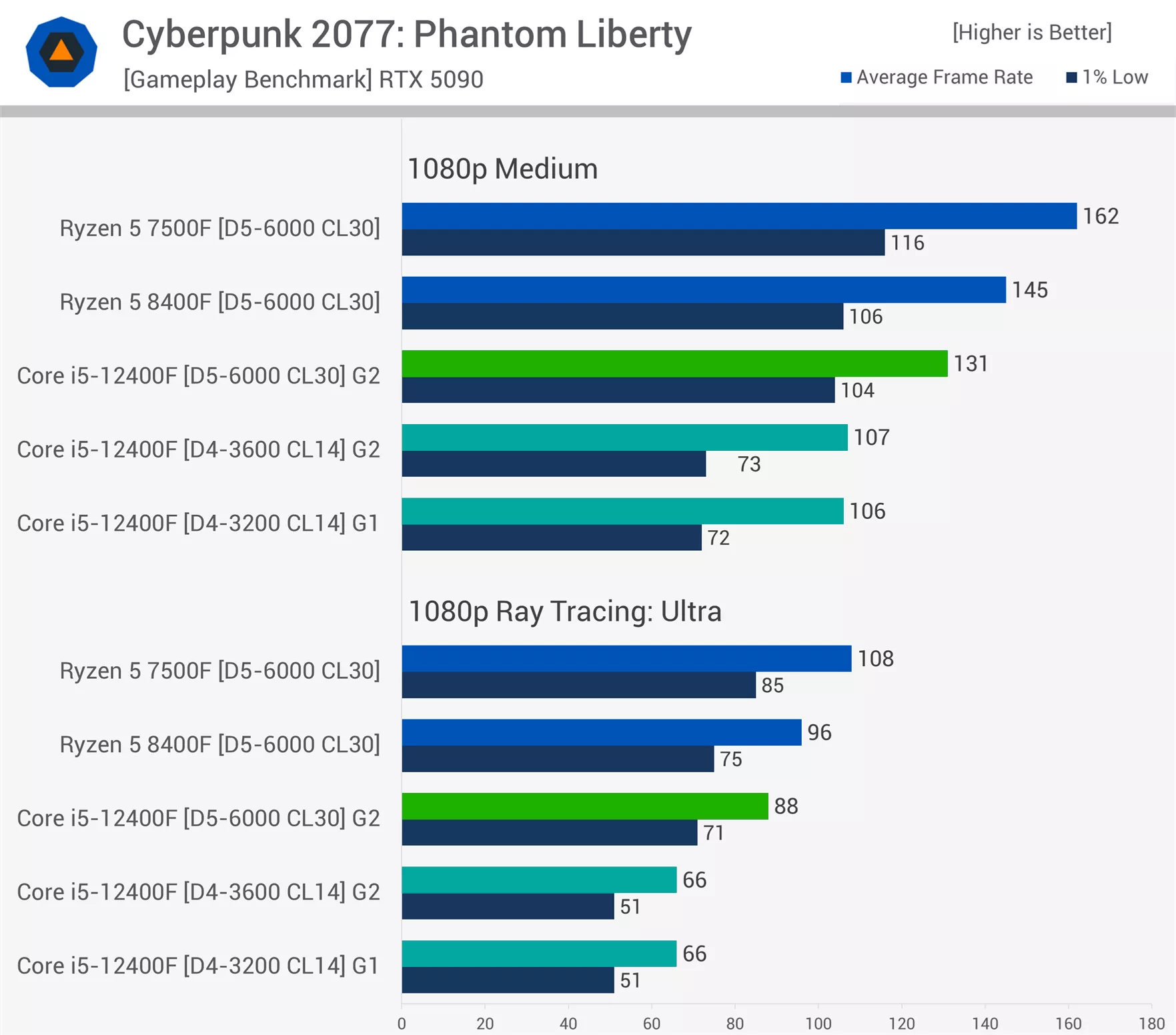
Cyberpunk 2077 can easily consume system memory bandwidth. With the medium preset, we're looking at a substantial 24% performance improvement when moving from DDR4 to DDR5. This lines up with past testing on CPUs such as the Core i5-14600K, 12600K, Core i9-12900K, and 14900K.
Here, the 7500F was 24% faster than the 12400F when both used DDR5-6000. But if we downgrade the Core i5 to DDR4-3600, that margin grows to 51%.
Where things really escalate is at the ray tracing ultra preset. Using DDR5-6000, the 12400F averaged 88 fps, making the 7500F 23% faster. Even that data is CPU-limited and could be reached with a slower GPU.
However, limiting the 12400F with DDR4-3600 drops performance to just 66 fps on average. In this example, DDR5 is 33% faster, and the 7500F becomes 64% faster overall.
Counter-Strike 2

In Counter-Strike 2, results look different from what we've seen so far because the Gear 1 DDR4-3200 memory was roughly 7 – 8% faster than the Gear 2 DDR4-3600 configuration. DDR5 was around 18% faster than DDR4-3600, but only 10% faster than DDR4-3200.
Space Marine 2

Space Marine 2 is a very CPU-demanding title. Here, the 12400F was much faster with DDR5, delivering 24% more performance using either medium or ultra settings. The data is heavily CPU-limited, meaning you'd see these margins with any GPU capable of rendering 80 fps at your chosen settings. This is something many people misunderstand with CPU testing: it's about the frame rate more than anything else.
The Last of Us Part II Remastered

Moving on to The Last of Us Part II Remastered, this is another modern title that benefits from additional memory bandwidth. We measured a 21% improvement when upgrading the 12400F from DDR4 to DDR5 using the medium preset, and a 23% gain using very high.
Once again, the 7500F goes from being only a bit faster when both CPUs use DDR5 (13% faster at very high), to nearly 40% faster when the Core i5 is limited by DDR4.
Spider-Man 2

From past testing, we know the Spider-Man games love memory bandwidth, whether system memory or VRAM. Using medium settings, the 12400F was 28% faster with DDR5 than with DDR4 – a substantial difference. It also meant that while the 7500F was only 13% faster when both CPUs used DDR5, it became 44% faster when limiting the 12400F to DDR4.
Memory bandwidth becomes even more important with the ultimate ray tracing preset. In this example, the 12400F is 33% faster when using DDR5, going from 51 fps to 68 fps on average. It also meant the 7500F was nearly 60% faster than the DDR4-restricted 12400F.
Mafia: The Old Country

Mafia: The Old Country is a new game that already didn't run as well on the 12400F compared to the Ryzen 5 7500F and even the cut-down 8400F. Switching to DDR4 does the Core i5 no favors here, as DDR5 was 21% faster at medium and 29% faster using Epic, again showing that higher quality presets can increase CPU load.
The Epic data is particularly eye-opening. Previously, we found the 7500F to be 17% faster than the 12400F when both used DDR5. That's still a large margin, but when using DDR4, the 7500F ends up 51% faster.
Assetto Corsa Competizione

From past testing, we've learned that ACC – like Counter-Strike – is not very sensitive to system memory performance, whether latency or bandwidth. ACC is highly sensitive to CPU cache performance, as shown by 3D V-Cache processors. But when it comes to DDR4 vs. DDR5, the gains are fairly minimal. Here, the 12400F saw up to a 13% improvement.
Baldur's Gate 3

Finally, we have Baldur's Gate 3. Unlike ACC, this game makes good use of the additional bandwidth from DDR5. Using the medium preset, we measured a 30% performance increase for the 12400F when upgrading from DDR4-3600 to DDR5-6000. With the ultra preset, that margin falls slightly to 26%, but it still matters. In this scenario, the 7500F goes from being only 5% faster when both CPUs use DDR5, to 32% faster when the Core i5 is limited by DDR4.
12 Game Average
Here's a look at the 12-game average, starting with medium settings. Using DDR5, the 12400F was comparable to the 8400F, which made the 7500F about 20% faster. The 12400F was also 20% faster on average with DDR5 versus DDR4. That means when using DDR4, the 7500F ends up roughly 45% faster on average – a massive difference.
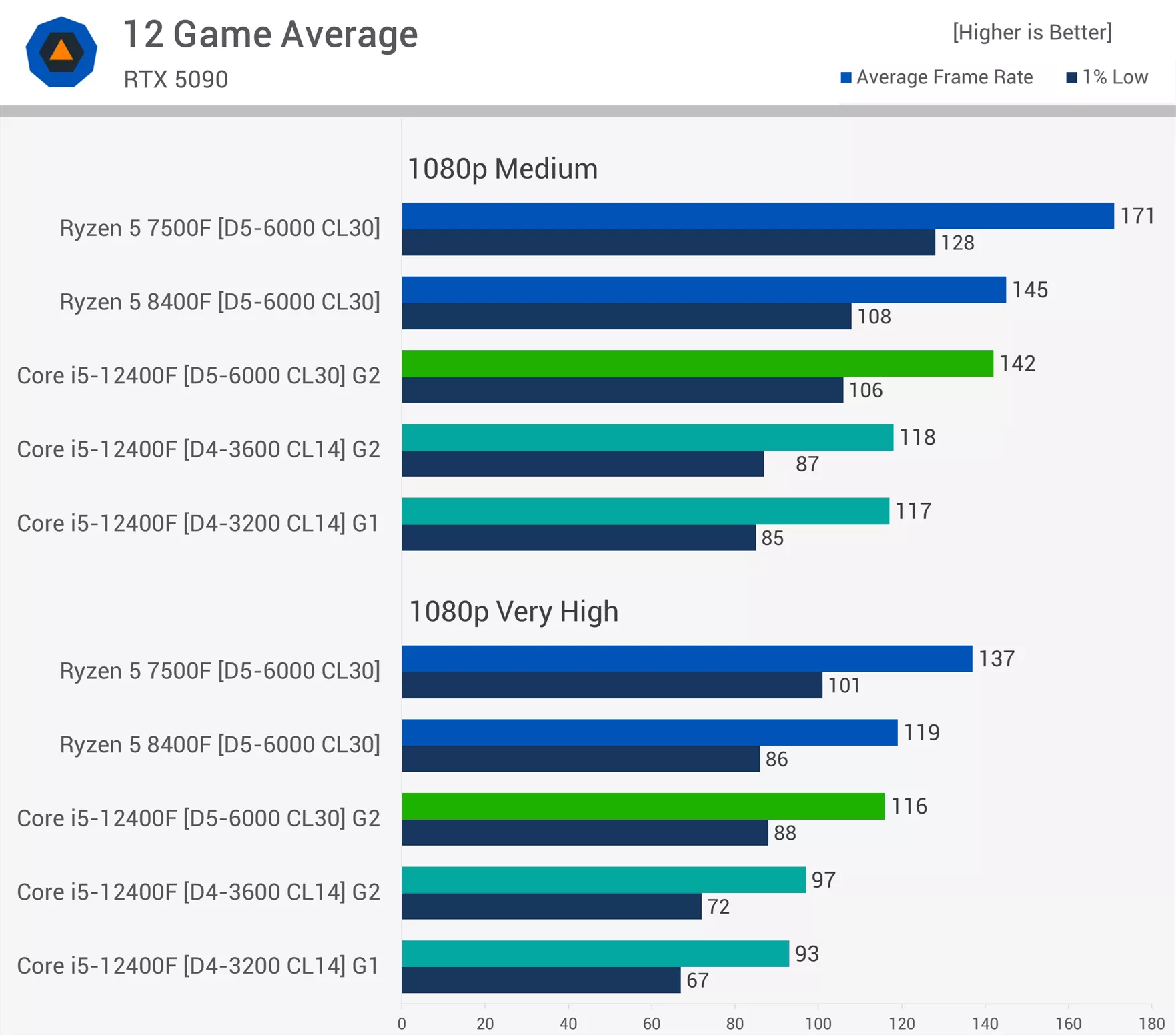
Even at Ultra, we're still seeing an average 20% uplift for the 12400F when using DDR5 instead of DDR4. This also means that while the 7500F was 18% faster than the 12400F with DDR5, it becomes 41% faster if the Core i5 is limited by DDR4.
The Numbers Show It: DDR5 Wins
So there you have it, as previous testing has shown, DDR5 typically delivers roughly a 20% performance bump over DDR4. There will be games that barely respond to the extra bandwidth like Assassin's Creed Shadows, while others push memory hard and show huge gains, like the 33% jump we saw in Cyberpunk 2077 with ray tracing enabled.
So there you have it, as previous testing has shown, DDR5 typically delivers a ~20% performance bump over DDR4 (on average).
In our earlier breakdown of the 12400F vs. 7500F as budget gaming CPUs, we noted that the total platform cost for the Ryzen setup – CPU, motherboard, and memory – was about 27% higher than a 12400F paired with DDR4. But as the numbers here show, when you run the 12400F with DDR4, the 7500F ends up around 41 – 45% faster on average, depending on quality settings. That makes the Ryzen chip not only much quicker, but clearly the stronger value overall.

Taken together, the conclusion feels unavoidable: if you're building a new system or refreshing an older one, DDR4 shouldn't be on the table anymore. In a future piece, we'll look at whether starting with a single 16 GB DDR5 module – instead of a full kit – is a reasonable way to cut costs now and add more memory later, once pricing settles.
One last note, because we know the comments are already being drafted: testing at 1080p, or with an RTX 5090 is "unrealistic" and therefore the results worthless, so on, and so forth. To help explain why we tested like this, we've included a few educational graphs that should clarify things – even if you accept and understand why CPU-limited testing for this kind of test makes sense.
Our first example is Cyberpunk 2077. Starting with the medium preset: if you're someone who owns a high refresh rate monitor and wants at least 120 fps, enabling settings that target that frame rate makes sense – the medium preset included. Under those conditions, the 12400F paired with DDR4 struggles. We also saw the Ryzen 5 8400F was 36% faster, going from 107 fps to 145 fps.

Some might say we're testing at 1080p, or using an RTX 5090, or both. And yes, that's true. But that line of thinking misses the forest for the trees.
This data clearly shows that the 12400F with DDR4 will not deliver more than roughly 107 fps on average, while DDR5 raises that limit to 130 fps. What it doesn't show is how many frames the RTX 5090 can render under these same conditions. As we saw with the 9800X3D, that answer is at least 234 fps.
It also doesn't tell you that we need the RTX 5090 to reveal the true difference in performance between DDR4 and DDR5, or even the gap between the 12400F and 7500F.

To show this, we re-tested using the 9800X3D with the RTX 5060 Ti and RTX 5070. The RTX 5060 Ti, for example, rendered 141 fps on average. In that scenario, the 35% margin between the 12400F on DDR4 and the 8400F – shown earlier using the RTX 5090 – would be essentially identical using the 5060 Ti in this specific test.
The bottom line is this: the RTX 5060 Ti can enable just over 140 fps, the RTX 5070 reaches 175 fps, and the RTX 5090 goes well over 200 fps. So if you're capped at ~107 fps because of your CPU, you'll likely be CPU-limited with any GPU equal to or better than the RTX 5060 Ti.
This picture changes if you're targeting a lower frame rate or prioritizing visual quality – and are happy playing at lower fps to enable things like ray tracing. With the ray tracing ultra preset, you do need a fast GPU before CPU performance becomes a limiting factor. The RTX 5070, for example, only managed 63 fps. If that's your target, then the difference between a CPU like the 12400F and 7500F is minimal. This can be useful to know right now, but for anyone upgrading their CPU to improve gaming performance, it's misleading because it's a GPU-limited result and doesn't answer the actual question.

Space Marine 2 is a good example of a very CPU-demanding title, and there are many like it. In this case, it should be clear that testing with an RTX 5090 isn't hiding anything, as the RTX 5060 Ti paired with the 9800X3D was still much faster than both the 7500F and 12400F – even though those CPUs were paired with the RTX 5090. This was true using both medium and ultra settings.
At best, we achieved an average of 84 fps with the 12400F in our horde battle test, and that was when paired with DDR5. So if you want more than 84 fps in such heavy scenes, you'll need a faster CPU. And if you need more than 97 fps, you'll need something faster than the 7500F.
As shown with the 9800X3D, the current limit is about 145 fps on an RTX 5090, though we managed 122 fps using the RTX 5060 Ti with the medium preset, because the data was mostly CPU-limited.

But even in a game like Spider-Man 2, we see similar performance trends. With the medium preset, the 12400F topped out at 118 fps with DDR4 and 151 fps with DDR5 – both good numbers. The 28% performance jump isn't misleading because of the RTX 5090, since that GPU should be rendering well over 200 fps here.
In fact, you'll see almost the same margin using an RTX 5060 Ti, as that GPU can render 159 fps in our test.
With the ultimate ray tracing preset, the story is similar. Even with an RTX 5060 Ti, there's still a measurable uplift when moving from DDR4 to DDR5 on the 12400F. The margin shrinks a bit, but not by much. You'd see nearly identical scaling using the RTX 5070 as you would with the RTX 5090.

The RTX 5090 is simply used to minimize the GPU bottleneck so we can properly examine what we're testing: CPU performance, and more specifically, how it's affected by memory performance.
Hopefully those graphs helped explain the data more clearly. If not, we recommend you check out this piece where we explain in-depth why CPUs are tested the way they are.
Either way, the takeaway is simple: the DDR4 era is over. That's today's TL;DR.