
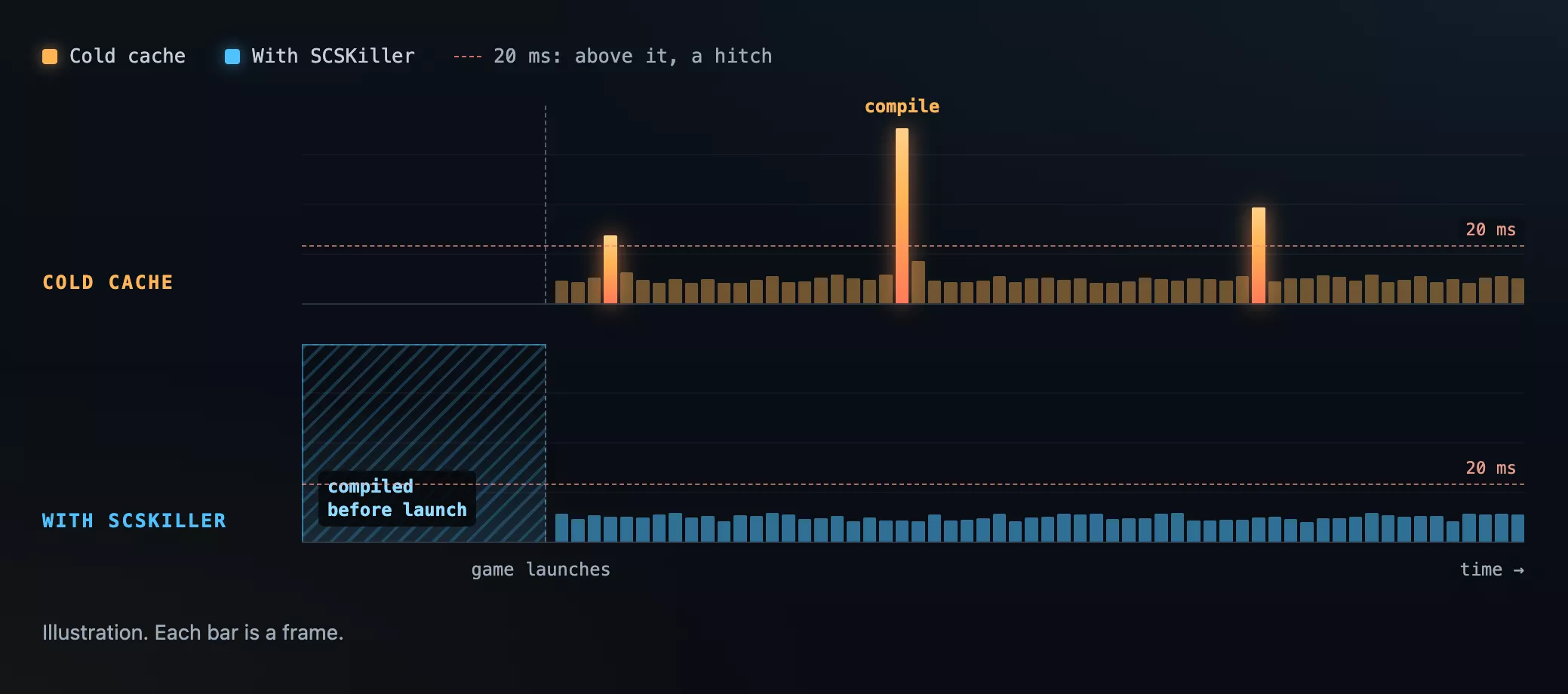
Shader compilation stutter has plagued PC gaming for years, and a new application called Shader Compilation Stutter Killer, or SCSKiller for short, promises to do something about it. The idea is simple enough: compile shaders before launching a game rather than waiting for them to be compiled during gameplay. But does it actually work?
That's what we set out to find out, testing the application across several notoriously stutter-prone games. Along the way, we also discovered something rather interesting about shader compilation on Radeon GPUs. Something that could be a pretty big deal, and that we hadn't heard about before.
What's SCSKiller?
SCSKiller is a free and open-source application, so if you're interested, we recommend downloading it and giving it a shot for yourself. For those unfamiliar with shader compilation stutter, it's a common issue in modern PC gaming where a game briefly freezes or hitches the first time a new visual effect appears.
Some games attempt to address this by precompiling shaders before gameplay begins. The Last of Us Part I, for example, is famous for its lengthy shader compilation process.
Unfortunately, even games that precompile shaders can still suffer from horrific shader compilation stutter, while others don't bother precompiling much of anything, which can also lead to a poor experience.
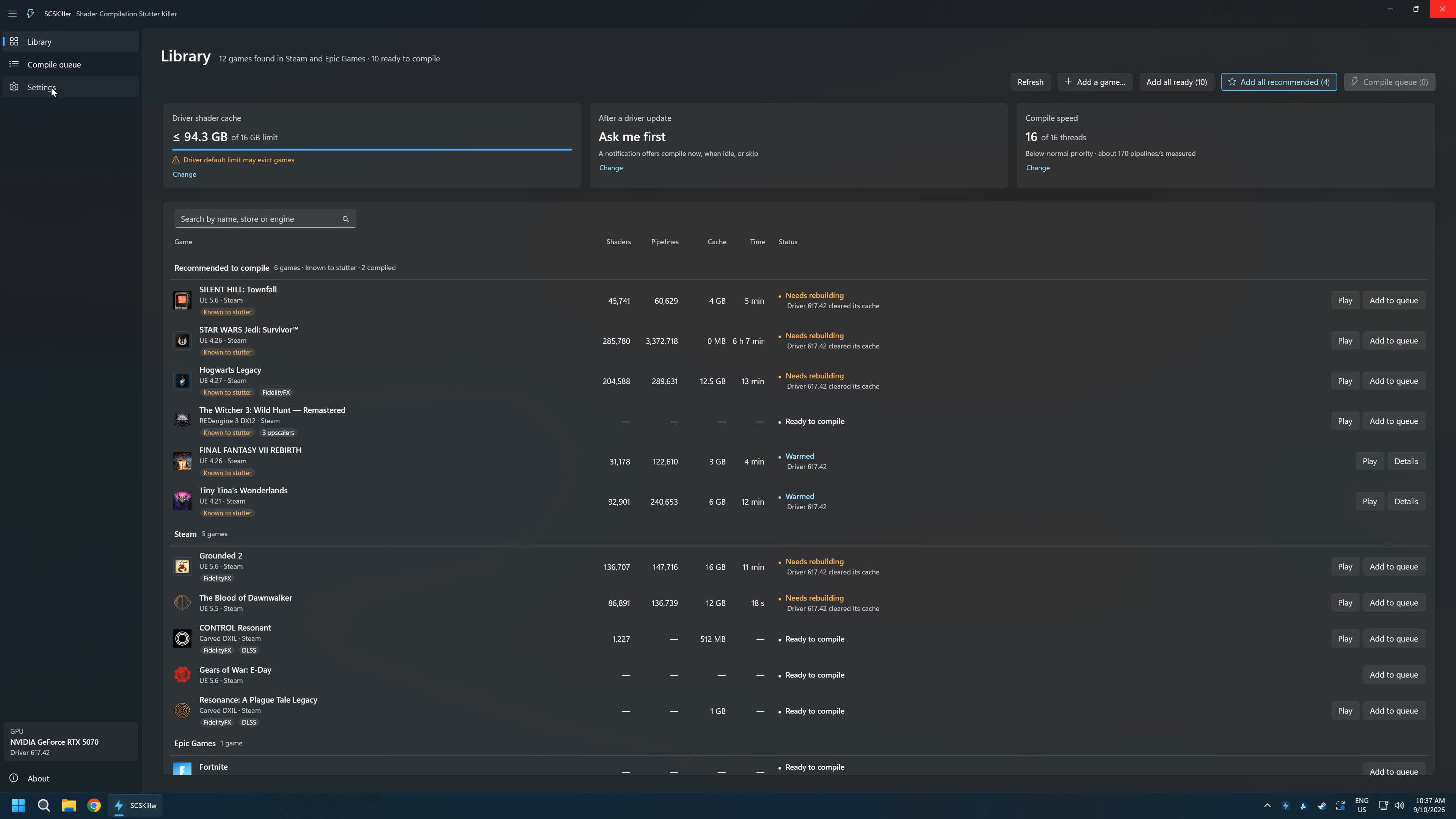
Rather than relying on a game to compile shaders, either beforehand or on the fly, SCSKiller attempts to do the work before you launch it. The application scans game files, extracts the necessary shader code, and compiles as many shader pipelines as possible into the GPU driver's cache. The idea is that when you launch the game, those shaders are already compiled, so the driver doesn't have to interrupt gameplay to process new visual effects.
SCSKiller doesn't rely on a whitelist of specific games. Instead, it works at the engine level, with support for games built using Unreal Engine 4 and 5, Unity, RE Engine, and FromSoftware's engines, alongside a more generic approach for other DirectX 12 titles. It also supports DirectX 11 games on Nvidia GPUs.
For games where shader pipelines can't easily be extracted from the game files, SCSKiller includes an optional recorder. This allows you to play for a few minutes with recording enabled, after which the application can use the collected data to compile additional shaders.
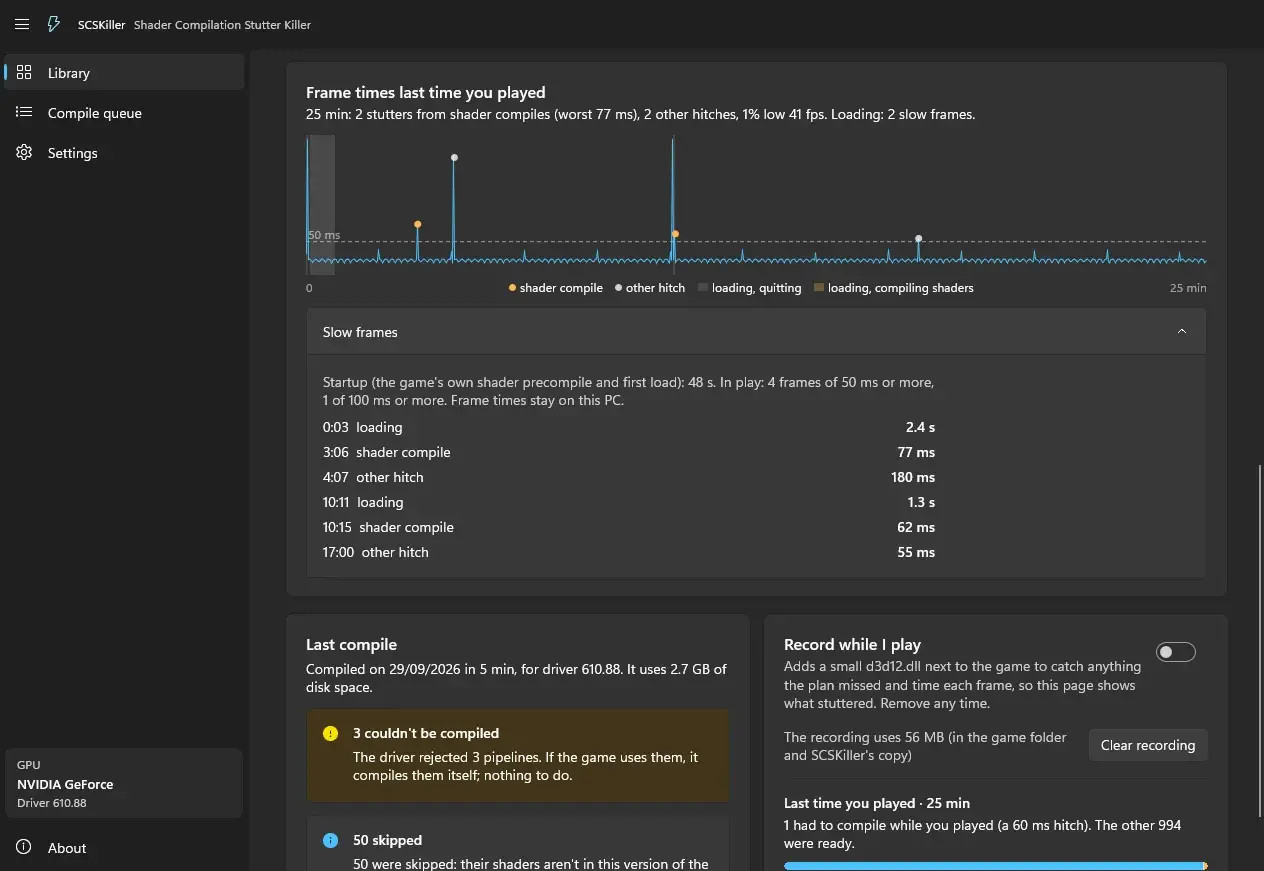
It's important to understand that SCSKiller doesn't solve all forms of stuttering, because not every stutter you encounter is related to shader compilation. One of the biggest issues, particularly with Unreal Engine 5 games, has been traversal stutter, and SCSKiller can't address that.
In our opinion, traversal stuttering is generally more disruptive, as it can result in longer pauses when new environmental assets are loaded from local storage. This typically happens as you cross an invisible boundary within the game world, triggering the loading of additional assets. Perhaps we'll get a Shader Traversal Stutter Killer, or STSKiller, in the future. Fingers crossed.
The Drawbacks: Compilation Time, Storage, and Memory
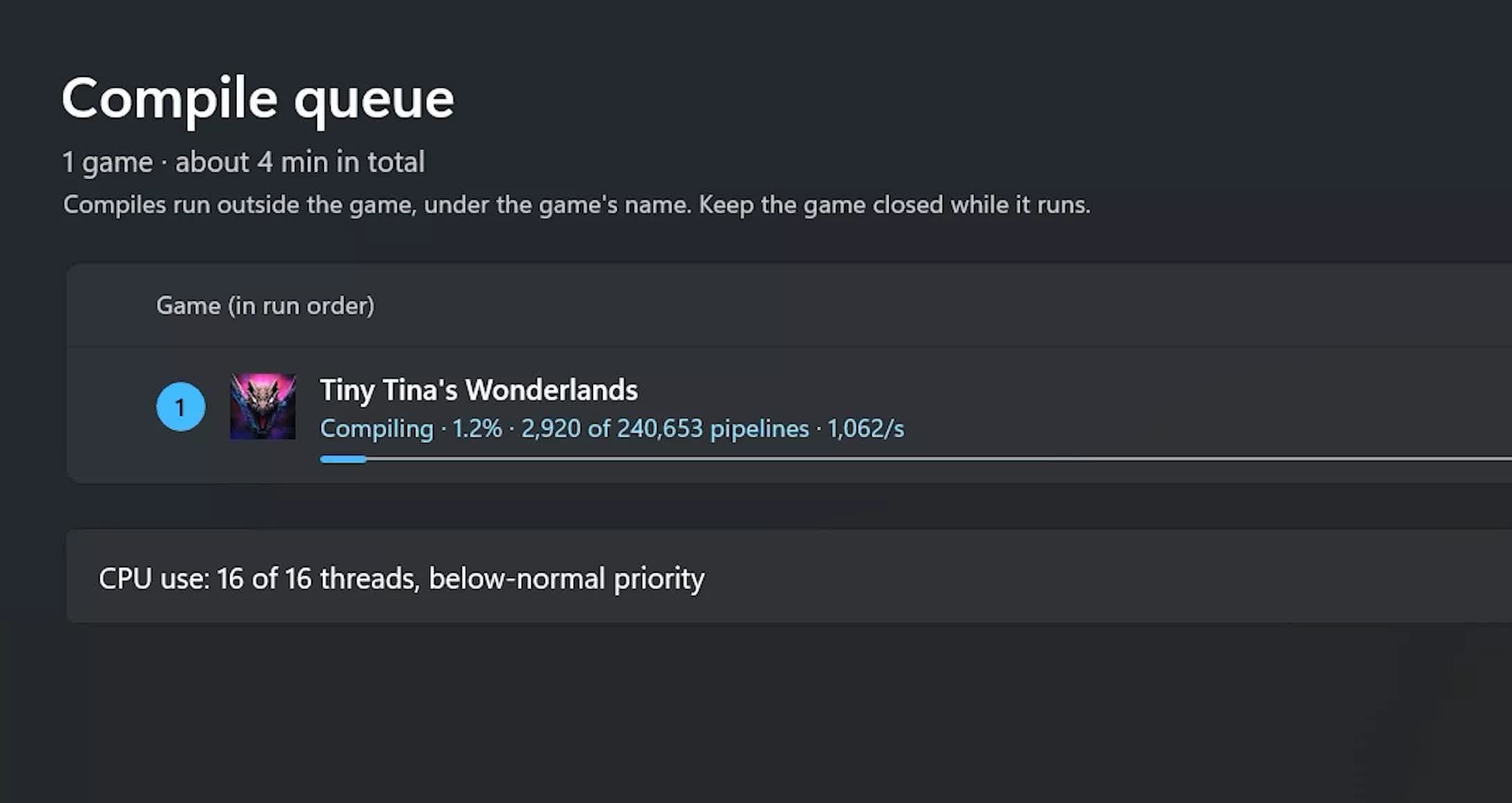
There are some drawbacks to SCSKiller, though they're largely unavoidable consequences of how the application works. For starters, brute-forcing thousands of shader pipelines can take considerable time, depending on how many shaders need compiling and the performance of your CPU.
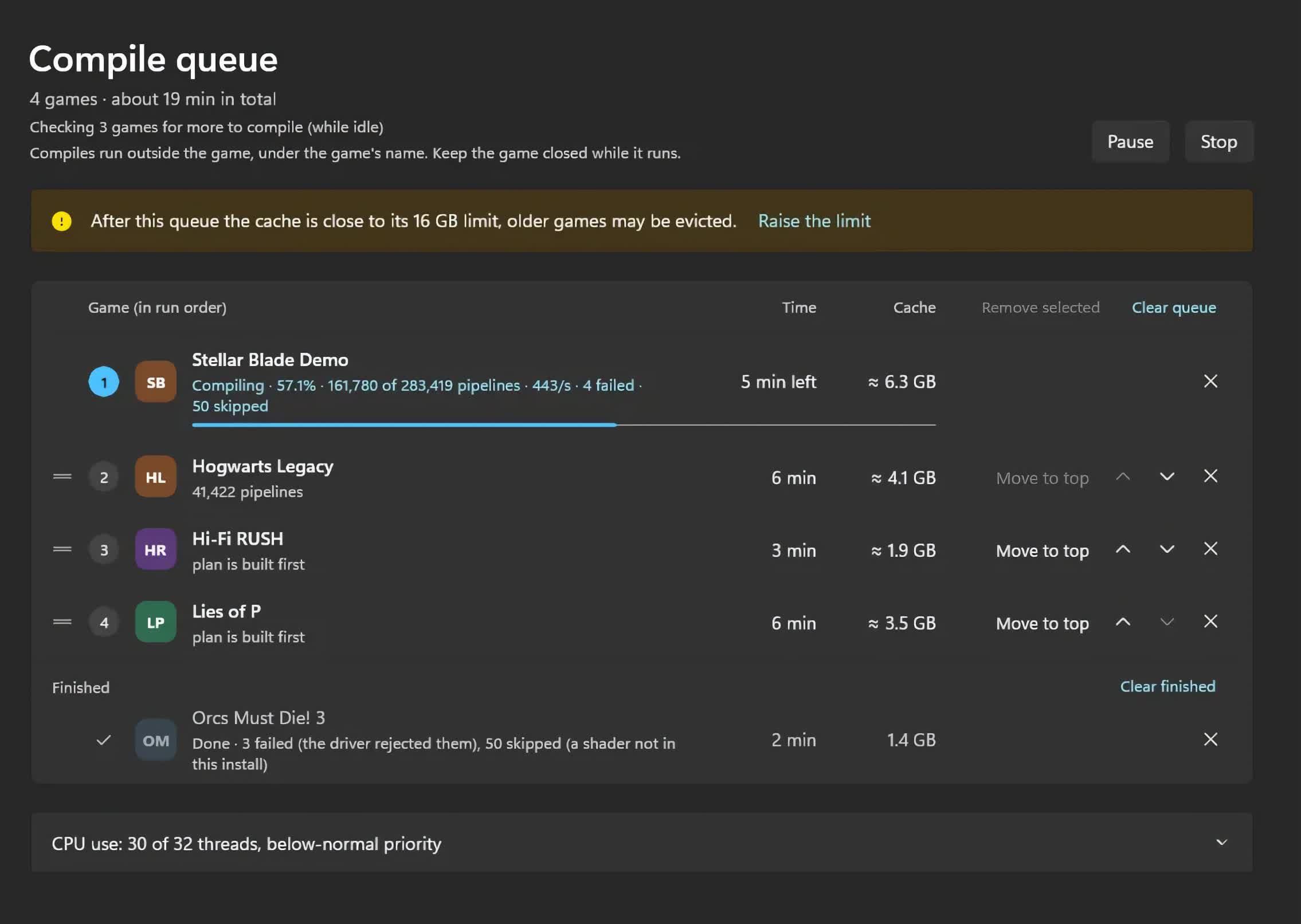
Of course, the advantage is that you can run the compilation process when you're not actively using your PC. Just be aware that it can pin CPU usage at 100% for extended periods, though with a properly configured system, that shouldn't be an issue.
SCSKiller also consumes additional storage space, and with SSDs at a premium right now, that's something worth considering. Compiling thousands of shaders increases the size of the GPU driver's shader cache. As a result, you may need to increase the cache size to prevent older compiled shaders from being removed.
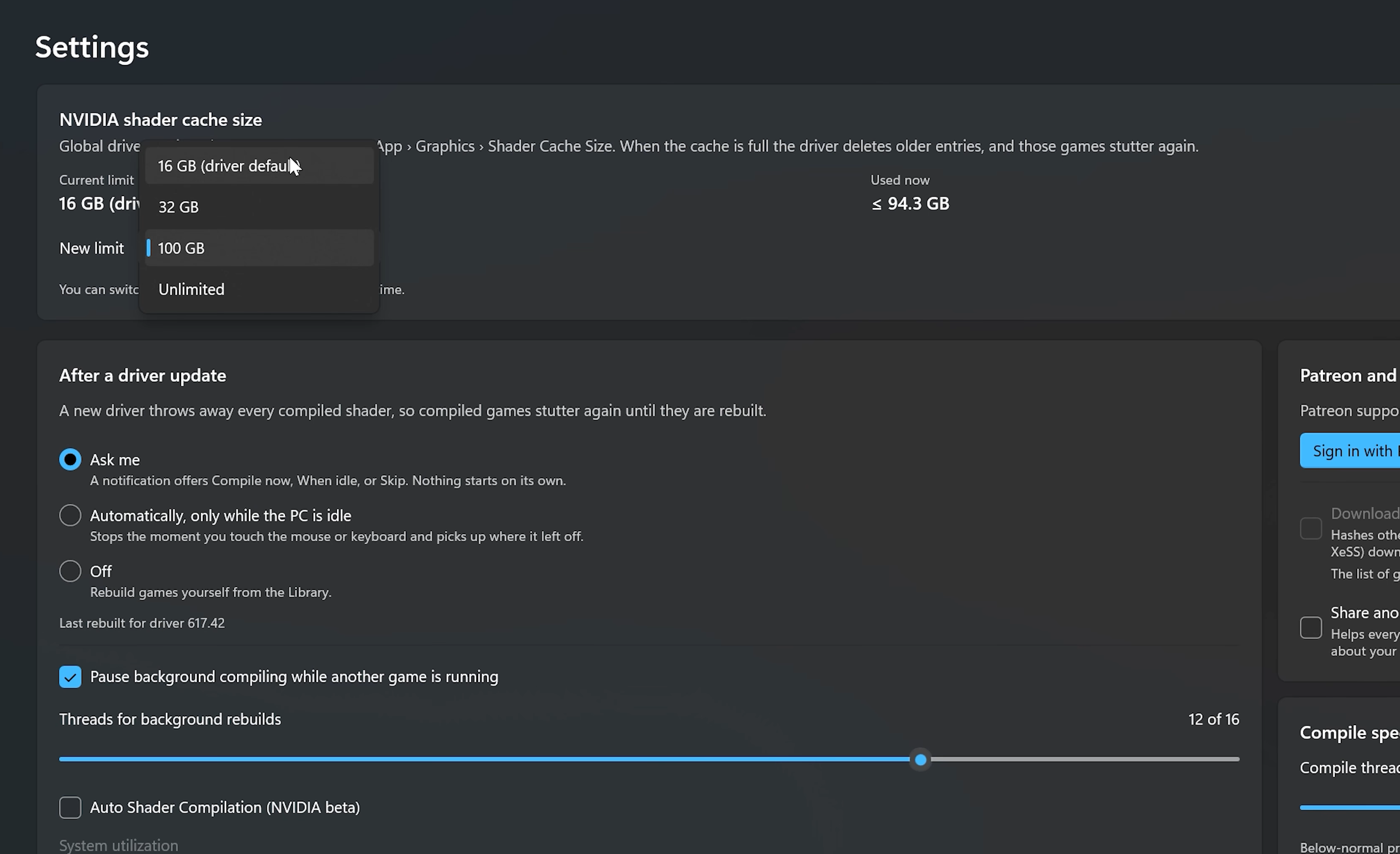
Nvidia users can adjust this through the driver settings. The standard limit is typically 10 GB, but you can increase it to 100 GB or even set it to unlimited, preventing older shaders from being deleted as new ones are added.
Unfortunately, things are more restrictive for Radeon users. According to SCSKiller, AMD's driver has a fixed shader cache limit of 16 GB. We haven't independently confirmed that limit with AMD, but if accurate, it means Radeon owners can't simply increase the cache size. Once the cache reaches its limit, older entries are removed to make room for new ones. SCSKiller will then identify previously optimized games as needing to be compiled again.
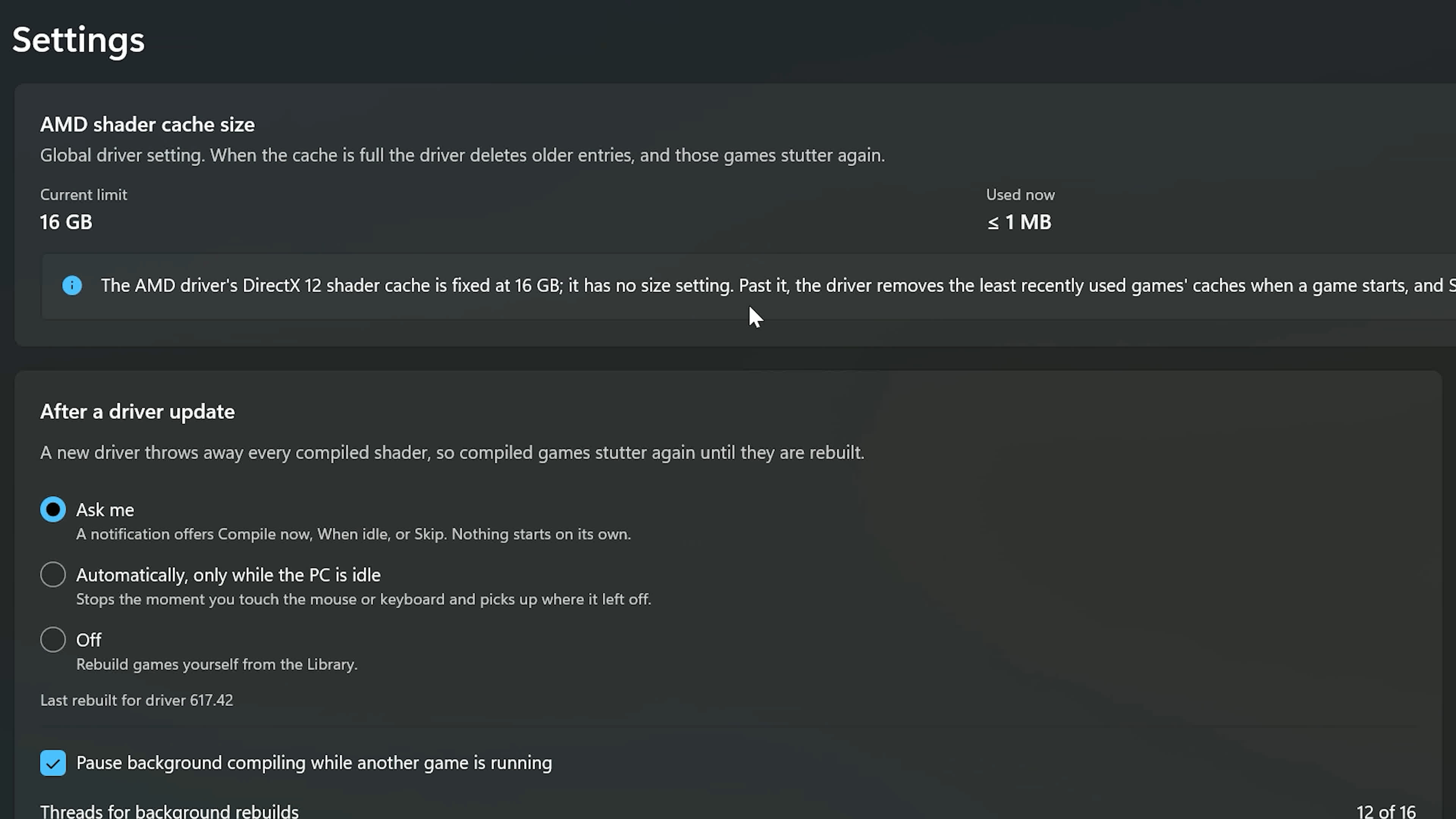
This potentially limits the usefulness of SCSKiller on Radeon GPUs, particularly if you're trying to optimize a large library of games. That said, there's no need to panic. As we discovered during testing, AMD has some pretty interesting shader compilation behavior of its own, and we'll explore that shortly.
Test System and Methodology
For all of this initial testing, we used our Ryzen 7 9800X3D test system with 32 GB of RAM, initially paired with the GeForce RTX 5090. Later, we also tested the Radeon RX 9070 XT and GeForce RTX 5070 to investigate some interesting differences in shader compilation behavior.
We may explore additional hardware configurations in the future, particularly slower CPUs. For now, though, the goal was simply to determine whether SCSKiller actually works. As it turns out, we were able to demonstrate that quite clearly using the 9800X3D. So, let's get into the results.
Test System Specs
| CPU | AMD Ryzen 7 9800X3D |
| Motherboard | MSI MPG X870E Carbon WiFi [BIOS 7E49v1AA7] |
| Memory | G.Skill Trident Z5 RGB DDR5-6000 32GB CL30 [CL30-38-38-96] |
| Graphics Card | GeForce RTX 5090, GeForce RTX 5070, Radeon RX 9070 XT |
| ATX Case | MSI Prospect 700R |
| Power Supply | Kolink Regulator Gold ATX 3.0 1200W |
| Storage | TeamGroup T-Force Cardea A440 M.2 PCIe Gen4 NVMe SSD 4TB |
| Operating System | Windows 11 25H2 |
| Display Driver | AMD Radeon Adrenalin 26.9.2 Nvidia GeForce Game Ready Driver 617.42 |
Gaming Benchmarks
Star Wars Jedi: Survivor
We'll start with Star Wars Jedi: Survivor, a game famous for its numerous stuttering issues. Jedi: Survivor precompiles shaders when loading for the first time. For this initial test, both configurations were running the game for the first time immediately after completing that initial shader compilation process.
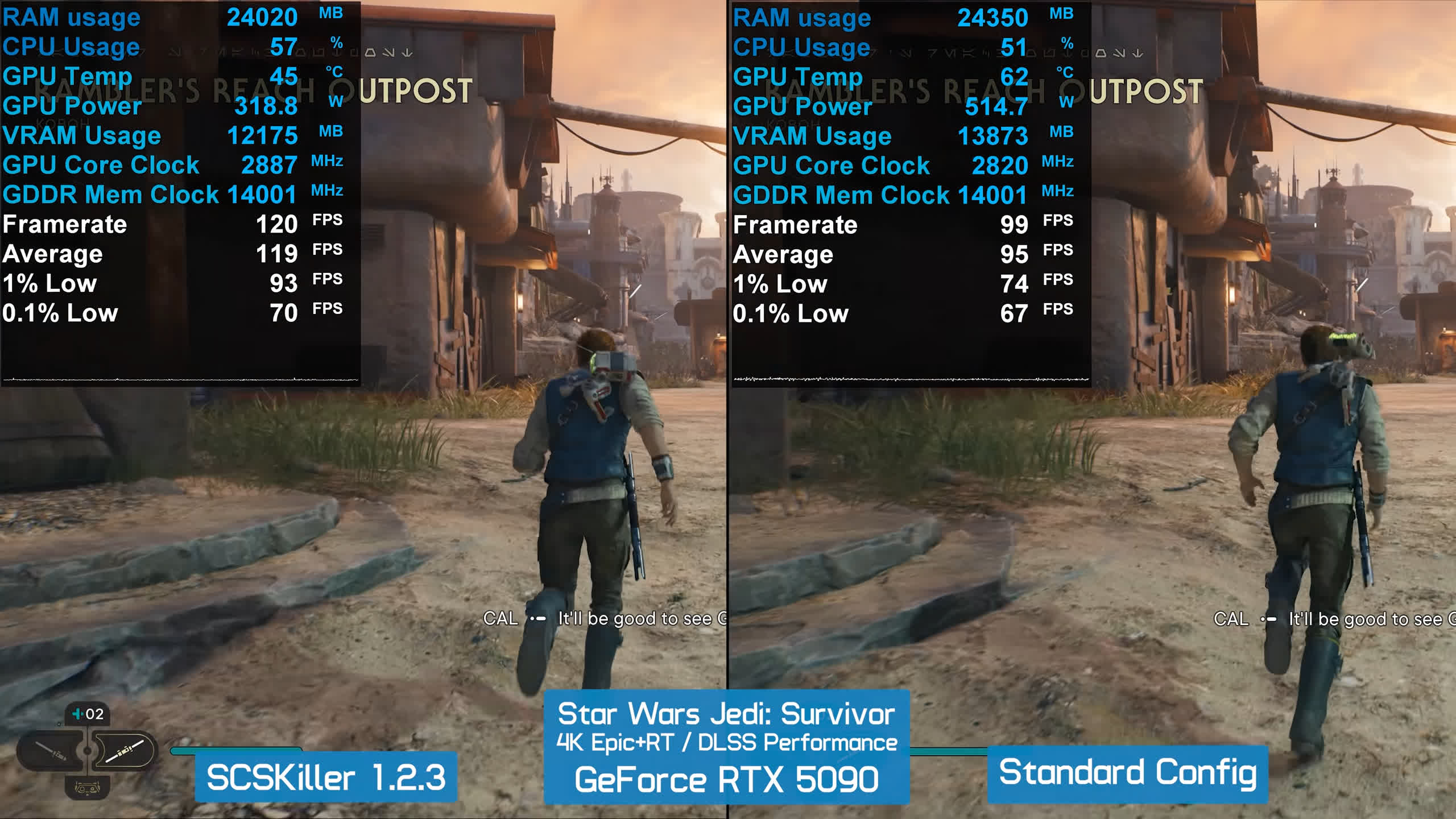
There are quite a few interesting things to note here. First, performance was substantially better with SCSKiller enabled, boosting the average frame rate by 25%, with a similar improvement to the 1% lows. However, you might have also noticed that the standard configuration was consuming around 60% more GPU power, at least at the beginning of the test. That difference gradually decreased to just under 40% by the end of our run.
Despite the game precompiling shaders when initially loading, there appears to be considerable additional shader compilation work taking place during gameplay, particularly in the early stages. This can reduce frame rates and increase the processing overhead associated with rendering new effects.
Something else worth noting is that SCSKiller increased system memory usage. We're looking at around 7% more RAM consumption in this example, apparently due to the additional precompiled shader data being buffered into system memory.
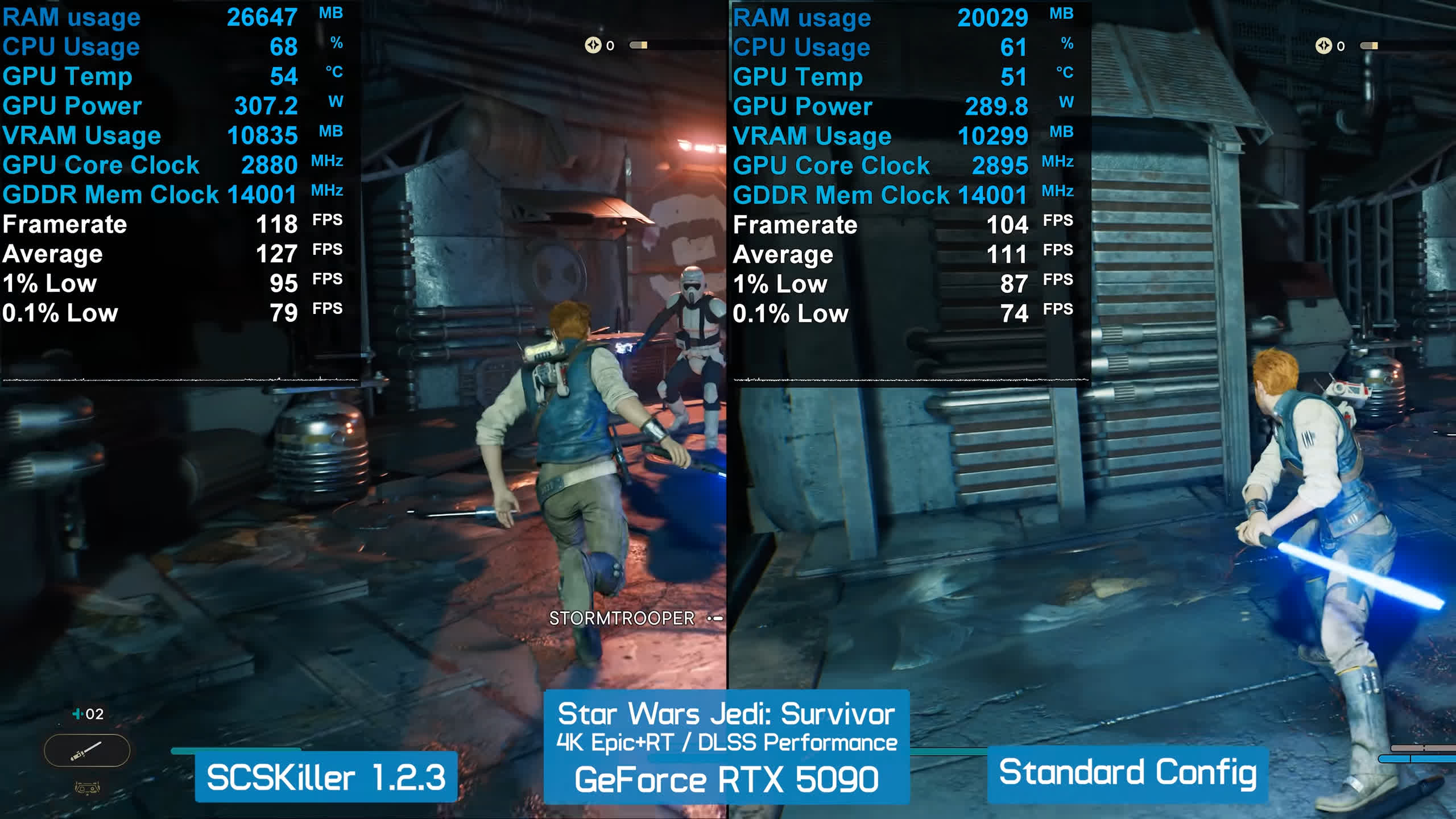
For our second Jedi: Survivor test, we loaded an earlier section of the game immediately after completing the first run. By this point, the game had already been running for quite some time. In terms of performance, the SCSKiller configuration was around 14% faster, though neither configuration suffered from what we'd consider shader compilation stutter.
Interestingly, SCSKiller was now consuming around 30% more system memory, representing almost 7 GB of additional RAM usage. That wasn't a problem for our 32 GB configuration, but it's certainly something to consider if you have less than 32 GB of system memory.
GPU power consumption also increased with SCSKiller this time, which makes sense given that we were rendering more frames. It also suggests the RTX 5090 was spending less time dealing with shader compilation work during gameplay. Although SCSKiller wasn't solving any noticeable shader compilation stutter in this particular example, since the standard configuration wasn't stuttering to begin with, it still managed to improve performance substantially.
It's possible that slower hardware would have exhibited more obvious stuttering with the standard configuration, but that's something we'll need to explore in future testing. It's also worth noting that despite consuming more system memory, SCSKiller didn't always improve frame rates. In another section of the game, performance was much the same between the two configurations. And as we mentioned earlier, SCSKiller can't fix traversal stutter, which remained clearly visible at several points throughout our testing.
Grounded 2
Another game reportedly affected by shader compilation stutter is Grounded 2, so we decided to take a look. However, with the hardware configuration we were testing, we didn't encounter any significant stuttering issues, at least in the sections of the game we examined.
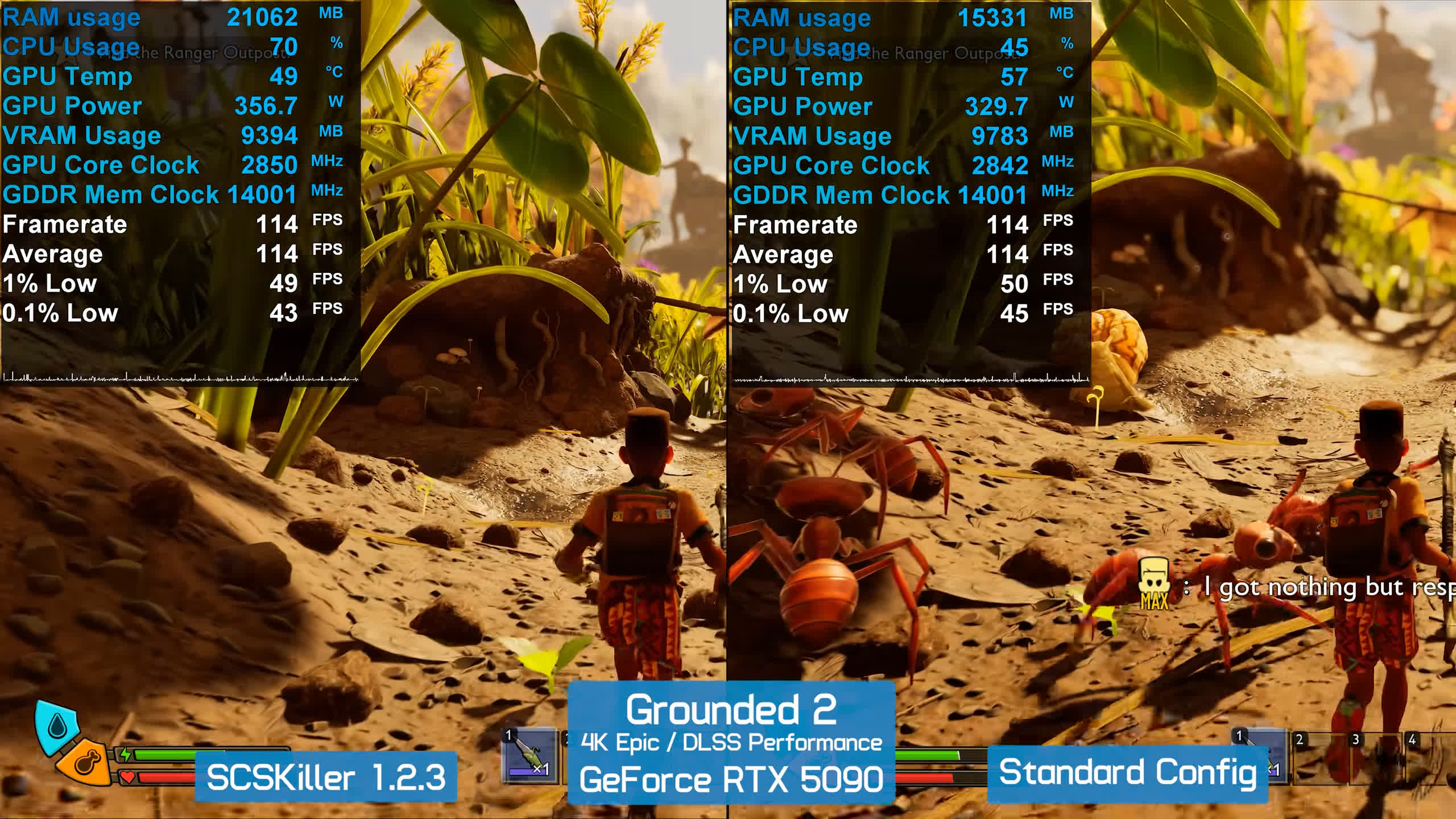
Despite SCSKiller increasing system memory usage by around 5 to 6 GB, there were no measurable performance improvements. In this case, the application simply didn't provide any meaningful benefit.
Hogwarts Legacy
Another game we were particularly keen to investigate was Hogwarts Legacy, especially since the developer of SCSKiller specifically highlights performance improvements in this title. Unfortunately, we couldn't reproduce those improvements in our testing. Initially, we tested using the Ultra quality preset at 4K with Performance upscaling and ray tracing enabled.
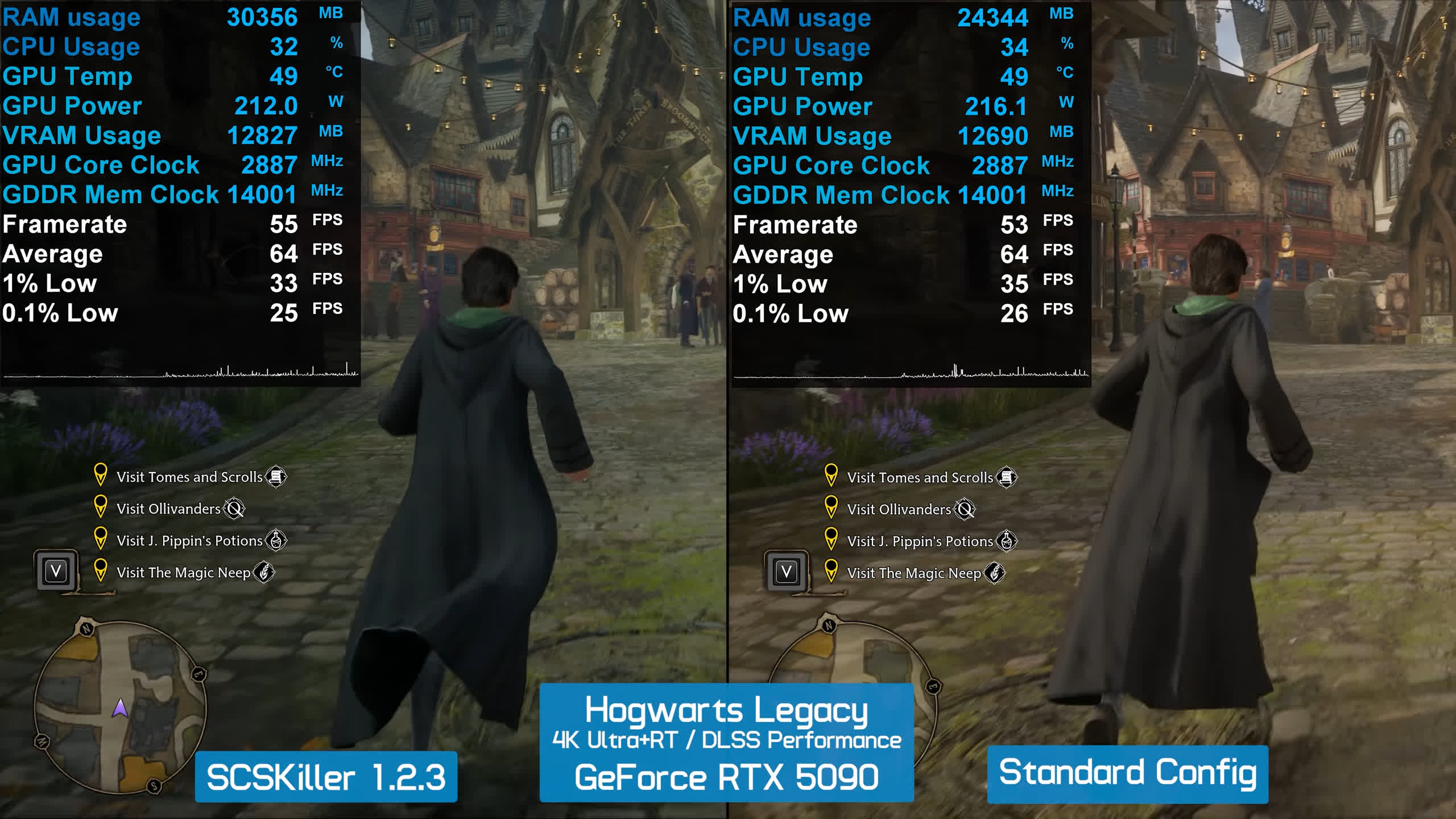
Performance remained pretty poor even after running SCSKiller, particularly the 1% lows, and we couldn't identify any meaningful improvements to frame times. What we did see, however, was a substantial increase in system memory usage of over 20%, effectively maxing out our 32 GB capacity.
Concerned that the additional memory consumption might be preventing SCSKiller from delivering an improvement, we decided to retest with ray tracing disabled, which reduced overall memory usage. Unfortunately, that didn't change much. Performance was virtually identical between the two configurations. If anything, the standard configuration was slightly faster, while SCSKiller was now consuming over 50% more system memory without providing any measurable advantage.
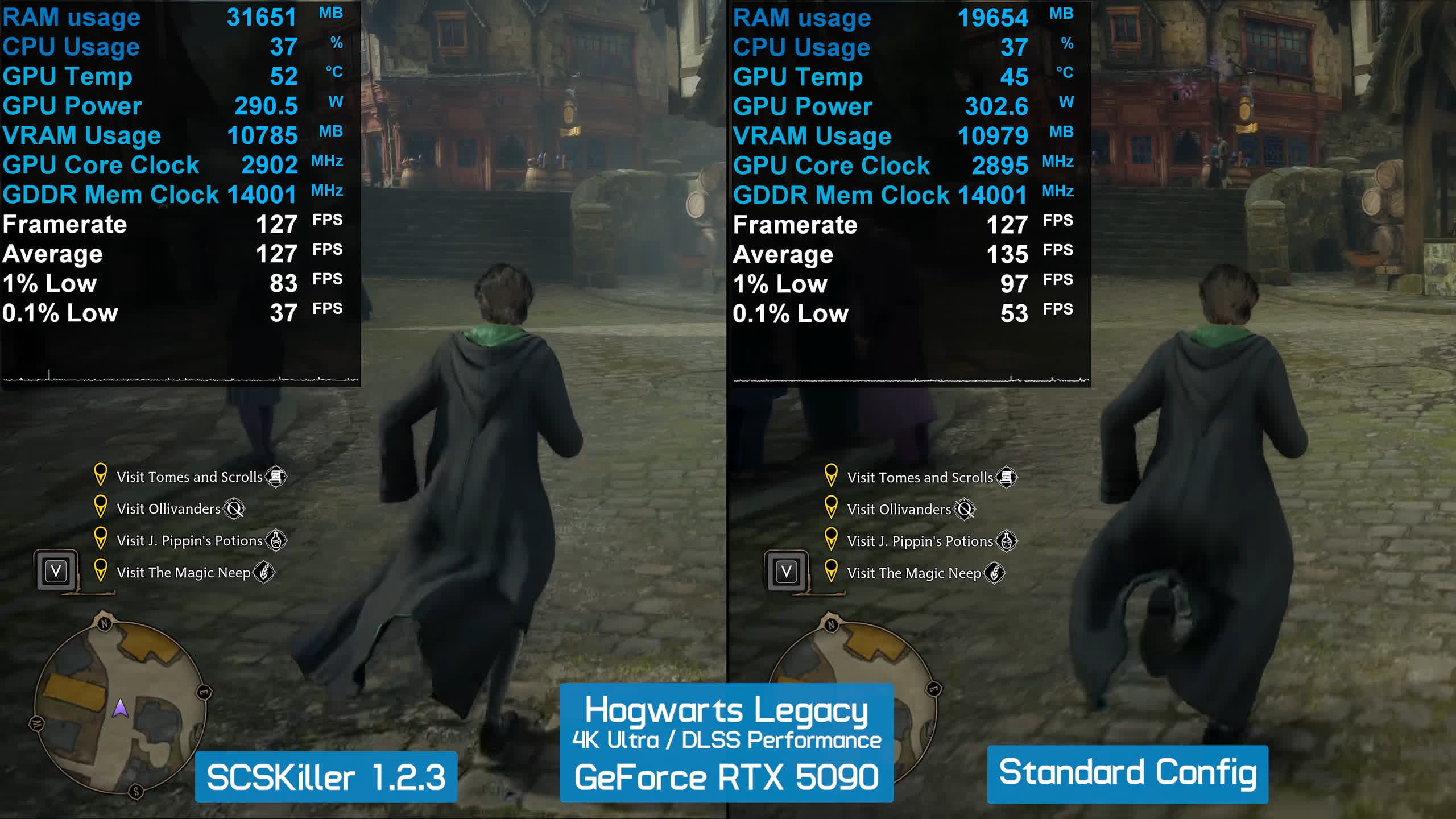
Frame pacing was also largely unchanged. In a final attempt to reduce system memory usage, we dropped to the Medium quality preset, again with ray tracing disabled. But once again, frame rates and frame pacing were essentially identical between the two configurations. This time, SCSKiller increased system memory usage by around 25%, still without delivering any meaningful improvement.
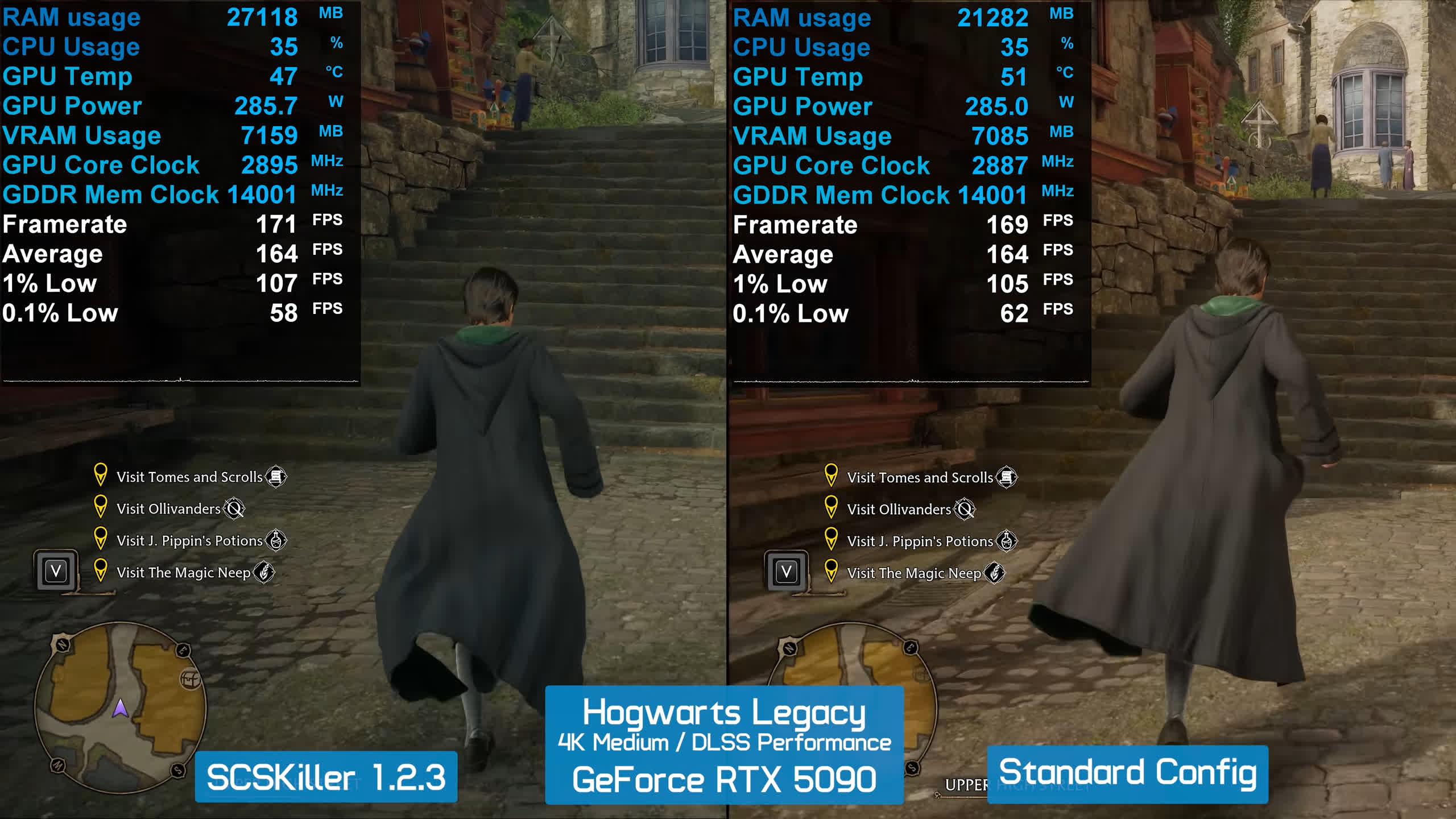
So, what's going on here?
It's possible that our hardware configuration was influencing the results, though the SCSKiller developer also reported improvements using an RTX 5090. Alternatively, it could simply be that the section of the game we tested wasn't particularly affected by shader compilation stutter. Either way, we weren't able to reproduce the improvements claimed by the developer, despite testing several graphics configurations.
The Blood of Dawnwalker
The Blood of Dawnwalker is another game we've heard suffers from shader compilation stutter, though in our testing, the issue didn't seem particularly problematic. That said, SCSKiller did manage to deliver a reasonable performance improvement, presumably by making additional compiled shader data available in system memory.
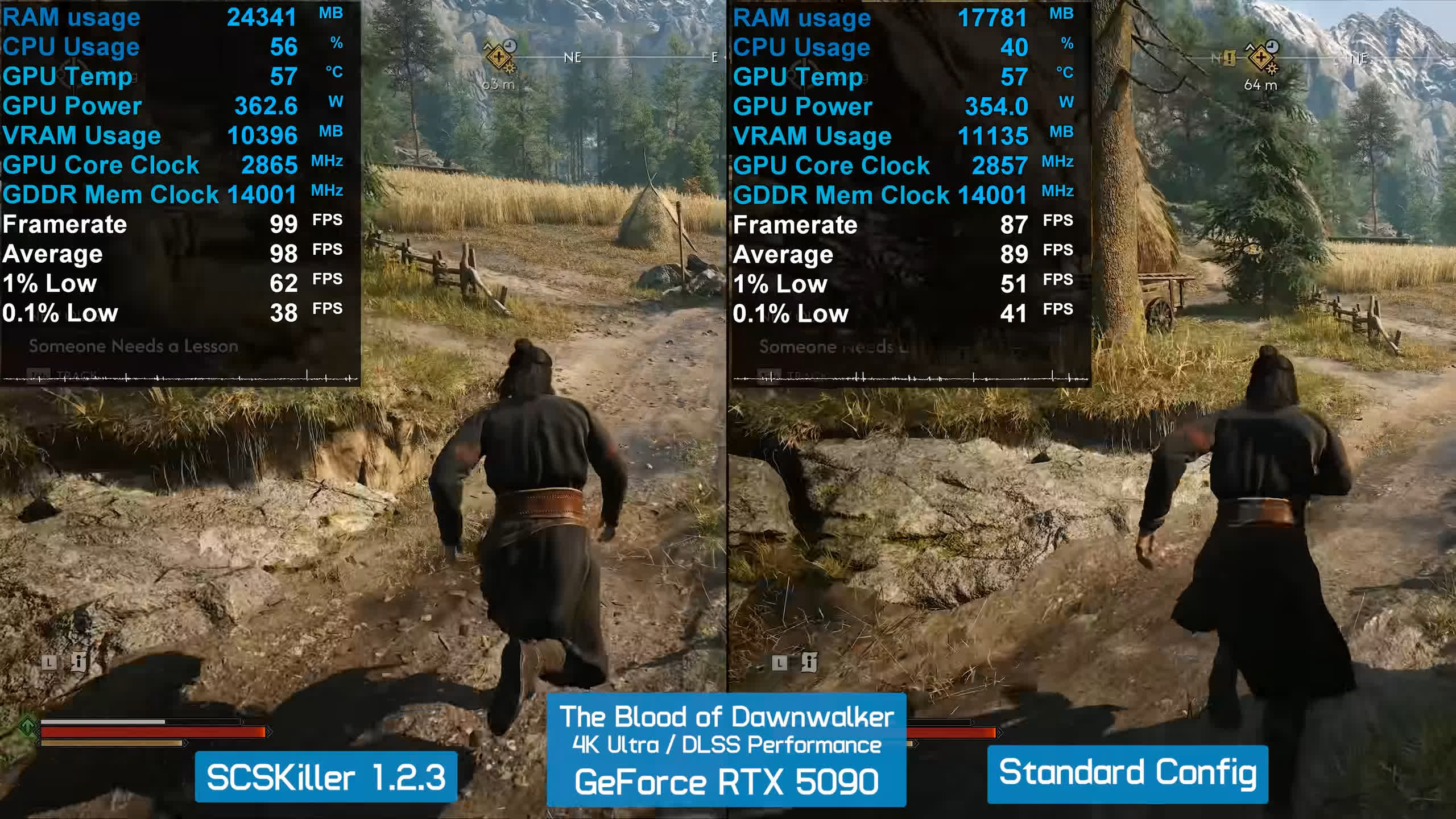
By the end of our test, the 1% lows had improved by 15%, accompanied by a 6% increase in the average frame rate. That's a pretty decent improvement considering the application is free, assuming you have enough storage space and system memory available.
In this example, system memory usage increased by 33%, with SCSKiller consuming approximately 5 GB of additional RAM.
Silent Hill: Townfall
Another relatively new game we decided to examine was Silent Hill: Townfall. Unfortunately, performance was much the same between the two configurations, and SCSKiller wasn't able to eliminate the stuttering we encountered.
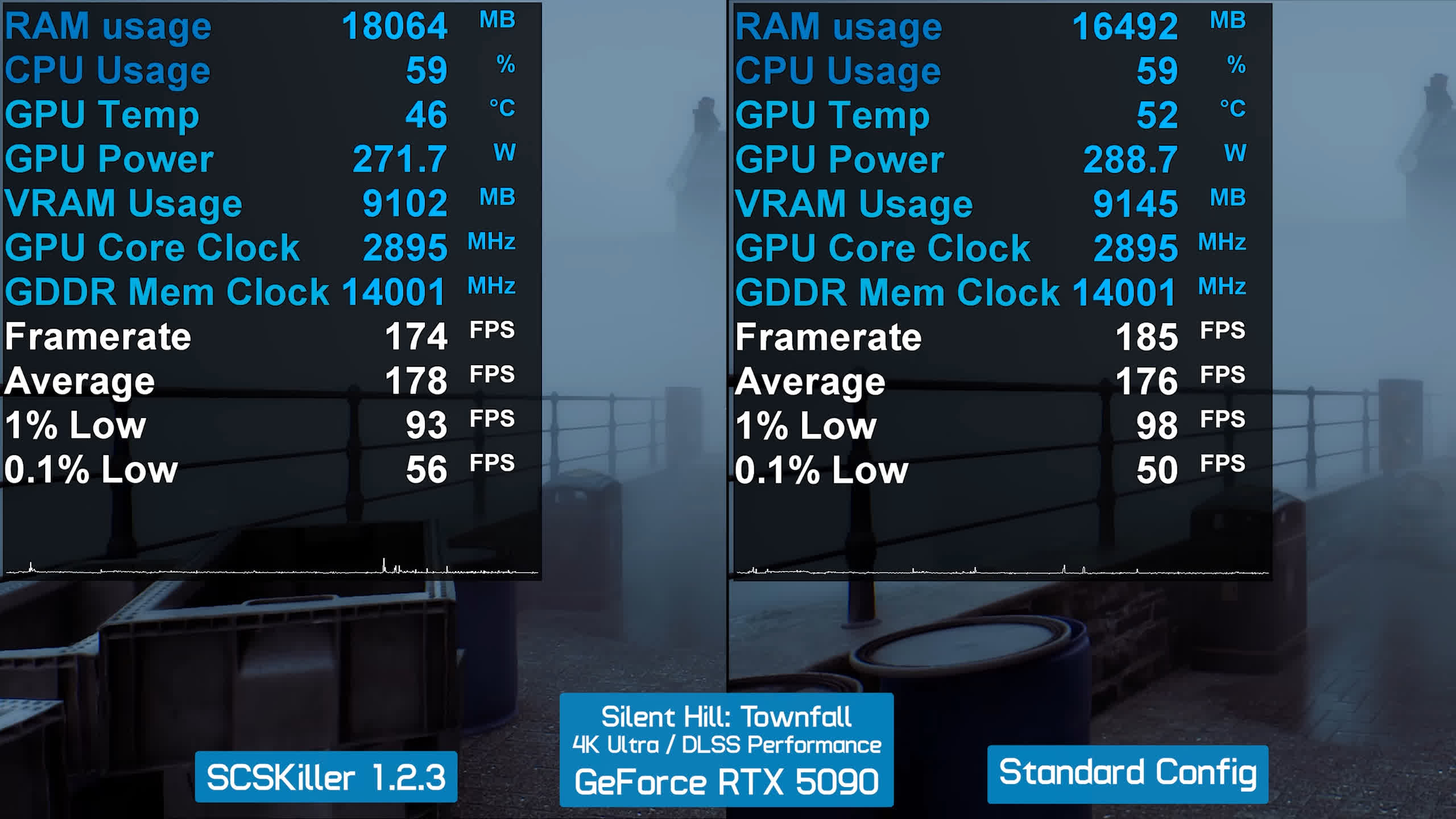
In fact, we observed more stuttering with SCSKiller enabled, though it's important to note that this was based on a single pass through the game. That's one limitation of this type of side-by-side testing, as stuttering behavior can vary between runs, so we wouldn't read too much into that particular result. Still, there was no evidence of a meaningful improvement in the section we tested.
Tiny Tina's Wonderlands: A Dramatic Improvement
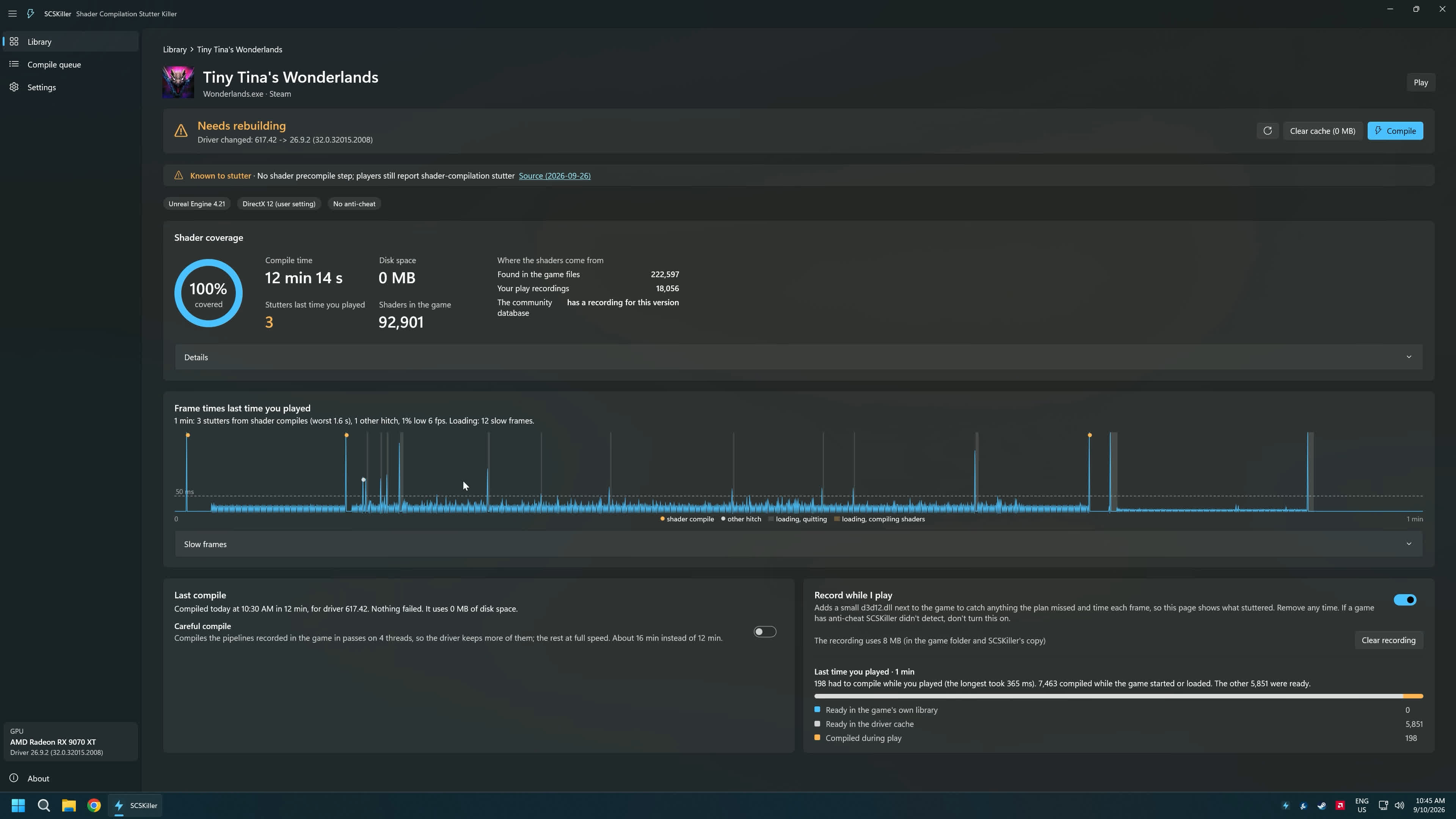
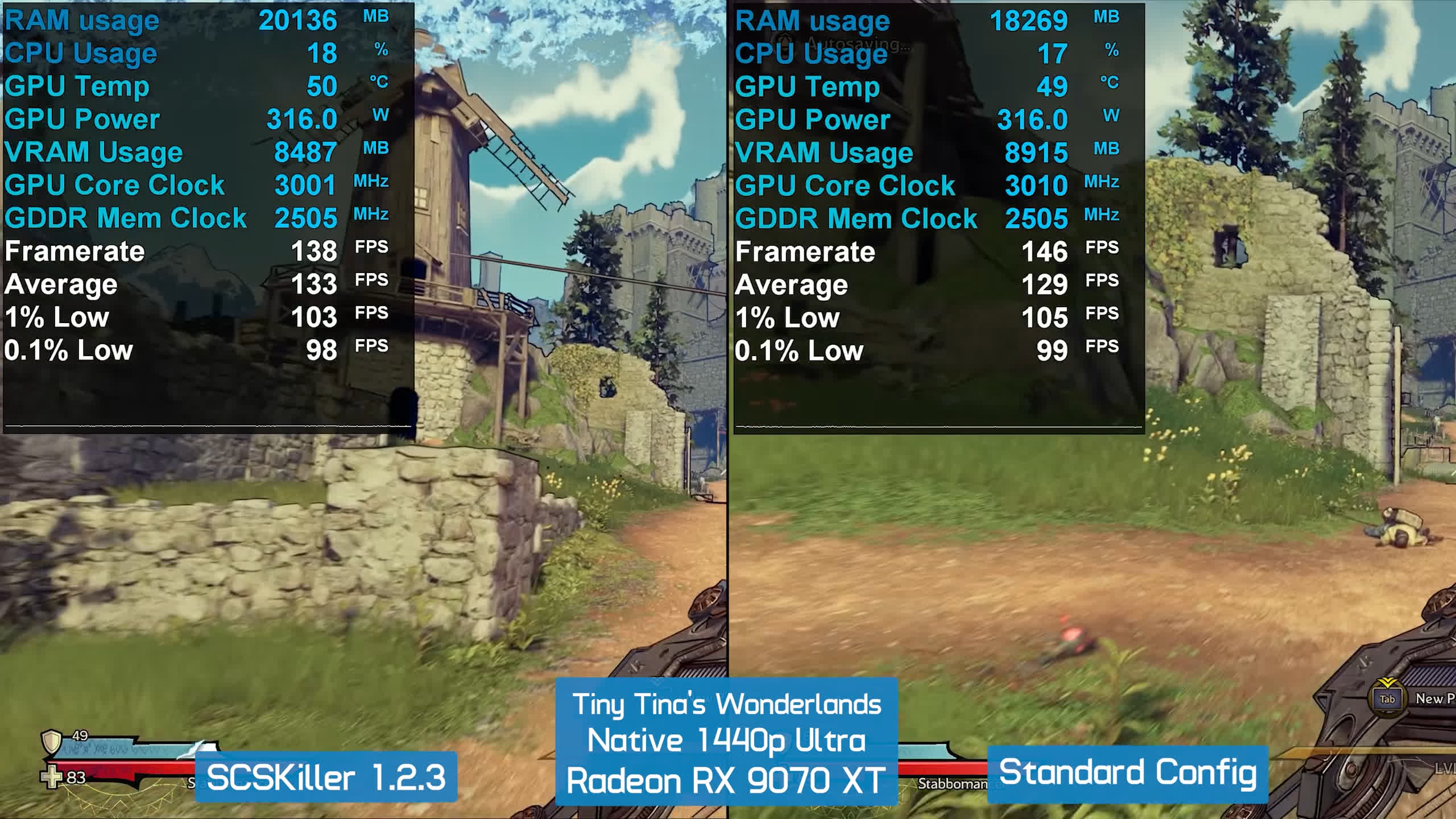
Now, here's a game we know stutters like absolute buggery. Tiny Tina's Wonderlands is an Unreal Engine 4 title with so much shader compilation stutter that it's almost unplayable at times. And keep in mind, we're testing with a Ryzen 7 9800X3D and GeForce RTX 5090 here. The average frame rate looks pretty impressive, but the 1% lows tell a very different story. They're absolutely horrid.
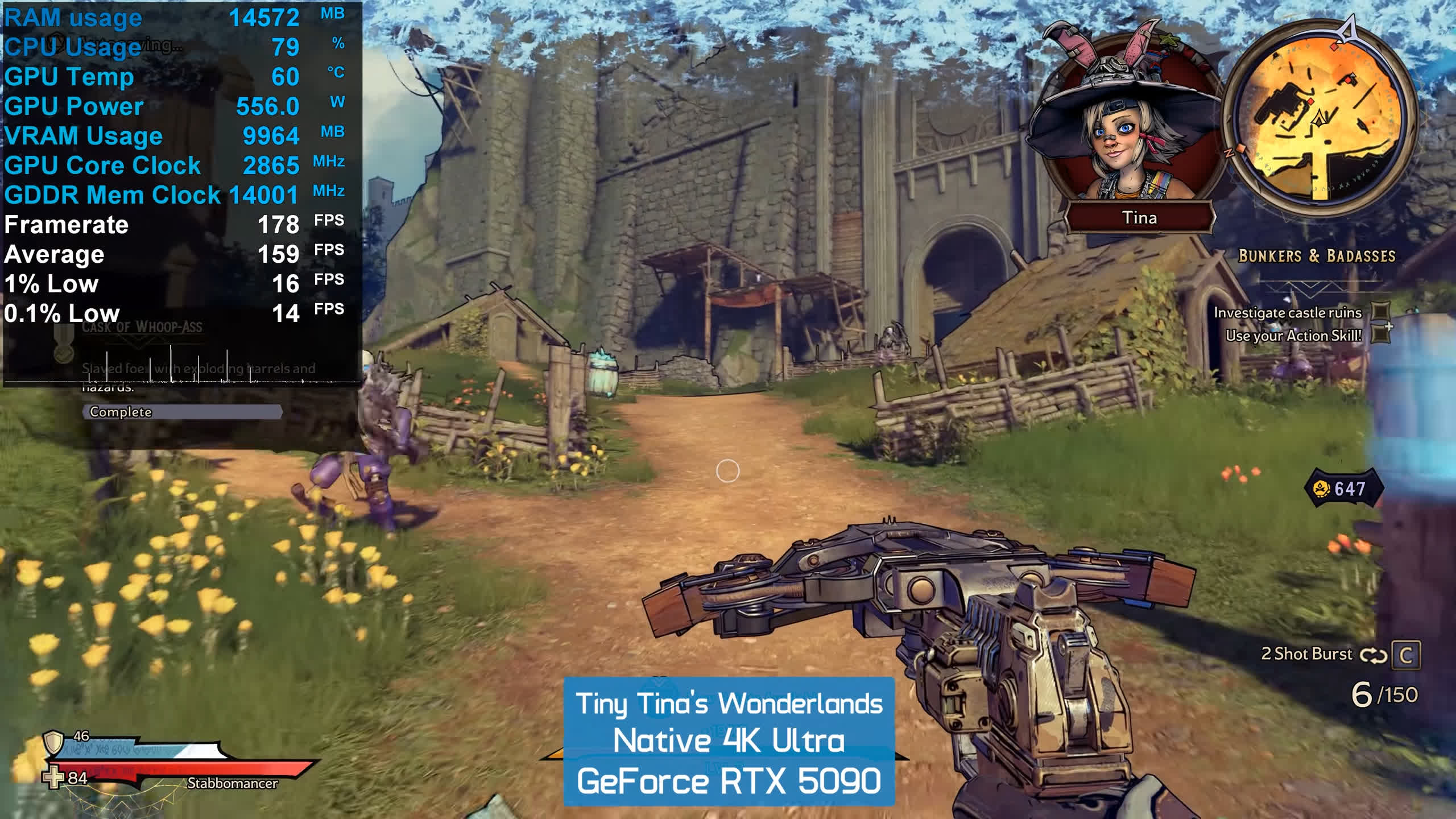
The game does precompile shaders before you start playing, and while things improve as you spend more time in the same area, moving somewhere new often means it's Stutter City all over again. For example, we left our initial test area for a few minutes before returning. Despite having already explored that section of the game, it didn't take long for the shader compilation stutters to return.
Admittedly, they weren't quite as severe as before, but they remained pretty annoying, especially considering the hardware we were using. This is where SCSKiller really comes into its own. It transformed Tiny Tina's Wonderlands from a stuttery mess into an exceptionally smooth experience, eliminating the constant hitching we had been experiencing.
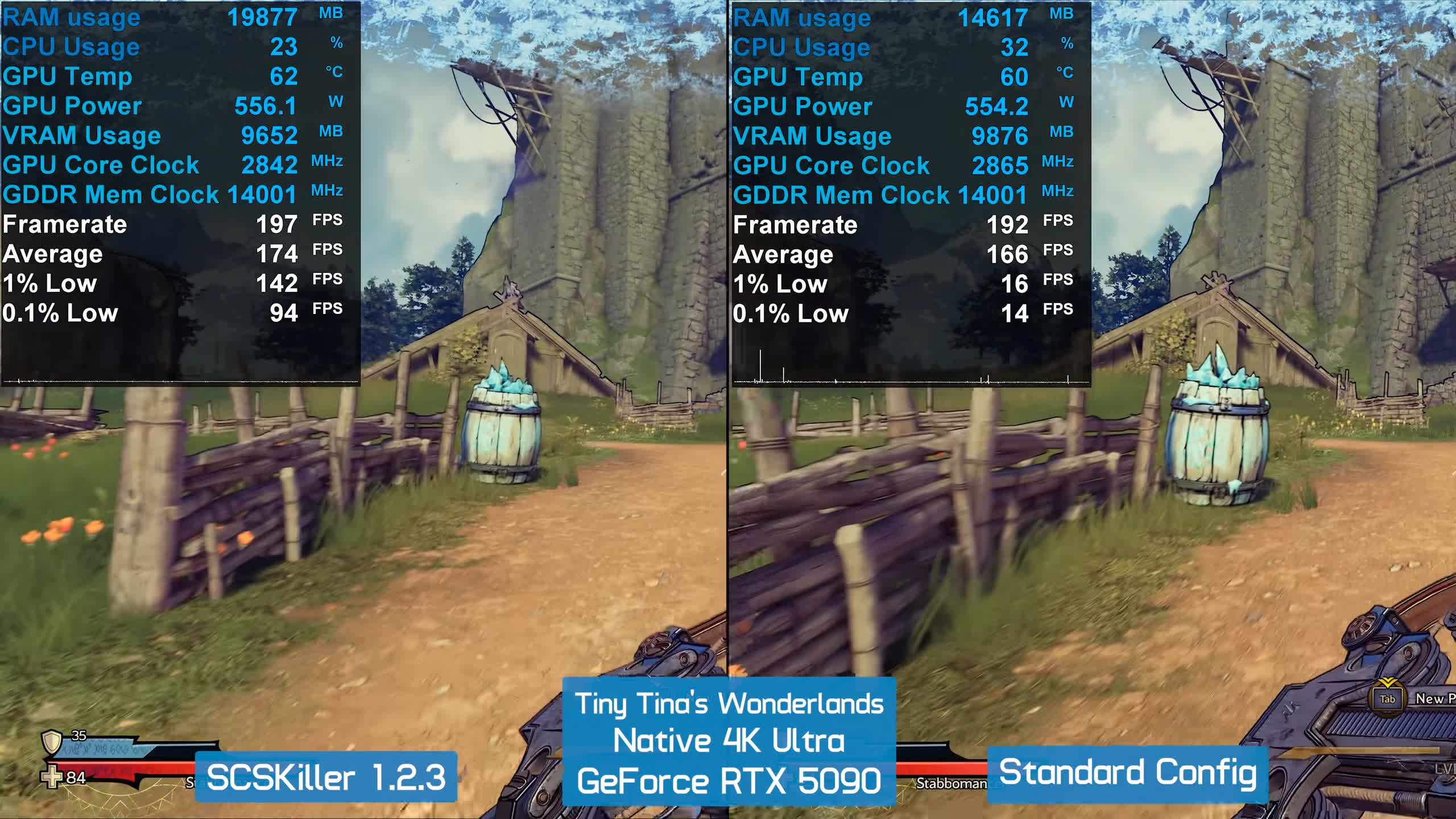
By the end of our test, the 1% lows had improved from just 45 fps to an incredible 147 fps. More importantly, the constant stuttering and hitching were completely gone in the section we tested. This was one of the most impressive results we'd seen so far, demonstrating SCSKiller can be effective when shader compilation is responsible for poor performance.
However, what happened next was arguably even more interesting.
AMD's Background Shader Compilation: An Unexpected Discovery
Having seen how dramatically SCSKiller improved performance on the RTX 5090 in Tiny Tina's Wonderlands, we decided to swap out the GeForce GPU for a Radeon RX 9070 XT. And we're glad we did, because the results were rather puzzling, but in a good way. What we observed was the first few seconds of gameplay after freshly installing the RX 9070 XT along with AMD's latest display driver. SCSKiller hadn't been used at all.
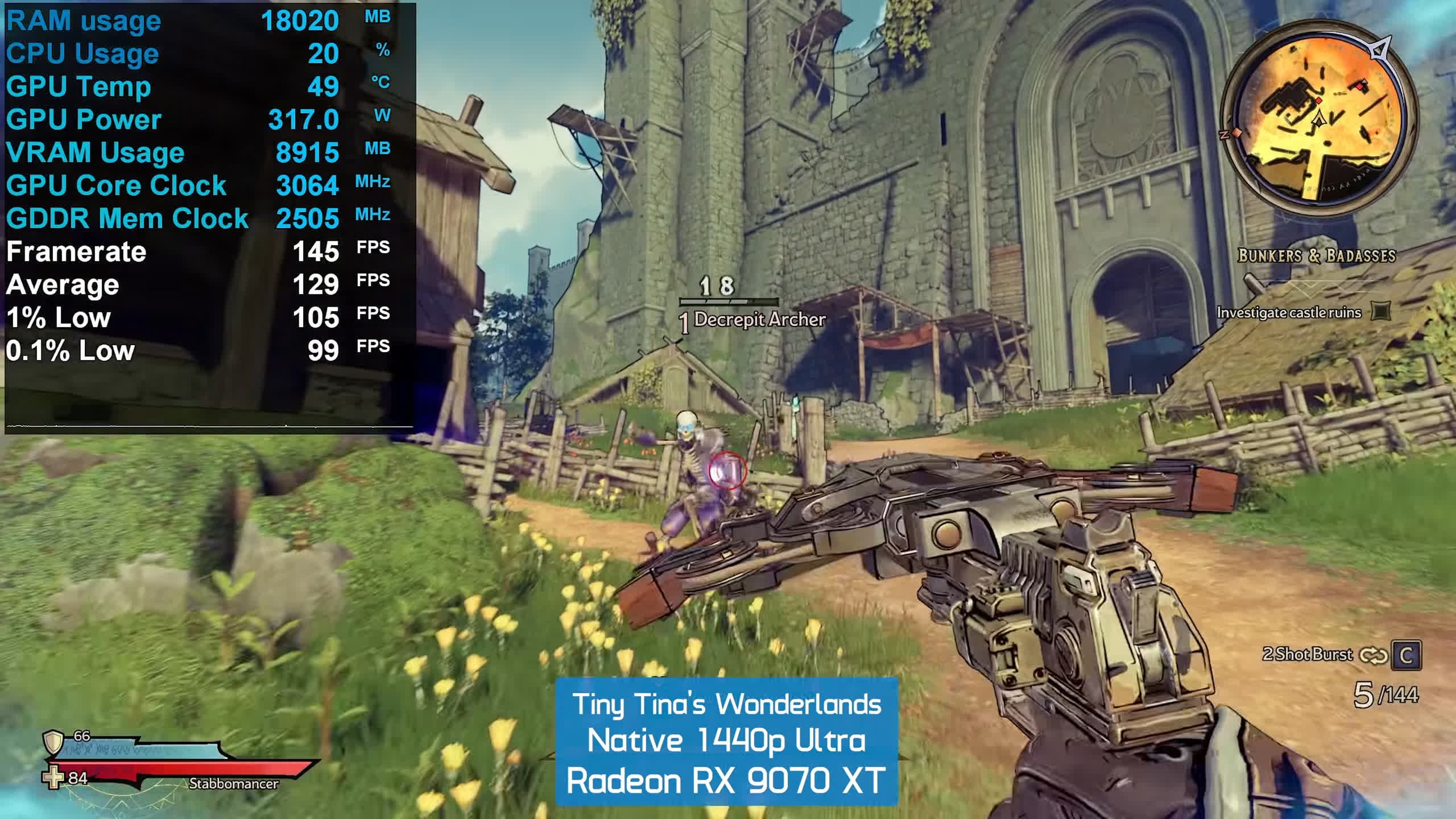
We simply allowed the game to perform its usual shader precompilation process before loading our save file. Yet, despite everything we'd just seen with the RTX 5090, the game ran perfectly smoothly. There was no noticeable stuttering whatsoever. We couldn't quite believe what we were seeing, especially after spending so much time testing the GeForce GPU, where the experience had been a complete mess.
We continued playing, exploring several new areas, but at no point did the game exhibit the same stuttering problems. This left us looking for answers. That's when we came across an extremely brief article on AMD's website titled AMD Software: Adrenalin Edition 26.9.2 Background Shader Compilation. This was the exact driver we were using for our testing. The article explains that AMD has expanded its DirectX 12 background shader processing support to Unreal Engine 5 games.
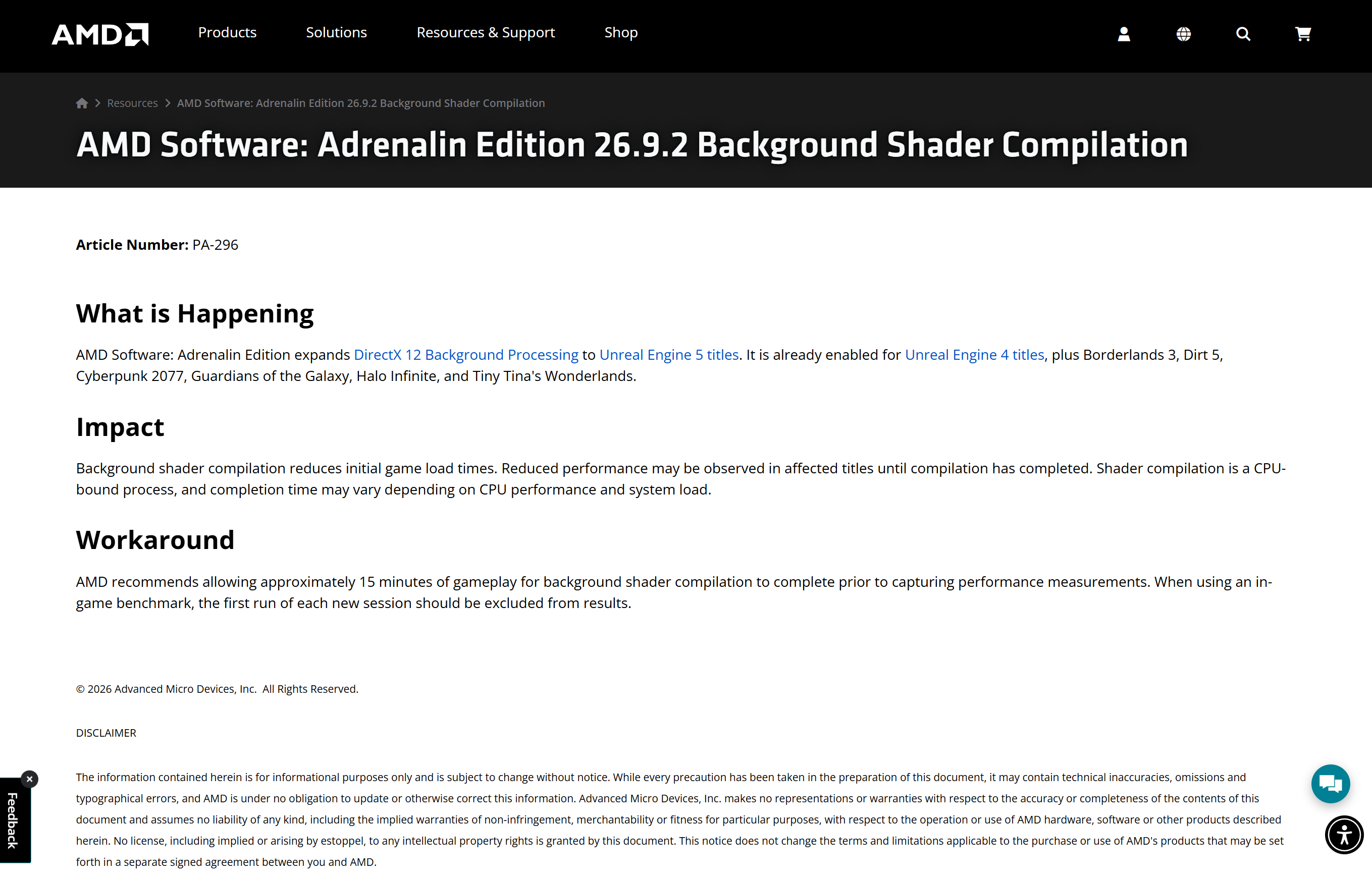
According to AMD, the functionality was already enabled for Unreal Engine 4 titles, along with several specifically named games, including Borderlands 3, Dirt 5, Cyberpunk 2077, Guardians of the Galaxy, Halo Infinite, and Tiny Tina's Wonderlands. AMD also notes that background shader compilation can reduce initial game loading times, though performance may be temporarily reduced while compilation is taking place. Because shader compilation is CPU-intensive, the time required to complete the process depends on the processor and overall system load.
For benchmarking purposes, AMD recommends allowing approximately 15 minutes of gameplay for background compilation to finish before recording performance measurements. The company also recommends excluding the first run of each new session when using an in-game benchmark. Based on that explanation, AMD appears to be saying that background shader compilation has already been supported in Unreal Engine 4 titles for some time, with Unreal Engine 5 support arriving more recently.
So the bigger news for Radeon owners is that AMD has been working on background shader compilation at the driver level, and its latest update expands that functionality to Unreal Engine 5 games. This was news to us. Admittedly, shader compilation performance isn't something we've investigated in detail for quite some time. There didn't appear to be much progress on the issue, so it had become one of those unfortunate realities of PC gaming that we'd more or less accepted.
But based on what we're seeing in Tiny Tina's Wonderlands, AMD appears to have effectively solved shader compilation stutter in this particular game. And what's particularly impressive is how quickly it happens. After a brief shader preparation process, we could simply load into the game and start playing without encountering any noticeable stutters. Meanwhile, the same game remained a complete mess on our GeForce GPUs without SCSKiller.
Tiny Tina's Wonderlands: Radeon vs. GeForce
Despite Tiny Tina's Wonderlands already running perfectly smoothly on the RX 9070 XT, we still wanted to see what would happen if we used SCSKiller. This was also when we discovered the apparent 16 GB shader cache limitation on Radeon GPUs. After precompiling the game's shaders using SCSKiller, we ran the test again and found virtually identical performance. SCSKiller increased system memory usage by approximately 2 GB, but this had no measurable effect on frame rates or frame pacing. In other words, AMD's standard driver configuration was already doing everything we needed.
For a better representation of image quality comparisons, check out the HUB video below:

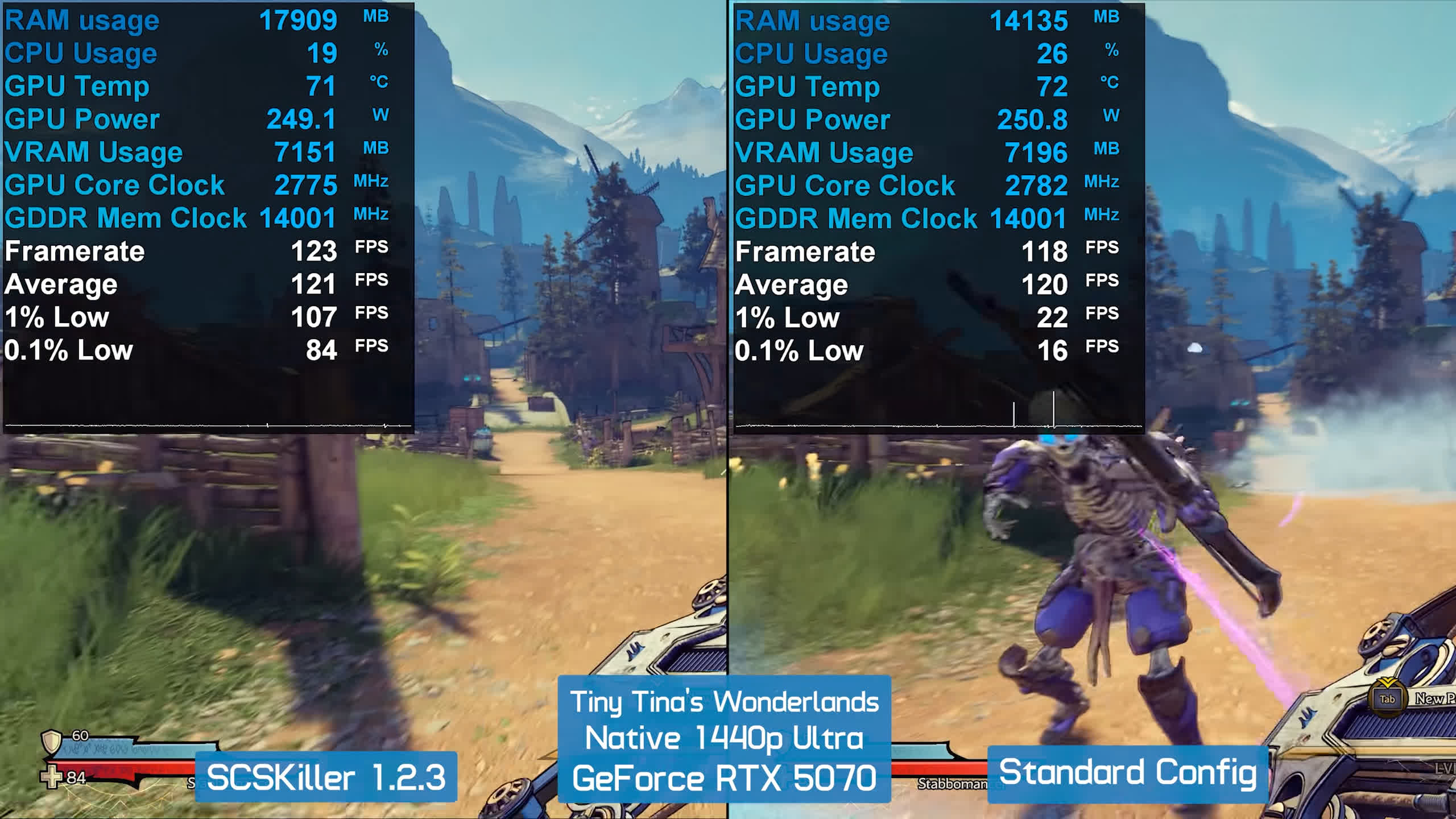
For comparison, we also tested the GeForce RTX 5070 under identical conditions, both with the standard driver configuration and after using SCSKiller. As expected, the RTX 5070 suffered from severe shader compilation stutter when running the game normally. However, after using SCSKiller, those issues were completely eliminated in our test. The application also increased VRAM usage by around 4 GB, bringing it roughly in line with what we observed on the Radeon RX 9070 XT.
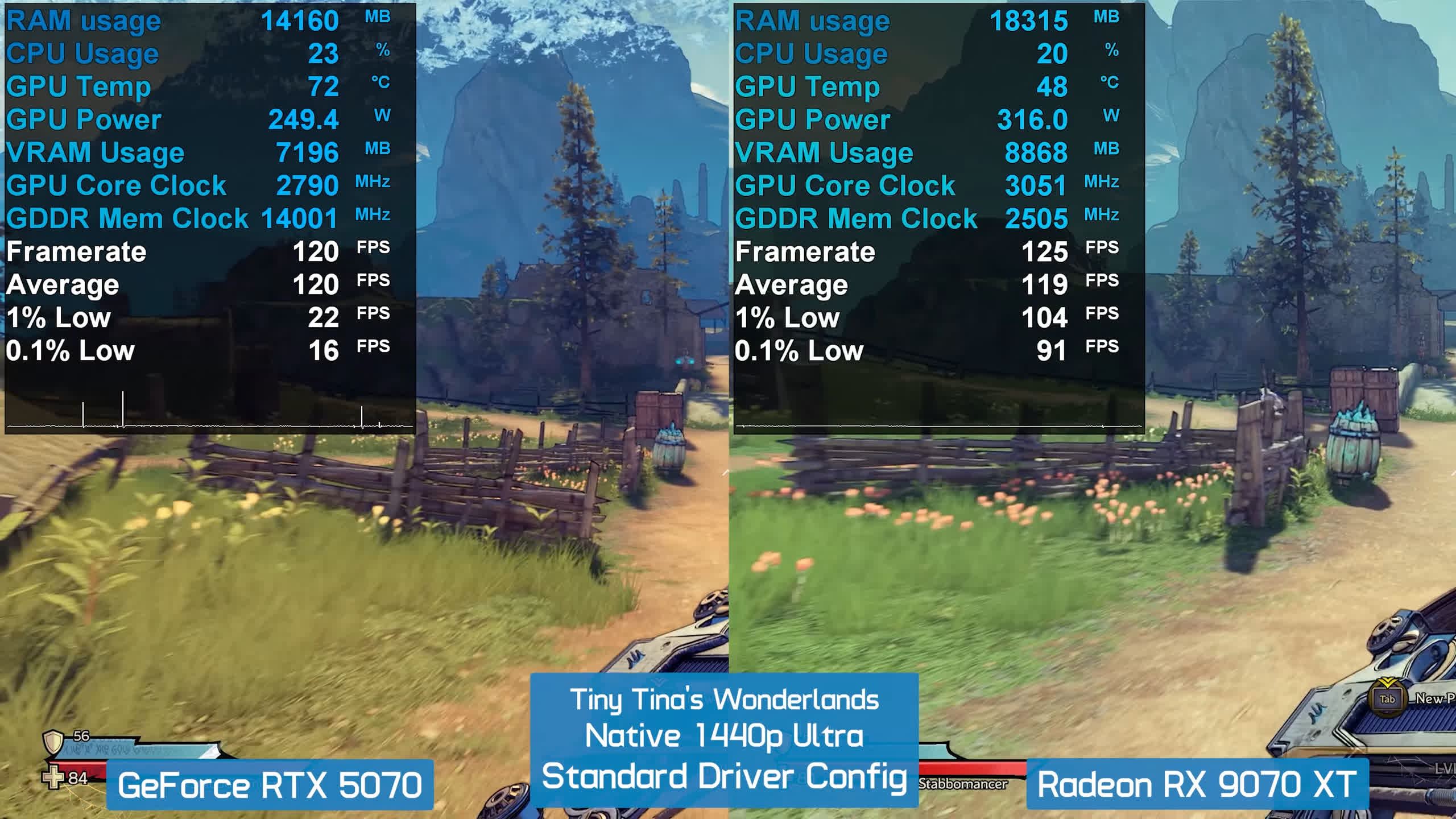
Comparing the two GPUs with their standard driver configurations reveals how significant AMD's advantage was in this particular game. Although average frame rates were similar, the 1% and 0.1% lows were substantially better on the Radeon GPU, with AMD's background shader compilation apparently doing an excellent job of preventing the constant interruptions we encountered on GeForce.
For a better representation of image quality comparisons, check out the HUB video below:

Now, compare the standard RX 9070 XT configuration against the RTX 5070 after using SCSKiller. Both GPUs delivered exceptionally smooth performance at roughly the same frame rates, with the GeForce GPU actually coming out ever so slightly ahead. That's a good result for SCSKiller, but it's also a demonstration of what AMD's driver is already doing.
What makes this particularly interesting is the amount of preparation required. For the RX 9070 XT, we literally installed the driver, restarted the system, loaded into Windows, and immediately launched Tiny Tina's Wonderlands. After the game's brief initial shader preparation process, we were playing without any issues.
For the RTX 5070 to deliver the same kind of smooth performance, we first had to install SCSKiller and then spend around 30 minutes precompiling shaders. Only after completing that process were we able to achieve the results shown here. So, at least in Tiny Tina's Wonderlands, AMD's driver implementation appears considerably more efficient at preparing shaders and avoiding compilation stutter. Very impressive stuff.
Final Fantasy VII Rebirth: Another Stutter-Filled Experience
Finally, we wanted to compare the RTX 5070 and RX 9070 XT in Final Fantasy VII Rebirth, another game we've heard suffers from severe shader compilation stutter. And unfortunately, those reports appear to be accurate. Starting with the RX 9070 XT, we compared the standard driver configuration against SCSKiller. Neither configuration was flawless.
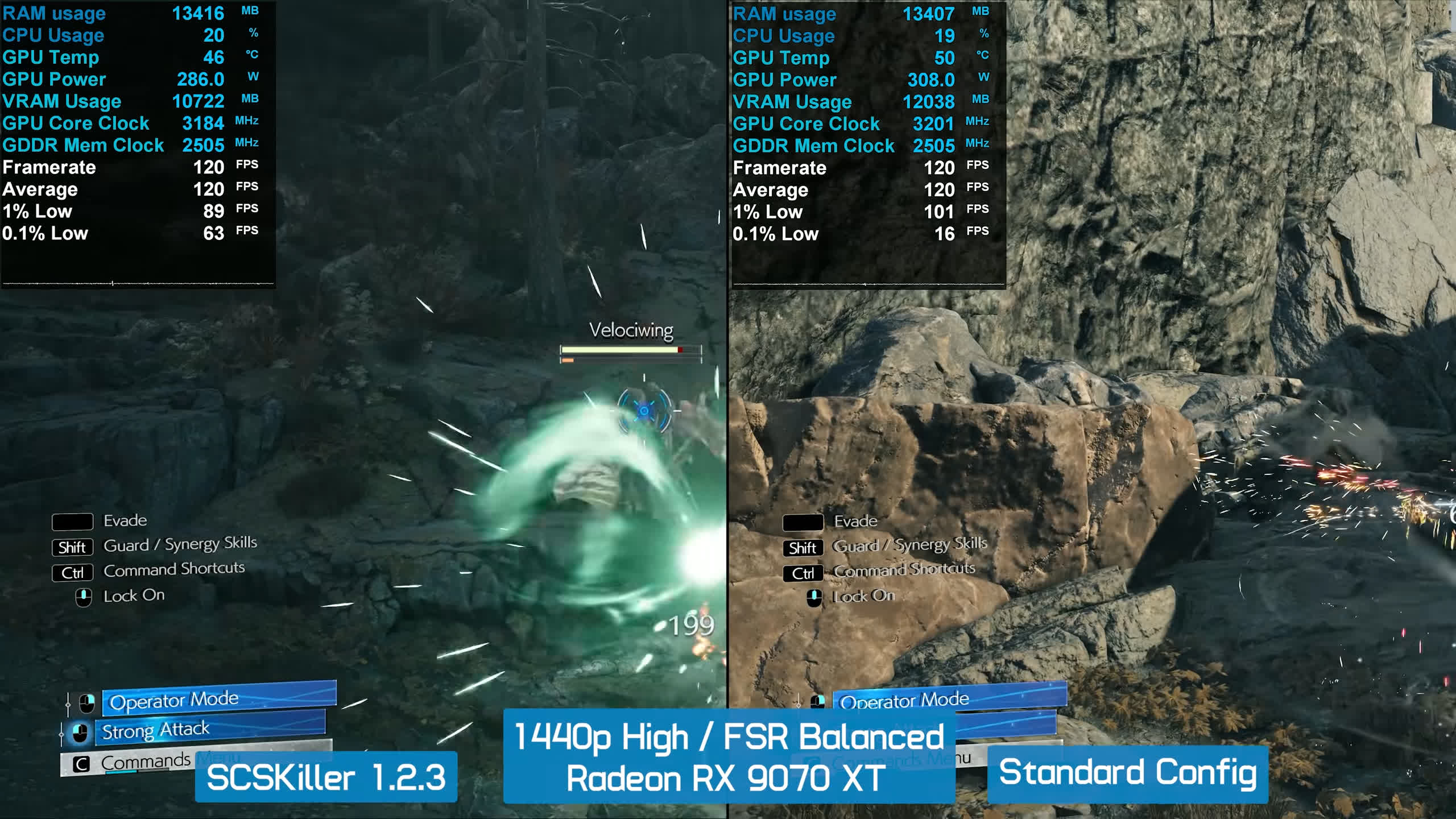
It's worth noting that Final Fantasy VII Rebirth has a hard 120 fps frame rate cap, which is a little annoying for this type of testing. However, we're primarily interested in the 1% and 0.1% lows anyway, so the cap isn't a major concern. With the standard Radeon driver configuration, 1% lows remained above 60 fps, but there were still noticeable stutters, reflected in the 0.1% low results. SCSKiller certainly helped, though it wasn't able to eliminate every stuttering issue in this particular title.
While the RX 9070 XT wasn't perfect, its performance was considerably better than what we observed with the RTX 5070. In fact, the situation was remarkably similar to Tiny Tina's Wonderlands. With the standard GeForce driver configuration, Final Fantasy VII Rebirth was a stuttery mess. Whereas the Radeon GPU managed to keep its 1% lows above 60 fps, the RTX 5070 suffered from severe performance drops, with its 1% lows falling into single digits. Average frame rates were very similar between the two GPUs, but the 1% and 0.1% lows on the GeForce GPU were terrible.
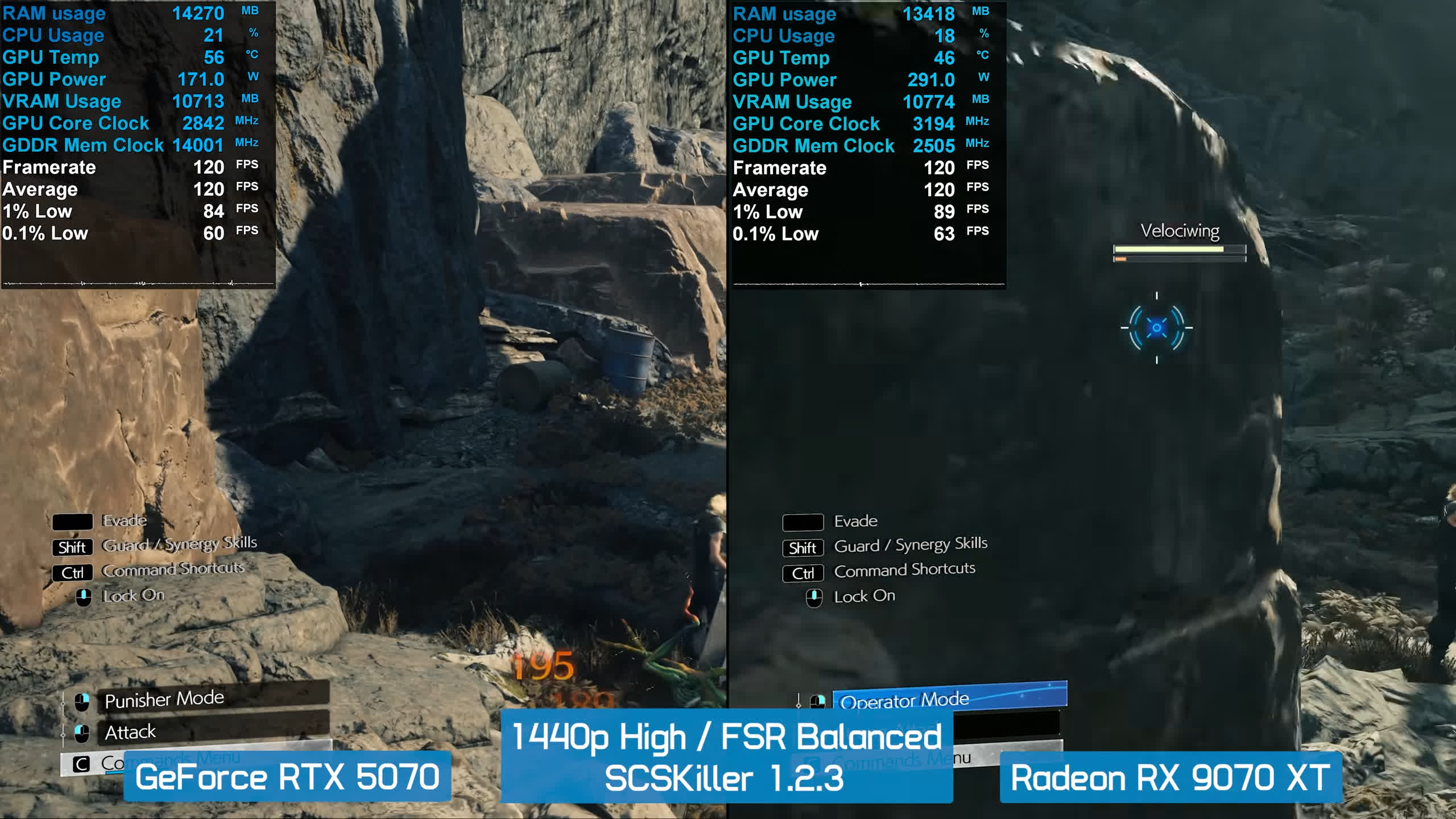
Then we enabled SCSKiller. After precompiling shaders, the RTX 5070's performance problems were essentially eliminated. The jarring stutters disappeared, 1% lows remained well above 60 fps throughout our testing, and even the 0.1% lows were very good. Frame pacing was excellent, resulting in a completely transformed gaming experience.
We initially captured several minutes of gameplay, but continued playing beyond that and didn't encounter any further issues in the areas we explored. Comparing the RX 9070 XT and RTX 5070 with SCSKiller enabled on both GPUs produced very similar results. Interestingly, SCSKiller consumed more system memory with the RTX 5070 than with the RX 9070 XT. It's possible that this relates to the Radeon driver's more restrictive on-disk shader cache capacity.
Overall, SCSKiller helped improve performance on both GPUs, though the most dramatic improvement was clearly seen on the GeForce side.
Conclusion: Does SCSKiller Actually Work?
SCSKiller certainly took us down a rabbit hole we weren't expecting. At some point, we might conduct a more extensive investigation comparing Radeon and GeForce GPUs across a broader range of hardware configurations and games. For now, though, we can conclude that SCSKiller is genuinely useful and it can improve performance in games affected by shader compilation stutter.
That doesn't mean it's a universal solution. It doesn't address traversal stutter, and even in games where shader compilation is an issue, the benefits can vary significantly depending on the hardware and the sections being tested. In some titles, such as Hogwarts Legacy, we couldn't reproduce the developer's claimed improvements at all. In others, such as Star Wars Jedi: Survivor and The Blood of Dawnwalker, we observed respectable performance gains, even when the standard configuration wasn't exhibiting particularly severe stuttering.
Then there are games like Tiny Tina's Wonderlands and Final Fantasy VII Rebirth, where SCSKiller completely transformed the experience on our GeForce GPUs.
Of course, there are some practical considerations. Compiling shaders can take considerable time, particularly when dealing with thousands of pipelines. You may also need to repeat the process after driver or game updates, and the resulting shader cache can consume a substantial amount of local storage. SCSKiller can also increase system memory consumption considerably, which may or may not be a problem depending on your PC's configuration.
But the good news is that the application itself is free, and there's little downside to trying it in a game you're already having trouble with, provided you're mindful of storage requirements and anti-cheat compatibility. It's straightforward to download and use, and based on our results, certainly worth experimenting with if you're experiencing shader-related stutters.
The Radeon results, however, are a different story, and potentially the more interesting discovery to come out of this testing. Initially, the inability to increase AMD's on-disk shader cache size seemed like a bit of a Radeon fail. And while we'd still like to see AMD provide more control over that limit, if the company continues improving background shader compilation, perhaps it won't be such a significant limitation after all.
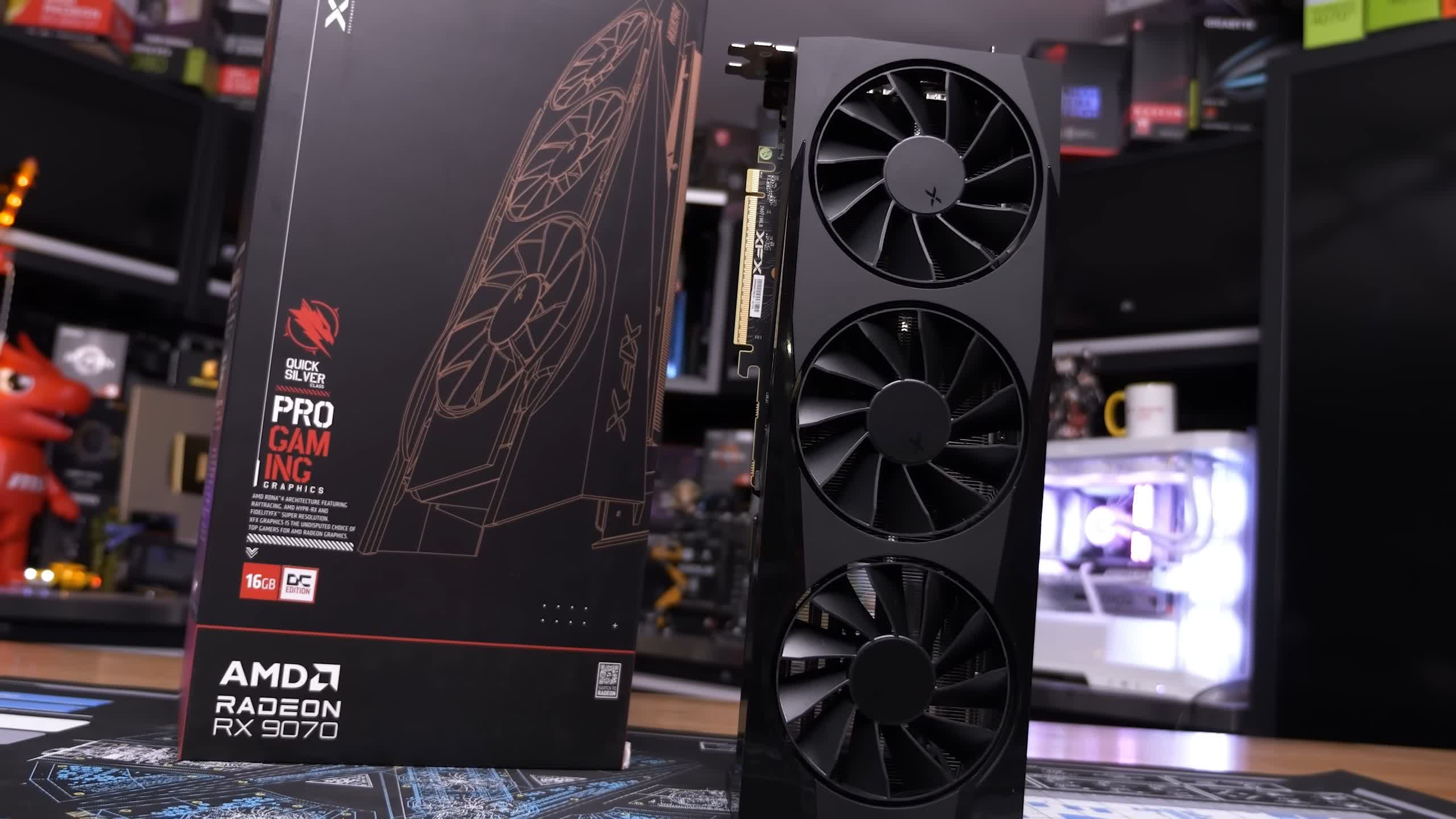
We actually spoke with AMD about this, and the company said that while it appreciates third-party applications such as SCSKiller, it also considers itself an industry leader in supporting DirectX 12 Advanced Shader Delivery, which aims to address the same underlying problems through an officially supported approach.
Advanced Shader Delivery is a separate technology developed by Microsoft for Windows 11 and DirectX 12. It allows supported games to download precompiled shaders, reducing the need for compilation on the player's PC and helping prevent stuttering. AMD has been an early supporter of this technology, though its benefits depend on game and platform support.
In any case, there's clearly more testing to be done. We're particularly interested in seeing how AMD's background shader compilation performs across more games, different CPU configurations, and older Radeon hardware. Likewise, SCSKiller deserves a closer look with slower processors, where shader compilation stutter may be even more disruptive. For now, though, we've learned two things: SCSKiller really can work, and AMD's shader compilation improvements might be a bigger deal than we initially realized.