
Nvidia has released a new version of DLSS 5 neural rendering, claiming it runs twice as fast as the previous model. This October update reduces the number of parameters in the DLSS 5 model by 24%, halving execution time and reducing VRAM usage by 20%. All of this has been achieved while maintaining comparable image quality, according to Nvidia.
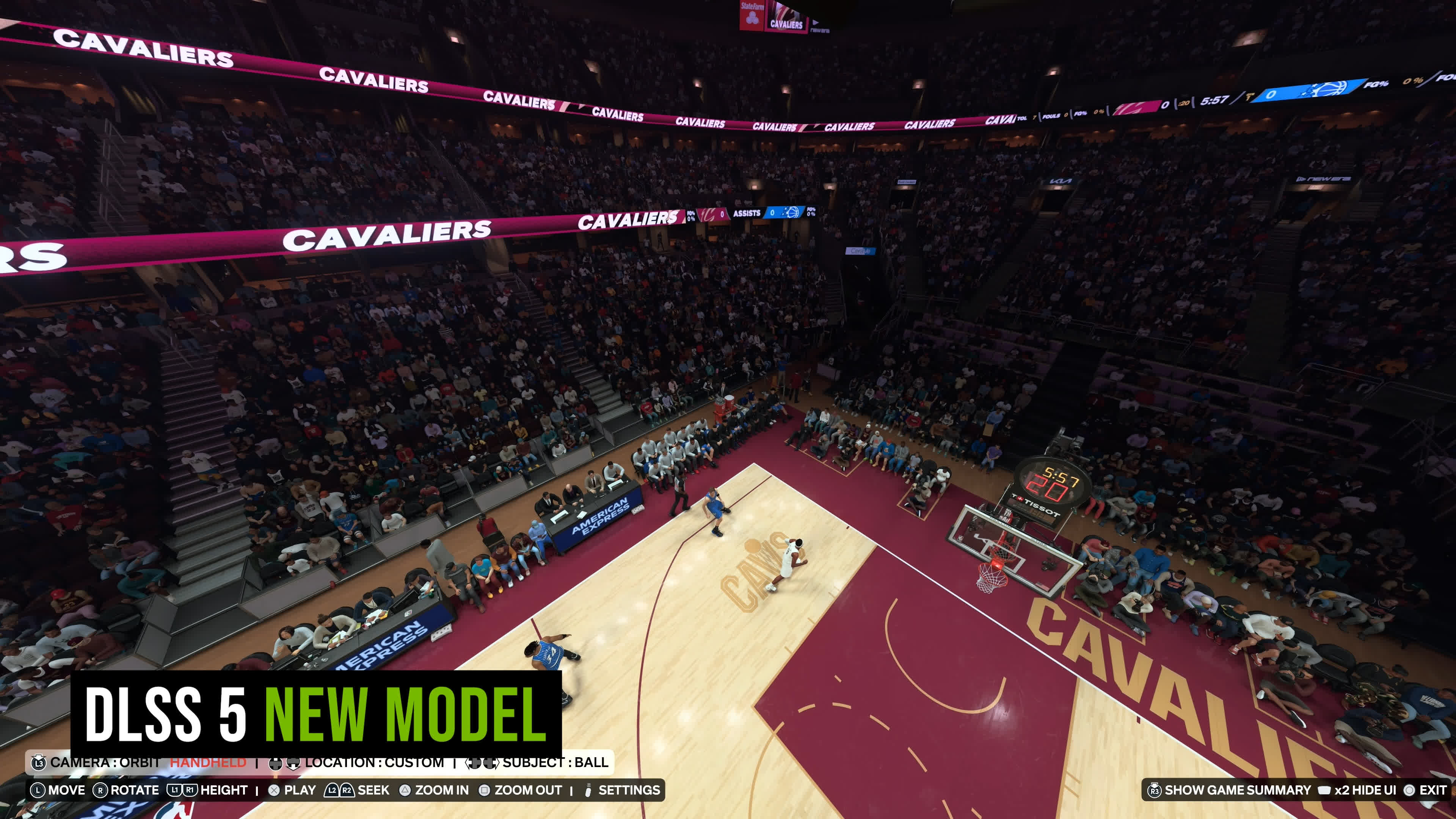
We thought it was worth revisiting DLSS 5 in everyone's favorite title, NBA 2K27, which is once again the first game to officially ship with the latest model. Does the new version really run twice as fast across all RTX 50 series GPUs without compromising image quality? Does it address some of the issues we raised in our initial DLSS 5 analysis? And does this performance improvement make DLSS 5 worth using now?
– WolfOfDarkness® (@WolfOfDarknesss) October 19, 2026
– Sim Racing Esport (@SimRacingEspor) October 14, 2026
One thing to clarify before getting into the benchmarks... when Nvidia says the new DLSS 5 model is twice as fast, that doesn't mean games with DLSS 5 enabled will run at twice the frame rate. The improvement refers specifically to the rendering cost of DLSS 5, not everything else the game needs to render.
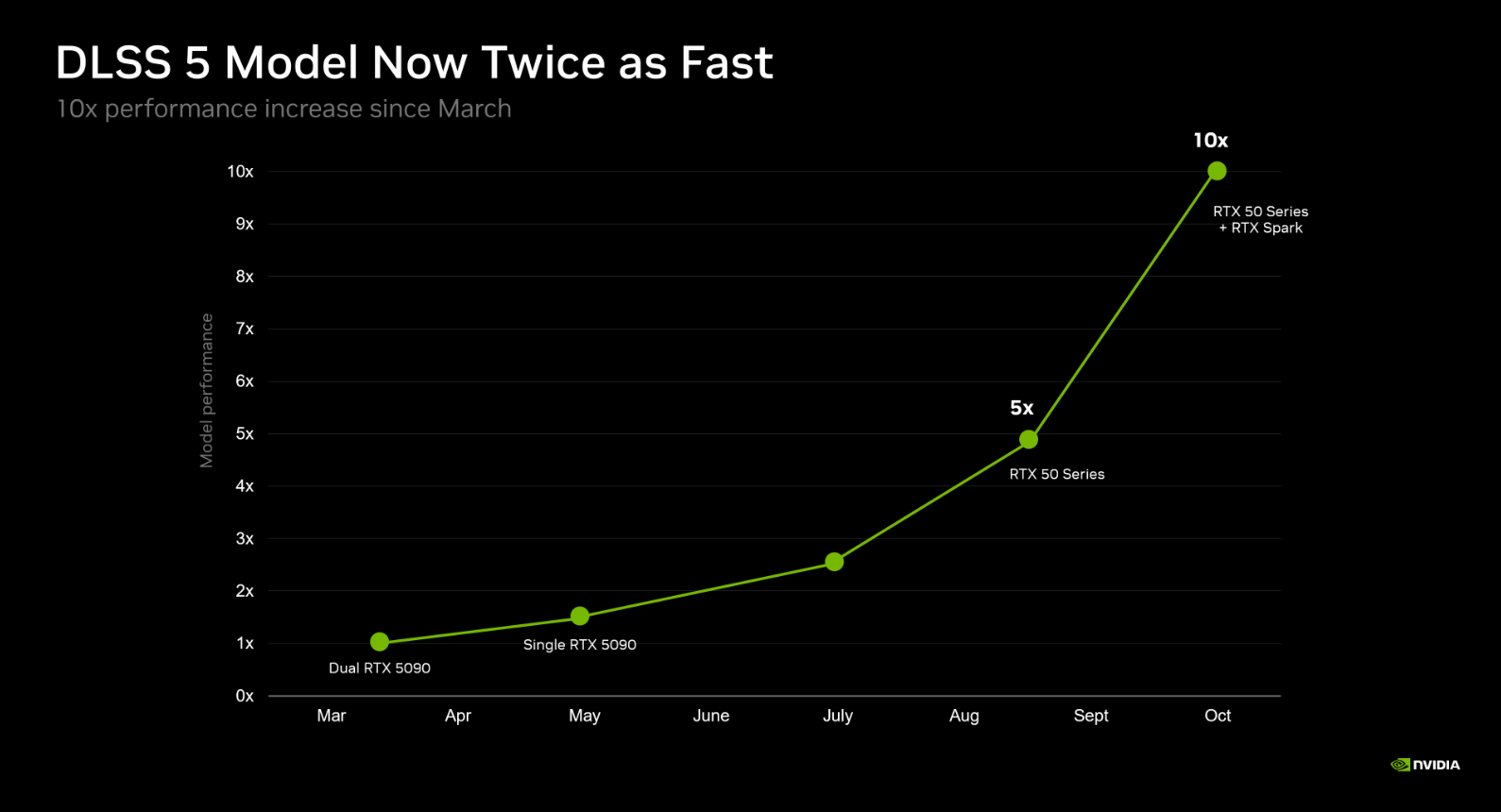
As a result, actual frame rates won't double after this update. However, Nvidia does claim a 1.4x performance improvement in NBA 2K27, so we'll see whether that holds up.
How the New Model Performs
Let's kick things off with Nvidia's gaming flagship, the GeForce RTX 5080 (see what we did there?). Previously, DLSS 5 was quite taxing on this GPU at 4K, dropping NBA 2K27 from 185 FPS with DLSS 5 disabled to just 53 FPS with the feature enabled.
As we showed in our previous investigation, performance doesn't change much when adjusting settings or increasing the level of upscaling, because the official DLSS 5 implementation operates on the output frame at the output resolution, rather than before upscaling is applied.
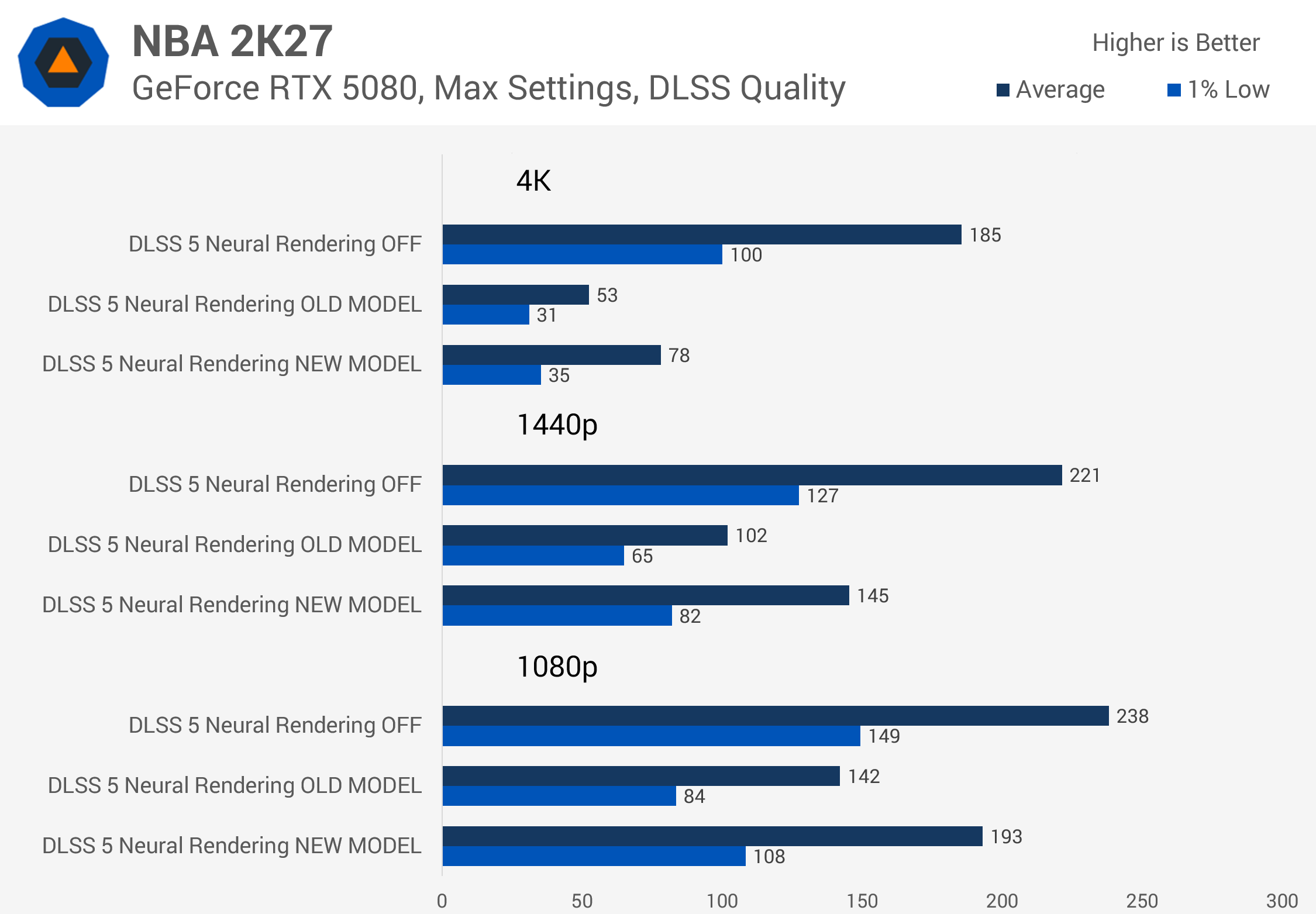
The new model improves performance considerably at 4K, increasing frame rates from 53 to 78 FPS, a 47% gain in this title. This makes 4K playable on this GPU to some degree, though there's still a 58% reduction in FPS compared to running without DLSS 5. Previously, that reduction was 71%, so the gap has narrowed somewhat.
At 1440p, we saw a 42% increase in frame rate with the new version of DLSS 5 compared to the old model, reducing the overall performance loss from 54% to 34%. Enabling the feature still significantly reduces in-game performance, just not to the same degree as before.
Meanwhile, at 1080p, the RTX 5080 is quite capable of running DLSS 5, though with neural rendering disabled, we run into CPU and game engine bottlenecks that cap performance.
RTX 5070 Ti and RTX 5070: Big Gains at 1440p
The RTX 5070 Ti also benefits from the DLSS 5 model improvements. At 4K, the new model delivered 48% better performance, pushing NBA 2K27 above 60 FPS at this resolution for the first time. However, without DLSS 5 enabled, the game ran at 166 FPS, so the new model still comes with a massive 61% performance hit.
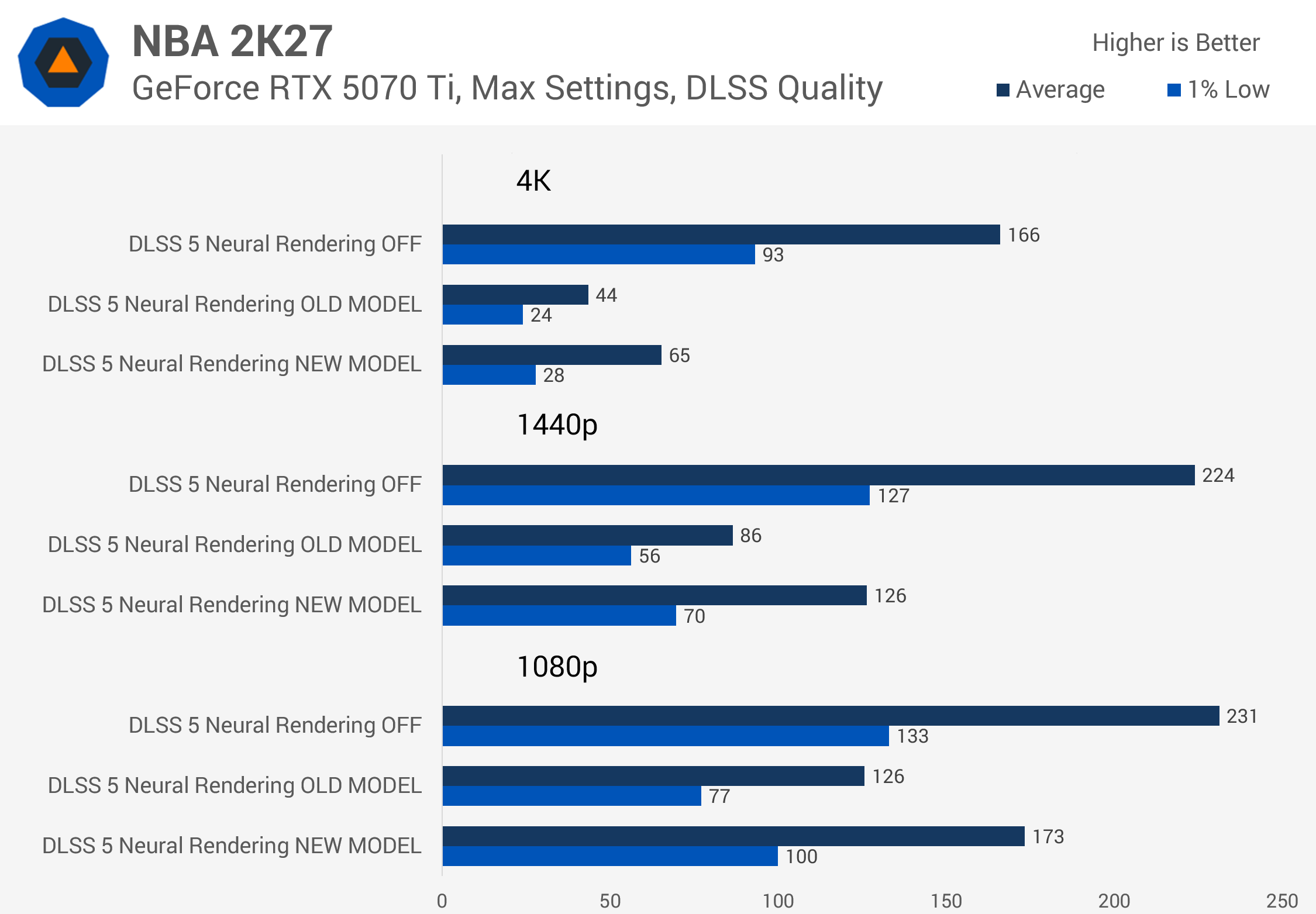
At 1440p, though, the situation is much better. The new model delivered 47% higher FPS than the previous version, cutting the performance loss from 62% to 44%. The game now runs above 120 FPS at this resolution with DLSS Quality upscaling enabled, which is very playable in this title. At 1080p, we saw a performance loss of 25% when enabling the new model, compared to 45% previously.
With the old DLSS 5 model, the RTX 5070 struggled at both 4K and 1440p. The new model provides a substantial boost in both scenarios. While this isn't enough to push 4K performance above 60 FPS, it does deliver 100 FPS at 1440p.
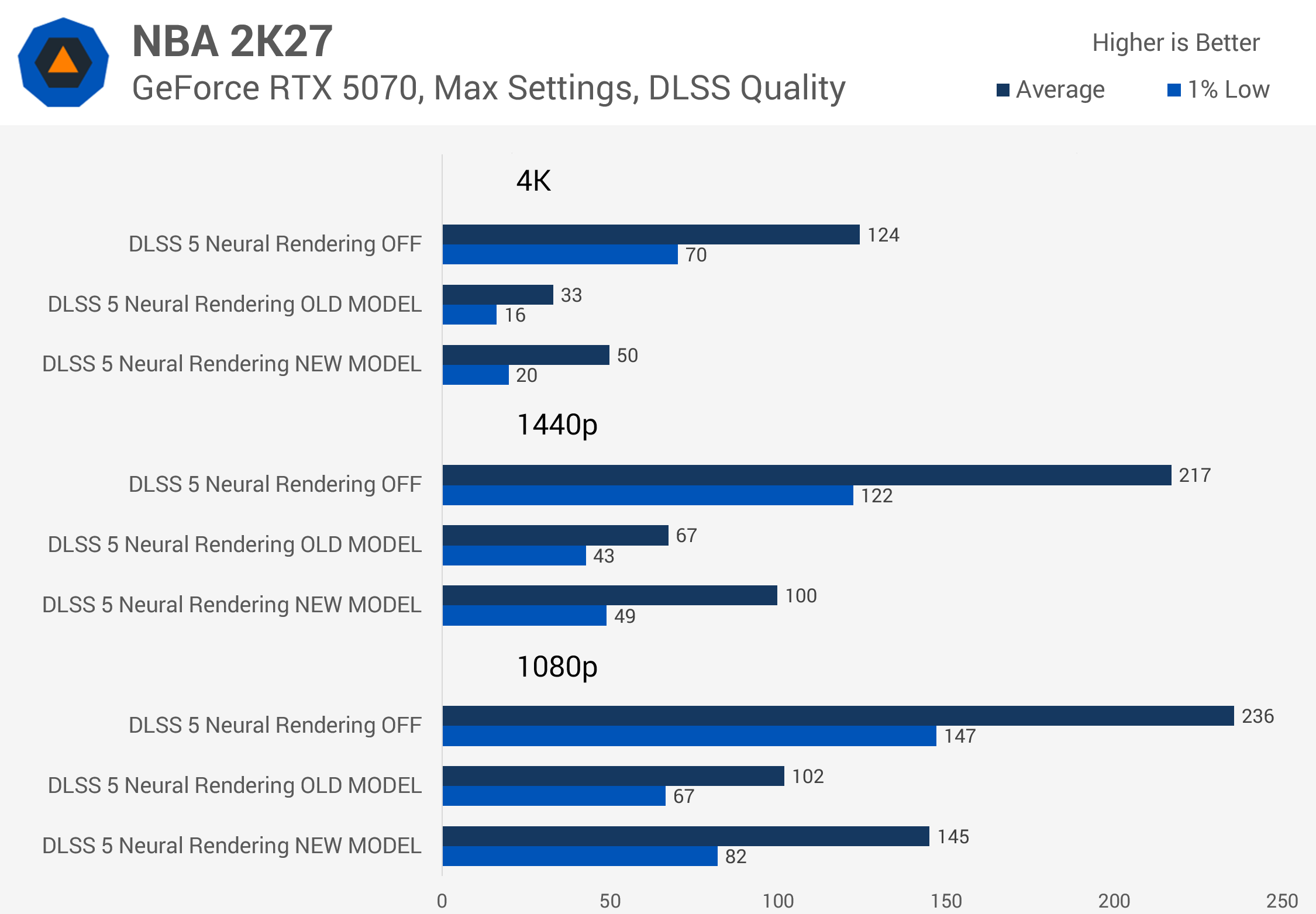
The overall performance loss compared to running without DLSS 5 is still pretty large, though. Frame rates were reduced by 60% at 4K and 54% at 1440p, although both are an improvement over the first model. At 1080p, the performance impact of enabling DLSS 5 on the RTX 5070 was around 39%.
RTX 5060 Ti and RTX 5060: More Playable, Still Costly
DLSS 5 was not usable on the RTX 5060 Ti 16GB at 4K with the old model, and that remains the case with the new version, despite a significant performance improvement.
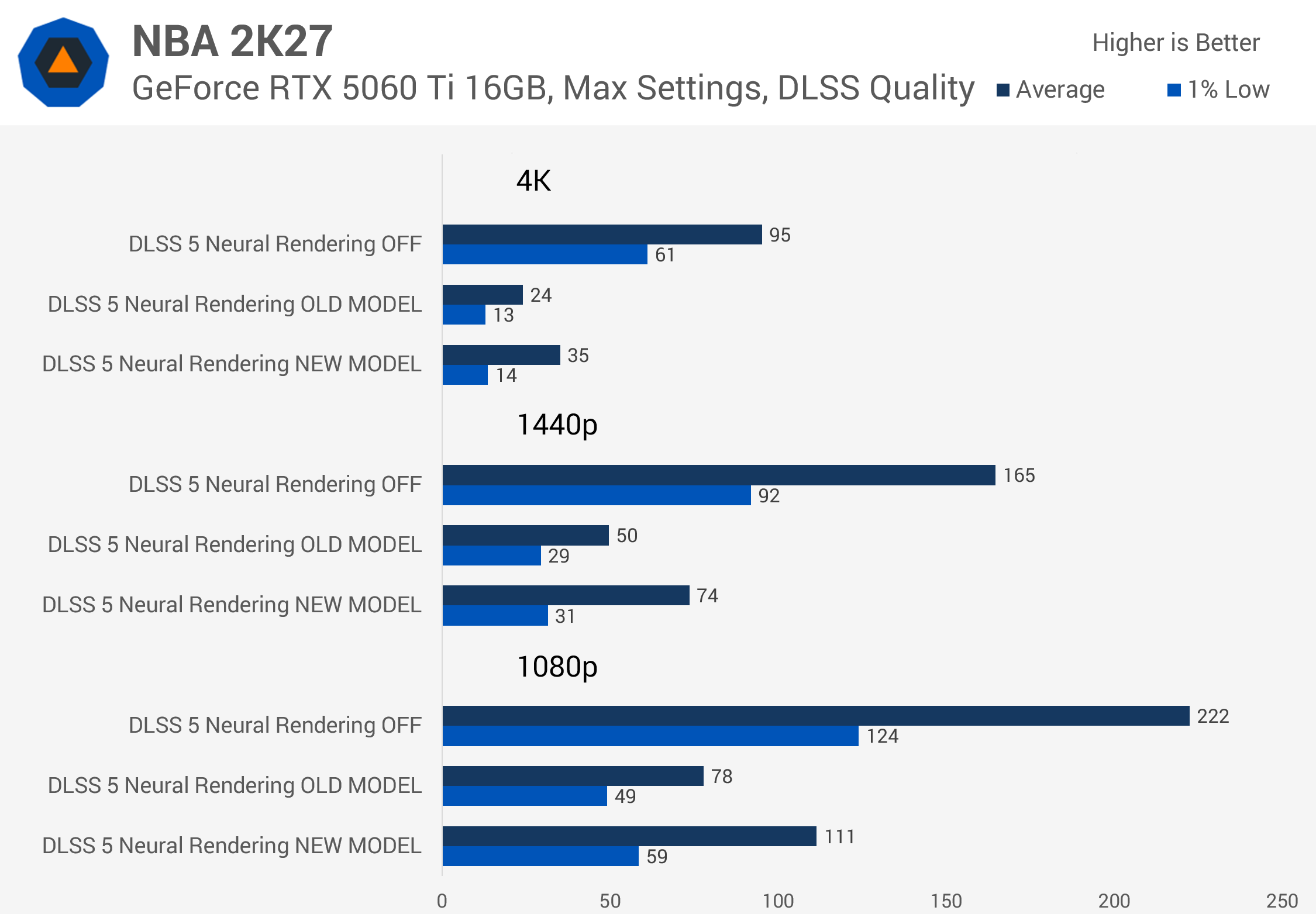
Going from 24 to 35 FPS represents a 46% gain at 4K, but without DLSS 5, the game runs at 95 FPS. That's still a whopping 63% performance loss when enabling neural rendering.
At 1440p, the situation is better. The old model ran below 60 FPS at this resolution, while the new version pushes performance above 60 FPS, a welcome improvement for what used to be a mid-range GPU option. At 1440p, enabling DLSS 5 reduced performance by 55%, while at 1080p, we saw the frame rate cut in half.
On the RTX 5060, we're using Low settings to avoid VRAM issues. The new model delivers 57%, 54%, and 53% higher frame rates at 4K, 1440p, and 1080p, respectively. This makes 1440p gaming in particular a lot more pleasant, with the game now running at 71 FPS.
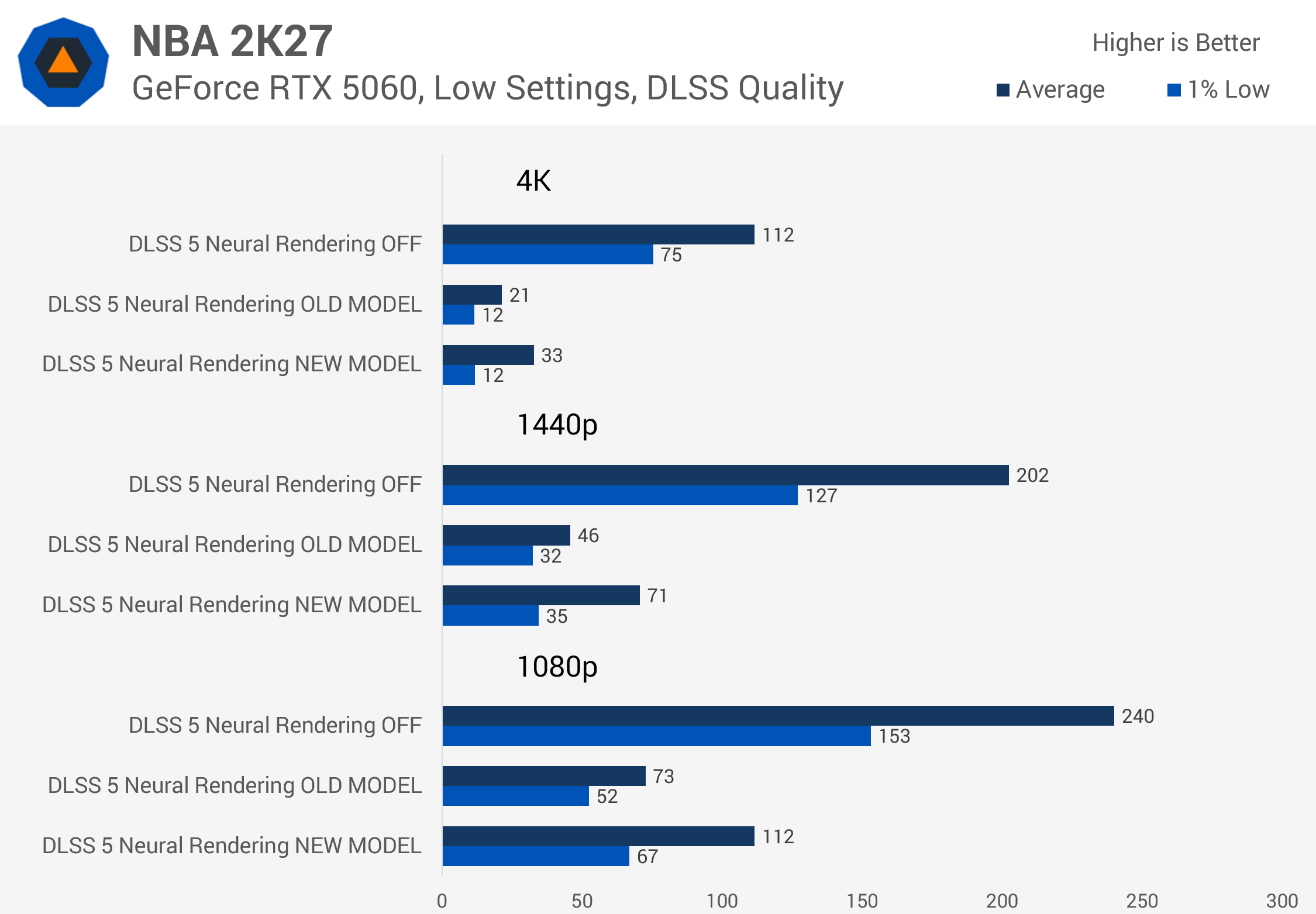
1080p also becomes more usable on the RTX 5060, with the new DLSS 5 model now capable of 112 FPS at this resolution. It technically exceeded our threshold for usability previously as well, but dropping from 240 to 73 FPS was a bit of a sting. The performance loss has now been reduced to 53% at this resolution.
RTX 5050: Playable at 1080p, with a Catch
Then we have the RTX 5050. This entry-level model was previously not fast enough to run DLSS 5 in our opinion, achieving just 33 FPS at 1440p and 53 FPS at 1080p with the old model.
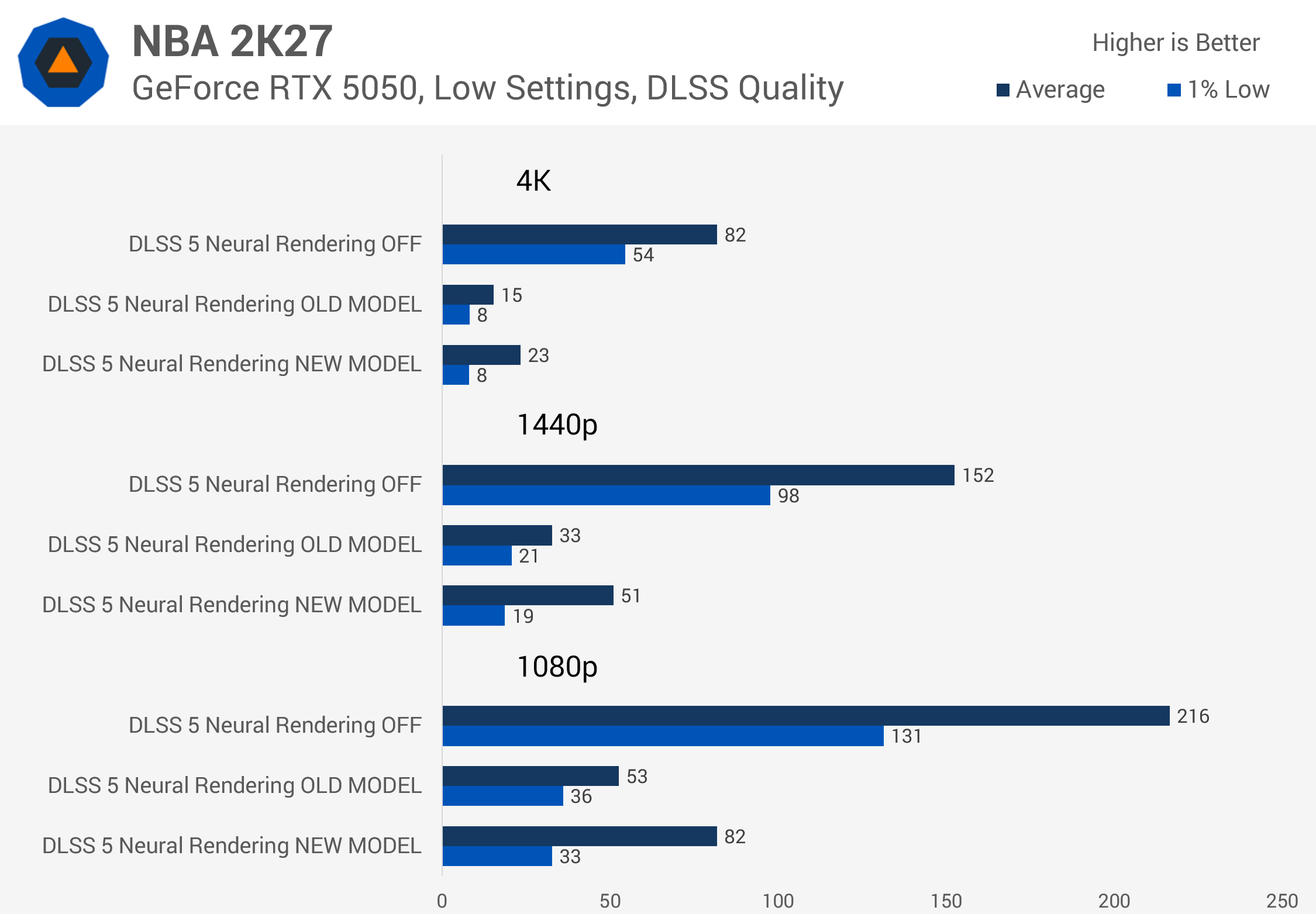
The new version runs considerably faster on this GPU, delivering a 55% increase in FPS at both 1440p and 1080p. While this isn't enough to push performance above the 60 FPS threshold at 1440p, it does increase the frame rate to 82 FPS at 1080p. That's still a huge performance loss compared to running without DLSS 5, but at least it's playable.
One weird result we noticed with the RTX 5050 specifically, and not so much with the other graphics cards, is that 1% low performance didn't really improve with the new DLSS 5 model.
In some cases, it actually went backwards. It could simply be a testing quirk, but at 1080p, an 82 FPS average with 1% lows still in the 30s doesn't make for the smoothest experience.
RTX 5090: The Best Case for DLSS 5
Lastly, here's a look at Nvidia's RTX 5090. This was clearly the best GPU to use with DLSS 5, as even with the old model, it delivered playable frame rates at all resolutions.
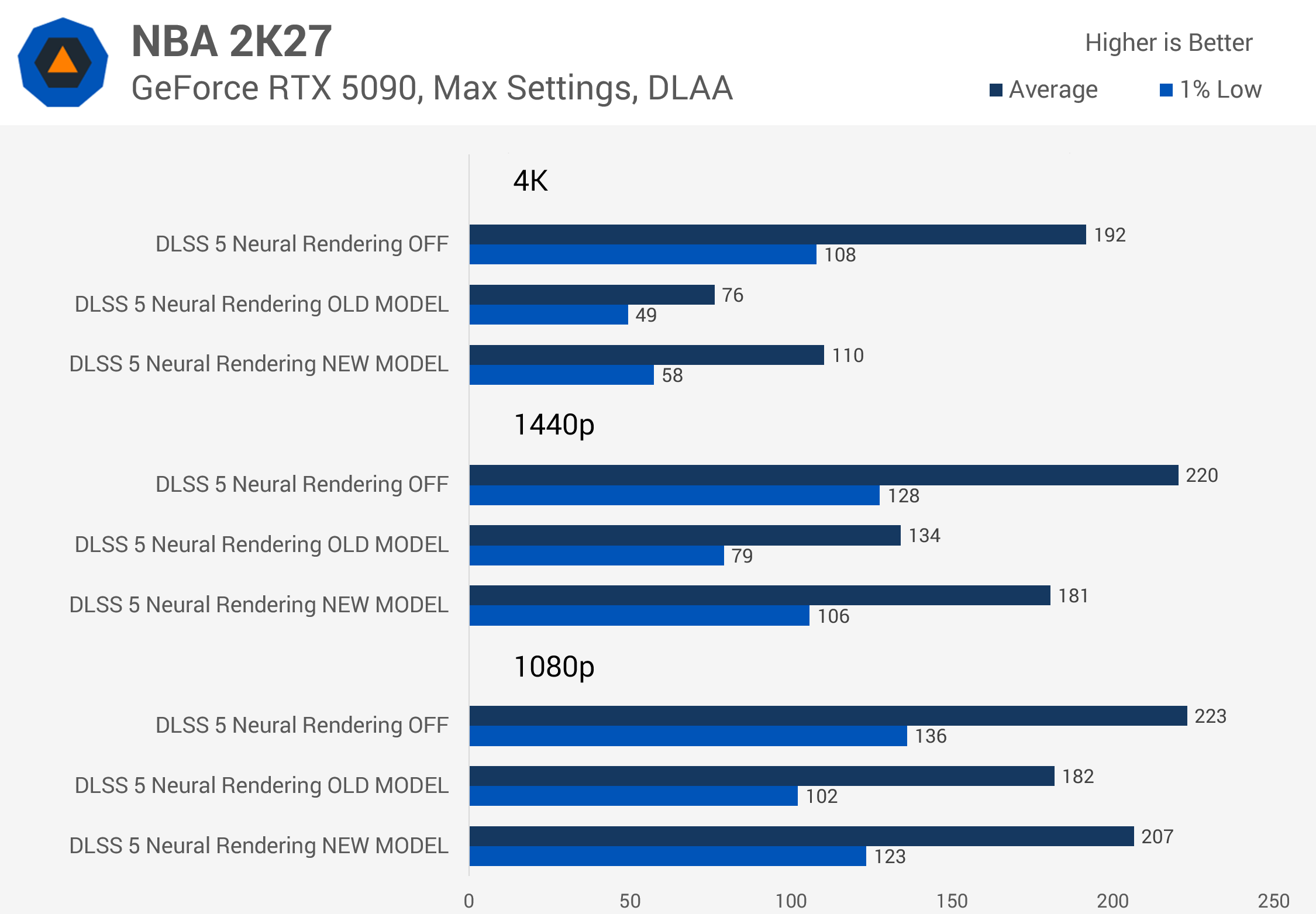
The new model works quite well here. At 4K, frame rates increased by 45%, while the performance loss compared to running without DLSS 5 dropped from 60% to 43%.
At 1440p, the situation is even better, though performance without DLSS 5 enabled is again limited by other bottlenecks. The new model delivered a 35% higher frame rate, and the overall performance loss was relatively small at just 18%. So if you happen to be using an RTX 5090 to play NBA 2K27 at 1440p, you may as well enable DLSS 5 given the frame rates we're seeing here.
And of course, the RTX 5090 is also more than capable at 1080p, though we're not sure how many people are pairing a 5090 with a 1080p display.
Render Times: How Much Faster Is the New Model?
With this performance data in hand, we can calculate DLSS 5's render time across the entire RTX 50 series lineup and use those figures to estimate performance in various scenarios with neural rendering enabled.
For reference, let's revisit the results from our previous DLSS 5 performance analysis, using the original model. At 4K, many performance scenarios simply weren't possible. On the RTX 5070 Ti, for example, DLSS 5 had a render time of 17ms, meaning that no matter how fast the rest of the game ran, you'd never achieve a 60 FPS render rate on that GPU. The only way to achieve the visual smoothness of 60 FPS would be through heavy frame generation.
Measured DLSS 5 Render Times (previous model)
| RTX 5090 | RTX 5080 | RTX 5070 Ti | RTX 5070 | RTX 5060 Ti 16GB | RTX 5060 | RTX 5050 | |
|---|---|---|---|---|---|---|---|
| 4K DLSS 5 Render Time (ms) | 7.9 | 13.7 | 17.0 | 22.1 | 31.1 | 37.8 | 53.1 |
| DLSS 5 Estimated Frame Rate (120 FPS Game FPS) | 62 | 45 | 40 | 33 | 25 | 22 | 16 |
| DLSS 5 Estimated Frame Rate (80 FPS Game FPS) | 49 | 38 | 34 | 29 | 23 | 20 | 15 |
| Required Game FPS to Hit 60 FPS | 114 | 332 | n/a | n/a | n/a | n/a | n/a |
| Required Game FPS to Hit 80 FPS | 217 | n/a | n/a | n/a | n/a | n/a | n/a |
| 1440p DLSS 5 Render Time (ms) | 3.6 | 6.1 | 7.8 | 10.2 | 14.1 | 16.9 | 24.0 |
| DLSS 5 Estimated Frame Rate (120 FPS Game FPS) | 84 | 69 | 62 | 54 | 45 | 40 | 31 |
| DLSS 5 Estimated Frame Rate (80 FPS Game FPS) | 62 | 54 | 49 | 44 | 38 | 34 | 27 |
| Required Game FPS to Hit 60 FPS | 77 | 95 | 113 | 156 | 387 | n/a | n/a |
| Required Game FPS to Hit 80 FPS | 112 | 157 | 213 | 444 | n/a | n/a | n/a |
At 1440p, more cards were capable of running DLSS 5 at acceptable frame rates, but there were still plenty of scenarios that we felt weren't particularly reasonable. The RTX 5070, for example, could achieve 60 FPS with DLSS 5 enabled, provided the game was already running at 156 FPS before switching the feature on. The RTX 5060 Ti and below weren't really capable of running DLSS 5 at this resolution.
The newer model is much faster, significantly reducing render times. On average, the model ran 83% faster at 4K in our testing and 94% faster at 1440p. These are averages across the RTX 50 lineup, so we're not quite at the doubling Nvidia claimed, but the improvement is substantial and close enough. An 83% increase in speed at 4K is massive.
Measured DLSS 5 Render Times (October model)
| RTX 5090 | RTX 5080 | RTX 5070 Ti | RTX 5070 | RTX 5060 Ti 16GB | RTX 5060 | RTX 5050 | |
|---|---|---|---|---|---|---|---|
| 4K DLSS 5 Render Time | 3.8 | 7.4 | 9.3 | 12.0 | 17.9 | 21.5 | 30.6 |
| DLSS 5 Estimated Frame Rate (120 FPS Game FPS) | 82 | 64 | 57 | 49 | 38 | 33 | 26 |
| DLSS 5 Estimated Frame Rate (80 FPS Game FPS) | 61 | 50 | 46 | 41 | 33 | 29 | 23 |
| Required Game FPS to Hit 60 FPS | 78 | 108 | 136 | 216 | n/a | n/a | n/a |
| Required Game FPS to Hit 80 FPS | 116 | 196 | 312 | 2217 | n/a | n/a | n/a |
| Required Game FPS to Hit 120 FPS | 223 | 1076 | n/a | n/a | n/a | n/a | n/a |
| 1440p DLSS 5 Render Time | 1.6 | 3.1 | 4.1 | 5.4 | 7.5 | 9.2 | 13.1 |
| DLSS 5 Estimated Frame Rate (120 FPS Game FPS) | 101 | 88 | 81 | 73 | 63 | 57 | 47 |
| DLSS 5 Estimated Frame Rate (80 FPS Game FPS) | 71 | 64 | 60 | 56 | 50 | 46 | 39 |
| Required Game FPS to Hit 60 FPS | 66 | 74 | 79 | 89 | 109 | 134 | 277 |
| Required Game FPS to Hit 80 FPS | 92 | 106 | 119 | 141 | 201 | 305 | n/a |
| Required Game FPS to Hit 120 FPS | 149 | 191 | 235 | 343 | 1231 | n/a | n/a |
Interestingly, the speedup varies depending on the overall performance of the GPU. On the RTX 5090, for example, the new DLSS 5 model was slightly more than twice as fast at 4K. The RTX 5070 saw an 83% improvement, while the RTX 5060 was 76% faster. Even the RTX 5050 ran the new model 73% faster at 4K, which is an excellent outcome from a performance standpoint.
What Faster Render Times Mean for Gaming
These improvements make DLSS 5 a lot more usable across most of the GeForce RTX 50 series. Previously, the RTX 5080 took 13.7ms to render DLSS 5 at 4K, making it very difficult to hit 60 FPS unless the game was already running at a very high frame rate.
The new model takes just 7.4ms to render, meaning a game only needs to be running at 108 FPS before enabling DLSS 5 to still achieve 60 FPS afterward. For games previously running at 80 FPS, the new model now delivers 50 FPS, compared to 38 FPS with the old version.
There's also good news for the RTX 5070 Ti, which was largely unusable at 4K. The old model turned 120 FPS gaming into 40 FPS gaming. The new model is much more capable, with a starting frame rate of 136 FPS allowing the game to run above 60 FPS with neural rendering enabled. That's still a huge performance hit, but at least this configuration is realistic in games.
The news is even better at 1440p. With the old model, the RTX 5080 and 5070 Ti were usable at this resolution, and both become considerably more practical with the update. On the RTX 5070 Ti, you previously needed a game to run at 113 FPS to achieve 60 FPS with DLSS 5 enabled. That requirement has dropped to just 79 FPS, meaning a game running at 79 FPS without DLSS 5 will only drop to 60 FPS with the feature enabled.
It's still a sizeable performance hit for a single visual feature, a 24% reduction in FPS in this example, but it's not that crazy. We're now within the realm of other performance-intensive graphics settings, rather than dealing with such a huge outlier.
The Performance Penalty Is Smaller, but Still Significant
With the new DLSS 5 model running ~80% to 90% faster than the original, the performance penalty has been reduced across the board. Take a game running at 120 FPS as an example.
Across the RTX 50 series lineup, enabling the old DLSS 5 model resulted in an average 71% performance loss at 4K. That's been reduced to 58% with the new model. At 1440p, the average performance loss has dropped from 54% to 39%.
In situations where you were enjoying a high frame-rate gaming experience, the performance loss remains substantial with neural rendering enabled. The RTX 5070 drops from 120 FPS to 73 FPS at 1440p. Essentially, you sacrifice those high frame-rates along with the latency benefits, to use DLSS 5 feature. But you don't have to sacrifice nearly as much as before.
For games running at 80 FPS, the impact of enabling DLSS 5 is smaller because its render time accounts for a lower proportion of the overall frame time. With the old model at 1440p, enabling DLSS 5 took games from 80 FPS to 44 FPS on average, a 45% performance loss. That penalty has been reduced to 31% with the new model.
Image Quality: Little Has Changed
Do these performance improvements come at the expense of visual quality? We're not going to do an exhaustive analysis here, but our general impression from using the new model in NBA 2K27, which features the official implementation, is that image quality is broadly the same, potentially slightly worse in some situations.
For a better representation of image quality comparisons, check out the HUB video below:
There are two ways to look at this. On the one hand, it's great that Nvidia has been able to improve performance while delivering largely similar visual output. That's a step in the right direction. On the other hand, DLSS 5's original model had quite a few visual issues, so stagnation or even a small step backward in image quality is not ideal. What we really need to see from DLSS 5 is performance and visual quality improving simultaneously.
The new DLSS 5 model still has noticeable issues with image stability, though it's difficult to say based on our testing whether these problems have gotten worse. Lighting flicker, where surfaces shift slightly in tone from frame to frame, is still very much present in the updated October model, and we noticed it in the same scenarios as in our original DLSS 5 analysis.
We also found with the original DLSS 5 model that neural rendering had a hard time keeping objects consistent at different distances from the camera.
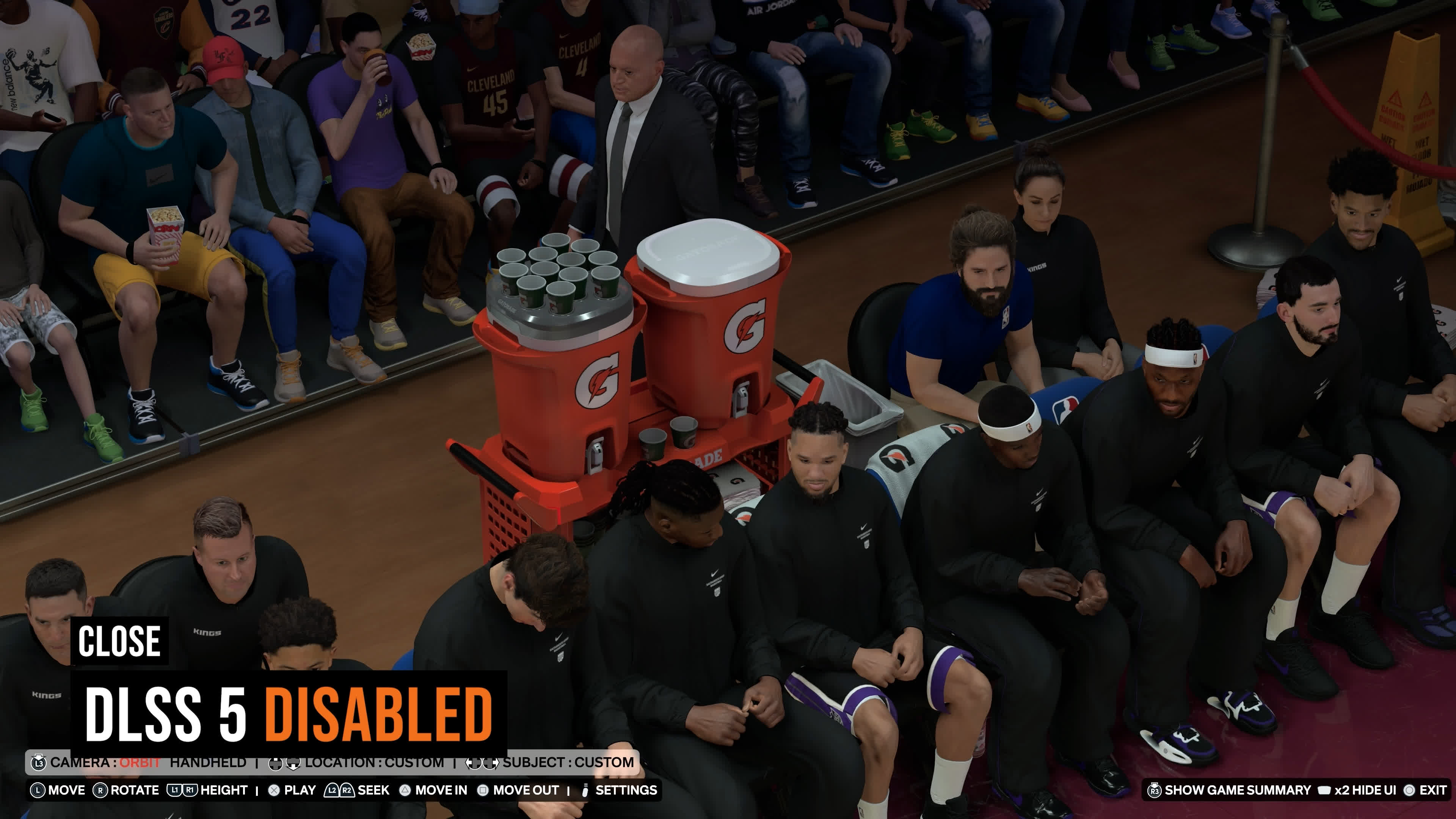
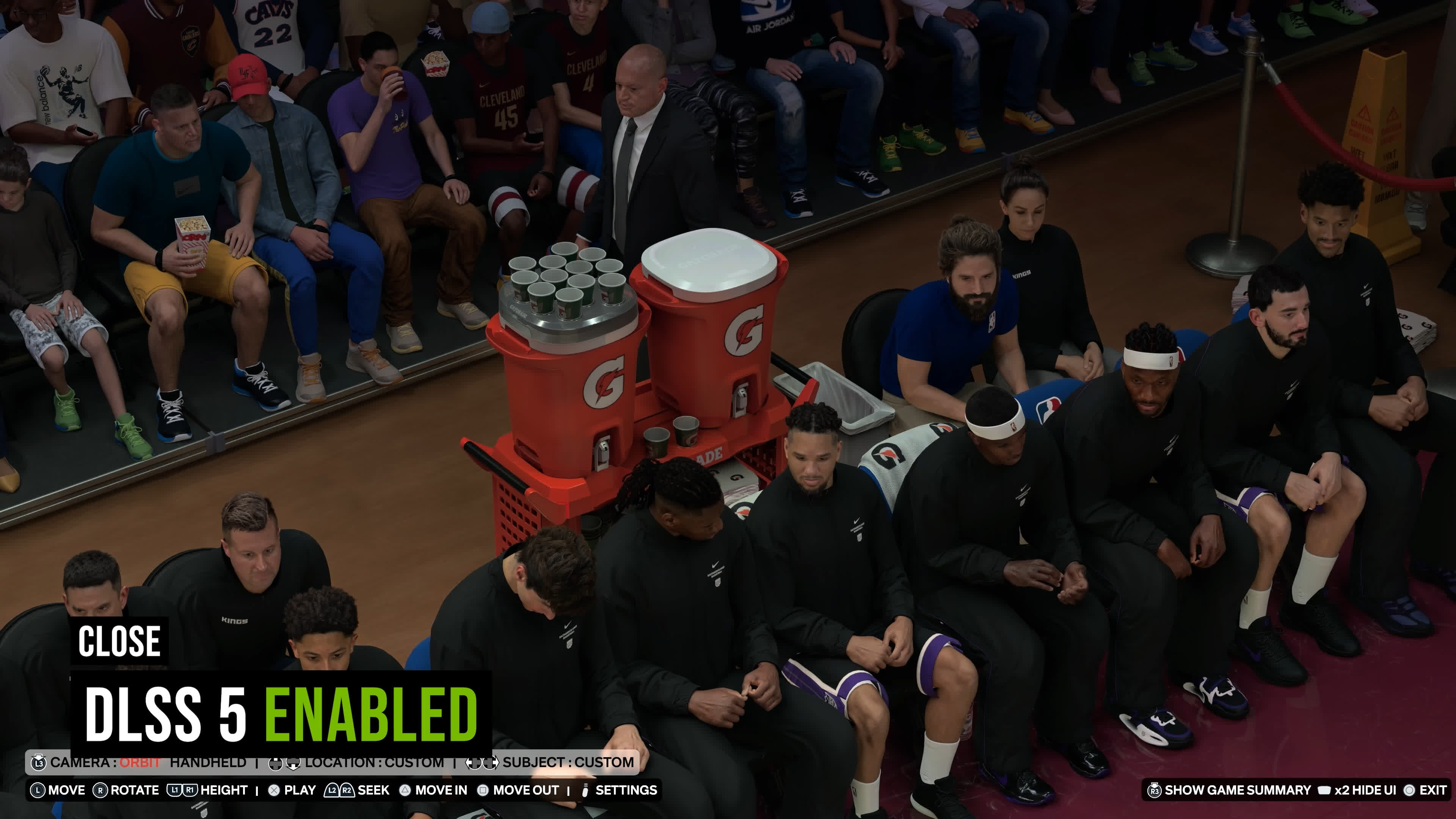
This ugly effect also extends to skin tones. DLSS 5 is best equipped to enhance skin when a character is relatively close to the camera and occupies a large portion of the frame. As you zoom out or move farther away from a character, their skin typically becomes darker and shinier with neural rendering enabled, something that doesn't occur with the feature disabled. In our opinion, this can make human characters look a bit strange unless they're close to the camera.
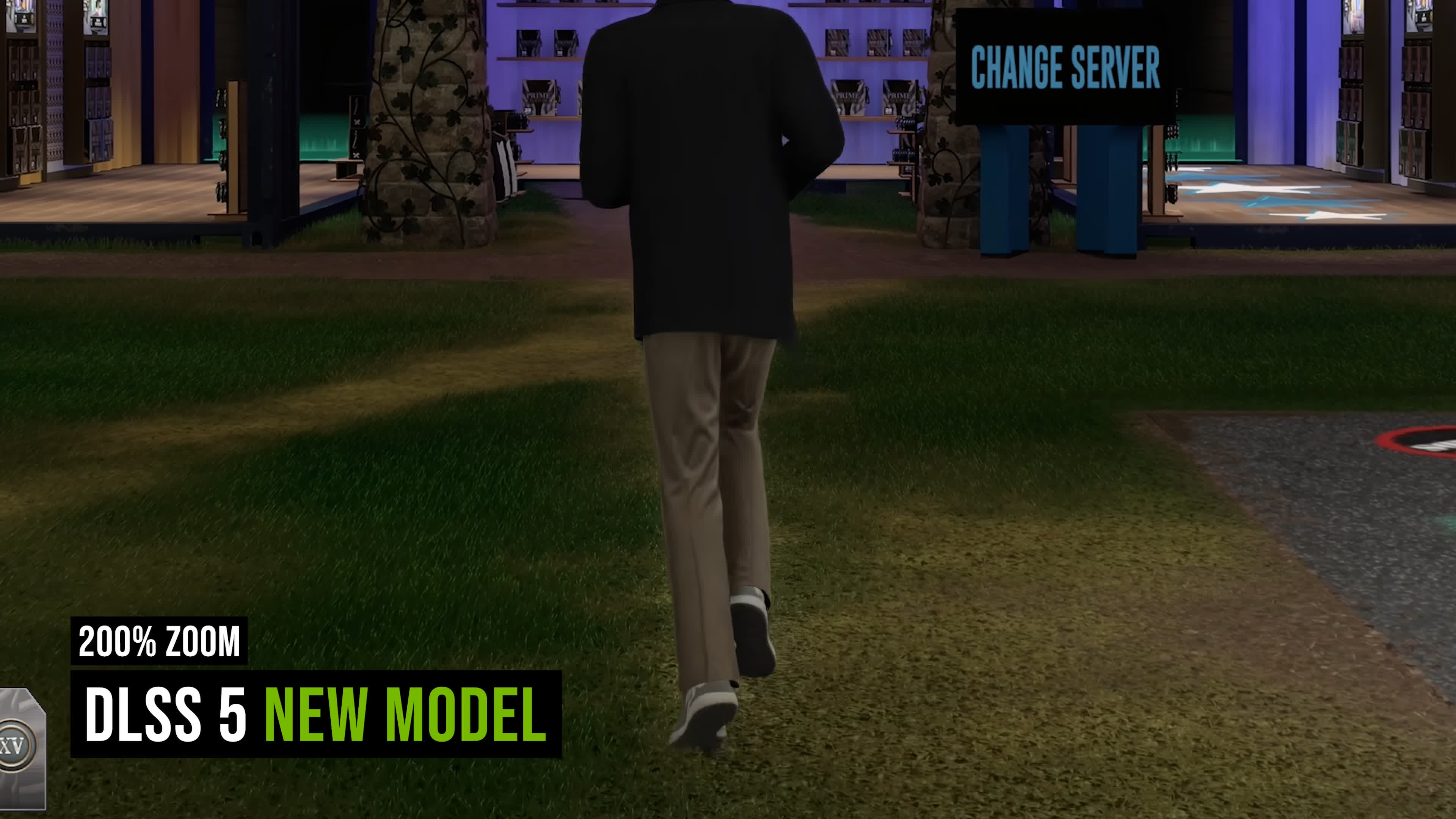
Another major artifact we discovered was related to disocclusion. DLSS 5 had a tendency to create a halo-like effect around characters, and I think this has actually become slightly worse and more noticeable with the new model.
Has Nvidia Toned Down Neural Rendering?
Interestingly, while researching the new DLSS 5 model, we came across quite a few posts from people using modded versions who complained that the updated model appears toned down compared to the original. According to these reports, it produces a less intense effect and a smaller overall visual change, particularly with the sliders set to higher levels.
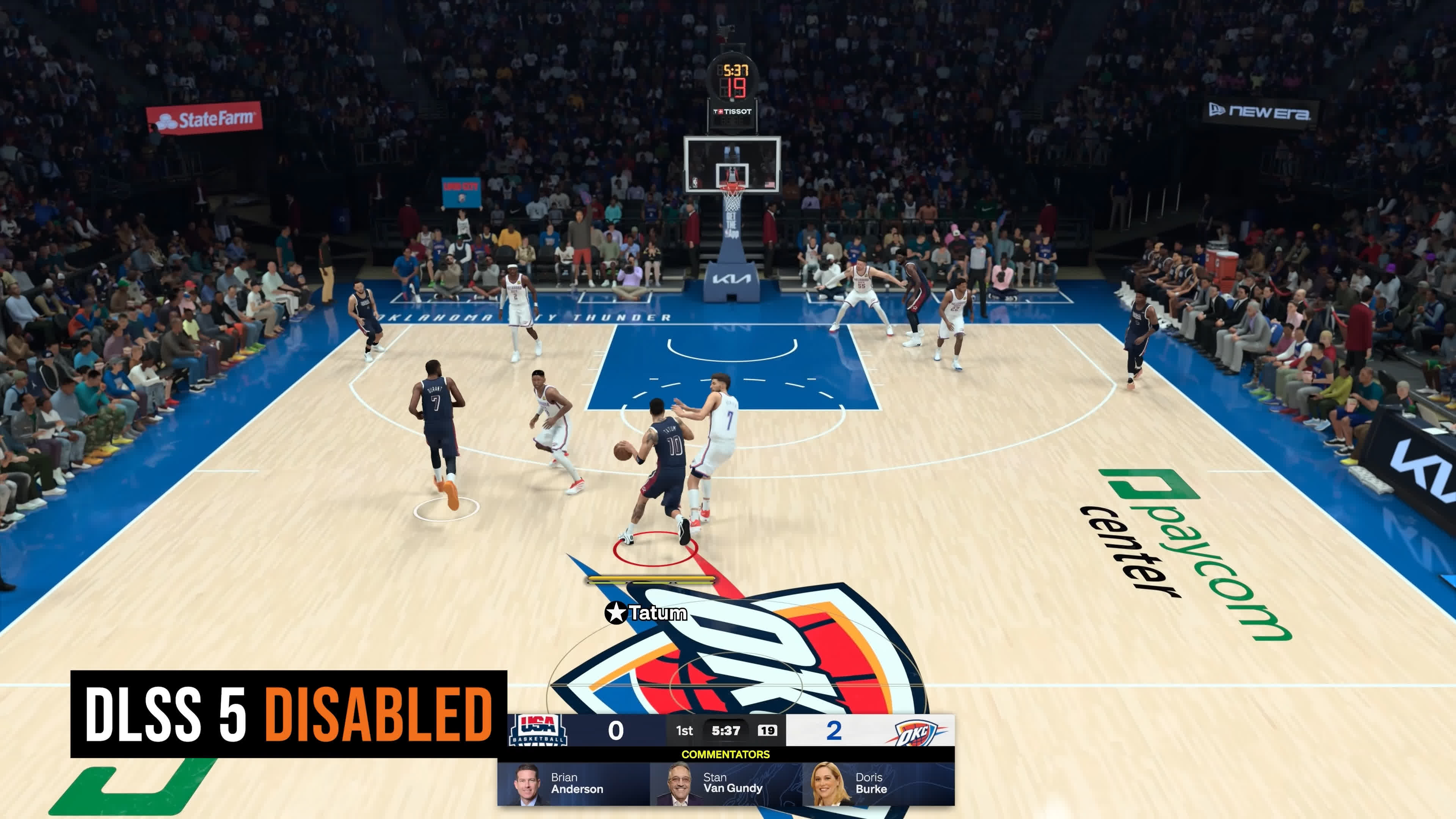
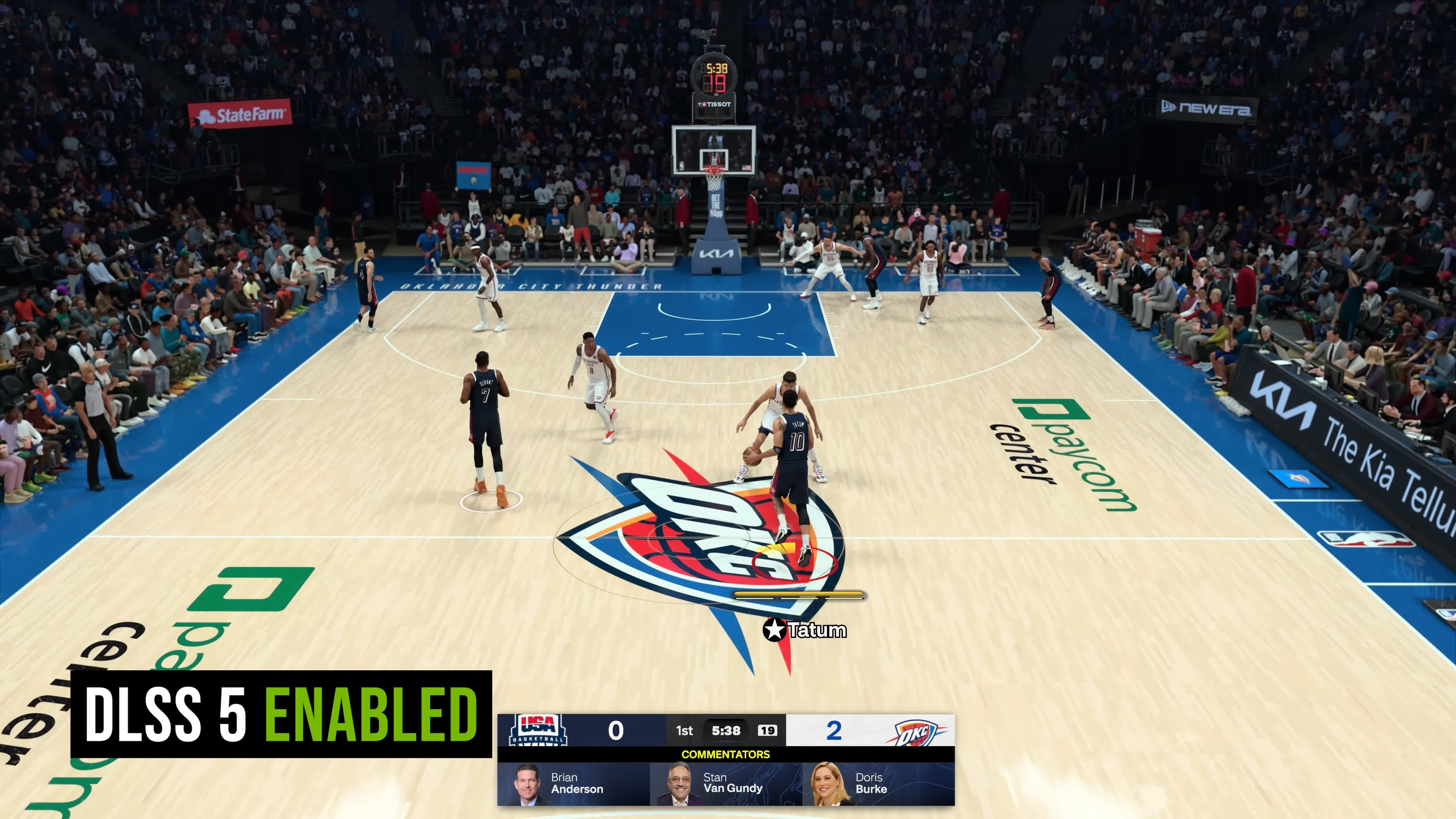
This is interesting because in NBA 2K27 (with the official DLSS 5 implementation), the effects of neural rendering look broadly similar to what they were before. Then again, NBA doesn't have an aggressive implementation. It mostly attempts modest visual improvements to avoid overcooking the image and generating an AI slop-like result.
DLSS 5 Got Faster, but It's Still a Work in Progress
The new DLSS 5 model is a step in the right direction toward making it a genuinely usable feature in games. The updated model runs much faster, while visual quality appears broadly similar. It's a decent level of optimization that makes neural rendering viable on more GPUs than it was at launch.
But doubling the processing speed is only one of many improvements this technology needs. Enabling neural rendering still comes with a high performance cost, even after this update. It's just that the penalty isn't nearly as massive as it used to be.
It's clear that performance was the focus of this DLSS 5 release and not visual quality. All of the artifacts and issues with the original release remain, and these need to be addressed. Otherwise, neural rendering will continue to produce worse image quality in some respects than traditional rendering. Whether Nvidia can improve both performance and image quality simultaneously remains to be seen.
I do find it bizarre that Nvidia didn't simply wait a few weeks and make this faster model the official release of DLSS 5. The tech has been integrated into a single game so far, and there has hardly been a rush of developers jumping on board (in contrast, modders appear to be all-in). How much optimization headroom remains is unclear, but it's an interesting jump in performance just weeks after launch.
Going forward, DLSS 5 titles will use the new model, so the original version is effectively going to be consigned to history. The upcoming Hogwarts Legacy update in November will use the new model, and we'll likely revisit DLSS 5 when that arrives.