Has it been mentioned anywhere that 2 cores will be dedicated to System OS for PS5 and XSX? surely 1core2 thread Zen2 beats any performance from 2 jaguar cores currently? in fact I'm pretty sure the PS4 only uses 1 as I remember guerrilla games saying they coded Killzone shadowfall to use 7 cores, although the PS4's OS is very lightweight so maybe xbox one required 2 cores because of the hypervisor running 3 OS's if I remember correctly.I expect the exact opposite. 2 cores of the new consoles are reserved hardware, so games will have access to 6 cores 12 threads at most. Given the work to get game engines to use 6 cores already done, I believe we will see games continue to use 6 cores, MAYBE 12 threads, and continue to not take advantage of 8+ cores as there is no financial inentive to do so unless you are making a PC exclusive game.
The Xbox 360 had 3 cores and 6 threads, but games didnt start using more then 2 cores in any significant manner until the PS4 came out in 2013.
There is also the issue of games not inherintly being a multi threaded application. Throwing more cores at the issue will not always mean they will be used. Even today we still see 1-2 threads being loaded way heavier then the other 4-6. The boost another 2 cores will provide under sucha system are very minimal, and this is with engines optimized for 6 very slow jaguar cores. Now we'll have 6 fast Zen cores available, there's no incentive to push even more multithreading VS taking advantage of the 6 cores they arleady have.
You are using an out of date browser. It may not display this or other websites correctly.
You should upgrade or use an alternative browser.
You should upgrade or use an alternative browser.
Ryzen 3 vs. Ryzen 5 vs. Ryzen 7 vs. Ryzen 9
- Thread starter Steve
- Start date


This says 1 core (and thus 2 threads) are reserved in the Xbox Series X:Has it been mentioned anywhere that 2 cores will be dedicated to System OS for PS5 and XSX?
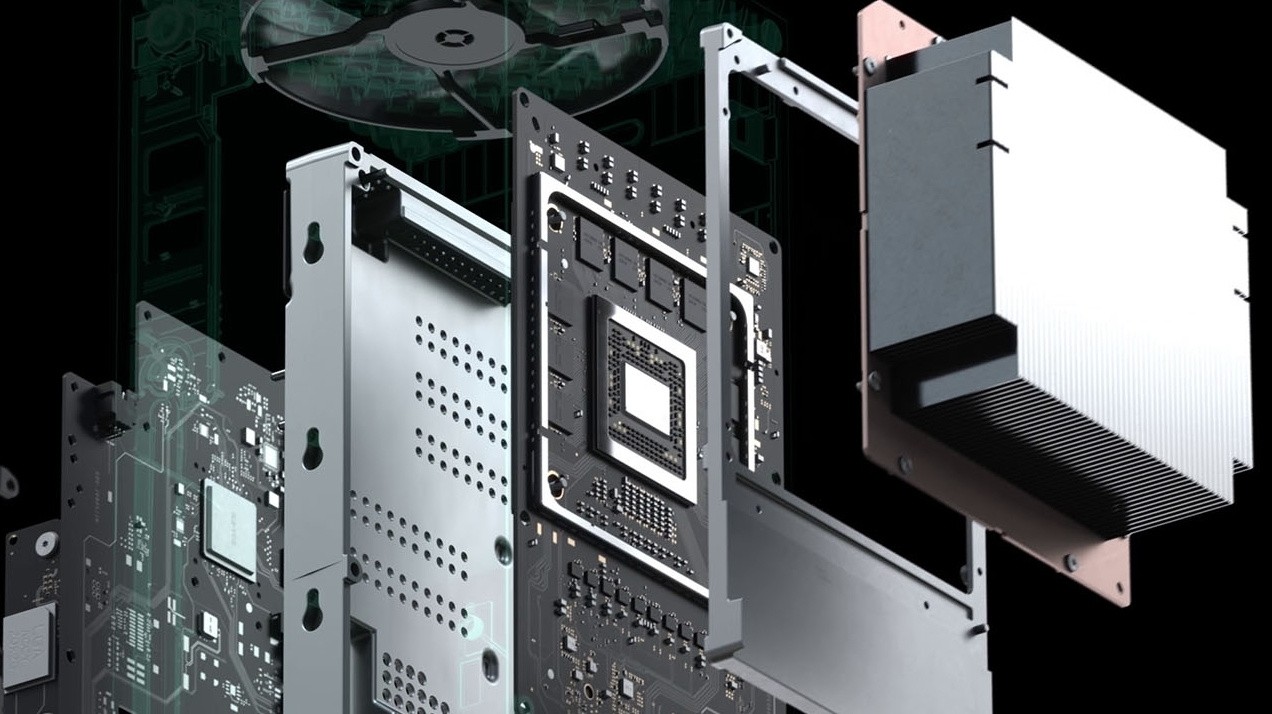
Inside Xbox Series X: the full specs
We visit Microsoft for a briefing on the impressive tech of its next flagship console
 www.eurogamer.net
It will almost certainly be the same for the PS5, given how similar their fundamental structures are.

Irata
Posts: 2,290 +4,005
I've cobbled together some images of the Ryzen chips examined in this article, so you can see how the various structures are laid out. The source for die shots is Fritzchens Fritz's incredible collection of images:
Just found that Death Stranding seems to scale really well with cores / threads even up to 32. Maybe adding this game to your benchmark suite for cases like this would be a good idea.
Am really hoping that newer engines will scale similarly well.
I think a little evidence/investigation is needed here, before assuming that Kojima Productions have achieved something unique amongst game engines. Other reviews suggest a different outcome:Just found that Death Stranding seems to scale really well with cores / threads even up to 32. Maybe adding this game to your benchmark suite for cases like this would be a good idea.

Death Stranding PC Performance Analysis
Death Stranding is finally available on the PC, so we've decided to benchmark it and see how it performs on the PC platform.
 www.dsogaming.com
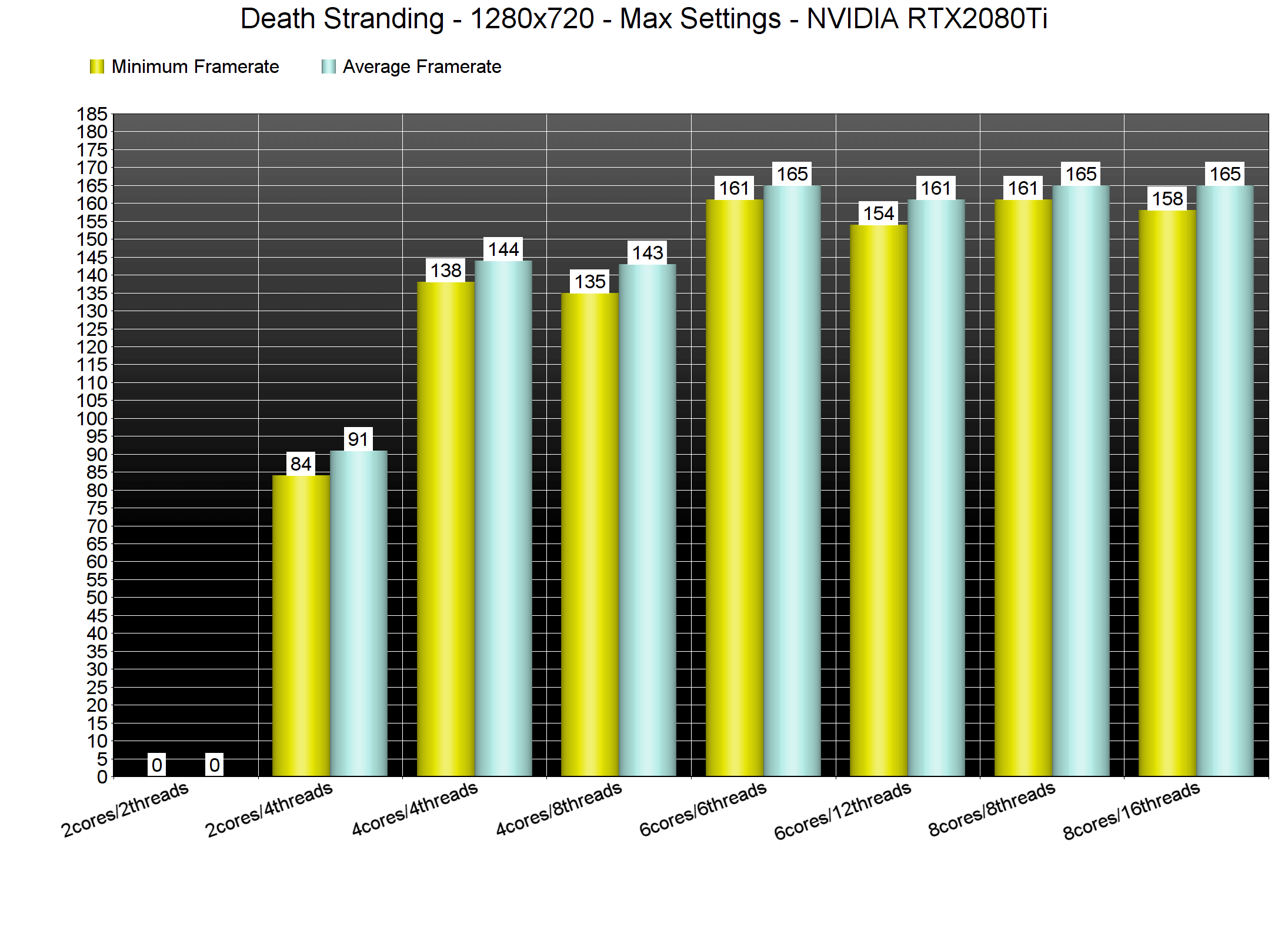
And in the following, there is clear difference across GPUs, even at 1080p:
Death Stranding: PC graphics performance benchmark review
Are you ready for a long walk? Finally moved from console to PC, We look at Death Stranding 2020 in a PC graphics performance and PC gamer way. We'll test the game on the PC platform relative toward... Game performance 1920x1080 (Full HD)

Irata
Posts: 2,290 +4,005
I think I know the perfect guys for that. ?I think a little evidence/investigation is needed here, before assuming that Kojima Productions have achieved something unique amongst game engines. Other reviews suggest a different outcome:
View attachment 86832
The analysis on Twitter seemed very thorough, also testing this with Intel CPU, SMT on and off, frametimes.
The most noticeable differences with more threads were on the low 1% and 0.1% it seems, not so much on the averages.
And this is afaik a brand new game engine.

OptimumSlinky
Posts: 276 +510
And this is afaik a brand new game engine.
Brand new to PC. It's Guerilla Games' in-house "Decima" engine that was previously used for both Horizon: Zero Dawn and Killzone: Shadow Fall on PS4.
OptimumSlinky
Posts: 276 +510
Not necessarily. On PS4, Sony implemented a secondary ARM-based CPU that handles all OS and background tasks. I could see Sony running something similar in PS5.This says 1 core (and thus 2 threads) are reserved in the Xbox Series X:
Inside Xbox Series X: the full specs
We visit Microsoft for a briefing on the impressive tech of its next flagship console
It will almost certainly be the same for the PS5, given how similar their fundamental structures are.

Mike Gray
Posts: 17 +13
Guys can you stop testing only at 1080p and add 1440 and even 4k as I'm sure the frame rates will then differ more from processor to processor.
I really don't care a bit about 1080p resolution. Honestly it's only for the frame rate nutters. The rest of us appreciate a game looking great and being absorbing.
Love your work otherwise guys. Cheers.
What he said. Seriously. This is sooooo irritating.
I get it: There's (probably?) practically no difference between CPUs at this level, so it's boring to test. But because freaking EVERYBODY insists on doing running 1080p tests on high end cards like the 2080 TI - and ignoring 4k or even 1440p -, we just keep getting information that is irrelevant to practically anyone. The vast majority of the people with truly high end GPUs buy them to push truly demanding monitors - 1440p 16:9 being pretty much the MINIMUM resolution, 21:9 / 1440p (or even 32:9 - me!) or 4k being more realistic for the kind of person who buy that kind of card.
Actually: I wrote "irritating" - which it is for those of us who have been following this stuff for decades. But continually seeing tests like these creates a misleading impression - particularly for folks who are maybe a little newer to the scene. If I were 23 and ready to turn that first serious paycheck into a seriously nice rig, I'd be ill served overpaying for an intel CPU because I thought it would improve my FPS by 10% - when it actually might not improve my FPS at all but would definitely slow me down if I want to, say, stream, or edit video.
By the way:
Sure, there ARE some articles out there that compare CPUs with high end GPUs at high end resolution. But they are few and far between.
Of course there are competitive gamers out there who run at 1080p. But e-Sports titles can generally hold 240hz on a 2060 super. Unless you're a pro being payed to use top tier gear, even a 2080 Super is silly.
Of course there are more powerful GPUs on their way. But it's not like games are hold still in terms of their demands on GPUs - otherwise we'd all be playing something that looks like Half-Life 2 at 3000 FPS. You lust after the most powerful available GPUs because games get more demanding. I'm running a 1080 TI on a 32:9 at 1440 and I've decided to put off buying RD2 until I can upgrade. Why? Because my old 1080 TI is too weak to handle it with the kind of settings I'd like to enjoy.
Definitely not all OS operations - it was there to manage the console when in low power/idle/sleep mode, hence why it as a simple low power ARM chip. Main operation of the system was handled by one of the Jaguar cores. The PS5 does have auxiliary chips, but for audio and data decompression.Not necessarily. On PS4, Sony implemented a secondary ARM-based CPU that handles all OS and background tasks. I could see Sony running something similar in PS5.
Jerry in WA
Posts: 138 +179
RE: 1080p and 2080Ti.
Not that these charts should not remain, but it does seem likely that people who have been willing to shell out $1,000+ for a GPU in the last few years may have already moved on from 1080p. Not all, but I would think a majority may have. I can't say. Never seen a "chart". But that bump up is a significant framerate hit. I resisted for a long time because of that. It's going to be expensive just to try to maintain high settings at 60FPS, let alone my 144 max. (3440x1440)
My 4790K did not like the bump up in resolution in some AAA games. Lag spikes that don't really get represented in these bar graph review charts all that well. Average 1% low is some indication, but real-time frametime graphs really show it the best. I built a 3800x rig and have not experienced a lag spike since. (5700XT used in both)
It also seems to be implied in some fashion (all over, not here) that it's "easier on your CPU" at higher resolutions and harder on it at low setting, 1080p. This doesn't seem to make much difference for actual gaming situations. Most want max settings at any resolution. The CPU isn't really catching a breather if you go max settings on a game at 4K. It still has a lot of work to do. I get why the charts exist (everywhere, not picking on this story), but much of it is meaningless information for actual, use case scenarios.
Anecdotal perhaps, but my bump up in resolution from 1080p forced my hand on a new build. I was going to wait for Zen 3.
6+ actual cores. I'd say r5 3600, bare minimum if I'm building a gamer right now. It isn't that much more than a quad. Or use a 2600/x.
Not that these charts should not remain, but it does seem likely that people who have been willing to shell out $1,000+ for a GPU in the last few years may have already moved on from 1080p. Not all, but I would think a majority may have. I can't say. Never seen a "chart". But that bump up is a significant framerate hit. I resisted for a long time because of that. It's going to be expensive just to try to maintain high settings at 60FPS, let alone my 144 max. (3440x1440)
My 4790K did not like the bump up in resolution in some AAA games. Lag spikes that don't really get represented in these bar graph review charts all that well. Average 1% low is some indication, but real-time frametime graphs really show it the best. I built a 3800x rig and have not experienced a lag spike since. (5700XT used in both)
It also seems to be implied in some fashion (all over, not here) that it's "easier on your CPU" at higher resolutions and harder on it at low setting, 1080p. This doesn't seem to make much difference for actual gaming situations. Most want max settings at any resolution. The CPU isn't really catching a breather if you go max settings on a game at 4K. It still has a lot of work to do. I get why the charts exist (everywhere, not picking on this story), but much of it is meaningless information for actual, use case scenarios.
Anecdotal perhaps, but my bump up in resolution from 1080p forced my hand on a new build. I was going to wait for Zen 3.
6+ actual cores. I'd say r5 3600, bare minimum if I'm building a gamer right now. It isn't that much more than a quad. Or use a 2600/x.
Last edited:
To provide some further clarity as to why we benchmark/review CPUs at 1080p, I did some quick runs with Assassin's Creed: Odyssey - it's heavy on the CPU and GPU. The graphics card used was a 2080 Super, and the CPU was an i7-9700K. All quality settings were set to their highest values.
The same area in the game was looped through a few times, and the minimum, maximum, and average frame rates noted, and then averaged over the loops. The CPU was put into 2 configurations: 8 cores, all at 4.9 GHz, and 4 cores only, all at 3.6 GHz, to represent a 'high end' and a 'budget' CPU. The % difference refers to how much an increase the [email protected] setup achieves over the [email protected] setup.
1080p results (min/avg/max)
[email protected] = 31 / 83 / 171
[email protected] = 25 / 56 / 108
%diff = 24% / 48% / 58%
1440p results (min/avg/max)
[email protected] = 31 / 67 / 126
[email protected] = 24 / 56 / 104
%diff = 29% / 20% / 21%
4K results (min/avg/max)
[email protected] = 31 / 45 / 73
[email protected] = 24 / 46 / 72
%diff = 29% / -2% / 1%
Now the minimums here are not 1% Low values, they're absolutely minimums (and they're almost always caused by the CPU and/or platform, rather than the GPU), but other than these figures, note how there is practically no difference between the two CPU configurations at 4K. With 1440p, the gap opens out and at 1080p, it really opens out.
4.9 GHz is 36% faster than 3.6 GHz, so to be achieving a difference of 48% to 58% (average and max) at 1080p clearly shows that halving the core count notably impacts this particular game's performance, just as one would expect putting a high end CPU up against a budget one.
But the point of all of this is to show that at 1080p, in today's game, differences in CPUs are more clearly highlighted, just as they are when using the likes of Cinebench or 7zip.
The same area in the game was looped through a few times, and the minimum, maximum, and average frame rates noted, and then averaged over the loops. The CPU was put into 2 configurations: 8 cores, all at 4.9 GHz, and 4 cores only, all at 3.6 GHz, to represent a 'high end' and a 'budget' CPU. The % difference refers to how much an increase the [email protected] setup achieves over the [email protected] setup.
1080p results (min/avg/max)
[email protected] = 31 / 83 / 171
[email protected] = 25 / 56 / 108
%diff = 24% / 48% / 58%
1440p results (min/avg/max)
[email protected] = 31 / 67 / 126
[email protected] = 24 / 56 / 104
%diff = 29% / 20% / 21%
4K results (min/avg/max)
[email protected] = 31 / 45 / 73
[email protected] = 24 / 46 / 72
%diff = 29% / -2% / 1%
Now the minimums here are not 1% Low values, they're absolutely minimums (and they're almost always caused by the CPU and/or platform, rather than the GPU), but other than these figures, note how there is practically no difference between the two CPU configurations at 4K. With 1440p, the gap opens out and at 1080p, it really opens out.
4.9 GHz is 36% faster than 3.6 GHz, so to be achieving a difference of 48% to 58% (average and max) at 1080p clearly shows that halving the core count notably impacts this particular game's performance, just as one would expect putting a high end CPU up against a budget one.
But the point of all of this is to show that at 1080p, in today's game, differences in CPUs are more clearly highlighted, just as they are when using the likes of Cinebench or 7zip.

MaxSmarties
Posts: 562 +331
I don’t know why many people consider the 3600 as the best option right know. Don’t get me wrong, it is a great CPU at a good price, for sure, but if I had to buy a new CPU in the second half of 2020, the choice would be a 3700X. The price is higher, but still reasonable, and the performance better in every way, with more headroom for future improvements (games will use more cores in the future, thanks to next gen consolle).
Last edited:
MaxSmarties
Posts: 562 +331
If you are testing graphic cards, you use every mainstream resolution (1080, 1440 and 4K).What he said. Seriously. This is sooooo irritating.
I get it: There's (probably?) practically no difference between CPUs at this level, so it's boring to test. But because freaking EVERYBODY insists on doing running 1080p tests on high end cards like the 2080 TI - and ignoring 4k or even 1440p -, we just keep getting information that is irrelevant to practically anyone. The vast majority of the people with truly high end GPUs buy them to push truly demanding monitors - 1440p 16:9 being pretty much the MINIMUM resolution, 21:9 / 1440p (or even 32:9 - me!) or 4k being more realistic for the kind of person who buy that kind of card.
Actually: I wrote "irritating" - which it is for those of us who have been following this stuff for decades. But continually seeing tests like these creates a misleading impression - particularly for folks who are maybe a little newer to the scene. If I were 23 and ready to turn that first serious paycheck into a seriously nice rig, I'd be ill served overpaying for an intel CPU because I thought it would improve my FPS by 10% - when it actually might not improve my FPS at all but would definitely slow me down if I want to, say, stream, or edit video.
By the way:
Sure, there ARE some articles out there that compare CPUs with high end GPUs at high end resolution. But they are few and far between.
Of course there are competitive gamers out there who run at 1080p. But e-Sports titles can generally hold 240hz on a 2060 super. Unless you're a pro being payed to use top tier gear, even a 2080 Super is silly.
Of course there are more powerful GPUs on their way. But it's not like games are hold still in terms of their demands on GPUs - otherwise we'd all be playing something that looks like Half-Life 2 at 3000 FPS. You lust after the most powerful available GPUs because games get more demanding. I'm running a 1080 TI on a 32:9 at 1440 and I've decided to put off buying RD2 until I can upgrade. Why? Because my old 1080 TI is too weak to handle it with the kind of settings I'd like to enjoy.
But if you are testing and compare CPUs and you are at least half competent, you HAVE to test it at 1080P. So the staff was right.
By the way many users are playing at 1080 even with high end cards. I prefer 1080P with ultra quality and high frame rate over 1440P.
I don’t know why many people consider the 3600 as the best option right know. Don’t get me wrong, it is a great CPU at a good price, for sure, but if I had to buy a new CPU in the second half of 2020, the choice would be a 3700X. The price is higher, but still reasonable, and the performance better in any way, with more headroom for future improvements (games will use more cores in the future, thanks to next gen consolle).
I'd say that you get the 3600 over the 3700X for the same reason you get the 3700X over the 3900X. Because it more than meets your needs and you don't want to pay more than you need to. I'd add that with Ryzen 4000 coming, I could see why someone would not want to pay more to 'futureproof' knowing that they might have access to some amazing deals on Ryzen 4000's in a couple years.
Irata
Posts: 2,290 +4,005
That‘s my thinking - don‘t overspend now and get the good enough option so that future upgrades are even more worthwhile.I'd say that you get the 3600 over the 3700X for the same reason you get the 3700X over the 3900X. Because it more than meets your needs and you don't want to pay more than you need to. I'd add that with Ryzen 4000 coming, I could see why someone would not want to pay more to 'futureproof' knowing that they might have access to some amazing deals on Ryzen 4000's in a couple years.
Ended up with a 2700X because I got a great deal, so even a price reduced 3900X would be sweet, but I‘ll see what Ryzen 4000 offers.
Honestly, given what I have in terms of screen and GPU, spending more on a CPU would not have made much sense and I really appreciate the 2700X‘s extra cores over the 3600 for multi-tasking and the considerable savings over the 3700X for being able to spend that on other things.
MaxSmarties
Posts: 562 +331
I'd say that you get the 3600 over the 3700X for the same reason you get the 3700X over the 3900X. Because it more than meets your needs and you don't want to pay more than you need to. I'd add that with Ryzen 4000 coming, I could see why someone would not want to pay more to 'futureproof' knowing that they might have access to some amazing deals on Ryzen 4000's in a couple years.
It is demonstrated above that in most of the cases (especially games) you have no benefits from a 12 cores CPU.
With the new consoles coming in the next months, using an 8 cores architecture, I can't see any need to go above an 8 cores in the foreseeable future, so the Ryzen 5 3600 could be an issue in a couple of years, when the 3700X could age much better.
I strongly think the 3700X is the sweet spot.
Surely waiting for Ryzen 4000 series would even be better, but I don't expect great improvements from them.
But man c’mon that’s what high refresh monitors for. You must be not into competitive games or prefer to chill looking at the visuals of nature.
Irata
Posts: 2,290 +4,005
It is demonstrated above that in most of the cases (especially games) you have no benefits from a 12 cores CPU.
That depends on what else you do at the same time. Imho, benchmarking is usually done on clean systems in a single task scenario. That is OK for comparability but may not necessarily reflect a typical user scenario.

dsilvermane
Posts: 9 +4
dsilvermane
Posts: 9 +4
Guys can you stop testing only at 1080p and add 1440 and even 4k as I'm sure the frame rates will then differ more from processor to processor.
I really don't care a bit about 1080p resolution. Honestly it's only for the frame rate nutters. The rest of us appreciate a game looking great and being absorbing.
Love your work otherwise guys. Cheers.
Well I still game at 900p and I know there are a LOT of 1080p gamers out there, so not everyone is interested in ultra-high res benchmarks... In addition, the whole point in testing at 1080p and NOT 1440p or higher is because you become GPU limited at those resolutions. Which nullifies the entire point of a CPU benchmark. 1080p shows the actual difference in CPU performance.
MaxSmarties
Posts: 562 +331
You are right. I’m speaking about a fairly typical scenario. Your mileage may vary.That depends on what else you do at the same time. Imho, benchmarking is usually done on clean systems in a single task scenario. That is OK for comparability but may not necessarily reflect a typical user scenario.

OptimumSlinky
Posts: 276 +510
Repeat after me:
If you're testing CPU performance in gaming, you MUST remove GPU bottlenecks. To do this, you need the biggest GPU you can get running at the lowest resolution (1080p, and frankly, 720p too).
It's not about whether it's "practical" or sensible; it's about precisely controlling variables. If this doesn't make sense to you, go take a Statistics class on EdX.
If you're testing CPU performance in gaming, you MUST remove GPU bottlenecks. To do this, you need the biggest GPU you can get running at the lowest resolution (1080p, and frankly, 720p too).
It's not about whether it's "practical" or sensible; it's about precisely controlling variables. If this doesn't make sense to you, go take a Statistics class on EdX.
I'm rebuilding my desktop into a gaming/production machine. I'm going with an AMD processor this time around. I've seen some talk, in this page and online, in general, about the release of Zen 3, later this year. Assuming it happens in 3 months, would the new line of CPUs be worth the wait? I'm wondering if we'll see a huge jump in cpu strength. Will the pricing be considerably higher than the 3000s?
MaxSmarties
Posts: 562 +331
I’m in a similar situation. I have two gaming PC, both on Intel 9th Gen, and I’d like to try an AMD setup on one. I’m debated on buying a 3800X + x570 in August or wait for the 4000 series in December (hopefully).I'm rebuilding my desktop into a gaming/production machine. I'm going with an AMD processor this time around. I've seen some talk, in this page and online, in general, about the release of Zen 3, later this year. Assuming it happens in 3 months, would the new line of CPUs be worth the wait? I'm wondering if we'll see a huge jump in cpu strength. Will the pricing be considerably higher than the 3000s?
Similar threads

- Replies
- 41
- Views
- 179
- Replies
- 3
- Views
- 32
Latest posts
-
 US-Iran war permanently damaged Amazon's AWS infrastructure in the Middle East
- captaincranky replied
-
 Air traffic control assisted by AI could arrive as soon as next week
- Plutoisaplanet replied


-
TechSpot is dedicated to computer enthusiasts and power users.
Ask a question and give support.
Join the community here, it only takes a minute.