The traditional PC layout might not be the best: unusual GPU placement cuts temperatures by 17°C

midian182

Posts: 11,985   +183
Staff member
In a nutshell: PC builders have long tried to find the most optimal cooling setups for their components, moving around fans, cables, etc. to find the best configurations. A YouTube channel decided to try something a little different: moving the components themselves. This included shifting the GPU next to a case's side-intake, which resulted in a 17-degree drop in temperatures.
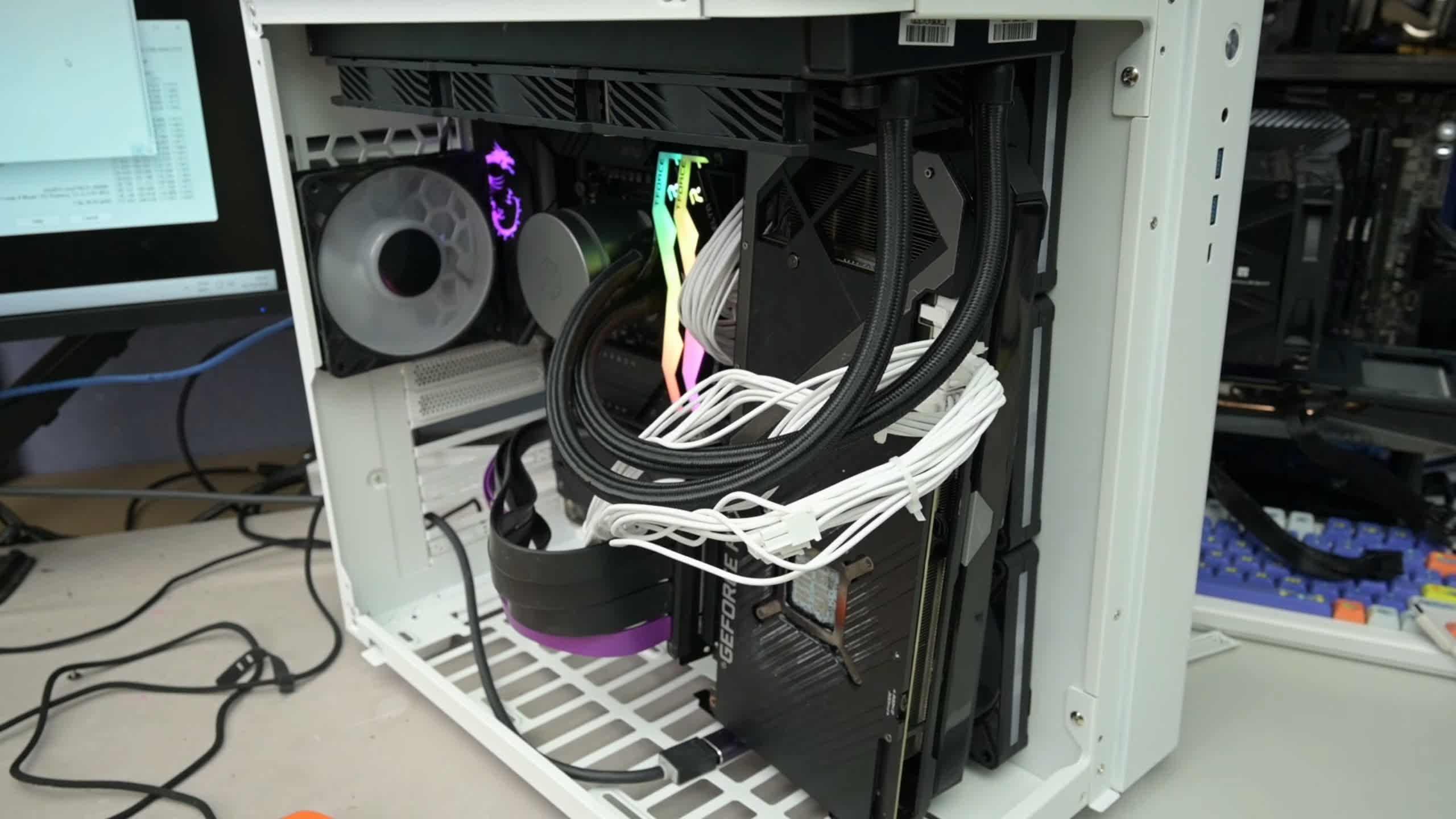
The experiment was carried out by TrashBench, which used an Asus ROG Strix RTX 3080 inside a dual-chamber case. The cooling came from three side-intake fans, a rear exhaust, and a top-mounted 360mm CPU AIO.

The idea was to change component placement without moving the case fans. PCIe riser cables were used so the graphics card could be moved away from its usual slot on the motherboard.

Testing involved looping 3DMark Time Spy alongside 7-Zip running on 12 CPU threads. All fans stayed at fixed RPMs, with each configuration tested for ten minutes and temperatures averaged over the final five.

The GPU's first position was on the case floor, which required the removal of the bottom mesh because it touched the card's fans. GPU temperatures barely changed, but the CPU and motherboard VRM dropped around 4°C and 7°C, respectively. Conventional vertical mounting slightly worsened GPU temperatures while modestly improving everything else.

However, placing the card directly against the side intake made all the difference. GPU core temperatures fell 16.7°C, the hotspot dropped 19.3°C, and VRAM cooled by 14°C. Motherboard VRMs also dropped around 8°C, while the CPU warmed just 1.1°C.

Moving the card behind those intake fans, into the rear chamber, improved on stock temperatures but couldn't match the previous arrangement.

Next came the CPU. Relocating its radiator would have introduced another variable, so TrashBench placed the GPU back in its usual position and reversed the radiator fans from exhaust to intake. CPU temperatures dropped about 6°C, but the graphics card suffered from the radiator's warm exhaust.

Combining the intake radiator with the GPU beside the side intake improved both components over stock. It led to a 3.3°C reduction in CPU temperature and a 14°C cooler GPU hotspot, sacrificing some GPU cooling for a better overall balance.

TrashBench acknowledges that the experiment wasn't rigorously scientific, and different cases, fans, and fan positions will likely change the results. But as the channel points out, it illustrates how the normal PC layout might not be the best one.

TrashBench carries out lots of experiments like these. Last year, it strapped dual CPU tower coolers to an RTX 2060, cutting temperatures by 31°C.

Permalink to story:

 
We have known for a long time that ATX is sub-optimal. It's why BTX was introduced, but it would require changes that costs more money than it was worth so it never caught on.

Considering the costs of risers, same problem here.

I did quite like my SilverStone Raven RV03 which just flips the motherboard 90°c which for my system worked wonders. I had a 2500K under a Be Quiet Dark Rock Pro overclocked to 4.4GHz with an AMD 7950 [flashed to 7970] which had some heat issues in the regular case I had before it.
 
Regular PCs are suboptimal for cooling in general. We have to handle airflow and it's never perfect.

But there are several ways to "cheat", like this one but not limited to.

I remember that some tests of the AIO radiator placement showed that you can gain several degrees (cooler) depending on where you put it in your case.
 
I think the real problem is that the now standard GPU cooling airflow is introducing a lot of heat inside the case, without putting anything out.

Previously blow fans on GPUs would take the case's air and blow it out of the case. Now things just recirculate, so is no surprise it got hotter inside the case.

In my mind, the best solution would be a frontal fan of 120mm and up, blowing air directly to the GPU's heatsink trough a tunnel. It would be like a older GPU blower fan cooling system, but now with a much bigger, capable and silent fan taking cold air directly from the outside.

That way you lower the cards temperatures and at the same time don't introduce hot air inside the case.
 
Desktop towers/ATX were created when 450watts was considered an excessive amount of power and the PSU went at the top of a case to remove air.

With how expensive GPUs have gotten and have become the center peice of any build I'm surprised there isn't a standard to just keep it outside the case to show it off more.
 
ATX is an outdated standard. Now that GPUs are huge, and sound cards, controllers, ece ece are obsolete, its time for a new standard, one that is more size efficient and designed around cooling ala BTX.
 
The Cooler Master HAF XB EVO has been my go to for years. It might be a bit ugly to some, but it keeps everything nice and cool while being almost silent at idle. High 20C to low 30C and max low 70C when doing a stress test.

https://www.tomshardware.com/reviews/cooler-master-haf-xb-review,3559.html
Absolutely the best case I've ever used. I have two (had 3, but just recently sold one since I hadn't used it for several years). One is in use for my server, the other is just in storage in case I wish to go back to using it.
I find that the XB Evo tends to keep things cooler with just the front intake fans and a top 200mm exhaust over cases that have 6+ fans.

Only 2 downsides HAF XB Evo in my opinion:
1) lack of headroom for tall CPU air cooler if you're using the top 200mm fan
2) limited to GPUs up to 13" long as long as you don't have a radiator mounted to the front of the case. A lot of higher-end GPUs are pushing close to 13" in length, so you can be limited to what GPU you can fit in it.
 
Back