This Connection is Untrusted

learninmypc

Posts: 9,859   +753
A FIRST.JPG
ONLY happening on my Vista Home Premium. This has never happened before to me. On my W7, no problem. Am confused.
Same trying to go to facebook
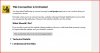
This Connection is Untrusted

You have asked Firefox to connect securely to www.facebook.com, but we can't confirm that your connection is secure.

Normally, when you try to connect securely, sites will present trusted identification to prove that you are going to the right place. However, this site's identity can't be verified.
What Should I Do?

If you usually connect to this site without problems, this error could mean that someone is trying to impersonate the site, and you shouldn't continue.
 
I cannot even do a simply google search on my Vista Home Premium laptop. Yes, I have rebooted a couple times & have even restarted the browser, still no joy.
No changes to my knowledge
 
If it were me I would start buy running a spyware scan. If you are not have this problem on your win 7. I would also check your settings on your Wot. See if maybe this maybe the problem. But I more or less think it maybe spyware.
 
Malwarebytes Anti-Malware 1.75.0.1300
www.malwarebytes.org

Database version: v2013.12.28.07

Windows Vista Service Pack 2 x86 NTFS
Internet Explorer 9.0.8112.16421
cyber :: CYBER-PC [administrator]

1/1/2008 3:41:06 AM
mbam-log-2008-01-01 (03-41-06).txt

Scan type: Full scan (C:\|)
Scan options enabled: Memory | Startup | Registry | File System | Heuristics/Extra | Heuristics/Shuriken | PUP | PUM
Scan options disabled: P2P
Objects scanned: 297590
Time elapsed: 1 hour(s), 19 minute(s), 43 second(s)

Memory Processes Detected: 0
(No malicious items detected)

Memory Modules Detected: 0
(No malicious items detected)

Registry Keys Detected: 0
(No malicious items detected)

Registry Values Detected: 0
(No malicious items detected)

Registry Data Items Detected: 0
(No malicious items detected)

Folders Detected: 0
(No malicious items detected)

Files Detected: 0
(No malicious items detected)

(end)
 
Looks good . Have you updated WOT on these browsers. Looks like maybe it may be a security feature. That maybe turned on.. Other then that I am not sure.
 
Unfortunately WOT has not been available for SeaMonkey for quite some time. but it is updated on Firefox.
I'm also going to clear the cache & browsing history. If push comes to shove, I'll use revo to uninstall both & reinstall both.
 
That would be a good ideal. You also may need Broni to run some of his good tools. If that dose not work. Because I am not having a problem with either of my browsers. In Win 8 or win 7 , Going to either site.
 
I'm replying now on my W7 using SeaMonkey & I'm having zero problems going to facebook or even any https website. Its just on the Vista. Will give Broni a try tomorrow, thank you.
 
Always VIEW the certificate details and compare your system date/time to that of the cert.
  • The system time can be just flat wrong
  • The cert could have expired and not yet been renewed (happens frequently)
When your A/V or browser verifies the certificate, then you see these warnings which can be over ridden by the user, but I LIKE to at least see it and make that choice.
 
I had forgotten about that. Last time I had seen anything like that was years ago in a old PC . That had a bad cmos battery. I just sync my time with my explorer.
 
Ok, I shut down the laptop for about 30 some hours & when I booted it back up, it was 2 hours fast & 4 years behind so I once again changed it. Now I'm wondering if there is a free way to keep this from happening? If not, I'll live with it :)
 
Yep , But the good news is It about a 1.79. This will save the lap top. But what you can do is leave it plug in. This will stop it from loosing its settings for a while.
 
Back