Windows 11 adds taskbar 'End Task' button for killing frozen apps

Skye Jacobs

Posts: 1,896   +58
Staff
In a nutshell: Microsoft has quietly introduced a new Windows feature allowing you to deal with unresponsive applications faster. A new "End Task" option is available directly from the taskbar, streamlining a process that usually requires a few more steps and a trip to the Task Manager list of running programs.
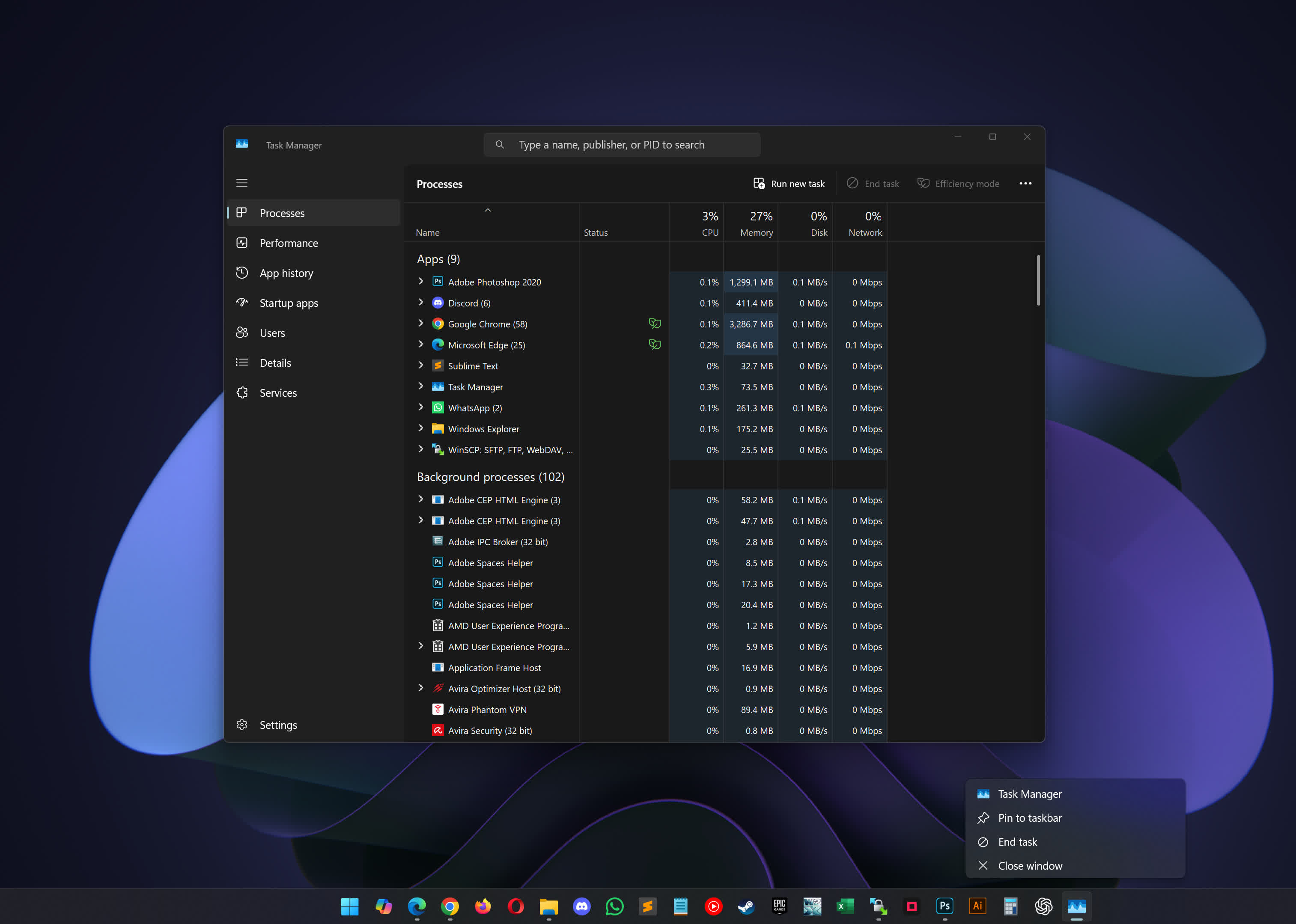
For years, the standard response to a frozen app was either to reboot the system or summon Task Manager – often by pressing Ctrl + Alt + Delete – and hunt through the list of running processes to find and terminate the problematic program. While effective, this approach remains cumbersome.

The new feature spotted by Windows Latest makes that process faster and more convenient. By enabling the "End Task" option, users can right-click any open application on the taskbar and immediately force it to close.

To activate this, go to Settings > System > For Developers and toggle on the "End Task" setting. Once enabled, the option appears in the context menu whenever you right-click an app's icon on the taskbar.

Its effectiveness sets "End Task" apart from the familiar "Close Window" option. While "Close Window" merely requests that an application shut down – sometimes leaving background processes running or failing to close unresponsive apps – "End Task" forcefully terminates the entire process. This mirrors the functionality of Task Manager's "End Task" command, but with the added convenience of being accessible from the taskbar.

Windows first attempts a standard shutdown when the button is pressed, like clicking the "X" in an app's title bar. If the application fails to respond, Windows escalates by identifying the main process and any related processes and terminating them all, ensuring that even stubborn, unresponsive programs are closed. This is particularly useful for apps that hang or freeze, bypassing the need to track down every process in Task Manager manually.

There are some limitations however. The "End Task" button cannot terminate system processes such as File Explorer, for that you will still have to go through the Task Manager which kind of makes sense. Additionally, users should be aware that using "End Task" is akin to pulling the plug: any unsaved data in the forcibly closed application will be lost, as the app is not given a chance to save its state or perform cleanup routines.

This feature is tucked away in the "For Developers" section of Settings and does not require enabling Developer Mode. The End Task feature has been available in Insider builds for some time, but only recently it was spotted in the final Windows 11 24H2 build, which has been rolling out to users for the past few months.

Permalink to story:

 
Huh! I already have it, but I never turned it on in Settings.
But Wait! It IS turned on in Settings! And I'm on the Release Channel... huh?!?!?
 
Huh! I already have it, but I never turned it on in Settings.
But Wait! It IS turned on in Settings! And I'm on the Release Channel... huh?!?!?

A feature that's been available for months now. In standard release. I know - because I've been using it. No Release channel buggy version required. ANOTHER very late news from TechSpot. Soz bois, but catch up on the news.

How, about letting us move the damn taskbar to the top of our monitors in Windows 11? *****s!

StartAllBack - Awesome, cheap, Start Menu replacer. Also allows movement of TaskBar location. And bonus for me, can revert Windows Ribbon / top bar. Get rid of tabs etc, your choosing. Highly customizable.

https://www.startallback.com/ $4.99
 
Thanks. A useful feature but no fanfare from Microsoft. Something they are not telling us? Perhaps telling us that applications are now freezing more than ever before - nothing to do with the OS of course :)
 
A feature that's been available for months now. In standard release. I know - because I've been using it. No Release channel buggy version required. ANOTHER very late news from TechSpot. Soz bois, but catch up on the news.


StartAllBack - Awesome, cheap, Start Menu replacer. Also allows movement of TaskBar location. And bonus for me, can revert Windows Ribbon / top bar. Get rid of tabs etc, your choosing. Highly customizable.

https://www.startallback.com/ $4.99
I'm, using StartAllBack now. But, I shouldn't have to. Those, greedy weasels at Microsoft should fix their s**t!
 
Thanks. A useful feature but no fanfare from Microsoft. Something they are not telling us? Perhaps telling us that applications are now freezing more than ever before - nothing to do with the OS of course :)
I'm actually having many more issues with freezing on my macbook than on my windows laptop. The same with my colleagues at work.
 
I'm still muddling on with Windows 7 using Control/Alt/Delete to kill off frozen apps in Task Manager.
Not too difficult really, and I don't have to accept all the privacy issues of later Microsoft telemetry and bloatware.
 
A feature that's been available for months now. In standard release. I know - because I've been using it. No Release channel buggy version required. ANOTHER very late news from TechSpot. Soz bois, but catch up on the news.


StartAllBack - Awesome, cheap, Start Menu replacer. Also allows movement of TaskBar location. And bonus for me, can revert Windows Ribbon / top bar. Get rid of tabs etc, your choosing. Highly customizable.

https://www.startallback.com/ $4.99
I also suggest a lightweight, free and open source Windhawk on top of that to fix many issues with Win11 UI MS has not fixed or will likely never fix. For example always showing all tray icons that was removed and never reintroduced in Win11. or change and improve taskbar icon size and spacing. Also hiding tray system icons that normally cannot be hidden. Also unpairing notification center and calendar. By default if you disable one it disables both. Not to mention it runs in memory and injects intro processes instead of permanently modifying system files.
 
Back