

PC Game Booster aims to eliminate lags, crashes, and interruptions, helping you achieve higher in-game FPS. The program works by disabling unnecessary system features, applying various optimizations, and reallocating system resources specifically for the games you are playing. This results in a much better gaming experience, all with just a single mouse click.
Features
Real-time Game Booster
What sets PC Game Booster apart from other game boosters is its ability to enhance the performance of games and applications in real-time, ensuring that they utilize all available system resources effectively. It also prevents unnecessary background processes from consuming valuable resources. Furthermore, PC Game Booster provides real-time updates on your system's health and performance, displaying information such as CPU and GPU temperature and clock speed.
Customizable Optimization
With its intuitive and advanced user interface, PC Game Booster allows you to take control of the game optimization process. It offers a variety of powerful optimization tools that can significantly improve your computer's performance, including a file defragmentation utility, a settings tweaking tool, an applications optimizer, and more.
All Game Manager
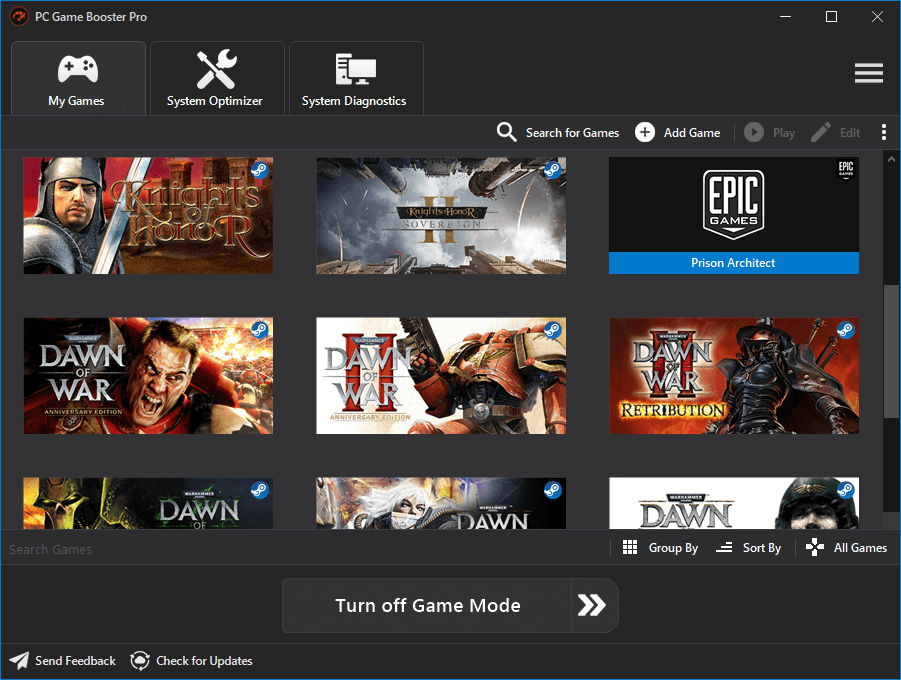
In addition to boosting game performance, PC Game Booster enhances your overall gaming experience. It enables you to manage all your games, including those on popular platforms like Steam and Uplay, from a single user interface accessible from anywhere on your computer.
Safe to Use Game Booster
PC Game Booster is a safe and user-friendly application that does not overclock your hardware. Any optimizations or changes made to your system settings can be easily reversed.
What's New
UI
- Added support for Chinese (Simplified), German, and Italian localizations.
- Updated the Flat UI Framework to v2.4; the new version brings several improvements and bug fixes to the user interface.
- New UI for the Game Mode progress window used when activating Game Mode from the Game Booster tray app.
- Improved the user interface of the Game Mode Configuration window.
- Several user interface improvements and bug fixes.
Game Mode
- New Game Mode engine written from scratch aimed to improve system components optimization, restoration, and error handling.
- Added the ability to automatically update the apps cache in the background from the system tray app.
- Improved and fixed several bugs in the Game Mode Configuration window.
- Added option to disable CPU core parking.
- Added an option to disable the Sticky Keys hot key.
- Added an option to clear the clipboard.
- Added an option to close Copilot and Windows widgets to free up memory.
- Added an option to prevent the Windows key from opening the Start Menu when a full-screen game is active.
- Improved Game Mode to reduce File Explorer restarts.
My Games
- Added the ability to scan and import Microsoft Store games.
- Added the ability to add games to the Favorites category.
- Added an option to customize games with gradient-color thumbnails.
- Added the ability to customize columns in My Games.
- Added support for initiating game uninstallation for some game platforms from the My Games interface.
- Added options to control which platforms PC Game Booster can automatically import games from.
- Added the ability to import games from Battle.net
- Improved game information editing in My Games.
- Improved the display and loading speed of games in My Games.
- Improved the speed of game scanning.
- Improved the My Games Desktop widget and added a tooltip about this feature.
Misc.
- Added a dedicated tab in the Settings window to manage all PC Game Booster hot keys.
- Added a hot key to free up system memory. You can use this feature to reclaim memory from idle and background processes.
- Added an option to automatically delete old debug mode and error logs.
- Improved system tweaking in the System Optimizer.
- Improved the hardware temperature monitoring to reduce false positives.
- Live Optimization received several reliability changes and bug fixes.
- Improved the integration with Windows Defender to reduce conflicts with PC Game Booster's optimizations.
Bugfixes
- Fixed several issues affecting the integration with Steam, Epic Games, and Ubisoft game clients.
- Fixed an issue with creating shortcuts for games in My Games.
- Fixed several threading-related issues.
