

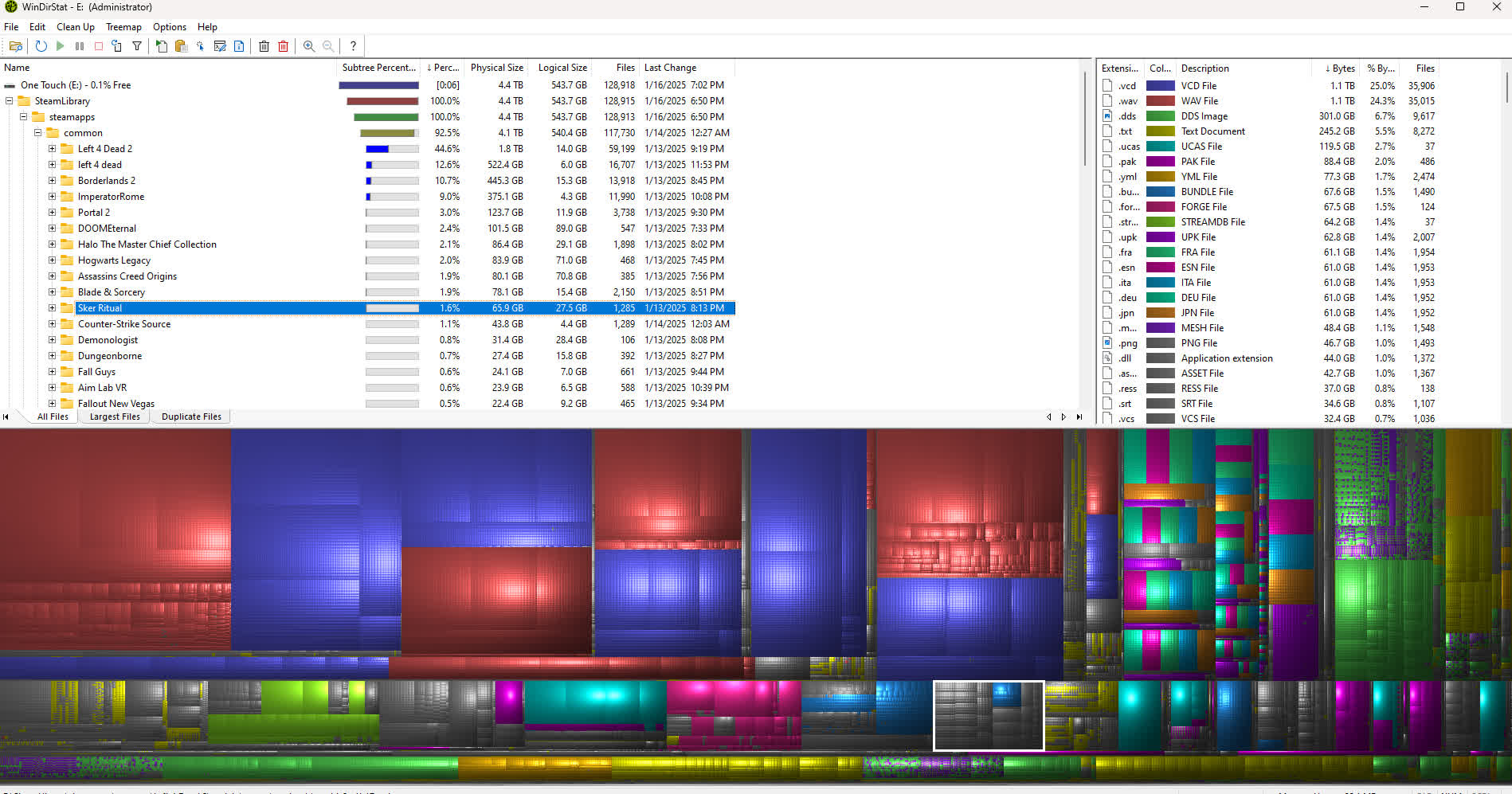
WinDirStat is a program that allows you to find drive space hogs at a glance. It achieves that by displaying a drive, drives or directories in a treemap that assigns bigger areas to bigger files and directories. Making those areas visually separate by coloring and other means allows you to see literally at a glance what the space hogs are and where to dig deeper.
The directory tree is simultaneously shown as a tree list and as a treemap. One can effortlessly gain an impression of the proportions on the drive(s).
Is WinDirStat safe to use?
Yes, it's safe and widely trusted. It doesn't modify files unless you manually delete them.
Can I delete files directly from WinDirStat?
Yes, You can right-click on any file or folder and choose to delete it directly within the interface. However, it's strongly recommended to review what you delete, as WinDirStat doesn't move files to the Recycle Bin - deletions are permanent.
Does WinDirStat support network drives and external disks?
Yes, WinDirStat can analyze local drives, network shares, and external storage devices as long as they're accessible via Windows Explorer. However, scans over a network may take longer due to transfer speed limits.
Why do some file sizes in WinDirStat differ from what Windows Explorer shows?
WinDirStat calculates actual disk usage, not just the logical file size shown in Explorer. It accounts for cluster sizes, NTFS compression, and hard links, which can make sizes appear slightly different from what Windows reports in folder properties.
Does WinDirStat detect duplicate files automatically?
No, WinDirStat identifies which files take up the most space but doesn't compare file contents for duplication. To remove duplicates, users often combine it with tools like dupeGuru, Auslogics Duplicate File Finder, or CCleaner.
Features
- Three views: Directory Tree, Treemap, and Extension
- Duplicate file detection
- Built-in cleanup actions including Open, Delete, Show Properties
- User-defined cleanup actions (command line based)
What's New
Enhancements
- Added flame graph as an alternative visualization view (thanks @P403n1x87)
- Added sunburst graph as an alternative visualization view
- Added Hilbert and Moore treemap visualization layouts
- Added additional window layouts
- Added per-user Explorer context menu registration
- Added configurable process CPU and I/O priority
- Added absolute/relative percentage display modes
- Added confirmation prompt for potentially destructive actions
- Added list-header column choosers
- Added File Watcher toolbar controls
- Added cancellable file hashing progress (thanks @harryytm)
- Added folder frames color customization and draw threshold (thanks @harryytm)
- Improved populating large message box lists (thanks @harryytm)
- Improved File Watcher defaults and autoscroll behavior (thanks @harryytm)
- Improved percentage progress messages
- Improved message box dialog performance for massive lists (thanks @harryytm)
- Improved logical/physical size menu item generalization
- Improved font refresh behavior after settings changes
- Improved remote volume scanning performance using smaller buffers
- Modernized locale string retrieval functions (thanks @harryytm)
Bug Fixes
- Corrected archive compatibility issues
- Corrected indeterminate progress dialog repainting
- Corrected layout view type identifiers (thanks @harryytm)
- Corrected menu mnemonic conflicts across translations
- Corrected OLE dependency on context menu
- Corrected optional pane resizing across window layouts
- Corrected shell context menu clipboard operations
- Corrected some argument passing issues
- Corrected time accounting when scan is paused
- Corrected keyboard focus navigation between data panes
- Restored the option to hide the visualization pane
WinDirStat 2.7.0
- Added Storage Analytics and cost optimization view
- Added permissions scanning and export capabilities
- Added window layout chooser for the main panes
- Added tools to remove empty folders and change folder dates to last change
- Added folder frames option to treemap visualization
- Added multilingual support for MSI installer
- Added file deletion warning before profile deletions
- Added profile deletion progress tracking
- Added xxHash (XXH3) as a selectable file hashing algorithm
- Added option to group unregistered file extensions
- Added shortcut to launch Microsoft Storage Settings
- Added extension search on double-click in extension list (thanks @harryytm)
- Added selected items count and statistics to status bar (thanks @harryytm)
- Added UTF-8 BOM support for CSV/JSON files
- Improved column width autosizing performance in list and tree views
- Improved progress control rendering and layout behavior
- Improved multi-file operations and multi-selection properties dialog
- Improved CSV/JSON loading performance using buffered reads
- Improved tab spacing in light mode
- Improved Italian translation (thanks @bovirus)
Bug Fixes
- Corrected accelerated scanning on Linux-created NTFS file systems
- Corrected potential crash when scanning root network shares
- Corrected potential shutdown hang or delay after a scan completes
- Corrected potential scan cancellation hang when worker thread is blocked
- Corrected progress bar behavior dropping from 100% back to 99% at scan completion
- Corrected layout alignment and spacing in setting dialogs
- Corrected localization language fallback logic regression (thanks @harryytm)
- Corrected various other minor issues
Miscellaneous
- Added MSIX bundle publishing support in WinGet
- Updated build script to default to the beta configuration after a short delay

