

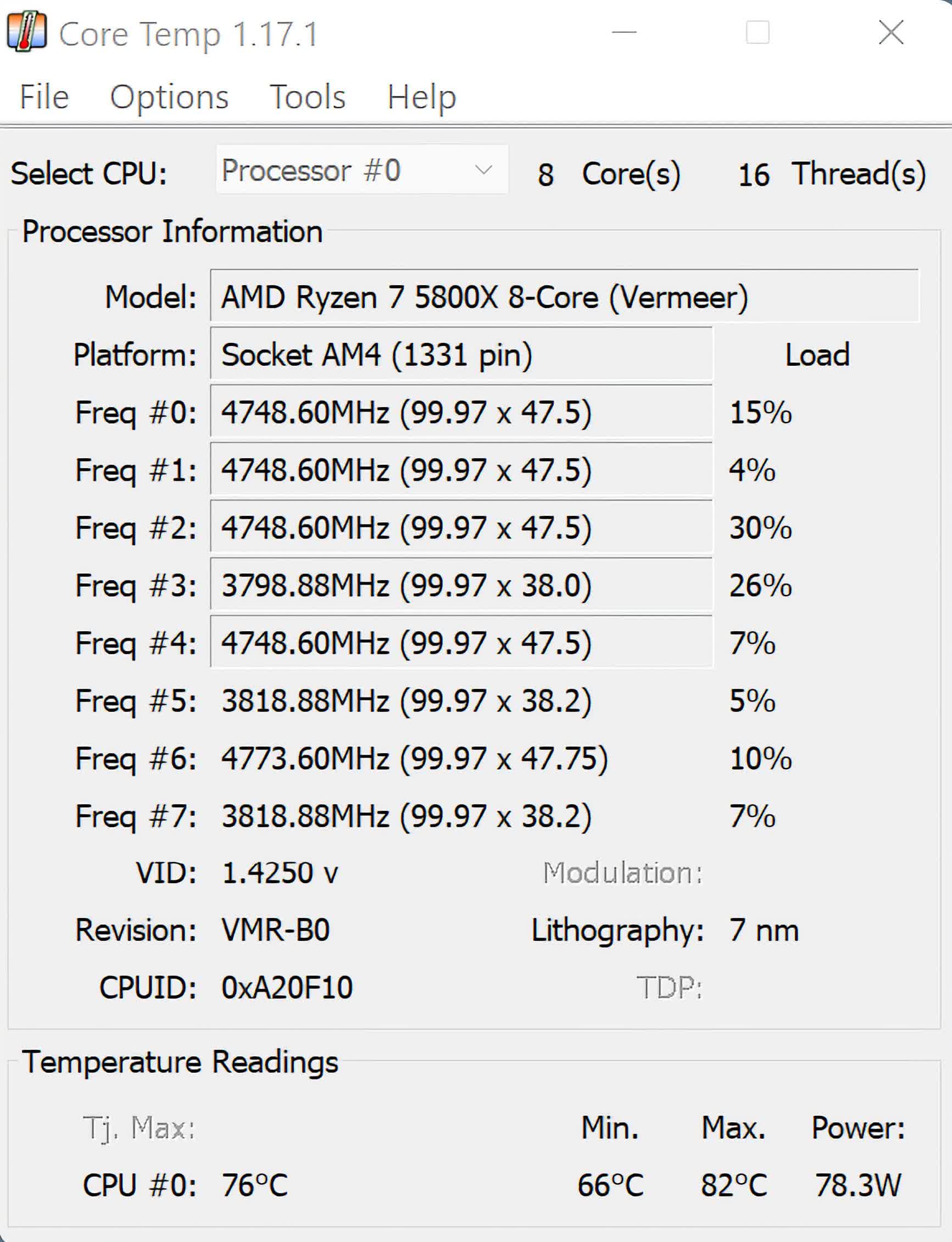
What makes Core Temp unique is the way it works. It is capable of displaying a temperature of each individual core of every processor in your system. You can see temperature fluctuations in real time with varying workloads.
Core Temp is also motherboard agnostic. Core Temp makes it easy for you to monitor the temperature of any modern x86-based processor.
How does Core Temp work?
Core Temp reads information directly from the DTS or Digital Thermal Sensor in each core, which allows for virtually no delays and very accurate readings.
What is considered a safe temperature range for my CPU?
Safe operating temperatures vary depending on the CPU model. Generally, idle temperatures between 30°C and 50°C are acceptable, while temperatures under load should ideally remain below 85°C.
Why does Core Temp show different readings compared to other monitoring tools?
Core Temp utilizes the Digital Thermal Sensor (DTS) embedded in each CPU core, providing per-core temperature readings. Other tools might display average temperatures or use different sensors, leading to variations in reported temperatures. It's common to see discrepancies between tools like Core Temp, HWMonitor, and BIOS readings due to these differences in measurement methods.
Which processors are supported by Core Temp?
Core Temp supports most modern processors from Intel, AMD and VIA. All Intel Core, Atom, Celeron, Pentium and Xeon series. AMD Ryzen, Epyc, FX, APU, Athlon, Turion, Sempron, and Opteron as well. VIA Nano and C7 series.
Is it normal for one core to run hotter than the others?
Yes, it's typical for one core to exhibit higher temperatures than the others. Factors such as workload distribution, background processes, and physical placement on the CPU die can cause temperature variations between cores.
Features
Core Temp's ability to display each core temperature within the processor package is what sets this program apart from other system information and monitoring apps. Core Temp also provides a platform for plug-ins, which allows developers to add new features and extend its functionality.
Intel processors starting with the "Core" series all the way up to the newest Core i7, including all the derivatives. AMD processors starting with the first Athlon64 and Opteron processor series, all Phenom and AMD's new APU are supported. VIA processors starting with the C7 generation of CPUs, including all the derivatives based on the C7 architecture. All of the Nano based processors are supported as well.
The temperature readings are very accurate as the data is collected directly from a Digital Thermal Sensor (or DTS) which is located in each individual processing core*, near the hottest part. This sensor is digital, which means it doesn't rely on an external circuit located on the motherboard to report temperature, its value is stored in a special register in the processor so that software can access and read it. This eliminates any inaccuracies that can be introduced by external motherboard circuits and sensors.
Supported Processors
AMD
- All Ryzen/Epyc series.
- All FX series.
- All APU series.
- All Phenom / Phenom II series.
- All Athlon II series.
- All Turion II series.
- All Athlon64 series.
- All Athlon64 X2 series.
- All Athlon64 FX series.
- All Turion64 series.
- All Turion64 X2 series.
- All Sempron series. (K8 and up based)
- All Opteron processors.
- Single Core Opterons starting with SH-C0 revision and up. (K8 based)
Intel
- All Core i3, i5, i7, i9 series.
- All Atom processors.
- All Core Solo series.
- All Core Duo series.
- All Core 2 Duo series.
- All Core 2 Quad series.
- All Core 2 Extreme series.
- All Celeron-M 400 and 500 series.
- All Celeron series.
- All Pentium series.
- All Xeon (Core based) processors
VIA
- All Nano series.
- C7 series and derivatives.
A complete list of supported processors is available.
Core Temp Monitor for Android
Windows Install
- Make sure that you have the latest version of Core Temp installed. (1.0 is the minimum requirement)
- Windows 8/2012 Server and later: Install .Net 3.5. Go to 'Turn Windows features on or off' (under Settings in the Start screen), tick .NET Framework 3.5 and click OK.
- Download Core Temp Remote Server.
- Open the folder where Core Temp is installed, create a 'plugins' folder if it doesn't exist and extract the zip file into a 'CoreTempRemoteServer' folder.
- Restart Core Temp, go to Tools, Plug-in manager and enable plug-ins.
- Select the plug-in and click Start, the status should change to 'Started'. You should be prompted to unblock Core Temp in Windows' Firewall, you must do it, or else it will block the server and you won't be able to connect.
- *If you wish to see the connection status of the server, or change the default listening port you can click 'Configure' now.
- Close the manager.
Android Install
- First of all you need Core Temp Monitor. You can get it at Google play.
- There are two versions available:
- The Lite version, which is free, includes an advert at the top and is limited to monitoring up to 2 machines.
- The Standard version, which only costs $0.99, doesn't contain any ads and supports an unlimited (in theory) number of machines.
- After you've selected your version and installed it, we need to add a new 'monitor'.
- Press the menu button and tap 'Add monitor'.
- Give this monitor a name, such as 'Gaming rig', 'Main', etc.
- Next you have to provide a host name or an IP address and the port used to connect to your machine.
- You can set the monitor to connect automatically when you start the app, and choose the fields that you wish to see in this monitor.
- Tap on save and you are done.
What's New
- Fix no core temps displayed or updated after reboot/sleep on Ryzen processors.
- Fix "Not responding" issue, during or after start of program.
- Fix TjMax reporting in Fahrenheit to shared memory and plugins.
- Add new notification tray configuration. It now allows you to show/hide any of the sensors that are available. This change means that existing color configs will be reset.
- Add a battery status indicator for the notification area.
- Add updated Mini-Mode.
- Add zoom setting for the main UI (in Options --> Settings --> Display)
- Add show Processor model name in a tool-tip when the name is too long to fit in the model field.
- Fix incorrect readings or missing readings or incorrectly mapped CPUs/cores on some Intel platforms.
- Fix driver security vulnerability.
- Fix BSOD on machines with Kernel-mode Hardware-enforced Stack Protection enabled.
- Fix BCLK detection on some Intel gen 10 and 11 systems.
- Fix BCLK detection in some situations on AMD K8 chips.
- Fix core temperature detection on some AMD Matisse, Rembrandt and Strix APUs.
- Fix TjMax for some Zen1 CPUs
- Fix Min/Max/Avg fields not recording changes while the Core Temp window is minimized
- Fix platform detection of LGA 2066 Kaby Lake processors.
- Fix temperature reporting on AMD AM2 CPUs (G-revision)
- Fix some AMD K8 (G-revision) CPU not detected on startup message
- Fix model name detection for K8 through K14 generations
- Fix Core Temp randomly crashing (caused by 3rd party SW)
- Fix Core Temp crash on start on some AMD Ryzens with a single CCD.
- Fix Core Temp starting at the wrong window position in certain situations.
- Change G15 applet to support displaying more than 8 temperatures, use the 3rd button to scroll to the next set of temps. And fix spacing for a less twitchy UI.
- Change ini file to correctly save each setting under its section (this may lead to some settings being reset to defaults)
Core Temp 1.19 Changelog
New
- Support for Zen 4 AMD processors including ThreadRipper 7000 series, Raphael, Dragon Ridge, Genoa ES, Hawk Point, Phoenix
- Support for Zen 5 AMD processors including ThreadRipper 9000 series, Granite Ridge, Fire Range, Strix Halo, Strix Point, Krackan Point, Turin
- Per-CCD and per-core temperature readings for all generations of Zen based processors, most models supported
- TDP and TjMax detection on most Zen based processors
- Support for Intel processors including Sapphire Rapids, Emerald Rapids, Granite Rapids, Lunar Lake M, and preliminary Panther Lake
- Dark Mode (requires Windows 10 or newer OS)
- Effective core frequency readings + system tray icon
- Core select menu for frequency (right click the frequency fields)
- P-Core/E-Core tooltip indicators
- Folder selection for log file path
- Windows Event Log reporting for Overheat Protection events
- System Information dialog upgraded
- Average measurement field for temperatures
Fixed
- BSOD on some newer AMD machines
- Vulnerabilities in driver and better restrict driver access
- Improve frequency detection accuracy on AMD processors by using a new algorithm
- Frequency detection on newer Intel processors
- Many other fixes for older AMD and Intel processors
- Window size on DPI, resolution and display changes
- Button sizes in the settings dialog in some languages
- UI glitches on older OSes
Changed
- Make the look and feel of the UI on AMD processors to be the same as Intel
- Both Tdie and Tctl readings are displayed on Zen 1 processors when applicable
- Mini-Mode and TjMax adjust options removed
- Modulation field replaced with Effective frequency
Core Temp 1.18.1 Changelog
- Fix: Do not display TDP and TjMax for Zen and Zen+ CPUs
- Fix: Incorrect BCLK on legacy (Pre-Zen) AMD CPUs
- Fix: Check for updates feature
- New: AMD Zen 4, Zen 3 APU and Zen 2 APU support
- New: Intel Raptor Lake and Alder Lake support
- New: TDP, TjMax, multiplier range detection on desktop AMD Zen platforms
- Fix: Address the kernel-mode driver vulnerability/exploitation issues
- Fix: Redesign Bclk detection on all AMD platforms starting from the Phenom series
- Fix: Workaround the Bclk detection issues on Intel Skylake and newer series
- Fix: Bclk detection on older Intel platforms, utilizing x2Apic configuration
- Fix: Thread count on Intel hybrid architectures (Raptor/Alder Lake)
- Fix: Improve support for multiple older AMD and Intel processors
- Fix: Base multiplier detection on AMD Zen processors
- Fix: Incorrect temperature on AMD Zen processors (missing -49C offset)
- Fix: Engineering Sample recognition on newer Intel processors
- Fix: Multiple minor bugs
- Change: Windows Vista 64-bit is no longer supported.
Previous release notes
- Fix: Crash on some AMD Opteron/FX/APU A-series (Bulldozer based) CPUs
- Fix: Crash on old versions of Windows
- New: AMD Zen 3 and Zen 2 APU support
- New: Intel Rocket Lake support
- New: Preliminary Alder Lake support
- New: Very preliminary Meteor Lake support
- Fix: "Unsupported CPU" message when only some cores have HT enabled
- Fix: Epyc Rome/Threadripper 3rd gen Platform detection
- Fix: Gemini Lake platform detection
- Fix: Whiskey Lake codename
- Fix: Incorrect VID reporting on some Celeron/Pentium processors
- Fix: Crash on Intel Banias based (Pentium/Celeron M) processors
- Fix: Turbo multiplier detection on Nehalem/Westmere
- Fix: Bugs related to response to DPI changes
- Fix: VID reporting on some AMD Athlon64 processors
- Change: Improve accuracy of information on unsupported Intel CPUs
- New: Intel 10th generation CPU support (Cannon/Ice/Comet Lake)
- New: Package Power reading for AMD Zen based CPUs
- New: Very preliminary Intel Tigerlake support
- New: Preliminary AMD Renoir support
- New: AMD Picasso detection
- New: Intel Lakefield detection
- Fix: System hangs during ATI SMBus dump in AIDA64
- Fix: Crash when display DPI changes
- Fix: Crash when opening Settings dialog
- Fix: Main window incorrectly resized when display DPI changes
- Fix: High CPU usage on unsupported Intel CPUs
- Change: Expand available information on unsupported Intel CPUs
- Change: Improve stepping detection on supported Intel CPUs
- Change: Frequency detection changes for Nahelem/Westmere to make it consistent with newer Intel CPUs

