
As many of you already know, we have mixed feelings about AMD's Radeon RX 9060 XT. On one hand, we find it problematic and even anti-consumer. AMD shipped two very different versions under the exact same name. One includes 16GB of VRAM, the other comes with just 8GB, and the performance gap between them is significant. The pricier 16GB model is far more capable and will hold up much better over time.
On the other hand, the 9060 XT is the best-value current-generation GPU for budget builders. The 16GB version has an MSRP of $350, considerably less than Nvidia's competing 16GB RTX 5060 Ti, and it regularly sells at that price. The 8GB version has also fallen below MSRP and is often available for $280, though we still recommend avoiding it. For those who understand its limitations and simply want to spend as little as possible, it remains an option.

Since launch, we have argued that two cards with the same name should never have existed. The 9060 XT should always have shipped with 16GB of VRAM. The 8GB version should have carried the RX 9060 name instead, potentially with some cores disabled.
AMD chose not to do that because there was more profit to be made elsewhere. Those binned Navi 44 dies could command higher margins in pre-built systems, and AMD leaned into that strategy. A few months ago the company quietly announced the Radeon RX 9060, making it available only through select system integrators. There is no retail card to buy. If you want the 9060, you have to buy an entire PC. So that is exactly what we did.

The reason we purchased a full system is straightforward. We want to see how the non-XT Radeon 9060 performs and how those numbers compare with the XT version. Before we get into the benchmarks, we need to look at the specifications.
| Radeon RX 9060 | Radeon RX 9060 XT | Radeon RX 9070 | Radeon RX 9070 XT | |
| Price MSRP | OEM | $300 / $350 | $550 | $600 |
| Release Date | Aug 5, 2025 | Jun 5, 2025 | Mar 6, 2025 | |
| Process | TSMC N4P | |||
| Transistors | 29.7 billion | 53.9 billion | ||
| Die Size (mm²) | 199 mm² | 356.5 mm² | ||
| Core Config | 1792 / 112 / 64 | 2048 / 128 / 64 | 3584 / 224 / 128 | 4096 / 256 / 128 |
| GPU Boost Clock | 2990 MHz | 3130 MHz | 2520 MHz | 2970 MHz |
| Memory Capacity | 8 GB | 8 GB / 16 GB | 16 GB | |
| Memory Speed | 18 Gbps | 20 Gbps | ||
| Memory Type | GDDR6 | |||
| Bus Type / Bandwidth | 128-bit, 288 GB/s | 128-bit, 320 GB/s | 256-bit, 640 GB/s | |
| Total Board Power | 132 W | 150 W / 160 W | 220 W | 304 W |
Like the 9060 XT, the 9060 is built on the Navi 44 die, but it is a binned configuration with fewer cores and slower memory. The core count drops by 13% from 2,048 to 1,792, and clock speeds fall by 4.5%. This model is available only with 8GB of VRAM, and the GDDR6 memory is clocked at 18 Gbps, reducing bandwidth from 320 GB/s to 288 GB/s, a 10% drop.
These cuts reduce the TBP to 132 watts, which is 12% lower than the 8GB 9060 XT, though you still get the full x16 PCIe 5.0 interface. In short, you lose 13% of the cores and 10% of the bandwidth, and there is still no official MSRP since this is an OEM-only product.

The system we purchased came in 15% cheaper than a similar build using the 8GB 9060 XT, which gives us an estimated MSRP of around $260. With that context out of the way, it is time to test the card. We installed it in our 9800X3D GPU test system and benchmarked several games at 1080p and 1440p using medium and ultra presets. Let us dive into the data.
Test System
| CPU | AMD Ryzen 7 9800X3D |
| Motherboard | Gigabyte X670E Master (BIOS F34b - ReBAR enabled) |
| Memory | G.Skill Trident Z5 RGB DDR5-6000 [CL30-38-38-96] |
| Graphics Cards |
GeForce RTX 2060 6GB
GeForce RTX 3060 12GB GeForce RTX 4060 8GB GeForce RTX 5060 8GB Radeon RX 5600 XT 6GB Radeon RX 6600 8GB Radeon RX 7600 8GB Radeon RX 9060 8GB Radeon RX 9060 XT 16GB |
| ATX Case | MSI Prospect 700R |
| Power Supply | Kolink Regulator Gold ATX 3.0 1200W |
| Storage | TeamGroup T-Force Cardea A440 M.2 PCIe Gen4 NVMe SSD 4TB |
| Operating System | Windows 11 24H2 |
| Display Driver | Nvidia GeForce Game Ready 581.80 AMD Radeon Adrenalin 25.11.1 |
Benchmarks
Rainbow Six Siege X
Medium

Starting with the Rainbow Six Siege X medium quality data, we see that the 9060 is 15% slower than the 9060 XT at 1080p and 17% slower at 1440p. In both cases this made it slower than the RTX 5060, though it should be cheaper, but pricing is still uncertain. The 9060 is noticeably faster than the RX 7600, delivering around 30% stronger performance at 1440p and 35% stronger performance at 1080p.
Ultra+

Switching to the Ultra+ preset we find similar margins. The 9060 trails the XT model by about 14 to 15% depending on the resolution, making it 4 to 8% slower than the RTX 5060. However, it was a massive 38% faster than the RX 7600 at 1080p and 28% faster at 1440p.
Horizon Zero Dawn Remastered
Medium
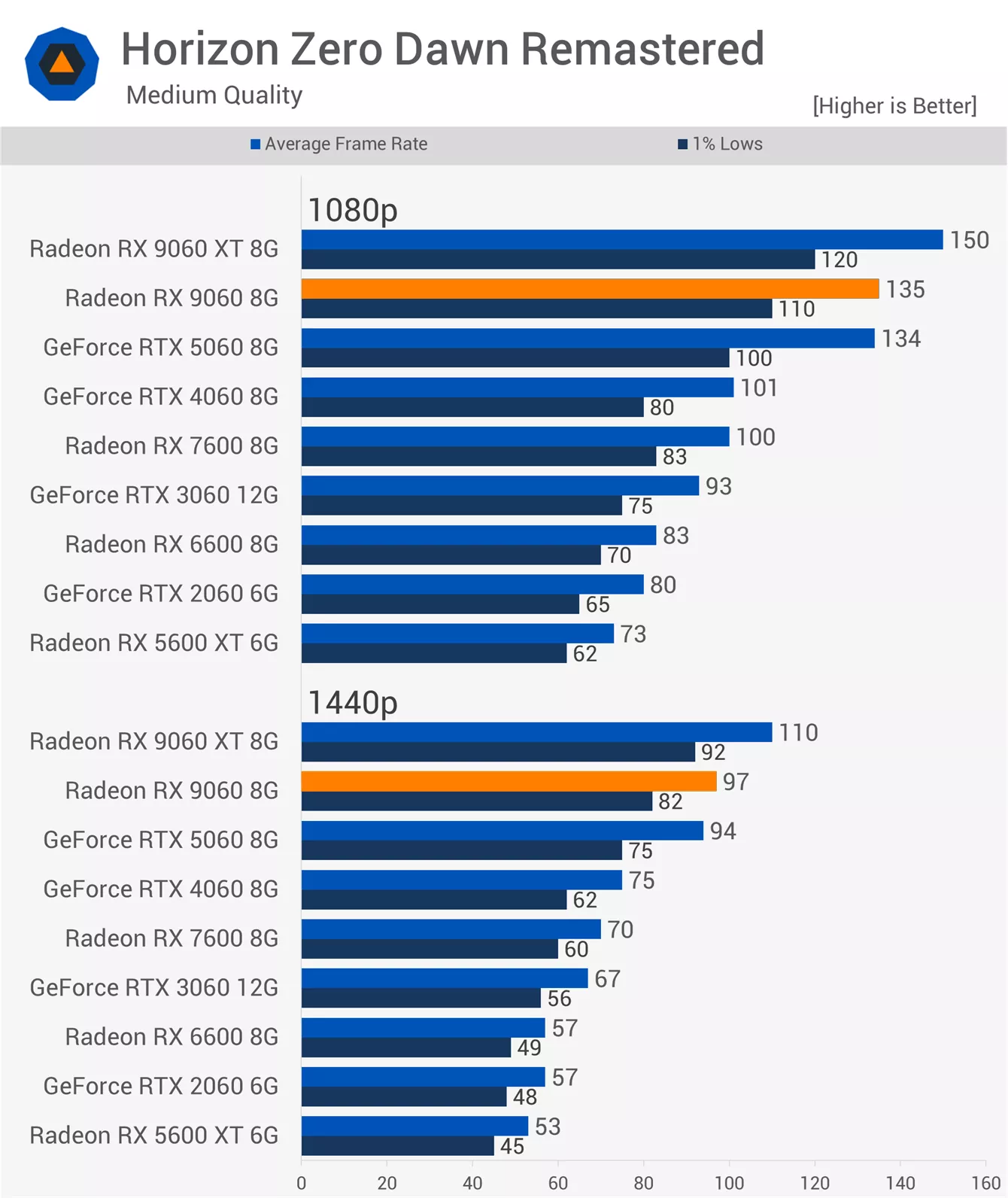
Moving on to Horizon Zero Dawn Remastered, the 9060 was slightly faster than the RTX 5060 at 1080p when using the medium settings, making it just 10% slower than the 9060 XT and 35% faster than the RX 7600. At 1440p it trailed the XT model by 12% but still managed to edge out the RTX 5060.
Ultra

Increasing the visual quality with the very high preset reveals a few interesting points. This preset requires more than 8GB of VRAM even at 1080p, but the 9060 series avoids the worst effects of running out of VRAM in this example because it still provides all 16 PCI Express lanes, whereas all other 8GB GPUs, such as the RTX 5060, are limited to just 8 lanes.
The 9060 ended up just 8 to 9% slower than the XT model and an enormous 110% faster than the RTX 5060. To be clear, the GeForce GPU was completely unusable here and will require reduced quality settings.
Kingdom Come: Deliverance II
Medium

Next we have Kingdom Come: Deliverance II. Using the medium preset, the 9060 was 15 to 16% slower than the XT version, making it around 13% slower than the RTX 5060. It was also only 14 to 16% faster than the RX 7600, which is a very small improvement in this title.
Ultra

Using the ultra preset, the 9060 was 16 to 17% slower than the 9060 XT. The margins relative to the RTX 5060 were similar, though in this case it was 20% faster than the RX 7600.
Cyberpunk 2077: Phantom Liberty
Low

Now for Cyberpunk 2077. Starting with the low preset, the 9060 was 16 to 17% slower than the 9060 XT and very similar to the RTX 5060. This made it 38% faster than the RX 7600 at 1080p and 34% faster at 1440p.
High

Switching to the high preset produced similar margins. The 9060 was again up to 17% slower than the 9060 XT. It also trailed the RTX 5060, coming in 13% slower at 1080p and 6% slower at 1440p.
Warhammer 40,000: Space Marine 2
Medium

The RX 9060 performs quite well in Space Marine 2 with the medium preset. It was just 12% slower than the XT version at 1080p and 13% slower at 1440p. It was also 15% faster than the RX 7600 at 1080p and 18% faster at 1440p.
Ultra

With the ultra preset applied, the 9060 is the typical 13 to 16% slower than the 9060 XT, which also makes it slower than the RTX 5060 at both tested resolutions. Achieving only 59 fps at 1440p is not exactly impressive, but even then it was still 26% faster than the RX 7600, which is a reasonable improvement.
Shadow of the Tomb Raider
Medium

The second last game we are looking at is Shadow of the Tomb Raider. Here the 9060 is just 11% slower than the XT model at both resolutions using the medium preset. However, it was only up to 15% faster than the RX 7600, so while performance is solid for this older title, the upgrade over the previous generation is not substantial.
Highest

A similar pattern appears when using the highest quality preset. The 9060 was only 8% slower than the XT model at 1440p, but both cards were slower than the RTX 5060.
Call of Duty: Black Ops 6
Basic

Finally we have Call of Duty Black Ops 6. Starting with the Basic preset at 1080p, the RX 9060 was considerably slower than the XT model, coming in 20% slower, and then 16% slower at 1440p. Even so, AMD maintains a significant performance advantage in Call of Duty, so the 9060 still ended up about 20% faster than the RTX 5060.
Extreme

Enabling the Extreme preset does not change much. The 9060 remains about 18 to 20% slower than the 9060 XT, but still 25% faster than the RTX 5060 at 1080p and 16% faster at 1440p. It was only a mild upgrade over the RX 7600 at 1080p, but 16% faster at 1440p, resulting in mixed performance gains.
7 Game Average
Here is our performance summary based on 7 game average data, calculated using the geomean. As expected based on the individual game results we just reviewed, the RX 9060 delivers very similar fps performance to the GeForce RTX 5060. It is 13 to 14% slower than the 9060 XT depending on the resolution. This also means it is 23 to 26% faster than the RX 7600, which is a solid improvement for what should be similar pricing.


Using the ultra quality settings, the 7 game average shows the same pattern. The RX 9060 trails the 9060 XT by 13 to 14%, although in this scenario it was slightly faster than the RTX 5060. It was also 26 to 29% faster than the RX 7600.
GPU Temps

The Radeon RX 9060 model we tested was the XFX Swift Gaming Edition, a compact dual fan design that ran very quietly.
Under a one hour load in a 21 degree room, inside an ATX case with the panels closed, we recorded a peak hotspot temperature of 79 degrees at a fan speed of just 1,100 RPM. The VRM temperature also peaked at 79 degrees and the memory reached 74 degrees. Overall these are good temperatures with very low noise output.
What Budget Gamers Need to Know
So there you have it. The Radeon RX 9060 is ~13 to 14% slower than the 9060 XT 8GB model and it should cost around 15% less, resulting in a similar cost per frame. You simply need to ensure you are truly getting a discount and not paying XT pricing for the non XT version, which can be difficult to guarantee with pre-built systems.
Generally speaking, we do not take issue with the idea of a product like the Radeon RX 9060. AMD clearly has enough defective Navi 44 dies to make this configuration viable, just not enough to sell it widely through retail. What concerns us is that most PC gamers are not aware it exists at all, and many will assume it is the same product as the 9060 XT they researched.

That confusion already existed with the 9060 XT. Sorting retailer listings by price brings a flood of 8GB cards to the top, and unless you know the lineup includes both 8GB and 16GB versions, it is very easy to believe you are getting a fully fledged 9060 XT at a bargain. Long term, that mistake has consequences.
The Radeon RX 9060 arguably amplifies the problem. This time you are not even buying the 9060 XT. You are buying an 8GB card that is slower, and because the non-XT version has almost no reviews or online visibility, most buyers will not know it is different in the first place.

If AMD wanted to be fully transparent and consumer friendly, they would have launched a single 9060 XT with 16GB of VRAM. An 8GB model would be the RX 9060, and a further cut down option could carry the RX 9050 name.
Instead they flooded the internet with positive Radeon 9060 XT 16GB coverage, sending out very few 8GB XT cards, and kept the regular 9060 locked away in OEM systems. With no retail presence and no early sampling, the 9060 remains hidden from most conversations. That excitement surrounding the 9060 series then pushes budget buyers toward cheaper options under the assumption they are getting the same hardware reviewers praised.

That is our take on the situation.
If you are reading this in the future and have a chance to buy the RX 9060 at retail or second hand, make sure it is at least 15% cheaper than the 9060 XT 8GB before you consider it a worthwhile deal.