With Chrome nipping at Firefox's ankles, Mozilla knows it has to perform a drastic overhaul - and it is. Firefox 4 is shaping up nicely, adding tons of new features and addressing many complaints about the current version. Despite that fact, many people will find it difficult to embrace some of the upcoming changes.
Fortunately, Mozilla hasn't deviated from what's made Firefox the second most used browser in the world: flexibility. We're going to look at some tweaks you might want to apply if you're running the current Firefox 4 beta, such as changing the color of the new orange menu button, moving tabs back to the bottom, getting add-ons to work and more.
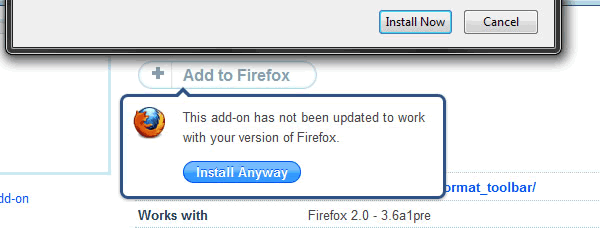
Firefox wouldn't be where it is without extensions, and we know many of you rely on them for school, work, and entertainment - we do too. Some developers drag their feet when it comes to updates, and while you can't make them work faster, you can force Firefox to ignore the incompatibility of your add-ons with a simple change in about:config.
- Enter about:config in the address bar and click through the warning message.
- Right click anywhere on the page and select New > Boolean.
- Enter this: extensions.checkCompatibility.4.0b
- Set the value of the new entry to false when asked.
- Restart Firefox if necessary.
If that's one too many mouse clicks for you, just install the Add-on Compatibility Reporter. In addition to forcing your rusty extensions to work, you can flag them as compatible or incompatible to inform Mozilla and the add-on developer. It goes without saying that your mileage will vary when enabling outdated add-ons, but we've had good luck so far, especially with the less complex add-ons.
Among the more obvious changes in Firefox 4 is the addition of an orange menu button located at the top left corner of the browser window. This replaces the menu bar by including the most used options in a single location. Although this button is convenient and leaves more space for content viewing, the color will probably clash your Aero theme.

Download Squad has a solution that not only lets you change the new button's color, but you will be able to move it around, too, if you don't mind messing with CSS (that's asking for trouble if you ask us). If you simply want to make the button transparent follow the instructions below, if you want the full run down on moving and tweaking the button head on over for a complete tutorial:
- Download this file.
- Copy it to C:\Users\YOUR-USERNAME\AppData\Roaming\Mozilla\Firefox\Profiles\XXXXXX.default\chrome
- Restart Firefox if necessary.
If you open a link in a new tab in Firefox 3.6 or Firefox 4, it will start right beside whatever tab it was launched from - just like Chrome. Earlier versions shoved new tabs to the back of the line, and call us picky, but it can be hard to break old habits. Share our sentiments? Here's a thirty-second fix:

- Enter about:config in the address bar and click through the warning message.
- Filter browser.tabs.insertRelatedAfterCurrent.
- Double click the entry to disable it.
- Restart Firefox if necessary.
Instead of showing one taskbar preview per window, the Firefox 4 beta displays a preview for every single tab you have open. Tangerine menu button aside, this has to be the most annoying setting on what is otherwise a very impressive refresh, especially if you're juggling many windows with tons of tabs. Thankfully, it only takes a moment to turn off:

- Enter about:config in the address bar and click through the warning message.
- Filter browser.taskbar.previews.enable.
- Double click the entry to disable.
- Restart Firefox if necessary.
Yeah, we all get it. Firefox isn't the first browser to shift tabs above the address bar. Opera and Chrome have long used this layout, and for a good reason: it makes more sense. To clear things up once and for all, Mozilla recently released a video explaining why tabs are on top in Firefox 4. Unconvinced by their logic? Then put the tabs back "where they belong":

- Click the Firefox button.
- Go to Customize > uncheck Tabs on Top
Before we get rolling, we'd like to say that you should consider participating in Mozilla's feedback program. The organization is working hard to deliver the features you want, but that's impossible if you don't speak up. That said, if you're not going to contribute, you might as well free up the space occupied by the feedback button and here's how:

- Click the Firefox button.
- Go to Customize > Add-ons
- Find the Feedback add-on.
- Click Disable.
- Restart Firefox if necessary.
That's it for now, if you have other nifty tricks that you want to share please do so in the comments.
Truth be told, many of our staffers were becoming Chrome converts or rather they had already moved completely, but this first Firefox 4 beta is looking particularly solid and in a short time Mozilla has been able to win back a few of us. Haven't downloaded the Firefox 4 Beta yet? You can do so here (Windows/OS X), highly recommended.