Firefox 148 rolls out with the promised AI kill switch: here's how to enable it

DragonSlayer101

Posts: 991   +14
Staff
The big picture: Firefox and its forks remain the preferred browsers for a niche segment of power users, many of whom strongly opposed Mozilla's plans to infuse the browser with generative AI features. To its credit, Mozilla listened to community feedback and agreed to introduce a graphical interface option allowing users to disable all AI features globally. The so-called "AI kill switch" is now available in Firefox 148.

The "Block AI Enhancements" toggle was originally introduced in Firefox 148 Nightly in January following significant community backlash after Mozilla's new CEO, Anthony Enzor-DeMeo, announced plans to add AI features to Firefox. With Firefox 148 now rolling out to the stable channel, the feature is available to users across all release channels.

In Firefox 148, all AI features are disabled by default, though users can enable them at any time with a few clicks. To change the setting in the desktop version of Firefox, click the hamburger menu (three parallel lines) in the top-right corner of the window and select Settings. Then choose AI Controls from the left sidebar and toggle on "Block AI Enhancements."
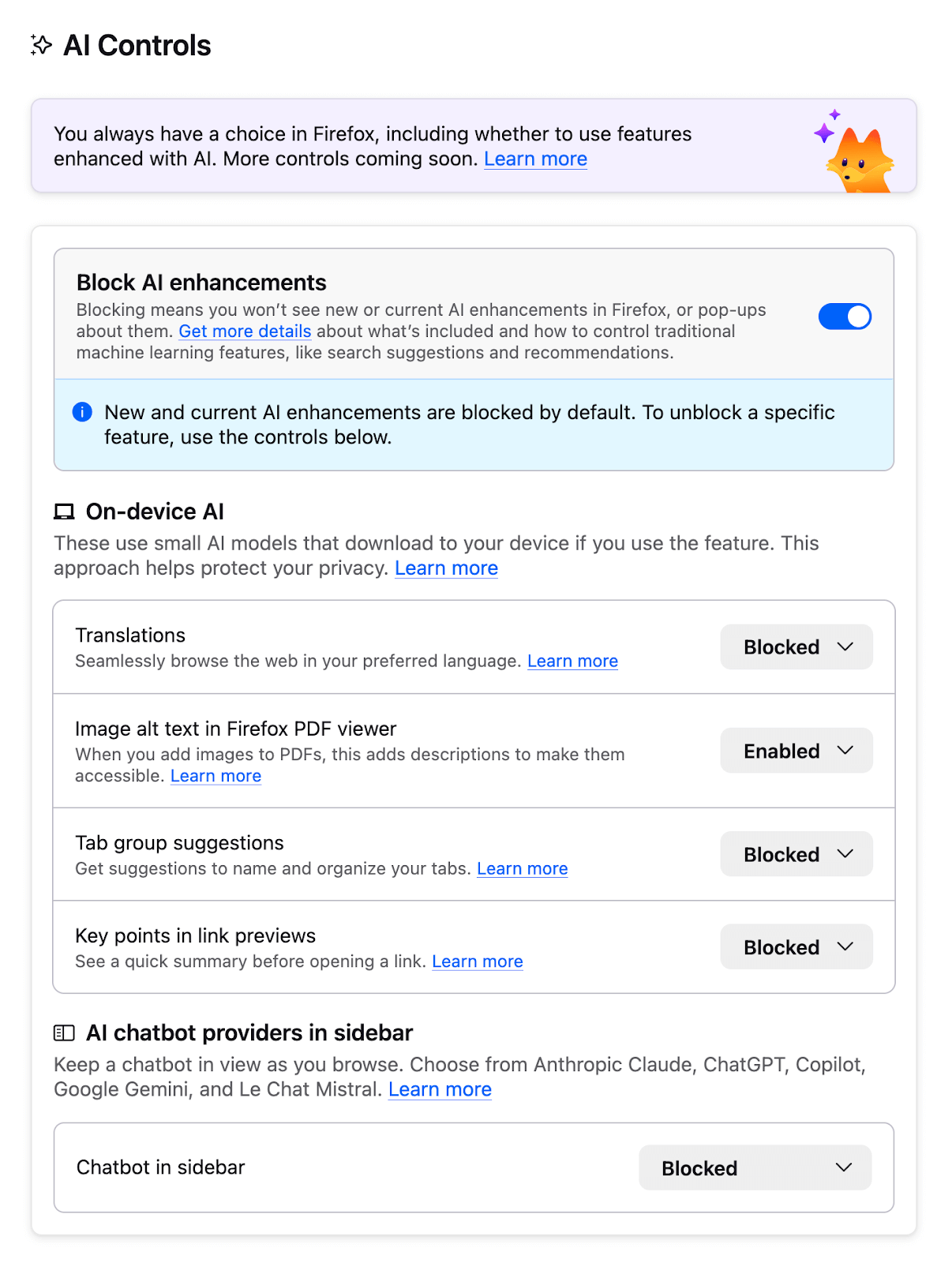
Users can also enable specific AI features individually while keeping others disabled. To do so, update the settings for each AI feature using the dropdown menus while the global kill switch remains enabled. Note that future AI features will also be disabled by default if the AI-blocking toggle is turned on.

If you choose to enable the AI chatbot feature, Firefox offers a choice of five providers, including Anthropic Claude, ChatGPT, Google Gemini, Le Chat Mistral, and Microsoft Copilot. Other features that can be enabled individually include AI translation, Alt text generation for PDF images, AI-enhanced tab groups, and "Key Points" summaries in link previews.

In addition to the AI kill switch, Firefox 148 also introduces other improvements, such as enhanced screen reader support for mathematical formulas embedded in PDFs, Remote Improvements without telemetry requirements, and added support for Traditional Chinese and Vietnamese in the translation system. The release also includes several security patches and bug fixes.

Permalink to story:

 
Why do we need AI in everything? I'm not saying AI is bad, but how is this useful? What problem does this solve? This all brings me back to the moment when I was in Lowes looking at an AI powered smart dishwasher. Corporations don't care about us, investors don't care, so why do we keep catering to them? What AI model does Firefox even use? It's probably Gemini because they get stupid amounts of money from Google. Literally paying people to use AI because no one wants it.
 
Why do we need AI in everything?
We don't. But there are venture capital suckers righht now willing to give companies money if they cram AI into their products regardless of how useful that is. Imagine you're the CEO of Mozilla or the CEO of the dishwasher manufacturer, and you could get millions of dollars in funding/investment just by saying your product has AI. Why wouldn't you take it?

When venture capital and the stock market learns their lesson that this provides no returns, it will stop. Until then it will keep happening, and it's not because the companies are dumb, it's because their investors are dumb and the companies are taking advantage of it.
 
Firefox adding AI but shipping it disabled feels like the browser equivalent of putting hot sauce on the table instead of dumping it in your food. Power users stay happy, normies can still opt in, and nobody has to fork the project out of spite. Win-win.
 
Try fixing your broken browser first. I haven't been able to log into my Outlook email account for months now -despite trying every suggested fix. Any other browser...no problem.
 
Try fixing your broken browser first. I haven't been able to log into my Outlook email account for months now -despite trying every suggested fix. Any other browser...no problem.
You are free to choose, but still you complain.
 
Firefox adding AI but shipping it disabled feels like the browser equivalent of putting hot sauce on the table instead of dumping it in your food. Power users stay happy, normies can still opt in, and nobody has to fork the project out of spite. Win-win.
The only reason this switch exists is Firefox tried to force it on everyone via an update and there was a revolt in their dwindling userbase.

so more like you were served your normal meal, but it had 9 alarm hot sauce in it instead of mustard, and the restaurant refused to sell you the normal meal without said hot sauce, and only after a sustained outrage campaign did they finally admit it was a mistake. Now they'll serve you the meal you want, but they keep shoving the bottle of hot sauce on the table, you know, just in case you want to use it.
You are free to choose, but still you complain.
Because we would like the problem to be fixed. Stop being an obedient little consumer and expect more from your multi million dollar corpos.
 
I think the AI translation feature is helpful, but I've turned off everything else. AI kill switch is not coming to a Chrome browser ever I'd say.
 
Try fixing your broken browser first. I haven't been able to log into my Outlook email account for months now -despite trying every suggested fix. Any other browser...no problem.
Seems like a PEBKAC issue, been using it for a decade or so without issues.
 
What Mozilla should do is make two separate versions of FireFox, one with AI(including controls) and one without any AI at all.
 
Back