Microsoft tests new Windows AI in the taskbar and File Explorer

Skye Jacobs

Posts: 2,049   +60
Staff
Ripple effect: Microsoft's latest Windows experiment hints at a shift in how GenAI will surface across the operating system. Instead of relying on standalone new apps or flashy new interfaces, plans to embed small, conversational AI tools into places people already use every day – most notably the taskbar and File Explorer.
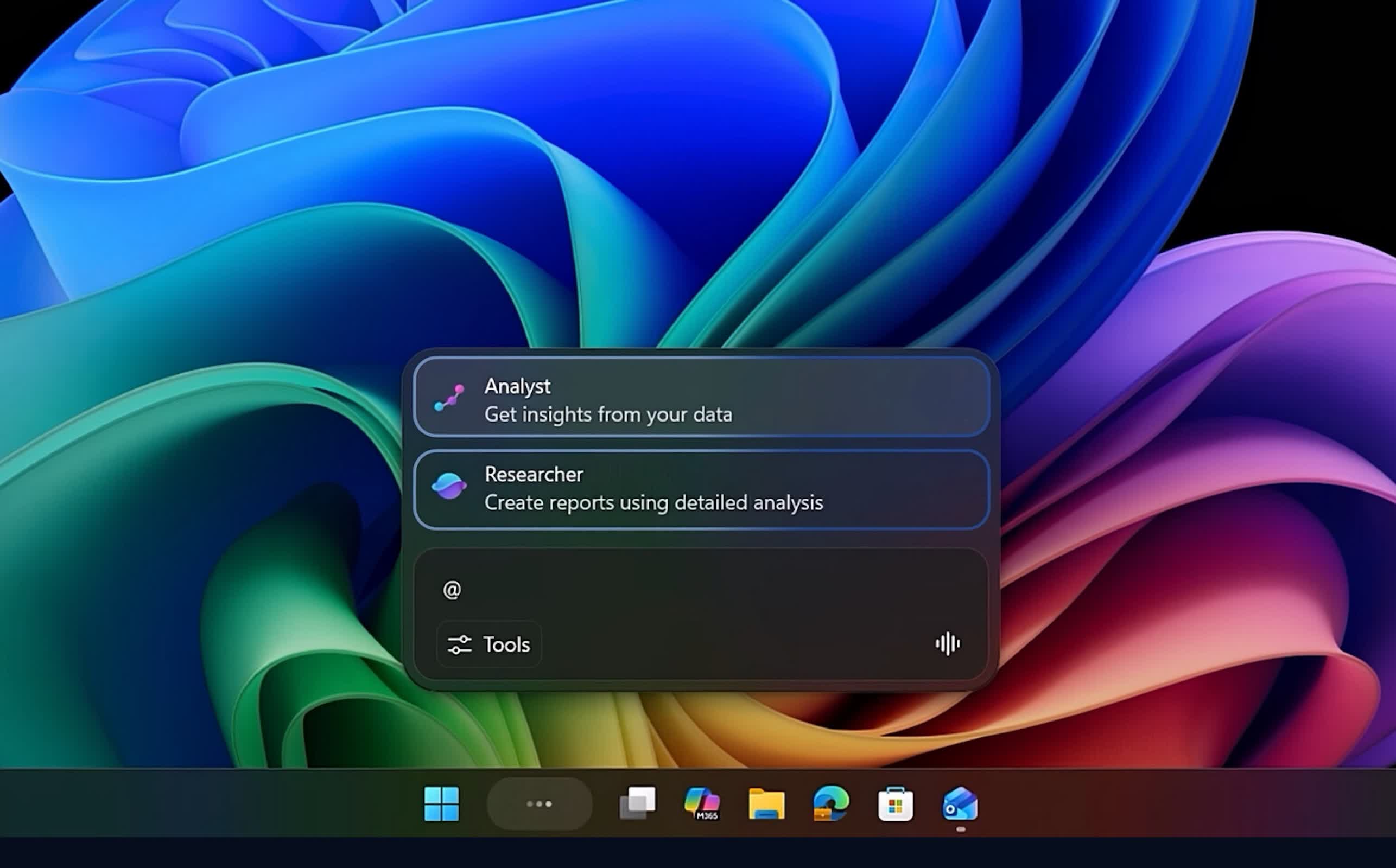
At the center of this effort is a new feature called Ask Copilot, which effectively turns the traditional Windows search bar into a gateway for Microsoft 365's AI services. Once enabled, it replaces Windows Search and introduces an @ command syntax that feels closer to tagging someone in a chat than issuing a system query.

Type something like @researcher, and Windows can spin up specialized AI agents designed to work over longer stretches of time, handling tasks such as gathering background information or summarizing dense technical documents. Some of these jobs can run for 10 minutes or more, with real-time progress indicators shown directly in the taskbar – a familiar visual borrowed from Windows' file download behavior.

This suggests Microsoft's broader AI ambitions for Windows never really went away, despite public messaging that hinted at dialing back its "AI everywhere" approach. Instead of front-loading the experience with intrusive prompts or dedicated apps, the company appears to be embedding assistance tools into common workflows, encouraging users to interact with them as part of everyday computing.

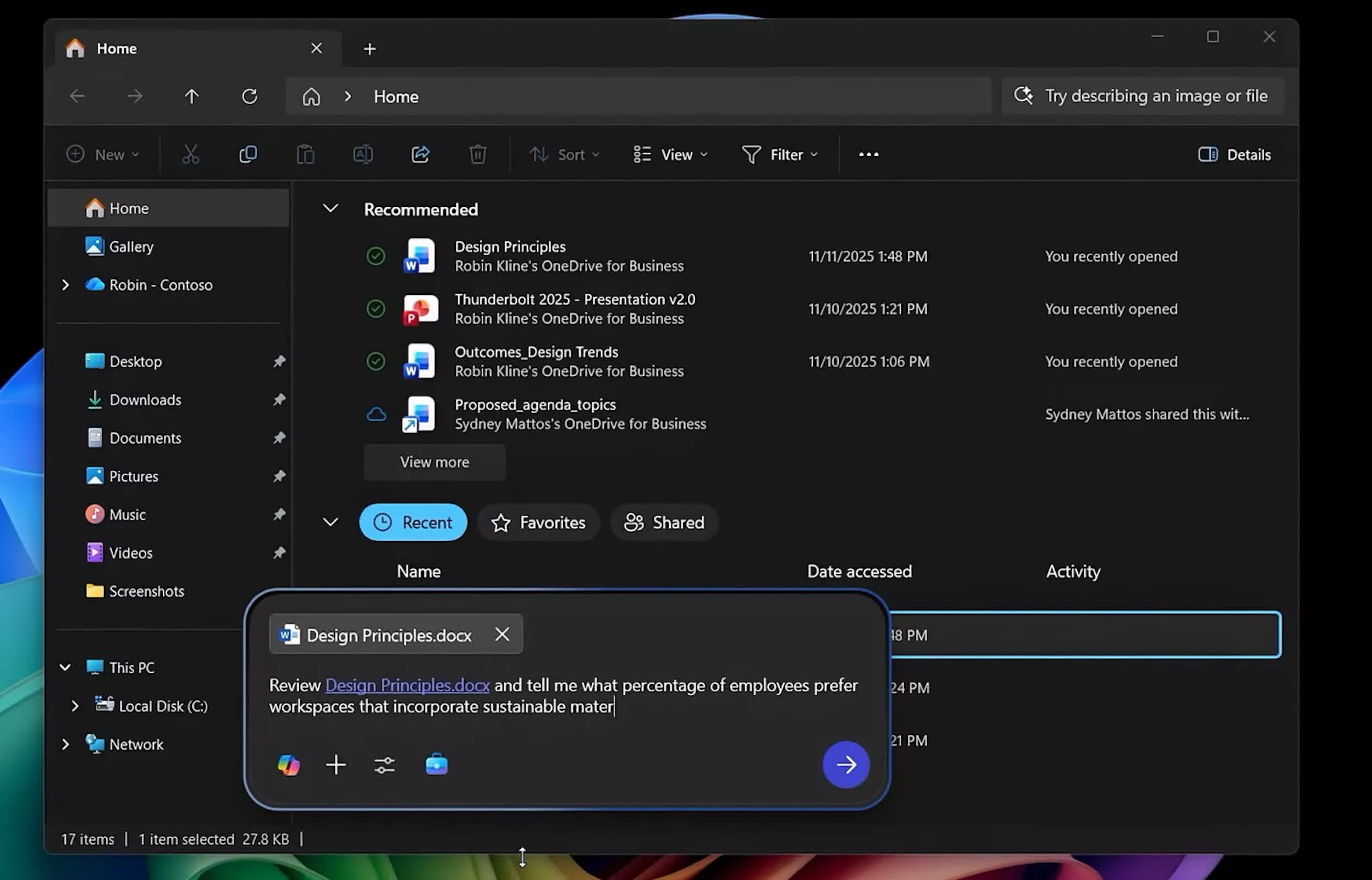
Beyond the taskbar, Windows 11's File Explorer is gaining its own Copilot integration. A new button inside the app lets users generate context summaries and document insights without leaving the file view. These real-time AI annotations draw from Microsoft 365's connected services, giving workers a quick overview of shared documents or synced projects without switching between applications.
For Microsoft, this gradual layering of AI points to a design mindset that treats intelligence as infrastructure rather than a headline feature. Each integration targets small efficiencies: modest boosts to speed and clarity that compound over the course of a workday.

While the company hasn't disclosed how far these integrations will go, it says Ask Copilot will begin rolling out to Windows 11 users in the coming weeks.

The result is a quieter but more pervasive form of AI, a framework that could eventually redefine the role of the desktop assistant. Instead of asking users to open Copilot, Windows itself becomes Copilot.

Permalink to story:

 
And people will continue to ignore it. Even when it was slammed front and center, it's been largely ignored. Switching gears, subtlety adding it is the next approach. The Matrix's architect, while heavily laden in language (of which I am guilty of), spoke volumes in terms of the philosophical points salient to this topic: People will only accept certain realities, if given a choice, albeit it only superficially. Thus Microsoft is going the route of smaller, more invasive while giving the illusion of choice or reduction.

Hammer won't work? Then a fine chisel. The outcome is the same, sadly. My bet personal bet: it still won't work.
 
How can a company be so out of touch with what consumers want.
Instead of fixing and improving Windows, they just keep on pilling on the slop.
I swear Microsoft is run by *****s.
 
Oh good, I’ve already replaced windows search and file explorer with FileLocator and OneCommander so this doesn’t impact me.
Well, unless you've fully disabled the built in windows search with a group policy setting and somehow figured out how to fully remove the AI built into Windows 11 without breaking explorer.exe, you're basically just adding "bloat" on top of bloat so your issue isn't really solved. Everything is still running in the background.
 
Well, Microsoft is not scaling back on AI, but I have scaled back the use of Microsoft products altogether. They can do what they want, that's fine by me. The more people cling on to a product that is clearly not designed for you, the more we are empowering these companies to ignore our displeasure and do what they want.
 
Well, unless you've fully disabled the built in windows search with a group policy setting and somehow figured out how to fully remove the AI built into Windows 11 without breaking explorer.exe, you're basically just adding "bloat" on top of bloat so your issue isn't really solved. Everything is still running in the background.
Windows search defaults to very little indexing of the useless My Docs and the like which I don't use. Heck my files aren't even on the same drive. The rest of this AI that I can't removed (Copilot, onedrive, and more are removed on Windows install) isn't doing anything in the background other than wasting RAM (which I have plenty).

And I'm not sure how you classify applications I installed myself for tasks I want to do with my computer as "bloat". Nonsensical statement really.
 
The @researcher syntax that runs tasks for 10 minutes in the background is either the most useful thing Microsoft has ever added to Windows or a completely novel way to have no idea what your computer is doing or sending out. Possibly both.
 
Windows search defaults to very little indexing of the useless My Docs and the like which I don't use. Heck my files aren't even on the same drive. The rest of this AI that I can't removed (Copilot, onedrive, and more are removed on Windows install) isn't doing anything in the background other than wasting RAM (which I have plenty).

And I'm not sure how you classify applications I installed myself for tasks I want to do with my computer as "bloat". Nonsensical statement really.
You're right, the default indexing settings for Windows suck. It still works properly though, you just have to alter the defaults. Open the classic control panel and sort it by large or small icons, hit the "file explorer options" and go to the search tab and set it the way you want. Do the same in the "indexing section." It's really annoying watching everyone complain about Windows Search not working for all these years when they simply don't alter the defaults, which were changed without letting users know outright, which I'll give you.

I quoted the software you installed as "bloat" out of sarcasm...while simultaneously mentioning Microsoft's apps as bloat without quotes in the exact same sentence. I'm obviously stating that what you choose to install yourself isn't "bloat."

Way over your head bud.
 
I wonder what sort of issues, meaning patches this will cause? It sounds simple so shouldn't cause any, but well the track record for anything W11 isn't stellar.

As for search I always disable it on any new install, and fully disable the index too. Never needed it.

Edit: I'm using W10 btw.
 
Last edited:
You're right, the default indexing settings for Windows suck. It still works properly though, you just have to alter the defaults. Open the classic control panel and sort it by large or small icons, hit the "file explorer options" and go to the search tab and set it the way you want. Do the same in the "indexing section." It's really annoying watching everyone complain about Windows Search not working for all these years when they simply don't alter the defaults, which were changed without letting users know outright, which I'll give you.

I quoted the software you installed as "bloat" out of sarcasm...while simultaneously mentioning Microsoft's apps as bloat without quotes in the exact same sentence. I'm obviously stating that what you choose to install yourself isn't "bloat."

Way over your head bud.
Yes, I'm aware of how to change the Windows indexing options. It works adequately in Win 10 but noticeably worse in Win 11. And that's after a lengthy indexing process.

FileLocator is faster than Win 11 search without indexing so it's one less thing I have to setup on a (re)install of Windows (especially since I use winget to install apps without any hassle).
 
Dear Microsoft,

Thank you very much for being such a wonderful advocate of Apple and Linux. It is thanks to your tireless efforts many of my colleagues and customers discovered the unparalleled convenience and speeds of these systems.

Sincerely yours
 
"Everything" is a near instantaneous search replacement and free.
Private Firewall, an old app, is a free and easy way to completely lock down what runs, accesses the internet.
M$ has already deployed the Taskbar tracking and reporting feature. I used Private Firewall to prevent it from phoning home.
 
Back