This Windows registry hack can boost NVMe SSD performance by up to 80%, but there's a catch

DragonSlayer101

Posts: 997   +14
Staff
In a nutshell: Microsoft recently updated Windows Server 2025 with a native NVMe driver that can significantly increase SSD performance. While the new driver is not officially available for consumer versions of Windows, enterprising developers have seemingly found a neat registry hack to enable it in Windows 11, potentially boosting NVMe SSD performance by up to 80 percent.
One developer who successfully activated the feature in Windows 11 (version 25H2) claims it works "pretty good" on his computer. He shared a step-by-step guide on how to activate the feature on Windows 11 devices.

To activate the new driver, open Regedit and navigate to: HKEY_LOCAL_MACHINE\SYSTEM \CurrentControlSet\Policies\ Microsoft\FeatureManagement\Overrides.

Then add the following 32-bit DWORD values:

  • "735209102"=dword:00000001
  • "1853569164"=dword:00000001
  • "156965516"=dword:00000001

After editing the registry, restart your PC. NVMe SSDs will now show up under "Storage Media" instead of "Devices" in Device Manager.

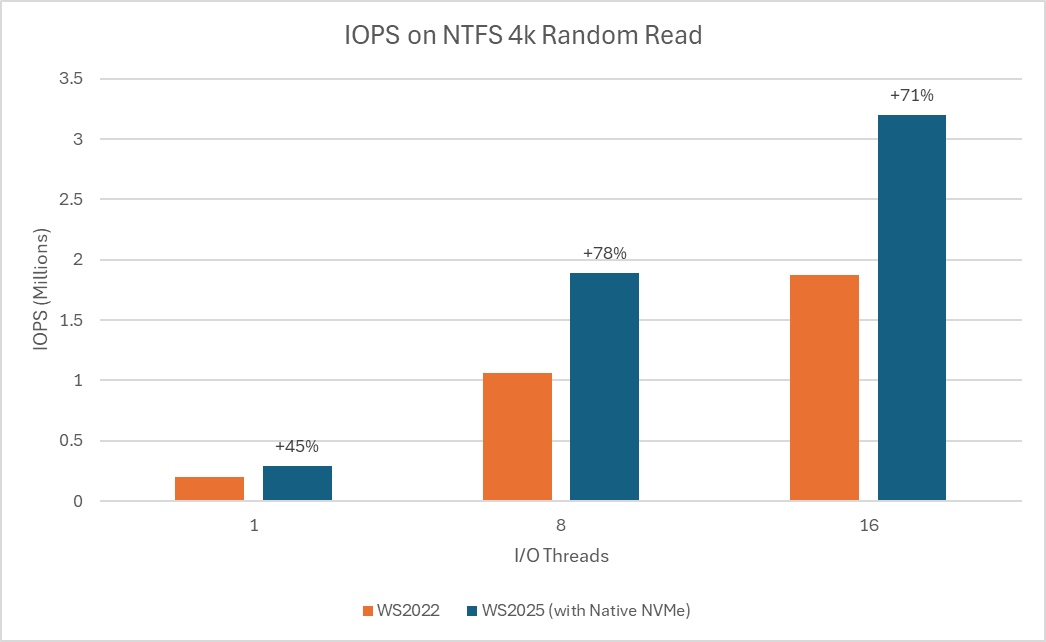
Microsoft claims that the native NVMe driver can increase IOPS performance by up to 80 percent and reduce CPU cycles by around 45 percent. However, German tech publication ComputerBase found that real-world performance gains in Windows 11 are closer to 10 - 15 percent, far less dramatic than Microsoft's figures for Windows Server.

According to Microsoft, the most noticeable improvements are expected in workloads such as database transactions, metadata operations on file servers, Hyper-V and other virtualization tasks, and large dataset processing for ML and AI applications.
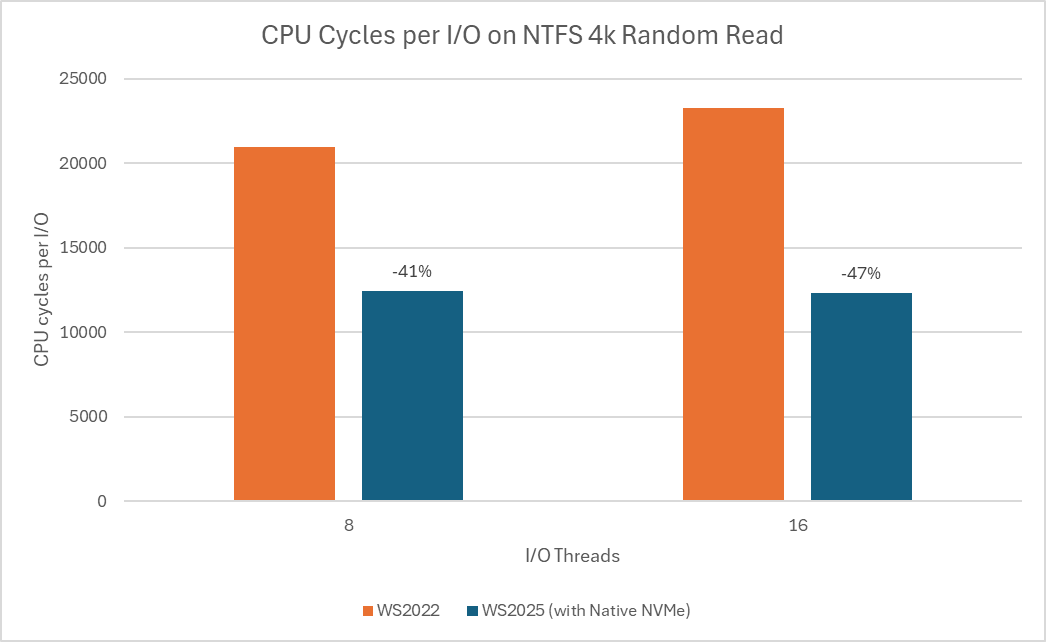
Those considering experimenting with the registry should be aware that some Windows 11 users have reported issues with device management applications such as Samsung Magician. In some cases, these tools fail to detect NVMe drives entirely or list them twice as separate devices. As explained by Tom's Hardware, this occurs because the registry hack changes the disk ID, making it harder for third-party software to correctly identify the drive.

Despite NVMe SSDs becoming mainstream more than a decade ago, Windows has so far relied on a SCSI translation layer rather than a purpose-built NVMe-first storage stack. So, the operating system treated all storage devices as SCSI (Small Computer System Interface), a legacy standard originally designed for tape drives and mechanical hard drives.

Without native NVMe support, SSDs using the modern standard could not fully exploit its performance advantages. The latest update aims to improve read and write speeds, and Microsoft is encouraging Windows Server customers to switch to the native driver to benefit from these gains. The feature is currently available as an opt-in setting with the latest cumulative update for Windows Server 2025.

Permalink to story:

 
I don't see anything "sensible" about force-hacking my way into a storage driver the provider of which does not feel is ready for use on my version of the operating system.

Also, tuning of storage for enterprise server use is not necessarily the same as for personal use.
 
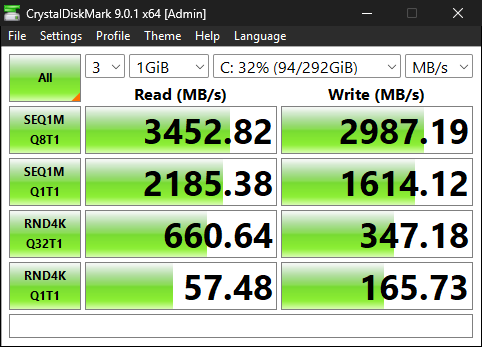
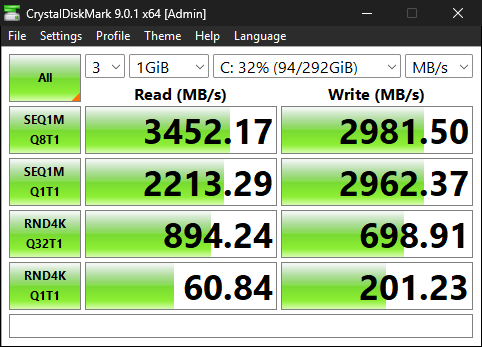
I tested this on my PC and got:
SEQ1M Q1T1 Write - 83% Increase
RND4K Q32T1 Read - 35% Increase
RND4K Q32T1 Write - 101% Increase
RND4K Q1T1 Read - 5% Increase

Most important, CPU usage was lower with games that have asset streaming, such as UE4 and 5.
So this was a cool upgrade for my PC, considering it's just a driver.

One issue that this new driver has, that the article doesn't mention, is that entering safe mode with it, causes a green screen.
 
I tested this on my PC and got:
SEQ1M Q1T1 Write - 83% Increase
RND4K Q32T1 Read - 35% Increase
RND4K Q32T1 Write - 101% Increase
RND4K Q1T1 Read - 5% Increase

Most important, CPU usage was lower with games that have asset streaming, such as UE4 and 5.
So this was a cool upgrade for my PC, considering it's just a driver.

One issue that this new driver has, that the article doesn't mention, is that entering safe mode with it, causes a green screen.

How did you do this testing...can you post screenshots, did you run the same tests multiple times?
 
But Microsoft is not recommending nvme users switch. It would not need a hack for 99% of users to switch if this was so.
They're recommending it for windows server customers.
God, I don’t know why I need to explain this to someone who apparently edits for a living.

I have a NVMe drive. I do not have windows server. 99% of people would not have windows server. Now look at what your last paragraph says (or does not say).
What is it like being unable to comprehend words? I'm curious. You must get confused often.

But you are absolutely right. If it's this hard for you to understand context, you REALLY shouldnt be messing around with drivers. Or computers at all, frankly.
 
How did you do this testing...can you post screenshots, did you run the same tests multiple times?

Old NVME driver
ivA8wfPEVlcmp1D3.png


Native NVME driver
F7bf7zRNrWBUsXra.png
 
Right. It’s called context. It’s on the subheading and the intro paragraph where the patch originates. “Officially available on Windows Server 2025”

This article has a few errors, that should be addressed:
Although this feature is only intended for now, for Windows Server, it also works on Windows 11 Pro and Home, 25H2 and 24H2, as long as people have KB5066835.

It should be noted that this driver will cause green screens in safe mode, which can be a big issue if people are not aware. The solution is to add these keys to the registry:

reg add "HKLM\SYSTEM\CurrentControlSet\Control\SafeBoot\Network\{75416E63-5912-4DFA-AE8F-3EFACCAFFB14}" /ve /d "Storage disks" /f
reg add "HKLM\SYSTEM\CurrentControlSet\Control\SafeBoot\Minimal\{75416E63-5912-4DFA-AE8F-3EFACCAFFB14}" /ve /d "Storage disks" /f

Another issue to consider is that this driver is not compatible with DirectStorage's feature, BypassIO. People can confirm I with this command, just change the drive letter accordingly.

fsutil bypassIo state c:\ /v
 
Yes it looks like AI was used to write this article. Completely 100% lazy writing. Even if you do use AI at least check your work and at least make it appear human written.

https://www.grammarly.com/ai-detector 23.00%
https://www.zerogpt.com/ 49.50%
https://mydetector.ai/ 49.00%
https://originality.ai/ 37.00%
https://app.gptzero.me/ 21.00%

Average 35.90% AI written

Haha... not sure if that was being ironic, but pass any article through those detection "tools" and the result will be more or less the same, unless it was truly written by an older AI model that uses certain known wording, repetition and distinct punctuation, then it will score 80% +
 
Yes it looks like AI was used to write this article. Completely 100% lazy writing. Even if you do use AI at least check your work and at least make it appear human written.

https://www.grammarly.com/ai-detector 23.00%
https://www.zerogpt.com/ 49.50%
https://mydetector.ai/ 49.00%
https://originality.ai/ 37.00%
https://app.gptzero.me/ 21.00%

Average 35.90% AI written

Those tools don't seem very reliable.
I tested all of those you posted with one of the post I wrote in this thread.
3 of those sites said it was 100% written by a human. One said it was 98% written by AI. And another said it was 27% AI.
 
Yes it looks like AI was used to write this article. Completely 100% lazy writing. Even if you do use AI at least check your work and at least make it appear human written.

https://www.grammarly.com/ai-detector 23.00%
https://www.zerogpt.com/ 49.50%
https://mydetector.ai/ 49.00%
https://originality.ai/ 37.00%
https://app.gptzero.me/ 21.00%

Average 35.90% AI written
I typed a paragraph for a proposal at around 100 words, copy and pasted it into these detectors, and surprise....got nearly the same result every time.

If you’re trusting AI detecting AI, you’re falling for a gimmick.
I really hope this isn’t something you rely on professionally.
 
I tested it on my three NVMe drives. One is connected to the CPU. Two to the chipset. Two Samsung. One Adata. Performance uplift for CPU connected drive was 14% median. For chipset connected drives 3% median.

People seeing triple digit uplifts makes me thing they have had their systems wrongly configured before and thus the uplift.

I had already optimized mine by disabling PCIe ASPM and other features that would limit or degrade SSD performance.

 
Back