Windows 11 patch linked to SSD data loss, reports remain under investigation

Daniel Sims

Posts: 2,452   +74
Staff
PSA: Windows 11 24H2 users who recently installed the KB5063878 update should avoid file transfers exceeding 50GB for now. Those who haven't updated yet should delay the security patch until more information is available. Neither Microsoft nor storage manufacturers have responded to the reports, and it remains unclear how widespread the issue is.

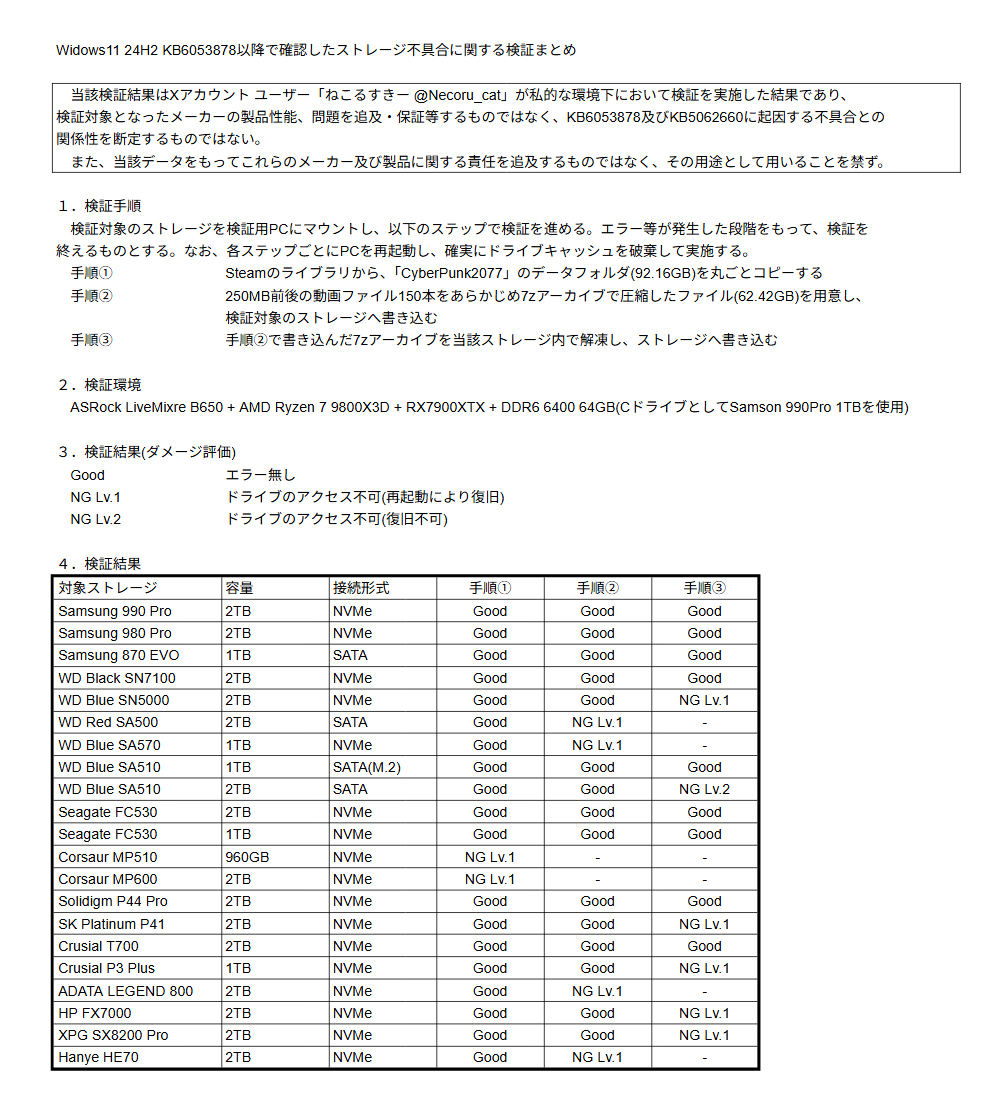
Twitter user @Necoru_cat has spent several days investigating an error that can make storage drives undetectable, potentially destroying massive amounts of data. Although at least one other user has reproduced the issue, all known reports have originated in Japan, and media coverage has thus far relied on machine translation; therefore, further investigation is needed.

Necoru_cat first noticed the problem when their SSD disappeared while updating Cyberpunk 2077 after installing the KB5063878 update for Windows 11 24H2, which Microsoft released last week. However, the issue might have been present in previous builds, and KB5063878 could have simply made it more likely to occur.

Further benchmarks reproduced the error in over 20 SSDs from Samsung, Western Digital, Seagate, Corsair, Crucial, and other manufacturers. Popular models, such as the 2TB Samsung 990 Pro and WD Black SN7100, are affected, and DRAMless SSDs might be more vulnerable. Because Necoru_cat could only test a small number of SSDs, the full extent of the issue remains unclear. They also observed similar behavior in HDDs.

The problem occurs during transfers of dozens of gigabytes on storage drives with utilization exceeding 60 percent. Sometimes, simply rebooting resolves the issue until users attempt another large transfer. However, other cases require a full partition overwrite. In the worst instances, only reformatting the drive in Linux works.

Necoru_cat suspects that the hardware environment could be a factor, but they cannot isolate every variable since they only have access to one system. Time will tell if other users from around the globe report the same issue, confirming that it isn't an isolated case.
Windows 11 24H2's KB5063878 update introduces numerous security fixes and minor user interface updates, including relocating the search bar in the Settings app to the top of the window. On Copilot+ PCs, it has been integrated with Microsoft's generative AI chatbot, which tries to advise users when adjusting specific settings

The update also activates Quick Machine Recovery, changes the infamous Blue Screen of Death into a Black Screen of Death, and lets users enter a PC's PIN with a gamepad.

Permalink to story:

 
My SSD went Tango Uniform. I've tried Diskpart, other stuff, and tried a Linux boot and tried gdisk. Also, I formatted the drive on my other computer and once back in the computer that the NVMe was in. I still was unable to load windows back on. I kept on getting the disk is write protected and even after clearing the attributes it still a no go. Thinking it was my mobo, ordered another mobo and I still have the same issue.

The drive ins question is a ADATA XPG SX8200 Pro 1TB 3D NAND NVMe. Before I get that's a crappy NVMe.. This was installed in a secondary computer that didn't have anything important on it. Just use it a streaming computer and FT8.
 
My SSD went Tango Uniform. I've tried Diskpart, other stuff, and tried a Linux boot and tried gdisk. Also, I formatted the drive on my other computer and once back in the computer that the NVMe was in. I still was unable to load windows back on. I kept on getting the disk is write protected and even after clearing the attributes it still a no go. Thinking it was my mobo, ordered another mobo and I still have the same issue.

The drive ins question is a ADATA XPG SX8200 Pro 1TB 3D NAND NVMe. Before I get that's a crappy NVMe.. This was installed in a secondary computer that didn't have anything important on it. Just use it a streaming computer and FT8.

I had first heard that for those affected by this buggy patch, just using diskpart to clean, reinitialize and repartition the drive got things back to normal (other than losing all data on the affected drive). But in many cases looks like it's actually killing SSDs.
 
Just another typical example of a topic about W11/W11 update/Windows 11 new features.

What I mean by that is that everythings is backwards. Everything this sick company does makes things worse.

I haven't heard or read a positive story about anything W11 (or MS for that matter) since I don't know when.

It's always negative. They always force things, or screw up and annoy their customers.
In fact I think they don't consider customers as people anymore. Just some nondescript install base who have no say in anything they do. A truely vile organization.
 
This problem may be traceable to Microsoft's Human Resources Department. Stationing HR employees outside McDonald's franchises waiting for forcibly retired employees to exit. To offer them positions at Microsoft.

Microsoft has only spent over 30 years trying to get WinBloZe right. This makes a new high point. Destroying users' data and SSDs. Still a few bugs in the system... with possibly more injected with each new update.
 
I have a Crucial T710 2TB with a Silicon Motion SM2508 controller and it also had issues. Oddly enough I was experiencing issues even before the KB5063878 update. I had reported it to MSI just last week explaining my Event Viewer kept showing Pluton Kernel Errors ever since updating to 24H2, that were made significantly worse with KB5062553. I was told to update as soon as another KB was available and I regret every second of it. After KB5063878, while copying a 151GB file, it froze at 99%. Following a 2 hour wait, I had to restart Windows Explorer and was left with a 151GB ghost file that could not be accessed or deleted. I tried force deleting the file via CMD, PowerShell, Unlocked, MiniTool, etc. After 3 safe boots (minimal) I was finally able to delete the file and recover the space. CrystalDiskInfo shows no errors, Event Viewer shows ABSOLUTELY nothing at the time of failure... It's as if nothing happened. Computer was fine - as well as "fine" is with Win11 - before, with version 23H2. 24H2 has been a disaster from day one. Since 24H2 I have huge latency issues, windows explorer is lagging, any browser is lagging (Edge, Chrome, Opera AND Firefox), I get random kernel and network system log errors, graphics glitches, I experienced one random reboot that cost me an entire days work (Da Vinci showed it was saving when in fact it wasn't) and many other annoyances that I fail to recall...
 
I have a Crucial T710 2TB with a Silicon Motion SM2508 controller and it also had issues. Oddly enough I was experiencing issues even before the KB5063878 update. I had reported it to MSI just last week explaining my Event Viewer kept showing Pluton Kernel Errors ever since updating to 24H2, that were made significantly worse with KB5062553. I was told to update as soon as another KB was available and I regret every second of it. After KB5063878, while copying a 151GB file, it froze at 99%. Following a 2 hour wait, I had to restart Windows Explorer and was left with a 151GB ghost file that could not be accessed or deleted. I tried force deleting the file via CMD, PowerShell, Unlocked, MiniTool, etc. After 3 safe boots (minimal) I was finally able to delete the file and recover the space. CrystalDiskInfo shows no errors, Event Viewer shows ABSOLUTELY nothing at the time of failure... It's as if nothing happened. Computer was fine - as well as "fine" is with Win11 - before, with version 23H2. 24H2 has been a disaster from day one. Since 24H2 I have huge latency issues, windows explorer is lagging, any browser is lagging (Edge, Chrome, Opera AND Firefox), I get random kernel and network system log errors, graphics glitches, I experienced one random reboot that cost me an entire days work (Da Vinci showed it was saving when in fact it wasn't) and many other annoyances that I fail to recall...
Ahh man, that really is too bad. Those *****s MS.
(Not that they would care about it.)
 
This problem may be traceable to Microsoft's Human Resources Department. Stationing HR employees outside McDonald's franchises waiting for forcibly retired employees to exit. To offer them positions at Microsoft.

Microsoft has only spent over 30 years trying to get WinBloZe right. This makes a new high point. Destroying users' data and SSDs. Still a few bugs in the system... with possibly more injected with each new update.

I believe you are correct.
 
I had first heard that for those affected by this buggy patch, just using diskpart to clean, reinitialize and repartition the drive got things back to normal (other than losing all data on the affected drive). But in many cases looks like it's actually killing SSDs.
I am RMA'ing the drive. I will see if they accept it or blame MS.
 
Back