Microsoft is rolling out its Windows 11 CPU-boosting update – here's how to enable it

midian182

Posts: 11,726   +177
Staff member
What just happened? Remember the Low Latency Profile feature that Microsoft has been working on? The frequency-boosting update is rolling out to eligible Windows 11 24H2 and 25H2 users, promising up to 70% faster flyouts and 40% quicker app launches. If you want to try it now, check out how to enable it below.
Microsoft lists the change in update KB5089573 as a "General Performance" improvement, saying it accelerates app launches and core shell experiences such as the Start menu, Search, and Action Center.

This is the same LLP system we covered earlier this month, a feature that briefly pushes CPU clocks higher when Windows detects an interaction that would otherwise feel sluggish.

Low Latency Profile (LLP) is designed to cut those delays that make Windows 11 feel slower than it should, such as opening the Start menu, bringing up Search, launching apps, or triggering flyouts and context menus.

Instead of letting the processor ramp up gradually, Windows gives it a short burst of maximum frequency for one to three seconds, finishes the task sooner, then drops back down. Microsoft has defended the approach as normal modern OS behavior rather than a cheat, noting that phones, macOS, and Linux already use similar tricks.

The feature is part of Windows K2, Microsoft's broader effort to fix long-running complaints about Windows 11. K2 has been framed as a multi-update push rather than a single patch, and KB5089573 is one of the first releases where users can actually feel the difference.

Microsoft also bundles several smaller changes in the update, including better Task Manager visibility for NPU usage, Windows Hello tweaks, Search results after entering as few as two characters, and reliability improvements for File Explorer, USB devices, and sign-in screens.

Because this is Windows, the catch is that installing the update does not guarantee the feature will be enabled immediately. Microsoft is using a controlled rollout, so some users may get the code without the switch being flipped.

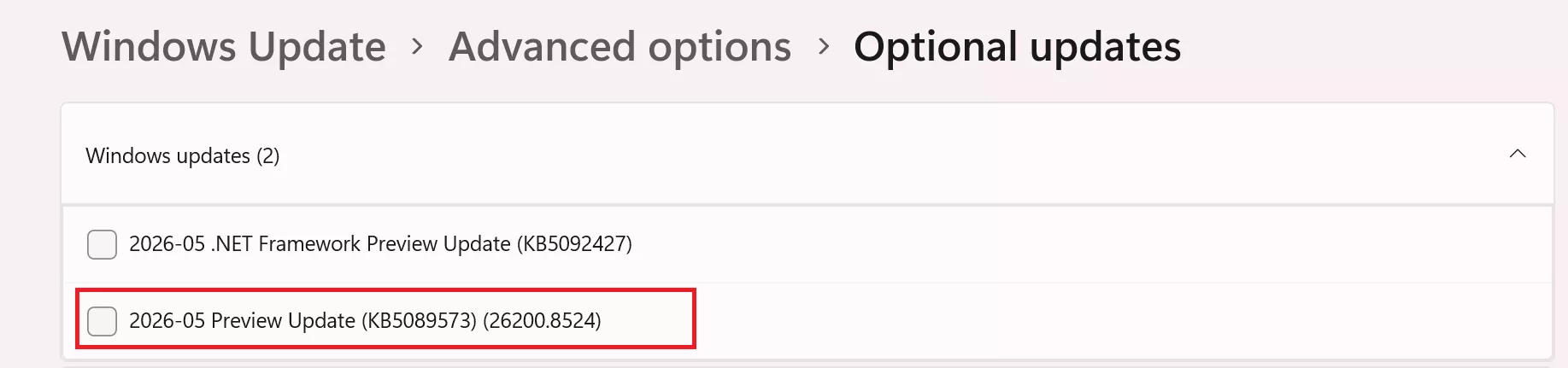
To get the update officially, open Settings > Windows Update > Advanced options > Optional updates, then install KB5089573. The same changes should arrive more broadly with the next Patch Tuesday security update.
Users can force-enable LLP right now using ViveTool, though that remains an unofficial method. After installing KB5089573, download ViveTool (you can do it safely right here), extract it to C:\ViveTool (in this example), open Command Prompt as administrator, run cd C:\ViveTool, then enter vivetool /enable /id:58989092 and restart the PC. There is no standard Settings toggle for LLP; once Microsoft enables it by default on your device, it should simply run in the background.

Permalink to story:

 
Congrats Windows on becoming a bit more modern and adopting a long-used trick by other OS's.

Can't believe this wasn't in 10-20 years ago already...
Pretty sure win10 and intel turbo boost allowed this behaviour back when I first got my current rig in 2017. No wonder win11 felt slow in comparison.
 
Pretty sure win10 and intel turbo boost allowed this behaviour back when I first got my current rig in 2017. No wonder win11 felt slow in comparison.
Do you know if it was an Intel software thing then? I feel like if it was a native Windows thing it would've been ported over...

It just seems so obvious to implement and keep as a feature now that it's pointed out...
 
I installed it, And it reset my default browser to Edge, Otherwise I can't really tell tbh.

Maybe the Start menu is a bit better.
 
I installed it, And it reset my default browser to Edge, Otherwise I can't really tell tbh.

Maybe the Start menu is a bit better.
Definitely has improved things on my machine - hovering over the taskbar icons has a much faster response time and my CPU boosts a little bit each time I do it (start menu causes a 0.5GHz boost). So yes definitely an update worth installing. Now to have a look around and see what is broken (it is a windows update after all).
 
I believe the CPU is already boosting its clockspeed when launching any applications. So I am not sure if this is pushing for higher clockspeed to make it 'more responsive". Having said that, this may likely impact battery life on laptops depending on the conditions that will trigger this boost.
 
Congrats Windows on becoming a bit more modern and adopting a long-used trick by other OS's.

Can't believe this wasn't in 10-20 years ago already...
Actually it was, at least after a fashion. All the bloat,the garbage trials, and anything M$ wanted to impress you with, was set running in the start menu..

Of course, it stunted boot times a bit, but M# figured you's blame the computer manufacturer for that. "This machine feels a bit sluggish", meh, who cares.
 
I just spent an entire day trying to figure out why my machine was stuck in a continual reboot loop. BE CAREFUL with this update!!! On some of my machines it is ok but on a new AMD system it caused boot loop.
 
I believe the CPU is already boosting its clockspeed when launching any applications. So I am not sure if this is pushing for higher clockspeed to make it 'more responsive". Having said that, this may likely impact battery life on laptops depending on the conditions that will trigger this boost.
This is more to do with windows behaviour rather than launching any particular app - as I mentioned above the start menu, hover over and right click context menus are more responsive and you see the jump in CPU clock when doing any of the above. Seems the win11 behaviour of treating all windows functions as "background tasks" limited its responsiveness - note though I only have full cores in my machine no e-cores or lp-cores so no idea if this behaviour is gated to use p-cores as the boosts on the other two types are underwhelming.
 
The fact that phones, macOS, and Chrome OS have been doing aggressive frequency boosting on UI interactions for years and Windows is only now catching up says a lot about how long the Windows shell has been operating on autopilot. The Start menu feeling sluggish on a "Core Ultra" 9 is genuinely embarrassing.
 
Microsoft procedure:
Option A: make AI & extra bloat optional and take time to optimize the code to be light and fast, while saving even more energy and making the system cooler

Option B: maintain all the AI & bloat, but make the CPU speed up aggressively to cope with that negative code weight, making the system use more energy and generate more heat

Microsoft team: definitely option B! We maintain our info stealing code, no waste of time and money optimizing the code and users will think we did a good thing.
 
Back