

The free version of HelpNDoc lets you to easily create the most amazing books, help files, user manuals and documentations by generating CHM help files, responsive HTML web-sites, PDF and Word documents, mobiles web-sites for iPhone and Android, ePub and Kindle eBooks, Markdown documents as well as Qt Help files painlessly... And much more!
HelpNDoc is available completely free for personal use and evaluation purposes: you can use the full version of HelpNDoc for as long as you want. Most features are available and enabled, there are no hidden fees or registration process and it doesn't contain any virus, spyware or malware of any kind. The only restriction is that the Personal Edition of HelpNDoc or its generated files can't be used for profit: only personal non-lucrative work and evaluation purposes are permitted by the license.
A discreet banner is added in the generated documentation to remind that it has been created by the Personal Edition of HelpNDoc, and some features are not available. To unlock those features, remove the banners and use HelpNDoc for commercial purposes, you might consider ordering a full version of HelpNDoc.
What's New
We are pleased to announce the release of HelpNDoc 10.8, a major update that opens new possibilities for AI-assisted documentation workflows. This version introduces a built-in Model Context Protocol (MCP) server, enabling compatible external AI clients to inspect and manage the project currently open in HelpNDoc.
HelpNDoc 10.8 also significantly expands the tools available to its built-in AI Assistant. Topics, keywords, tags, statuses, library items, project properties, and parts of the HelpNDoc user interface can now be inspected and managed through a consistent set of purpose-built tools. These capabilities are shared with the MCP server, giving technical writers the choice of working with HelpNDoc's integrated AI Assistant or a compatible external AI client.
Beyond AI integration, this release adds the ability to export individual topics directly to HTML and PDF, improves scripting support for Markdown content and picture attributes, produces cleaner generated documentation, and includes important updates to project storage, application stability, high-DPI support, accessibility, compatibility, licensing, and API documentation.
Built-in MCP Server: Connect HelpNDoc to External AI Clients
HelpNDoc 10.8 includes a built-in MCP server that enables compatible external AI clients to inspect and manage the currently open HelpNDoc project.
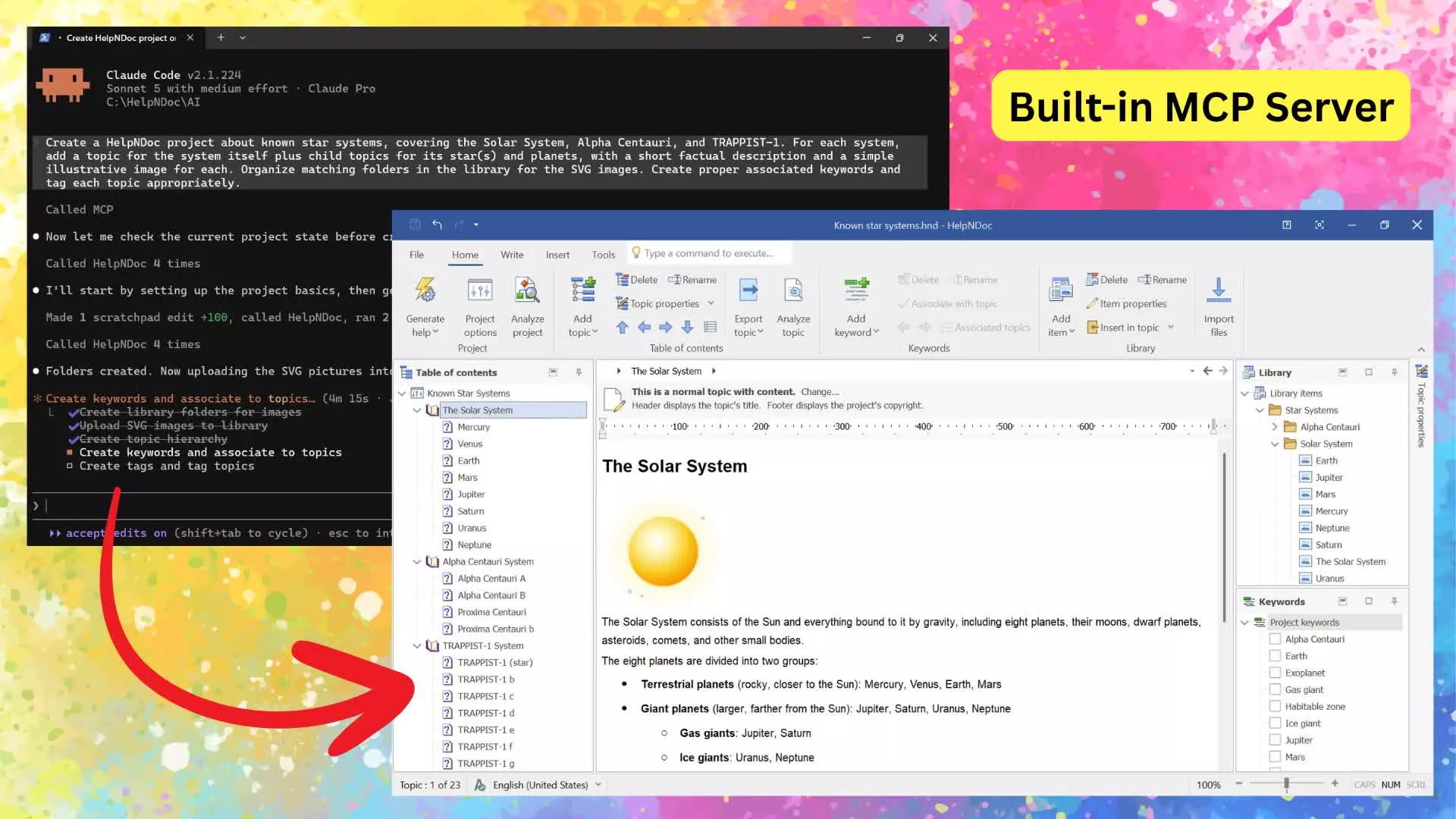
Artificial intelligence is becoming an increasingly useful part of technical writing, content maintenance, and documentation quality assurance. However, an AI client can only provide meaningful assistance when it has access to accurate project information and purpose-built operations.
HelpNDoc 10.8 addresses this with a built-in Model Context Protocol server. MCP is a standard that allows compatible AI clients to discover and use tools exposed by an application. In practical terms, it gives supported external AI tools a structured way to interact with the project currently open in HelpNDoc.
The MCP server can be started whenever you want to work with a compatible external AI client, then stopped just as easily when the task is complete.
Compatible clients such as Claude Code, OpenAI Codex, GitHub Copilot, and other MCP-compatible tools can connect to HelpNDoc and use the operations it provides. Depending on the requested task, an AI client can inspect project metadata, navigate the table of contents, read or replace topic content, maintain keywords and tags, manage library items, update statuses, reorganize project structures, and perform other supported content-management actions.
This enables practical workflows that go far beyond generating isolated paragraphs. For example, an external AI client could:
- Audit an existing project for quality and missing information. It could inspect the table of contents, topic content, statuses, keywords, build tags, and reusable assets to identify incomplete sections, inconsistent organization, missing cross-references, outdated metadata, or topics that may be excluded from the wrong builds. It could then summarize the findings and navigate HelpNDoc directly to the areas that need attention.
- Improve and reorganize an established documentation project. It could review selected topics, rewrite unclear passages, add missing explanations, standardize terminology, update reusable snippets or variables, and reorganize topics or keywords where the current structure is difficult to follow. The client could also apply the appropriate statuses and build tags so the improved content fits the project's review and publishing workflow.
- Create a new documentation project from a software interface screenshot. Starting from screenshots of an application's windows, dialogs, and controls, it could propose a table of contents, create the corresponding topics, and draft initial instructions based on the visible user interface. It could then place the topics in the correct hierarchy, add reusable pictures to the Library, and open each new topic in HelpNDoc for review and refinement.
- Go much further with the complete HelpNDoc toolset. These examples represent only a small selection of the available possibilities. Consult the HelpNDoc AI and MCP tools documentation to explore every available tool and learn how compatible AI clients can use them.
The result is a flexible bridge between HelpNDoc and the growing ecosystem of MCP-compatible AI clients. Technical writers can continue using their preferred authoring environment while bringing external AI tools into project inspection, content creation, maintenance, and review workflows.
