
openSUSE offers Leap, an LTS-style distribution that shares the code base SUSE Linux Enterprise (SLE), effectively making Leap a non-commercial version of its enterprise-grade operating system. Users that prefer more up-to-date free software can use its rolling release distribution Tumbleweed. Users can also use the Open Build Service. Moreover, the flexibility of openSUSE makes it easy to re-purpose for specific goals like running a web- or mail server.
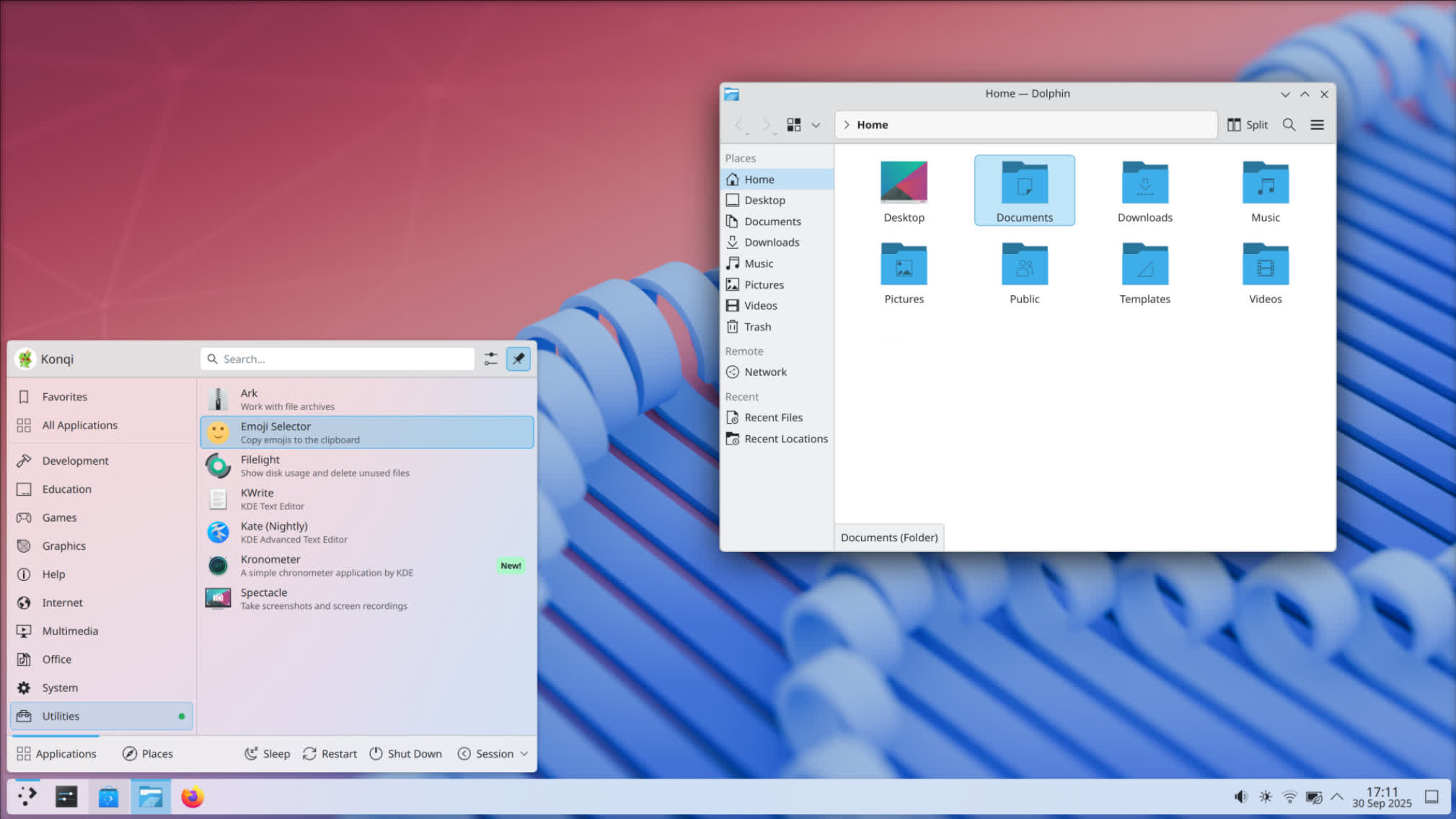
Like most Linux distributions, openSUSE includes both a default graphical user interface (GUI) and a command line interface option. Users of openSUSE may choose several desktops environments GUIs like GNOME, KDE, Cinnamon, MATE, LXQt, Xfce. openSUSE supports thousands of software packages across the full range of free software / open source development.
How is Leap different from openSUSE Tumbleweed?
Leap follows a fixed release cycle with regular updates and security patches, focusing on stability and tested packages. Tumbleweed, on the other hand, is a rolling release that always delivers the latest software versions but may be less stable.
Can I use openSUSE Leap for professional or enterprise environments?
Yes, Because Leap shares its code base with SUSE Linux Enterprise, it offers enterprise-grade stability and compatibility. This makes it suitable for production servers, cloud deployments, and business desktops.
What is YaST and why is it important in Leap?
YaST (Yet another Setup Tool) is openSUSE's system management framework. It provides both graphical and command-line tools to configure almost every aspect of the system, including network, storage, software repositories, virtualization, and security settings.
Can I upgrade from one Leap version to the next without reinstalling?
Yes, openSUSE Leap supports online upgrades. You can update repositories to the new version and use zypper to perform a system upgrade. However, it's recommended to carefully read the official release notes and back up important data before upgrading.
System Requirements
- 2 Ghz dual core processor or better
- For x86_64: microarchitecture level x86-64-v2 or higher
- For ppc64le: POWER9 or higher
- For s390x: z14 or higher
- 2GB physical RAM + additional memory for your workload
- Over 40GB of free hard drive space
- Either a DVD drive or USB port for the installation media
- Internet access is helpful, and required for the Network Installer
The operating system is compatible with a wide variety of hardware on numerous instruction sets including Arm-based single-board computers. Examples include the Raspberry Pi 3 and Pine64 on the ARMv8 platform also known as aarch64, the Banana Pi and BeagleBoard on the ARMv7 instruction set, and the first iteration of the Raspberry Pi on the ARMv6 ISA. RISC-V, PowerPC (PPC64 and PPC64le) and S390 are supported as well.
Many desktops, three by default
The openSUSE contribution process empowers desktop development for everybody, so you have the choice to pick your favourite one in the installer. We actively feature three desktop environments, and offer even more in the expanded software view within the installer.
Everything is transparent
From start to finish, every package which goes into the distributions has all of its sources and build scripts openly visible for everyone to see. Doubtful of a source? Just check it out on the build service.
Free software? Your choice
Packages in the distributions are divided into free and non-free repositories. Don't want to use non-free packages? You can easily disable the non-free repository. It's your choice, not ours.
Welcoming contributions
We try our best to please the community, and we can only make this happen when the community is vocal about what they need. That's why we ensure contributing is as easy as possible.
YaST, the best choice for the user
One of the greatest system configuration tools helps you, the user, to setup every single aspect of your system. You no longer need to go through a plethora of configuration scripts or enter dubious commands to get the system setup as you need it.
The goals of the openSUSE project are:
- Make openSUSE the easiest Linux distribution for anyone to obtain and the most widely used open source platform.
- Provide an environment for open source collaboration that makes openSUSE the world's best Linux distribution for new and experienced Linux users.
- Dramatically simplify and open the development and packaging processes to make openSUSE the platform of choice for Linux hackers and application developers.
With the launch of the openSUSE project, openSUSE is now developed in an open model - public development builds, releases, and sources will be posted frequently here and you will have access to our Bugzilla database for defect reporting. You can also sign up on special interest mailing lists to make sure that you are always getting the most recent news on the openSUSE project and the openSUSE distribution.
openSUSE tools:
- Open Build Service (OBS)
- Our build tool, building all of our packages as well as ones for SUSE Linux Enterprise, Arch, Debian, Fedora, Scientific Linux, RHEL, CentOS, Ubuntu, and more.
- openQA
- Automated testing for *any* operating system, that can read the screen and control the test host the same way a user does.
- YaST
- The best/only comprehensive Linux system configuration & installation tool.
- Kiwi
- Create Linux images for deployment on real hardware, virtualization, and now even container systems like Docker. Kiwi is the engine that builds the openSUSE release images.
What's New
Contributors to openSUSE had a great time at the openSUSE Conference in June. Even as many of them gathered in Nuremberg to discuss how to drive development of the rolling release forward, software package updates for openSUSE Tumbleweed kept rolling out.
June brought major version bumps across the stack with Samba jumping to 4.24.3 carrying seven Common Vulnerabilities and Exposures fixes, MariaDB advancing from 11.8 to 12.3.2, and Flatpak reaching 1.18.0.
KDE Gear 26.04.2 landed as the second bugfix release of the series, and GStreamer progressed to 1.28.4 with security and playback fixes. OpenSSL received a massive security update and both WebKitGTK and the Linux kernel received extensive rounds of vulnerability fixes.
The second half of June was headlined by KDE Plasma 6.7.0 and KDE Frameworks 6.27.0. NetworkManager advanced to 1.56.1 and python-cryptography reached 49.0.0 with post-quantum ML-DSA signing support. FreeRDP 3.27.1 raised the minimum TLS version to 1.2 while addressing multiple CVEs. VirtualBox 7.2.10 added Linux kernel 7.1 support and Wayland clipboard sharing.
As always, be sure to roll back using snapper if any issues arise.
New Features and Enhancements
Samba 4.24.3: A major version bump from the 4.23 series brings a major security refresh with several CVE fixes. Notable changes include a fix for unauthenticated remote code execution in the AD DC, SAMR remote code execution, and group policy certificate enrollment without validation.
Flatpak 1.18.0: This major update improves error handling and printed output of flatpak-coredumpctl, adds support for the AMD vendor-specific compute interface (/dev/kfd) via DRI device permissions, and improves startup time for fish shell integration. Ignoring system bus failures in parental controls check and replacing deprecated GTimeVal with g_get_real_time() round out the release.
GPGME 2.1.0: This update introduces new flags is_de_vs and beta_compliance for encryption results, a new decryption flag GPGME_DECRYPT_SESSION_HASH, and support for setting CMS signature attributes via gpgme_sig_notation_add. A new context flag export-filter is also added. Several locking and passphrase handling fixes are included, along with the companion gpgmepp 2.1.0 and qgpgme 2.1.0 updates.
MariaDB 12.3.2: A major version jump from 11.8.8 brings the database server to the 12.3 series. This release carries multiple security fixes alongside a changelog of improvements documented in the upstream release notes.
KDE Gear 26.04.2: Dolphin fixes a dangling pointer access in SettingsDataSource and a swapActiveView crash. Kate corrects working directory handling when invoking git and fixes urlinfo for relative files. Konsole fixes a copy command causing unwanted scroll-to-bottom. Kitinerary adds extractors for BDŽ (Bulgarian State Railways) PDF tickets and Condor PKPass. KOrganizer fixes recurring event start-end time display and Kleopatra now requires GpgME 1.24.2 (at the beginning of the month in Tumbleweed updated to version 2.1.0).
GStreamer 1.28.4: The rtspsrc2 element receives major feature expansion with support for SRTP, authentication, HTTP tunnelling, keep-alive, TLS validation, and latency configuration. Wavpack audio receives channel and channel-mask related fixes. Debug logging performance is improved, and memory leaks across caps allocation, buffer pools, and the GL upload path are resolved. The d3d12decoder gets a fix for Qualcomm GPUs on ARM64 Windows.
GraphicsMagick 1.3.47: DPX subsampling validation is corrected to avoid divide-by-zero. The JNG writer properly handles NULL returns from ImageToBlob(), and the MNG writer enforces a 256-color palette limit. The PS/PS2/PS3 coders enforce dimension limits to prevent Ghostscript-based denial-of-service. SVG gains validations for element id syntax and rejects attribute values with single quotes. The XCF reader reports errors for layerless images and fixes two unsigned integer overflow cases.
fwupd 2.1.4 & 2.1.5: The firmware update daemon received two updates during June. Version 2.1.4 adds support for Compal BIOS version format, NixOS quickstart, encrypted swap detection below device-mapper, and removes the flashrom plugin. Dozens of bounds checks and validation fixes are included across Dell dock, Novatek, Goodix MoC, Synaptics RMI, CCGX DMC, and other device updaters. The 2.1.5 follow-up fixes a msgpack regression for Huddly cameras, adds Elan touchscreen support, and expands the netlink socket buffer to prevent packet loss during event floods.
SDL3 3.4.10: This update adds depth texture array support in the GPU API, GameInput v3 controller sensor support, rumble support for the new Steam Controller, and GameCube rumble support when the adapter is in PC mode. Several new controllers are supported including the GameSir Super Nova and PDP Afterglow Wave Wireless. The X11 Synchronization Extension is disabled by default and can be re-enabled via SDL_HINT_VIDEO_X11_ENABLE_XSYNC_EXT.
Key Package Updates
Linux kernel 7.0.11 & 7.0.12: The kernel received two updates during June with a heavy security focus. Version 7.0.11 carried an extensive set of CVE fixes spanning BPF (end-of-list detection in cgroup storage, negative CO-RE accessor indices), netfilter (divide-by-zero in nfnetlink_osf, IEEE1394 ARP payload handling, arp_tables), ALSA USB audio UAC2 rate parsing, and more. Version 7.0.12 added fixes for NFC LLCP use-after-free, xfrm underflow, netfilter ebtables OOB read, nf_tables dst corruption, tun/tap XDP page handling, ethtool RSS context handling, ALSA HDA cs35l56 and OSS setup UAF, and HSR OOB access in supervision frame handling.
WebKitGTK 2.52.4: A security-focused update fixing 16 CVEs in the web rendering engine. The release adds support for half-width fonts, improves content filter compilation, improves handling of out-of-disk-space conditions in the NetworkProcess cache, fixes scrollbar painting during width changes, fixes playback of certain YouTube videos with low frame rates, and addresses several crashes and rendering issues.
ImageMagick 7.1.2.25: A security-focused update rejecting malformed HDR, PGX, RLA, FITS, SGI, and DDS files with invalid dimensions. Polynomial distortion argument count validation is added, and an out-of-bounds read of GPS rationals in GetEXIFProperty is fixed.
Mesa 26.1.2: The update resolves graphical corruption on older Intel integrated GPUs (e.g., i5-2400) introduced in 26.1.0 and fixes a crash in ANV's ASTC texture handling on Xe3 when floating-point exceptions are enabled. Vulkan drivers see important corrections: RADV adds workarounds for Forza Horizon 6 and Crimson Desert, ANV restores Android external format compatibility in debug builds, and PanVK/Turnip improve memory reporting and depth state handling. More details are available in the Mesa 26.1.2 release notes.
mutter 50.2: Fixes size increases when quickly unmaximizing windows by drag, cursor position hint for Xwayland with scaling, fullscreening of edge-tiled windows, tablet tool cursor hotspot scaling, alt-tab with sloppy/mouse focus, and broken switch-monitor mapping on stylus buttons. Support for version 2 of the text_input_v3 protocol is implemented, and DND with tablets now works across surfaces.
flatpak 1.18.0: This update adds support for the AMD compute interface (/dev/kfd) via the DRI device permission, enabling GPU compute access for Flatpak applications on AMD hardware. The output of flatpak update is improved with clearer failure causes, and flatpak-coredumpctl gains better error handling. Fish shell integration startup time is improved. Bug fixes include ignoring system bus failures in parental controls checks and replacing deprecated GTimeVal usage.
cups-filters: The cups-browsed service is now provided as a separate sub-package, allowing users to uninstall it to avoid the security risk of automatic print queue creation from any DNS-SD announcement on the local network.
libzypp 17.38.13: Two security fixes in the package management library. A path= entry in .repo files must not refer to a location outside the repo (CVE-2026-44942), and repo keyhint must denote a filename not a path (CVE-2026-44941).
wicked 0.6.79: Fixes an indirect remote shell command injection via unsanitized DHCP strings and leaseinfo dump (CVE-2026-44932). Single-quote escaping is added to leaseinfo dump output, and posix-tz-dbname processing now permits only valid characters per RFC 4833.
Security Updates
OpenSSL 3:
- CVE-2026-45447: Fixes a heap use-after-free in PKCS7_verify() that could lead to memory corruption.
- CVE-2026-45446: Addresses incorrect tag processing for empty messages in AES-GCM-SIV and AES-SIV modes.
- CVE-2026-42770: Resolves FFC-DH peer validation using attacker-supplied q, potentially weakening key exchange.
- CVE-2026-45445: Fixes AES-OCB IV being ignored on the EVP_Cipher() path.
- CVE-2026-42767: Addresses a NULL pointer dereference in CRMF EncryptedValue decryption.
- CVE-2026-42768: Resolves a multi-recipient Bleichenbacher oracle in CMS_decrypt() and PKCS7_decrypt().
- CVE-2026-42769: Fixes trust-anchor substitution via cert/issuer typo in CMP rootCaKeyUpdate.
- CVE-2026-42766: Addresses a possible NULL dereference in password-based CMS decryption.
- CVE-2026-34183: Resolves unbounded memory growth in the QUIC PATH_CHALLENGE handler.
- CVE-2026-42764: Fixes a NULL pointer dereference in QUIC server initial packet handling.
- CVE-2026-34182: Addresses CMS AuthEnvelopedData processing that could accept forged messages.
- CVE-2026-9076: Fixes an out-of-bounds read in CMS password-based decryption.
- CVE-2026-7383: Resolves a possible heap buffer overflow in ASN.1 multibyte string conversion.
- CVE-2026-34180: Addresses a heap buffer over-read in ASN.1 content parsing.
Linux kernel 7.0.11:
- CVE-2026-45838: Fixes end-of-list detection in BPF cgroup storage.
- CVE-2026-45839: Addresses negative CO-RE accessor indices in BPF.
- CVE-2026-45840: Resolves an upcall PID array size issue in openvswitch.
- CVE-2026-45841: Fixes a divide-by-zero in netfilter nfnetlink_osf.
- CVE-2026-45842: Addresses VJ receive packet rejection on SLIP instances.
- CVE-2026-45843: Resolves compressed decode bounds in SLIP.
- CVE-2026-46242: Fixes an eventpoll struct issue in ep_remove.
- CVE-2026-45844: Addresses IEEE1394 ARP payload handling in netfilter arp_tables.
- CVE-2026-45845: Fixes a NULL pointer dereference in net/sched taprio.
- CVE-2026-45846: Resolves a NULL pointer dereference in bareudp.
- CVE-2026-43494: Fixes zerocopy page pin reset in net/rds.
- CVE-2026-46300: Addresses shared frag marker preservation in skbuff.
- CVE-2026-43503: Resolves shared frag marker propagation through skbuff.
- CVE-2026-46243: Fixes SMB client rejection of userspace cifs.spnego descriptions.
- CVE-2026-46018: Addresses ALSA USB audio UAC2 rate parsing at MAX_NR_RATES.
- CVE-2026-45993: Resolves a LoongArch spectre boundary for syscall dispatch.
- CVE-2026-46006: Fixes a u32 overflow in Nouveau pushbuf relocation.
- CVE-2026-46041: Addresses a sleep-in-atomic context in greybus gb-beagleplay.
- CVE-2026-46022: Fixes an OOB MMIO read in ibmasm.
- CVE-2026-45994: Addresses OOB reads in ibmasm command file write.
- CVE-2026-46064: Resolves a heap over-read in ibmasm I2O message send.
- CVE-2026-46100: Fixes an AFS mmap_prepare revert.
- CVE-2026-46017: Addresses deferred split queue races during migration in mm.
- CVE-2026-46080: Fixes transaction splits in OCFS2 DIO completion.
- CVE-2026-46097: Addresses a use-after-free in edt-ft5x06 input debugfs.
- CVE-2026-46089: Fixes partial discard endio handling in zram.
- CVE-2026-46092: Addresses a PCI upstream bridge existence check in rtw88 WiFi driver.
- CVE-2026-46069: Fixes a use-after-free in mwifiex adapter.
- CVE-2026-46036: Addresses VFIO CDX serialization of device IRQ setting.
- CVE-2026-46034: Resolves a NULL pointer dereference in VFIO CDX interrupt handling.
- CVE-2026-46021: Fixes thermal zone governor cleanup.
- CVE-2026-45996: Addresses a use-after-free on SPI IMX unbind.
- CVE-2026-46074: Fixes memory leaks on SPI CH341 probe failures.