

Mumble was the first VoIP application to establish true low latency voice communication over a decade ago. But low latency and gaming are not the only use cases it shines in.
We heard from users who record podcasts with our multi-channel audio recorder, players seeking realism with our positional audio in games, Eve Online players with huge communities of over 100 simultaneous voice participants (I bet they make good use of our extensive permission system ð), the competitive Team Fortress 2 community making us their required voice communication platform, hobby radio transmission users, and a variety of workplaces adapting Mumble to fit their needs - be it on-head mobile devices or communicating across countries or into airplanes.
Administrators appreciate Mumble for being able to self host and have control over data security and privacy. Some make use of the extensive permission system for complex scenarios (for example separating two groups but leaders being able to talk to both). Some love to provide their users with additional functionality with scripts making use of server APIs, or host music bots and the like that connect to the server. Those that have an existing user database often make use of authenticators to allow authenticating with existing account login data.
Features
Different user groups are interested in different capabilities and so we describe some of the features specific to each kind of user.
For End-Users
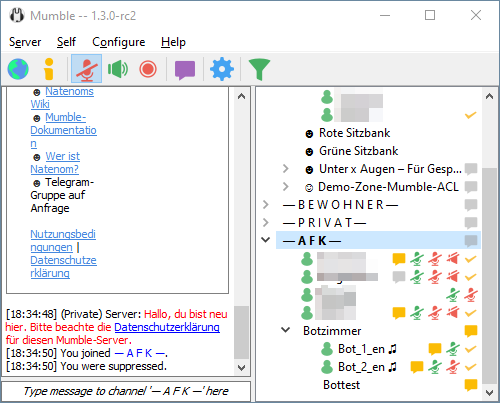
- Mumble Client
- Connected to a Server
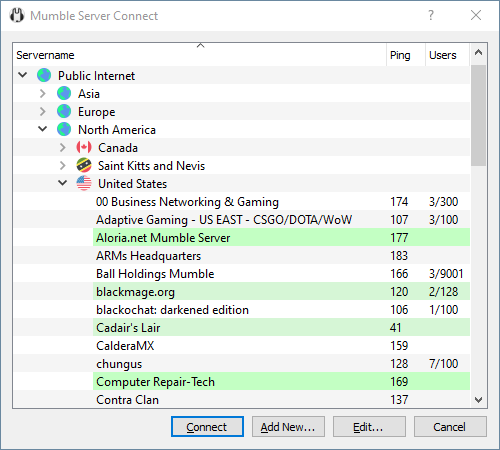
- Public Server List
- Low-latency - great for talking and gaming
- Stay private and secure
- always encrypted communication
- Public/private-key authentication by default
- Recognize friends across servers
For gamers:
- In-game Overlay - see who is talking, FPS and the current time
- Positional audio - hear the players from where they are located in-game
- Wizards to guide you through setup, like configuring your microphone
To get started simply download, install and start Mumble and connect to a public server, or a specific one you know of.
For Administrators
- Libre software - no licensing hassle, caveats and limitations
- Open Source - open in security and technology, and open to extendibility
- Extensive user permission system (ACL)
- Extendible through Ice protocols
- Web interfaces - free choice of several community free software projects
- Channel viewers - even without direct Ice access, if the hoster provides the CVP, easily set up your channel viewer of choice
- Authenticators - to allow users to authenticate against an existing user database
- Custom chat commands and context (right click) menu entries
To get started you can check out our Server guide.
For configuration options see Murmur.ini and our documentation on third party administration software, scripts, and bots.
For Hosters
- Free software - no licensing hassle or cost
- Automatable administration through Ice middleware
- Low resource cost for hosting
- Very stable server software
- Free choice between official and third party server software
- Custom web-interfaces for users through Ice
- Or host one of the available free software web interfaces
- Provide users with channel viewer data (CVP) without giving control away
- Or empower the users by providing the Ice interface
To get started you can check out our Server guide.
What's New
Changes to some ACL behavior
Attention Server Administrators:
We have fixed a few ACL-related behaviors that we have determined to be bugs. This is why we are including them in this patch-release. If you have ACLs configured which were relying on that undesired behavior, you want to make sure to fix your ACL configuration when updating your server to this release. We assume the number of impacted servers will be minimal and adapting the ACLs in case your server is affected will be reasonably easy.
- Previously, both the Traverse and Write ACLs would be evaluated without taking the "in this channel" and "in sub-channels" context options into account. This is now fixed. You can now deny Traverse for sub-channels, while the channel you are defining the ACL in is still traversable. (#3579)
- Previously, in addition to normal ACL inheritance rules, the Write ACL would always be inherited from the parent channel. For consistency, this was removed. To prevent "ungovernable" channels, users who are granted Write on the root channel, will be able to Write in any channel of the server, no matter what these sub-channels configure. (#6512)
- Previously, the Register ACL was used to determine, if a client was able to see extended user information including user IP address and user-agent. This was changed to now require the Ban ACL. (#6697)
- Due to the client being able to uncheck both context option checkboxes in the ACL editor, admins could create "dangling" ACLs that were present, but had no effect. Starting with this release, clients will not be able to create these "dangling" ACLs. Existing "dangling" ACLs will not be affected by this unless they are modfied. (#6512)
Changelog
This is the full changelog for this release (changes relative to the Mumble 1.5.735 release).
Client
- Changed: Client-side max image width and height for better legibility (#6825)
- Fixed: Bug with default values for talking UI options (#6728)
- Fixed: Enable "Paste" action, if there is an image in clipboard (#6790)
- Fixed: Infinite loop and log spam on ALSA input device disconnection (#6702)
- Fixed: Limit size of images pasted in RichTextEditor (#6790)
- Fixed: Memory leaks due to BIO_NOCLOSE (#6604)
- Fixed: Message size limit bypass (#6875)
- Fixed: Missing theme changes on macOS (#6925)
- Fixed: Network packets of exactly max size are rejected (#6924)
- Fixed: Prevent local muted users from triggering attenuation (#6747)
- Fixed: Prevent unchecking both ACL context checkboxes (#6512)
- Fixed: Rare crash when using PipeWire (#6852)
- Fixed: Remove "Write" ACL parent channel inheritance (#6512)
- Fixed: Restart audio system when a Windows audio device we use reappears (#6777)
- Fixed: Shortcut data not being saved (#6832)
- Fixed: Specify version when loading/saving MainWindow state (#6584)
- Fixed: Text-To-Speech volume on macOS (#6896)
- Fixed: Update chat bar, if selected channel changes name (#6748)
- Fixed: Unlink active plugin before unloading (#6602)
- Fixed: Volume adjustment slider keyboard inputs (#6841)
Server
- Changed: Extended user stats now requires "Ban" ACL (#6700)
- Fixed: ACL parsing of "Traverse" and "Write" ACL (#6512)
- Fixed: Missing permission check on msgQueryUsers (#6916)
- Fixed: Network packets of exactly max size are rejected (#6924)
- Fixed: Prevent server startup when providing empty certificate files
- Fixed: Remove "Write" ACL parent channel inheritance (#6512)
Windows Installer
- Added: Bundle C++ redistributables on Windows (#6789) Many thanks to @sqwishy!
Known issues
- macOS binaries not being signed/notarized (overlay installer not signed) (#4263)
- Overlay blocked by BattleEye (Whitelisting request has been ignored)
- Overlay blocked by CS:GO Trusted Mode
