
In a year that's been dominated by next-gen hardware and shifting price points, one CPU continues to spark interest well beyond its launch window: AMD's Ryzen 7 5800X3D. Until now, we've barely featured it in 2025, so consider this a proper revisit.
This new benchmark series takes a focused look at how the 5800X3D scales with today's top-tier and upper-midrange GPUs, including Nvidia's RTX 5090 and 5080, as well as AMD's Radeon RX 9070 and 9060 XT 16GB.

Rather than casting a wide net across dozens of games, we've zeroed in on four titles. The reason is practical: generating detailed CPU and GPU scaling data is very time consuming, especially when tested across multiple resolutions and quality settings.
Each game was benchmarked at 1080p, 1440p, and 4K, using both medium and ultra presets. For every configuration, we ran four GPUs, collecting data from three benchmark runs to ensure consistency. That's 48 data points per game, enough to surface meaningful performance trends without overwhelming the analysis.
Including AMD's cards this time wasn't just about variety. With the RX 9070 gaining traction and the 9060 XT 16GB emerging as a strong value pick, it made sense to expand beyond the usual Nvidia lineup.

Comparing the RTX 5080 and Radeon RX 9070 also helps illuminate one lingering question: is driver overhead still holding certain setups back? Let's dive into the numbers.
Test System Specs
| CPU | Motherboard | Memory |
|
AMD Ryzen 7 9800X3D |
Gigabyte X670E Aorus Master [BIOS F37] | G.Skill Trident Z5 RGB 32GB DDR5-6000 CL30-38-38-96 Windows 11 24H2 |
| AMD Ryzen 7 5800X3D AMD Ryzen 5 5600 |
MSI MPG X570S Carbon MAX WiFi [BIOS 7D52v1B1] | G.Skill Ripjaws V Series 32GB DDR4-3600 CL14-15-15-35 Windows 11 24H2 |
| Graphics Card | Power Supply | Storage |
| Nvidia GeForce RTX 5090 / 5080 AMD Radeon RX 9070 / 9060 XT 16GB |
Kolink Regulator Gold ATX 3.0 1200W | TeamGroup T-Force GE Pro M.2 PCIe Gen5 NVMe SSD 4TB |
| GeForce Game Ready Driver 580.88 WHQL AMD Radeon Adrenalin 25.6.3 |
||
Benchmarks
Rainbow Six Siege X
1080p - Medium
Starting with Rainbow Six Siege at 1080p using the medium quality preset, we find that with the RTX 5090, the 5800X3D is just 15% faster than the 5600 and 13% slower than the 7600X. It's a similar story with the RTX 5080, and it's not until we drop down to the RX 9070 that performance roughly matches the 7600X.
That said, when using the Radeon RX 9070, we find something rather odd: both the Ryzen 5 and 5800X3D become faster when paired with what is a slower GPU – evidenced by the 9800X3D results. In the case of the 7600X, it is 10% faster using the RX 9070 compared to the RTX 5090, while the 5800X3D is 25% faster.

Even crazier are the Ryzen 5 5600 results. This CPU is 32% faster when paired with the Radeon GPU, jumping from 337 fps to 446 fps – an impressive and highly repeatable increase. These findings align with examples we first observed four years ago, where the GeForce overhead issue in DX12 games could reduce performance by over 20%.
Also, as a side note: if you're wondering why we didn't use the 9070 XT, don't worry. The RX 9070 can clearly exceed 446 fps, as seen in the 7600X and 9800X3D data. A faster Radeon GPU would not have changed the Ryzen 5 5600 results – we've simply reached the CPU's performance ceiling with Radeon hardware.
So, when you see these unusual results, rest assured it's not a mistake – it highlights the overhead issue that can occur with GeForce GPUs in heavily CPU-limited scenarios.
1440p - Medium

Increasing the resolution to 1440p while maintaining the medium preset, we find that with the RTX 5090, the 5800X3D is 7% slower than the 7600X and 31% slower than the 9800X3D. It's also just 14% faster than the 5600, and we must say – it's impressive how well the old Ryzen 5 processor is holding up here.
Downgrading to the RTX 5080 results in mostly GPU-limited data for the 5800X3D, 7600X, and 9800X3D. For example, the 5800X3D is now just 4% slower than the 7600X and 7% slower than the 9800X3D.
Then, with the Radeon RX 9070, performance is identical across the board due to the strong GPU limitation – same goes for the 9060 XT 16GB.
4K – Medium

At 4K with medium settings, we're GPU-limited in all scenarios with the 5800X3D, meaning the newer AM5 processors don't offer additional performance here.
1080p – Ultra

Switching to the ultra+ preset at 1080p, the 5800X3D is again slower than the 7600X – 8% slower using the RTX 5090 and just 3% with the 5080. If you're upgrading from the 5800X3D, you'd really need to consider the 7800X3D or 9800X3D, and even then, only if you're using a high-end GPU or lower quality settings to notice a meaningful difference.
1440p – Ultra

At 1440p, the 5800X3D quickly runs into GPU limitations. Performance is heavily GPU-bound when using the RTX 5080, RX 9070, and 9060 XT 16GB. Even with the RTX 5090, the 5800X3D is just 4% slower than the 7600X and 8% behind the 9800X3D.
4K – Ultra

At native 4K with maximum in-game settings, CPU performance is no longer a factor – at least within reason. The Ryzen 5 5600 manages to match the 9800X3D, even when paired with the RTX 5090.
Kingdom Come: Deliverance II
1080p - Medium

The Kingdom Come: Deliverance II results differ from what we saw in Rainbow Six Siege. Here, the 5800X3D is slightly faster than the Ryzen 5 7600X, delivering 9% better performance with the RTX 5090. That said, it is still 26% slower than the 9800X3D, but a significant 39% faster than the Ryzen 5 5600.
Switching to the RTX 5080 heavily reduces the 9800X3D's performance due to GPU limitations, leaving the 5800X3D just 6% slower. Compared to the 5600, the 5800X3D is 33% faster – a sizable gain. Dropping to the RX 9070 brings performance to a GPU-limited state, and the same applies with the 9060 XT 16GB.
1440p – Medium

At 1440p, GPU load increases, yet the 5800X3D is still 14% slower than the 9800X3D when paired with the RTX 5090. However, it also beats the 5600 by a 36% margin.
These margins shrink significantly when switching to the RTX 5080, with all four CPUs delivering similar average frame rates. The 9800X3D still has strong 1% lows. Dropping to the RX 9070 or 9060 XT 16GB results in a fully GPU-limited scenario.
4K – Medium

At 4K, even with medium settings, performance is largely GPU-limited. Using the RTX 5080, RX 9070, and 9060 XT 16GB results in fully GPU-bound performance. With the RTX 5090, there's some variation, but the 5800X3D is only 4% slower than the 9800X3D, so the overall experience remains consistent.
1080p – Ultra

The 5800X3D performs well in Kingdom Come: Deliverance II at ultra settings, coming in just 8% behind the 9800X3D at 1080p when both are paired with the RTX 5080. That said, dropping to the RTX 5080 sees both X3D CPUs deliver very similar results.
1440p – Ultra

At 1440p, performance differences between the 9800X3D and 5800X3D become negligible – even with the RTX 5090, the older AM4 processor is just 3% slower.
4K – Ultra

At 4K, performance becomes virtually identical, especially when using the RTX 5080, RX 9070, or 9060 XT 16GB.
Marvel Rivals
1080p - Medium

Moving on to Marvel Rivals, we begin at 1080p using the medium quality preset. With the RTX 5090, we see a wide range of results. The 5800X3D is just 7% slower than the 7600X when comparing average frame rates, but a more notable 14% slower when looking at 1% lows. That said, the 5800X3D was still 36% faster than the Ryzen 5 5600, though also a massive 33% slower than the 9800X3D.
The gap to the 9800X3D narrows significantly when downgrading to the RTX 5080, where we hit a cap of 183 fps with the Zen 5 X3D chip. In this case, the 5800X3D was just 8% slower, while remaining 42% faster than the 5600.
When switching to the RX 9070, performance between the 5800X3D, 7600X, and 9800X3D levels out due to a strong GPU bottleneck.
1440p – Medium

Increasing the resolution to 1440p produces fairly typical results. The only meaningful performance differences are seen with the RTX 5090, where the 5800X3D is 5% slower than the 7600X and 19% slower than the 9800X3D. With the RTX 5080, RX 9070, and 9060 XT 16GB, all three CPUs delivered identical performance.
4K – Medium

At native 4K, there's no real difference between the 5800X3D, 7600X, or 9800X3D. However, the 5800X3D was still up to 23% faster than the Ryzen 5 5600 when using the RTX 5090.
1080p – Ultra

Switching to the Ultra preset increases GPU load, but even so, at 1080p with the RTX 5090, the 5800X3D was still 32% faster than the 5600, though 8% slower than the 7600X and 24% slower than the 9800X3D. Most of these margins are eliminated when dropping down to the RTX 5080, where the 9800X3D, 7600X, and 5800X3D perform within a few frames of each other.
1440p – Ultra

At 1440p with Ultra settings, the 5800X3D is 34% faster than the 5600 when using the RTX 5090. It's also just 6% slower than the 7600X and 10% behind the 9800X3D.
However, with the RTX 5080, there's no performance difference between the 5800X3D, 7600X, and 9800X3D, as we're GPU-limited at 94 fps, and all three CPUs are capable of delivering that level of performance. Needless to say, performance is also fully GPU-limited with the RX 9070 and 9060 XT 16GB.
4K – Ultra

At native 4K, we're unsurprisingly heavily GPU-limited. The 5800X3D and 9800X3D deliver identical performance, even with the RTX 5090, as frame rates are capped at just 90 fps under these conditions.
Warhammer 40,000: Space Marine 2
1080p - Medium

Now for the Space Marine 2 data, again starting at 1080p with the medium preset. This is a very CPU-heavy game, making it particularly useful for measuring CPU performance. Using the RTX 5090, the 5800X3D was just 2% slower than the 7600X, with both CPUs delivering similar frame rates around 90 fps. However, the 9800X3D hit 130 fps, meaning the 5800X3D was 31% slower in this CPU-bound scenario.
Similar margins were observed with the RTX 5080. But with the RX 9070, the Ryzen 5 5600 was 11% slower than the 5800X3D – compared to 18% slower with the RTX 5080 – due to the added CPU overhead from GeForce GPUs.
Even with the 9060 XT 16GB, the 5800X3D was still 13% faster than the 5600 and 22% slower than the 9800X3D, showing how demanding this title is on CPUs.
1440p – Medium
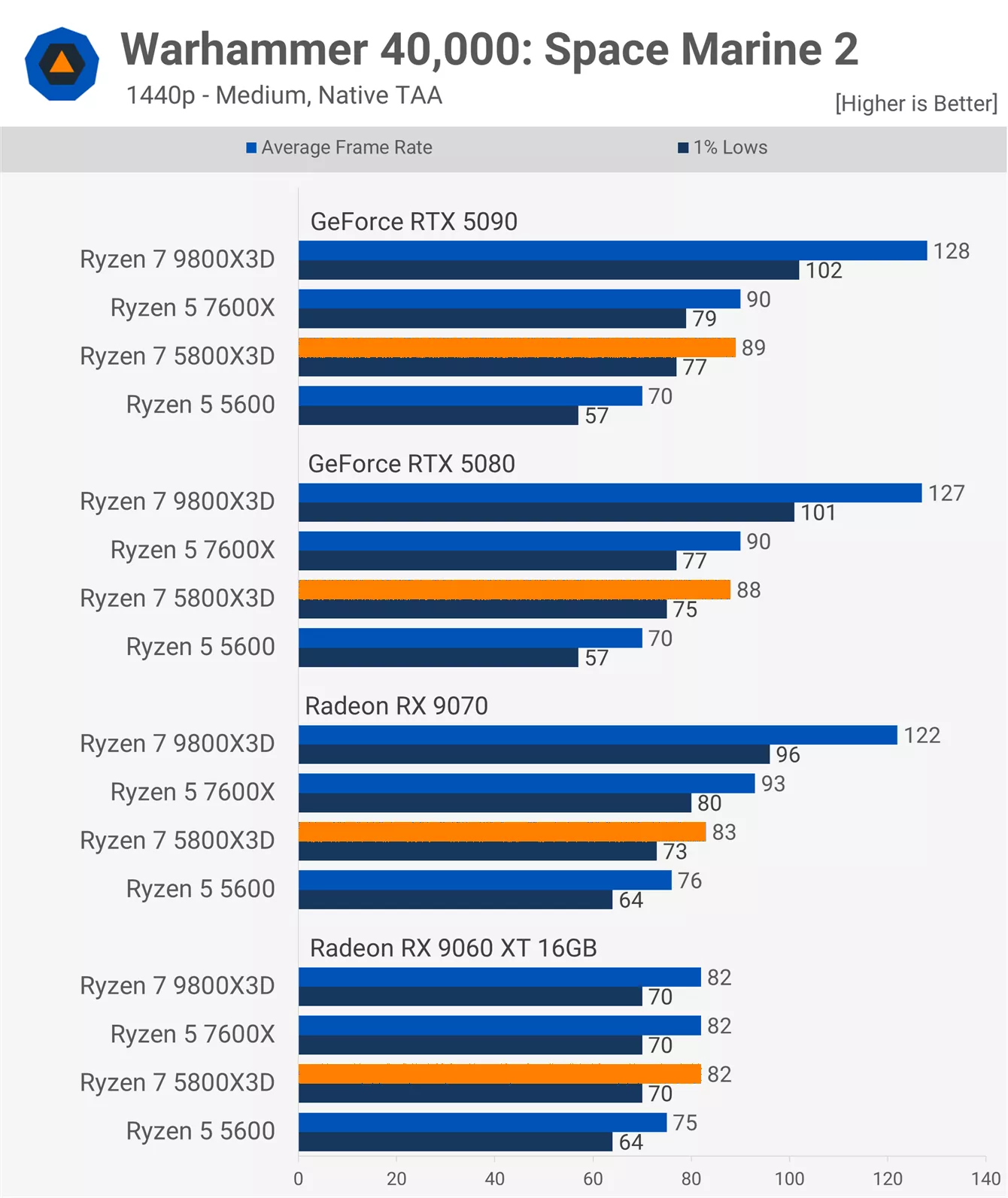
At 1440p, we still see a broad range of results. The 5800X3D and 7600X perform similarly, making the 5800X3D 27% faster than the 5600 but also 30% slower than the 9800X3D. These margins were consistent with both the RTX 5090 and 5080.
Switching to the RX 9070 helps the Ryzen 5 5600 close the gap, resulting in the 5800X3D being just 9% faster. Interestingly, the 5800X3D now falls 11% behind the 7600X. By the time we drop down to the 9060 XT 16GB, the 5800X3D, 7600X, and 9800X3D all deliver identical, fully GPU-limited performance.
4K – Medium

Even at 4K using medium settings, we still see a wide spread in results with high-end GeForce GPUs. For example, with the RTX 5090, the 5800X3D is 32% faster than the 5600 but also 31% slower than the 9800X3D.
GPU-limiting begins to emerge with the RTX 5080, as the 9800X3D tops out at 104 fps. Still, under those conditions, the 5800X3D was 16% slower than the 9800X3D but maintained a 32% lead over the 5600. Once we move to Radeon GPUs, results become fully GPU-limited.
1080p – Ultra

Switching to the Ultra preset at 1080p, performance closely mirrors the medium preset. The only exception is with the 9060 XT 16GB, which is limited to around 82 fps under Ultra settings.
With the RTX 5090, the 5800X3D delivers around 90 fps – the same as the 7600X – making the Zen 4-based X3D chip 22% faster than the 5600, but still 31% slower than the 9800X3D. Similar margins are observed with the RTX 5080.
1440p – Ultra
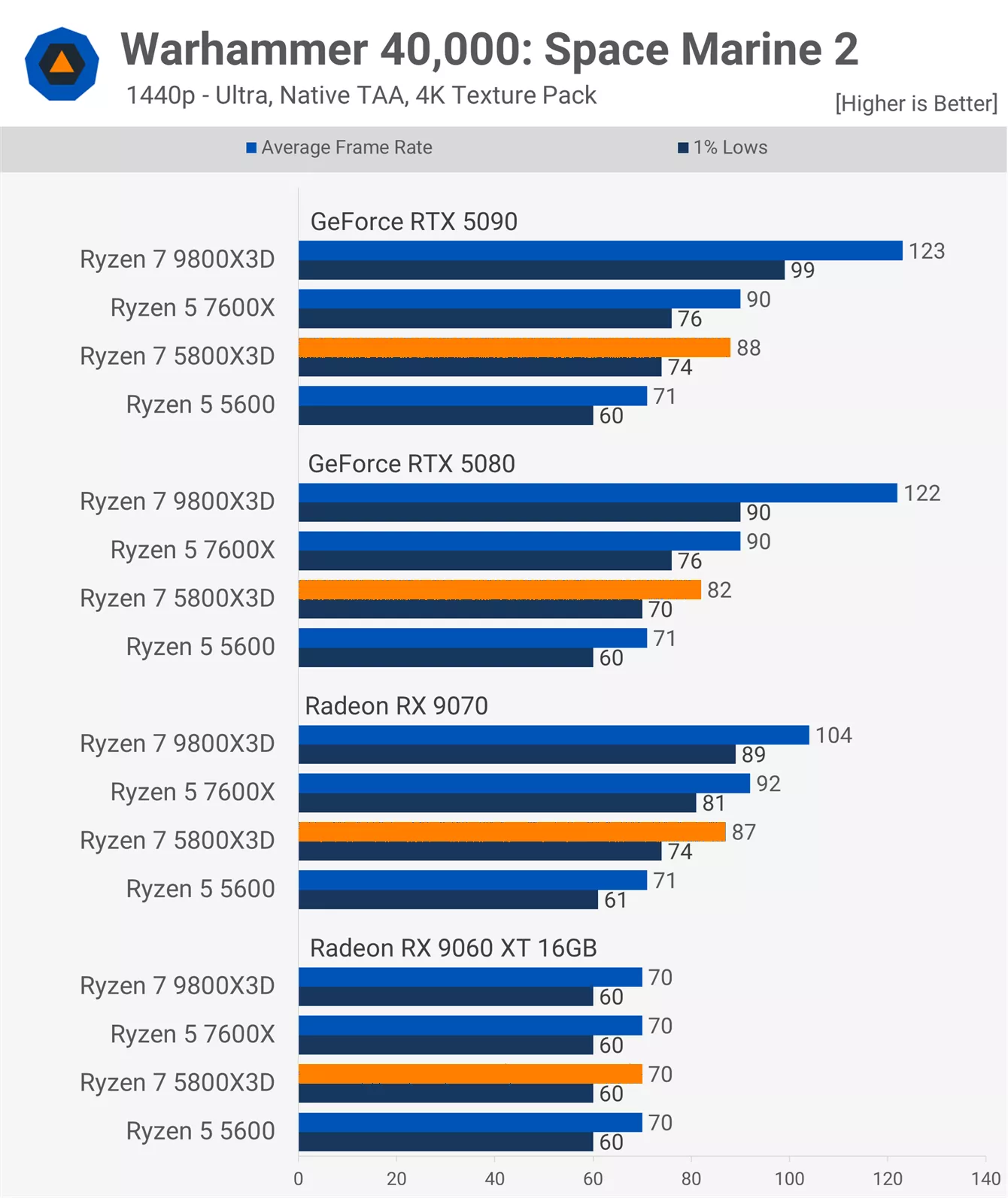
At 1440p Ultra, the 5800X3D leads the 5600 by 24% using the RTX 5090 but trails the 9800X3D by 28%. Results remain consistent with the RTX 5080.
Under these conditions, switching to the RX 9070 appears to benefit the 5800X3D more than the 5600. Here, the 5800X3D is 23% faster than the 5600 and 16% slower than the 9800X3D due to GPU limitations.
4K – Ultra

At 4K, performance predictably trends toward GPU limitation, though the RTX 5090 still exposes some CPU bottlenecks. In this case, the 5800X3D is 33% faster than the 5600 but 26% slower than the 9800X3D.
Dropping to the RTX 5080 reduces that gap, with the 5800X3D now just 5% slower than the 9800X3D, while still being 21% faster than the 5600. Beyond that point, results become heavily GPU-limited when using the RX 9070 and 9060 XT 16GB.
Performance Summary
Finally, we have the four-game average, calculated using the geomean. While it's not especially meaningful with just four titles tested, we know many of you like seeing average data, so here it is.
1080p - Medium

Across the four games tested at 1080p using the medium preset, we found that with the RTX 5090, the 5800X3D was just 3% slower than the 7600X, or 6% slower when looking at 1% lows. Compared to the 5600, that's a 28% performance uplift, though it did trail the 9800X3D by nearly 30%. Still, overall performance was very solid.
Results with the RTX 5080 were similar, although the 9800X3D was GPU-limited, making the 5800X3D 19% slower in this comparison. With the RX 9070, the 5800X3D matched the 7600X, coming in just 9% slower than the 9800X3D, and up to 21% faster than the 5600. Downgrading to the 9060 XT showed the 5800X3D just 6% behind the 9800X3D and 4% ahead of the 5600, as the data here was mostly GPU-limited.
1440p - Medium
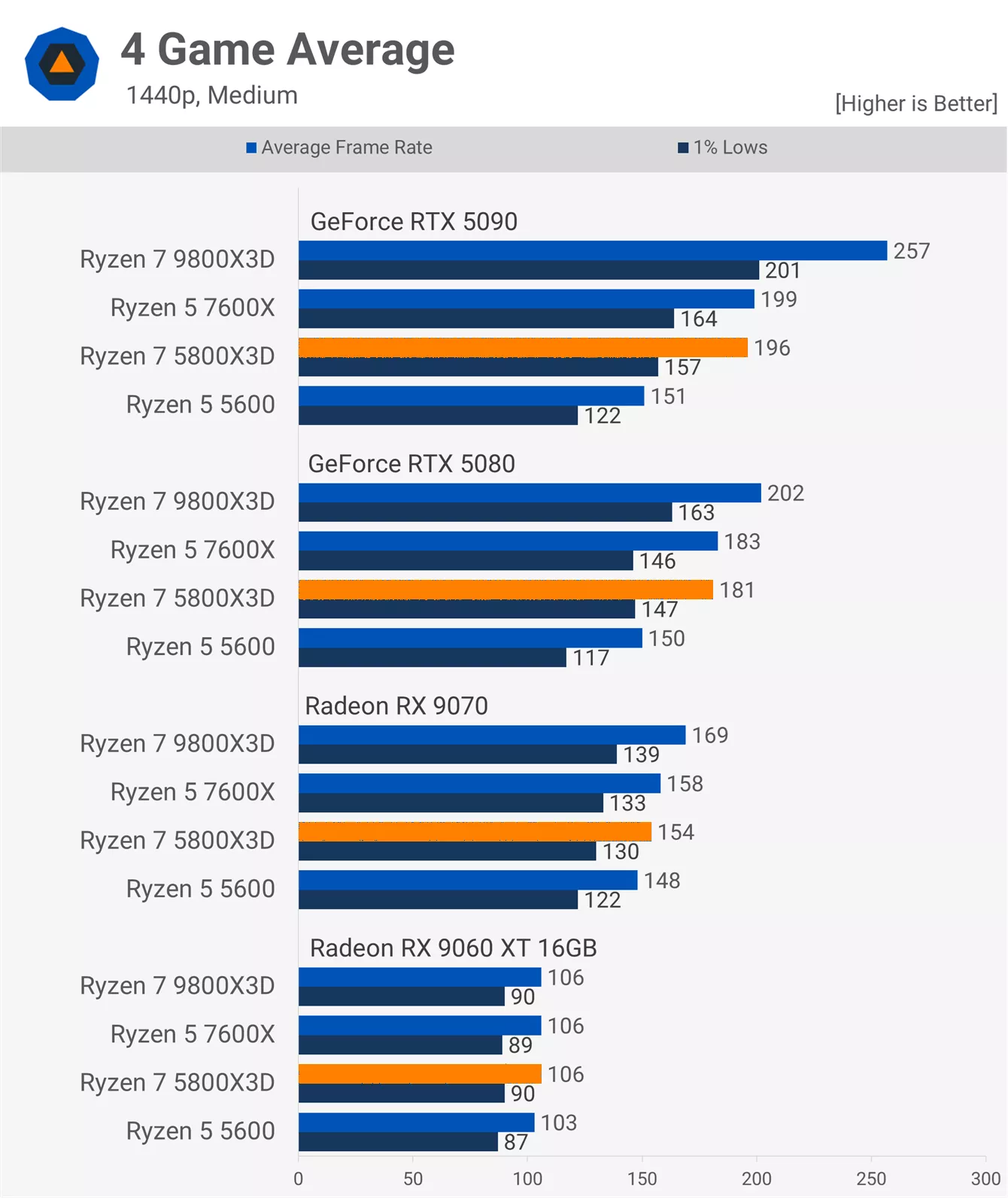
At 1440p with medium settings, the 5800X3D matched the 7600X when using the RTX 5090. It averaged 30% faster performance than the 5600 but was also 24% slower than the 9800X3D. That margin dropped to 10% with the RTX 5080 and 9% with the RX 9070, before performance equalized entirely with the 9060 XT.
4K - Medium

At native 4K, as expected, the performance margins narrowed. Even with the RTX 5090, the 5800X3D was just 10% slower than the 9800X3D and 14% faster than the 5600, delivering performance similar to the 7600X.
With the RTX 5080, the 5800X3D was only 4% slower than the 9800X3D and 7% faster than the 5600. Beyond that, results were fully GPU-limited with the RX 9070 and 9060 XT 16GB.
1080p - Ultra
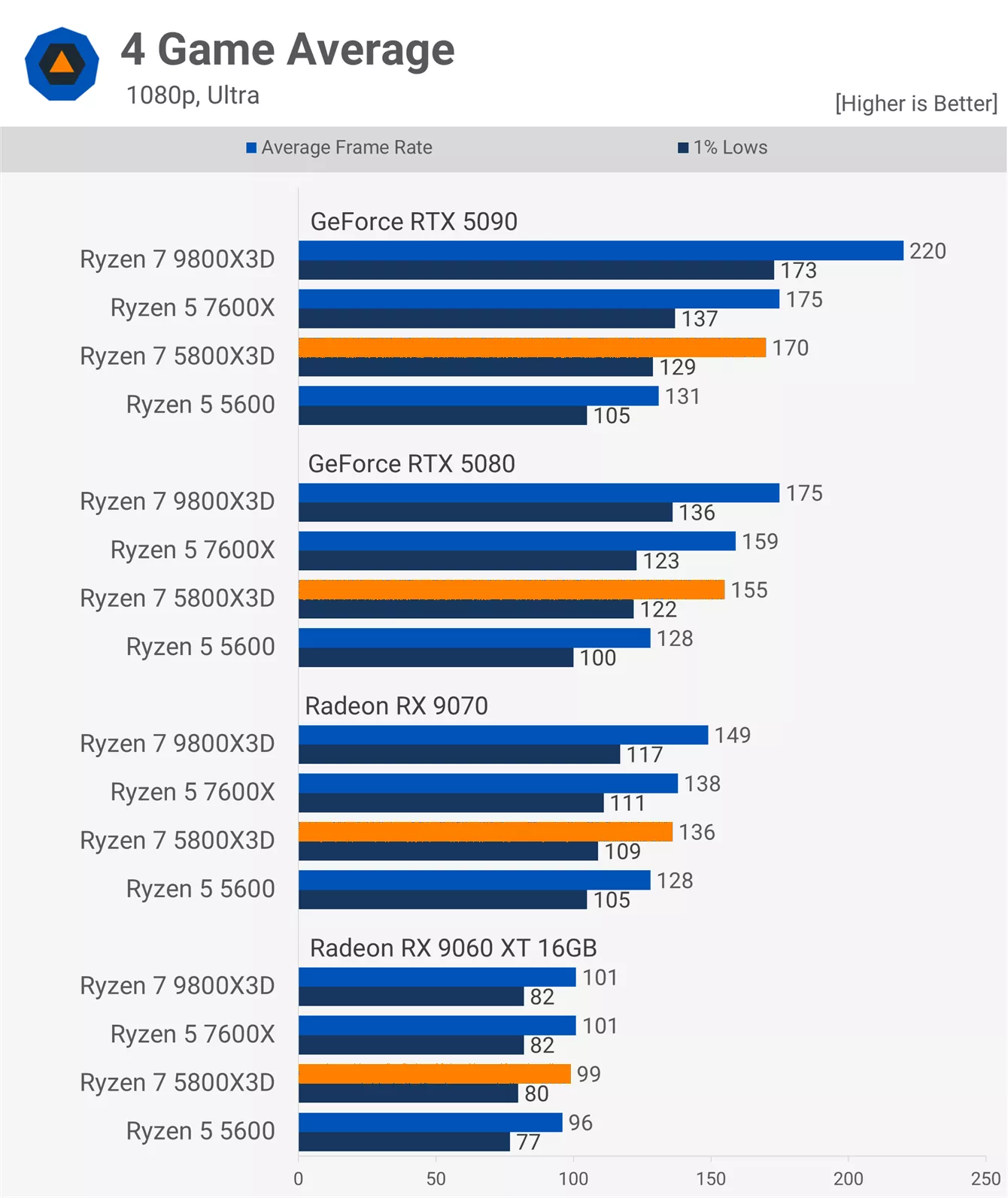
Switching to the Ultra preset at 1080p with the RTX 5090, the 5800X3D delivered 170 fps, making it just 3% slower than the 7600X on average. However, looking at 1% lows, the 5800X3D was 6% behind – still very competitive. It also delivered 30% more performance than the 5600 but was 23% slower than the 9800X3D.
These margins shift notably with the RTX 5080. The 5800X3D now led the 5600 by 21%, which is still solid, but down from the 30% seen with the 5090. The largest shift was in comparison to the 9800X3D, where the 5800X3D was now only 11% slower, essentially matching the 7600X.
With the RX 9070, margins shrank further: the 5800X3D was just 9% slower than the 9800X3D and 6% faster than the 5600. As a result, there's little to no meaningful performance difference between CPUs when using the 9060 XT.
1440p - Ultra
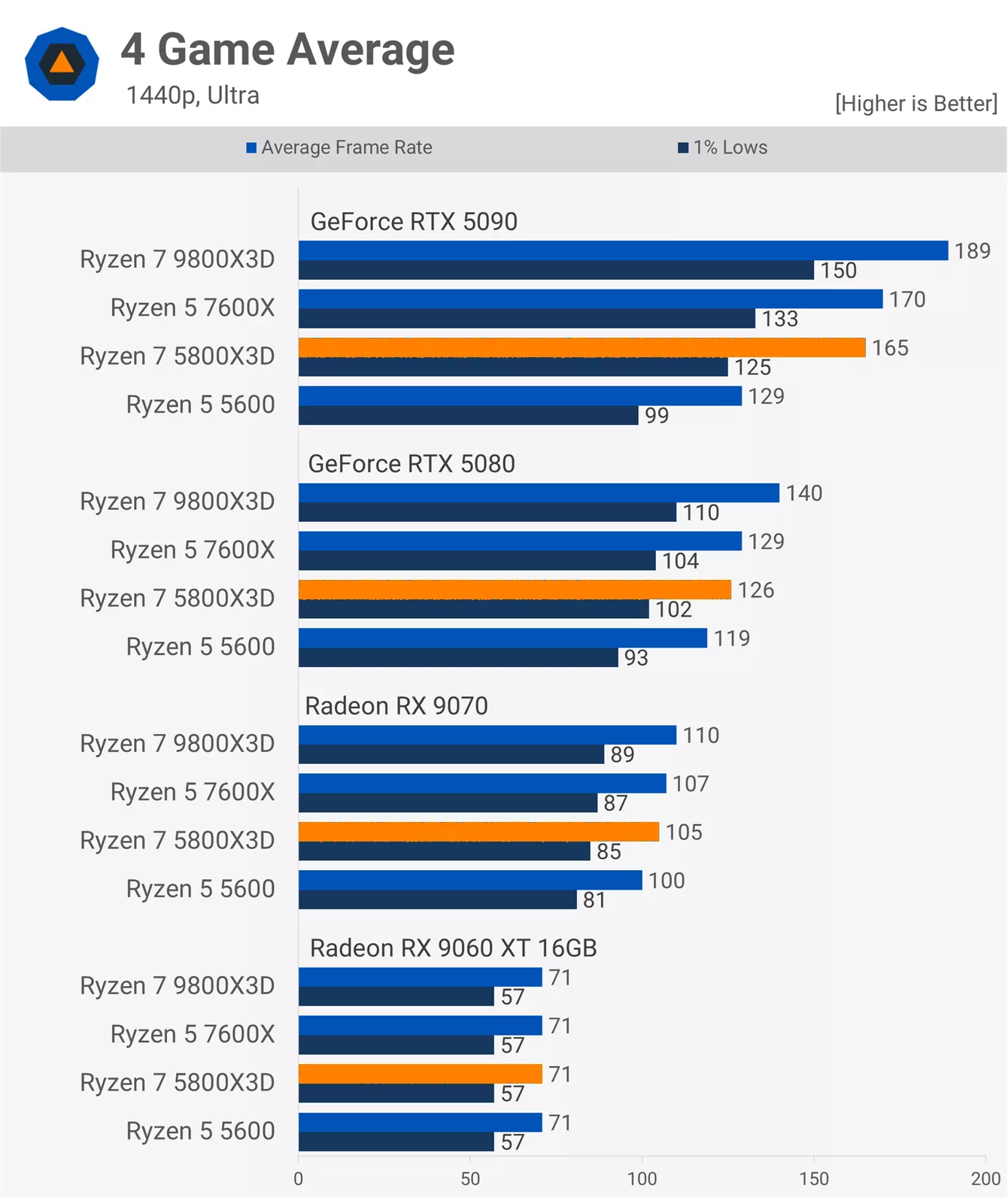
At 1440p with Ultra settings, results became increasingly GPU-limited. Even with the RTX 5090, the 5800X3D was only 13% slower than the 9800X3D, or 17% slower when considering 1% lows.
Those are still some decent margins in favor of the newer 9800X3D, but given the 5800X3D's age, it's performing admirably. It was also just 3% slower than the 7600X or 6% slower when comparing 1% lows. The big upgrade can be seen when going from the 5600 to the 5800X3D as the 3D V-Cache part is almost 30% faster here.
Lowering GPU power slightly with the RTX 5080 made performance more GPU-bound. The 5800X3D was now 10% slower than the 9800X3D and only 6% ahead of the 5600 – highlighting how well the older Ryzen 5 part holds up in GPU-limited scenarios.
With the RX 9070, the difference between the fastest and slowest CPU dropped to just 10%, placing the 5800X3D squarely in the middle. Results were fully GPU-limited with the 9060 XT.
4K - Ultra
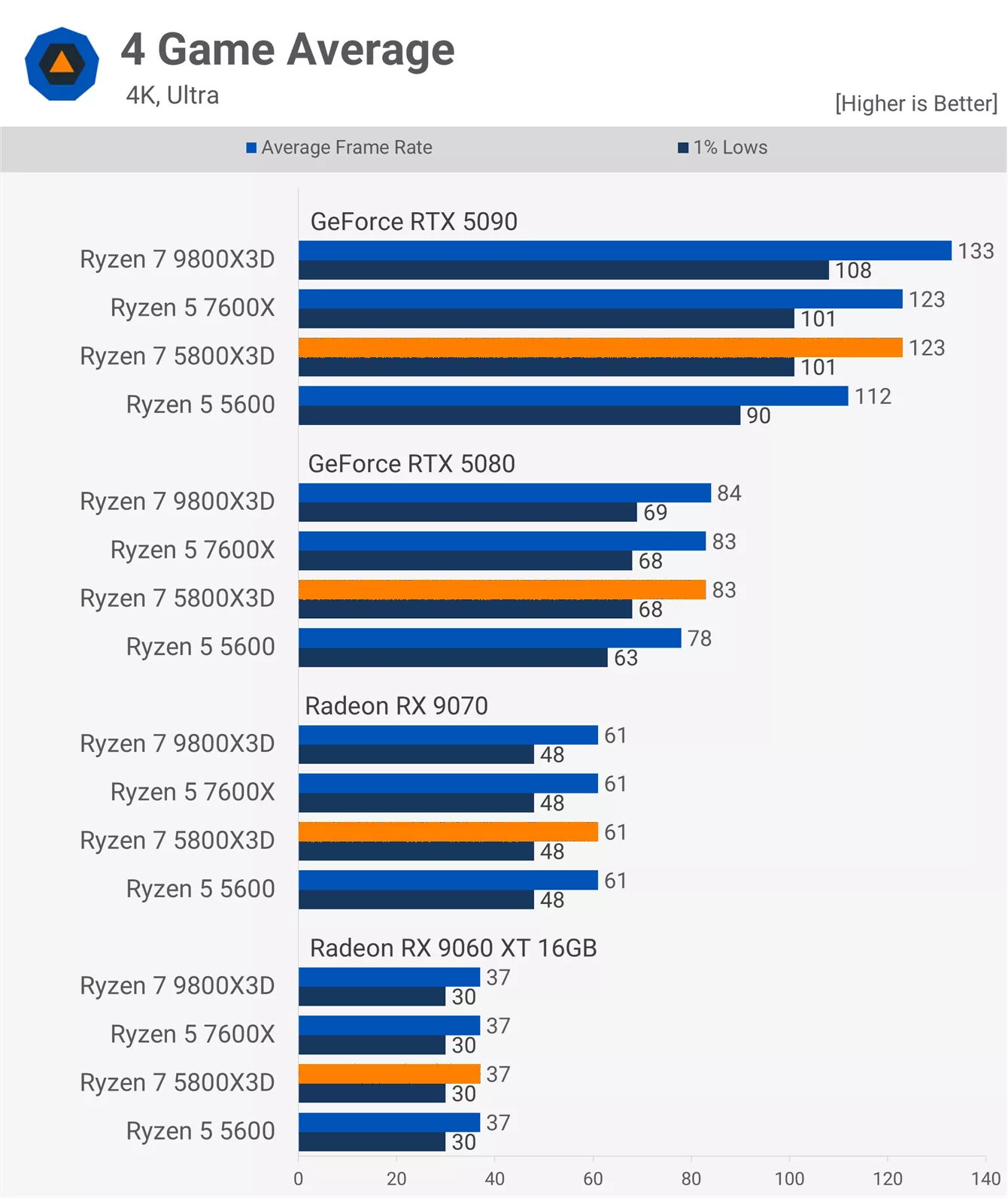
At native 4K with Ultra settings, performance was completely GPU-limited using the 9060 XT and RX 9070. The same was mostly true for the RTX 5080. Even with the RTX 5090, the 5800X3D was only 8% slower than the 9800X3D and 10% faster than the 5600.
Still a Gaming Beast?
The Ryzen 7 5800X3D remains an extremely capable CPU, suitable for use even with GPUs as powerful as the RTX 5080 or 4090 – and for most single-player games, it can handle the RTX 5090 just fine. Of course, as we've emphasized many times before, how much CPU performance matters depends entirely on the games you play and how you play them.
In terms of gaming performance, the 5800X3D is roughly equivalent to the Ryzen 5 7600X, which we consider to be a very good gaming processor. Naturally, the same applies to the 5800X3D. Alongside the binned 5700X3D, it remains an excellent upgrade for AM4 users, delivering on average nearly 30% more performance than the Ryzen 5 5600 (when CPU-limited, of course).

There were cases where the Ryzen 5600 limited performance enough that even a GPU like the Radeon RX 9070 wasn't used to its full potential. So while the 5600 still offers great value, if you've recently upgraded your GPU and still use a 5600, it might be time to consider a CPU upgrade – whether to the 5700X3D or 5800X3D, whichever is more affordable, or possibly a move to AM5, if gaming performance is that critical to you.
In a few cases, we suspect DDR5 helped the 7600X deliver better 1% low performance than the 5800X3D, making AM5 a bit more attractive long term. It's also possible that the 7600X will age better due to higher memory bandwidth. Still, the 5800X3D and 7600X remain very close in terms of overall gaming performance.

That wraps up our 5800X3D CPU and GPU scaling benchmark. If you enjoyed all the testing we put into this feature, please share it, subscribe to our newsletter to receive news of future articles like this one, and check out our TechSpot Elite subscription option for ad-free browsing and additional perks.
We've got more content like this on the way.