
We were granted early access to test Forza Horizon 6, and with that we've been preparing a full-on 40 GPU benchmark and a performance optimization guide (both are now live!).
But before that, we wanted to revisit the classic VRAM discussion because it's as relevant as ever given the current state of the GPU market. To our disappointment, we haven't published a single VRAM-related article this year, so let's fix that.
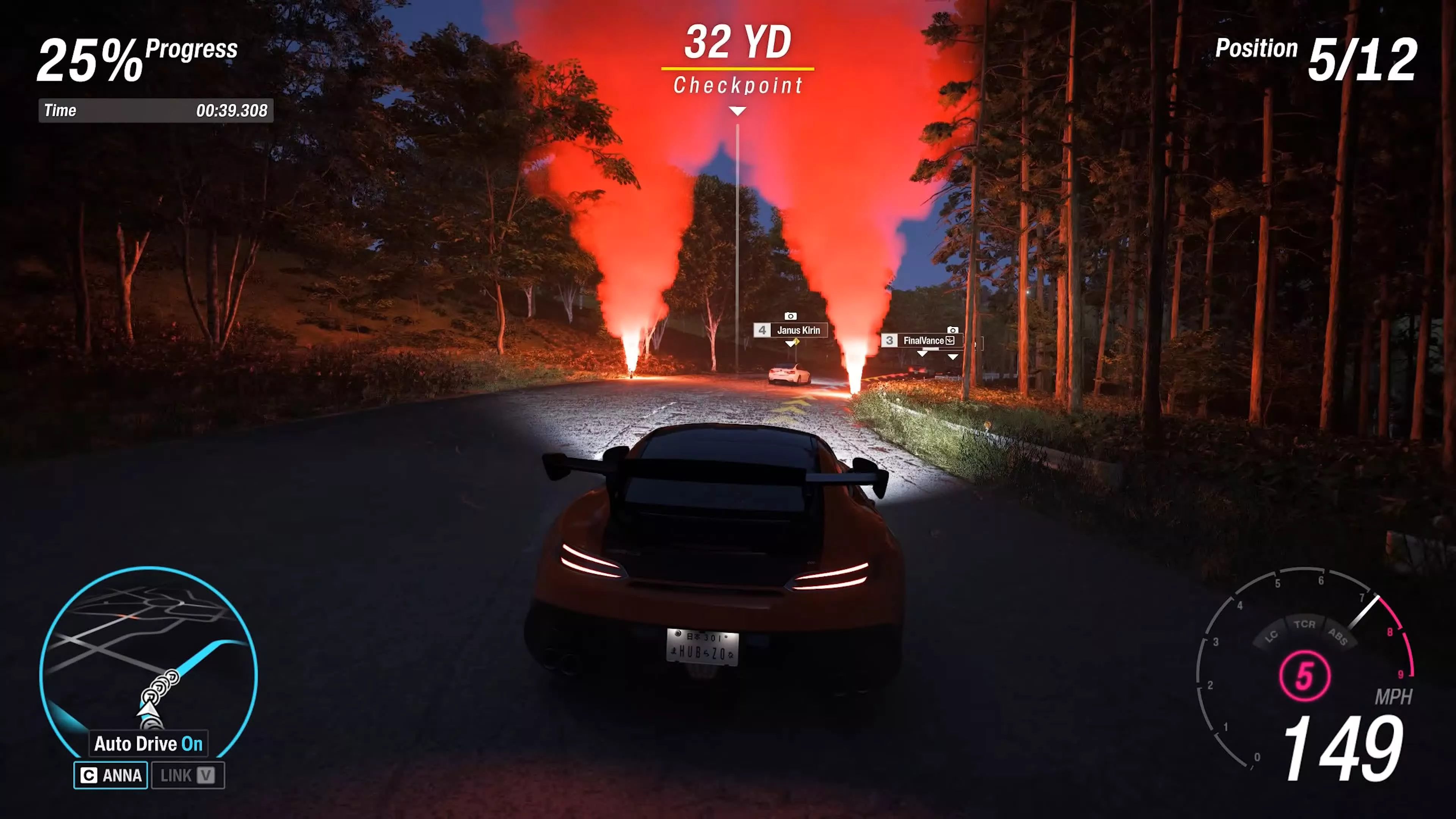
Our first impression of Forza Horizon 6 was captured on a GeForce RTX 5060 Ti. We raced at 1440p using DLSS Quality mode with the maximum in-game settings, that's the Extreme+RT preset. To our amazement, the game runs very well, rendering between 60 and 70 fps. That is an excellent level of optimization, and best of all, the game looks great.
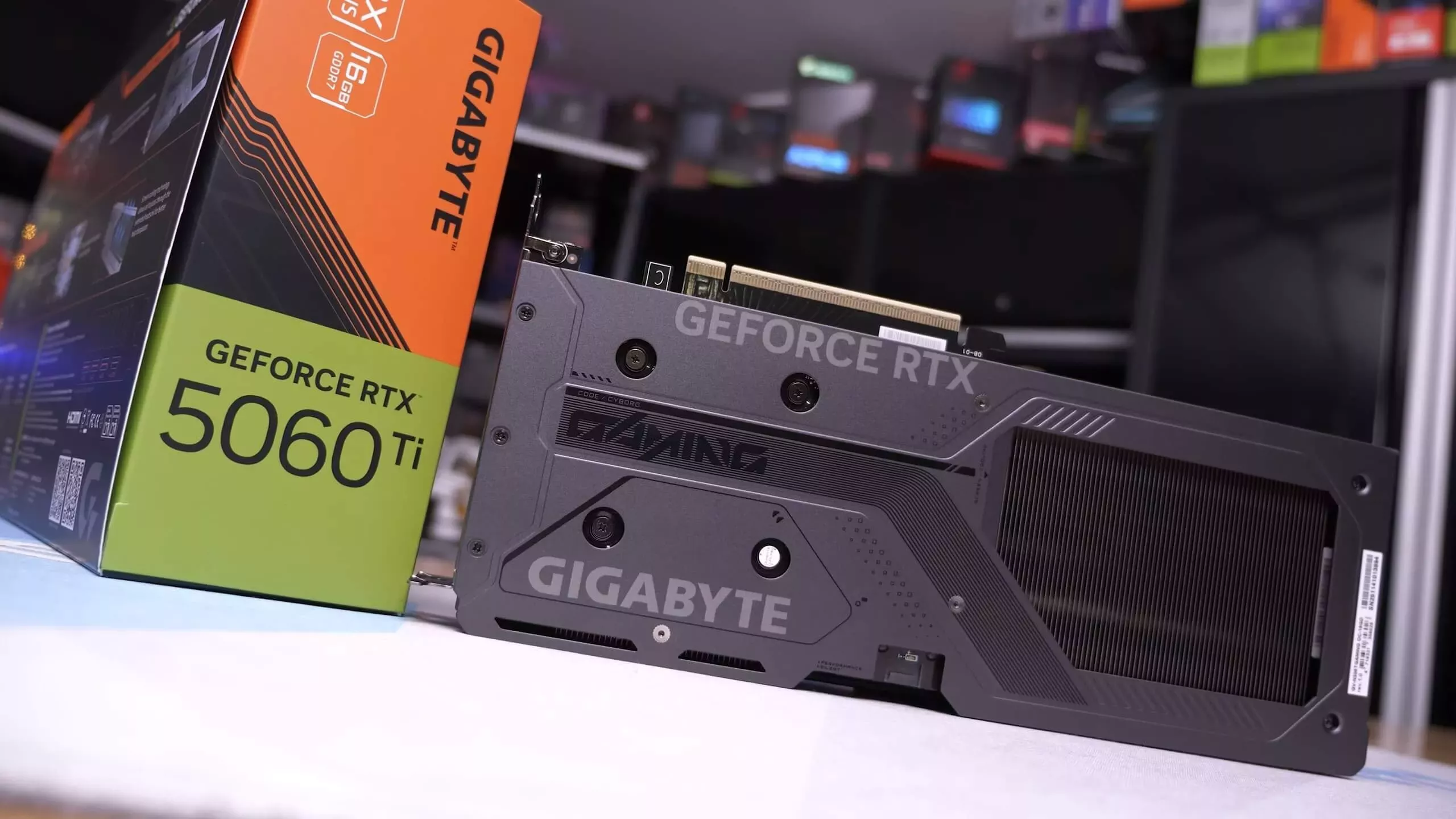
While we would ideally like high refresh performance (over 100 fps) for this style of game, playing with a controller or a steering wheel feels good. The input is certainly very acceptable, so high marks here for the RTX 5060 Ti. That said, we should specify that this is the 16GB RTX 5060 Ti. That's a very important distinction to make, and that's because this is how the game runs on the 8GB model...
For a better representation of image quality comparisons, check out the HUB video below:
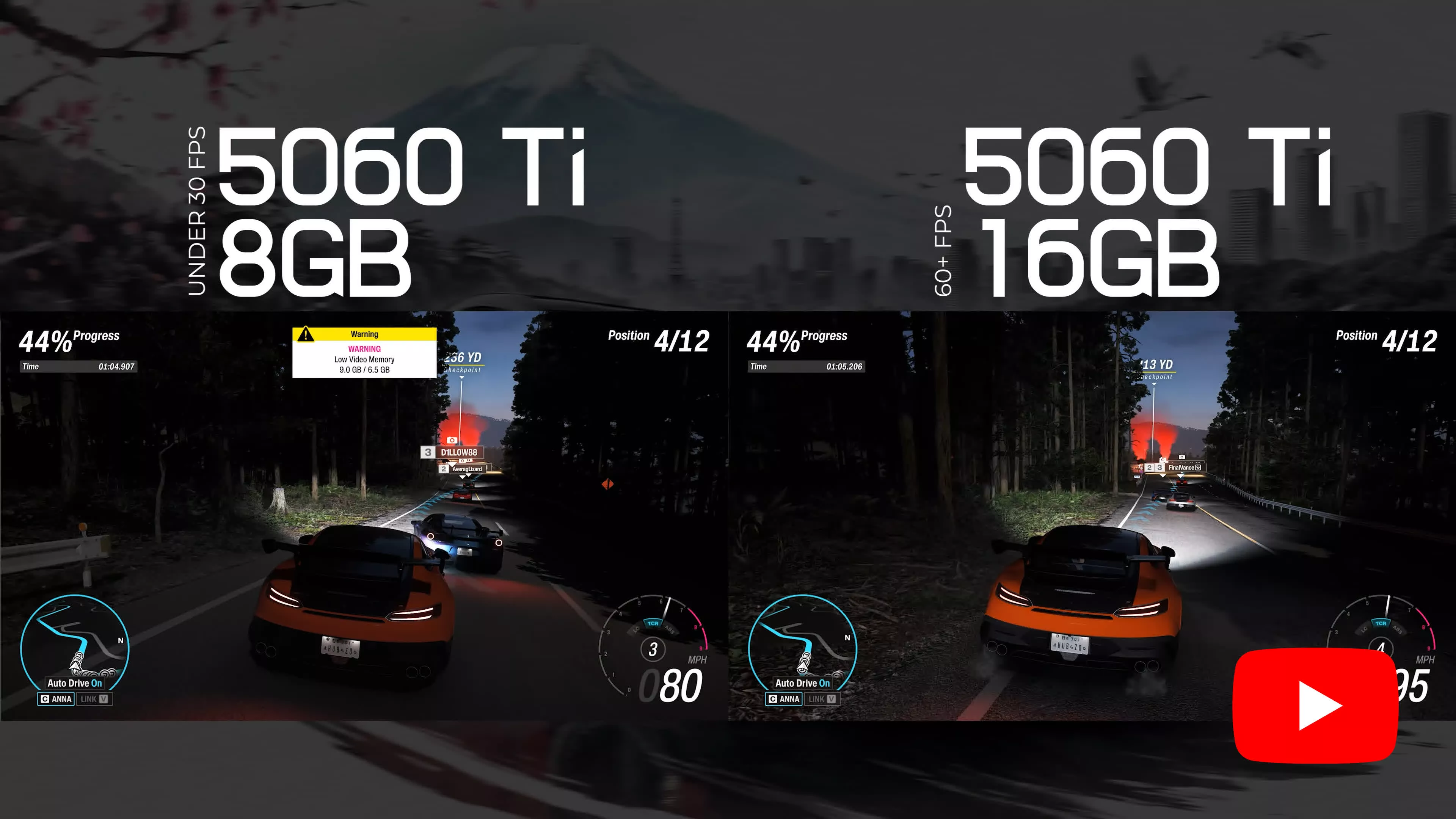
Yeah... it's really bad at under 30 fps. We struggled to play at this frame rate, and the input felt very laggy. Of course, this isn't a static benchmark. This is real world in-game performance in a dynamic race. The difference between these two GPUs is night and day, and it blows our mind that not only do they share the same name, but the same performance claims regarding their ray tracing capabilities were made.
Nvidia markets the RTX 5060 Ti as delivering the ultimate ray tracing experience, but they don't tell you that the 8GB version doesn't have enough VRAM to enable that experience, and that's what we're going to be looking at today.
Benchmark Time
1080p DLSS Balanced - Extreme+RT
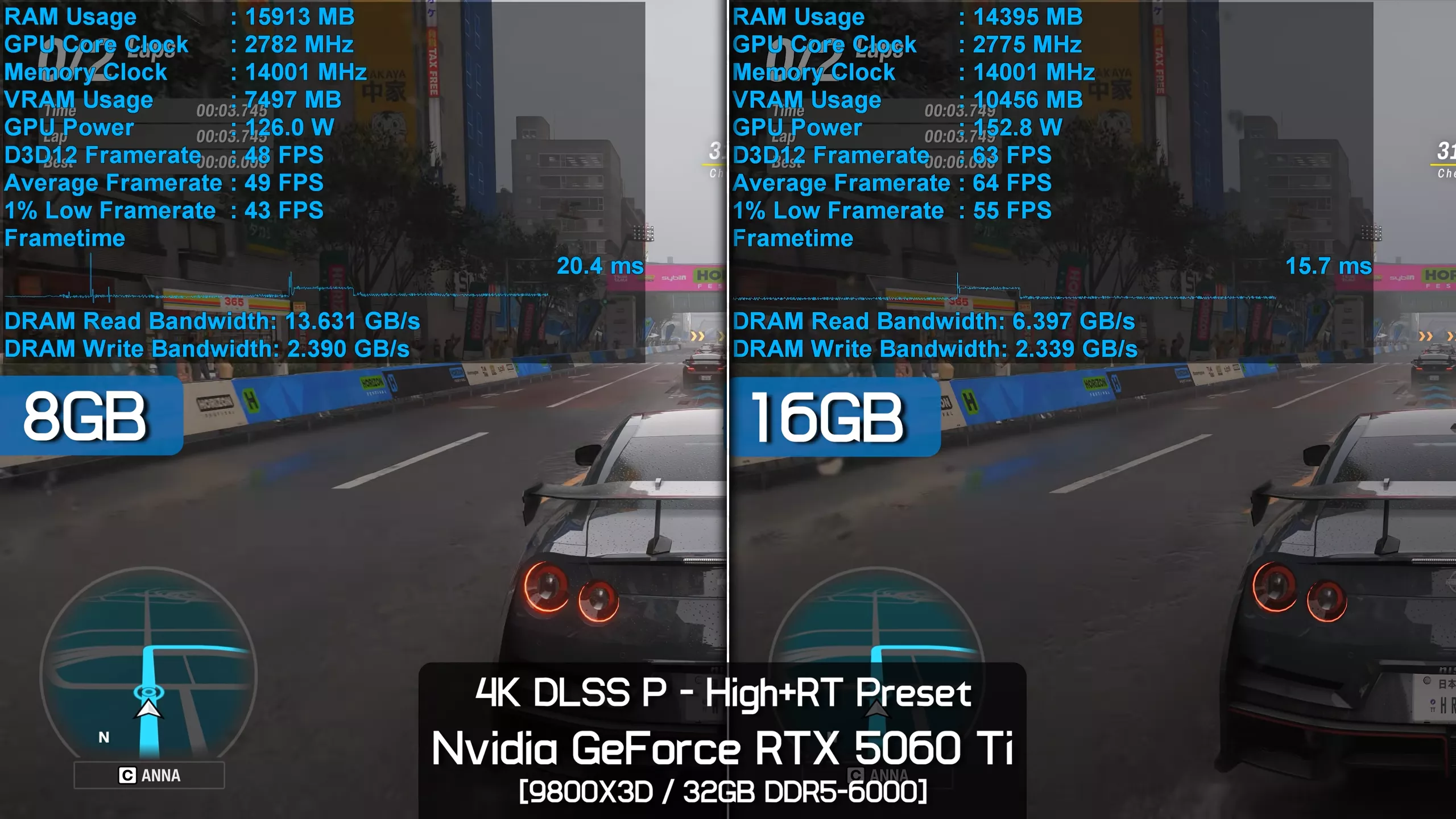
So let's get to it, then, and we'll start with more Extreme+RT preset testing. Using the game's built-in benchmark, which we're happy to report is highly representative of actual gameplay performance, we see that the 16GB model has no problem delivering very playable frame rates at 1080p with the Balanced DLSS preset, averaging 82 fps with 1% lows of 70 fps. That made it 50% faster than the 8GB model for this comparison, and it's worth noting that this configuration consumed almost 12GB of VRAM.
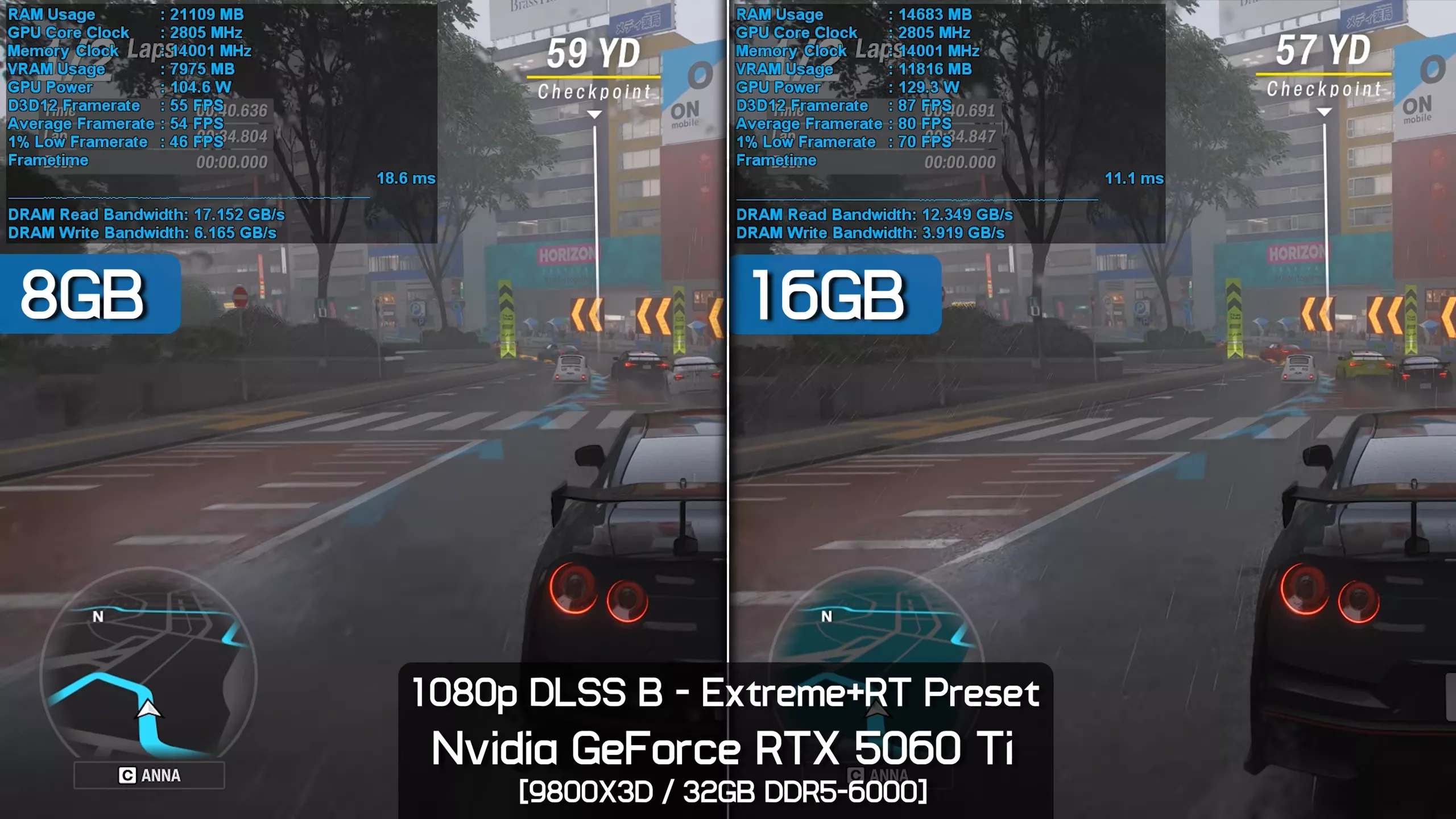
This might shock some people, as we've been told a number of times in the past that you shouldn't need to use more than 8GB of VRAM at 1080p, which is an odd claim, but people were making it nonetheless. It's also worth noting that this isn't even native 1080p, as we're using Balanced upscaling.
What's interesting to note here is that despite having to dip into system memory, the 8GB graphics card doesn't suffer from poor frame time performance. While the frame rates are lower, averaging 55 fps, the overall smoothness was good. That said, we do have 32GB of DDR5-6000 memory, so with slower memory or less capacity, performance will be even worse.
1080p DLSS Quality - Extreme+RT
Personally, we wouldn't go below Quality upscaling at 1080p, and if we use this more optimal configuration, the 16GB model is now 56% faster when comparing average frame rates, but a massive 67% faster when looking at the 1% lows.
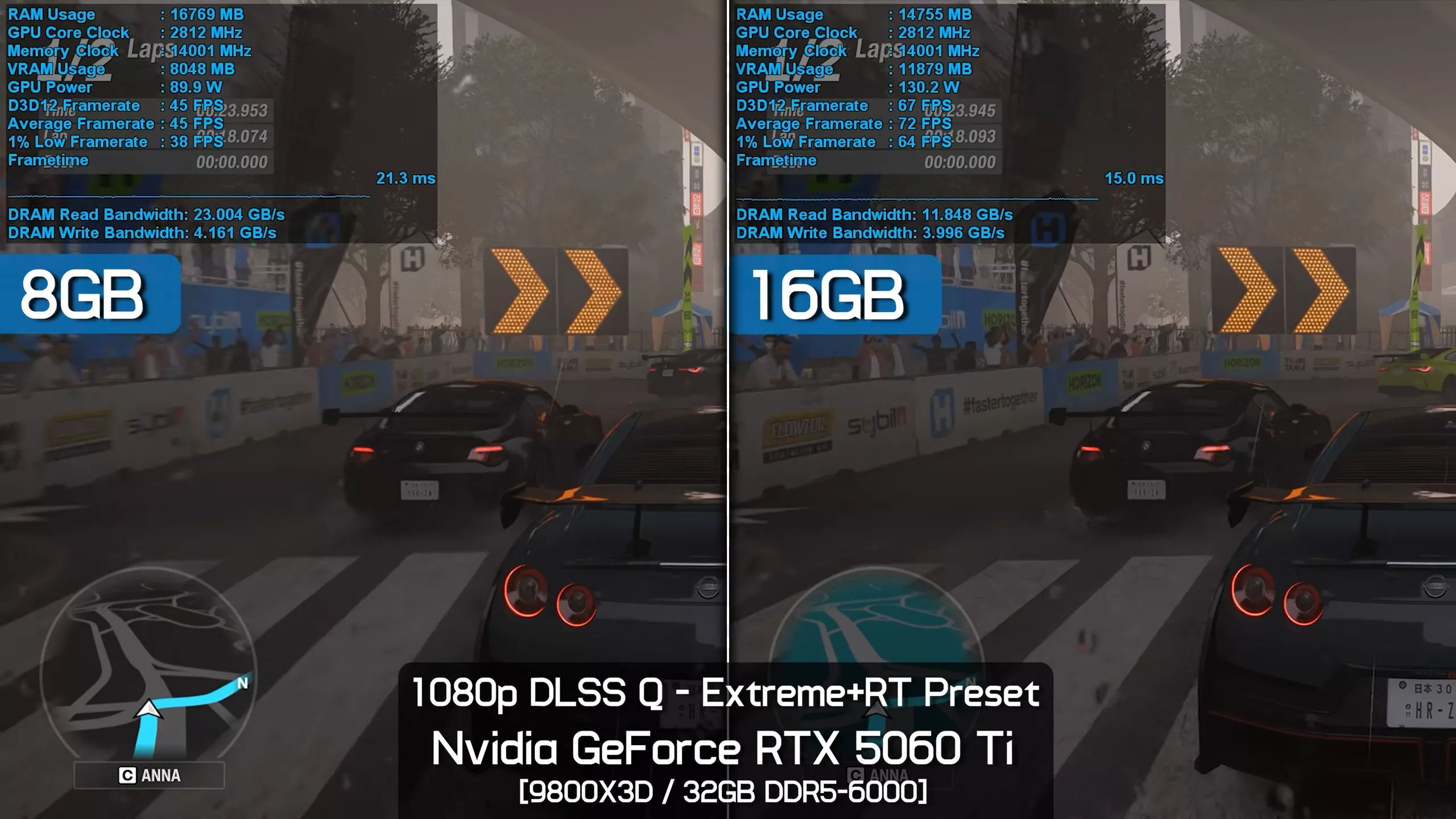
This is a night-and-day difference, as the 16GB version averaged over 70 fps while the 8GB model fell below 50 fps. Again, the game requires around 12GB of VRAM to use these settings.
1440p DLSS Balanced - Extreme+RT
We feel the RTX 5060 Ti is more of a 1440p graphics card, generally speaking, so if we increase the resolution to 1440p while falling back to Balanced DLSS upscaling, we see that the 16GB model was able to average 61 fps.
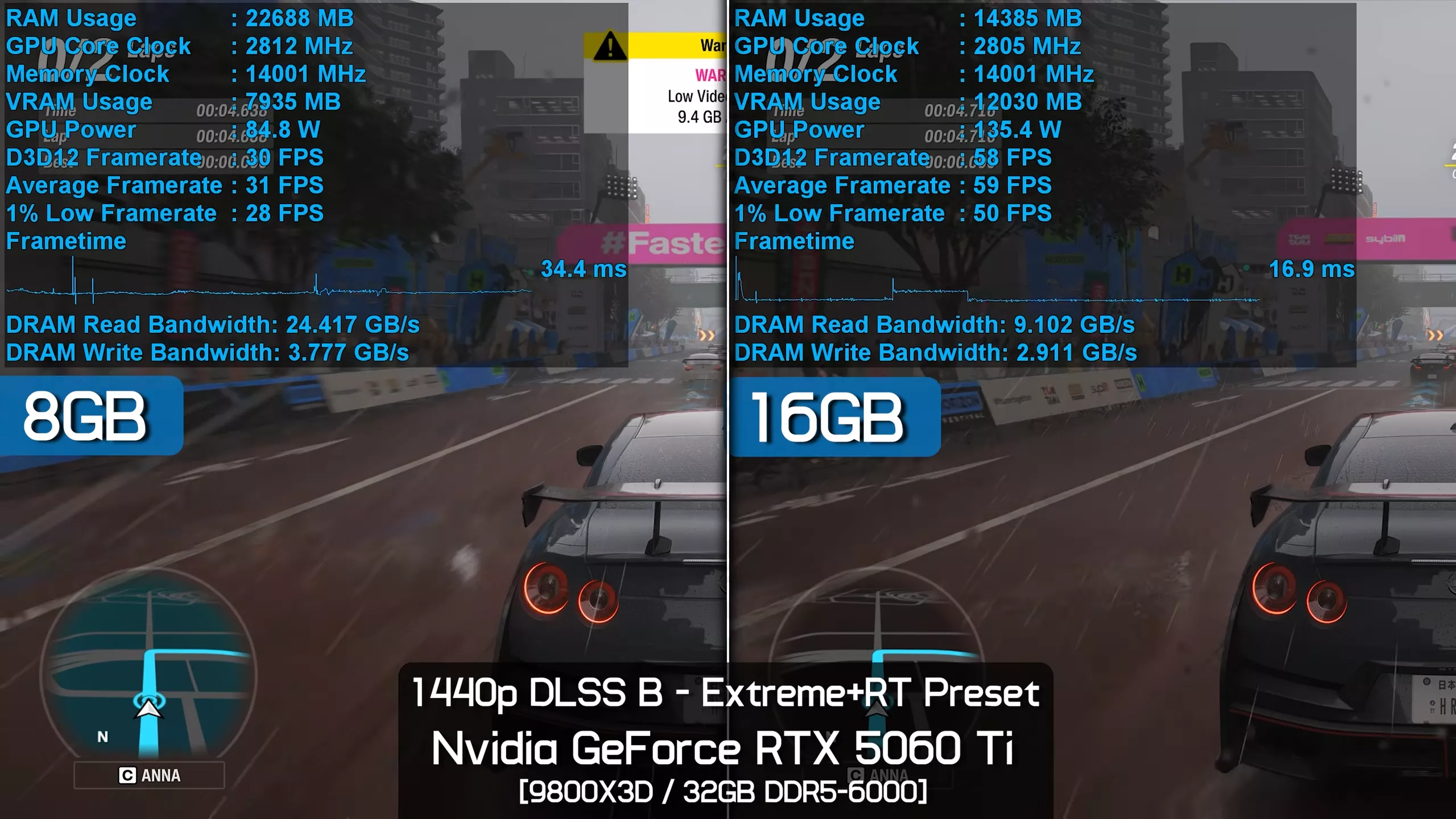
Incredibly, that made it 85% faster than the 8GB model, which was limited to an average of just 33 fps. The 16GB model was also 82% faster when comparing 1% lows, improving from 28 fps to 51 fps.
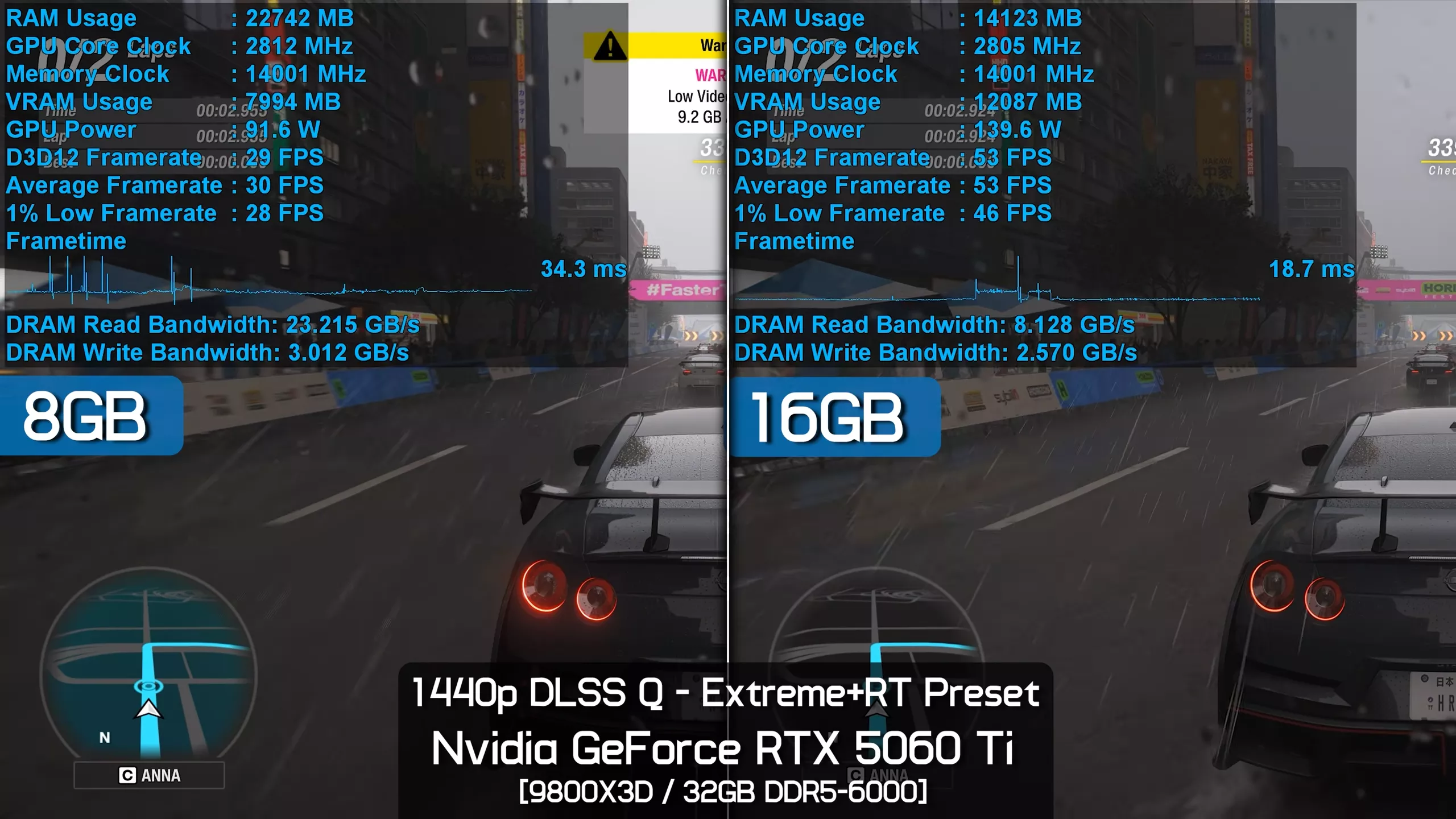
1440p DLSS Quality - Extreme+RT
If we then increase the DLSS mode from Balanced to Quality, the 16GB RTX 5060 Ti still delivers over 70% greater performance and, more importantly, remains very playable with an average frame rate of 55 fps and 1% lows of 46 fps. That's not exactly blazing-fast performance, but for the maximum ray tracing preset, it's about as good as you could realistically hope for from a 5060-class GPU.
1080p DLSS Quality - High+RT
In this example, we've dropped down to the lowest-quality ray tracing-enabled preset, labeled "High+RT." Here, the 8GB model is very usable, averaging an impressive 102 fps at 1080p with Quality DLSS enabled.
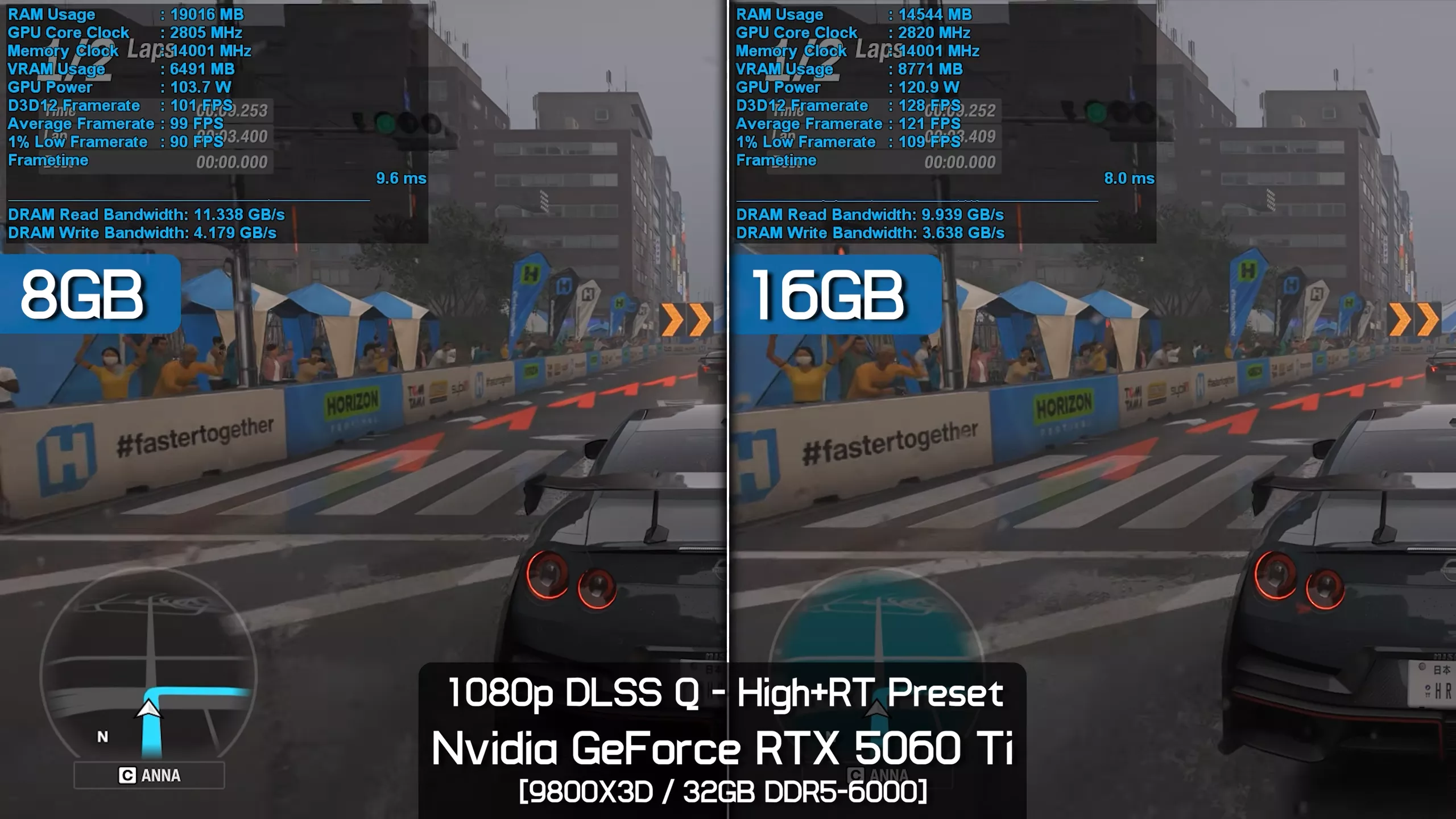
Still, the 16GB version was 22% faster, averaging 130 fps, though both delivered perfectly smooth performance. The game requires around 9GB of VRAM here, which is probably why the results aren't nearly as dramatic as what we saw with the Extreme+RT preset.
1440p DLSS Quality - High+RT
Increasing the resolution to 1440p doesn't change much. Again, we enabled Quality DLSS upscaling, and the game is now using just over 9GB of VRAM. In this test, the 16GB model was just 17% faster when comparing average frame rates, and surprisingly, only 13% faster when comparing 1% lows.
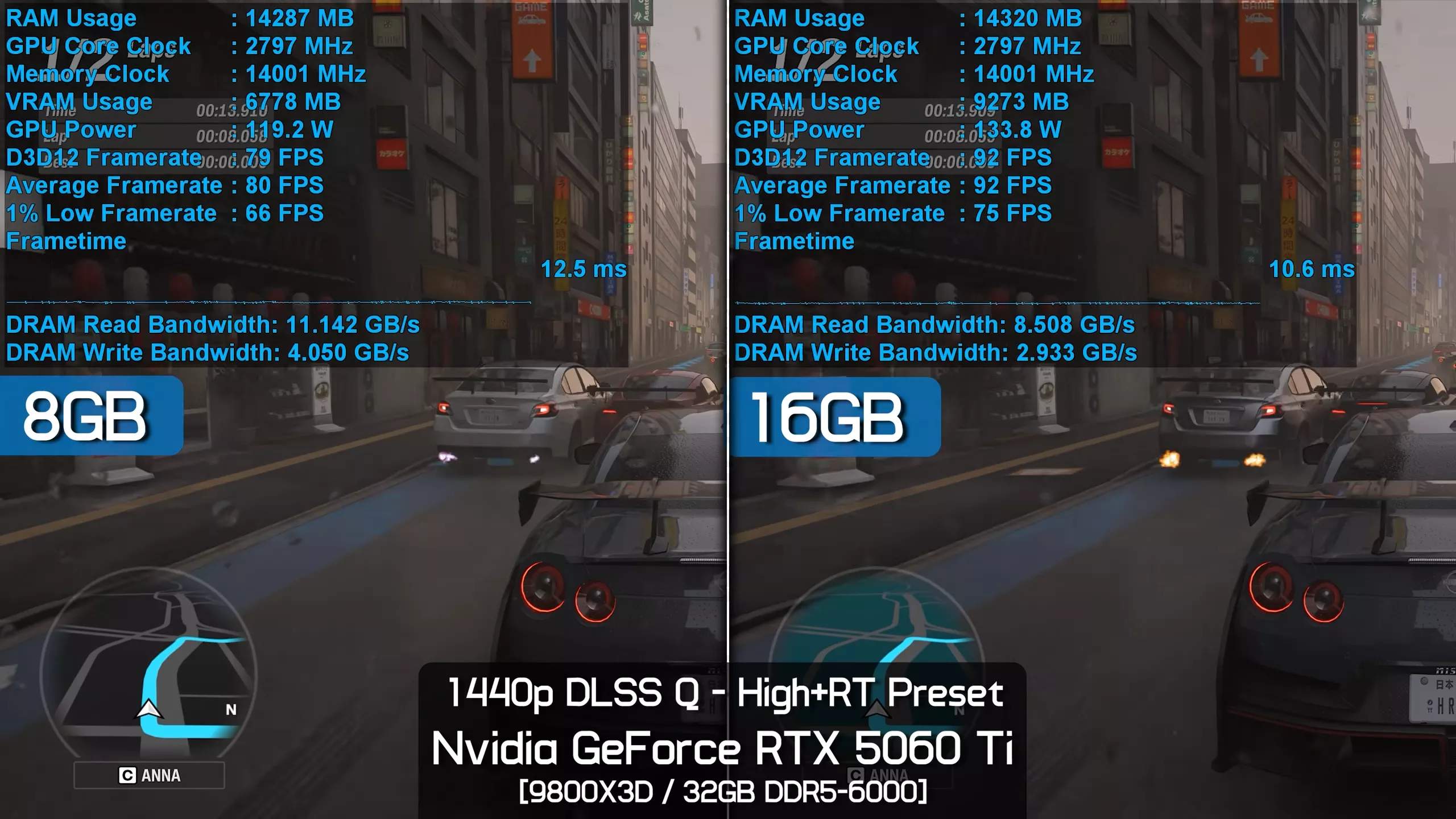
That's still a meaningful performance increase, but not nearly as large as you might expect when exceeding the 8GB VRAM buffer.
4K DLSS Performance - High+RT
The margin does blow out to 32% at 4K, and here the 16GB RTX 5060 Ti was really impressive, managing to average 66 fps whereas the 8GB model fell to just 50 fps. Still, despite the game now using over 10GB of VRAM, frame time performance on the 8GB model remained very smooth. Overall performance was much lower, but the game was still playable on the 8GB card.
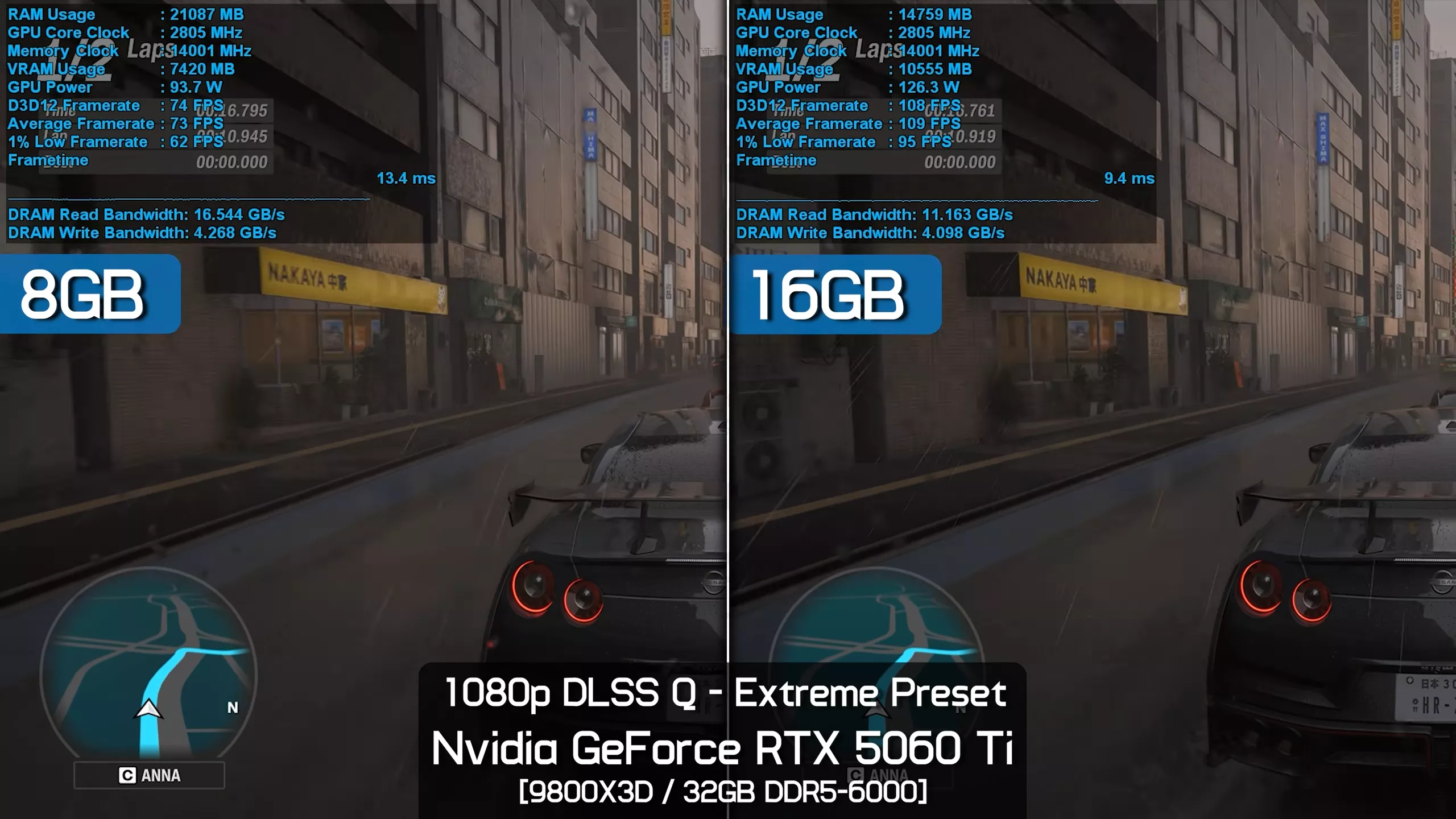
1080p DLSS Quality - Extreme
Okay, so what if we disable ray tracing altogether? How do the 8GB and 16GB versions of the RTX 5060 Ti compare then? Well, if we opt for the Extreme preset, both are able to deliver highly playable performance, so that's good news. That said, we're looking at 46% greater average frame rate performance for the 16GB model, which is a massive difference, along with a 51% improvement in 1% lows. So the 16GB model is able to deliver a true high refresh rate experience using this configuration.
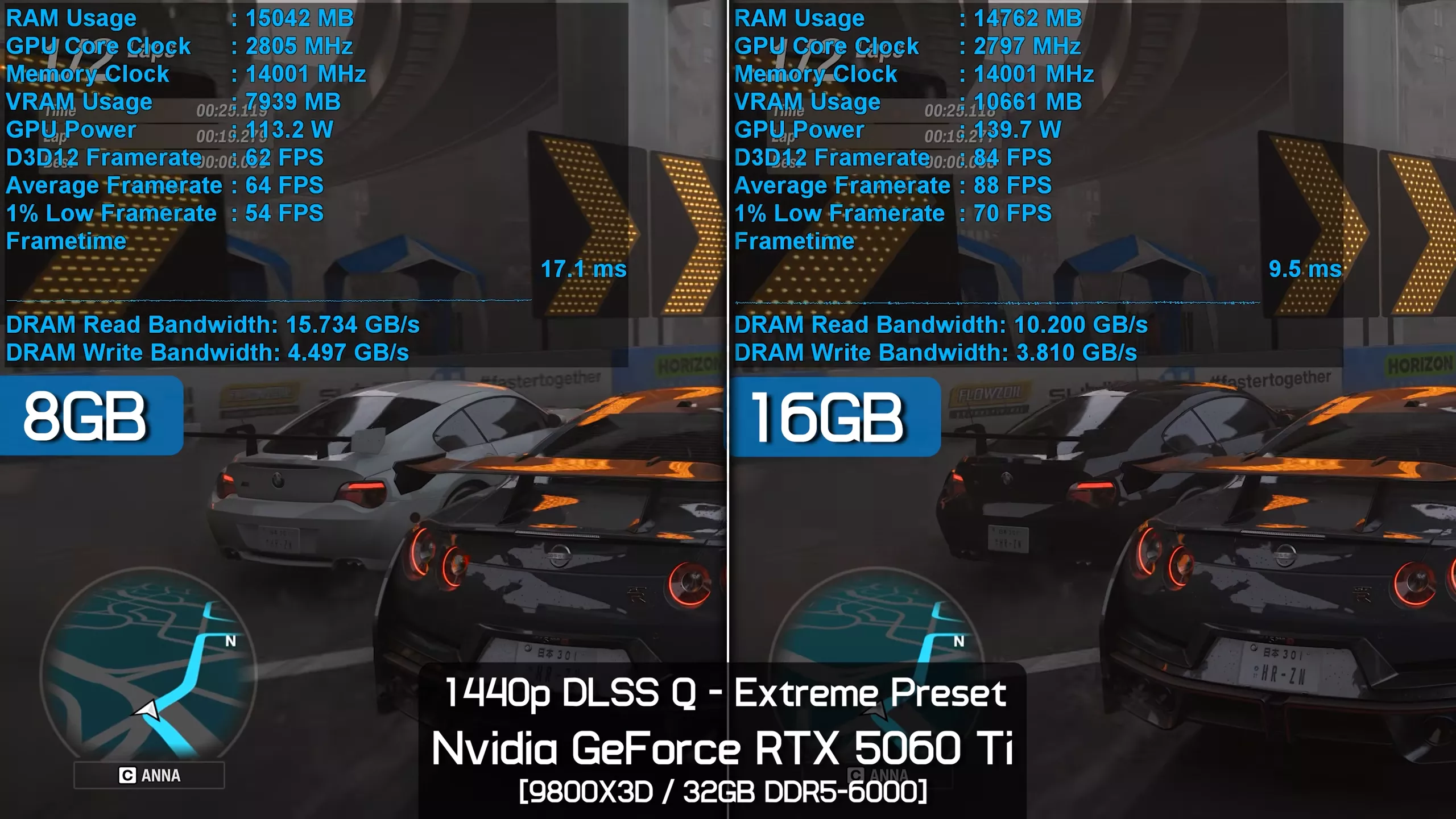
1440p DLSS Quality - Extreme
Interestingly, despite increasing the resolution to 1440p, the margin between the 8GB and 16GB models actually shrinks from 46% down to 37%. It seems the VRAM bottleneck limiting performance for the 8GB model at 1080p is constraining the card to a similar degree at 1440p. The 16GB model, on the other hand, isn't VRAM-limited, but rather compute-limited, so increasing the resolution causes a larger drop in performance, reducing the average frame rate to 92 fps.
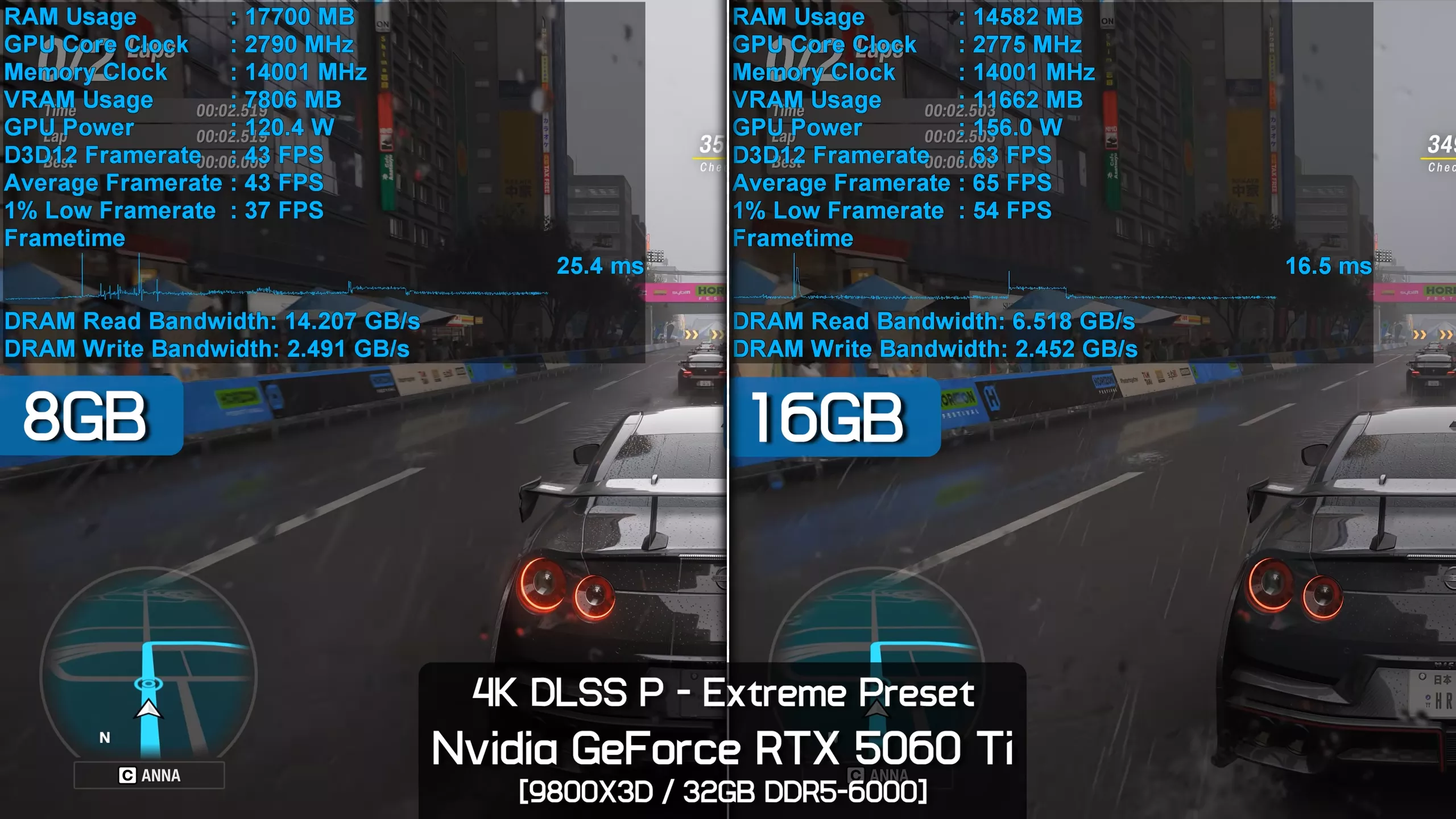
4K DLSS Performance - Extreme
However, if we move up to 4K with DLSS Performance mode enabled, the margin expands again to 49% in favor of the 16GB model, allowing it to render 64 fps on average compared to just 43 fps for the 8GB model. Crucially, the 16GB version was able to deliver a smooth experience, whereas the 8GB version felt noticeably laggy despite relatively consistent frame times.
1080p DLSS Quality - Ultra
Next, we've moved down to the Ultra preset, starting with 1080p testing using DLSS Quality upscaling. Even here, the game appears to require over 9GB of VRAM, but despite that, the 8GB model still performs well, averaging 102 fps in the benchmark with excellent frame time performance. The 16GB version, on the other hand, was 20% faster, which is certainly a meaningful increase, but with both delivering smooth frame pacing, the difference isn't especially noticeable during gameplay.
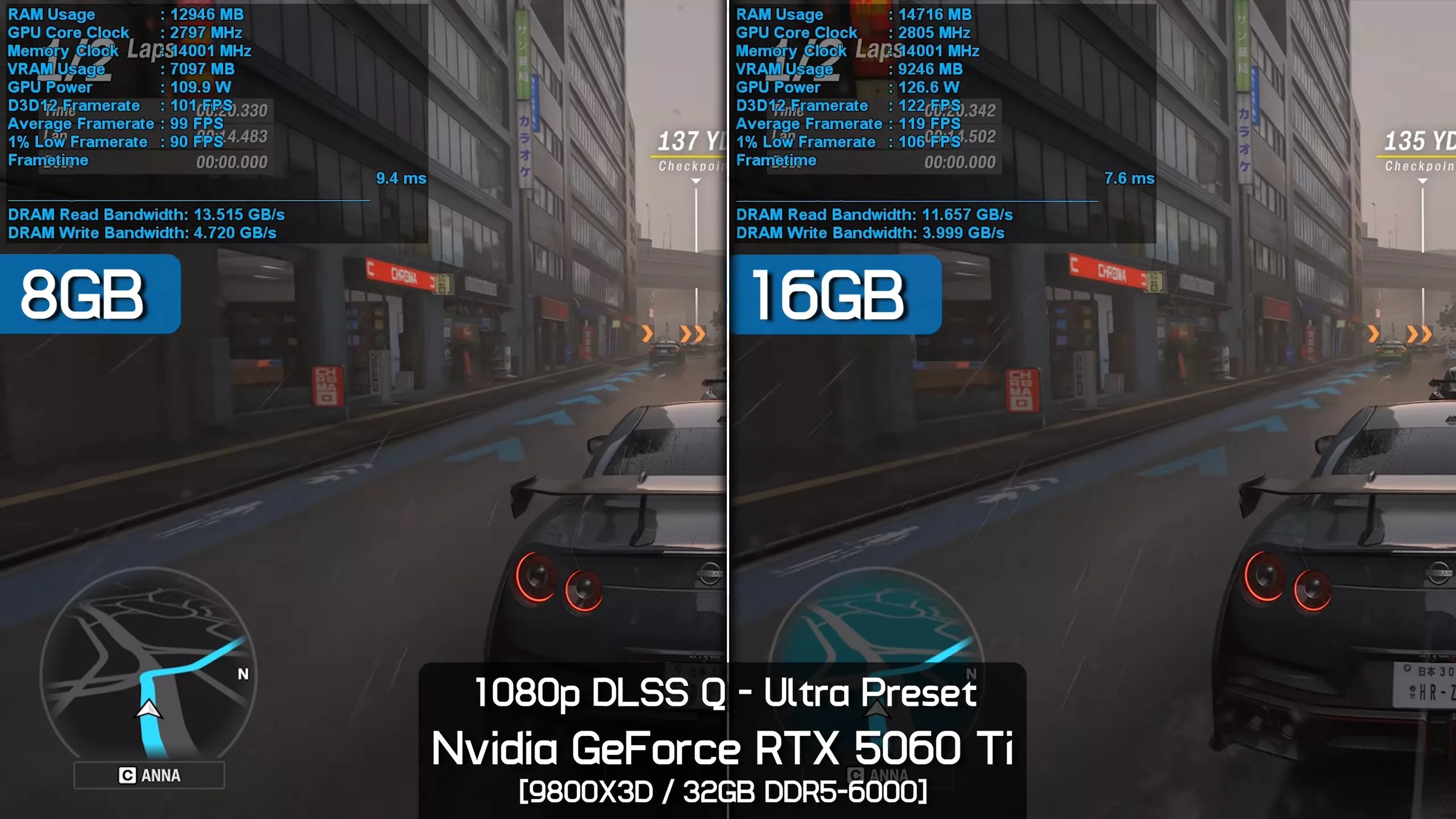
1440p DLSS Quality - Ultra
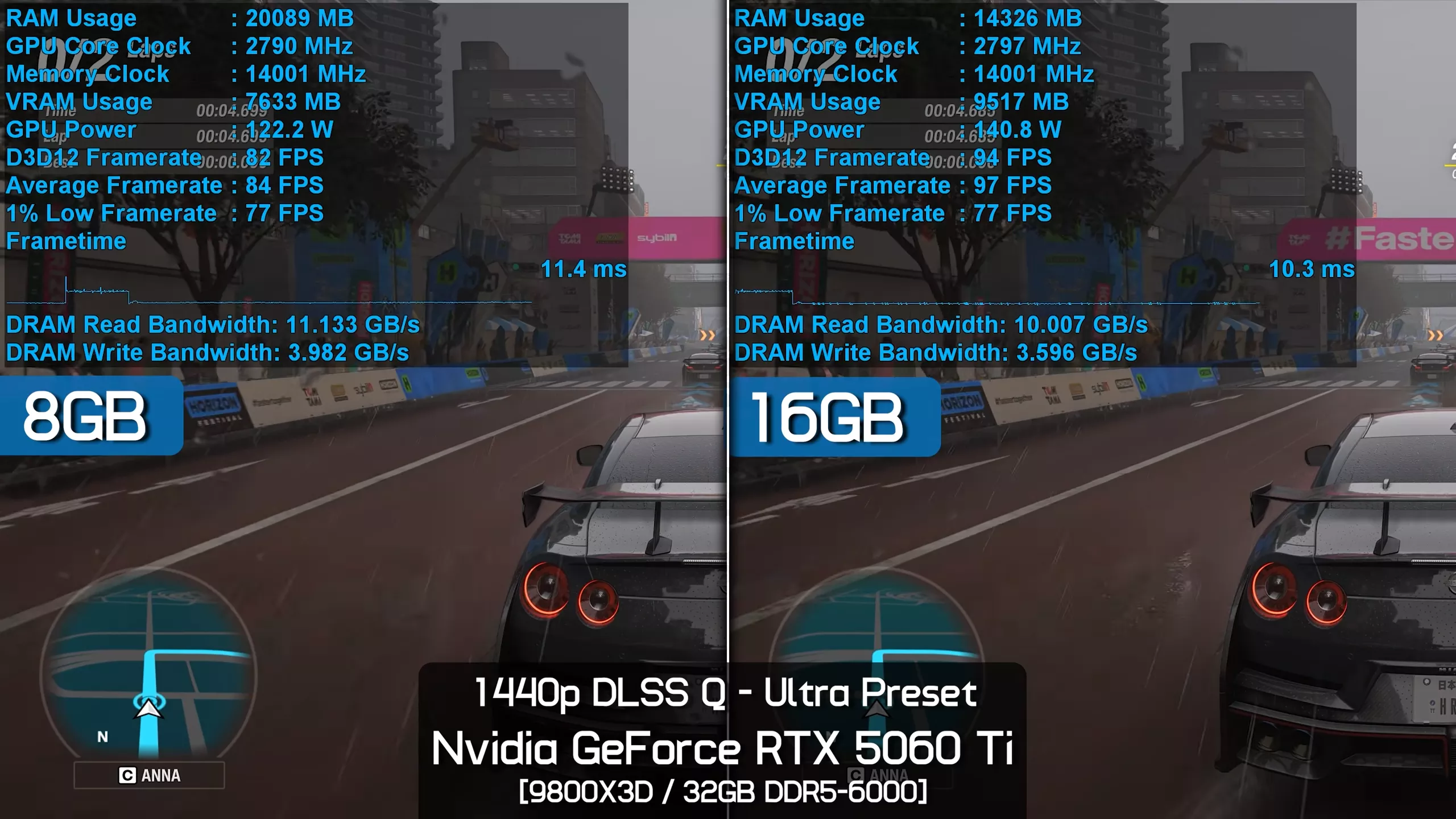
Even at 1440p, we're seeing something similar. The 16GB model is 18% faster, though in this example the jump from 83 fps on average to 98 fps was much more noticeable, despite nearly identical 1% lows.
1080p DLSS Quality - High
Dropping down to the High preset reveals an interesting scenario where the 16GB model is still offering 24% greater performance at 1080p with upscaling enabled, despite VRAM usage topping out at 7.8GB, so technically below the 8GB limit. Not only that, but with the 8GB card we saw VRAM allocation peak at around 6GB. So something unusual is clearly going on here, though we already suspected that because this game handles VRAM usage in a highly unconventional way.
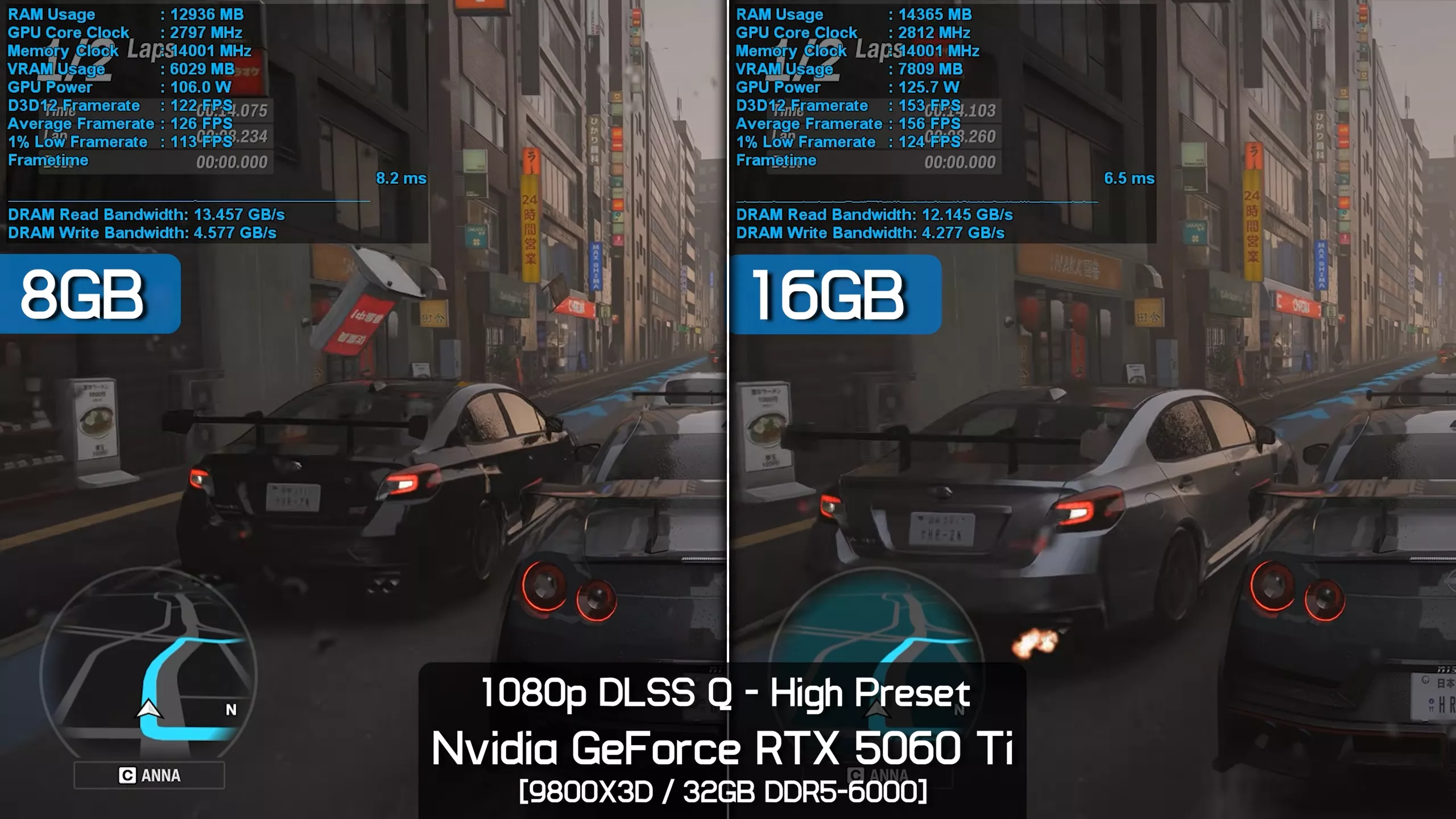
We're seeing a situation where frame rate performance can be heavily degraded while frame times remain smooth and consistent, all while visual quality appears identical. We can't recall seeing behavior quite like this before.
1440p DLSS Quality - High
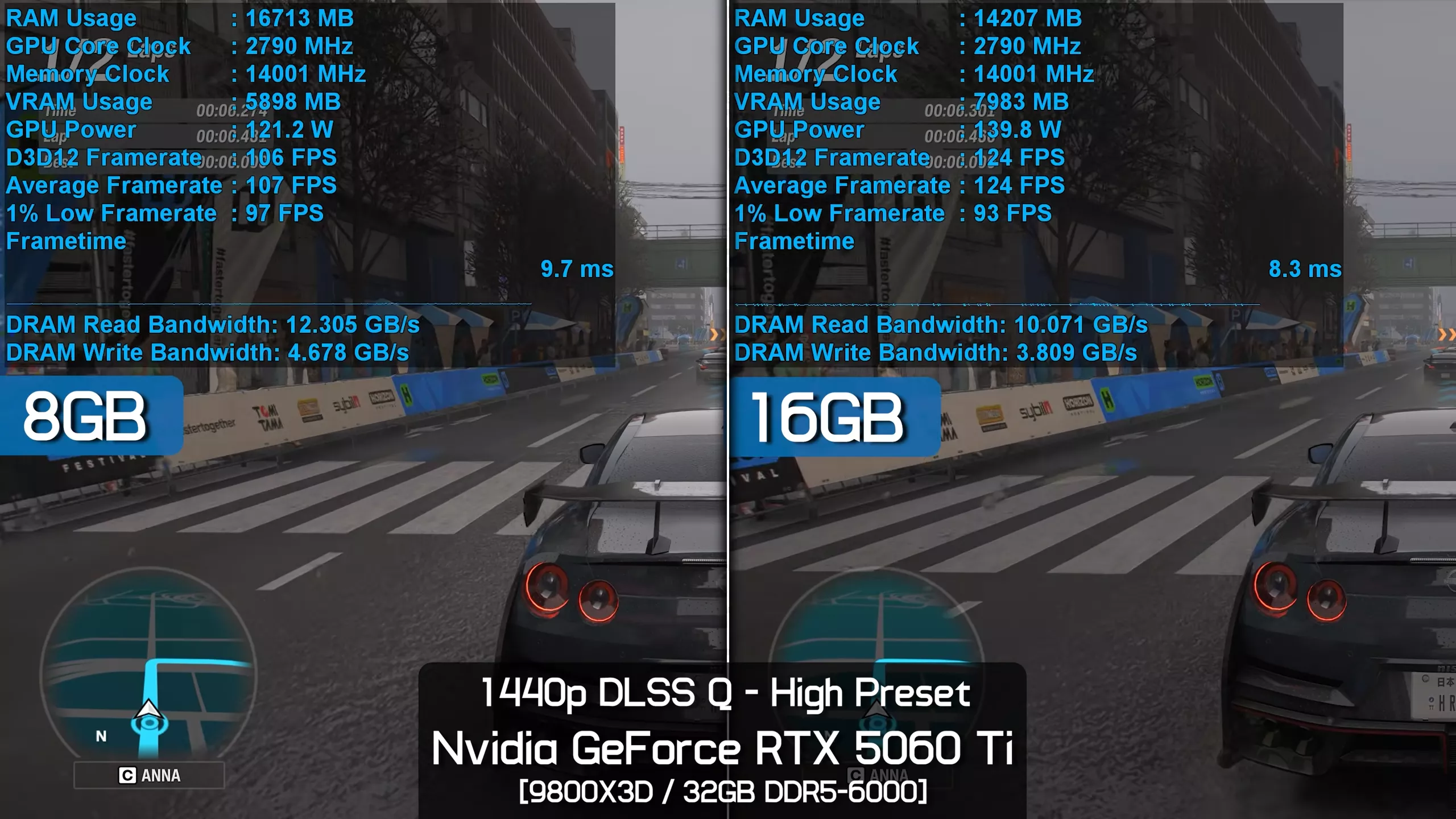
Then at 1440p, the margin is reduced again, the opposite of what you'd normally expect. Here, the 16GB model was 18% faster when comparing average frame rates, while the 1% lows were identical. Again, this is highly unusual behavior.
1080p DLSS Quality - Medium
The oddities continue as we move down to the Medium preset at 1080p with Quality upscaling. The 16GB model was still 27% faster when comparing average frame rates, and now we're seeing VRAM usage peak at around 7.5GB. The 1% lows were also 16% stronger for the 16GB model, but once again both configurations delivered excellent frame time consistency with no noticeable stuttering.
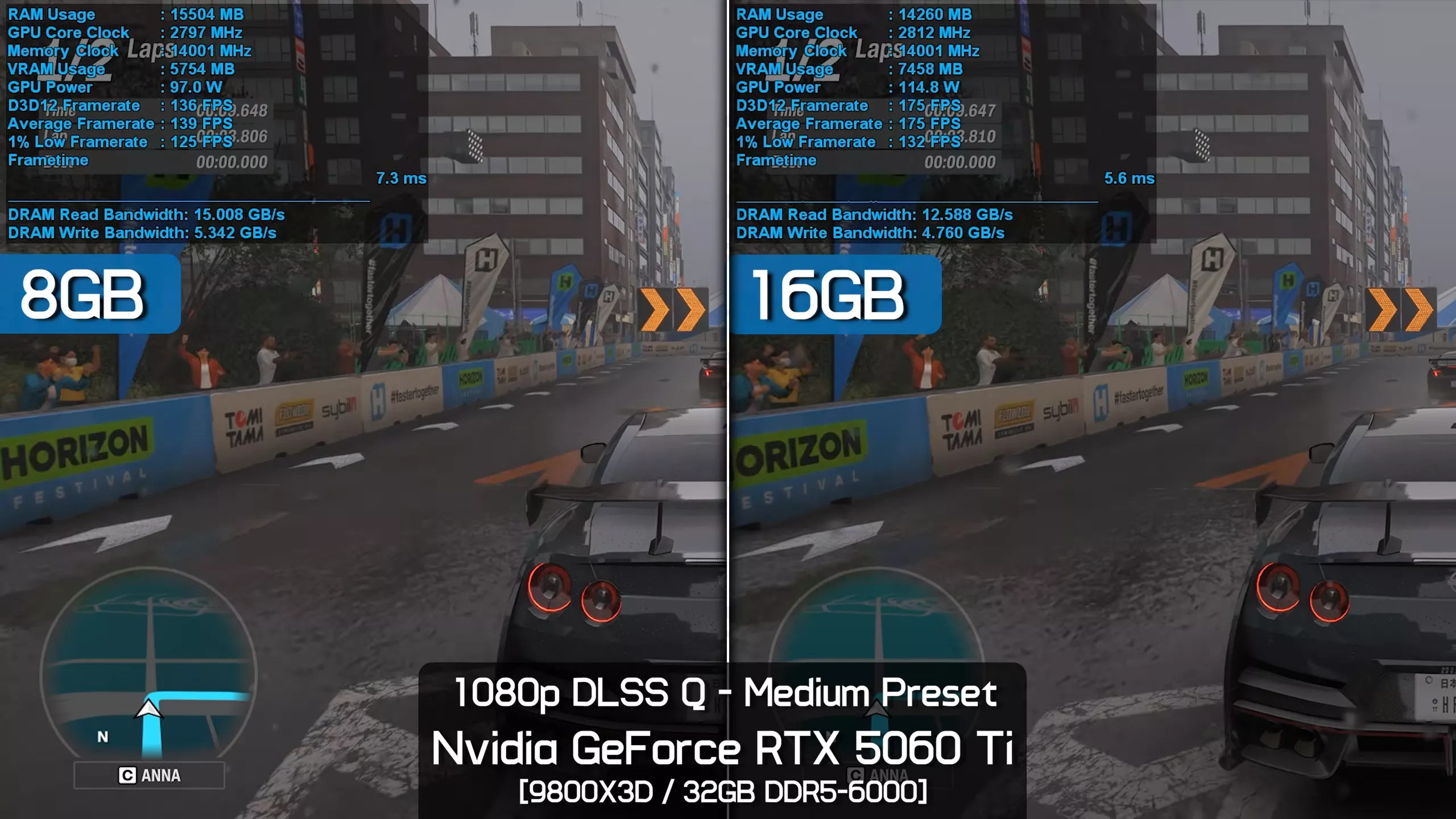
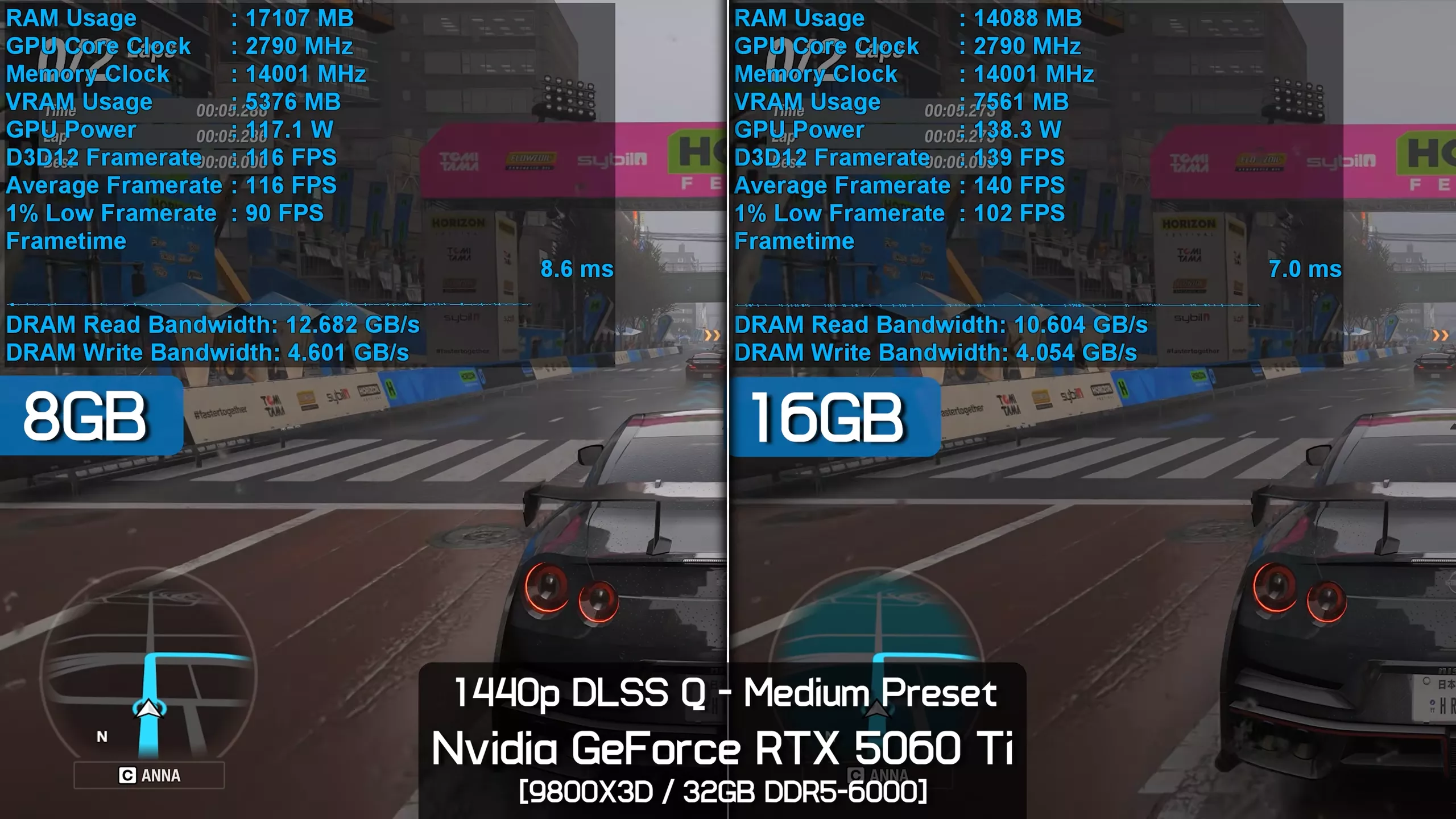
1440p DLSS Quality - Medium
Again, the margins were reduced at 1440p, which is the opposite of what you'd normally expect to see once VRAM capacity has been exceeded. Here, the 16GB model was 21% faster when comparing average frame rates and 15% faster when comparing 1% lows. So the 16GB model was certainly faster, but both configurations still delivered excellent, perfectly smooth performance.
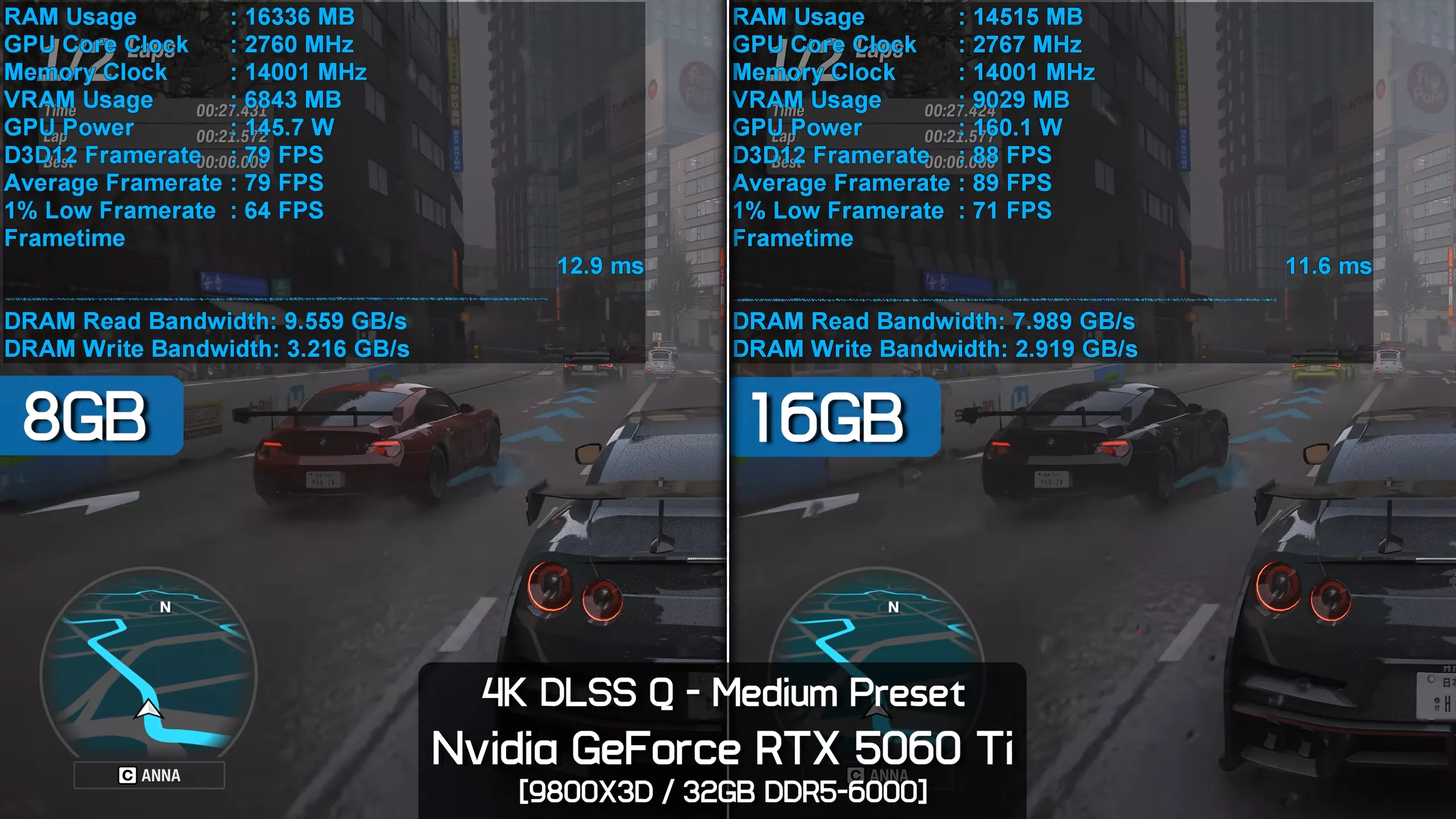
4K DLSS Quality - Medium
Finally, at 4K using the Medium preset with Quality upscaling, the 16GB RTX 5060 Ti was just 13% faster when comparing average frame rates and 9% faster when comparing 1% lows. So we're actually seeing a smaller performance delta at 4K than we observed at 1080p, which is highly unusual. Again, we may be witnessing a scenario where the primary bottleneck shifts from VRAM capacity to compute performance, as unlikely as that might initially seem.
16GB vs 32GB RAM (System Memory)
1440p DLSS Balanced - Extreme+RT
All of the testing so far has been conducted using 32GB of DDR5-6000 CL30 memory, but if we switch to two 8GB DDR5 modules for a total system capacity of 16GB, the 8GB GPU now has far less system memory available to spill over into.
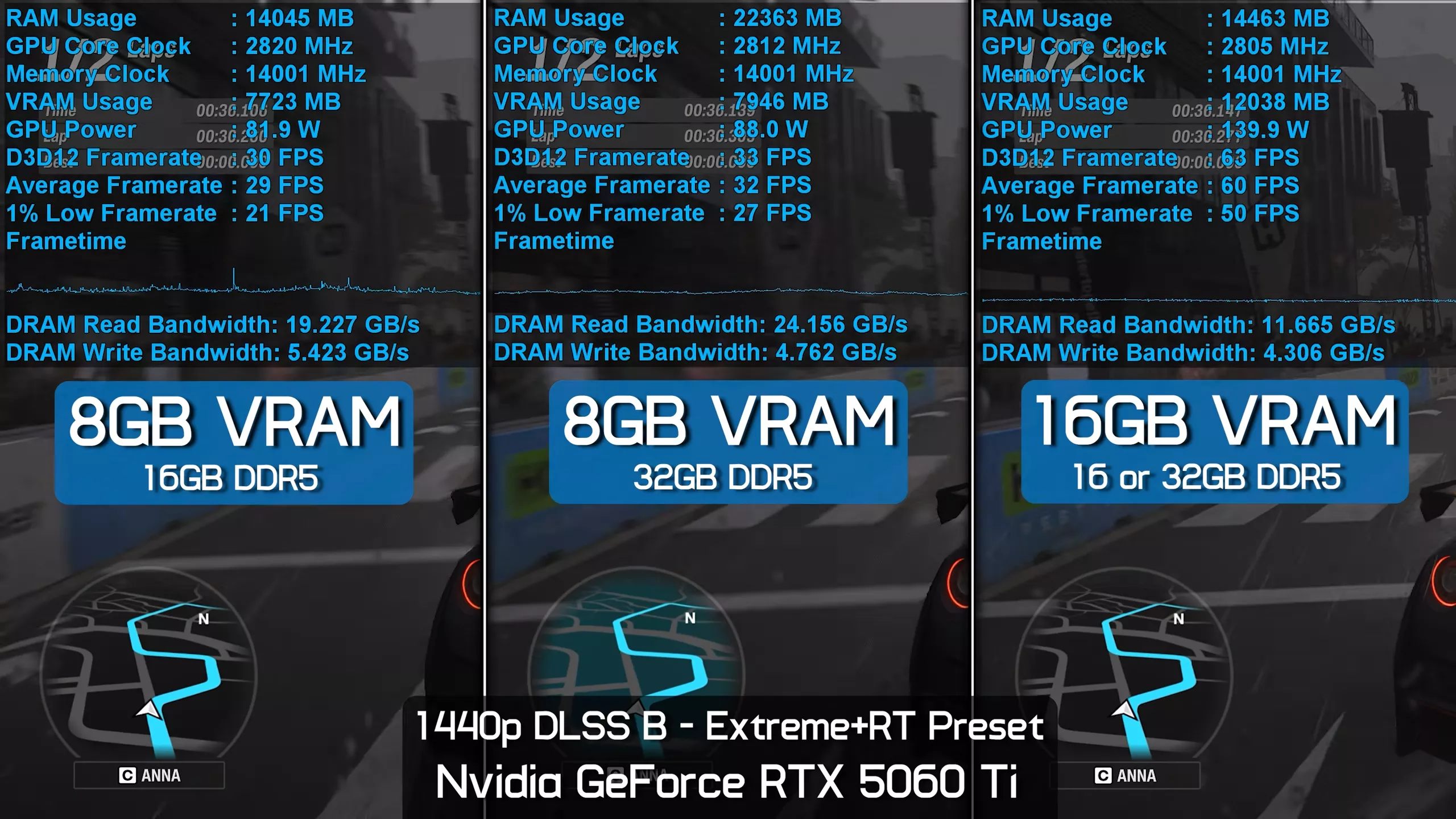
We should note that both memory configurations delivered identical performance with the 16GB RTX 5060 Ti, as that card isn't overflowing into system memory, and under these test conditions the game is far from CPU-limited.
However, for the 8GB card we're seeing a 9% reduction in average frame rate along with a massive 25% hit to the 1% lows. This means that for users with just 16GB of system memory who want to run Forza Horizon 6 maxed out, the 16GB RTX 5060 Ti becomes an even stronger option.
1440p DLSS Quality - Extreme
Lowering the quality preset to Extreme, so Extreme with ray tracing disabled, we're looking at an 18% decline in performance for the 8GB GPU when dropping from 32GB of system memory down to 16GB, along with a 25% hit to the 1% lows.
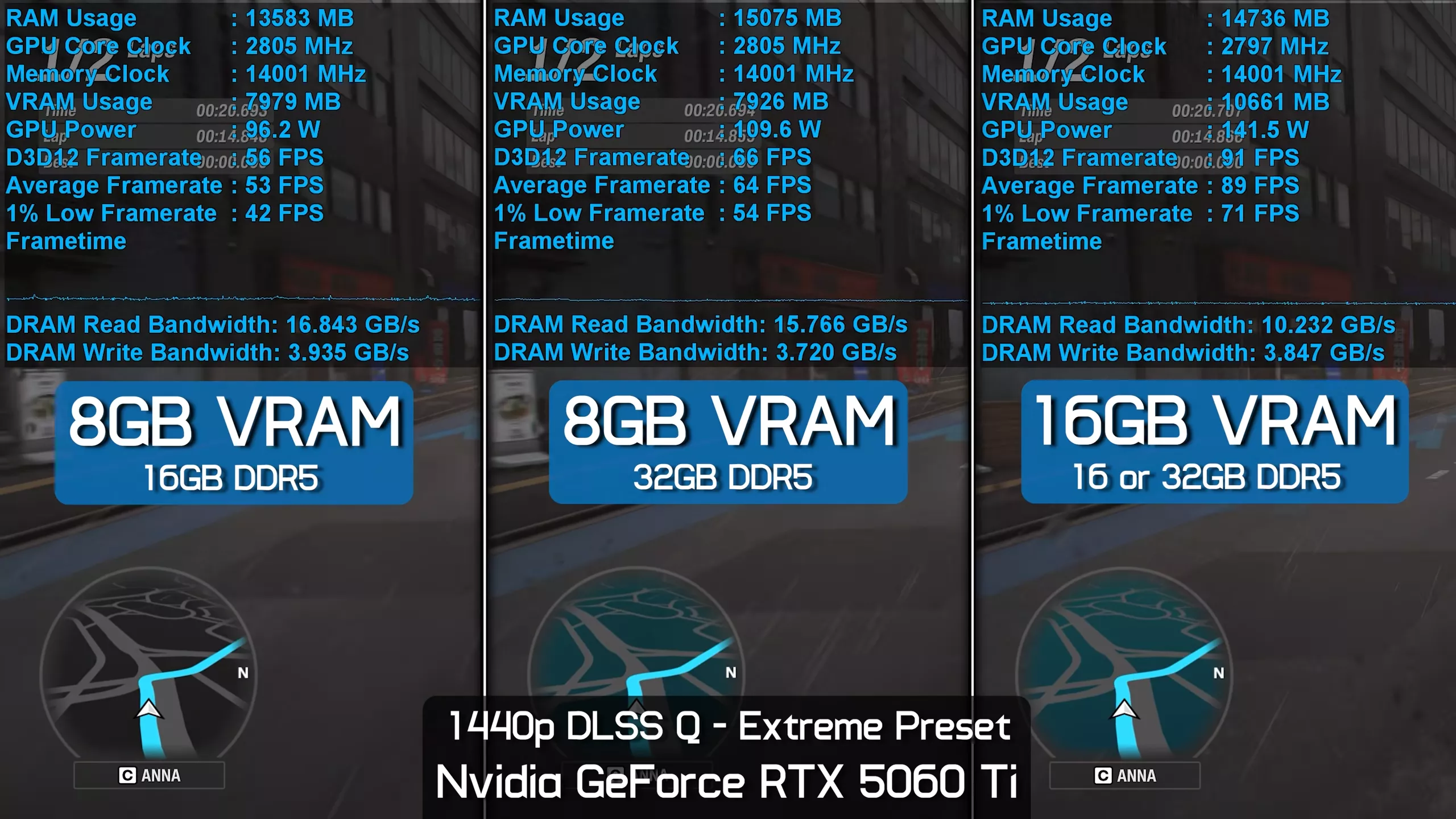
That means for users with just 16GB of system memory, the 16GB RTX 5060 Ti could be up to 75% faster than the 8GB model, even without ray tracing enabled.
1440p DLSS Quality - High
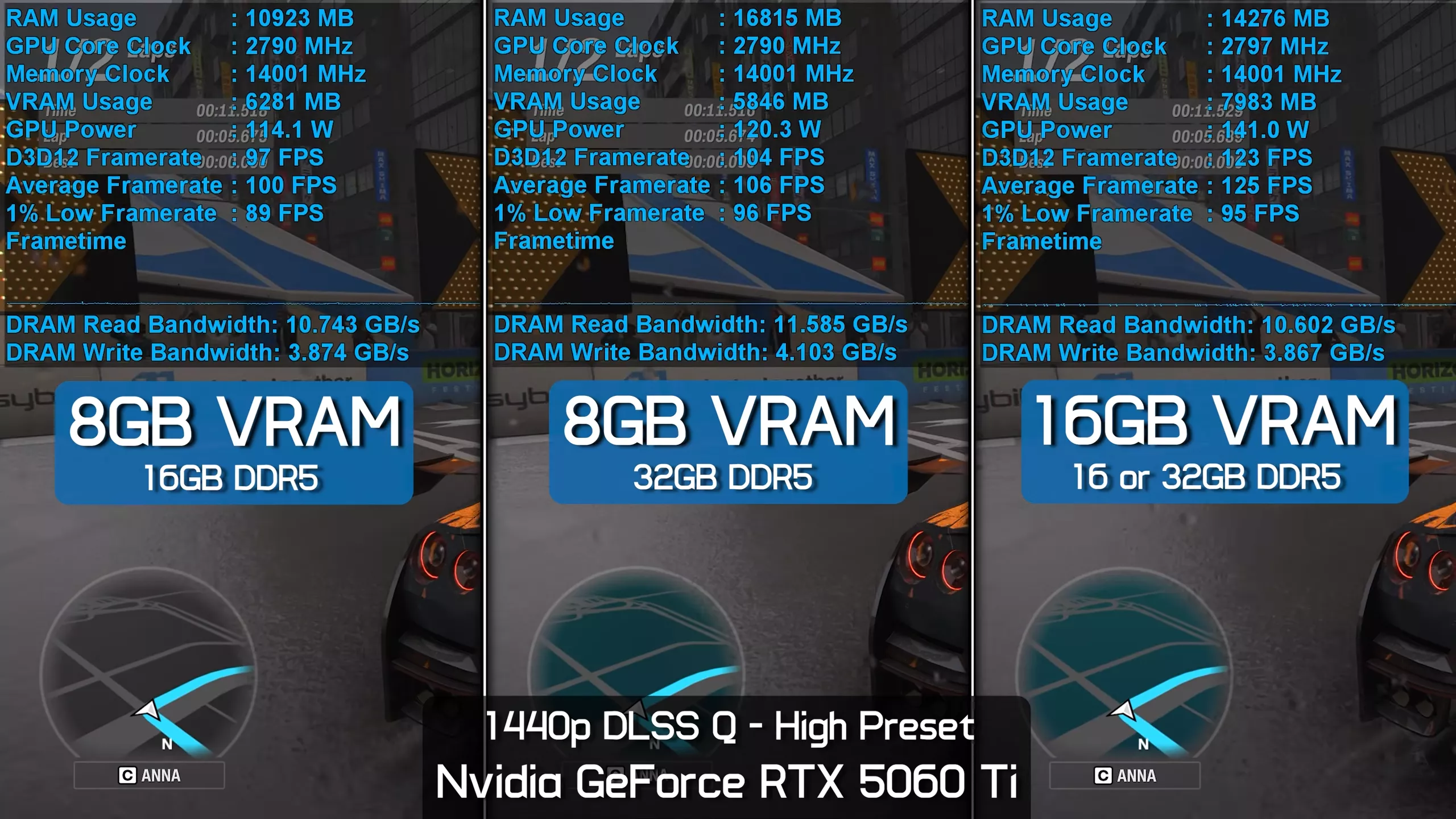
The performance hit when using the High preset at 1440p with Quality DLSS upscaling is much smaller. Here, the 8GB model is just 6% slower when paired with 16GB of system memory, making the 16GB RTX 5060 Ti 26% faster overall.
What's Killing 8GB Performance? Textures.
So what's killing the performance of the 8GB RTX 5060 Ti? Other than the obvious fact that it doesn't have enough VRAM, the primary issue appears to be texture quality.
Here, on the left and right sides of the screen, we have the 16GB and 8GB versions of the RTX 5060 Ti using the Extreme+RT preset at 1440p with Quality DLSS upscaling. If we reduce the environment texture size on the 8GB model, performance increases by a massive 34%, raising the average frame rate to 43 fps, though the 16GB model remains 28% faster.
For a better representation of image quality comparisons, check out the HUB video below:
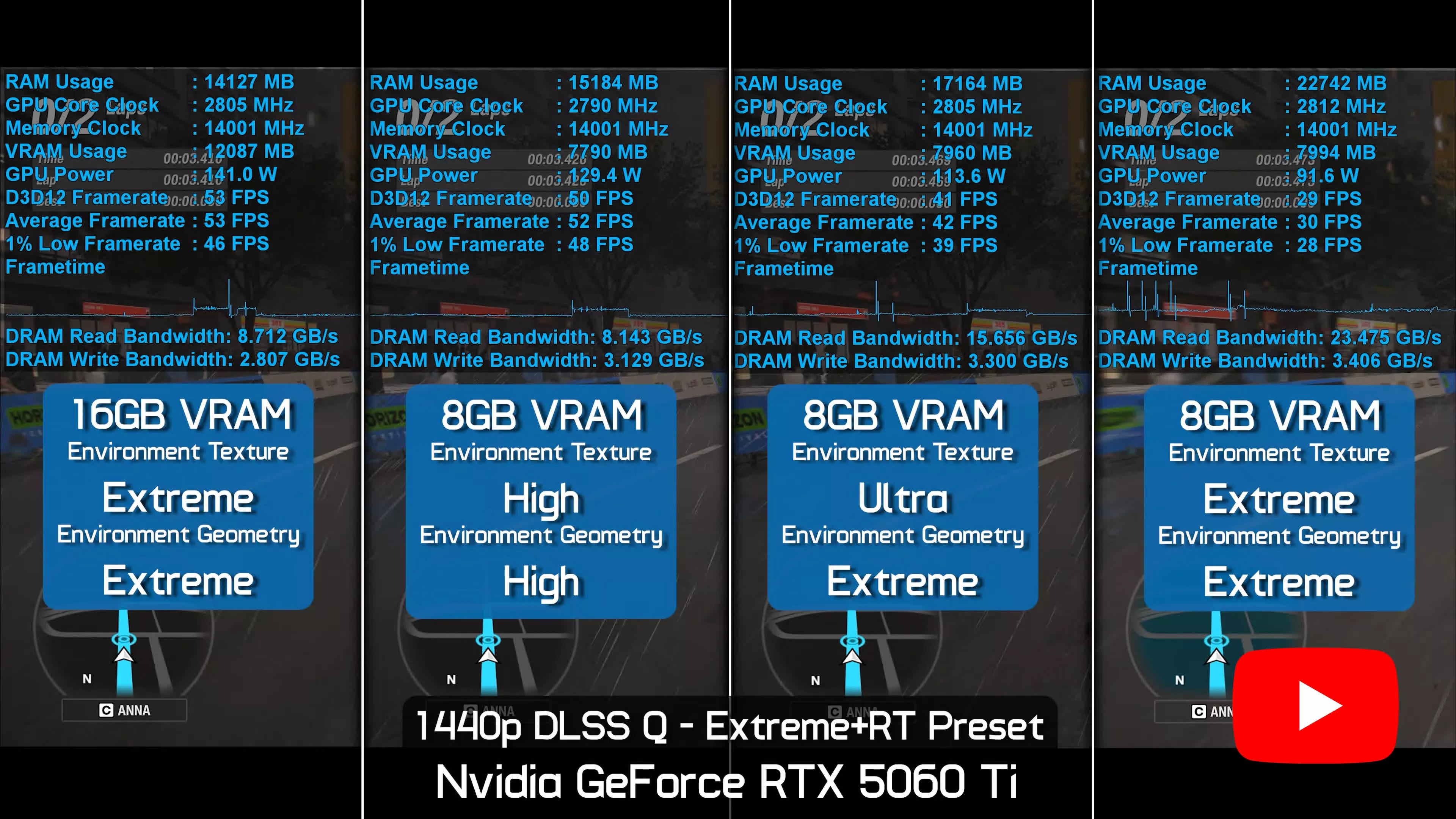
It's not until we drop down to the High environment texture setting that the 8GB model is able to roughly match the performance of the 16GB version. However, using the High environment texture setting also forces the environment geometry setting down from Extreme to High.
So yes, you can still enjoy high-quality ray tracing on the 8GB RTX 5060 Ti if you manually tune the settings, but does lowering the environment texture and geometry settings to High reduce visual quality?
Extreme vs High Preset Visuals Side-by-Side
In short, yes, it does reduce visual quality quite significantly, though you'll likely notice the reduced environment detail more than the lower texture quality itself.
For a better representation of image quality comparisons, check out the HUB video below:
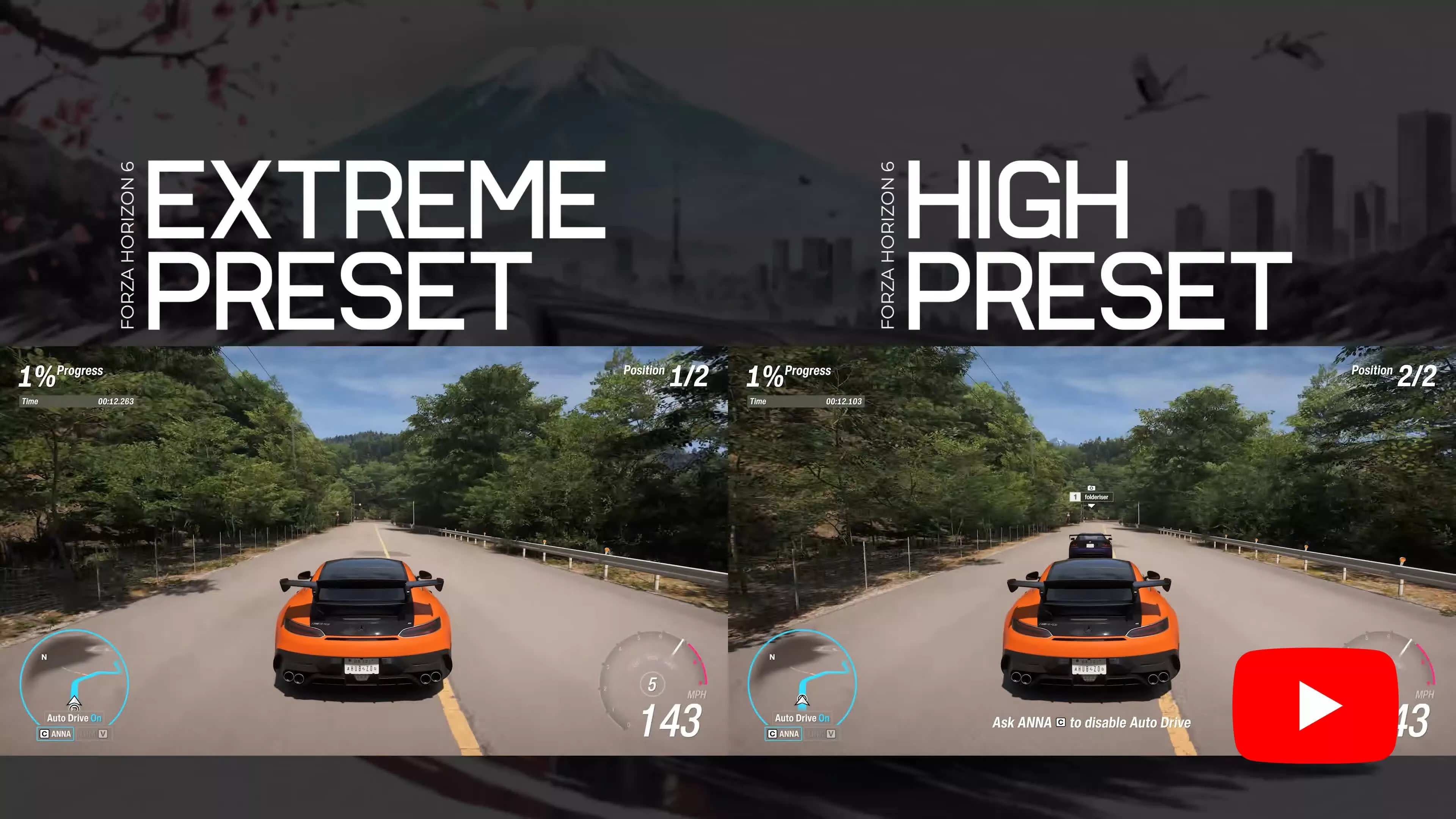
You'll probably notice a few things immediately. First, the vines growing over the road are no longer visible using the High setting. There's also far less vegetation along both sides of the road. Those are the most obvious differences.
However, there's much more going on than that. The entire environment quality has been scaled back, and if we switch between High and Extreme in full-screen mode, the differences become increasingly apparent. Not only are there far more plants in the Extreme preset, but even the shared vegetation assets are noticeably different. The Extreme version features fuller trees, denser shrubbery, and far richer foliage overall, which is especially noticeable on the tree to the right side of the screen.
These kinds of reductions can be seen throughout the game, affecting details both near the car and deep into the distance. In this example, the stone retaining wall has significantly more vegetation growing across it, with vines hanging almost down to the road.
But what really stands out while driving is the distant scenery. Entire forests are missing, giving parts of Japan an oddly arid, desert-like appearance that feels completely out of place.
Apparently, 8GB GPUs are now responsible for deforestation, too, just when we thought they couldn't get any worse.
1440p DLSS Quality - Extreme+RT
Lastly, we created a long-run benchmark, as extended gameplay sessions can often expose additional issues for VRAM-limited graphics cards. This test runs for 12 minutes, and we found this in-game testing to be even more favorable for the 16GB model.
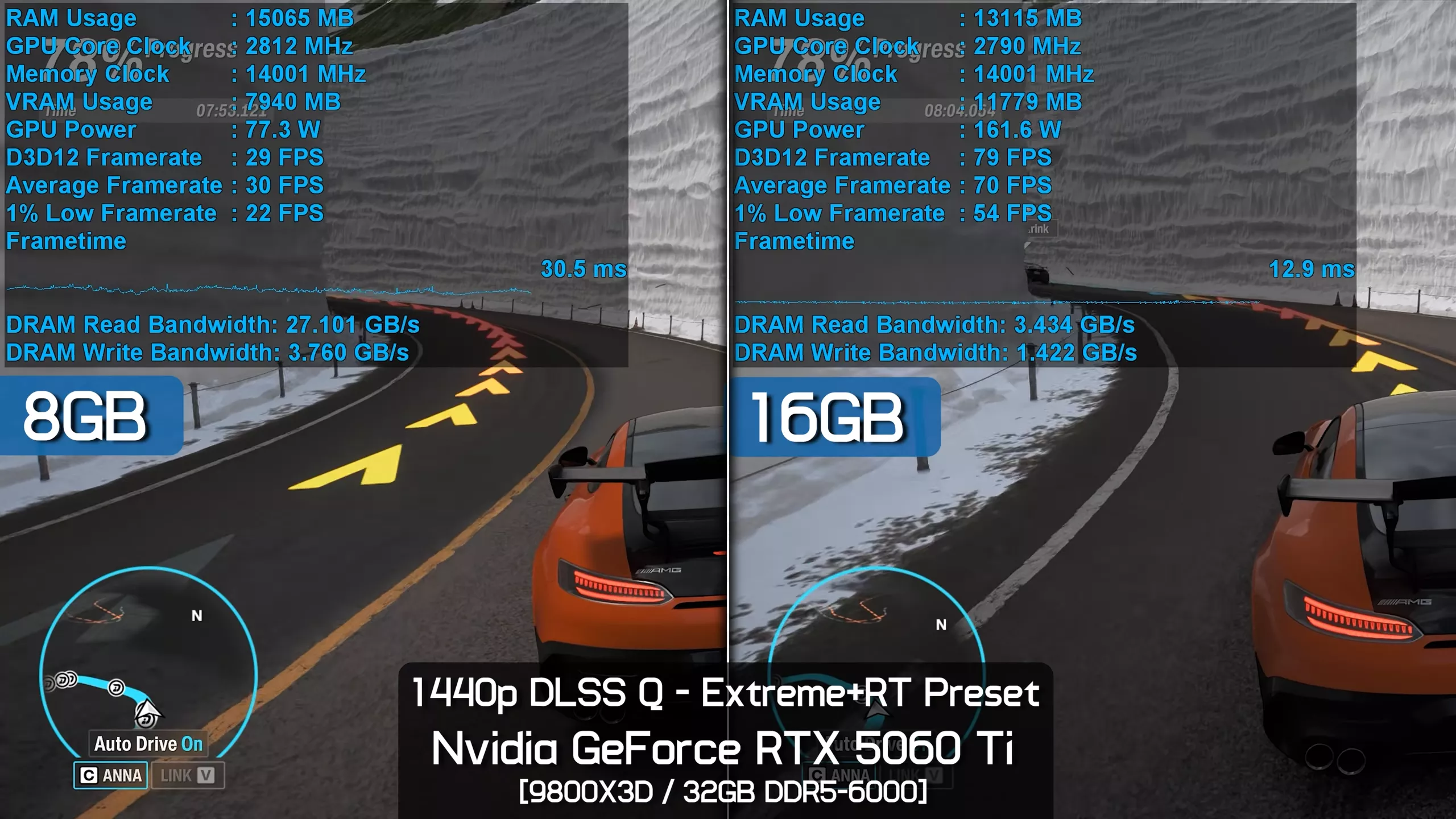
By the end of the test, the 16GB version was an incredible 140% faster when comparing both average frame rates and 1% lows.
Not only that, but the 16GB model averaged 72 fps, delivering highly playable performance and an excellent overall experience, while the 8GB model topped out at just 30 fps with 1% lows of only 22 fps. It was incredibly difficult to drive without relying on the auto-drive feature.
What We Learned: VRAM Reality Check
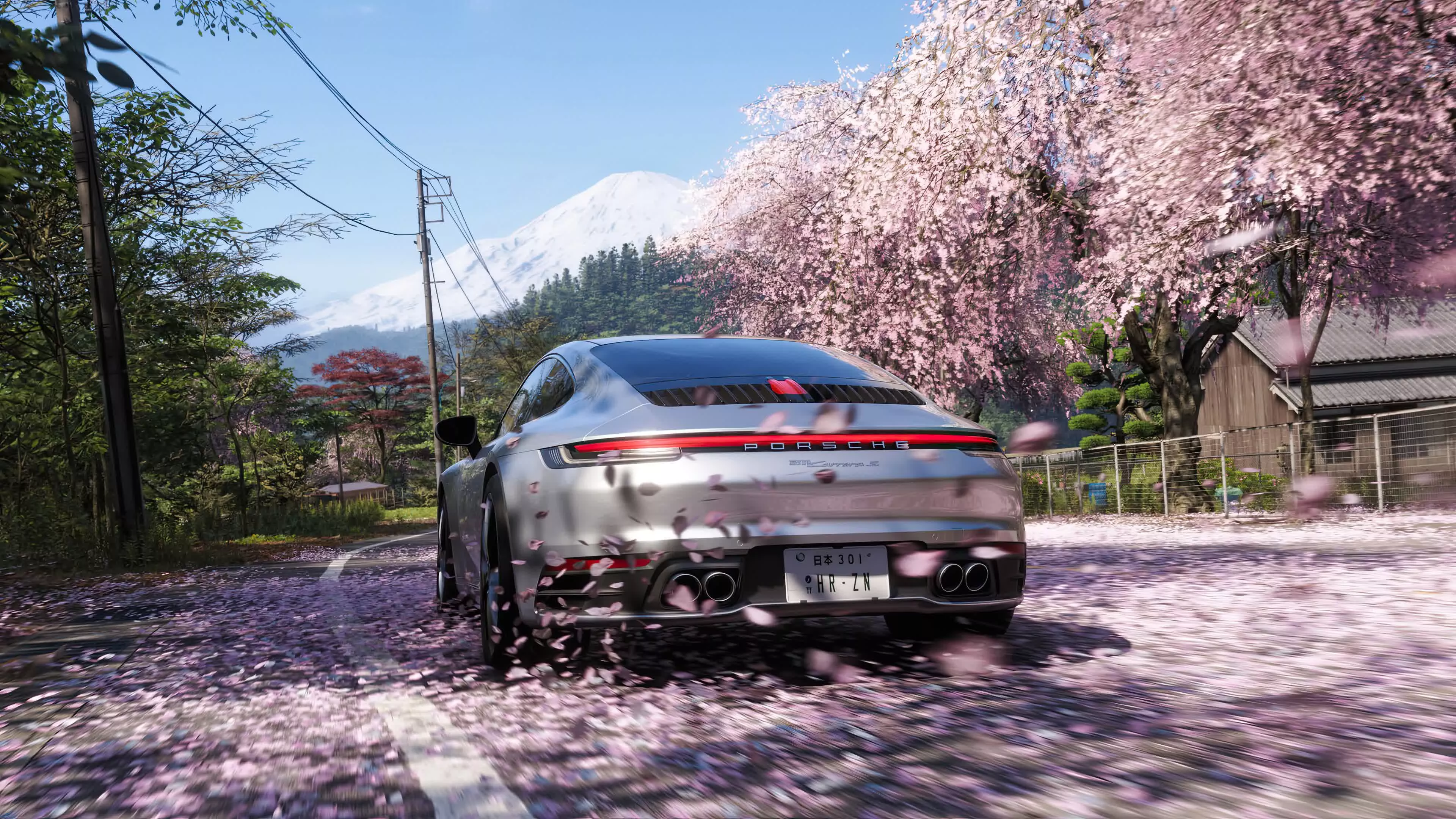
Forza Horizon 6 is an excellent game. It appears to be a major upgrade over the previous entry, featuring not only a larger map but also one that is far more densely populated. The gameplay is excellent, the graphics are spectacular, and in our opinion the game is very well optimized.
All of that said, to enjoy this game in all its glory, one of the minimum requirements you'll need to meet is 12GB of VRAM, though ideally you'll want 16GB.
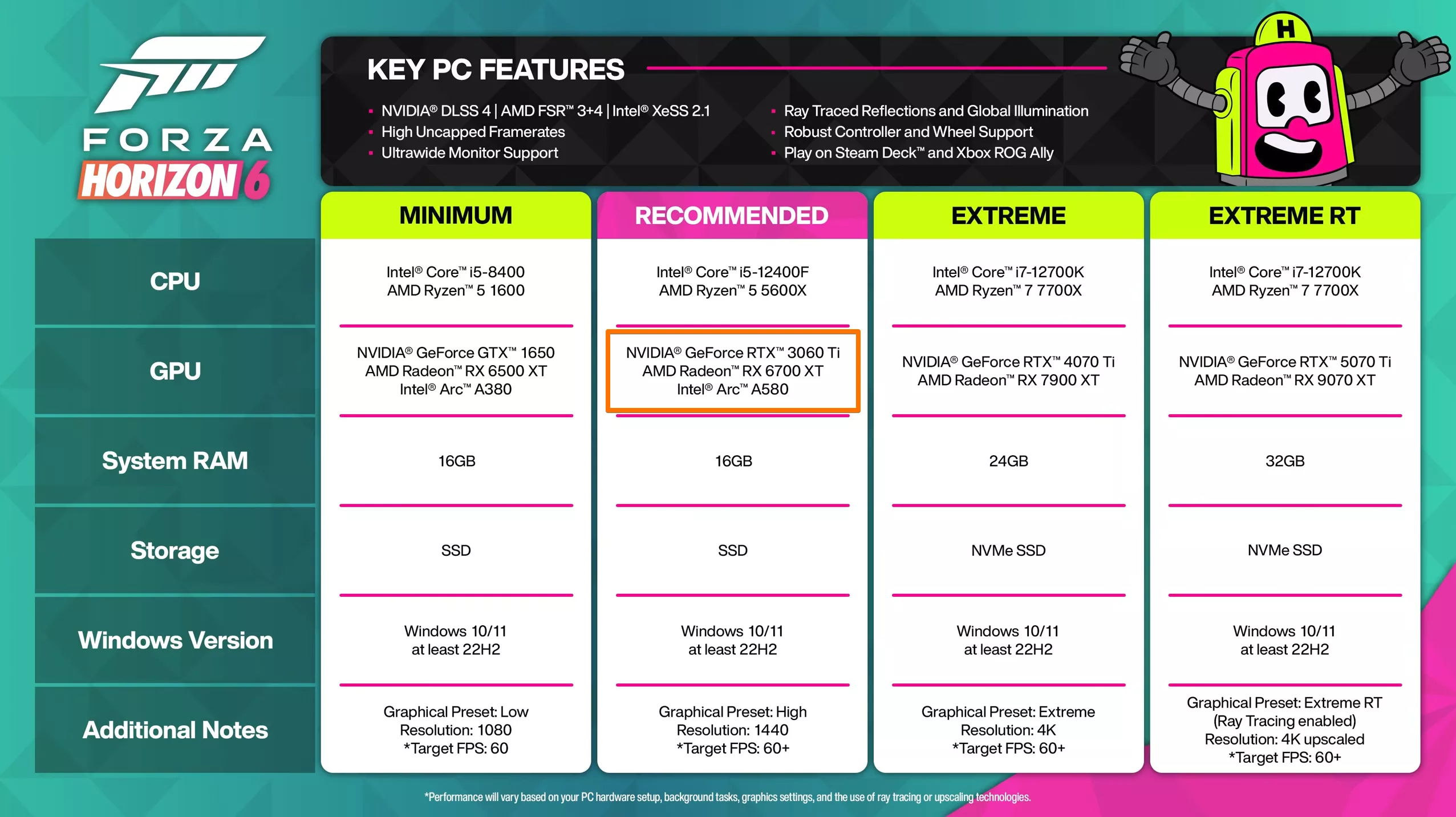
This is clearly why the developers recommend PC gamers use an RTX 4070 Ti or RX 7900 XT for the Extreme preset, as those GPUs pack 16GB and 20GB of VRAM respectively.
Interestingly, even the recommended specifications call for 12GB AMD and Nvidia GPUs, though Intel's Arc A580 was also included despite offering just 8GB of VRAM.
Having now tested the game, we can confirm that the Ultra and Extreme presets absolutely require a minimum of 12GB of VRAM, and that also applies to the base ray tracing preset, High+RT.
For years we've warned that any GPU offering only 8GB of VRAM would eventually be limited to using what are effectively medium-quality settings at best, and that's exactly what we're seeing here. Granted, the developer labels the preset as "High," but with nine presets in total, High effectively ranks as the sixth-lowest quality option.
The downgrade in visual quality from Extreme to High is also very noticeable, and this is something we'll explore further in our optimization guide. After speaking with Tim, he confirmed what we're seeing: even dropping from Extreme to Ultra results in a noticeable reduction in texture quality, while the High preset represents a massive visual downgrade.
The Real Problem with 8GB GPUs
The amount of additional detail and environmental complexity Forza Horizon 6 can include when moving from 8GB to 12GB of VRAM is staggering. It transforms the game from something that feels console-oriented into something that truly showcases the advantages of PC hardware
Forza Horizon 6 also reinforces something we've been saying for years: 8GB GPUs are unquestionably holding back PC gaming by limiting the options developers have to improve visual quality. The amount of additional detail and environmental complexity Forza Horizon 6 can include when moving from 8GB to 12GB of VRAM is staggering.
It transforms the game from something that feels console-oriented into something that truly showcases the advantages of PC hardware. At least, that was the dream before AMD and Nvidia decided mainstream GPUs would remain stuck with 8GB of VRAM for the better part of a decade.
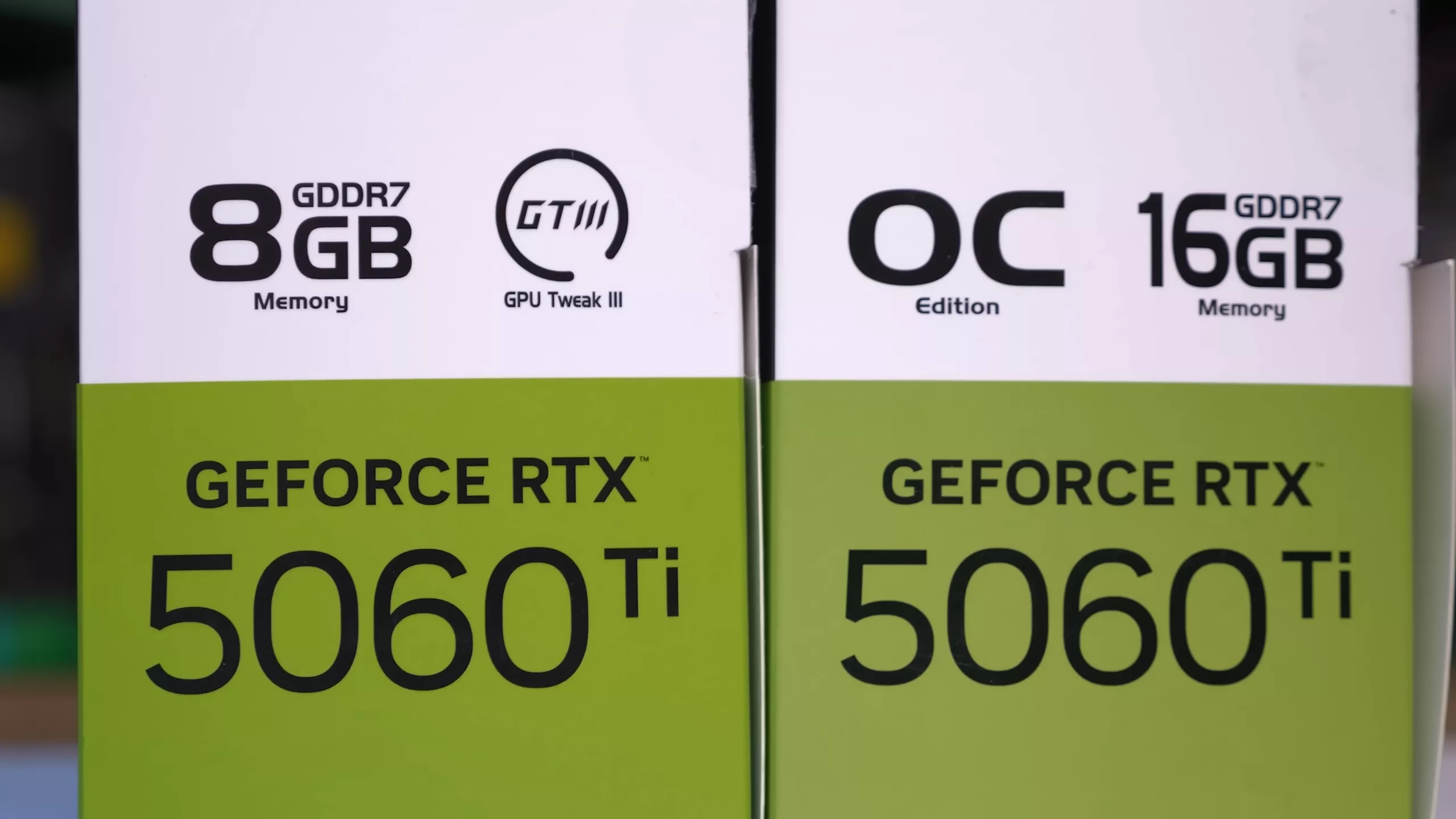
To be clear, we're not attacking anyone who bought an 8GB GPU. You didn't do anything wrong by purchasing one, and we're not trying to make anyone feel bad about their hardware. The issue lies with AMD and Nvidia continuing to limit gamers to 8GB of VRAM. We understand that the most affordable GPUs currently available still ship with 8GB, but that's exactly the problem. AMD and Nvidia have put the industry in this position, not gamers who were forced to buy underwhelming hardware due to limited options.
In the case of the RTX 5060 Ti, the difference between the 8GB and 16GB models is shocking. The 16GB version can comfortably play the game fully maxed out using the Extreme+RT preset, while the 8GB model doesn't even have enough VRAM to sustain 60 fps at 1080p using Balanced DLSS upscaling. That's appalling performance from a GeForce RTX 50-series product marketed as delivering the ultimate ray tracing experience.
You can switch to the High+RT preset, but as noted earlier, despite using reduced levels of ray tracing, the biggest downgrade affects virtually everything else, including texture quality and environmental detail.
It's also worth noting that lowering the texture quality setting below Extreme on the 16GB RTX 5060 Ti does nothing to improve frame rate performance, because that model already has sufficient VRAM. Reducing VRAM usage when you already have enough memory provides no performance benefit, it simply reduces visual quality unnecessarily.
What this ultimately means is that if all modern GPUs shipped with at least 12GB of VRAM, the baseline texture setting would likely be Extreme because there would be little reason to optimize around lower memory capacities. Developers could instead focus on creating 16GB, 20GB, or even higher-end texture and environment detail settings that push visual quality even further.
Unfortunately for gamers, while the RTX 5060 Ti 16GB is supposed to cost just 13% more than the 8GB model, making it the obvious choice, Nvidia's priorities driven by the AI boom and the resulting supply constraints have created artificial scarcity. As a result, 16GB models now cost roughly 53% more than their 8GB counterparts, which feels like a real slap in the face to the gamers and PC industry that helped build the company.
Of course, AMD isn't much better. While the 8GB Radeon 9060 XT at least includes the full x16 PCIe interface, as you'll see in our full benchmark session (now live), it still struggles badly when using maxed-out texture settings.
Now we'll get back to working on the full 40-GPU benchmark, so check back soon for that.