A closer look at AMD's RDNA 4 and FSR 4 Upscaling

Scorpus

Posts: 2,263   +247
Staff member

Update (Mar 5): TechSpot's Radeon RX 9070 XT review is now live.

After our initial analysis of the Radeon RX 9000 series announcement yesterday and the potential performance implications, let's put pricing aside and focus on some of the other interesting aspects of RDNA 4.

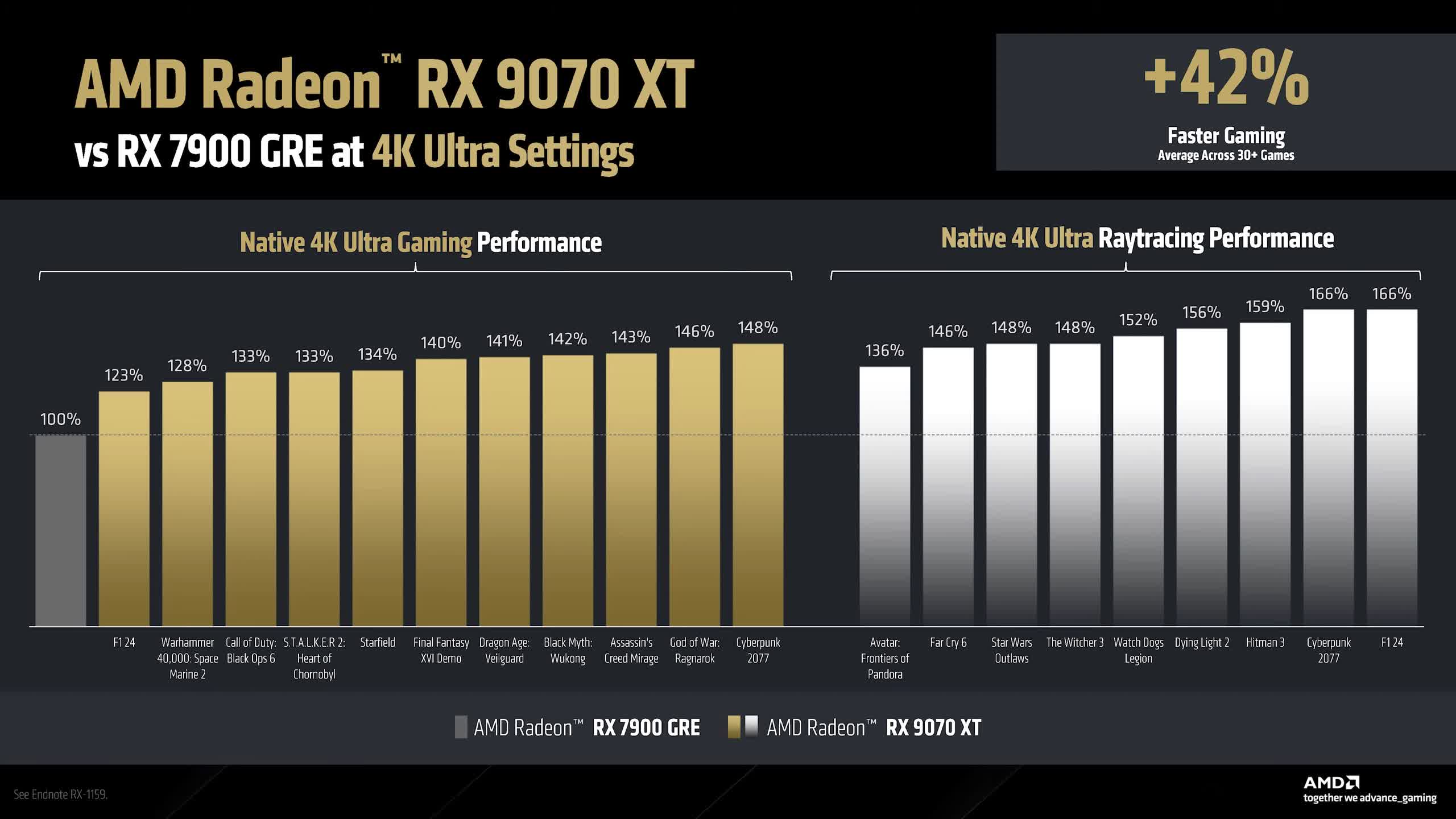
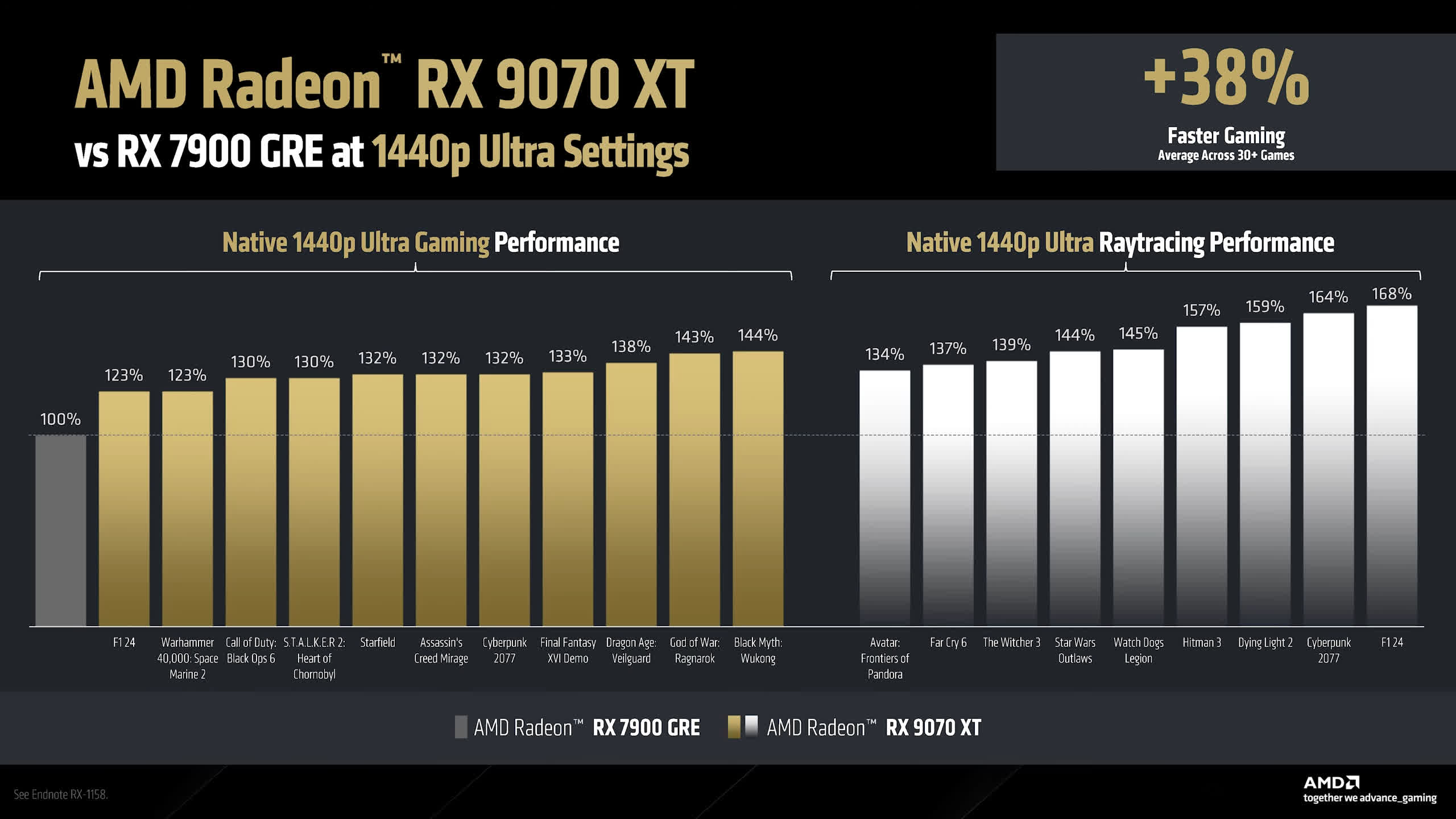
Based on AMD's performance claims, the RDNA 4 architecture is more optimized for higher resolutions than lower ones. While the Radeon 9070 XT is claimed to be 42% faster than the 7900 GRE at 4K Ultra settings, at 1440p, it is 38% faster. The relative uplift at 1440p is 3% lower than at 4K, which isn't a massive difference but is still worth noting.
Of course, the biggest and most important feature announcement AMD has made alongside RDNA 4 is FSR 4, which introduces an ML-based upscaling solution.

Currently, FSR 2.2 and FSR 3.1 upscaling are not competitive with DLSS 4, so for AMD to compete, FSR 4 needs to be a major step up. With an AI-based upscaling algorithm, AMD now has a much better chance of delivering a competitive solution.

We can't fully analyze FSR 4 until the RDNA 4 review embargo lifts, but expect dedicated coverage after the GPU reviews go live. However, we saw FSR 4 in action at CES and can confirm that, based on what was shown, FSR 4 is a significant improvement over FSR 3.1.

In the CES demo, Ratchet & Clank: Rift Apart was shown running in both FSR 3.1 and FSR 4 performance modes. FSR 4 was noticeably better at upscaling from low render resolutions, particularly in performance mode, which has historically struggled with image quality in previous FSR versions.

Managing expectations for RDNA 4

Alongside the RDNA 4 announcement, AMD provided a few additional image comparisons, mostly still images showcasing fine detail differences. While these examples don't fully demonstrate overall image quality improvements, our CES preview of FSR 4 was impressive. At first, we didn't even realize FSR 4 was running in performance mode until an AMD representative pointed it out – and this was later confirmed in the settings.
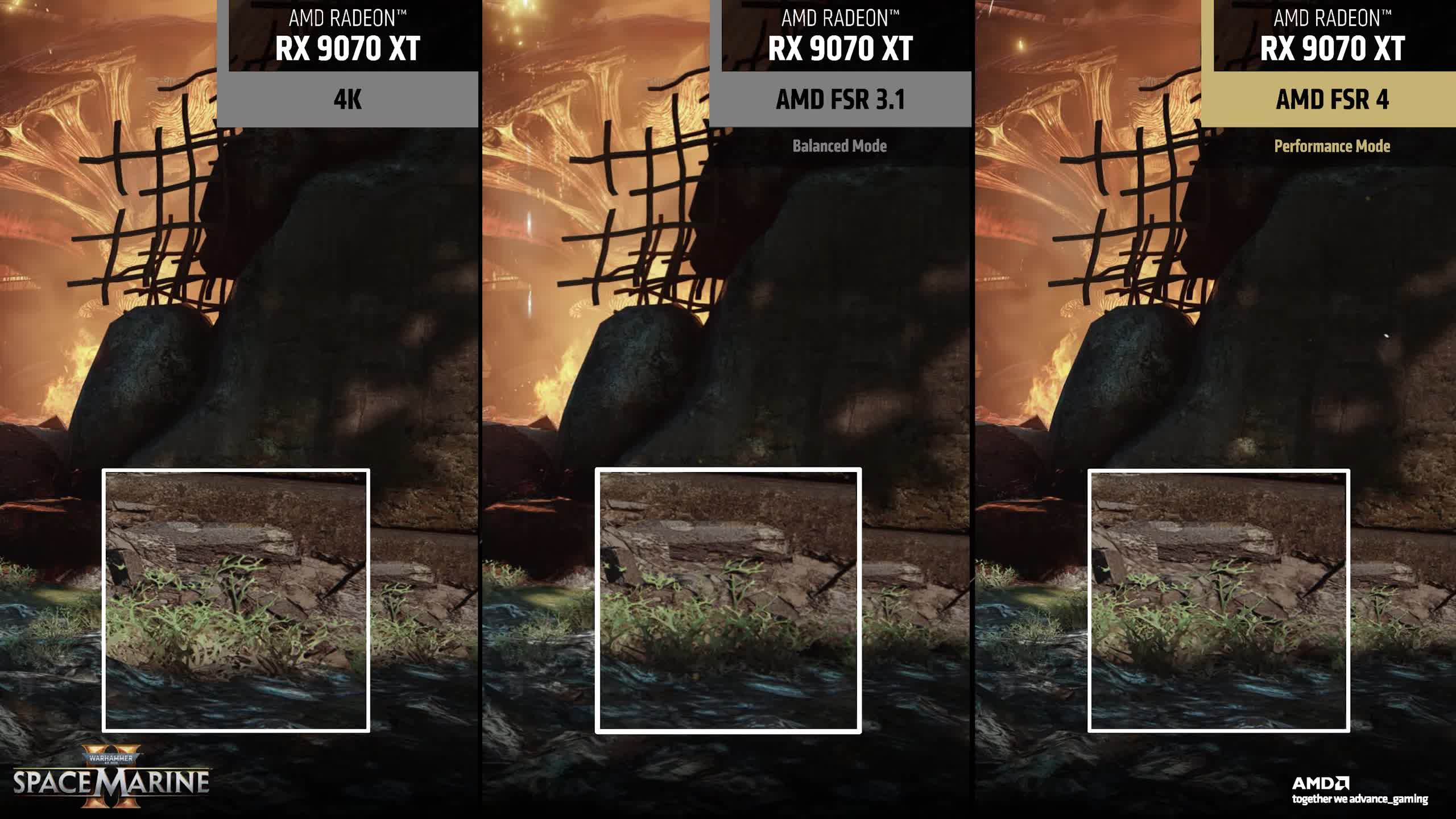
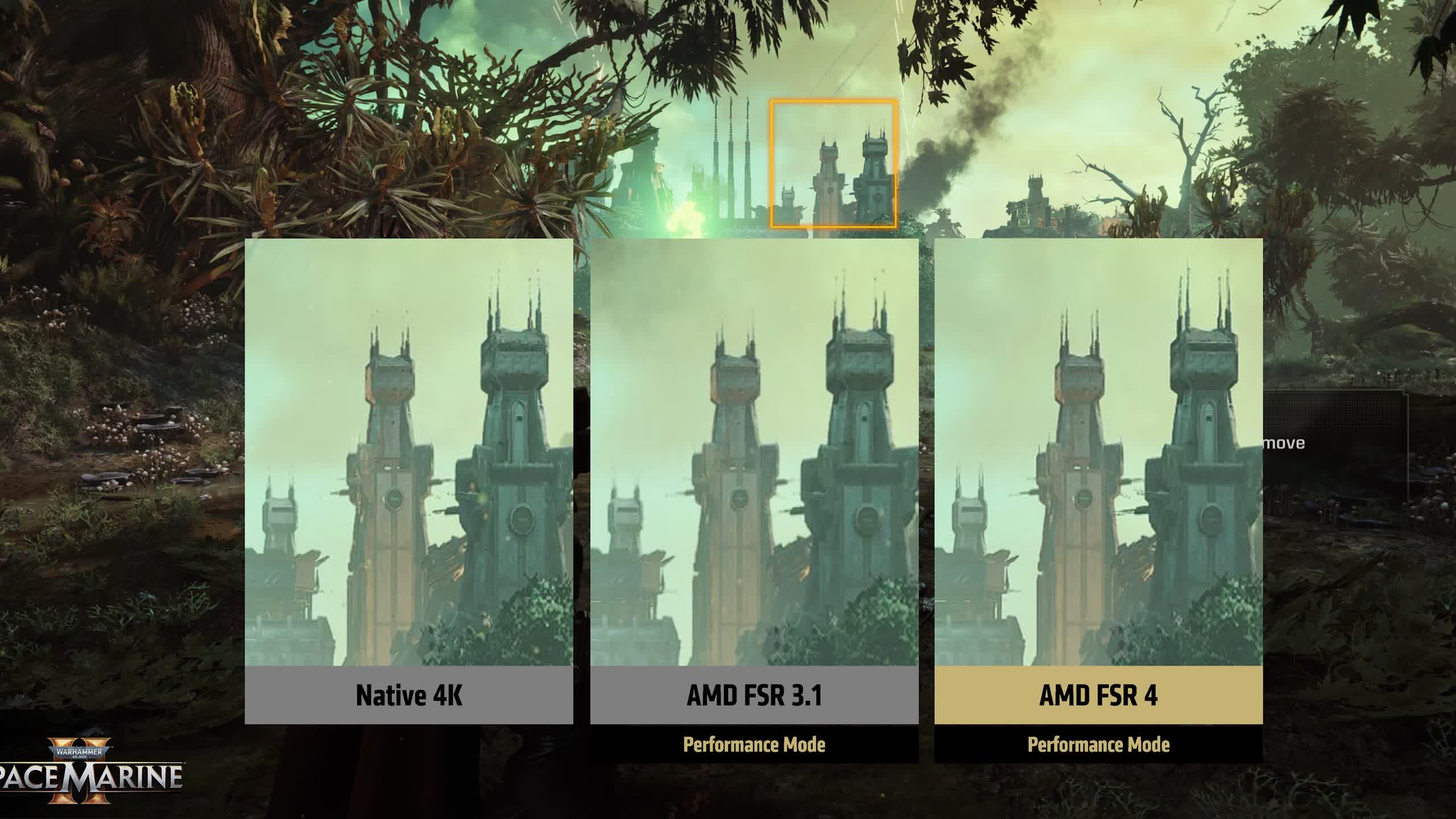
The biggest question we can't yet answer is: How close does FSR 4 get to DLSS? Are we looking at DLSS 2-level quality? DLSS 3? DLSS 4? We don't know yet. DLSS 4 has made significant strides in reducing TAA blur and improving image stability, so AMD has its work cut out to match Nvidia's offering.

However, there are several wins AMD can achieve with FSR 4:

  • A significant image quality boost over FSR 3.1 – Based on what we've seen, this seems like a given.
  • Better upscaling at lower resolutions like 1440p and 1080p – These are critical resolutions for gamers.
  • Making FSR 4 "usable" – Even if it doesn't match DLSS 4, if it can deliver DLSS 3-level quality with acceptable artifacting, that would be a huge improvement.
  • Matching or exceeding DLSS 4 quality – This would be an outstanding result, though AMD is coming from far behind, so expectations should be realistic.
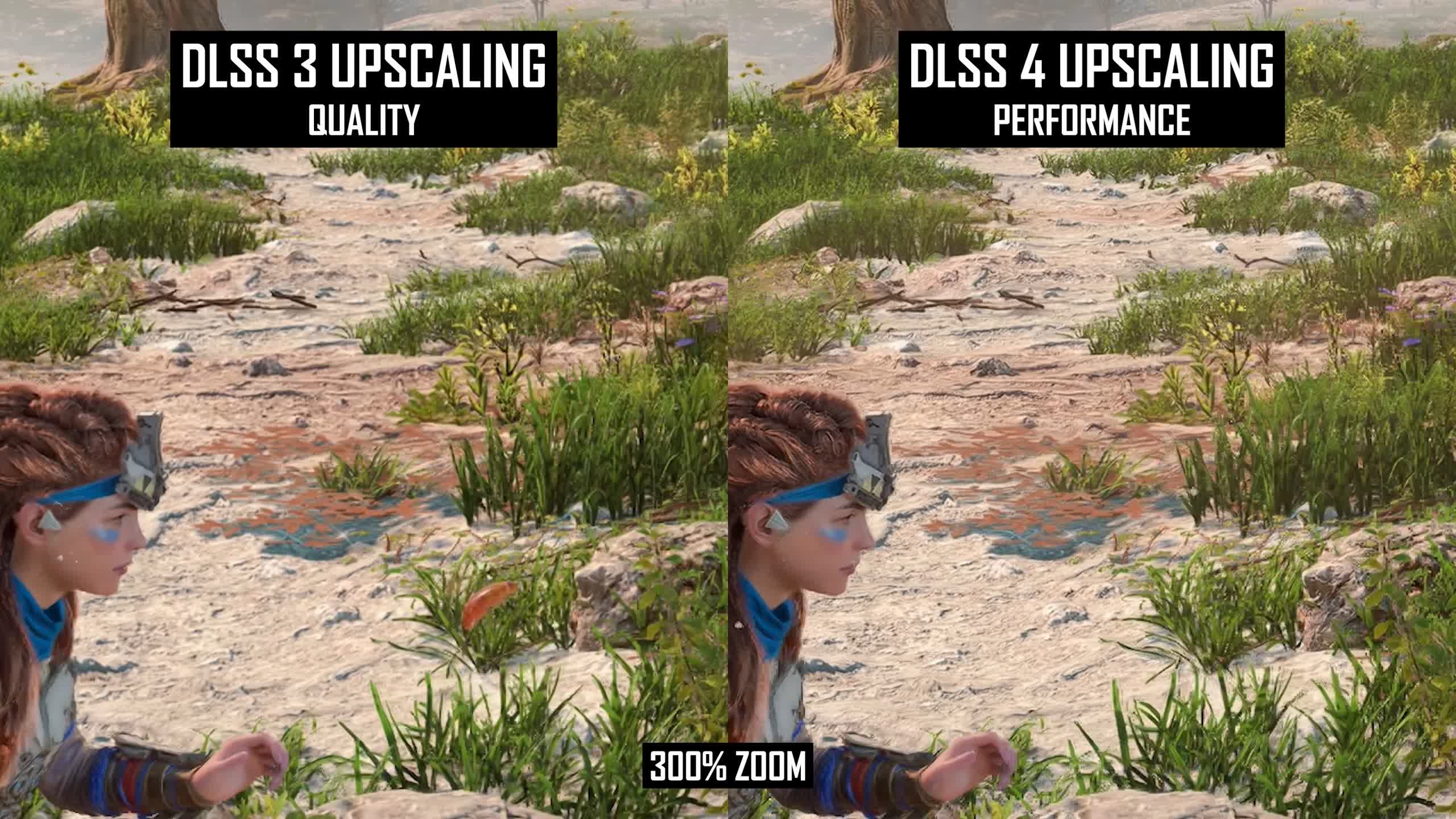
Also read: DLSS 4 Upscaling at 4K is Actually Pretty Amazing

Even if not all of these wins are achieved immediately, closing the significant gap in upscaling quality would be a major step forward – especially since upscalers are one of the biggest reasons gamers choose GeForce GPUs.

How FSR 4 Works

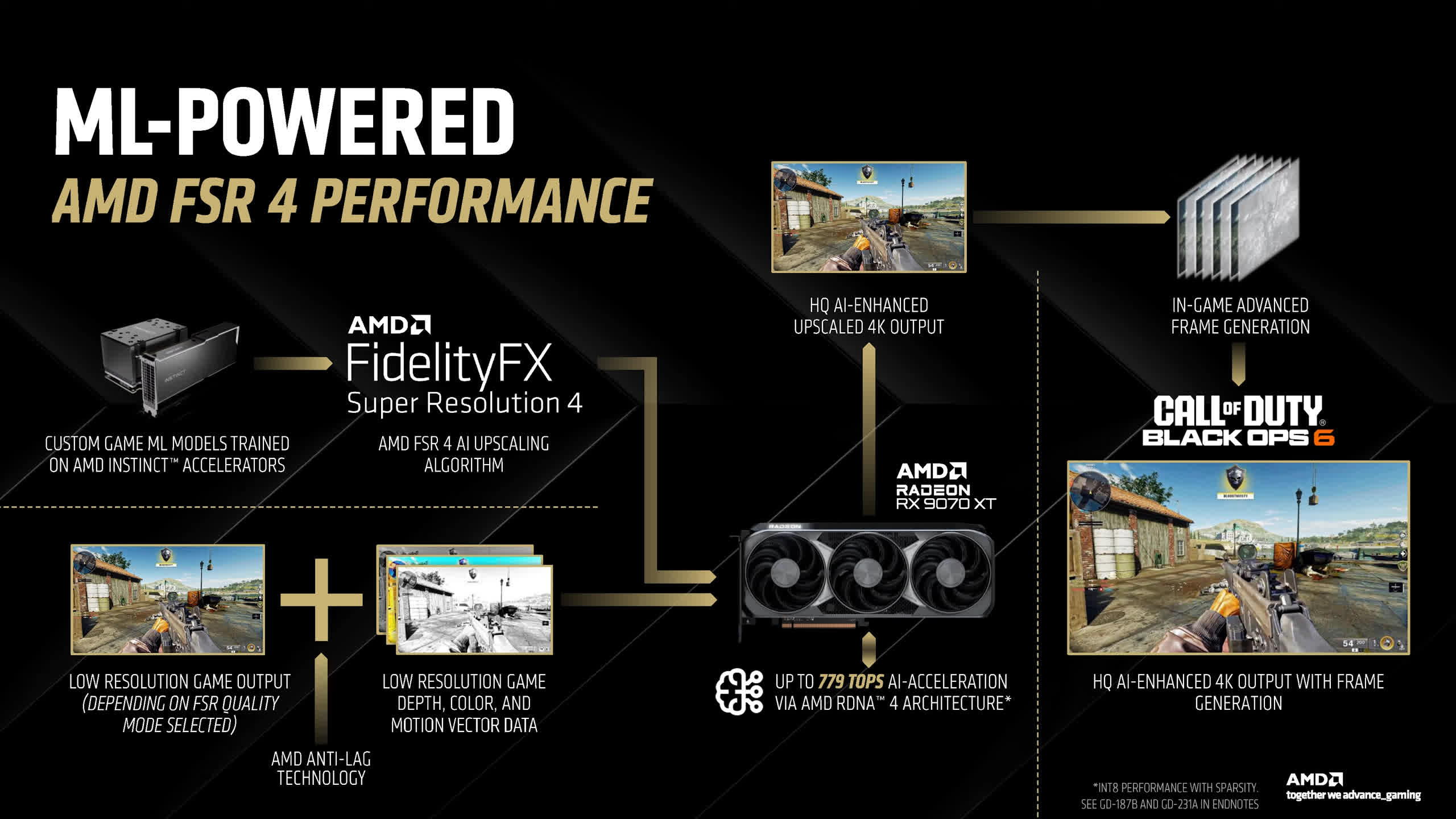
FSR 4 leverages FP8 processing, a new accelerated capability introduced in RDNA 4. This new architecture also improves the performance of other AI-relevant data formats, such as INT8 and FP16, but FSR 4 specifically relies on FP8. As a result, FSR 4 is exclusive to RDNA 4 GPUs and will not work on RDNA 3, at least initially.
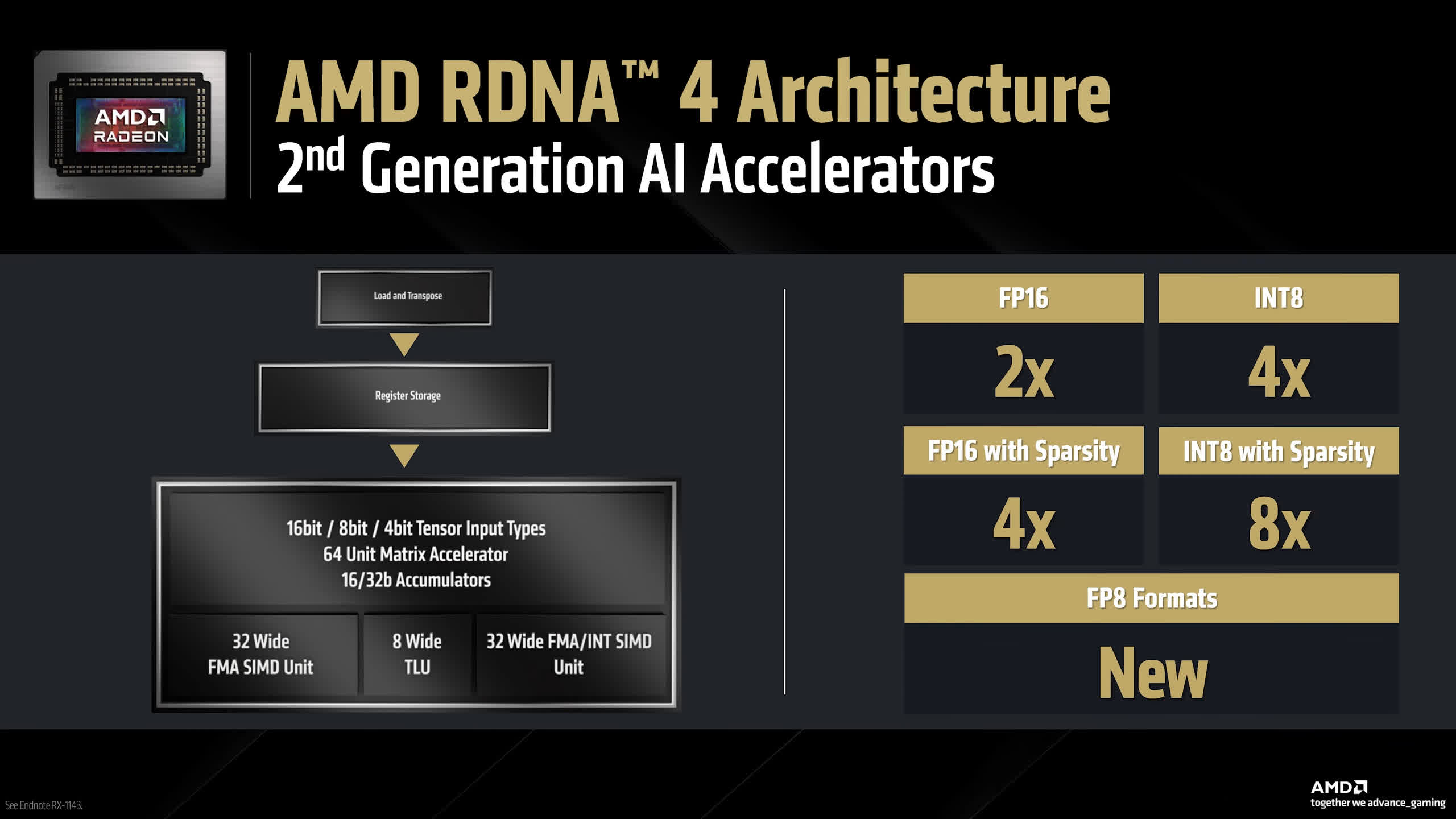
AMD has left the door open for a potential FSR 4 variant for older Radeon GPUs, but if that happens, it would likely be a separate, watered-down model – similar to Intel's XeSS, where the better XMX version runs on Arc hardware, while a weaker DP4a version runs on other GPUs. However, AMD has not confirmed whether this will happen.

FSR 4 integration and game support

FSR 4 will initially be integrated at the driver level. It hooks into the FSR 3.1 API and replaces the upscaling pass with the FSR 4 algorithm whenever FSR 3.1 is enabled in a game. On day one, all FSR 3.1-supported games will be upgraded to FSR 4 via the driver. Older FSR versions (FSR 3.0, FSR 2.2, etc.) must be upgraded to FSR 3.1 within the game to access FSR 4.
A native implementation of FSR 4 is expected in the future, but at launch, all FSR 4 titles will use the driver upgrade path – similar to Nvidia's DLSS override feature. However, FSR 4 does not improve frame generation quality over FSR 3.

Frame generation remains single-frame-based, and AMD is not attempting multi-frame generation to match Nvidia's DLSS 4 frame generation.

Performance uplift and benchmarks

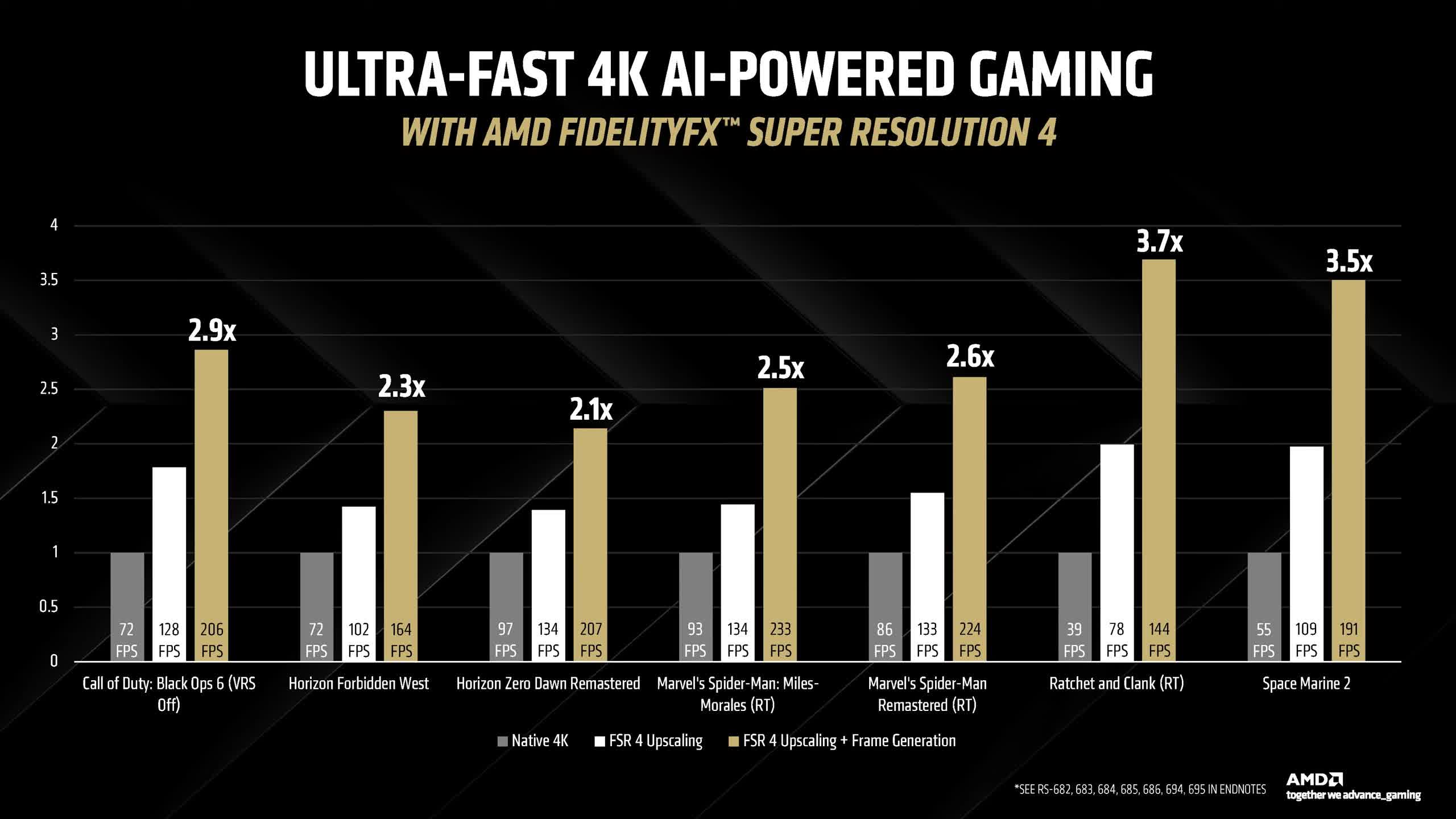
AMD has provided performance data comparing FSR 4 upscaling and FSR 4 + Frame Generation. The FSR 4 upscaling mode used in benchmarks is 4K Performance Mode, which AMD claims offers a 65% performance uplift over native 4K rendering across seven tested games.
For comparison:

  • In our DLSS 4 investigation, DLSS 4 Performance Mode delivered a 74% performance improvement on the RTX 5080 when compared to native TAA at 4K.
  • At lower frame rates, where the upscaler overhead is lower, FSR 4 achieved up to a 2X boost in some cases.
  • Ratchet & Clank: Rift Apart saw a 100% performance increase (2X boost).
  • Horizon Zero Dawn Remastered showed a 38% performance uplift, similar to DLSS 4 Performance Mode.

These results are very promising.

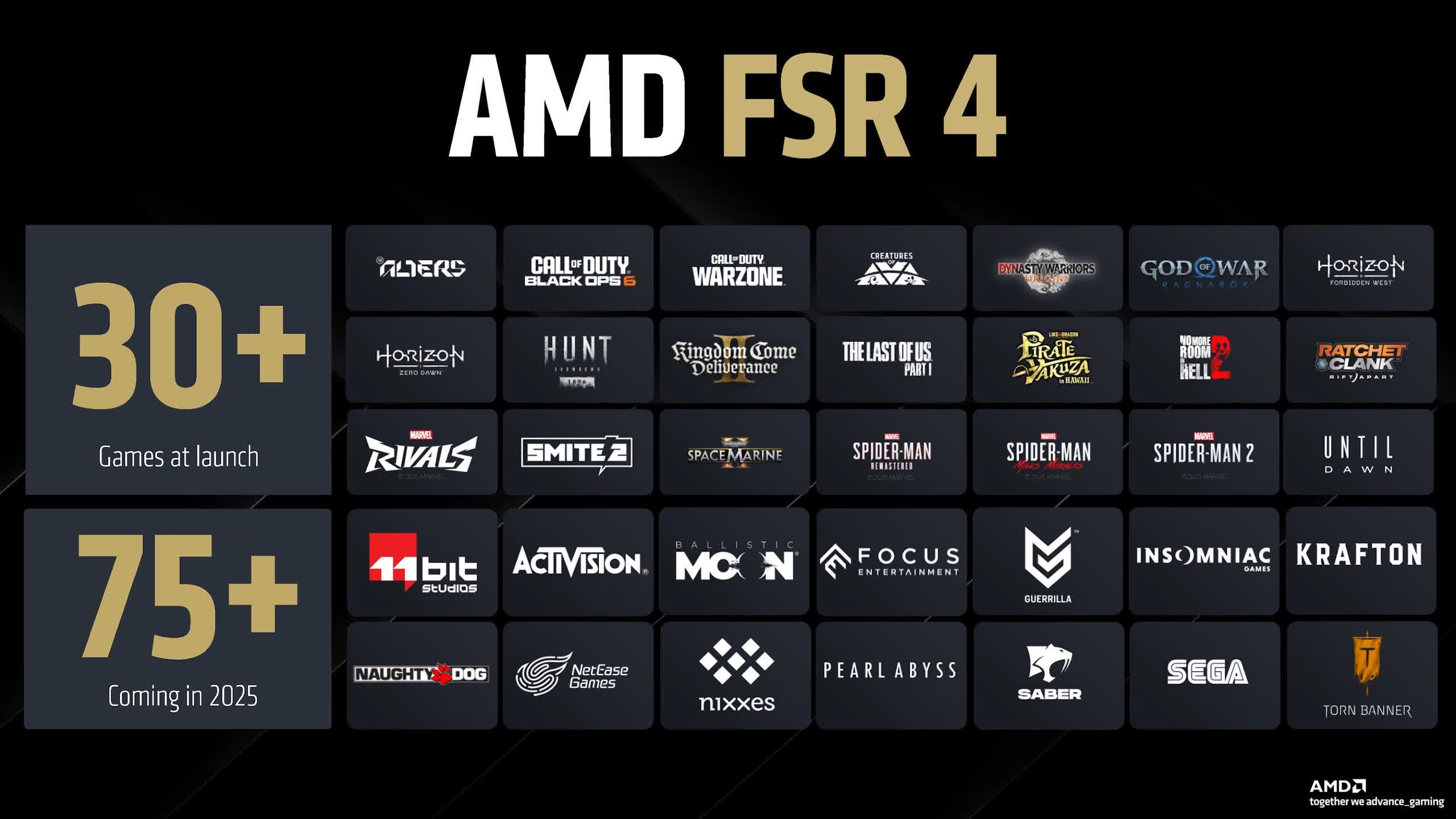
At launch, FSR 4 will be available in 30+ games, including Kingdom Come: Deliverance 2, Spider-Man 2, and Call of Duty: Black Ops 6, and while this is more than previous FSR launches, DLSS 4 already supports far more titles.

Nvidia has used an upgradeable DLSS DLL for much longer, so GeForce users can upgrade over 70 games via the DLSS override in the Nvidia App or through unofficial DLL swaps. Upgrading FSR 2.2 titles to FSR 4 will be significantly harder, creating a major gap in official and unofficial game support at launch.

For FSR 4 to succeed, AMD needs to build a strong ecosystem and expand game support significantly over time. Having 30 games at launch, including big-name titles, is a step in the right direction – certainly better than FSR 3's launch, which had only two titles.

However, closing the gap with DLSS 4 – both in quality and adoption – will take a long-term effort. Hopefully, AMD is making major investments into upscaling and committing to sustained support in the coming years.

Permalink to story:

 
The engineer in the video says that AMD's upscaling model is a customized hybrid resulting from studies of everything available on the market, supposedly a mix between CNNs and Transformers?

If a mod like OptiScaler can put FSR 3.1 and XESS in any game with DLSS, what's to stop AMD or devs from doing the same, patents ?
 
“ In our DLSS 4 investigation, DLSS 4 Performance Mode delivered a 74% performance improvement on the RTX 580 when compared to native TAA at 4K.”

I sure hope you mean RTX 5080 ;)
 
The engineer in the video says that AMD's upscaling model is a customized hybrid resulting from studies of everything available on the market, supposedly a mix between CNNs and Transformers?

If a mod like OptiScaler can put FSR 3.1 and XESS in any game with DLSS, what's to stop AMD or devs from doing the same, patents ?

That's what I understood too. I remember seeing someone on Twitter sharing AMD research papers about a Transformers model, which confirms this theory.
 
Maybe my eyes work differently than others. I can barely notice the difference in those static images at 300% zoom, let alone while actually playing at high frame rate and being focused on aiming and dodging.

In practice what I need out of a GPU is to not stutter, to not look blurry at my native 1440p resolution, to not have artifacts that call attention to themselves, and to not run out of VRAM in the middle of a level. This means that so far, on my 10 GB 3080, I generally render at native target resolution, decrease settings if necessary to reach at least ~90fps (generally achievable without obvious visuals loss - I usually don't notice if my shadows are high vs. ultra, etc.), and usually have DLSS off because in my experience it can cause problems I do notice while not fixing "problems" I didn't have in the first place.

Are mainstream gamers really lusting after Nvidia because of DLSS? I mean sure I get it as a tie breaker but generally I feel like their leadership position came from a perception of higher performance, higher stability, and/or being the card their prebuilt came with vs. this specific feature.
 
Are mainstream gamers really lusting after Nvidia because of DLSS? I mean sure I get it as a tie breaker but generally I feel like their leadership position came from a perception of higher performance, higher stability, and/or being the card their prebuilt came with vs. this specific feature.

Not sure if people just love to stroke NVIDIAs ego in comments as I often see people propping up dlss as the best thing since sliced bread because I share your opinion. It's best avoided, I'd rather get the FPS through configuring other settings to be lower. Lowering the resolution (with or without DLSS) is the last resort for me.

On 4k it might be a different story. I can imagine that being a lot more forgiving in quality and the performance being a lot more needed
 
Rdna 3 and older don't have native fp8 capability.
Amd should try to make int8 version of fsr4 for those older gpu
 
Not sure if people just love to stroke NVIDIAs ego in comments as I often see people propping up dlss as the best thing since sliced bread because I share your opinion. It's best avoided, I'd rather get the FPS through configuring other settings to be lower. Lowering the resolution (with or without DLSS) is the last resort for me.

On 4k it might be a different story. I can imagine that being a lot more forgiving in quality and the performance being a lot more needed
DLSS at 4k Quality pulls a sample from a slightly higher than 1440p image - which gives it alot to work with in terms of image quality. DLSS 4 4k quality looks super crisp and almost free of any ghosting or blur - while allowing me to still run 100+ fps at high / ultra settings.
Frame generation though…avoid it. Can’t see why Nvidia thinks that ..4 friggin fake frames isn’t going to bother people when it comes to input delay. Especially as they launched the 50 series without Reflex 2.0 - which was the «key factor» in their CES presentation
 
DLSS at 4k Quality pulls a sample from a slightly higher than 1440p image - which gives it alot to work with in terms of image quality. DLSS 4 4k quality looks super crisp and almost free of any ghosting or blur - while allowing me to still run 100+ fps at high / ultra settings.
Frame generation though…avoid it. Can’t see why Nvidia thinks that ..4 friggin fake frames isn’t going to bother people when it comes to input delay. Especially as they launched the 50 series without Reflex 2.0 - which was the «key factor» in their CES presentation
While I'm definitely on the AMD side of things, I can see why frame gen is "nice to have" but far from ideal for anyone. There is the issue if 4x frames being inserted out of order, but I'm certain that can be fixed with a driver update.

I think upscaling tech is great for people who want to play at their monitors native resolution(4k) but don't quiet have power for. Playing at native resolution is for reducing latency as most built in upscalers on monitors are, well, trash.

The ideal use of upscalers is basically upscalling 1440p to 4k. This era of gaming where in where they're upscaling 600p to 1080 to obtain 60FPS is just absurd. I don't directly blame nVidia for that, but that's not how this tech was intended to be used.

Then my biggest complaint with framegen is that you basically need around 50FPS native for it work properly. I see 60 recommended, but I've read reviews where 50 is about the floor.
 
While I'm definitely on the AMD side of things, I can see why frame gen is "nice to have" but far from ideal for anyone. There is the issue if 4x frames being inserted out of order, but I'm certain that can be fixed with a driver update.

I think upscaling tech is great for people who want to play at their monitors native resolution(4k) but don't quiet have power for. Playing at native resolution is for reducing latency as most built in upscalers on monitors are, well, trash.

The ideal use of upscalers is basically upscalling 1440p to 4k. This era of gaming where in where they're upscaling 600p to 1080 to obtain 60FPS is just absurd. I don't directly blame nVidia for that, but that's not how this tech was intended to be used.

Then my biggest complaint with framegen is that you basically need around 50FPS native for it work properly. I see 60 recommended, but I've read reviews where 50 is about the floor.
Problem is by using dlss (interpolated) combined with FG doubles down on input delay. If you base FG on anything below 60 native it feels sluggish. If you base it on 60 fps only achieved with DLSS it feels like something just isn’t working correctly.
FG on 80+ fps feels pretty decent - MFG I haven’t testet as I don’t have a 50 card yet
 
That's what I understood too. I remember seeing someone on Twitter sharing AMD research papers about a Transformers model, which confirms this theory.

I think that due to the nature of this type of technology it will take some time to perfect the quality, but being a hybrid model the ceiling is very high.
 
Back