Avoid iTunes Bloat With the Windows Store Version

Hmm; when in Rome, do as the Romans do - - eg: run Apple software from Apple Store and Android software from the Google Store. This way, you avoid possible hacks and malware. I take this very seriously, as iTunes is a major means to control your Apple-Id.

Similarly, IMO, never run downloads from Cnet which are available from OTHER authenticated sources - - I've always found PUP and Malware associated with them.
 
It's OK to have multiple choices - - as long as the consequences are understood.

All the so called "bloatware" in the article are useful and the iCloud service can even be necessary - - so where else would you go to get a copy?
 
Evidently the link I clicked on took me to the MS store cause it downloaded & installed it in one shot. I Couldn’t find it in programs & features or revo.
 
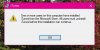
ITUNES.JPG Correct. Clarification. In order to install the itunes from HTG it had to uninstall the other one from apple. So now I can't find the one from htg in programs & features & I can't reinstall itunes from apple until I do.
 
What would I/should I look for in programs & features to remove it? Or just leave it as is??
 
For starters, make sure it's not running, the run taskmgr, view all user tasks and kill anything showing (iTunesHelper?)

Then try the uninstall again
 
Back