HP Desktop slowing down

learninmypc

Posts: 9,858   +752
Its about 3 years old, have run WD online & offline, clean. SUPERAntispyware clean, Sophos scan & clean a few tracking cookies, Malwarebytes clean, eset online scanner, clean. The only thing I can think slowing it down is 2 power outages recently, both laptops are running fine. I click on either Google Chrome or Firefox browser & it takes a couple minutes to load the home page, used to be almost instantly. Puzzled. FULLY updated.
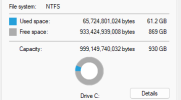
 
Hard disk or SSD? If it is a hard disk, I have seen several over the years get slower over time. A SSD on the other hand just has critical failures usually. This won't fix it for you but might explain it.
 
To the best of my knowledge, its a regular harddrive. I did shut it down yesterday for about 20 minutes, booted back up & it was much faster. Then last night, due to more possible outges, I shut it down, but was still slow this morning. I did a discclean up also.. Might be forced to do a reset to factory:mad:
 
Product Finder
I did do a factory reset, much better, now missing the built in alarm clock I use daily.
The problem may be on the hdd itself. Whenever you delete something the computer does not erase anything from the hdd, it just marks that space to be recorded over. There could be some spaces that have been recorded over so many times that they are not viable to be recorded on anymore or there may be a virus or malware so virulent that it cannot be removed my normal antivirus. There is a software package called killdisk that will wipe the drive completely clean like it was before anything was put on it at the factory. It was developed by the Department of Defense because they used to have to destroy the hdd in case of a failure and it could not be repaired because of that. I used to work for Dell and we did tech support where we had to set up a drive to be incinerated like for the Internal Revenue Service. I have had it work a couple of times when I could not reformat because of a self replicating registry virus. After you wipe the disk clean you can reload the os on the disk using an ISO on a flash drive or DVD. I used the free version and it worked.
 
Last edited:
If you have the older type [plate spinner] HDD then, I suggest you use Gsmart and test it out
the average life of an HDD is around 5 years, some may go on a lot longer and some will fail after a couple of years
other things that can cause a slow down are Overheating of the RAM and/or CPU, a slow degradation in the main PSU [if a desktop] or with windows the old favourite, too many programs running in the background
 
Back