Microsoft Word will soon save documents to the cloud by default

Daniel Sims

Posts: 2,414   +72
Staff
In brief: OneDrive, Microsoft's answer to iCloud and Google Drive, is deeply embedded in Windows 11. The operating system doesn't display prompts for opting out of the program, and Microsoft is preparing to introduce more obstacles for users who wish to save files locally. The change will begin with Microsoft Word before coming to other apps.
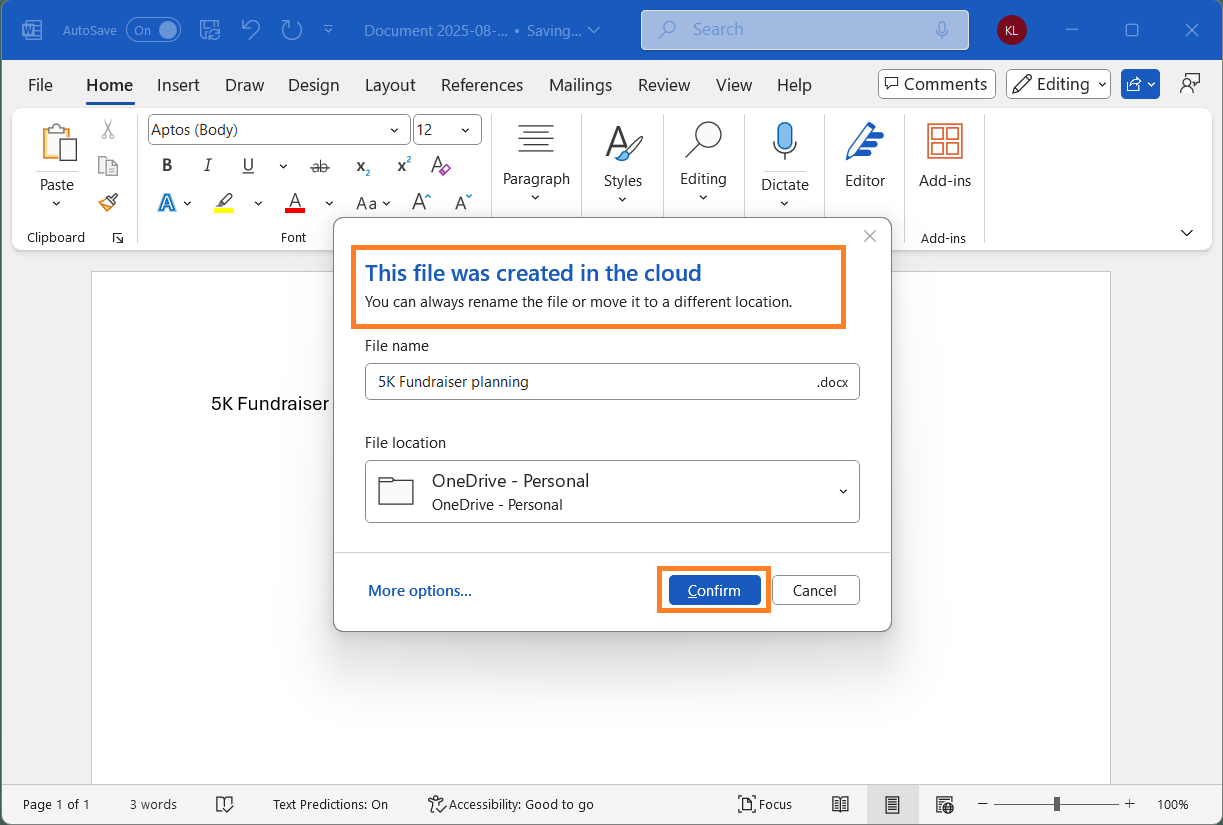
Microsoft 365 Insiders should soon begin seeing Microsoft Word automatically save files to the company's OneDrive cloud by default. Users can toggle the feature via Word's settings.

When Insiders update to Version 2509 (Build 19221.20000), the AutoSave icon in the top left corner of the Word window will switch to "On" by default, automatically saving files to a folder in OneDrive. When users click the Save icon, Word confirms that the document is saved in the cloud and lists OneDrive under the location drop-down menu. Later updates will introduce this behavior to Excel and PowerPoint.
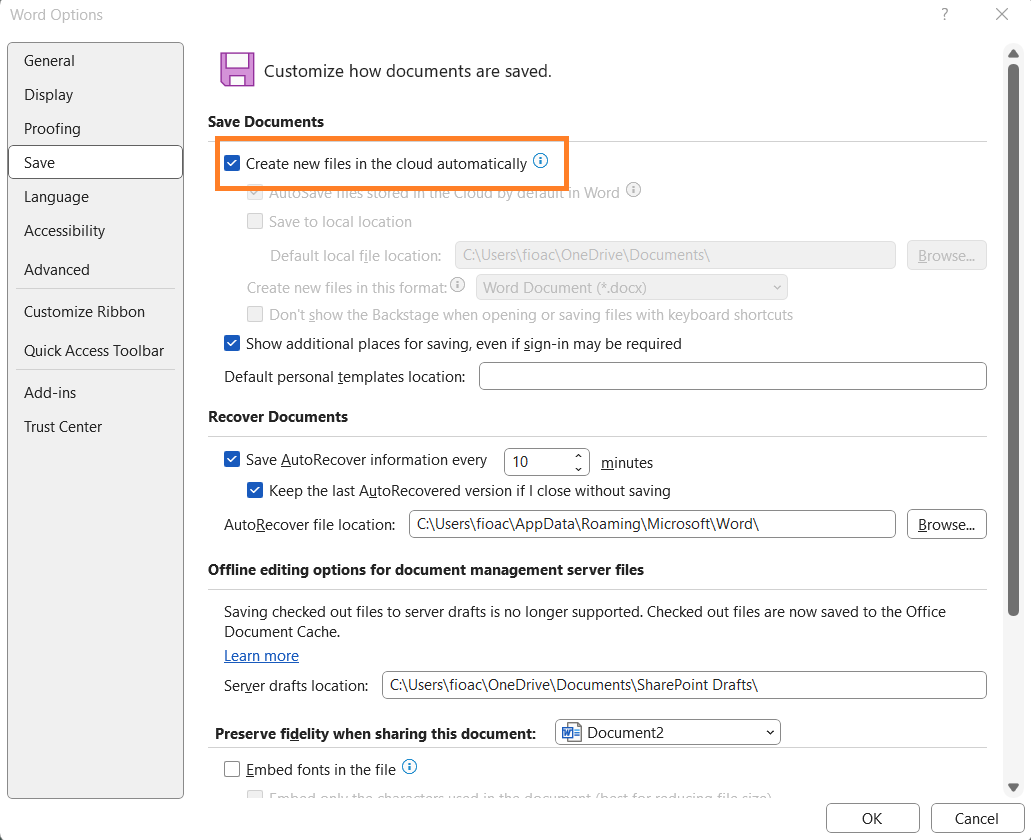
To deactivate OneDrive in Word, navigate to File > Options > Save, and uncheck the box that says "Create new files in the cloud automatically." Another box below it also mentions autosaving files in OneDrive. Other boxes further down the list determine whether and how often Word automatically saves files.

Although saving files to the cloud creates backups and instantly makes them accessible on other devices, Microsoft's recent behavior feels somewhat forceful. Automatically saving documents to OneDrive by default without first asking users will likely annoy those who prefer storing files locally and confuse users who don't understand that their work is being uploaded.

It can also become a way to push Microsoft 365 subscriptions onto unsuspecting users. The latest change to Word's behavior only impacts customers who already subscribe and thus receive at least 100GB of cloud storage. However, extending it to non-subscribers, such as those who purchased standalone versions of Microsoft Office, could cause them to quickly and mistakenly fill up their paltry 5GB of free space.
Windows 11 already saves pictures, documents, and videos to OneDrive by default upon installation. Since there is no prompt to explain the choice, users who realize what has happened must manually deactivate the program by clicking on the OneDrive icon in the taskbar and navigating to Settings > Sync and backup.

The latest insider update could be another step in Windows' gradual transformation from an operating system into a service.

Permalink to story:

 
Had to deal with a client earlier this week, had all her documents backed up on one drive....

Except, when she logged into the new PC to replace her failed one, half the content was missing. Just gone. Hammer the old machine into life, and it's all sitting in one drive. It thinks it's synced.

OneDrive sucks massive hairy testicles. But don't worry, MS absolutely isn't pushing you to be a cloud user, ita just giving you OPTIONS.
 
Except, when she logged into the new PC to replace her failed one, half the content was missing. Just gone. Hammer the old machine into life, and it's all sitting in one drive. It thinks it's synced.

I run into this constantly with customers as well..
It typically happens when a user has the basic 5GB limit, once it hits that limit, the rest of the data stores locally.
Such a frustrating thing to try to explain to customers and deal with.
 
I run into this constantly with customers as well..
It typically happens when a user has the basic 5GB limit, once it hits that limit, the rest of the data stores locally.
Such a frustrating thing to try to explain to customers and deal with.
Interesting, does it not alert the customer?

In this case she only had 1.2GB of files. I dont know if she had once previously triggered the 5GB limit or not. I've seen this multiple times on Onedrive setups, but never with iCloud, google drive, or dropbox.
 
Interesting, does it not alert the customer?

In this case she only had 1.2GB of files. I dont know if she had once previously triggered the 5GB limit or not. I've seen this multiple times on Onedrive setups, but never with iCloud, google drive, or dropbox.

OneDrive will certainly tell you once you've hit your 5GB limit and suggest buying into Microsoft 365 to gain 1TB of space, access to the full Office suit, and of course, Co-Pilot.

When you sign into OneDrive, it changes the default location of your Desktop, Documents and Pictures to be under your C:\[USERNAME]\OneDrive\[FOLDER NAME]

Generally, when you first sign up, it will bring up a screen to "Manage Backup". If you do not enable this feature for each folder you want backed up, it will simply stay saved Locally, but under the OneDrive folder. -- This is what likely happened for her. OneDrive asked her to sign in, she did, then it moved the default locations to C:\USERNAME\OneDrive\[FOLDERNAME] but they were not being saved to OneDrive's cloud storage.

If you choose any of those folders to be managed, they are then Sync'd with OneDrive's Cloud Storage.


OneDrive has changed recently to include the Music & Video folders to be backed up as well, originally they were not an option and would stay under the User's 'home' folder.
 
Switched to Libre Office years ago. I don't use "office" enough to put up with the MS nonsense.
On the PC, I've got one drive disabled. Shoot, google has enough of my information, why should
I give it to MS also?
Probably just using what is stored on One Drive to train AI and push ads to you anyway.
 
Microsoft manage to successfully complete their quota of adding at least 1 'confrontational computing' feature to their software each day.
 
I'd love for someone to explain to me why Microsoft continues to make its products worse. Windows has down downhill since Windows 7. Office was good enough at 2003. At home I quit using Office several years ago and use Libre Office very successfully.
 
I'd love for someone to explain to me why Microsoft continues to make its products worse. Windows has down downhill since Windows 7. Office was good enough at 2003. At home I quit using Office several years ago and use Libre Office very successfully.
Microsoft is not really a software company anymore they are a advertisement data broker.
Microsoft profits from your data primarily by selling targeted advertising on platforms like Bing and LinkedIn, where they use your browsing activity, search queries, demographics, and product usage to personalize ads for companies. They also sell aggregated and "anonymized" data to business partners for market insights. They view their products as a means to sell your data.
 
Back