

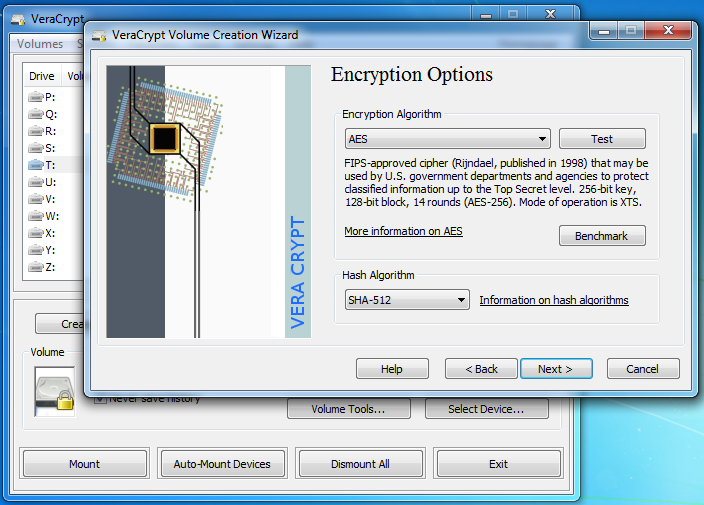
VeraCrypt adds enhanced security to the algorithms used for system and partitions encryption making it immune to new developments in brute-force attacks. VeraCrypt also solves many vulnerabilities and security issues found in TrueCrypt.
Is VeraCrypt more secure than TrueCrypt?
Yes, VeraCrypt is considered more secure than its predecessor, TrueCrypt. After TrueCrypt's discontinuation, VeraCrypt addressed known vulnerabilities and implemented several security enhancements. These include increased iterations for key derivation functions, support for newer encryption algorithms, and protection against certain types of attacks.
Should I use full disk encryption (FDE) or just encrypt a partition?
Consider your security requirements and technical comfort level when choosing between the two. The choice depends on your specific needs:
- Full Disk Encryption (FDE): Encrypts the entire drive, including the operating system. This offers comprehensive protection but may be more complex to set up, especially on systems with UEFI and GPT partitions.
- Partition/Container Encryption: Encrypts specific partitions or creates encrypted containers within a file. This method is more flexible and easier to manage, especially for encrypting external drives or specific data folders.
Can I use VeraCrypt on SSDs, and are there any concerns?
Yes, VeraCrypt can be used on SSDs. However, due to the wear-leveling feature of SSDs, which distributes data across the drive to prolong its lifespan, there may be concerns about residual data remnants. To mitigate this, it's recommended to perform a full format (not a quick format) when creating encrypted volumes, ensuring that all sectors are overwritten with random data.
What is a hidden volume, and how does it provide plausible deniability?
A hidden volume is a feature in VeraCrypt that allows you to create a concealed volume within another VeraCrypt volume. This setup provides plausible deniability, as the existence of the hidden volume cannot be proven without the correct password. Even if someone forces you to reveal the password to the outer volume, the hidden volume remains secure and undetectable.
Features
- Creates a virtual encrypted disk within a file and mounts it as a real disk.
- Encrypts an entire partition or storage device such as USB flash drive or hard drive.
- Encrypts a partition or drive where Windows is installed (pre-boot authentication).
- Encryption is automatic, real-time(on-the-fly) and transparent.
- Parallelization and pipelining allow data to be read and written as fast as if the drive was not encrypted.
- Encryption can be hardware-accelerated on modern processors.
- Provides plausible deniability, in case an adversary forces you to reveal the password: Hidden volume (steganography) and hidden operating system.
VeraCrypt adds enhanced security to the algorithms used for system and partitions encryption making it immune to new developments in brute-force attacks. For example, when the system partition is encrypted, TrueCrypt uses PBKDF2-RIPEMD160 with 1000 iterations whereas in VeraCrypt we use 327661. And for standard containers and other partitions, TrueCrypt uses at most 2000 iterations but VeraCrypt uses 655331 for RIPEMD160 and 500000 iterations for SHA-2 and Whirlpool.
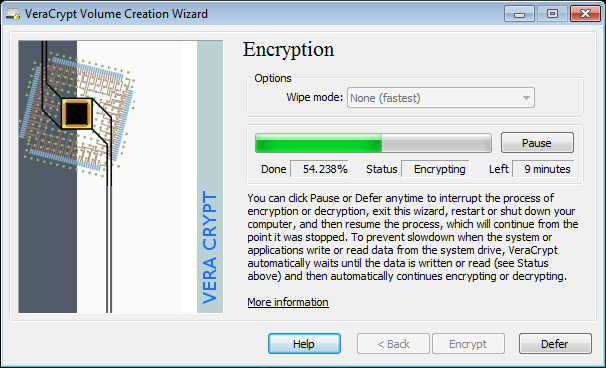
This enhanced security adds some delay only to the opening of encrypted partitions without any performance impact to the application use phase. This is acceptable to the legitimate owner but it makes it much more harder for an attacker to gain access to the encrypted data.
What's New
All OSes:
- Add Argon2id as an alternative memory-hard KDF for non-system volumes.
- Use "KDF" terminology in the user interface and documentation instead of "PKCS-5 PRF".
- Update logo icons with simplified icons without extra label text.
- Harden XML and TLV parsers against malformed input.
- Security: Fix GHSA-94c6-mgmv-mqc5: non-default WOLFCRYPT=1 builds now use wolfCrypt PBKDF2 instead of HKDF and honor VeraCrypt's PBKDF2 iteration count.
- Reported by https://github.com/vastblast
- Fix CPU feature detection and crypto implementation edge cases, including AVX2/leaf 7 detection, BLAKE2s/Argon2 no-SSE2 x86 fallback paths, Camellia SSSE3 dispatch, Twofish x64 multiblock tail handling and Whirlpool alignment.
- Update documentation, including Argon2id/KDF information and split Windows/Unix command line usage pages.
- Update translations.
Windows:
- Fix rare BSOD (Blue Screen of Death) issue affecting the VeraCrypt driver.
- Fix hibernation crash on fresh Windows 11 25H2 installations.
- Security: Fix GHSA-jjcr-75w7-58jp: hidden volume quick format no longer uses the file-container allocation shortcut that wrote plaintext zero sectors at 128 MiB intervals, preserving plausible deniability.
- Reported by https://github.com/vastblast
- Regression introduced in 1.26.6
- Harden Windows driver input validation and crash dump filter handling (GH PR #1590).
- Improve driver I/O handling, including safer request completion, ordered volume flush barriers, and better VERIFY/TRIM validation.
- Fix PBKDF XSTATE cleanup and add Win64 unwind metadata for AES assembly.
- Speed up mounting when KDF autodetection is selected.
- Allow selecting which KDF algorithms are included in the benchmark dialog.
- Allow canceling long mount operations from the wait dialog and with the new /cancelmount CLI switch, including auto-mount scans.
- Add support for new Microsoft UEFI CA 2023 signed EFI bootloaders while preserving Microsoft UEFI CA 2011 support.
- Improve EFI system encryption repair and upgrade handling, including stuck decryption finalization, Post-OOBE repair, loader restoration verification, and clearer missing-loader reporting.
- Fix EFI DcsProp rewrite handling.
- Fix ghost drive letter after command line unmount (GH #337, GH #1426).
- Fix favorite volume mount race.
- Validate PIM when changing only the KDF.
- Fix elevated COM format drive validation and device path normalization (GH #1670).
- Fix ReFS formatting during volume creation.
- Fix MSI traveler disk creation with WHQL-signed drivers, ARM64 MSI build, Start Menu folder upgrades, and discovery of newer SDK MSI tools.
- Add CLI switch /protectScreen to allow disabling screen protection in portable mode (cf documentation).
- Add argument to CLI switch /protectMemory to allow disabling memory protection in portable mode (cf documentation).
- Add setting and CLI switch /enableIME to allow enabling Input Method Editor (IME) in Secure Desktop.
- Use tab control for VeraCrypt preferences to reduce clutter and size of the dialog.
- Provide VeraCrypt C/C++ SDK for creating volumes (https://github.com/veracrypt/VeraCrypt-SDK).
- Update LZMA SDK to version 26.01.
Linux:
- Update Ubuntu 25.04 dependency to require libwxgtk3.2-1t64 package.
- Add support for building against FUSE3.
- Add in-kernel NTFS driver selection for NTFS mounts, including --filesystem=kernel-ntfs and -m kernelntfs.
- - --filesystem=ntfs3 now pins the kernel ntfs3 driver and bypasses mount helpers such as mount.ntfs3.
- Fix AppImage portability and language loading, bundle a matching FUSE library, and allow AppImage file name to start with "veracrypt" in any case.
- Suppress redundant "already running" dialog and store the GUI instance lock under XDG paths.
- Add emergency cleanup for stale unmounts.
- Parallelize header KDF autodetection.
- Honor nokernelcrypto during external formatting.
- On WSL, open mounted volumes using Windows Explorer.
- Add support for reproducible Linux builds, including SOURCE_DATE_EPOCH handling, DEB/RPM packages, and Arch package builds.
- Add OpenWrt package build and QEMU test scripts.
- Fix CMake 4 compatibility, CentOS 6 GCC 4.4 builds, and wxWidgets-related build issues.
Linux and macOS:
- Fix initial width of columns in main UI.
- Enable Quick Format for normal file containers. The container is sized with ftruncate(), so the host filesystem may keep regions unwritten or sparse until data is written to them.
- Fix hidden volume size estimation for exFAT outer volumes.
- Fix hidden volume FAT size limit handling.
- Fix erroneous 2 TiB limit for hidden file containers in GUI wizard.
- Show volume creation finalization stages.
- Collect mouse entropy from nested controls in the volume creation wizard.
- Fix remaining wxWidgets sizer flags.
macOS:
- Use SMB backend for FUSE-T auxiliary mounts and improve FUSE-T SMB metadata handling and mount stability.
- Recover mounted volume mount points.
- Validate format wizard device targets and block partitioned whole-disk alias bypasses.
- Run APFS formatter elevated when needed and prepare APFS formatter device aliases.
- Force fresh exFAT layout when formatting volumes.
- Fix Command-A in password fields.
- Link against wxWidgets 3.2.10 and allow overriding the deployment target.
BSD:
- FreeBSD: link static wxWidgets builds with iconv.
- OpenBSD: fix device-hosted volume sizing, honor doas user for mount ownership and FUSE access, and fix CLI build and PCSC exit handling.
