

Inspired by the early CCleaner era, FluentCleaner reimagines the classic PC cleanup utility for modern Windows systems. Built with WinUI 3, it focuses on a cleaner, lightweight experience centered around removing temporary files, cache, logs, and leftover clutter - without aggressive registry tweaks, bundled extras, or scareware-style prompts.
The project also embraces the community-driven spirit that helped make older cleanup tools popular in the first place. FluentCleaner supports the well-known winapp2.ini cleaning database format, allowing it to leverage a large ecosystem of community-maintained cleaning rules while keeping the app fast, transparent, and easy to use.
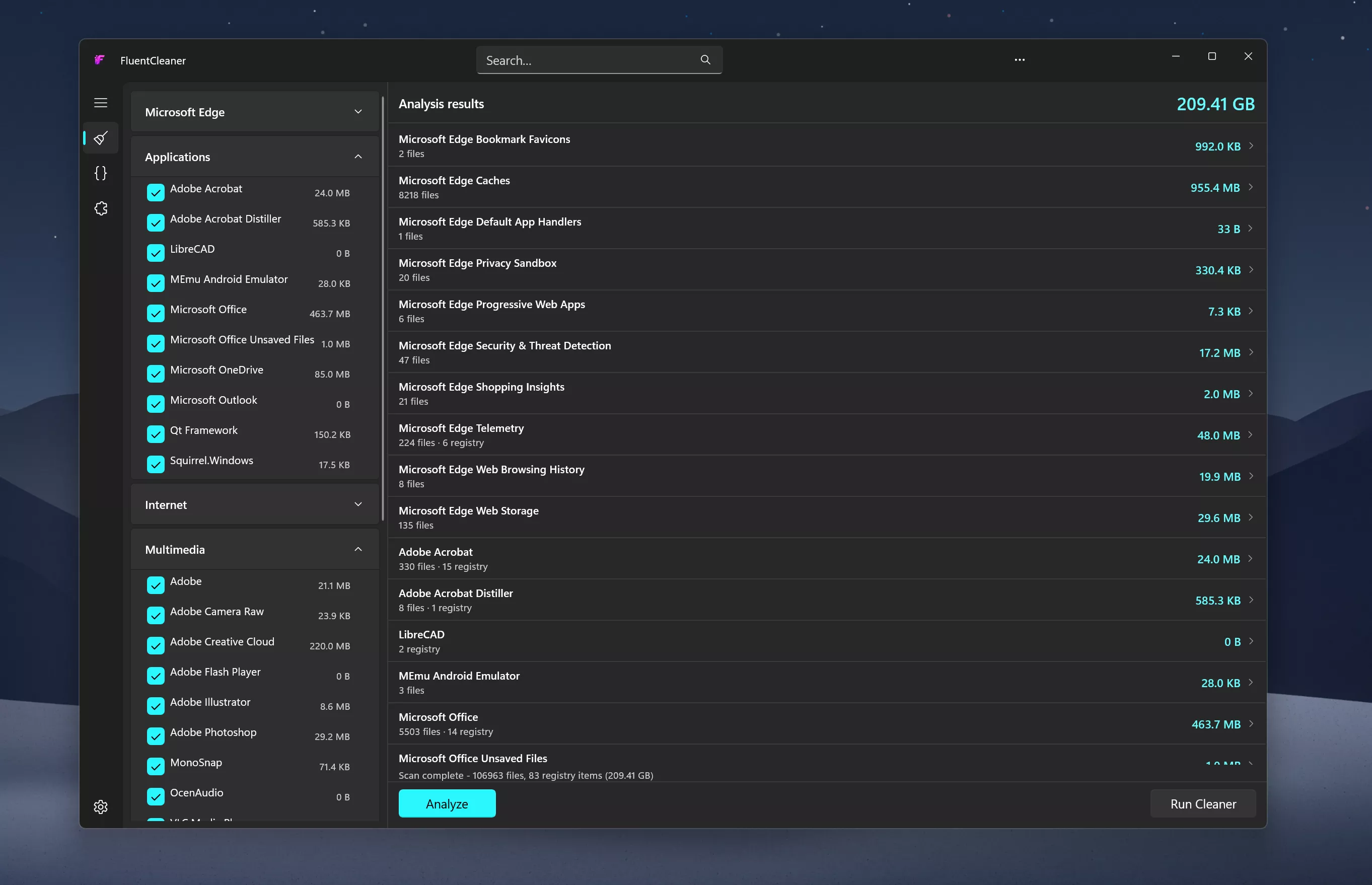
Features
- Portable design with no installation required
- One-click system analysis and cleanup
- Support for optional maintenance extensions
- Optimized for Windows 11
- Clear and easy-to-understand cleanup results
System Requirements:
- Windows 10 2004 (Build 19041) and later
- Windows 11
No Windows 11 requirement. Despite using WinUI 3, the app is intentionally built to remain compatible with modern Windows 10 systems as well
What's New
FluentCleaner update - less clutter, sharper behavior
The last days were not about piling on features at any cost. I experimented with a built-in Mini mode for FluentCleaner Classic in v1.17, but ultimately pulled it before release to keep Classic small, predictable, and easy to maintain. The idea is not dead, though, it may return later as an external add-on or plugin if I decide to make FluentCleaner more extensible
Instead, FluentCleaner Classic (only) gained something that fits its lightweight nature much better: proper command-line automation. It can now analyze or clean the saved selection silently, target individual cleaner categories, and slot neatly into batch files, PowerShell scripts, or other automation workflows.
So Mini is out for now, but Classic has become considerably more scriptable without becoming more complicated. Less interface bolted on, more power underneath.
- [Added] [Classic] Introduced command-line automation for scripts, batch files, PowerShell, and third-party tools. Classic can now analyze or clean the saved selection silently, optionally target a specific cleaner category, and shut down the PC after cleaning #52
- [Added] [Classic] Added command-line documentation and ready-to-copy examples under Options > Handoff / CLI
- [Changed] [Classic] Development of the built-in Mini mode has been paused for now. It may return later as a separate add-on or as part of a future plugin system.
- [Improved] [Classic] Deleting a cookie no longer throws the user back to the beginning of the list. FluentCleaner still refreshes the real browser databases, but now keeps the working position and selects the nearest remaining entry #185
- [Added] [Classic] Added Select all to the context menus of both Cookie Manager lists. Active search filters are respected, so only currently visible cookies are selected #185
- [Fixed] [Classic, Modern] FluentCleaner now correctly remembers an intentionally empty cleaner selection. Previously, selecting zero items was mistaken for a fresh installation and the default entries returned after restarting #176
- [Fixed] [Classic, Modern] Silent cleaning and command-line operations now also respect an intentionally empty cleaner selection instead of silently falling back to database Defaults
- [Fixed] [Classic, Modern] Improved DetectFile handling for 32-bit applications. Cleaner entries using %ProgramFiles% now correctly detect installations in both Program Files and Program Files (x86), with or without Wildcards #184
- [Improved] [Classic] The Entry column in the analysis results now automatically uses the available space, while the file, registry, and size columns remain compact and stable
- [Improved] [Classic] CLI runs return automation-friendly exit codes and write detailed results to %AppData%\FluentCleaner\auto.log
- [Added] [Classic] Azerbaijani localization is now available, bringing the Classic interface to another language. Thanks to @jamalkamaladdin for the contribution in #181
- [Updated] [Classic] Added localized Select all text for the Cookie Manager and cleaned up the English and German localization structure for easier maintenance
- [Updated] [Classic] Refreshed the Brazilian Portuguese and French localizations with the latest interface strings and translation improvements.
FluentCleaner Classic 1.18.250:
FluentCleaner Classic goes Mini
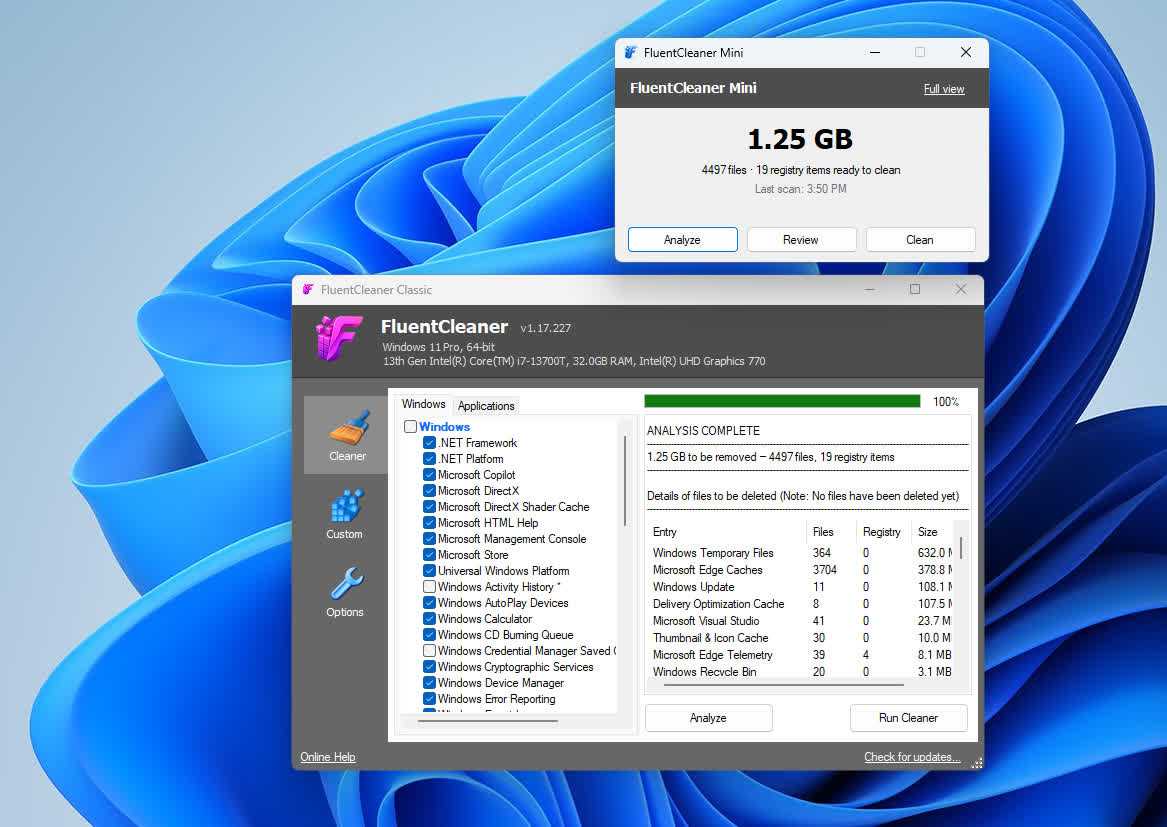
FluentCleaner Classic just learned how to stay out of the way. The new Mini mode turns the full cleaner into a compact desktop companion: analyze, review, and clean whenever needed without keeping the complete interface open. It is still the same FluentCleaner underneath, using the same databases, selections, exclusions, cookie protection, and cleaning engine.
- [Added] [Classic] Mini mode with quick access to Analyze, Review, and Clean
- [Added] [Classic] Option to launch FluentCleaner directly in Mini mode in Settings > Basic Settings
- [Added] [Classic] Always-on-top option and automatic Mini window-position saving
- [Added] [Classic] /MINI and /FULL command-line switches for overriding the saved startup mode
- [Improved] [Classic] Seamless switching between Mini mode and the full FluentCleaner interface
- [Improved] [Classic] The Settings page now scrolls correctly on smaller window sizes, keeping all options accessible
- [Added] [Classic] Polish localization
- [Updated] [Classic] German, English, Bulgarian, French, and Simplified Chinese localization files
Yesterday, the Cookie Manager entered its first real-world test run in FluentCleaner Classic. Today, it is already live in the Modern edition as well. Apparently, browser cookies did not get much of a weekend.
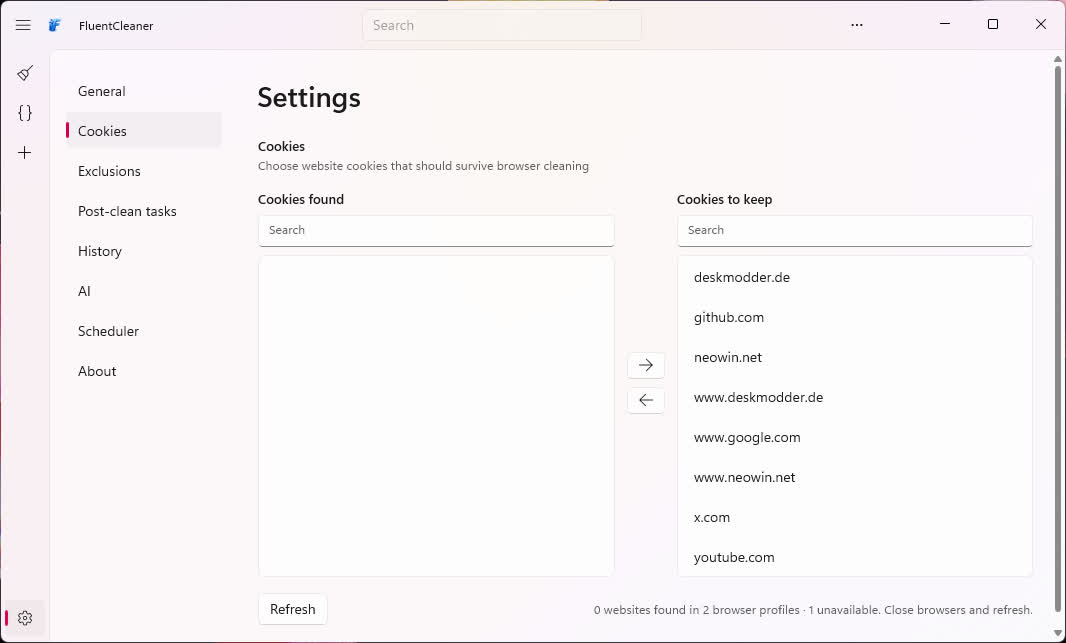
- [Added] [Classic, Modern] Full Cookie Manager for managing and protecting website cookies
- [Added] [Classic, Modern] Detects cookies from Edge, Chrome, Chromium, Brave, Vivaldi, Opera, Opera GX and Firefox profiles
- [Added] [Classic, Modern] Selected website cookies can be protected so logins survive regular browser cleaning
- [Added] [Classic, Modern] Individual cookies can be deleted directly from the Cookie Manager
- [Added] [Classic, Modern] Detected and protected cookies can be searched instantly
- [Added] [Classic, Modern] Existing cookie keep-lists can be imported from CCleaner TXT exports
- [Added] [Classic, Modern] Cookie keep-lists can be exported as portable TXT files
- [Improved] [Modern] The Settings panel is now divided into clearly navigable sections instead of one long scrolling page
- [Improved] [Classic, Modern] Browser cleaning now preserves selected cookies without deleting the complete cookie database
- [Updated] [Modern] English and German localization for the Cookie Manager and the redesigned Settings navigation

