
In a nutshell: Microsoft recently updated Windows Server 2025 with a native NVMe driver that can significantly increase SSD performance. While the new driver is not officially available for consumer versions of Windows, enterprising developers have seemingly found a neat registry hack to enable it in Windows 11, potentially boosting NVMe SSD performance by up to 80 percent.
One developer who successfully activated the feature in Windows 11 (version 25H2) claims it works "pretty good" on his computer. He shared a step-by-step guide on how to activate the feature on Windows 11 devices.
To activate the new driver, open Regedit and navigate to: HKEY_LOCAL_MACHINE\SYSTEM \CurrentControlSet\Policies\ Microsoft\FeatureManagement\Overrides.
Then add the following 32-bit DWORD values:
- "735209102"=dword:00000001
- "1853569164"=dword:00000001
- "156965516"=dword:00000001
After editing the registry, restart your PC. NVMe SSDs will now show up under "Storage Media" instead of "Devices" in Device Manager.
Enabling NVME native drivers in Win 11 (tried on 25H2)
– Mouse&Keyboard (@PurePlayerPC) December 22, 2025
Works pretty good.
Just open regedit.
Go to : HKEY_LOCAL_MACHINE\SYSTEM\CurrentControlSet\Policies\Microsoft\FeatureManagement\Overrides
Add DWORD 32 Bits:
"735209102"=dword:00000001
"1853569164"=dword:00000001… pic.twitter.com/UhE9q5Sw5h
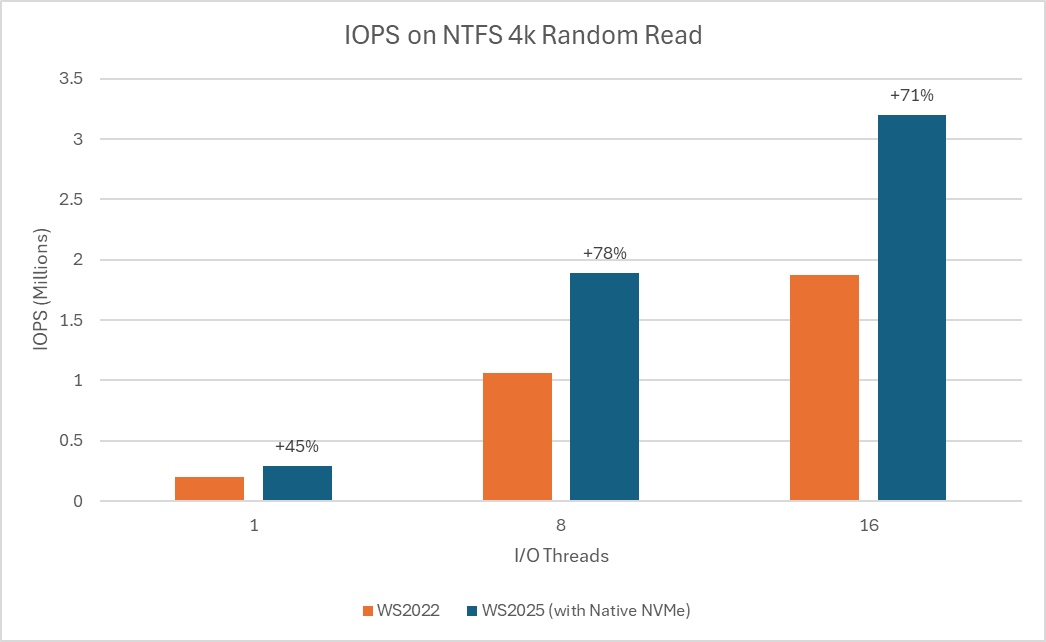
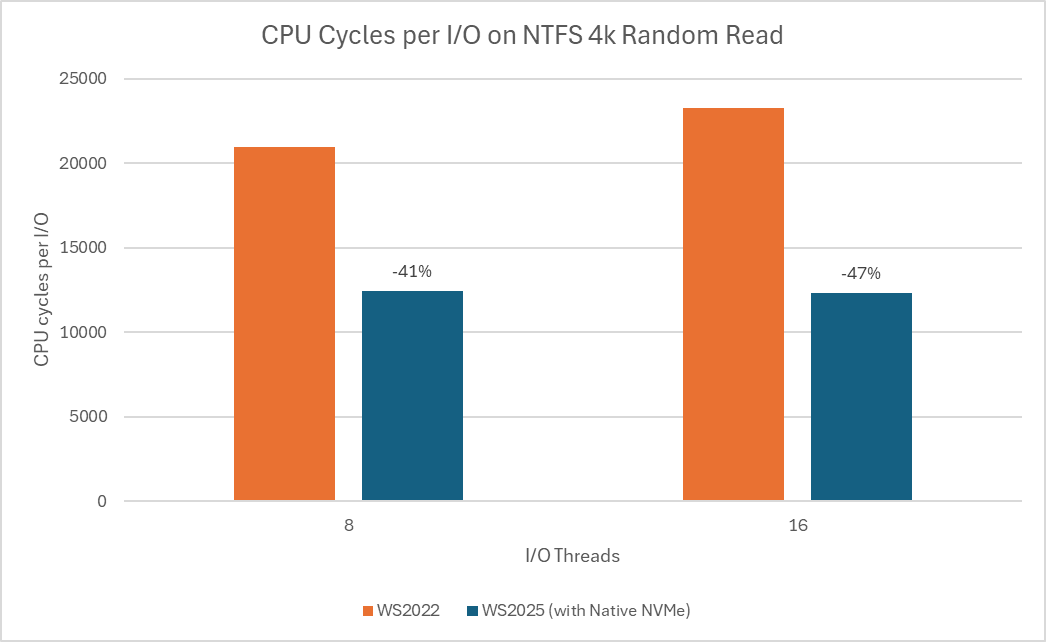
Microsoft claims that the native NVMe driver can increase IOPS performance by up to 80 percent and reduce CPU cycles by around 45 percent. However, German tech publication ComputerBase found that real-world performance gains in Windows 11 are closer to 10 - 15 percent, far less dramatic than Microsoft's figures for Windows Server.
According to Microsoft, the most noticeable improvements are expected in workloads such as database transactions, metadata operations on file servers, Hyper-V and other virtualization tasks, and large dataset processing for ML and AI applications.
Those considering experimenting with the registry should be aware that some Windows 11 users have reported issues with device management applications such as Samsung Magician. In some cases, these tools fail to detect NVMe drives entirely or list them twice as separate devices. As explained by Tom's Hardware, this occurs because the registry hack changes the disk ID, making it harder for third-party software to correctly identify the drive.
Despite NVMe SSDs becoming mainstream more than a decade ago, Windows has so far relied on a SCSI translation layer rather than a purpose-built NVMe-first storage stack. So, the operating system treated all storage devices as SCSI (Small Computer System Interface), a legacy standard originally designed for tape drives and mechanical hard drives.
Without native NVMe support, SSDs using the modern standard could not fully exploit its performance advantages. The latest update aims to improve read and write speeds, and Microsoft is encouraging Windows Server customers to switch to the native driver to benefit from these gains. The feature is currently available as an opt-in setting with the latest cumulative update for Windows Server 2025.