In a nutshell: Nvidia built a new GPU priority control for its RTX Spark laptops, allowing owners to keep games running smoothly while an AI agent churns away in the background. Now, the same setting is showing up in the Nvidia App on some standard GeForce RTX PCs, too. Nvidia hasn't said a word about bringing the feature to those systems, however.
The option, called GPU App Prioritization, sits under System > Advanced in Nvidia App version 11.0.9.585. Reddit user Warkratos first spotted it and posted screenshots on r/nvidia. They showed several presets for splitting GPU priority between the app in focus and whatever is running in the background.
By default, the foreground app gets 80% priority, while background tasks receive the remaining 20% Favoring the foreground increases that split to 90/10, while a custom setting reportedly allows users to go as far as 95/5. That means someone playing a game while exporting a video or running a local AI model could decide which workload gets the bigger slice of GPU resources.
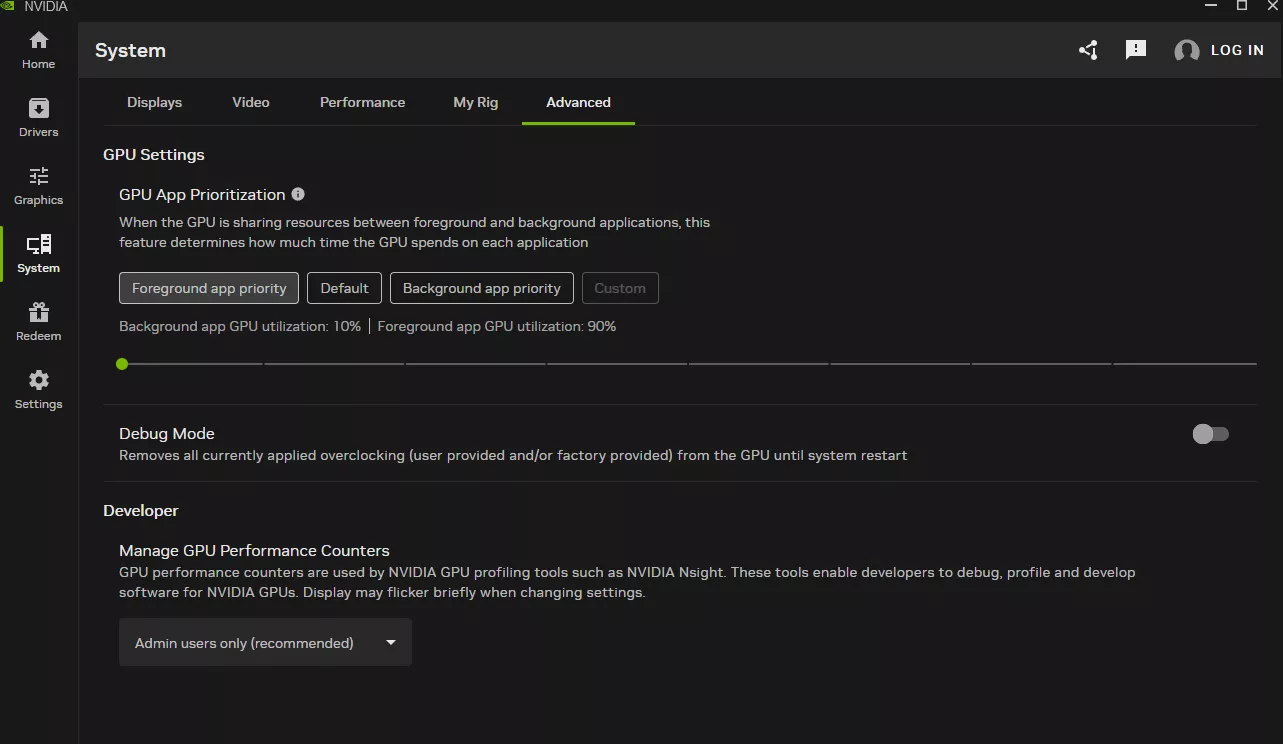
That's essentially the same as the Resource Management control Nvidia added to its RTX Spark laptops on October 28. At the time, the company pitched it as a way to give background AI agents more or less access to the GPU. On those machines, the feature also only works when hardware-accelerated GPU scheduling is enabled in Windows.
On GeForce cards, however, availability appears to vary considerably. One RTX 5090 owner confirmed that the option appeared after updating. Another user with an RTX 5070 Ti, the same app version, and hotfix driver 621.12 found no such option.
Nvidia's release notes for the update don't mention the feature at all, listing new DLSS overrides and game optimization profiles instead. For now, it's unclear whether this is a staged rollout, something tied to specific drivers, or simply a setting that slipped out before Nvidia intended to announce it.
Anyone curious can update the Nvidia App and check under System > Advanced. Nvidia hasn't confirmed whether the GeForce implementation requires hardware-accelerated GPU scheduling, but given that the RTX Spark version does, it's worth making sure the feature is enabled in Windows' graphics settings, too. Just keep in mind that nobody has independently tested how much of a difference the setting actually makes yet.