
It's only been days since Borderlands 4 landed, so we grabbed a copy and started testing, because that's pretty much all we've done for the past three days, and it has been brutal. We can't imagine what simply playing the game is like. Of course, we did play for a bit to reach a section suitable for testing, and for that, we used an RTX 5090. However, we were forced to dial the resolution down to 1440p and enable upscaling because the experience at native 4K was damn terrible.
We were shocked to find frame rates in the 40s... like, what on earth is going on there?

At first, we thought there might be a weird setting enabled or an issue with the display drivers. But no, the RTX 5090 genuinely struggles to get near 60 fps, and in the heavier sections of the game, frame rates dip well into the 40s. That's shocking, and not in a good way.
Optimization Issues: Badass or Simply...
So today we're going to explore GPU performance in Borderlands 4 using the "Badass" and "Medium" presets. We'll also review preset scaling and upscaling data in a moment.
As a side note, developer Gearbox Software stated that when changing visual quality settings, players should wait in-game for at least 15 minutes before evaluating performance, as shaders need to recompile. This is unusual, and we investigated it. However, we observed no change in performance after extended gameplay.
When switching from the highest graphics preset to the lowest, the frame rates we saw observed after loading into the game stayed the same even after 30 minutes. This might be because we are using a 9800X3D, which likely prevents CPU bottlenecks, even with the RTX 5090. We can at least confirm this factor does not affect our results. CPU utilization also remained consistent, showing the same usage 30 minutes after loading as it did upon initial loading.
But before we get into the testing, let's cover some details about the game.
Borderlands 4 features the same cel-shaded art style as previous titles as expected. However, this time it runs on Unreal Engine 5, which includes technologies such as Lumen and Nanite. Borderlands 4 also uses World Partition, which, according to the developer, allows for a larger game world than what they could have achieved using their previous methods.
In addition to Unreal Engine 5 features, the game supports Nvidia DLSS, AMD FSR, and Intel XeSS upscaling, as well as frame generation.

Despite this support, the game is inexplicably demanding which has resulted in mixed reception from gamers on Steam. Most of the negative feedback stems from poor frame rate performance and crashes. Fortunately, during our testing, we only experienced a few crashes. While still far from ideal, this isn't too bad considering we tested over 40 GPUs. Unfortunately, many other players have reported much less stable experiences.
Test System Specs
| CPU | AMD Ryzen 7 9800X3D |
| Motherboard | MSI MPG X870E Carbon WiFi [BIOS 7E49v1A64] Resizable BAR Enabled |
| Memory | G.Skill Trident Z5 RGB DDR5-6000 CL30 [CL30-38-38-96] |
| ATX Case | MSI MEG Maestro 700L PZ |
| Power Supply | Kolink Regulator Gold ATX 3.0 1200W |
| Storage | TeamGroup T-Force Cardea Z44Q 4TB |
| Operating System | Windows 11 24H2 |
| Display Driver | Nvidia GeForce Game Ready Driver 581.29 AMD Radeon Adrenalin 25.9.1 Intel Arc 101.7029 Beta |
Now, let's get to the data. Our test system uses a Ryzen 7 9800X3D with 32 GB of DDR5-6000 memory and the latest display drivers available at the time of testing. Let's dive in.
Preset Scaling Benchmarks
First, let's take a look at preset scaling. For this, we are comparing two current-generation entry-level GPUs: the 16 GB versions of the 5060 Ti and 9060 XT. Both are reasonably capable products, so they should be able to deliver a smooth 60 fps experience at 1440p using mid-range quality settings. Unfortunately, that is not the case with Borderlands 4.

Using the lowest possible in-game preset, labeled simply as Low, the 9060 XT averaged just 62 fps. This made it 13% faster than the RTX 5060 Ti, which averaged 55 fps. Again, this was using the Low preset.
Increasing to Medium dropped the 9060 XT's performance by roughly 20%, down to 50 fps, while the 5060 Ti saw a 16% decrease, falling to just 46 fps. These are shockingly low numbers for such capable GPUs.
The High preset further reduced performance, bringing the 9060 XT down by another 18% to 41 fps on average. The 5060 Ti saw a 15% reduction, dropping to 39 fps.
Things got even worse with the Very High preset, which reduced the 9060 XT's average frame rate by 24% and the 5060 Ti's by 26%, leaving both hovering around 30 fps.
Finally, we have the Badass preset. In terms of performance, it truly lives up to its name in the worst way possible, delivering a sub-30 fps experience at native 1440p on these GPUs.
Upscaling Performance
As we've seen, performance can more than double – or be cut in half, depending on perspective – when comparing the lowest and highest quality presets. Another way to significantly improve performance is through upscaling.

The bulk of our testing was conducted at the native resolution, but for reference, here's how much the different upscaling methods can boost performance for Radeon and GeForce GPUs.
For this data, we used the Badass preset at 1440p. At native resolution, this produced a sub-30 fps experience. Enabling Quality FSR massively boosted the 9060 XT's performance by 74%, which was a surprisingly large uplift. Similarly, the RTX 5060 Ti saw a massive 76% increase using DLSS.
Despite these impressive gains, performance still fell well short of 60 fps. In fact, to reach 60 fps, we had to use the Performance mode, which more than doubled frame rates compared to native rendering. This makes upscaling an absolute necessity for this title.
General Benchmarks
Badass 1080p
Here we have the 1080p results using the Badass preset. As expected, the RTX 5090 was the fastest GPU, but it managed just 101 fps at 1080p. The RTX 4090 followed closely at 91 fps.

The RTX 5080, 7900 XTX, 9070 XT, and RTX 4080 all delivered around 70 fps. It might seem odd that the RTX 5080 was slightly slower than the RTX 4080, but this is something we've observed before with newly released titles, and others have reported similar results. At least for now, these two GPUs perform very similarly in Borderlands 4.
It was also surprising to see that AMD's flagship cards – the 7900 XTX and 9070 XT – were able to match the RTX 5080. While 69 fps on average is not spectacular, it is impressive relative to expectations. This also meant that the 9070 XT was 11% faster than the 5070 Ti, putting the RX 9070 (non-X model) on par with the 5070 Ti.
Below this tier, performance drops under 60 fps even at 1080p. GPUs such as the RTX 4070 Super and 7900 XT could not average 60 fps.
Previous-generation flagships like the 6950 XT and RTX 3090 were neck and neck at 51 fps. The RTX 3080 and 6800 XT, which are more common and affordable options, landed in the mid-40s.
As we move further down the chart, we see still-capable GPUs struggling to deliver even 30 fps in some cases. Notably, 8 GB GPUs are clearly under pressure at 1080p. The 16 GB version of the 5060 Ti was 73% faster than its 8 GB counterpart.
Badass 1440p
Switching to native 1440p is a major frame rate killer, with the RTX 5090 managing just 77 fps and the RTX 4090 coming in at 67 fps. Dropping below 50 fps, we have GPUs like the RTX 4080 Super, RX 9070 XT, RTX 5080, RTX 4080, and RX 7900 XTX. The RTX 5070 Ti competed more directly with the RX 9070 in this scenario.

Previous-generation parts such as the RX 7900 GRE, RTX 4070 Super, RX 6950 XT, and RTX 3090 all fell below 40 fps. It does not take long before we see GPUs unable to even maintain 30 fps on average, such as the RTX 4070, RX 7700 XT, and current-generation RX 9060 XT and RTX 5060 Ti.
This clearly highlights how poorly optimized the game is. Yes, the Badass preset looks impressive visually, but certainly not to the extent that justifies this extreme level of performance loss.
Badass 4K
Looking at the 4K data feels like stepping back 15 years to a time when 4K gaming was more of a dream than a reality. The RTX 5090 managed just 45 fps, while the RTX 4090 delivered only 36 fps. That is astonishingly low for GPUs of this caliber.
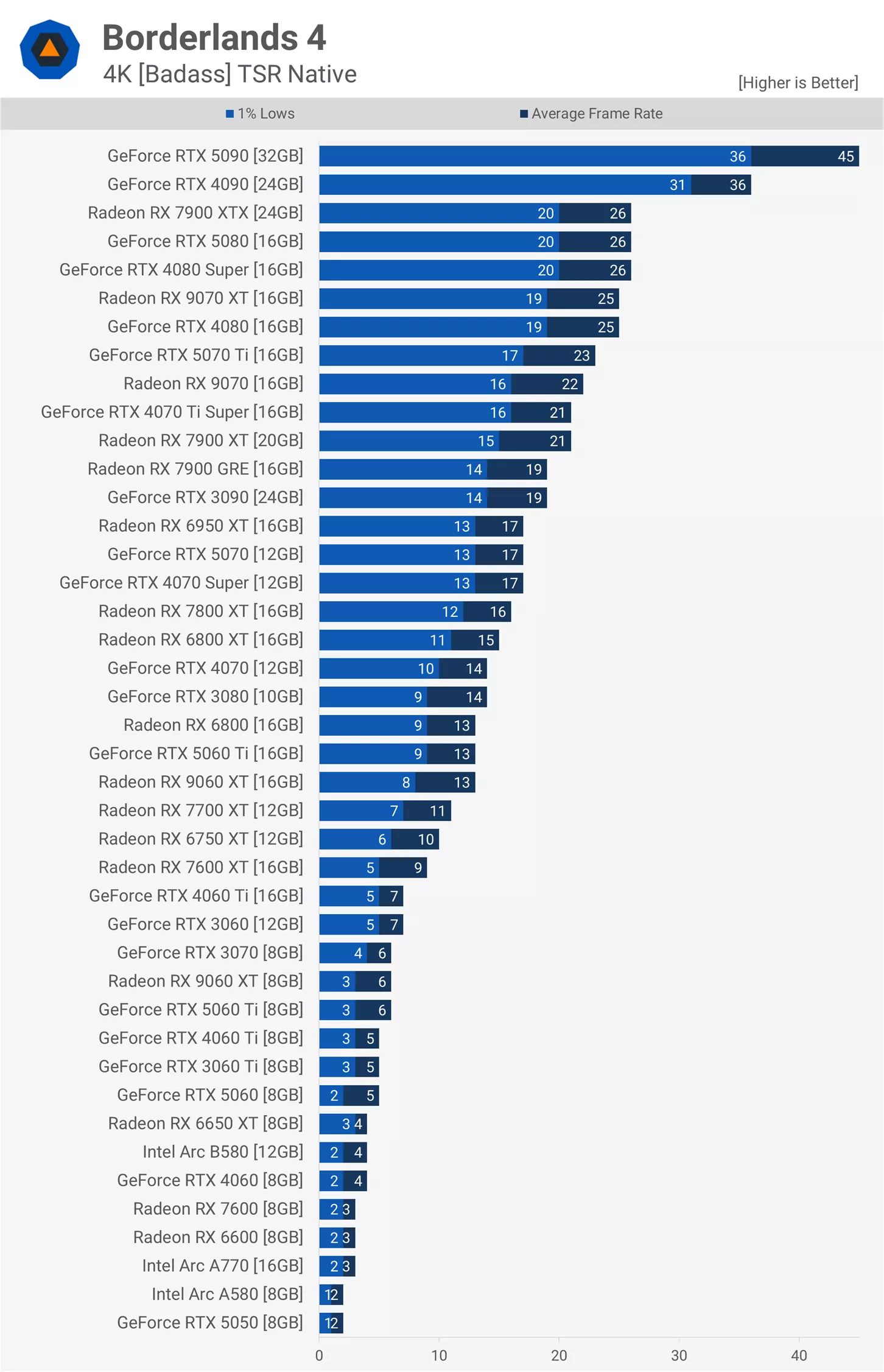
Everything else fell well below 30 fps at native 4K, making performance essentially unplayable. With that, let's move on from the Badass preset and check out Medium.
Medium 1080p
Switching to the Medium preset should boost performance by around 80%, as we saw earlier when looking at preset scaling. The exact improvement depends on both the GPU and CPU. Our testing system uses the 9800X3D, which offers more headroom than most, but even then, the RTX 5090 only saw a 42% increase, reaching 143 fps – a surprisingly low frame rate for this GPU at 1080p with medium settings.

The RX 9070 XT, on the other hand, experienced a significant 67% boost, climbing to 115 fps. This allowed it to edge past the RTX 4080 and RTX 5080 by a small margin, showing that this Radeon GPU performs well above expectations. Similarly, the RX 7900 XTX performed better than expected, matching the RTX 4080 and RTX 5080.
The RX 9070 (non-XT) also pulled ahead of the RTX 5070 Ti, coming in 22% faster than the RTX 5070 – the GPU it usually competes against. The RTX 5070 averaged 85 fps, which was similar to last generation's RX 7900 GRE.
Just below that, around 80 fps, we see the RX 6800 XT, RX 7800 XT, RTX 4070, and RTX 3090. Interestingly, the 8 GB and 16 GB versions of the RX 9060 XT performed the same here because the Medium preset significantly reduces VRAM usage. We observed a similar result with the RTX 5060 Ti models.
This allowed GPUs like the RTX 5060 to deliver roughly 60 fps. However, the RTX 5050 struggled badly, averaging just 44 fps, alongside Intel's Arc series and older models like the RX 6600.
Medium 1440p
Moving back up to native 1440p reduced performance by about 25%. The RTX 5090 dropped to 119 fps, while the RTX 4090 fell to 97 fps. The RX 9070 XT continued to impress, rendering 86 fps and slightly surpassing both the RTX 4080 and RTX 5080.

The previous-generation RX 7900 XTX also matched the RTX 4080, while the RX 9070 (non-XT) matched the RTX 5070 Ti at just under 80 fps.
Around the 60 fps mark, we find the RTX 4070 Super, RX 7900 GRE, RTX 5070, and RTX 3090. The RX 7800 XT and RX 6800 XT fell slightly short of that level.
The RX 9060 XT and RTX 5060 Ti were closer to 50 fps, along with the RX 7700 XT. Dropping further down, toward 30 fps, we see GPUs like the RTX 5060, RTX 3060 Ti, RTX 4060 Ti, and Arc B580. Below that point, performance becomes very poor. For example, the RTX 5050 averaged just 28 fps, similar to the RX 6650 XT and RTX 3060.
Medium 4K
At 4K, there is a bit of good news: if you have an RTX 5090 and are willing to use aggressive upscaling settings, you can achieve a high-refresh-rate experience in Borderlands 4. However, this comes with a major caveat – what you are seeing is not truly native 4K.

There's little point in going over this data in detail, as most GPUs cannot come close to 60 fps. Even with the Medium preset, performance is punishing, making this game extremely demanding at 4K.
Performance Summary and Recommended Specs

Borderlands 3 performance was problematic at launch, and unfortunately, this latest installment is even worse. While Borderlands 4 looks visually impressive, the graphics are not nearly impressive enough to justify well under 100 fps on an RTX 5090 at 1440p.
Outside of the RTX 5090, performance deteriorates quickly. Even with balanced upscaling at 1440p, mid-range GPUs struggle to reach 60 fps. This makes for a suboptimal experience, especially for players who expect at least 90 fps on a high refresh rate monitor.
This explains why so many PC gamers are frustrated and leaving negative reviews. In this case, the criticism seems completely justified.
Gearbox's updated recommended specs
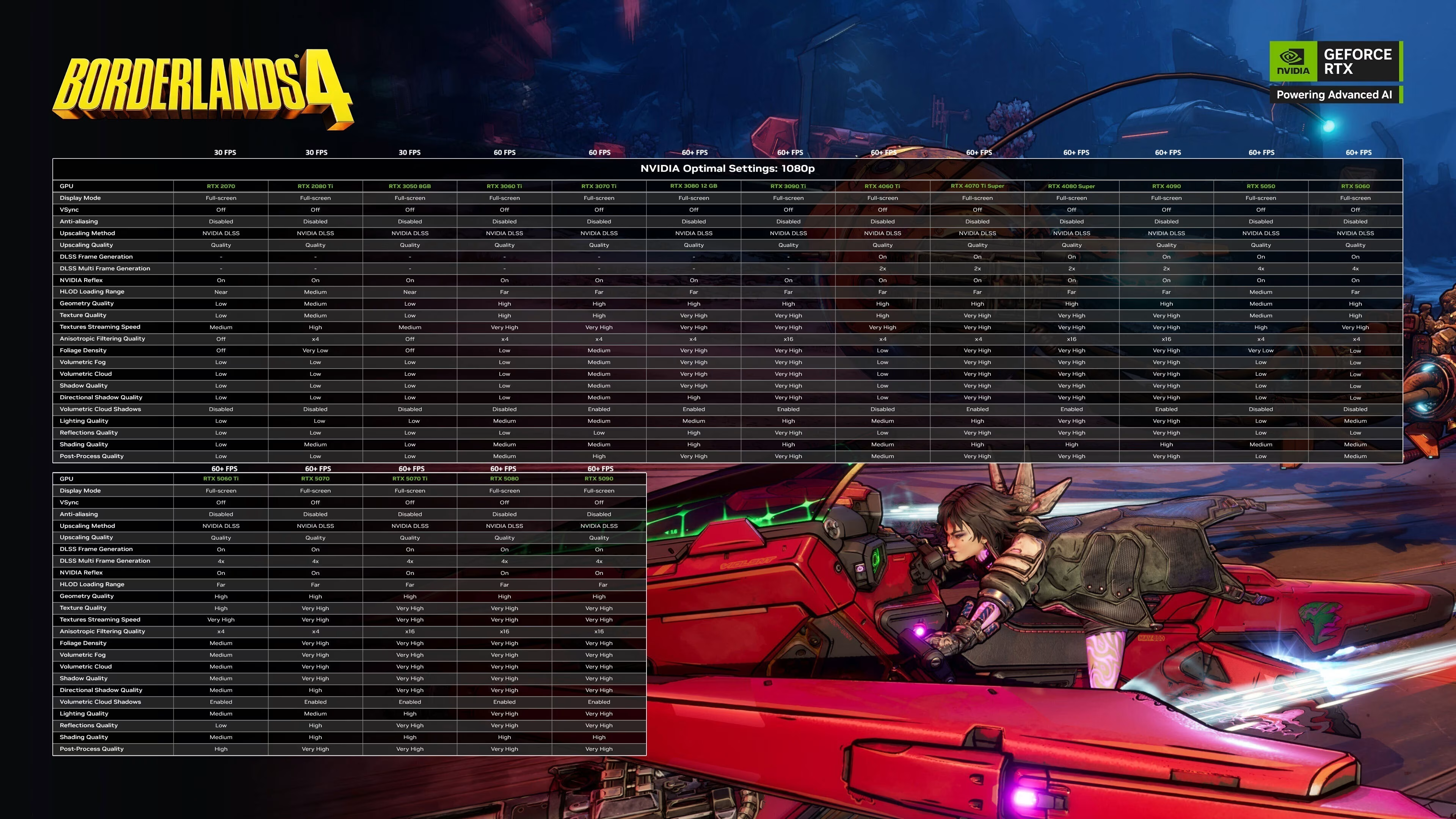
When reviewing the minimum and recommended PC specs for Borderlands 4, we were left confused about what frame rates the developers believe players find acceptable. The minimum specs list an RTX 2070, RX 5700 XT, or Arc A580. We didn't bother testing the first two, as there's no way they would perform well.
However, we did test the Arc A580, and at 1080p using the Medium preset, the GPU averaged just 30 fps. This suggests that the minimum target frame rate is around 30 to 40 fps – yikes! – which is very low for a modern game.
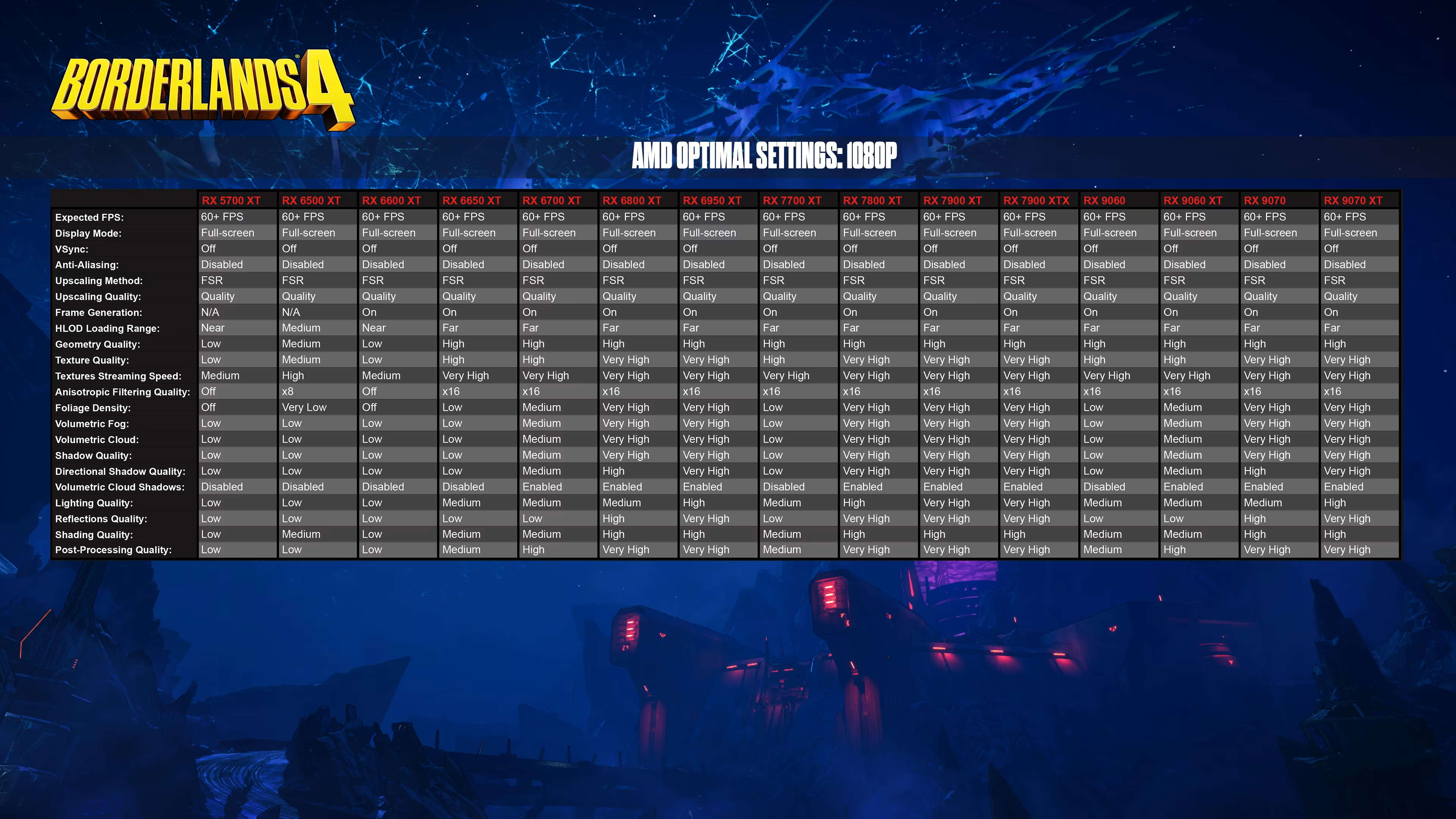
The recommended specs are also questionable (see the screenshots above for updated specs released by Gearbox after gamers' backlash). They list the RTX 3080, RX 6800 XT, or Arc B580. This is odd, considering the RX 6800 XT was nearly 70% faster than the B580 in our 1080p Medium testing.
Under those same conditions, the RX 6800 XT and RTX 3080 averaged over 70 fps, and with upscaling, they could reach roughly 100 fps. That's decent performance, but keep in mind this is only at 1080p. Moving up to 1440p knocks those frame rates down to just below 60 fps.
Wrap Up
Following player backlash, the developer clarified that the minimum specs target a 1080p, 30 fps experience using the Low preset, while the recommended specs target 1440p, 60 fps using the Medium preset. These figures are roughly in line with our testing.
The reality is that Borderlands 4 is very poorly optimized. While it's tempting to blame Unreal Engine 5, which has been challenging for many developers, the root problem here appears to be poor implementation. Some developers have explained that UE5 is extremely complex. When used incorrectly, it can lead to very slow performance, but when used properly, it can deliver technically impressive results. However, achieving this requires years of experience and deep technical knowledge.

This is why some studios opt to develop their own proprietary engines, where they can fully understand and control performance. These studios often achieve better results simply because they know their technology inside and out.
Another factor is time. Games like Borderlands 4 often need more development time to focus on optimization. Unfortunately, due to financial pressures and release schedules, that extra time is rarely granted.

Our testing here focused on GPU performance, but CPU performance is also a significant factor. Unfortunately, that side of the equation appears equally unpolished. While testing with the RTX 5090, we observed our Ryzen 7 9800X3D running at around 60% utilization. This is very high, especially considering we weren't testing in a CPU-intensive scenario, such as areas with many NPCs, there were only a few enemies present.
This suggests that performance could be even worse with slower CPUs. The game is also very demanding on VRAM when using higher quality settings. If you are running an 8 GB GPU, we recommend sticking to Low or Medium presets. Frame generation may also be difficult to use effectively on GPUs like the RTX 5060 Ti, which is something we plan to investigate in future testing.

Hopefully, a performance patch will be released soon. If that happens, we will revisit Borderlands 4 with a fresh round of testing to see what has improved. Until then, we are not especially eager to play more of the game, and we suspect many other gamers feel the same way. It's a disappointing situation for such a highly anticipated title.