
Battlefield 6 is finally here. Thanks to early access, we spent the past few days putting the game through its paces, running a comprehensive series of benchmarks. In total, we tested 43 different graphics cards across three resolutions and two quality presets, along with additional experiments examining preset scaling, DLSS, and FSR performance. We also prepared some image quality comparisons, so there's a lot to unpack.
Battlefield 6 hardly needs an introduction. We analyzed the open beta's multiplayer performance back in August and came away impressed. Ever since, we've wanted to deliver a full-scale GPU benchmark. The challenge, of course, was that multiplayer testing isn't ideal for consistent results, with performance fluctuating wildly from match to match.

This time, that wasn't an issue. Early access to the single-player campaign gave us the stability we needed. We focused our testing on the most demanding section we could find – the third mission – and ran all 43 GPUs through that same scenario.

Test System Specs
Before diving into the data and visual comparisons, here are the system specs: we used a Ryzen 7 9800X3D with 32 GB of DDR5-6000 memory and the latest display drivers available at the time of testing.
| CPU | AMD Ryzen 7 9800X3D |
| Motherboard | MSI MPG X870E Carbon WiFi [BIOS 7E49v1A64] - ReBAR enabled |
| Memory | G.Skill Trident Z5 RGB DDR5-6000 [CL30-38-38-96] |
| ATX Case | MSI MEG Maestro 700L PZ |
| Power Supply | Kolink Regulator Gold ATX 3.0 1200W |
| Storage | TeamGroup T-Force Cardea Z44Q 4TB |
| Operating System | Windows 11 24H2 |
| Display Driver | Nvidia GeForce Game Ready Driver 581.42 AMD Radeon Adrenalin 25.9.2 Intel Arc 32.0.101.8136 |
Now, let's get into it.
Visual Comparison Across Presets
Before going into the benchmarks, here's a quick look at image quality to give an idea of how they compare visually. We skipped the Ultra preset because High and Overkill are extremely similar.
In our video sample below, you can see that for the most part the Overkill and High presets look very similar. Overkill slightly improves shadow quality, producing sharper and more defined shadows, whereas High has softer shadows. From High to Medium, the differences are again subtle – the shadows become a little softer, but it's hardly a major downgrade.
For a better representation of image quality comparisons, check out the HUB video below:

Even the Low preset looks quite good. Some detail on the weapon is lost, and texture quality is worse, but not drastically so. The developer did an excellent job minimizing noticeable texture degradation.
Shadow and lighting quality are reduced, though not to a degree that makes the game look much worse. Overall, the downgrade is surprisingly minor and often goes unnoticed during gameplay.

When examining specific objects up close, differences between presets become easier to spot. Take this truck wheel, for example. Using the Overkill preset, textures and detail look very good, and they remain nearly identical at High, though the shadow from the handrail is slightly lower in quality.
Moving to Medium, the shadow from the handrail is mostly gone, and wheel hub textures are a bit downgraded, but it's still far from a dramatic drop. At Low, textures are noticeably worse, with more detail missing, but overall the presentation remains decent – impressive for the lowest quality preset.

When not focusing on a single object, all presets often appear very similar. For instance, the wheel arches on the distant white car become more jagged with the Medium and Low presets, while this detail is smoother at High and Overkill.
Still, the overall scene detail – the number of visible objects – remains largely the same, which explains why the Low preset looks surprisingly good.
IQ: Low vs. Overkill
As you'll see, the Low preset delivers around a 70% performance boost compared to Overkill, and when viewed side by side, it's difficult to justify using Overkill.
For a better representation of image quality comparisons, check out the HUB video below:

Even in the cutscene above, the difference between maximum and minimum quality settings is small. The most noticeable variation is in texture quality, particularly when examining the floor of the vehicle. The Overkill preset provides sharper textures and more detailed lighting and shadows.
During the beach assault scene, textures on the sand are also higher quality at Overkill, though the visual improvement is relatively minor considering the performance cost.
IQ: High vs. Overkill
For those wondering how Overkill compares to High in that same cutscene, the two are nearly identical. Even when pausing the scene, it's striking how similar they look.
For a better representation of image quality comparisons, check out the HUB video below:

The lighting appears slightly better at Overkill, with higher-quality shadows, so there's no denying it's the best-looking preset. However, the improvements are subtle and often hard to notice during gameplay, especially when compared to High.
Performance Benchmarks
Preset Scaling
First we're taking a look at preset scaling. For this, we compared two current-gen entry-level GPUs: the 16 GB versions of the GeForce RTX 5060 Ti and Radeon RX 9060 XT. Using the Low preset, performance was excellent at native 1440p, reaching 108 fps for the 9060 XT and 118 fps for the 5060 Ti, making the GeForce GPU 9% faster.

With the Medium preset, the 9060 XT experienced only a 6% performance drop, and the 5060 Ti saw an 8% drop. Both still managed to render well above 100 fps on average. At the High preset, frame rates dipped below 100 fps but remained excellent overall, with the GeForce GPU now 12% faster.
Using the Ultra preset, the GeForce GPU averaged 89 fps compared to 81 fps for the 9060 XT, a 10% lead. Finally, even with the Overkill preset, average frame rates stayed above 60 fps, and the 5060 Ti maintained a 9% advantage.
Upscaling
Although most of our testing was done at native resolution, we also gathered FSR and DLSS scaling data for the 9060 XT and 5060 Ti. At native resolution with the Overkill preset, the GeForce GPU was 9% faster. When enabling Quality upscaling, this margin grew slightly to 11%.

More importantly, the 5060 Ti achieved a 40% performance boost compared to native, while the 9060 XT gained 38%. Moving from Quality to Balanced settings yielded another 10 – 14% boost, followed by an additional 11 – 12% increase at Performance, and then 19 – 20% using Ultra Performance.
1080p Overkill
Starting with the Overkill data at 1080p, we found that even with this extreme preset, higher-end GPUs easily delivered high refresh rate gameplay. The RTX 5090, unsurprisingly, is a powerhouse, offering over 200 fps. Even more modest GPUs like the 7900 XT, 4070 Ti Super, RTX 5070, and RX 9070 performed exceptionally well, averaging above 130 fps.

The RX 9070 slightly outperformed the RTX 5070, while the 9070 XT trailed behind the 5070 Ti by a notable 11%.
GPUs such as the RTX 4070, 5060 Ti 16 GB, 6800 XT, RTX 3080, and 7800 XT all hovered around 100 fps. It's worth noting that the 8 GB version of the 5060 Ti struggled with the Overkill settings. Although the average frame rate looked acceptable, overall performance suffered due to very poor 1% lows. This issue was less severe for the 8 GB 9060 XT thanks to its PCIe x16 configuration, but even so, the 16 GB version was 17% faster on average and 32% faster in 1% lows. Clearly, the Overkill preset is too demanding for 8 GB GPUs.
The Intel Arc B580 performed reasonably well, averaging 66 fps, which is playable but significantly slower than the 16 GB 4060 Ti. Beyond that, the Overkill preset proved too demanding, with most struggling GPUs limited by their 8 GB of VRAM.
1440p Overkill
At 1440p, we still observed impressively high frame rates from GPUs like the RTX 5090 and 4090, with the RTX 5080 also performing well. Interestingly, the 9070 XT was only slightly slower than the 5070 Ti, while the 7900 XTX pulled ahead. The RX 9070 also outperformed the RTX 5070 by a comfortable 17%.
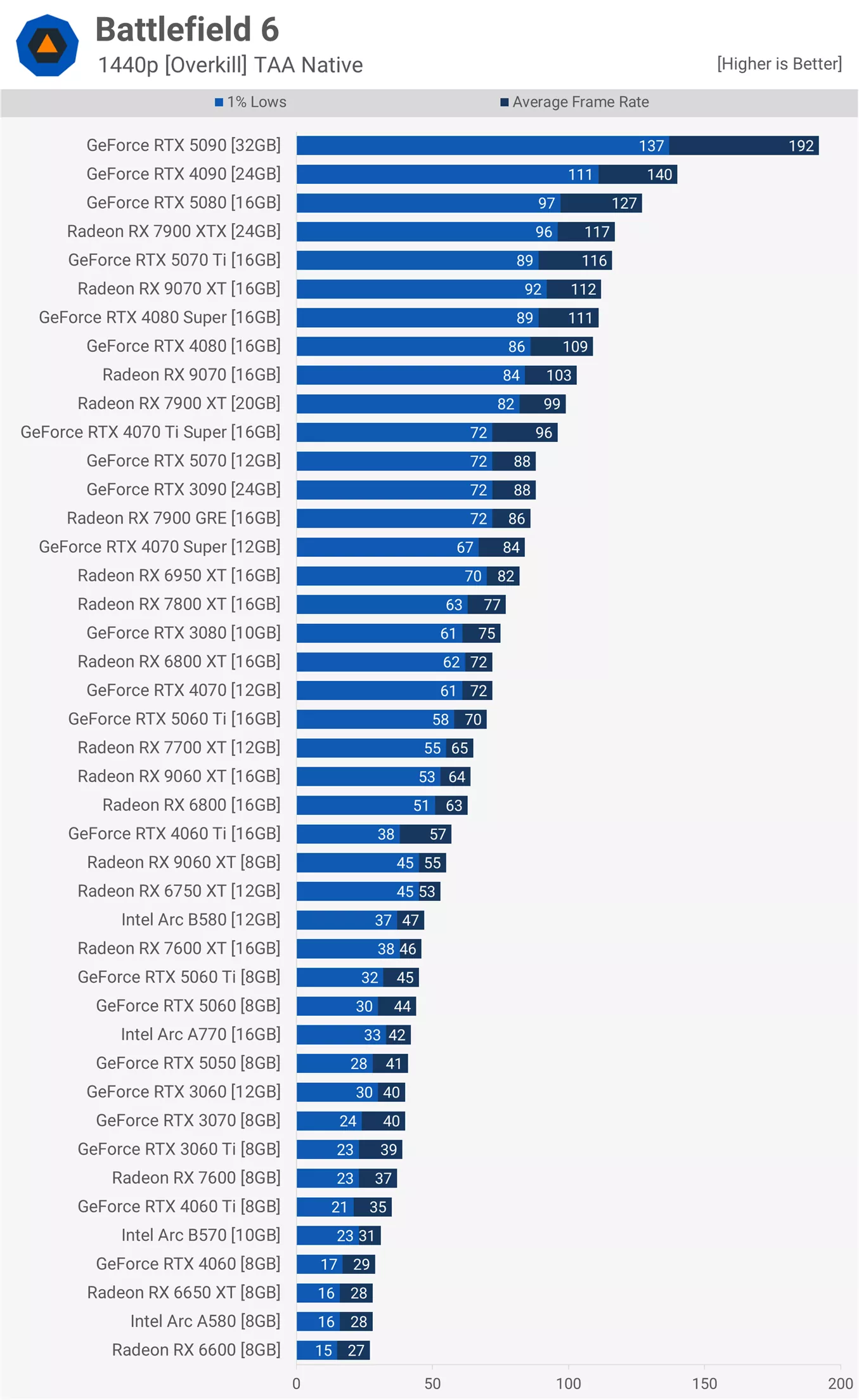
The older RTX 3090 and 6950 XT were closely matched, though the GeForce card held a small lead.
The RTX 5060 Ti once again outpaced the 9060 XT, averaging 70 fps, which made it 9% faster. However, the 8 GB versions told a different story: the 9060 XT was 22% faster, or 40% faster when considering 1% lows. That said, neither card was particularly impressive, as both failed to maintain 60 fps. Performance beyond that point dropped sharply, so it makes sense to lower the quality preset in such cases.
4K Overkill
Native 4K is a serious performance challenge, especially with the Overkill preset, but even so, the RTX 5090 managed an impressive 115 fps.

This is particularly notable given that just a few weeks ago, we recorded 45 fps in Borderlands 4. Meanwhile, in Battlefield 6, similar performance can be achieved with the 7900 GRE.
1080p High
Backing the resolution down to 1080p with the High preset shows just how well-optimized Battlefield 6 is. Testing the most demanding section of the campaign we could find, we still saw over 200 fps from the 5070 Ti, RTX 4090, 5080, and 5090.

Unfortunately, no Radeon GPUs joined that group, as the 9070 XT topped out at 179 fps, which is well short of the 5070 Ti. The 9070 and 9070 XT performed very similarly, suggesting that something is limiting these Radeon GPUs – possibly an overhead or driver-related issue. Either way, performance remained strong overall, though not as high as we might expect compared to competing GeForce GPUs.
These settings are more relevant for lower-end models, and as we move down the chart, it is impressive to see older cards like the RTX 4070 and 6800 XT achieving over 130 fps. For those targeting 100 fps or more, the 6750 XT and RTX 4060 Ti 16 GB deliver excellent results.
Even older entry-level GPUs such as the RX 6600 can manage over 60 fps with these settings, while popular models like the RTX 4060 comfortably average around 70 fps.
1440p High
Increasing the resolution to 1440p still allows most modern mid-range to high-end GPUs to render over 100 fps. The RTX 5090 easily surpassed 200 fps, while the 4090 and 5080 also performed exceptionally well. This time, the 5070 Ti and 9070 XT were neck and neck at around 150 fps, and the RX 9070, RTX 4080, 4080 Super, and 7900 XTX were all closely matched. The RX 9070 ended up about 7% faster than the RTX 5070, matching the performance of the older 7900 XT.
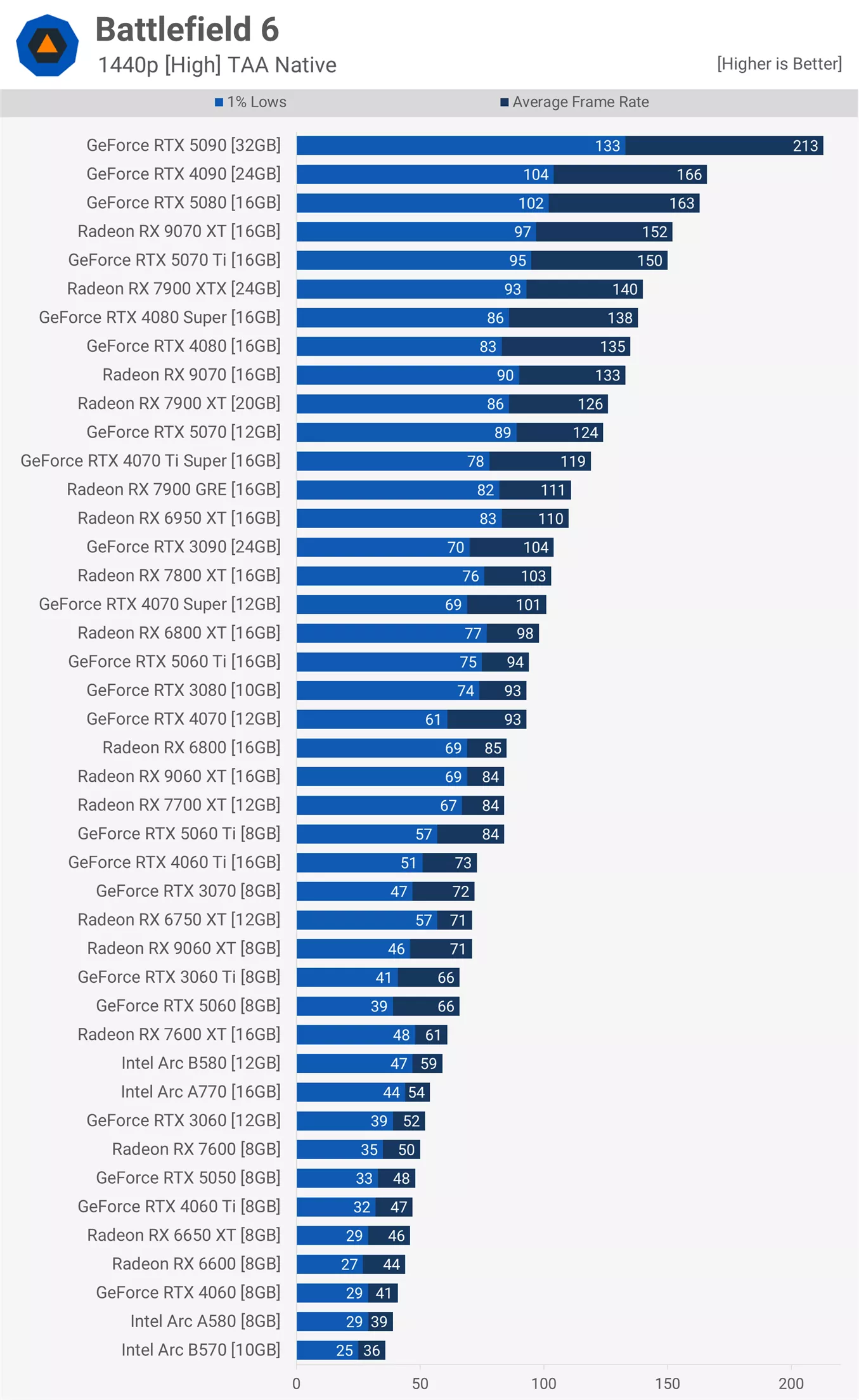
The 5060 Ti once again outpaced the 9060 XT, with the 16 GB versions delivering 94 and 84 fps respectively, giving the GeForce GPU a 12% lead. However, the 8 GB models told a different story: the 9060 XT version dropped 15% in average frame rate and 33% in 1% lows, while the 5060 Ti lost 11% on average and 24% in 1% lows. Not all 16 GB and 8 GB versions were affected equally – for example, the 4060 Ti 8 GB was 36% slower than its 16 GB counterpart. Even at the High preset, 8 GB GPUs suffer noticeably from limited VRAM, and enabling DLSS or FSR upscaling is unlikely to resolve this limitation.
The 5060 Ti was again too fast for the 9060 XT, with the 16GB models delivering 94 and 84 fps respectively, handing the GeForce GPU a 12% lead. But when we look at the 8GB models the 9060 XT version dropped 15% off the average frame rate and 33% from the 1% lows while the 5060 Ti saw the average frame rate drop by 11% and the 1% lows by a much larger 24% margin. But not all 16 and 8GB variants were affected evenly, the 4060 Ti 8GB for example was 36% slower than the 16GB version. So even with the high preset 8GB GPUs are suffering from a lack of VRAM, and it's unlikely that enabling DLSS or FSR upscaling is going to help.
Despite that, many 8 GB GPUs were still usable, though frame time stability was weaker. The 7600 XT, for instance, offered a smoother experience than the newer RTX 5060.
4K High
Lastly, at 4K, only the RTX 5090 can deliver a truly high-refresh-rate experience without upscaling. The RTX 4090 maintained just over 100 fps, while the RTX 5080 came in third with 94 fps, followed by the 5070 Ti, 9070 XT, and 7900 XTX.
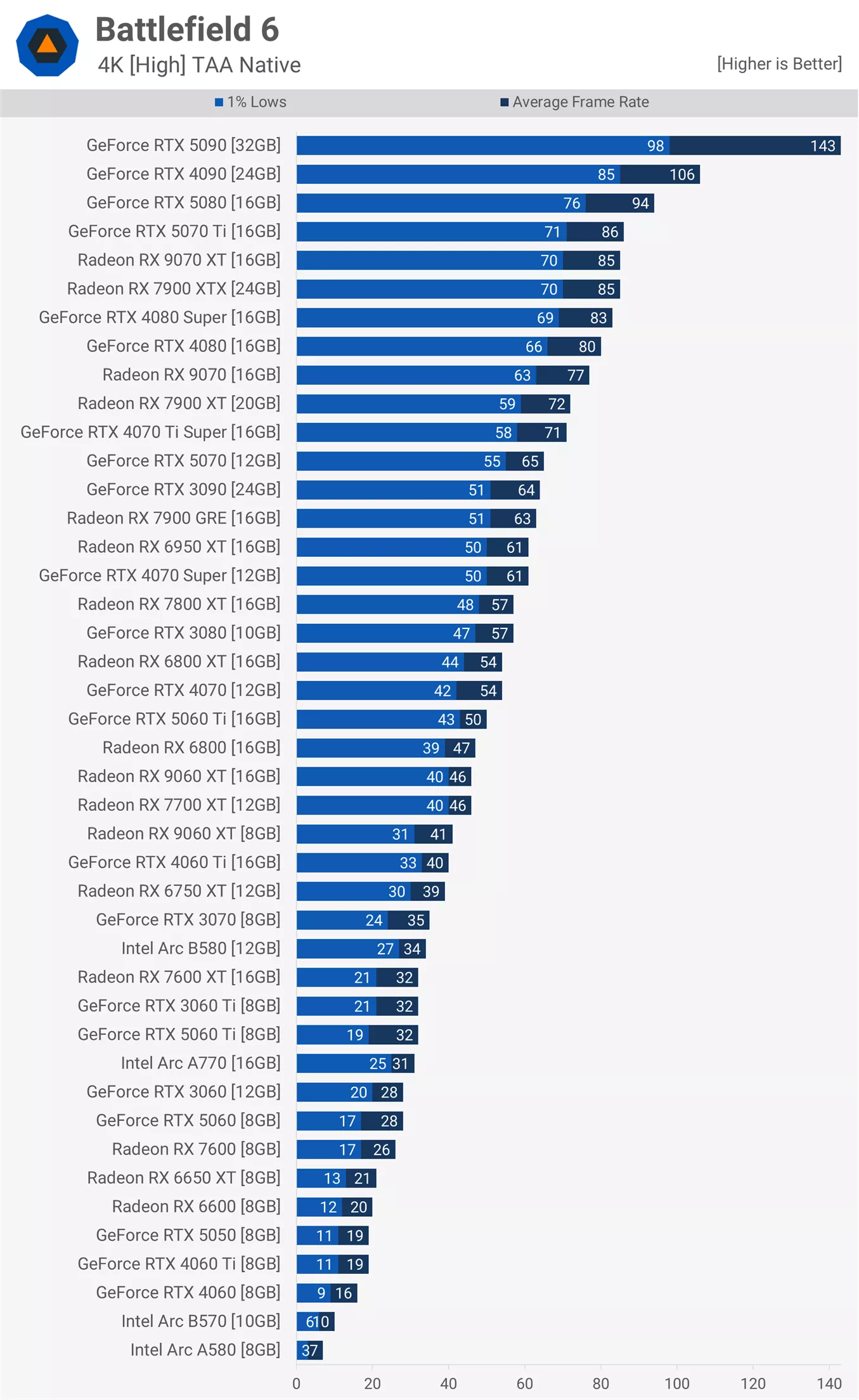
For just above 60 fps, GPUs like the RTX 4070 Super, 6950 XT, 7900 GRE, RTX 3090, and 5070 perform well, though enabling at least Quality upscaling is recommended. As expected, 8 GB GPUs struggle here. Although the 5060 Ti 16 GB managed 50 fps – making it usable at 4K with Balanced upscaling – the 8 GB version had no chance, suffering a 36% drop in average frame rate and poor frame time consistency.
What We Learned
Battlefield 6 feels like a rare thing in modern PC gaming: a blockbuster that's both visually ambitious and impressively optimized. It scales gracefully across a huge range of hardware, proving that you don't need a monster rig to enjoy it. Still, unless you're running top-tier components, the Overkill and Ultra presets are best left untouched. The High (or even Medium) settings strike a near-perfect balance between visuals and performance.
It's worth noting that most modern GPUs with 12 GB or more of VRAM can still push Battlefield 6 to impressive heights. In our testing, the RTX 5060 Ti 16 GB averaged around 100 fps at 1440p with Quality upscaling in the most demanding section of the game we could find after several hours of testing.

Step down to the High preset, and the visuals remain remarkably close, while the same GPU hits just over 130 fps with DLSS Quality enabled, a true high-refresh-rate experience.

Even those with older GPUs like the Radeon RX 6600 or GeForce RTX 3060 can enjoy Battlefield 6 at smooth frame rates when playing at 1080p with Medium settings. That's great news and should help this latest iteration of Battlefield reach the wide audience they wanted.