Google Chrome is a fast, simple, and secure web browser, built for the modern web. Chrome combines a minimal design with sophisticated technology to make the web faster, safer, and easier. Google builds powerful tools that help you connect, play, work and get things done. And all of it works on Chrome.
Is Google Chrome safe and private?
The Chrome browser utilizes site isolation, sandboxing, and predictive phishing protections to keep your browsing secure, among others. However, Google's browser always raises privacy concerns due to the fact that everything you do in Chrome, including every character you type into the address bar, is recorded by Google and linked to you. While using other Google services, all that data may be cross-referenced.
More privacy-conscious users may prefer to use Firefox or other Chromium-based alternatives (that may or may not record as much data) or try Ungoogled Chromium.
Is Chrome the fastest browser?
Chrome, Firefox, Safari and other major browsers are updated every few weeks, so it's hard to compare them over time which is the fastest. Chrome is known to be a RAM hog, but when used heavily, other browsers are known to be just as resource-consuming.
Google is good at creating the illusion of speed with prediction algorithms that preload parts of web pages that you are likely to visit. With a minimalistic design, you'll feel at home with Chrome, plus built-in integration with other Google services and mobile browsing can also be very convenient.
What are the best Chrome alternatives?
There are tons of good and free alternatives for browsing the web. If you want a more private browsing, you can opt for Firefox or Brave. If you don't want to use Google services, you can use Ungoogled Chromium.
Opera, Microsoft Edge and Vivaldi are other great options, these last two are Chromium-based just like Google Chrome.
What are the best features of Chrome?
Chrome is the most popular web browser out there, so website compatibility with it and other Chromium-based browsers is top notch. Performance is usually perceived as good (see question above).
Chrome is also feature-filled but not bloated. It does integrate nicely with other Google services and also lets you sync browsing history and bookmarks with your phone and other devices. Finally, Chrome has a vast library of extensions to add capabilities to your browser experience.
Features
Speed
Chrome is designed to be fast in every possible way: It's quick to start up from your desktop, loads web pages in a snap, and runs complex web applications fast. Learn more about Chrome and speed.
Stay organized with tabs
Tabs help you stay organized, keep track of multiple pages, and multi-task. You can group tabs together for better organization or pin tabs to automatically open websites you use the most.
What's New
The Stable channel has been updated to 154.0.8037.92/.93 for Windows and Mac and 154.0.8037.92 to Linux which will roll out over the coming days/weeks. A full list of changes in this build is available in the Log.
Security Fixes and Rewards
Note: Access to bug details and links may be kept restricted until a majority of users are updated with a fix. We will also retain restrictions if the bug exists in a third party library that other projects similarly depend on, but haven't yet fixed.
This update includes 32 security fixes. Please see the Chrome Security Page for more information.
- [TBD][551673541] Critical CVE-2026-102331: Buffer overflow in ANGLE. Reported by @mfx on 2026-08-24
- [N/A][517312707] High CVE-2026-102317: Improper privilege management in Mojo. Reported by Google on 2026-05-28
- [TBD][551668264] High CVE-2026-102312: UI misrepresentation in Omnibox. Reported by jodyritonga on 2026-08-24
- [N/A][556789073] High CVE-2026-102313: Uninitialized resource in ANGLE. Reported by Google on 2026-09-03
- [TBD][556908674] High CVE-2026-102299: Type confusion in V8. Reported by Andrew Boni on 2026-09-04
- [N/A][556926296] High CVE-2026-102306: Use after free in Bluetooth. Reported by Google on 2026-09-04
- [N/A][556959073] High CVE-2026-102307: Uninitialized resource in Dawn. Reported by Google on 2026-09-04
- [TBD][559266114] High CVE-2026-102323: Type confusion in V8. Reported by OpenAI Codex Security (amyb) on 2026-09-10
- [N/A][559727039] High CVE-2026-102303: Uninitialized resource in GPU. Reported by Google on 2026-09-10
- [N/A][559737160] High CVE-2026-102311: Uninitialized resource in GPU. Reported by Google on 2026-09-10
- [TBD][560062638] High CVE-2026-102300: Uninitialized resource in WebGPU. Reported by Arni Hardarson (Neonix Security) on 2026-09-11
- [TBD][560233248] High CVE-2026-102326: Type confusion in V8. Reported by OpenAI Codex Security (amyb) on 2026-09-11
- [TBD][560238698] High CVE-2026-102316: Use after free in Views. Reported by Xinyang Ge on 2026-09-11
- [TBD][560251736] High CVE-2026-102304: Use after free in Passwords. Reported by Xinyang Ge on 2026-09-11
- [TBD][560536732] High CVE-2026-102328: Type confusion in V8. Reported by OpenAI Codex Security (amyb) on 2026-09-12
- [TBD][560867085] High CVE-2026-102309: Use after free in FullScreen. Reported by sean geofrey on 2026-09-13
- [N/A][561994362] High CVE-2026-102325: Uninitialized resource in Skia. Reported by Google on 2026-09-15
- [N/A][561997480] High CVE-2026-102308: Use after free in Views. Reported by Google on 2026-09-15
- [N/A][562004351] High CVE-2026-102301: Out of bounds write in GPU. Reported by Google on 2026-09-15
- [N/A][562042411] High CVE-2026-102319: Uninitialized resource in GPU. Reported by Google on 2026-09-15
- [TBD][562174487] High CVE-2026-102324: Use after free in PictureInPicture. Reported by Blockian Creator of Kritt and Open-Kritt on 2026-09-15
- [N/A][562279351] High CVE-2026-102318: Out of bounds read in WebGL. Reported by Google on 2026-09-16
- [TBD][563297615] High CVE-2026-102329: Cross-site scripting in WebUI. Reported by chipsec on 2026-09-18
- [N/A][563351482] High CVE-2026-102315: Uninitialized resource in Media. Reported by Google on 2026-09-18
- [N/A][563716534] High CVE-2026-102302: Buffer overflow in V8. Reported by Google on 2026-09-19
- [TBD][565328105] High CVE-2026-102321: Type confusion in V8. Reported by Taisic Yun (@taisic_) of Theori, with Xint on 2026-09-23
- [TBD][554038924] Medium CVE-2026-102320: Missing authorization in CORS. Reported by Anonymous on 2026-08-28
- [$1,000][477726837] Low CVE-2026-102310: Missing authorization in Payments. Reported by Autodidact on 2026-01-22
- [N/A][496212975] Low CVE-2026-102327: Incorrect authorization in WebView. Reported by Google on 2026-03-25
- [N/A][498793976] Low CVE-2026-102330: Incorrect authorization in SiteIsolation. Reported by Google on 2026-04-02
- [N/A][514059780] Low CVE-2026-102314: UI misrepresentation in TabStrip. Reported by Google on 2026-05-17
- [N/A][533021953] Low CVE-2026-102305: UI misrepresentation in SignIn. Reported by Google on 2026-07-09
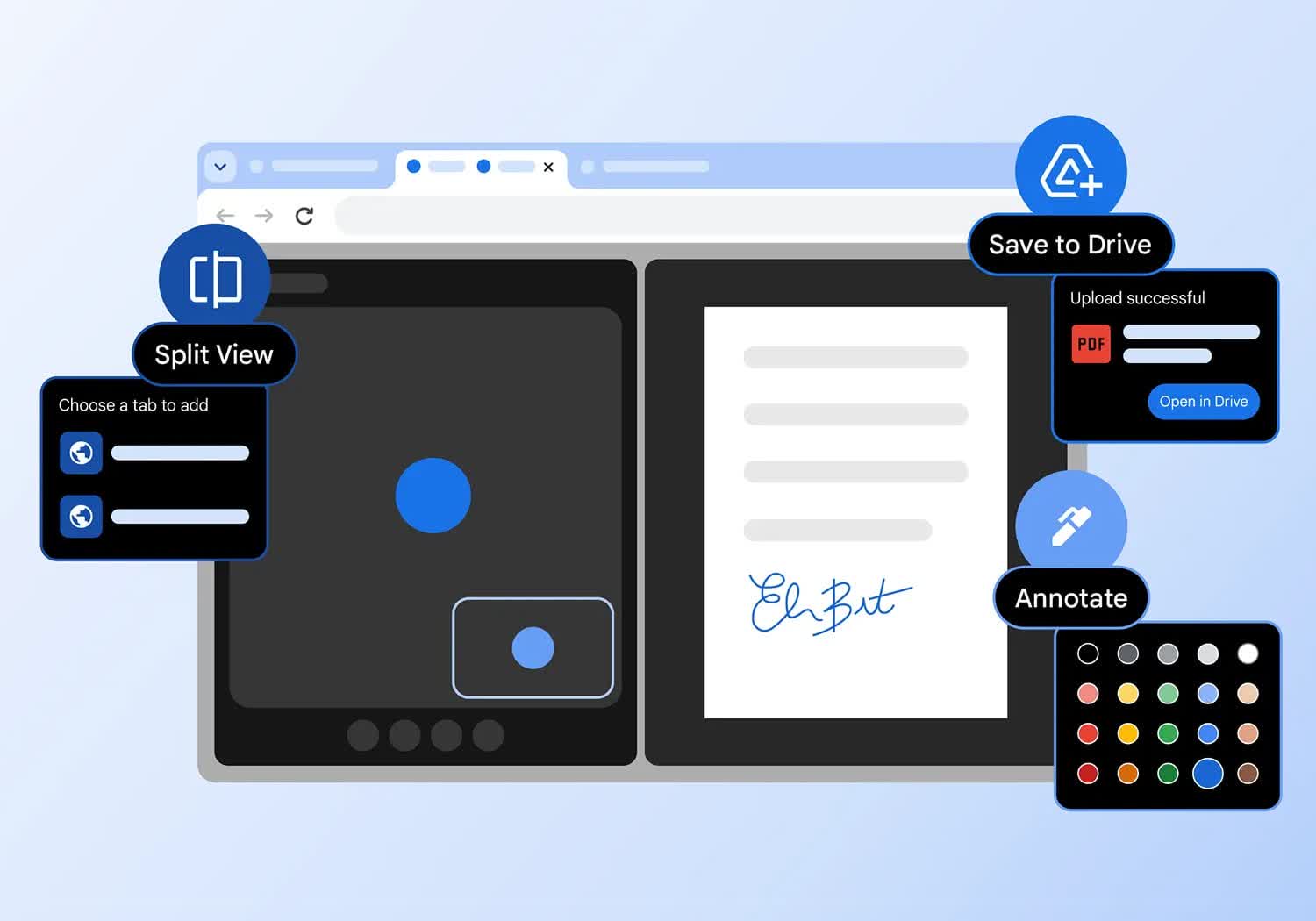
Google Chrome adds split view, PDF annotations, and Drive saves
Google is making Chrome a little more work-friendly with a trio of productivity upgrades that are now rolling out on the desktop. The browser's new built-in split view lets you run two tabs side by side without juggling windows, while its PDF viewer can now handle highlights, notes, and even signatures.
There's also a smarter Save to Google Drive option that sends PDFs straight into a dedicated "Saved from Chrome" folder, cutting out the download-and-reupload dance. If you live in your browser all day, the latest Chrome update is worth grabbing.