This PowerShell script promises to remove every AI feature from Windows

Alfonso Maruccia

Posts: 2,505   +934
Staff
Editor's take: Microsoft is doubling down on its plan to turn Windows 11 into an "agentic AI" platform, and in the process seems determined to strip away the last bits of user agency left in the OS. The backlash is something to behold, with increasingly throughout attempts to free Windows from any AI-related package, file, and Registry key. Or at least this developer is trying with an unsanctioned open source tool.
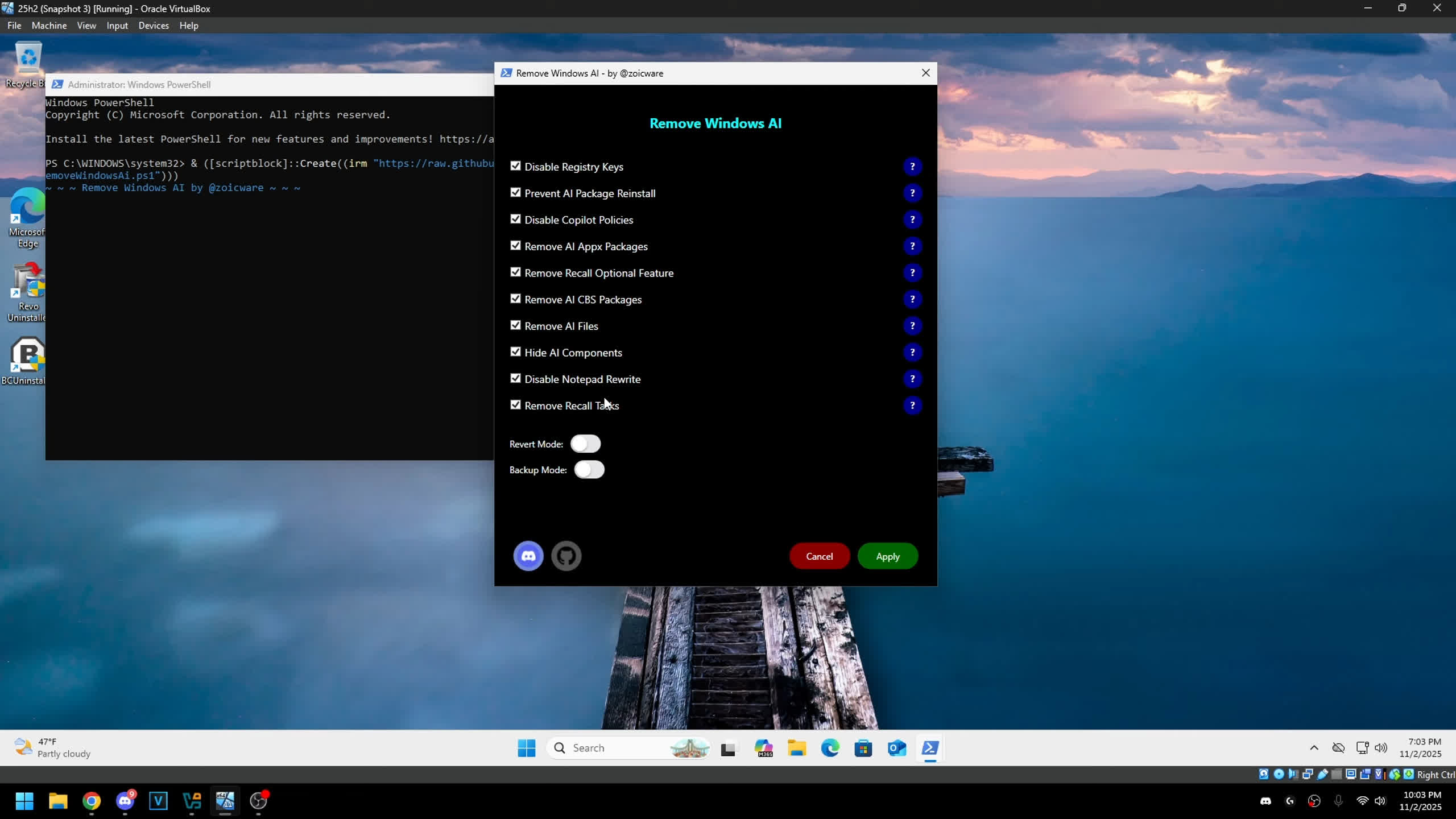
A developer who goes by "Zoicware" has joined that resistance. He recently updated his tool for ripping AI features out of Windows 11. Called RemoveWindowsAI, the open-source PowerShell script is built to scrub Microsoft's growing stack of AI components, and the dev claims it does a far deeper clean than competing tools.

The programmer launched the project in 2024, arguing that Windows 11 24H2 features like Copilot and Recall posed serious privacy and security risks. The latest release of the script shifts focus to Windows 11 25H2, a major update that layers on even more AI components throughout the system. Only if Microsoft would dedicate all those efforts to actual needed optimizations.

According to the developer, RemoveWindowsAI can boost user experience, privacy, and security on the newest versions of Windows 11. The script disables a long list of AI features like Copilot, Recall, Edge, Paint, AI Actions, and more – by directly erasing packages and files. It can even install custom Windows Update packages designed to keep those AI apps from reappearing in the future.

In a recent video, the tool's creator walked through its capabilities and compared it to other utilities aimed at clearing out Windows' growing AI clutter. He argues that while many of those tools simply uninstall a few unprotected apps that users could remove themselves, RemoveWindowsAI actually delivers on the promise of a full AI purge.

The script runs both as a PowerShell command-line tool and as a GUI app. It includes a "reverse mode" that can restore previously removed AI components, plus a backup option for safer experimentation.

A handful of features can't be removed automatically, though – users will need to disable those manually in the Windows Settings app, following the steps in this brief guide.

Before creating RemoveWindowsAI, the programmer built an eponymous PowerShell script for customizing Windows 10 and 11 installations, packed with tweaks aimed at boosting productivity and gaming performance. RemoveWindowsAI takes a similar approach but focuses solely on AI features, with more than 2,400 lines of code supporting the latest major Windows release.

The developer plans to keep expanding the script as Microsoft rolls out new AI integrations, though he says he'll only target major OS upgrades. He has no interest in chasing what he calls the "white rabbit" of Microsoft's ever-shifting Windows Insider experiments.

Permalink to story:

 
When I went to have a look at the guide linked above, this happened as I use Malwarebytes Browser Guard:

A full page warning which included the full URL.

This was also included in the full screen warning:

"Risky Heuristics behaviour." Strongly recommended not going forward. You may be putting yourself at risk by visiting this site.

Mmmm... Probably a false positive. I heard that github sometimes gets blocked by other security related software, but don't have any details.

I decide for now to "go back," and not unblock it until I know whats going on.

Anyone have any thoughts or knowlege about this? Also GitHub in general?
 
Last edited:
While I applaud these developers efforts... its only a matter of time before MS embeds AI so deeply into windows that trying to remove it will literally break windows.
 
Sometimes an operating system must just be an operating system. I guess Microsoft found that during installations, many people just prefer to opt out of most things. So instead they decided to install many things by default in hopes that Windows won't feel outdated compared to other options out there.
 
Curious if there is any performance difference with all the AI stuff turned off

There has been plenty of testing done (Youtube), with slimmed down 10/11 versions vs stock and to be honest, performance difference, at least in games, is extremely small and almost none-existing (sometimes retail even beats the slimmed down version) but I tend to like not seeing all kinds of apps I will never use and I like having fewer background processes running.

Even Microsoft knows Windows has become too bloated.

https://www.techspot.com/news/110547-windows-11-getting-faster-smoother-more-console-like.html

Lets see if they will deliver.
 
There has been plenty of testing done with slimmed down 10/11 versions vs stock and to be honest, performance difference, at least in games, is extremely small and almost none-existing
It may or may not be depending on amount of resources used on devices used on tests.
Considering prices of memory modules today ... every byte of RAM not used by services/apps not needed for task may help to do the difference.
 
It may or may not be depending on amount of resources used on devices used on tests.
Considering prices of memory modules today ... every byte of RAM not used by services/apps not needed for task may help to do the difference.
Also consider Microsoft's constant replacement of native system apps with WebView2 based apps that chug RAM. It should not take a full gigabyte to open an outlook client or calendar, but here we are.
 
Also consider Microsoft's constant replacement of native system apps with WebView2 based apps that chug RAM. It should not take a full gigabyte to open an outlook client or calendar, but here we are.
Do not remind me.
Even the Calculator devours more RAM than my PC in 2000 used to have in total.
 
You never know what these apps actually do. As for a powershell script, you can always paste it into Copilot and ask what each line is doing :)
Yes, and you'll get a response which may (or more likely won't) reflect reality.
 
I would rather know the commands being used.
Uh-huh. And you read the commands this script run. All 2430 lines of it. And also understood it all.

I like how you guys fantasize that open source = safe. As if Debian didn't run a patched OpenSSL version that pretty much defeated encryption on these systems. All open source, but no one noticed for 2 years. Two. Years. And OpenSSL isn't some random, obscure stuff, it's a major compotent that's being used by tens of thousands of packages.


This is just one example. There are a ton others.

How many of you read the 2500 LOC of this stuff? Don't fool yourselves, it's all just a false sense of security, nothing more.
 
Uh-huh. And you read the commands this script run. All 2430 lines of it. And also understood it all.

I like how you guys fantasize that open source = safe. As if Debian didn't run a patched OpenSSL version that pretty much defeated encryption on these systems. All open source, but no one noticed for 2 years. Two. Years. And OpenSSL isn't some random, obscure stuff, it's a major compotent that's being used by tens of thousands of packages.


This is just one example. There are a ton others.

How many of you read the 2500 LOC of this stuff? Don't fool yourselves, it's all just a false sense of security, nothing more.

ShutUp10 is for newbs, I use powershell and I easily can see what the commands do.

RemoveWindowsAI is the correct approach. You press a button, and see the command running in terminal.
 
Last edited:
There has been plenty of testing done (Youtube), with slimmed down 10/11 versions vs stock and to be honest, performance difference, at least in games, is extremely small and almost none-existing (sometimes retail even beats the slimmed down version) but I tend to like not seeing all kinds of apps I will never use and I like having fewer background processes running.

Even Microsoft knows Windows has become too bloated.

https://www.techspot.com/news/110547-windows-11-getting-faster-smoother-more-console-like.html

Lets see if they will deliver.
Ok, but its not always about the games performance. Its also about less bloat, more privacy, less telemetry, efficiency for weak PCs, etc. For example for my Dell mini PC with a Celeron J4105 I use a version of Tiny10 that runs with 700MB RAM.
 
Ok, but its not always about the games performance. Its also about less bloat, more privacy, less telemetry, efficiency for weak PCs, etc. For example for my Dell mini PC with a Celeron J4105 I use a version of Tiny10 that runs with 700MB RAM.
True, 100%

Depends, I'd prefer no bloat and no telemetry but don't forget that this telemetry often is used for correcting errors too, which don't really matter in small niche operating systems like Tiny10, compared to retail Windows used by billions

Telemetry is not all bad. I don't wear a tin foil hat either. However I don't like wasting ressources.
 
When I went to have a look at the guide linked above, this happened as I use Malwarebytes Browser Guard:

A full page warning which included the full URL.

This was also included in the full screen warning:

"Risky Heuristics behaviour." Strongly recommended not going forward. You may be putting yourself at risk by visiting this site.

Mmmm... Probably a false positive. I heard that github sometimes gets blocked by other security related software, but don't have any details.

I decide for now to "go back," and not unblock it until I know what's going on.

Anyone have any thoughts or knowledge about this? Also GitHub in general?
Toward the bottom of his main GitHub page:
"Anti-viruses will detected this as a trojan due to the nature of compressing a script inside of an exe."
 
Back