Windows 11 is getting a revamped Start Menu

DragonSlayer101

Posts: 970   +14
Staff
In a nutshell: Microsoft is testing a redesigned Windows 11 Start Menu that ditches the dual-section design for a larger layout with everything on a single scrollable page, including All Apps, Pinned Apps, and Recommendations. The new Start Menu will also allow users to disable the annoying recommendations and customize the layout to match their style.
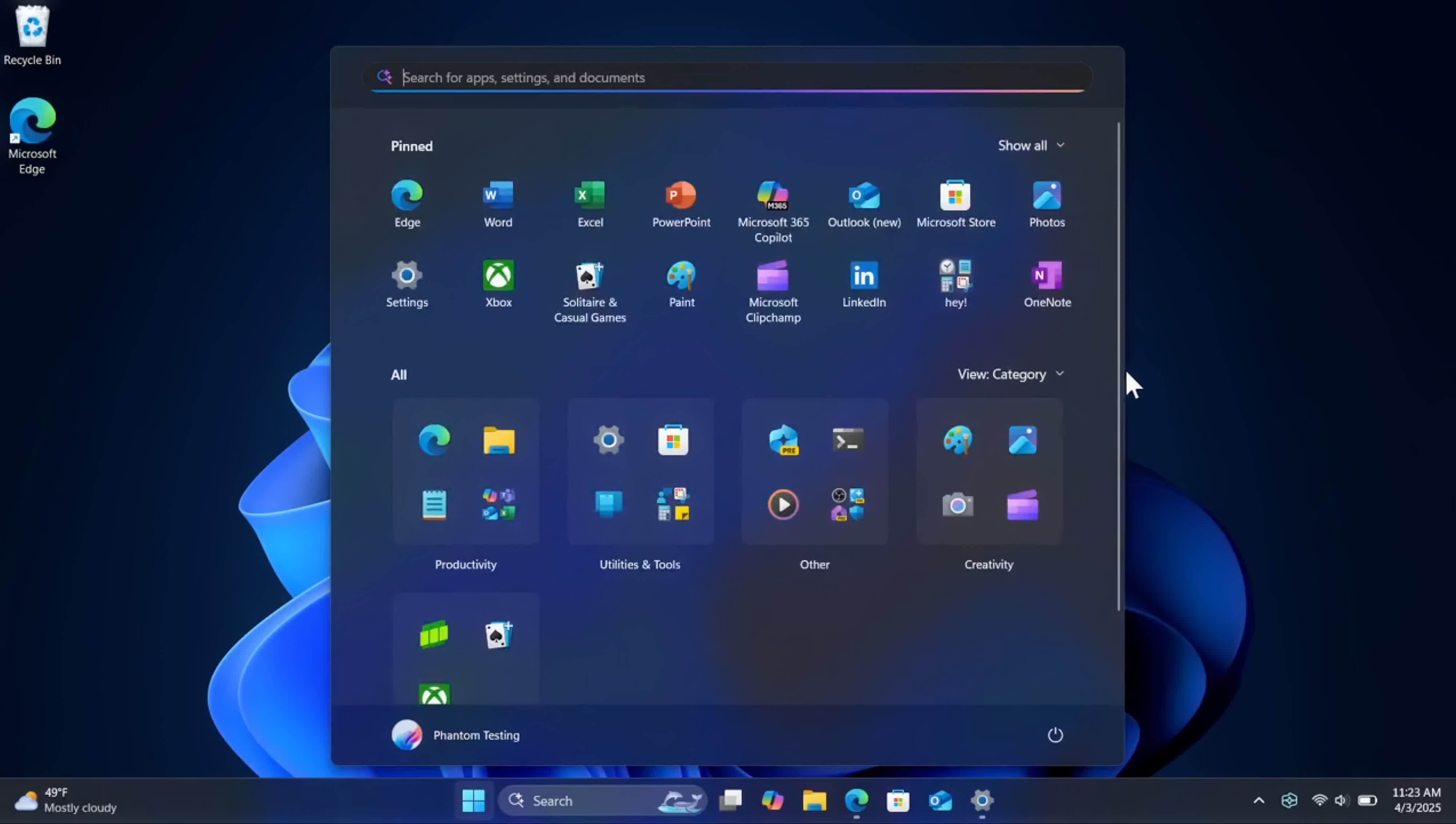
The new layout is hidden in the latest Windows 11 preview builds in the Dev and Beta channels, but reputable tipster @phantomofearth spotted the feature yesterday. The single-page layout puts the Pins and Recommendations at the top, with the All Apps list below. Scrolling the page will allow users to browse the installed apps without clicking the "All" button.

The best thing about the redesign is the ability to disable the Start Menu's 'Recommended' section, which many users don't like. To turn it off, navigate to Settings > Personalization > Start and then toggle off "Show recommended files in Start, recent files in File Explorer, and items in Jump Lists." However this comes with a slight caveat.
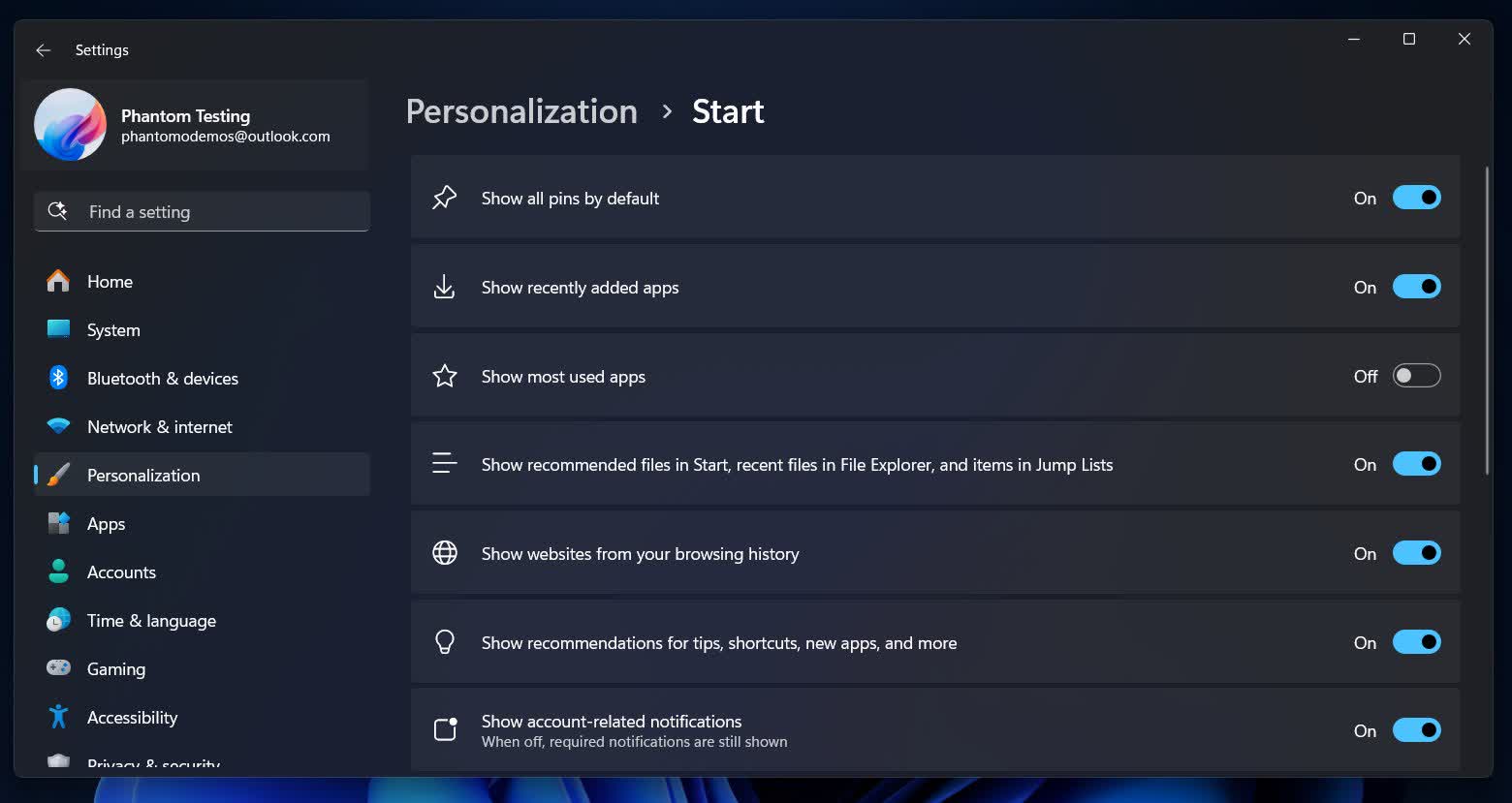
The toggle will also deactivate the Recommended/Recent files tabs in File Explorer. Hopefully, Microsoft will de-link the Recommended toggle from the Recent feed in File Explorer in the stable build since that is a more helpful feature. Of course, there are no guarantees that the experimental switch will make it to end users.

As seen on the first video above, the new Start Menu won't be drastically different from the existing one. However, it will be a little taller and wider to accommodate every section in a single view. The revamped design should provide a cleaner, more streamlined view by getting rid of the cluttered interface of the current Start Menu.

Microsoft has yet to announce the redesign, but its inclusion in the latest Preview builds suggests the feature will likely roll out sometime this year. Either way, it's good to see Microsoft finally listening to customer feedback and doing something to improve the user experience on Windows PCs.

Permalink to story:

 
I was looking at the roadmap for Windows - there is nothing in there. They are are just going round in circles now fiddling at the edges of this behemoth they can't properly maintain.
 
Sorry MS but in my opinion the proverbial "too little too late" applies and unless you REALLY step up your no-more-user-hostility game (which btw would still be VERY late) my upgrade to Win 11 will not happen.
I'll stick with my swap to Linux and/ór MacOS plan. FOR NOW.
Regain my trust and maybe...just maybe...
 
Please make it to where I don't have to use 3rd party software to move the taskbar, please Microsoft? Those of us with OLED screens need things movable to avoid burn in. I have had my OLED 3 years now, and I have zero burn in because I keep it random.
 
Another joke. Nothing ever comes close to Start Menu on Windows 9 (aka 8.1).
Why put a phone-size tiny thing on my 32 inch screen, then again hide most of things, so I have to choose "All..." and then scroll, scroll... yuk
Windows 9 got that one right, just was mis-marketed as 8.1.
 
Still sticking with Start11 by Stardock. 1000x better, you can customize icons , choose between windows 9,10 layouts and for a one time fee of $10. Absolutely worth it if you use your start menu.

 
Remember when you used to have an orderly layout and could see all installed programs and easily go to settings etc. Oh yeah windows 95 to Xp to Vista to 7 Microsoft knew what was functional and kept improving. Then they had an stroke, **** the bed and a new drooling and cross-eyed Microsoft gave us windows 8. They have in their pride been unable to repent of their sins and keep pushing stupid on us. Why? Who knows. Maybe these are vanity projects where someone at Microsoft wants to be able to say they left their mark and can brag to strangers at the bar that they did something. All I know is that nothing has improved from windows 7.
 
Remember when you used to have an orderly layout and could see all installed programs and easily go to settings etc. Oh yeah windows 95 to Xp to Vista to 7 Microsoft knew what was functional and kept improving. Then they had an stroke, **** the bed and a new drooling and cross-eyed Microsoft gave us windows 8. They have in their pride been unable to repent of their sins and keep pushing stupid on us. Why? Who knows. Maybe these are vanity projects where someone at Microsoft wants to be able to say they left their mark and can brag to strangers at the bar that they did something. All I know is that nothing has improved from windows 7.
While I mostly agree with your post I must mention that on my boxes 10 is more stable than 7. I loved (and BOUGHT) 7 but it did crash occasionally. 10 never crashed/crashes on my old and current boxes and runs a tiny bit faster than 7.
I do however use OpenShell on 10 to make it look&feel more 7-like.
 
Finally, a Start Menu redesign that looks like it was made for humans instead of aliens with a folder fetish. Only took them, what, two decades?
 
The thing, is you shouldn't even have to do that in the first place.
Agree and up until Windows 11, I never paid for any 3rd party windows software. Thats how bad the 11 start menu design is.

At least MS is heading in the right direction...(listening to consumer feedback)...They need to listen more and faster before more people adopt it (since win10 support is stopping this year).
 
A start menu that is a full page of icons looking like very spaced out desktop shortcuts. Genius!

The people designing these stuff ups should share their drugs. I really wanna get that high too.
 
Microsoft is trying to improve a desktop that has put many people of because it is very different than Windows 10. Why is it that I can type the name of a program in the search bar quicker than I can find it by click-click-click of the Start button and on and on? Absolutely awful design disregarding human factors for what?
 
I just disabled recommendations and search with a group policy, I guess they are now formally adding an option in the settings UI.
 
Back