
DaVinci Resolve is the world's only solution that combines professional 8K editing, color correction, visual effects and audio post production all in one software tool! You can instantly move between editing, color, effects, and audio with a single click.
This download page is for DaVinci Resolve 17, you can download the latest release of DaVinci Resolve here.
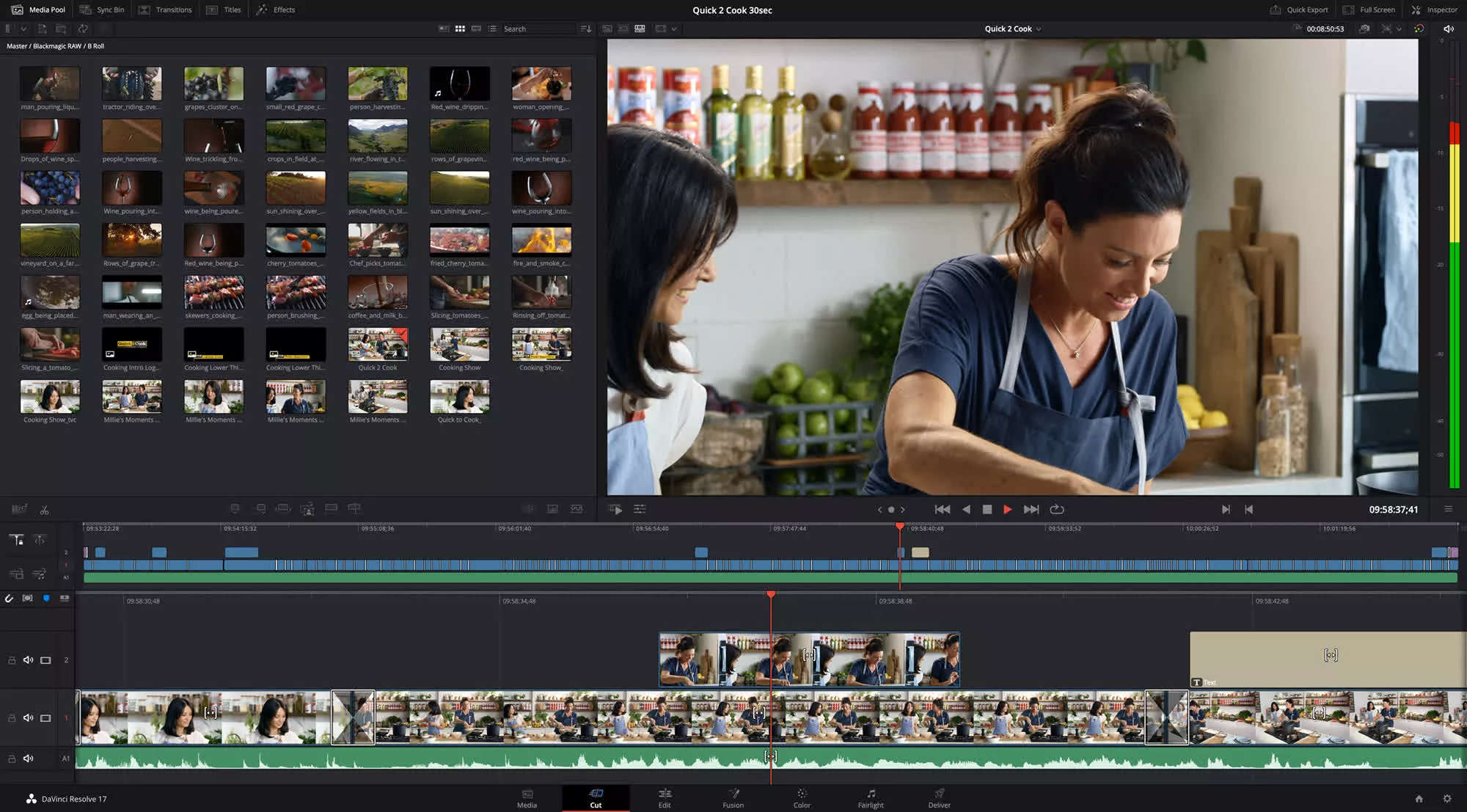
DaVinci Resolve 17 is a major new release with over 300 new features and improvements including HDR grading tools, redesigned primary color controls, next generation Fairlight audio engine including Fairlight audio core and support for 2,000 real time audio tracks plus dozens of other time saving tools for editors including a redesigned inspector, new bin sorting and metadata clip views!
DaVinci Resolve 17 is a major new release with over 100 new features and 200 improvements. The color page features new HDR grading tools, redesigned primary controls, AI based magic mask and more. Fairlight updates mouse and keyboard edit selection tools so customers can work faster, along with Fairlight Audio Core and FlexBus, a next generation audio engine and busing architecture with support for 2,000 tracks. Editors get a metadata slate view with bin dividers, zoomed waveforms for audio trimming, smart reframing, a unified inspector and dozens of other time saving tools. In addition, compositions created in Fusion can now be used as an effect, title or transition on the edit and cut pages.
DaVinci Resolve 17 features incredible new creative tools for colorists. Power Window drawing has been improved, there are new split screen wipe options, an additional Sat vs Lum curve, improved scopes, support for 17 point 3D LUTs and more.
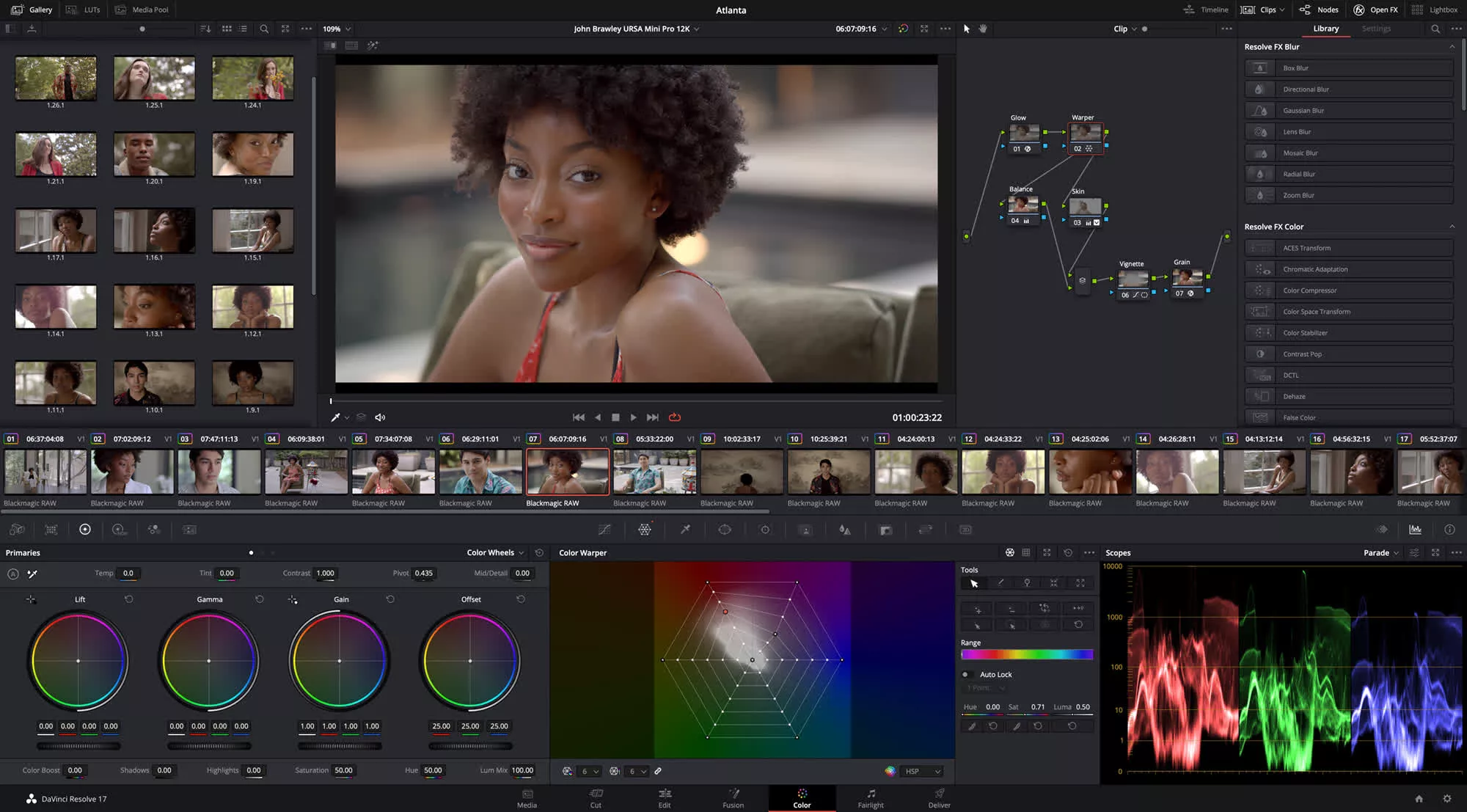
The HDR grading palette lets customers create new color wheels with custom roll off for specific tonal ranges, giving customers more creative control to make fine adjustments. The wheels include exposure and saturation controls for each zone. They're color space aware so customers get perceptually uniform results.
The mesh based warping tool lets customers adjust two color parameters at once. Customers can adjust both hue and saturation or chroma and luma. Adjustments are made by dragging control points, with smooth falloff for clean, natural looking adjustments. It's an entirely new way to transform color in their images.
Selecting and tracking people for targeted correction has never been easier. Magic mask uses the DaVinci Neural Engine to automatically create masks for an entire person or specific features such as face or arms. Customers get matte finesse tools, the ability to add and remove strokes and automatic tracking.
Can you use DaVinci Resolve on a budget PC?
Yes, you can use DaVinci Resolve on a budget PC, but with limitations. The free version works well for basic editing if your system meets the minimum specs: a decent multi-core CPU, at least 16GB of RAM (32GB preferred), and a dedicated GPU with at least 2 – 4GB of VRAM. Intel integrated graphics may run it, but performance will be poor, especially during rendering or color grading.
Is DaVinci Resolve good for beginners or is it too complex?
While the interface can seem overwhelming at first, Resolve is quite beginner-friendly once you understand the layout. The Cut and Edit pages are simplified for newcomers, and there are many tutorials available that make learning the basics approachable.
Is DaVinci better than Adobe Premiere?
DaVinci Resolve is widely praised for its color grading tools, built-in Fusion for motion graphics, and Fairlight for audio – all in one app. It's particularly strong for filmmakers and editors who want advanced features without needing multiple programs. The free version is powerful and covers most needs.
Adobe Premiere Pro is better integrated with the Adobe Creative Cloud suite, which is a major plus if you rely on After Effects, Photoshop, or Illustrator. It's often preferred in broadcast and commercial environments due to its long-standing industry presence and collaborative tools.
What are other free Premiere alternatives?
In addition to DaVinci Resolve there are plenty of free solid video editors to choose from. Some of which are VSDC Free Video Editor, Shotcut and Movavi Video Editor Plus. Here is a longer list of Adobe Premiere alternatives.
Features
- Next generation HDR color correction with customizable wheels and tonal zones.
- Mesh and grid based color warper delivers an entirely new way to transform color.
- Magic mask automatic object isolation powered by the DaVinci Neural Engine.
- Improved color management with tone mapping and color space aware tools.
- Massive DaVinci wide gamut color space for higher quality image processing.
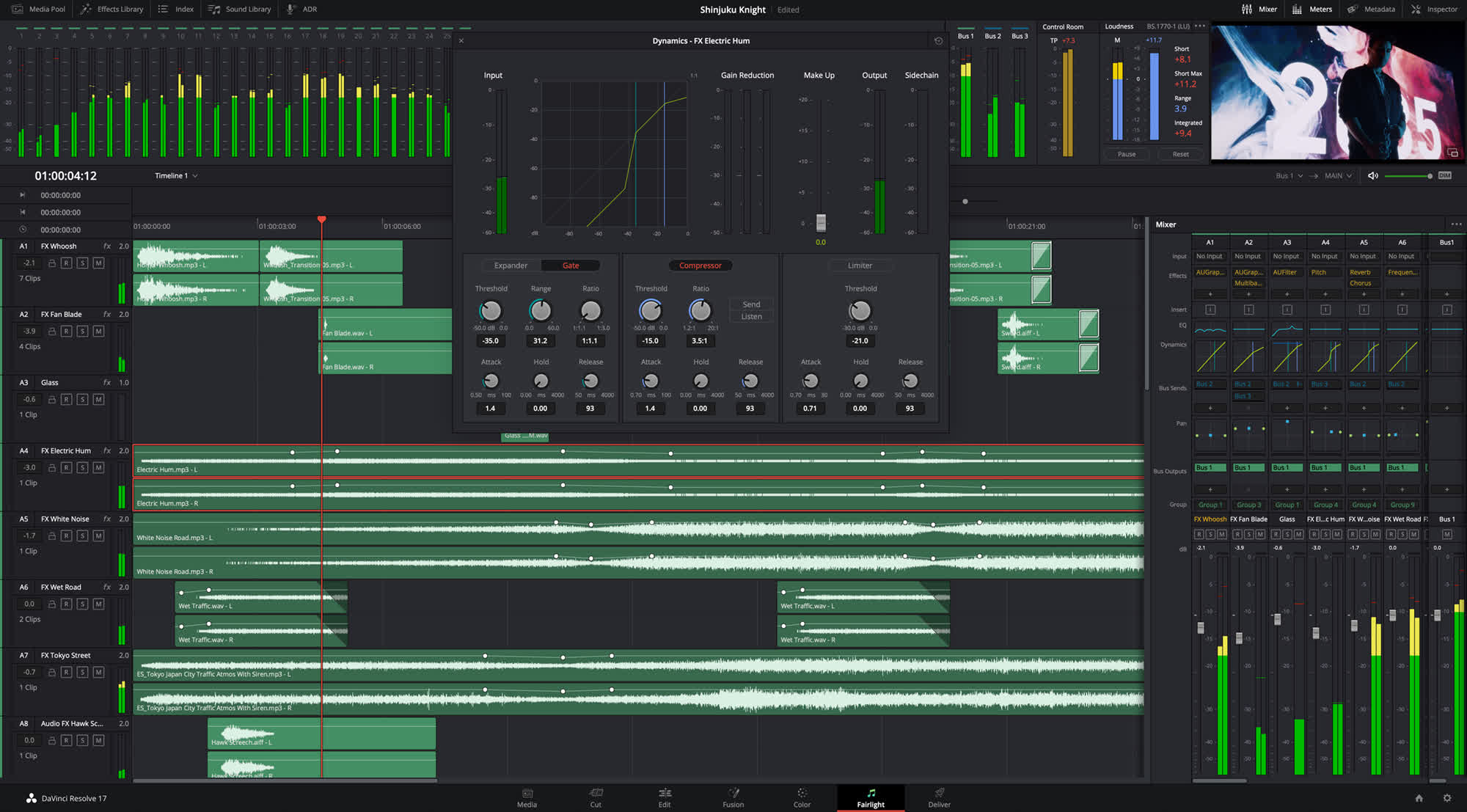
- High speed audio editing with new keyboard and mouse context sensitive tools.
- Fairlight Audio Core engine with auto load balancing and support for 2,000 tracks.
- Revolutionary FlexBus architecture for audio routing without limitations.
- Automatic transient detection for beats, words, and sound effects.
- Support for massive audio projects with thousands of tracks on a single system.
- Metadata based card view in media pool on cut page.
- Precision audio trimming on the cut page timeline and graphical trimmer.
- Smart reframe powered by the DaVinci Neural Engine on cut and edit pages.
- Live effect, title, and transition previews on cut and edit pages.
- Import and edit projects from ATEM Mini Pro ISO.
- Proxy media workflows up to 1/16th resolution in H.264, H.265, ProRes or DNxHR.
- Timeline based clip syncing to create multicam and compound clips.
- Alpha support for keying and compositing on cut and edit pages.
- Render in place command for effects heavy clips on cut and edit timelines.
- Make source side adjustments before editing clips into the timeline.
- Portable timeline and bin files for easy sharing.
- Native interlace processing and realtime 3:2 pulldown removal.
- Node tree bookmarks, customizable Fusion toolbar, and vertical node layouts.
- Support for growing files in media pool.
- Support for frame based metadata for BRAW, ARRI, RED, Sony and EXR.
- Workflow integration API and third party encoder API.
What's New
Now customers can edit in 16:9 HD or Ultra HD and quickly create square or vertical versions for posting to Instagram and other apps. The DaVinci Neural Engine automatically identifies faces and repositions them inside the new frame so customers don't have to do it manually.
Finding the right effect, transition or title is faster and easier than ever. The elegant, new multi column view lets customers see more and scroll less. Descriptive icons also help customers quickly find what customers need. Plus, customers can hover scrub the mouse across any item to see a live preview in the viewer.
Live production projects from ATEM Mini Pro ISO can be opened as a video edit. The sync bin with multiview lets customers fine tune edits from the original live production or even replace shots. You can use the HD ISO recordings from ATEM or relink to Blackmagic RAW camera files for finishing in Ultra HD.
The edit page adds dozens of time saving new features that professional editors have asked for.
Now customers can create easily managed, independent proxy media that dramatically improves system performance and makes projects portable. Proxies can be as small as 1/16th resolution and saved as H.264, H.265, ProRes or DNxHR. They can even be generated internally or externally by third party tools.
It's now easier to create synchronized multicam clips. Simply stack clips on the timeline and use the new "auto align" tool to sync based on timecode or waveform. Customers can also manually move clips into position to create a sync map. Timelines can be converted into a multicam clip or a compound clip.
New Resolve FX 3D, HSL and luma keyer plug-ins let customers pull keys directly in the timeline on both the edit and cut pages. In addition, alpha channels from Resolve FX and Open FX plug-ins are now supported, as are embedded alpha channels and external matte files giving customers even more compositing options.
The render in place command lets customers generate render files for any portion of the timeline. Once rendered, customers can move, edit and trim without having to re-render. Unlike cache files, render files are easy to manage and portable.
Source side adjustments let customers change a clip before editing it into the timeline. For example, customers can adjust RAW controls, add a LUT, remap audio tracks, change sizing, playback frame rate and more, all before editing a clip into the timeline.
Customers can now import and export individual timelines or bins, giving customers more ways to collaborate. Timeline and bin files are easy to share and small enough to email.
New support for native processing of interlaced timelines results in higher quality compositing and titling for interlaced deliverables. High quality DaVinci Neural Engine de-interlacing analyzes motion between fields to reconstruct progressive frames. Customers also get realtime 3:2 pulldown removal.
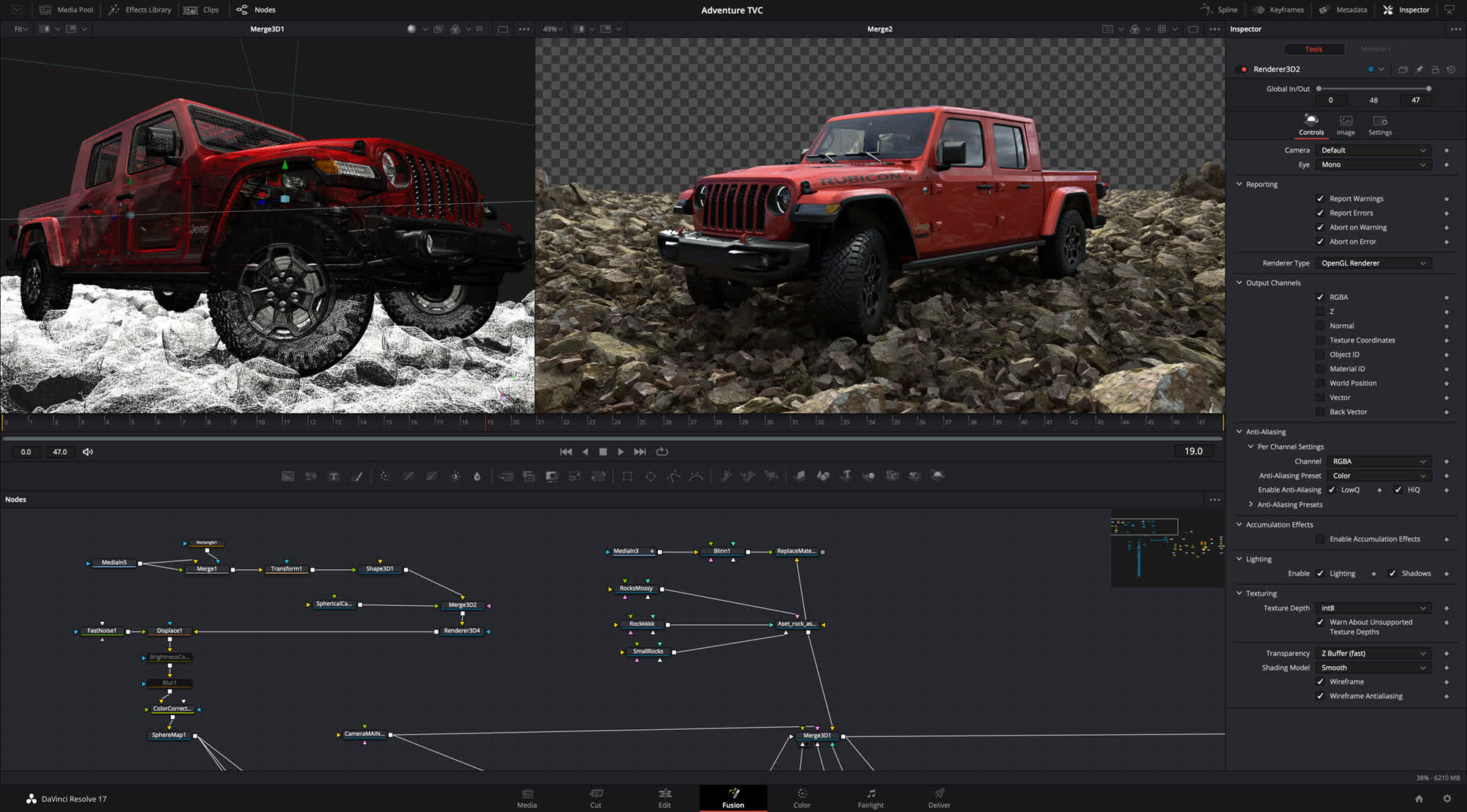
Compositions customers create on the Fusion page can now be saved as a template and used on the edit or cut page. New animation curve modifiers can be used to automatically retime animations when customers change their duration in an edit. Audio playback with waveform display makes it easier to create precisely timed animations, there are shared markers with the edit page and more. In addition, 27 GPU accelerated Resolve FX have been added to the Fusion page, including the noise reduction and sharpening tools from the color page. New node view bookmarks make it easy to navigate large comps, the toolbar can be customized with their favorite tools, and vertical layouts are supported in the node editor.
Node tree bookmarks let customers quickly navigate to any part of the node tree in a large composition. Customizable toolbars let customers quickly switch toolbars based on the current task. Vertical node tree layouts give customers more room to view the spline and keyframe editors when creating animations, and more.
Customers will find new and improved format support on the media page, new delivery options, and a unified inspector design on the media, cut, edit and Fairlight pages. DaVinci Resolve 17 also features consistent timeline navigation across all pages, better metadata support, new image scaling algorithms, the ability to share smart bins, smart filters and optimized media across all projects on a system, and even more GPU and CPU accelerated Resolve FX.
Now anyone can build their own post production studio. The free version of DaVinci Resolve now includes the revolutionary multi user collaboration tools previously available in DaVinci Resolve Studio. That means customers can have multiple users all working on the same project at the same time, for free.
Support for growing files in the media pool lets customers start editing while files are still being recorded. There's decoding support for QuickTime PNG, uncompressed RGB 8-bit and YUV 10-bit AVI, and spanned Panasonic 8K SHV clips.
DaVinci Resolve 17 support for frame based metadata from Blackmagic RAW, ARRI, RED and Sony camera files, along with decoding and rendering per frame EXR metadata.
In addition to existing Python and LUA scripting, DaVinci Resolve 17 adds a new workflow integration API and a new encoding API. These APIs allow third party developers to create integrated asset and workflow management solutions for DaVinci Resolve, as well as encoder plug-ins for custom output options.
"This is a massive update and it has amazing new technology and features for colorists, audio engineers, editors and visual effects artists," said Grant Petty, Blackmagic Design CEO. "While the new color science, HDR grading and improvements and Fairlight usability are the most noticeable features, what I am most proud of are the thousands of small improvements that customers will notice every day!"