

DaVinci Resolve is an all-in-one multimedia editing application that combines video editing, color correction, visual effects, motion graphics, audio post-production, and photo editing in a single platform. It offers a unified workflow that reduces the need to switch between multiple tools, with support for high-quality, camera-original media throughout the production process. The software is designed to accommodate both new users and professionals, and is widely used across film and video production environments.
Features
High end professionals working on feature films and television shows use DaVinci Resolve more than any other solution! That's because it's known for incredible quality and creative tools that are light years beyond the competition. You get DaVinci's Emmy award winning image technology with 32-bit float processing, patented YRGB color science and a massive wide gamut color space for the latest HDR workflows.
You also get the legendary quality of Fairlight audio processing for the best sound in the industry! With DaVinci Resolve, you get the same tools professional colorists, editors, VFX artists and sound engineers use every day to finish your favorite films and streaming television shows.
Multi User Collaboration
DaVinci Resolve is the only solution that lets you grow and build your own multi user post production studio! The project libraries are built for real time local and remote collaboration. While the Blackmagic Cloud website lets you host and access your projects and media from anywhere in the world. Now you can collaborate with editors, colorists, visual effects artists, and sound engineers all working together at the same time. Best of all, you no longer have to import and export files, translate projects, lose work, or conform and manage changes. DaVinci Resolve is the only application in the world that lets everyone work together in parallel on the same project and at the same time.
All In One Solution for Post Production
DaVinci Resolve is divided into "pages", each of which gives you a dedicated workspace and tools for a specific task. Editing is done on the cut and edit pages, visual effects and motion graphics on the Fusion page, color correction on the color page, audio on the Fairlight page, and media organization and output on the media and deliver pages. All it takes is a single click to switch between tasks.
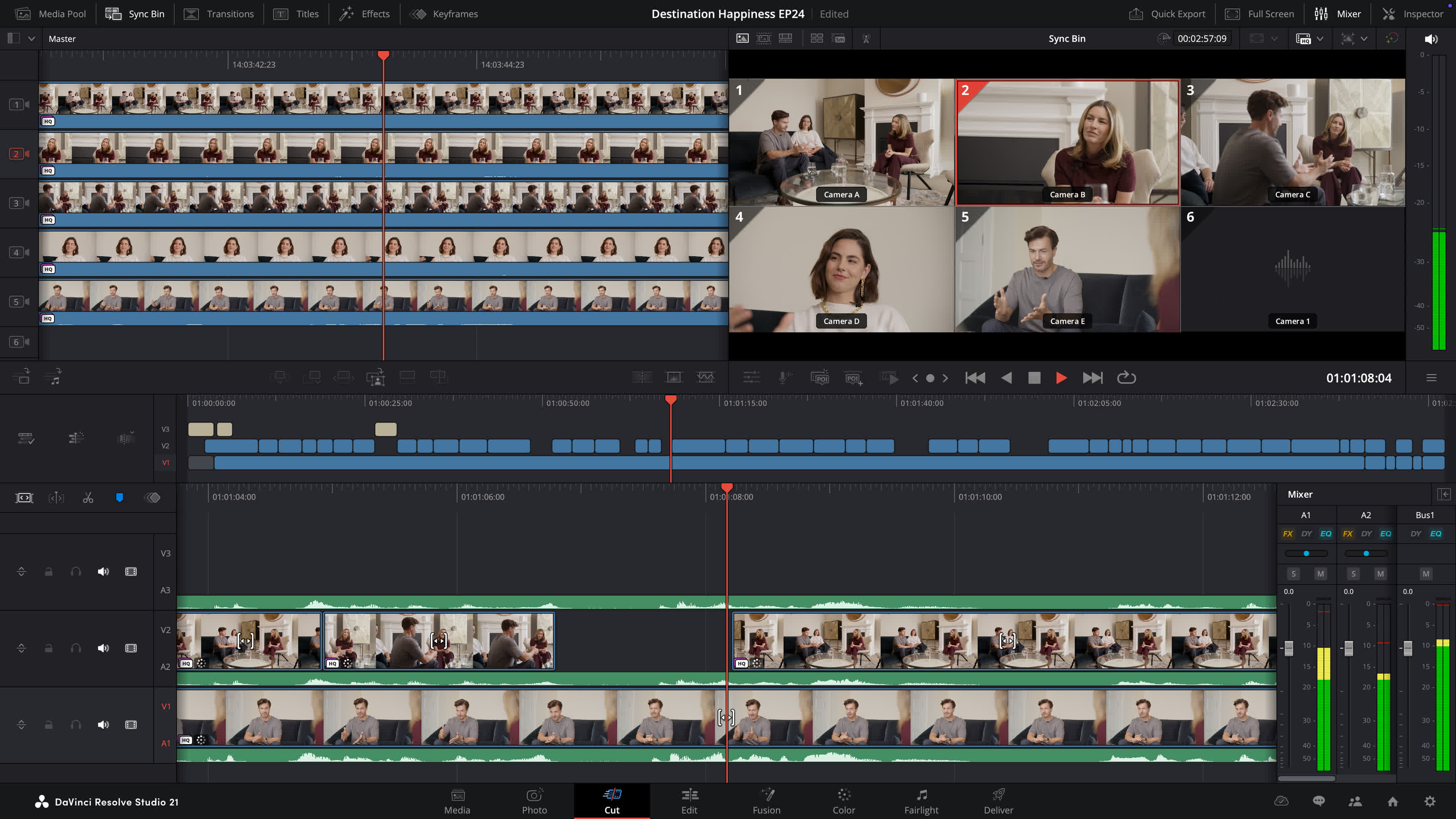
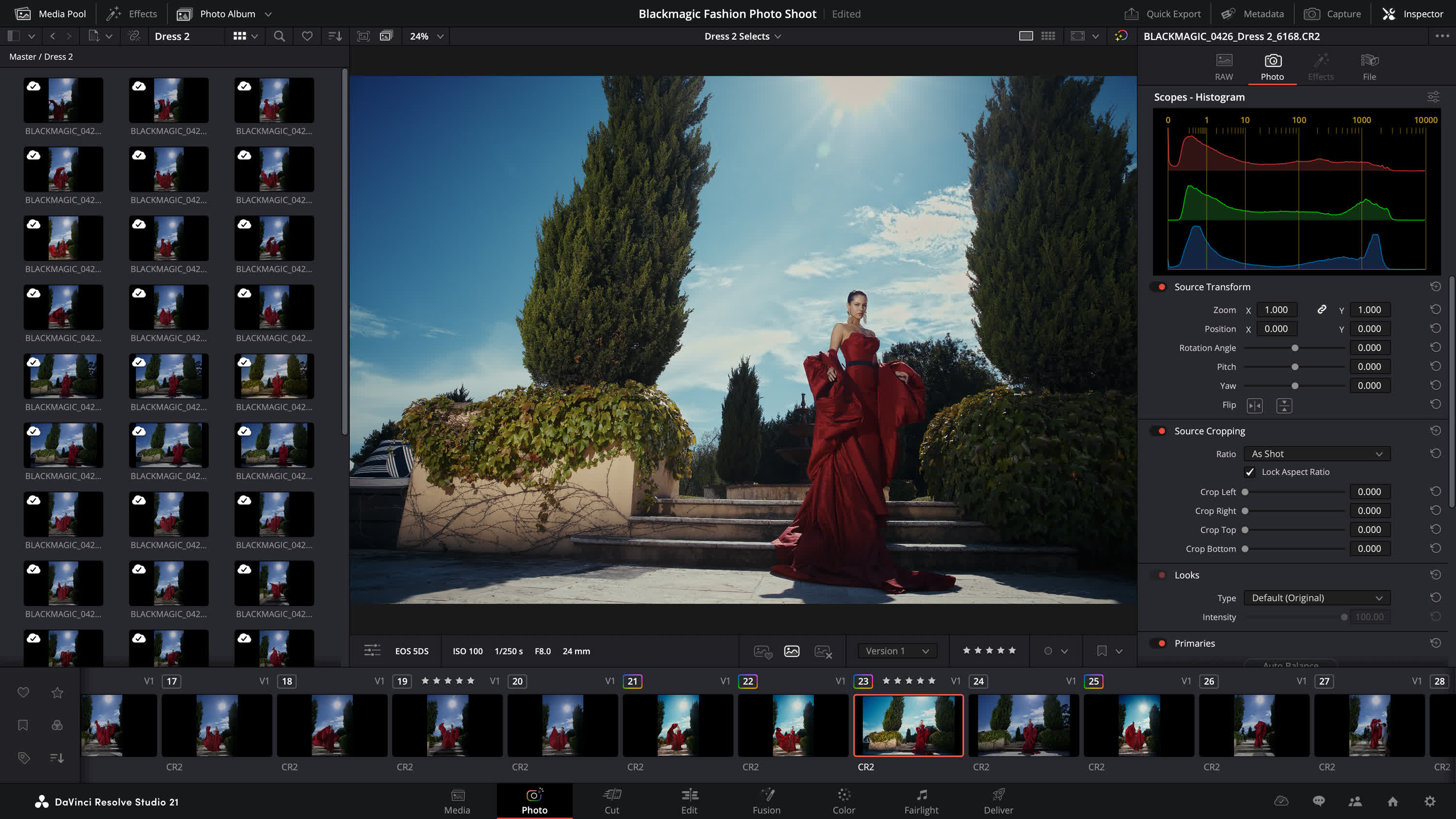
Photo - Hollywood's most advanced color tools for still photos
The Photo page introduces Hollywood's most advanced color tools to still photography for the first time. Whether you're a professional colorist applying your existing skills to fashion shoots and weddings, or a photographer ready to push the boundaries of dedicated photo apps, DaVinci Resolve unlocks the tools you need. Work with native RAW files from Canon, Fujifilm, Nikon and Sony cameras, reframing and cropping at source resolution. Manage and organize media with Albums and apply the full DaVinci color toolset to your images. Tether a camera for live capture and collaborate via Blackmagic Cloud. With all of DaVinci's AI toolset, ResolveFX and FusionFX, the only limit is your imagination.
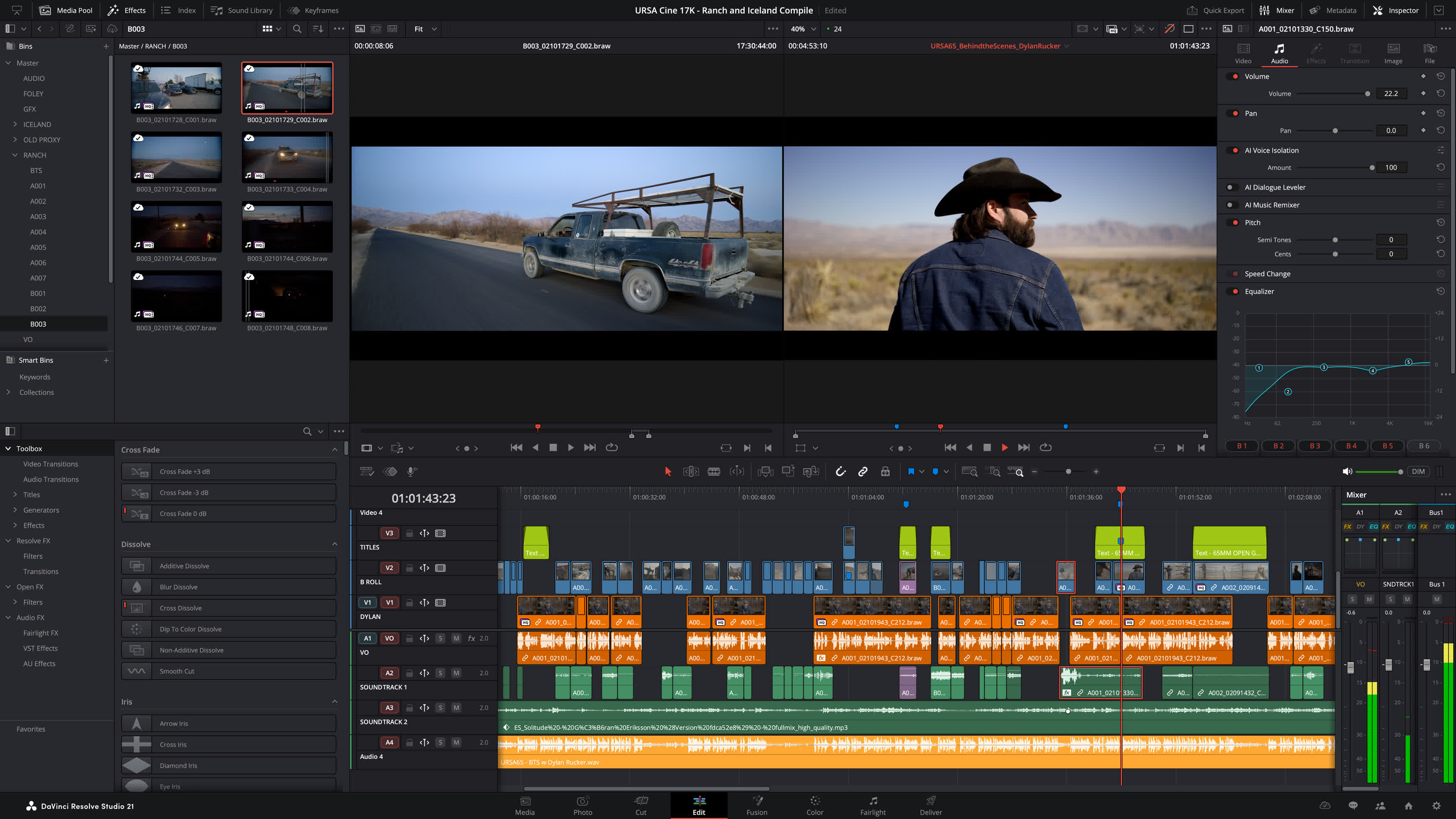
Edit - The world's fastest and most advanced professional NLE
The edit page is the world's most advanced professional non-linear editor. The familiar track layout, dual monitor design and traditional workflow makes it easy for new users to learn while still being powerful enough for professional editors. It's perfect for larger projects such as feature films, television shows, streaming, commercials, documentaries and more. The edit page features drag and drop editing, context sensitive automatic trimming tools, fully customizable keyboard shortcuts so you can work faster, and a library full of hundreds of titles, transitions, and effects that you can add and animate. You also get complete media management, organization and timeline management tools.
Cut - Designed for editors to turn around work fast
The cut page is perfect for projects with tight deadlines that you have to turn around quickly. The streamlined interface is fast to learn and designed for speed. Features such as source tape, dual timelines, fast review, and smart editing tools help you work faster than ever. The sync bin and source overwrite tools let you quickly edit multicam programs. It's also great for documentaries plus live broadcast editing and replay. Multi Source is the fastest way to see your cameras and edit to the timeline while the cameras are still recording! Everything on the cut page is action based so every click does something. That means you'll spend more time editing and less time hunting for commands.
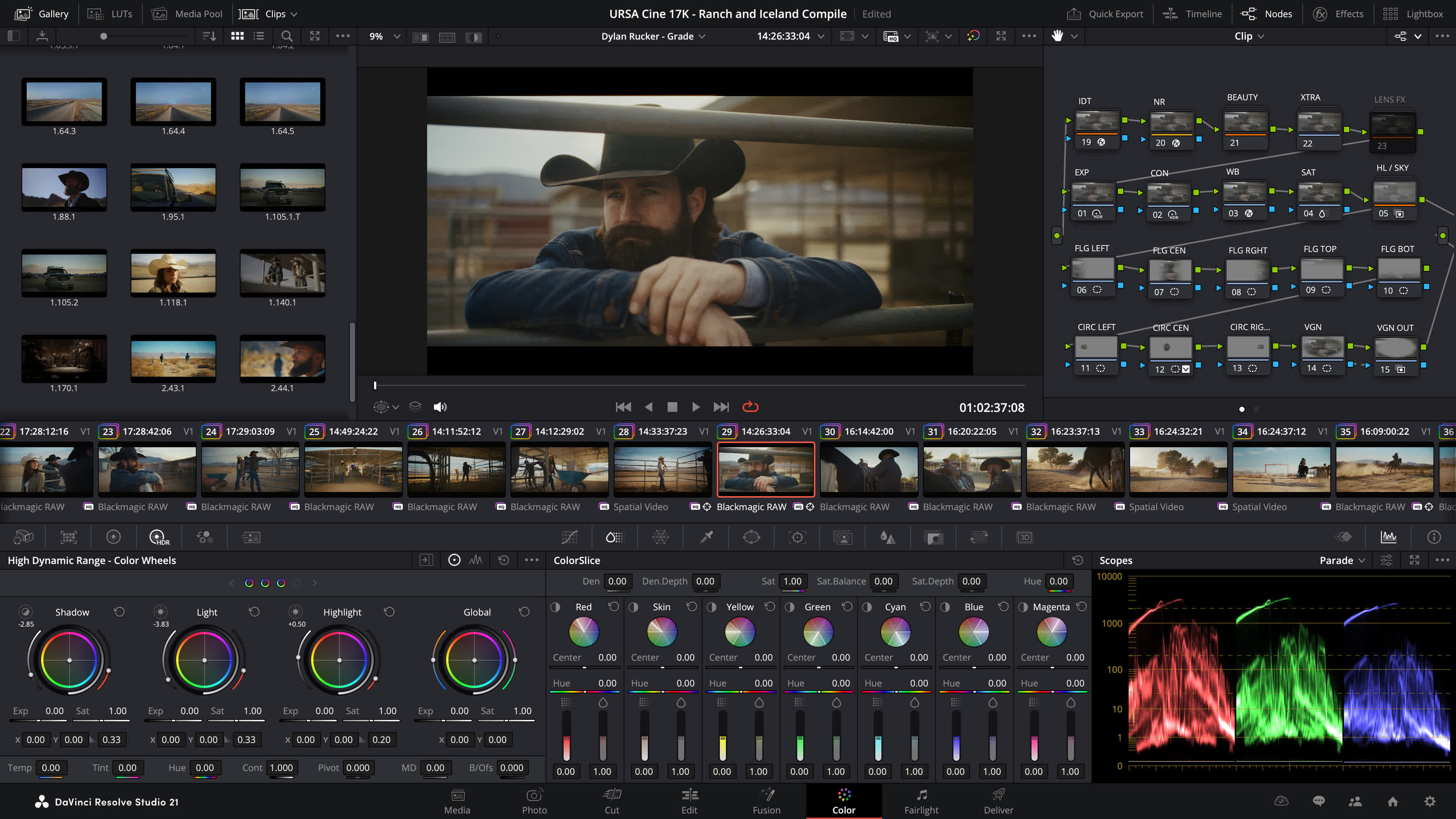
Color - Hollywood's favorite color corrector
The DaVinci Resolve color page is Hollywood's most advanced color corrector and has been used to color and finish more high end feature films and television shows than any other system! It's also approachable with features designed to make it easier for new users to get great results while they continue to learn the advanced tools. For example, primary control sliders will be familiar to anyone who's used image editing software, making it easy to adjust contrast, temperature, mid-tone detail, saturation and more. The color page has an incredible range of primary and secondary color grading features including PowerWindows, qualifiers, tracking, advanced HDR grading tools and more.
Node Editor for Non-Destructive Edits
DaVinci Resolve's powerful node based workflow can now be used on still images. Add nodes in series or parallel to build complex grades, apply different corrections to different parts of an image simultaneously and use shared nodes to apply the same look across an entire album of photos at once.
Cropping and Reframing
The Photo page lets you reframe and crop images at their original source resolution and aspect ratio. Every adjustment preserves the full quality of your original file, so you can refine your composition at any time without ever affecting image quality.
What's New
DaVinci Resolve 21 introduces the Photo page, bringing Hollywood's most advanced color tools to still photography! A new generation of AI tools let you search media by content, read slate data, perform de-aging, blemish removal and more. The Edit and Cut pages have improved keyframing and greater graphic format support. Color page workflows are optimized with MultiMaster trim passes, layer list node graphs and group versions. Fusion offers over 70 new graphics via the powerful Krokodove toolset. Fairlight's folder function simplifies audio track management and navigation. Plus, increased support for immersive and VR workflows puts you at the forefront of the latest deliverable technologies.
Search Contentwith AI IntelliSearch
Instantly search for people and content with AI IntelliSearch! Analyze media and use the IntelliSearch tool to find specific objects or key words in dialog. You can even search for individual faces! Results appear as whole clips in the Media Pool for faster clip organization and editing.
Advanced AI Speech Generator
Generate speech from written text using one of Blackmagic's voice models or a sample of your own. The DaVinci AI Neural Engine can create a unique voice from as little as a 10 second clip! Adjust speed, pitch and even inflection, to create multiple performances for voiceovers, narration and more.

Adjust Focuswith AI CineFocus
Define the focal point of a shot with AI CineFocus! Click to focus on a particular area of a scene and adjust aperture and focal range to change the depth of field. Advanced controls let you select the aperture shape and add optical effects like bokeh. You can even keyframe parameters to rack focus!

AI Face AgeTransformer
Change an actor's age with the AI Face Age Transformer tool. Analyze a face, enter the subject's age and adjust the age offset slider to add or remove age-related features, such as wrinkles and facial fullness. Perfect for maintaining continuity in flashbacks and flash-forward scenes!

AI Face Reshaper
The AI Face Reshaper lets you change facial features' shape and position on a moving subject. After detecting and tracking a face in a clip, use the AI Face Reshaper parameters to adjust the eyes, nose, mouth, eyebrows and overall face shape. Manual controls let you fine-tune the resulting face.
AI Blemish Removal
The AI Blemish Removal tool is perfect for reducing the appearance of superficial skin imperfections such as acne, discoloration, spots and pores while retaining texture of the natural skin. Use the strength slider to adjust the intensity of the tool to better suit the subject in the scene.

Sync withAI Slate ID
AI Slate ID automatically detects the slate clapperboard details! It intelligently extracts metadata from the slate in the frame, even in dark or out-of-focus clips, saving hours in metadata entry. Media is ready for editing, faster than ever before!
Extreme QualityAI UltraSharpen
DaVinci's most advanced sharpening tool to date lets you produce significantly clearer, high quality moving images. Use AI UltraSharpen with upscaled videos to make previously unusable footage sharp in higher resolutions. AI UltraSharpen can also be used to improve or fix slight focus errors.
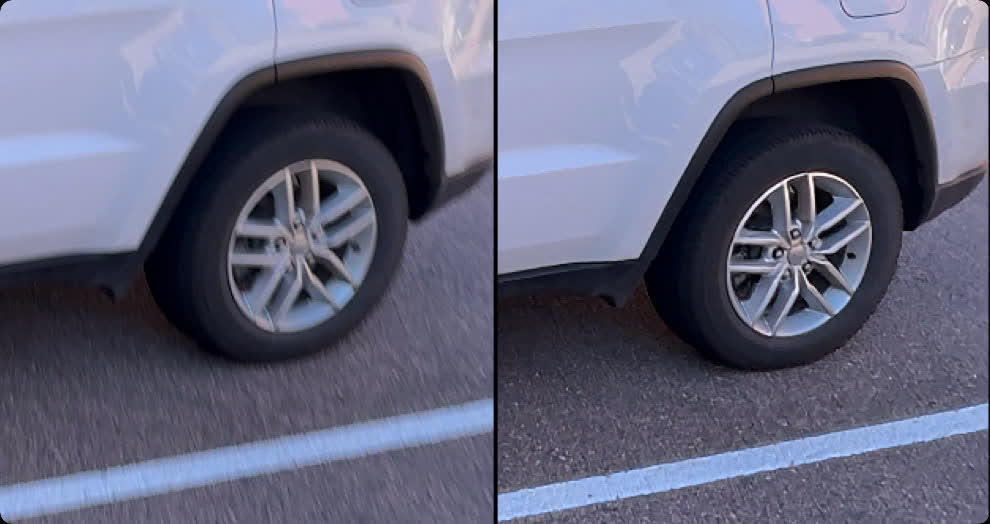
AI Motion Deblur
Remove common motion blur artifacts, such as streaks and softness, from video content. AI Motion Deblur analyzes the source media file and generates a new render with significantly reduced blurring for more dynamic images. This tool is perfect for more impactful slow motion and freeze frame effects.
Photo
Hollywood GradingTools for Still Photography
DaVinci Resolve's powerful post-production workflow now fully integrates photo image editing! The new Photo page lets you import and manage photographs, integrating with the color page for node based grading. Now colorists and photographers can use Hollywood color grading tools on still images!
Support forDaVinci Color Tools
Now you can easily use the legendary DaVinci color page tools for still images! Use primary color correction, curves, qualifiers, power windows and node editor to adjust color in artistic ways across your entire project. Plus, you can use a DaVinci color panel to adjust multiple parameters at once!
Node Editor for Non-Destructive Edits
DaVinci Resolve's powerful node based workflow can now be used on still images. Add nodes in series or parallel to build complex grades, apply different corrections to different parts of an image simultaneously and use shared nodes to apply the same look across an entire album of photos at once!
Croppingand Reframing
The Photo page lets you reframe and crop images at their original source resolution and aspect ratio. Every adjustment preserves the full quality of your original file, so you can refine your composition at any time without ever affecting image quality.
LightBox View
LightBox view on the Photo page gives you an overview of your entire album with grades applied. Select any image and grade it live while seeing the results update across the whole collection in real time. Filter by graded, ungraded, star rating, flag and clip color for fast library management!
Organize Images in Albums
Albums let you build and manage collections directly in DaVinci. Create albums based on shoot days, camera models, or any desired criteria, and save countless hours by tagging and making raw setting adjustments in batches. Albums appear as timelines on the Color, Cut and Edit pages for easy access.
Instantly Search Library
AI IntelliSearch lets you instantly find any photo across your entire project using plain language search. Analyze your albums and search for specific people, objects, animals or scenes without manual tagging. You can even label individuals to search for them by name!
Direct Image Capture
Camera Controls let you tether a Sony or Canon camera directly to DaVinci Resolve for live image capture. Adjust camera settings such as ISO, exposure, white balance, monitor with live view and save capture presets to lock in a consistent look before you shoot. Images save directly into an album!
Full Resolve FX Support
Resolve FX and Open FX plug-in support is available for still images on the Photo page, allowing you to apply effects, graphics, transforms and DCTLs. You can apply looks directly in the Photo page with the help of LUTs or generate LUTs to later apply looks in-camera or while monitoring.
DaVinci AI Toolset
You can access DaVinci Resolve's powerful native AI tools within the Photo page. Tools like the AI Magic Mask let you make one click selections of an object or person, and separately color grade different elements on an image. Or use the new AI UltraSharpen to upscale low resolution images.
Blackmagic Cloud Collaboration
The Photo page is integrated into DaVinci Resolve's multiuser collaboration workflow using Blackmagic Cloud. You can share the contents of albums, all associated metadata and tags, and all grades and effects with colorists, visual effects artists and editors, simultaneously anywhere in the world!
Cut and Edit
Keyframes andCurves Editor Updates
Keyframing updates include new ease animations with loop, pingpong and relative modes plus simultaneous adjustments to multiple clips. The curves editor's normalized zoom mode automatically scales curves to fill the available vertical space. Four-point Bezier easing supports complex video retiming.
AnimateFusion Effects
You can now adjust Fusion effects directly in the keyframes and curves editors of the cut and edit pages. This allows for more seamless workflows as you tweak text, transitions and motion graphics without leaving the editing pages. For advanced VFX adjustments, simply click the Fusion button!
HTML Graphicsand Lottie Support
Native support for OGraf HTML graphics and Lottie animations means that you can now drag .json and .lottie files directly into the media pool, where they will be treated like fully rendered animation clips. Alpha channels are recognized, allowing you to layer graphics and titles over video tracks.
Improved Text+and MultiText Tools
You can now enable multi-language spell check for all text elements, preview fonts in a dedicated font browser window and use emojis in your text. Character level styling lets you assign different attributes such as font size, weight and color within a single text box, simplifying title design.
Smart Bin Views in Cut Page
In the cut page, the bin list dropdown now features smart bins and quick access buttons for creating new bins. Smart bins allow you to design sophisticated media pool filters based on a wide range of rules and criteria. For example, filtering to display only .braw clips that have been flagged green.
Color
MultiMaster Trim Manager
The MultiMaster trim manager allows you to generate multiple HDR and SDR trim deliverables from a single timeline. When enabled, the node editor will display additional layers for trim operations, allowing you to color manage the timeline for each output standard and render each iteration in one go.
Magic Mask Render in Place
The Magic Mask palette now features a render in place option, allowing you to cache a tracked mask as a traveling matte node. The resulting matte will automatically link to your active node, allowing you to continue grading and applying effects in real time, with significantly lighter processing.
Layer List View in Node Editor
You can now change the color page node editor to layers view. Nodes are listed in rows according to their number in the node graph. This typically results in a less crowded interface and allows for easier node management when adding, labelling, switching, locking, bypassing and removing nodes.
Group Color Grade Versions
When using groups in DaVinci 21, you can now create and manage multiple grade versions. Right-click to add a new version or to change the group version of pre-clip and post-clip node graphs. This affects all clips in a group uniformly. Remove clips from groups for individual grading.
Fusion
Krokodove Motion Graphics
Fusion now proudly features Krokodove, the popular and ever-growing library of motion graphics. The collection ranges from utility tools that improve productivity, to essential vector and data tools, to customizable 2D and 3D graphic templates that can be used throughout DaVinci Resolve.
Macro Editor Inspector View
Building Fusion tools and templates is now even easier with the updated macro editor. Significant interface improvements make developing custom tools and templates faster and more intuitive. Use the newly supported inspector view to effortlessly set up, format and publish macros for immediate use.
Audio DrivenFusion Animation
The Fairlight Animator modifier connects Fusion to Fairlight's audio engine, enabling automatic animation based on audio analysis. The audio levels from timeline clips or media pool sources are used to drive the control of parameters such as eyes and lips giving you dynamic animation!
Upgraded USD Toolset
The USD toolset has been updated to USD SDK 25.11 with Hydra 2.0 API for the Storm renderer. This gives VFX artists an improved Fusion USD environment, with support for 3D matte objects and textures, USD Texture Projector and Catcher, plus global in and out controls for the USD loader.
Read the complete release notes here.
Previous Release Notes:
The following features have been added or updated.
- Relink clips can now relink proxies with different formats.
- DRT imports automatically relink to existing nested clips if present.
- Selected clip stays in view with clip filter changes in the Color page.
- Support for importing Affinity legacy file formats.
- Support for Sony FX-5 X-OCN clips.
- Scripting API to get timeline clip selection.
- Scripting API to get timeline object from media pool timeline entry.
- SetRenderSettings API options for handles, extents and data burn.
- Addressed realtime playback issues on large cached timelines.
- Addressed power bin navigation bar issue in media pool windows.
- Addressed segment clip suffixes in media management.
- Addressed issue with edit index ordering.
- Addressed source viewer audio issue when pasting timecode.
- Addressed multiple retime speed curve editing issues.
- Addressed path length issues for Fusion templates on Windows.
- Addressed missing marker notes tag for data burn in.
- Addressed issue with decoding some DPX files.
- Addressed issue with decoding some CR2 stills.
- General performance and stability improvements.
What's New in DaVinci Resolve 21.0.3
The following features have been added or updated:
- New legacy speed mode retime curve option.
- DNG pre tone curve is enabled by default in new projects.
- Addressed missing QuickSync encode options on older Intel GPUs.
- Addressed issue with adding keyframe at a subframe.
- Addressed issue with pasting keyframes to linked audio clips.
- Added configurable keyframe ease actions.
- Inspector frame display for interlaced transition durations.
- Addressed interlaced generator and transition duration interpretation.
- Addressed audio duration for inserted segment of interlaced media.
- Addressed field dominance detection issue for some interlaced clips.
- Addressed Fusion issue with importing PSDs with disabled layers.
- Addressed issue with rendered Magic Mask for photos in album.
- Addressed bezier window move when adjusting vertex smoothness.
- Addressed issue with decoding some Sony BURANO X-OCN clips.
- Addressed preview issue with HDR still exports on some browsers.
- Addressed wrong audio mapping scripting results in some scenarios.
- Updated DaVinci Resolve 21 reference manual.
- Replay SDI output now always shows selected camera.
- Scripting API support to list project attributes in a project bin.
- Scripting API support for user preferences presets.
- Scripting API support for listing UI layout presets.
- Scripting API support for listing and deleting data burn in presets.
- Addressed installation issues on some Windows systems.
- Custom install location for Windows ARM encode SDK plugins.
- General performance and stability improvements.
What's new in DaVinci Resolve 21.0.2? The following features have been added or updated.
- Addressed thumbnail preview when bypassing color or Fusion.
- Improved display of retime speed curve.
- Addressed issue with pasting copied keyframes between clips.
- Addressed issue with video inspector zoom minimum values.
- Addressed issue with slower IntelliSearch performance.
- Addressed bit depth when exporting current frame as TIFF still.
- Addressed inconsistent selection of source tape.
- Addressed inspector unicode display issue with spell check.
- Addressed some Fusion transition defaults for vertical timelines.
- Addressed media pool custom sort persistence issue.
- General performance and stability improvements.
DaVinci Resolve 21 introduces the Photo page, bringing Hollywood's most advanced color tools to still photography! A new generation of AI tools let you search media by content, read slate data, perform de-aging, blemish removal and more. The Edit and Cut pages have improved keyframing and greater graphic format support. Color page workflows are optimized with MultiMaster trim passes, layer list node graphs and group versions. Fusion offers over 70 new graphics via the powerful Krokodove toolset. Fairlight's folder function simplifies audio track management and navigation. Plus, increased support for immersive and VR workflows puts you at the forefront of the latest deliverable technologies.
DaVinci Resolve 21 Features
- New photo image editing now fully integrated within DaVinci Resolve.
- Support for DaVinci color control toolset and grading panels.
- Reframe and crop images at original source resolution and aspect ratio.
- LightBox view gives an overview of entire album with grades applied.
- Albums let you build, manage and tweak photos at source resolution.
- Direct image capture via Sony or Canon tethered cameras.
- Looks, LUTs, Resolve and Open FX for your images.
- Photo page is integrated with Blackmagic Cloud collaborative workflow.
- AI IntelliSearch lets you easily search for people or objects.
- AI Speech Generator transforms written text to spoken voice.
- AI CineFocus allows refocus with realistic bokeh and lens effects.
- AI Face Age Transformer lets you age or de-age a face.
- AI Face Reshaper for flexible reshape and resize of facial features.
- AI Blemish Removal to repair facial and skin blemishes.
- AI SlateID to read slate and populate clip metadata.
- AI UltraSharpen for high fidelity sharpening of moving images.
- AI Motion Deblur enables removal of common motion blur artifacts.
- Keyframing provides powerful retime controls with 4 point bezier.
- Fusion animation can be creatively driven by Fairlight audio.
- Native support for OGraf HTML graphics and Lottie animations.
- Spell checking, color fonts and Emoji for Text+ and MultiText.
- Smart bin views in Cut page.
- MultiMaster trim pass to grade single timeline to many deliverables.
- Render Magic Mask in place as an external matte.
- Node graphs can now be viewed as a layer list.
- Support for Krokodove motion graphics effects.
- New Macro Editor with inspector view and publishing to edit effects.
- Support for USD SDK 25.11 with Hydra 2.0 API for Storm renderer.
- Folder tracks allow a group of tracks to be folded down or expanded.
- Apple Immersive workflows now support foveated rendering.
- VR180 and VR360 deliver presets for Meta Quest and YouTube.
- Fusion adds Panomap immersive rotation and ILPD retargeting.
- Resolve FX Picture in Picture effect.
- IntelliScript supports Final Draft or plain text screenplay imports.
- Metadata panel supports star rating and tagging for clips.
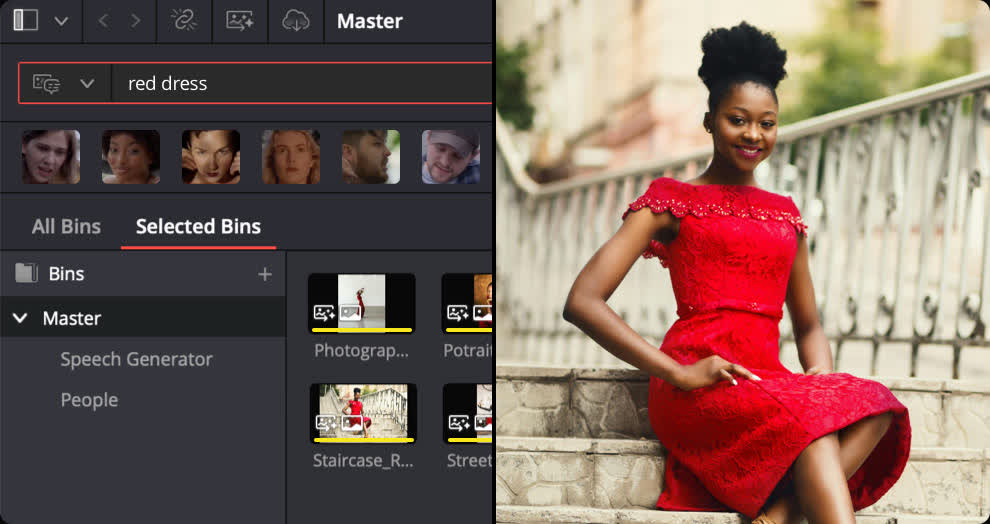
Search Content with AI IntelliSearch
Instantly search for people and content with AI IntelliSearch! Analyze media and use the IntelliSearch tool to find specific objects or key words in dialog. You can even search for individual faces! Results appear as whole clips in the Media Pool for faster clip organization and editing.
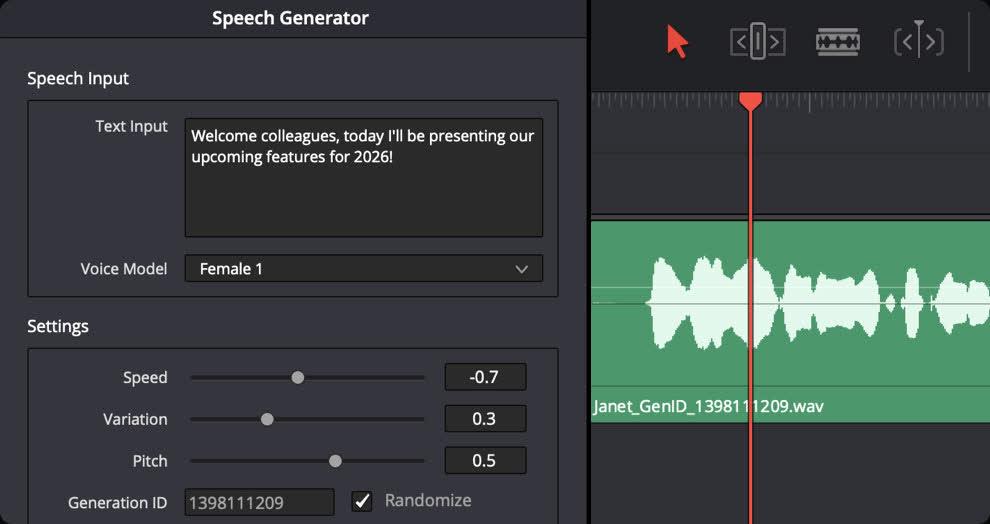
Advanced AI Speech Generator
Generate speech from written text using one of Blackmagic's voice models or a sample of your own. The DaVinci AI Neural Engine can create a unique voice from as little as a 10 second clip! Adjust speed, pitch and even inflection, to create multiple performances for voiceovers, narration and more.
Adjust Focus with AI CineFocus
Define the focal point of a shot with AI CineFocus! Click to focus on a particular area of a scene and adjust aperture and focal range to change the depth of field. Advanced controls let you select the aperture shape and add optical effects like bokeh. You can even keyframe parameters to rack focus!
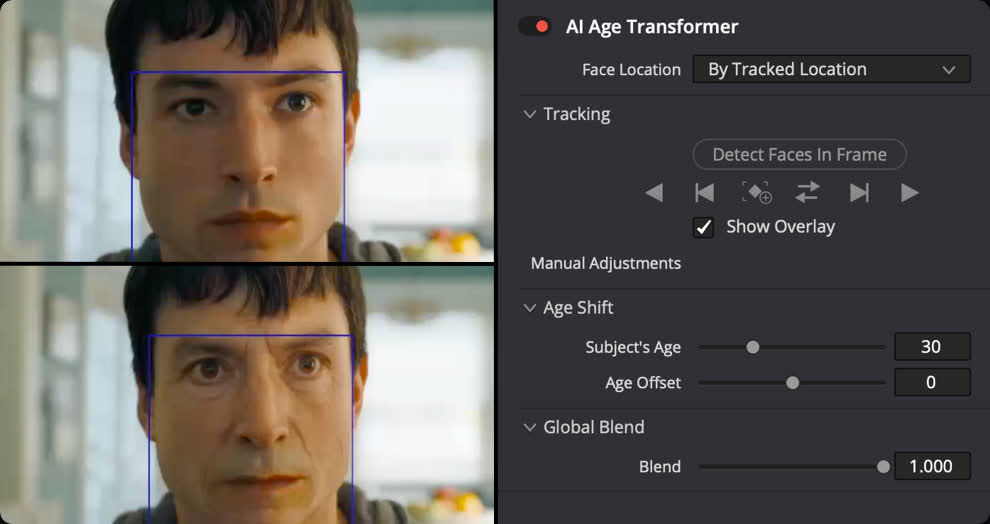
AI Face Age Transformer
Change an actor's age with the AI Face Age Transformer tool. Analyze a face, enter the subject's age and adjust the age offset slider to add or remove age-related features, such as wrinkles and facial fullness. Perfect for maintaining continuity in flashbacks and flash-forward scenes!
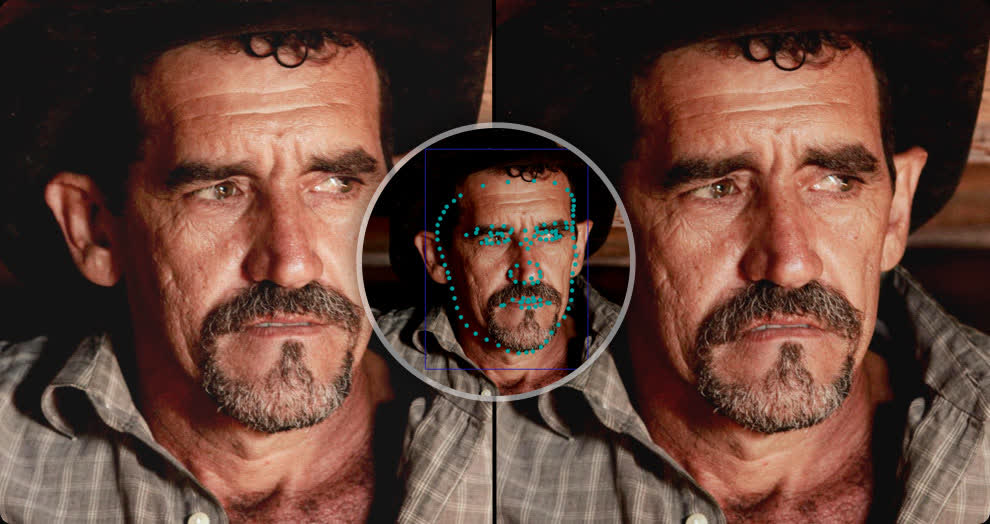
AI Face Reshaper
The AI Face Reshaper lets you change facial features' shape and position on a moving subject. After detecting and tracking a face in a clip, use the AI Face Reshaper parameters to adjust the eyes, nose, mouth, eyebrows and overall face shape. Manual controls let you fine-tune the resulting face.
AI Blemish Removal
The AI Blemish Removal tool is perfect for reducing the appearance of superficial skin imperfections such as acne, discoloration, spots and pores while retaining texture of the natural skin. Use the strength slider to adjust the intensity of the tool to better suit the subject in the scene.
Sync with AI Slate ID
AI Slate ID automatically detects the slate clapperboard details! It intelligently extracts metadata from the slate in the frame, even in dark or out-of-focus clips, saving hours in metadata entry. Media is ready for editing, faster than ever before!
Extreme Quality AI Ultra Sharpen
DaVinci's most advanced sharpening tool to date lets you produce significantly clearer, high quality moving images. Use AI UltraSharpen with upscaled videos to make previously unusable footage sharp in higher resolutions. AI UltraSharpen can also be used to improve or fix slight focus errors.
AI Motion Deblur
Remove common motion blur artifacts, such as streaks and softness, from video content. AI Motion Deblur analyzes the source media file and generates a new render with significantly reduced blurring for more dynamic images. This tool is perfect for more impactful slow motion and freeze frame effects.
Hollywood Grading Tools for Still Photography
DaVinci Resolve's powerful post-production workflow now fully integrates photo image editing! The new Photo page lets you import and manage photographs, integrating with the color page for node based grading. Now colorists and photographers can use Hollywood color grading tools on still images!
Support for DaVinci Color Tools
Now you can easily use the legendary DaVinci color page tools for still images! Use primary color correction, curves, qualifiers, power windows and node editor to adjust color in artistic ways across your entire project. Plus, you can use a DaVinci color panel to adjust multiple parameters at once!
Read the complete release notes here.
