

Spotify, native and fast. Spotifast is a lightweight Spotify app for Linux, macOS, and Windows. It opens in well under a second and typically uses 100 – 250 MB of memory, while Spotify's desktop app often uses 600 MB to over 1 GB. Your Spotify playlists stay on your account.
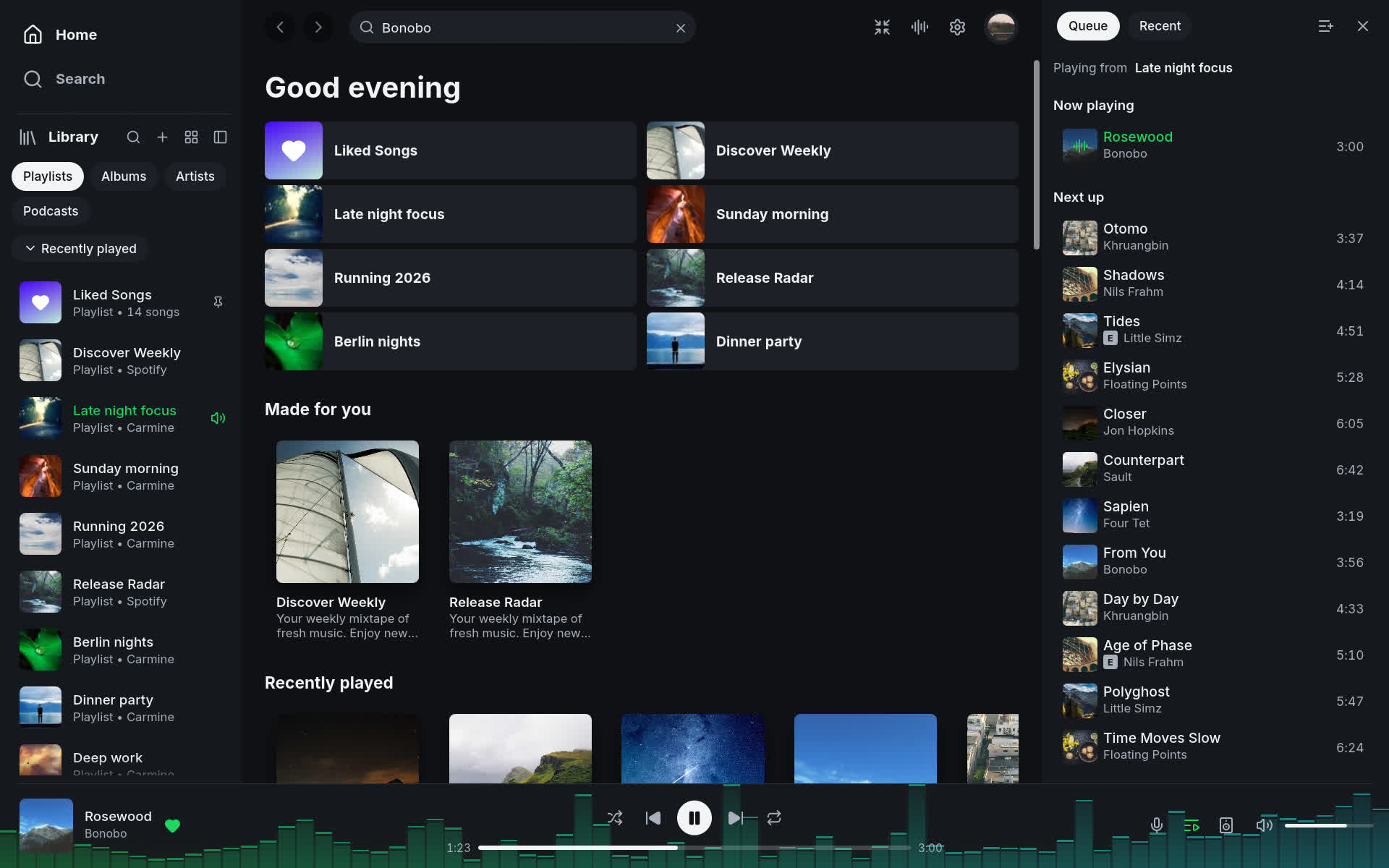
Playback needs Spotify Premium. Free accounts can browse and search, but cannot play music through Spotifast on this computer or another device.
Features
Lightweight
Opens in well under a second and typically uses just 100 – 250 MB of memory.
Spotify Connect
Listen on your computer with smooth transitions between songs, or control music on a speaker, phone, or TV. Playback needs Spotify Premium.
Library and search
Browse playlists, Liked Songs, albums, artists, and podcasts. Search the catalogue and edit playlists you own.
Themes
Choose light, dark, or your own colours. On Omarchy, Spotifast can follow your desktop theme as it changes, while the music keeps playing.
Winamp mini player
Bring back the classic Winamp look, with skins, a playlist, sound controls, and animations that move to your music.
MilkDrop
Watch colourful animations react to your music in their own window or full screen. Choose from more than 10,000 designs.
Desktop controls
Use keyboard shortcuts and your keyboard's media keys. Keep the music playing after you close the window.
Open source
Free to use, study, and improve. Explore the code, report a problem, or help build the next version.
What it does?
- Plays music on this computer. Spotifast appears as a Spotify Connect device. Select it from your phone or play music in the app. Playback has no added gaps between songs and supports up to 320 kbps. Optional settings keep songs at a similar loudness and reduce repeat downloads by keeping recently played audio.
- Controls other devices. Move playback to a speaker, a phone, or another computer from the device picker, and keep controlling it: play, pause, skip, seek, shuffle, repeat, volume. The picker expands upward to show several devices at once, fitting the window; longer lists scroll.
- Library. Browse playlists, Liked Songs, saved albums, followed artists, podcasts, and saved episodes. Create, edit, and reorder your playlists.
- Search across songs, artists, albums, playlists, podcasts, and episodes, with artist pages, discographies, and related artists. When Spotify provides an artist profile, select its name on a song, including the top result, to open that page.
- Background playback. Closing the window keeps the music playing from the system tray. Use your keyboard's media keys to play, pause, and skip.
- Themes. Choose light, dark, or your own colours. On Omarchy, Spotifast can follow your desktop theme automatically. Pages can also take a colour from album art.
Will my Spotify account get banned?
We're not aware of any confirmed account bans caused by normal Premium listening through Spotifast or other players using the same playback software, librespot. Spotifast plays music using your Spotify Premium subscription. It does not unlock Premium for Free accounts, remove ads, export songs, or bypass Spotify's copy protection. You sign in on Spotify's own website, and Spotifast never receives your Spotify password.
Spotifast is independent of Spotify, so we cannot guarantee Spotify's future decisions. Changes at Spotify can also temporarily interrupt playback until the app is updated.
What's New
Spotifast 0.12.0 rests the audio device while you're paused, lets you drop skins on the window on Wayland again, speaks Turkish, and fixes the queue, the Add to playlist menu, the volume on phones and a crowded top bar. It also finishes the move from Fastpotify: the old name, command and profile move are gone.
New
- A paused Spotifast costs nothing. Paused, Spotifast used to keep the audio device running and fed it silence. Now the device rests until you press Play, and starts again at once. On a Mac that took Spotifast from about 0.5% of a core to nothing, and macOS's audio service from about 4% to nearly nothing; Windows' audio service went from about 5% to nothing. By @crmne; thanks @gagarine. (#636)
- Turkish. Spotifast is now available in Turkish. By @brsbrkctn. (#643)
- Drop skins on the window on Wayland again. Dropping a .wsz skin, or any file, on the window works on Wayland again, and pasting keeps working on Hyprland. This lifts the 0.11.2 limitation. By @crmne.
- Every command works on Linux too. spotifast now-playing, devices, next, like, transfer and the other subcommands now work on Linux as they do on macOS and Windows, beside MPRIS. By @crmne.
- Scrolling, the tray and media controls shared with ZapFast and Solco. Spotifast's scrolling, single-instance guard and desktop media controls now come from fastframe, the foundation its sister apps share, so fixes reach every app. Scrolling picks up two fixes on the way: a slow frame no longer cuts a touchpad gesture short. By @crmne.
Fixed
- Reordering the queue moves the song you dragged. Several quick moves in Playing next could move a different song, or empty the list until the next track. By @crmne; thanks @D3SOX. (#598)
- The Add to playlist menu stays open while you search. Clicking its search field closed the menu, and clearing a search left the list short. By @crmne; thanks @D3SOX. (#638)
- The volume is greyed out for devices that won't take it. When the playing device, such as an iPhone over Bluetooth, doesn't let other apps change its volume, the volume control is now greyed out with a tooltip instead of showing an error. By @crmne; thanks @jorisw. (#627)
- The top bar keeps its room in a narrow window. With Queue or Lyrics open, the buttons beside the search field ran over it. The side panels now give way, down to their narrowest, and the window can't be made narrower than they need while they're open. By @crmne; thanks @oo7kc. (#624)
- A personal Spotify app is told to authorize again, not to sign in. A personal app set up before 0.9.0 showed "Spotify permissions changed. Sign in again." on every launch, which signing in couldn't fix. The message now points to Authorize in Settings → Account. By @crmne; thanks @azais-corentin. (#634)
- The window keeps its size when the interface is zoomed. With the zoom not at 100%, the window shrank on every restart. By @crmne.
- Older Windows graphics drivers start Spotifast. When a modern OpenGL context isn't available, Spotifast now falls back to a compatible one instead of failing to start. By @crmne.
Changed
- Fastpotify is gone. Spotifast no longer carries the old name anywhere:
- the fastpotify command is gone; use spotifast;
- settings, sign-ins and caches from Fastpotify 0.9.0 or older are no longer moved over: if you update straight from one of those, you start fresh (your old files stay where they were);
- on Windows, if you're on 0.10.0 to 0.10.2, start Spotifast once by hand after this update: those versions' updater looks for the old program name.
- The rodio audio backend setting now always means Spotifast's own output, which it always did in practice; librespot's separate rodio output is no longer included. PulseAudio stays available on Linux.
- Scripts and tools that talked to port 47113 need the command line now. On macOS and Windows the fixed local port is gone, replaced by a private channel only your own spotifast command can use. The spotifast subcommands work as before; tools that opened the port directly, such as Stream Deck plugins, should call them instead.
