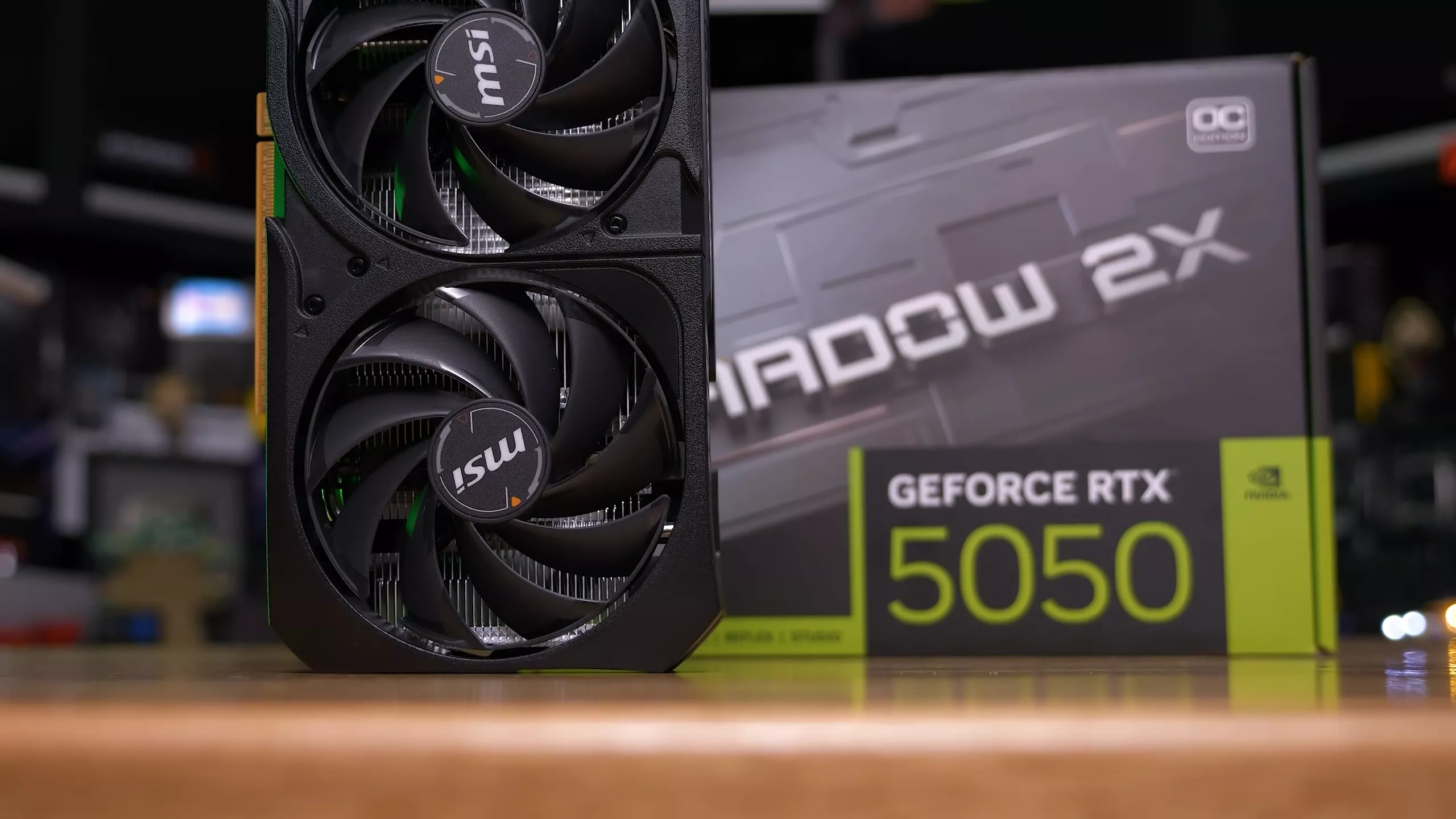
There are two graphics cards on the market today with a price tag of $250: the Nvidia GeForce RTX 5050 and the Intel Arc B580. But which of these models is the better buy for entry-level gaming – especially if you play with upscaling enabled? That's what we'll be diving into in today's head-to-head benchmark.
It's a tricky question to answer. Based on our day-one reviews you might think the choice is obvious, since we were largely positive about Intel's B580 and heavily criticized the RTX 5050. But there's a lot more going on here, including differences in upscaling quality, driver polish, major swings in performance in either direction... and of course, the VRAM gap. The RTX 5050 offers just 8GB, while the B580 provides 12GB. How do these factors influence the comparison? Let's find out.

As with other entries in this series, our goal is to provide a data set that differs from our day-one testing, which focused more on native performance across a range of resolutions. While native data is included today, the emphasis is on the main upscaling modes: Quality, Balanced, and Performance. We previously tested at 1440p on mid-range GPUs, but that resolution isn't necessarily what buyers in the $250 bracket are targeting. For many, 1080p remains the default.

To get a clearer picture, we polled the HUB community. With more than 30,000 votes, 1080p was the top choice at 55%, while 1440p followed at 39%, showing it's also quite popular these days. So 1080p is the focus of this review. In a perfect world, we'd include both resolutions, but testing four or five upscaling modes across multiple output resolutions is extremely time-consuming for a single article. Narrowing the scope keeps the data manageable and the comparisons meaningful.
DLSS vs XeSS Visual Comparison
When comparing upscaling performance between the RTX 5050, which uses DLSS 4, and the Arc B580, which uses XeSS, we need to revisit the visual differences between these technologies. We don't currently have a DLSS 4 versus XeSS comparison in our coverage, so we'll quickly show some examples at 1080p to illustrate how they differ.


It's important to remember that while XeSS works across all modern GPUs, Intel GPUs use a larger, higher-quality upscaling model powered by Intel's exclusive XMX instructions. All other GPUs run the cut-down DP4a version, so if you've tried XeSS on an Nvidia or AMD GPU, that experience doesn't reflect the quality you get on an Intel card.


XeSS is also a little strange in that the render resolutions for each mode differ from DLSS 4 and FSR 4. Starting with XeSS 1.3, the Quality mode uses a 1.7x scaling factor, while DLSS and FSR use a 1.5x factor in their respective Quality modes. As a result, XeSS renders at a lower resolution and relies more heavily on upscaling. The XeSS mode that matches DLSS's render resolution is always one tier higher, so Ultra Quality aligns with DLSS Quality at a 1.5x scale factor, XeSS Quality matches DLSS Balanced, and so on.
For a better representation of image quality comparisons, check out the HUB video below:

For 1080p gaming, DLSS 4 delivers superior image quality most of the time. In the video above we focused primarily on DLSS 4 Quality mode versus XeSS Quality and Ultra Quality. The most noticeable advantage DLSS 4 offers is improved sharpness and reduced blur. It also does a better job mitigating temporal anti-aliasing blur in motion, giving games clearer overall detail. In many cases this makes games appear closer to a higher native resolution compared to XeSS. At 1080p, none of the upscalers offer exceptional clarity (lower resolutions make this challenging), but we still prefer the look of DLSS.
Other advantages of DLSS include stronger fine-detail reconstruction and better stability. The overall presentation tends to be clearer, with more detail and fewer artifacts in motion. Issues like shimmering, aliasing, and blurring can still occur, but they are more noticeable with XeSS.
That's not to say XeSS is horrible. It remains a solid technology roughly on par with older DLSS iterations, such as DLSS 3. This makes sense, as the underlying AI model for XeSS hasn't been updated since early 2024. XeSS is now at version 2.1, with XeSS 3 on the horizon, but Intel's changelog only notes small visual improvements since version 1.3. What we're seeing today is closer to a previous-gen upscaler, though DLSS 3-level output is still respectable at higher modes.

We'd also place the XMX version of XeSS below AMD's FSR 4 at 1080p. FSR 4 doesn't quite match DLSS – especially at lower render resolutions – but it handles detail and blur well, surpassing DLSS 3 in many scenarios.

If we were to make a tier list, DLSS 4 would take the top spot, FSR 4 would sit in second, and third place would be a close contest between DLSS 3 and XeSS XMX. Below those sits the DP4a version of XeSS, and in a distant last place – and essentially unusable at 1080p – is FSR 3.
Benchmarks and Test System
Let's now explore performance. For testing these GPUs we're using our standard Ryzen 7 9800X3D system to eliminate CPU bottlenecks, paired with 32GB of DDR5-6000 CL30 memory. The latest game updates, Windows updates, and drivers have been installed. Let's get into it.

Ratchet & Clank: Rift Apart
Ratchet and Clank Rift Apart is first up, tested using the Very High preset with ray tracing enabled. The RTX 5050 struggles in this configuration, falling short of a 60 FPS average unless Balanced upscaling is enabled – ray tracing appears to be too demanding for this card.

The Arc B580, however, delivers 60 FPS natively and over 70 FPS with XeSS. Natively, the B580 is 30% faster, and we see a 28% margin when comparing equivalent render resolutions (DLSS 4 Quality vs XeSS Ultra Quality). Using the same named modes – Quality vs Quality – the Intel GPU is 34% faster.
There are also game-specific and GPU-specific issues to mention. On the RTX 5050, VRAM usage exceeds 11GB with this configuration, causing performance problems for its 8GB buffer. On the B580, enabling XeSS can reduce performance until the game is restarted, a problem that doesn't occur when enabling DLSS on the GeForce model.
Spider-Man 2

Spider-Man 2, running at maximum settings, performs poorly on both GPUs. Enabling DLSS 4 on the RTX 5050 actually reduces performance, with worse 1% lows. This configuration uses roughly 11GB of VRAM, overwhelming the 5050's buffer. The B580 suffers from a different issue: low overall performance.
Even with upscaling, the card averages around 40 FPS, but frame time consistency is poor and the game feels unpleasant to play. Scaling is weak on the B580 as well, with issues persisting even at medium settings. This is a clear case of pushing ultra settings beyond what entry-level GPUs can reasonably handle – even at 1080p.
Assassin's Creed Shadows

In Assassin's Creed Shadows, we're using the medium preset, the first setting that is playable on both GPUs. Here, the B580 is 5 – 6% slower than the RTX 5050, both natively and when upscaling. Shadows does not include an XeSS Ultra Quality mode, so the first available XeSS mode is Quality, which still cannot match DLSS 4 Quality on the 5050 despite its lower render resolution. Scaling is slightly better on the GeForce card, with lower modes delivering more performance.
The game can exceed 8GB of VRAM at higher settings, but neither GPU is powerful enough to run those presets. On the B580, you could increase texture quality slightly, but as tested, medium settings use under 6GB of VRAM at 1080p, which is fine for both cards.
The Last of Us Part II

The Last of Us Part II runs better on the Arc B580. Using the Very High preset, the Intel GPU is 14% faster natively, 12% faster when comparing Ultra Quality vs Quality upscaling, and 17% faster using Quality vs Quality. VRAM is a concern here, with usage exceeding 9GB at 1080p on Very High. The B580 handles this fine in our benchmark pass, but the 5050 may experience problems after extended gameplay or in heavier areas.
Ghost of Tsushima

The Arc B580 is significantly faster in Ghost of Tsushima. With native rendering at the Very High preset, it achieves 82 FPS on average – 58% faster than the RTX 5050. It also retains a 52% lead when comparing Ultra Quality vs Quality upscaling. There's no doubt the B580 provides the better gaming experience in this title.
However, there are caveats. The B580 shows graphical glitches when opening the settings menu, though this clears after restarting the game and doesn't affect standard gameplay. VRAM usage peaks at 7.7GB in our test area, so memory isn't responsible for the large performance gap.
Stalker 2

Stalker 2 is one of the more interesting titles in our suite. With native rendering at 1080p using the Epic preset, the B580 is 39% faster. However, this margin drops to near-even when Quality upscaling is enabled. The RTX 5050 scales better with lower modes such as Balanced and Performance.
The native performance discrepancy is due to inconsistent performance on the RTX 5050 at the Epic preset. Frametime behavior is poor, and performance varies wildly each time a save file loads. This is because the Epic preset at 1080p sits at the VRAM limit: up to 8.4GB on the B580 in our test area. Enabling upscaling lowers VRAM usage to under 8GB, allowing the 5050 to recover performance through DLSS 4. Even then, it remains right at the edge, and some parts of the game may overwhelm 8GB even with upscaling enabled.
Marvel Rivals

Marvel Rivals clearly highlights VRAM limitations when using the Ultra preset at 1080p. The RTX 5050 delivers a higher average FPS than the B580, but its 1% lows are significantly worse, with noticeable stuttering. A portion of the benchmark exceeds 8GB of VRAM, even with upscaling enabled.
Despite avoiding those VRAM issues, the B580 doesn't deliver a great experience either, barely averaging 60 FPS with Ultra Quality XeSS. Lower quality presets are recommended for both GPUs.
Star Wars Outlaws

Star Wars Outlaws delivers strange results. DLSS 4 provides little benefit on the RTX 5050 at 1080p using the Ultra preset, and the Performance mode even performs worse for unclear reasons. On the B580, lower modes appear locked around 65 FPS, though Quality mode is playable. Using native rendering, the B580 is 15% faster than the 5050; the same lead appears when comparing Ultra Quality vs Quality, and that margin grows to 41% when comparing Quality vs Quality.
VRAM usage again plays a role in the 5050's struggles, with the Ultra preset consuming up to 9GB. This title allocates VRAM aggressively, even at lower settings, so the B580's 12GB buffer better accommodates texture loading and draw distance demands.
God of War Ragnarok

Average performance in God of War Ragnarok is similar between the RTX 5050 and Arc B580. The Arc card holds a small advantage when comparing Quality vs Quality upscaling, but when matching render resolutions, the two GPUs perform the same. However, the B580 delivers stronger 1% lows, as the Ultra preset sits right at the limit of 8GB of VRAM. The 5050 shows a VRAM warning in this configuration, though both GPUs remain highly playable in terms of raw performance.
Call of Duty: Black Ops 7

The RTX 5050 performs quite well in Call of Duty Black Ops 7 using the Extreme preset at 1080p. In our benchmark pass, the card reaches 91 FPS, making it 6% faster than the Arc B580. Performance is similar when comparing Ultra Quality vs Quality upscaling. The B580 has slightly better 1% lows, and it is 8% ahead when comparing Quality vs Quality upscaling.
VRAM usage can exceed 8GB on a 12GB card, but this doesn't appear to hurt performance on 8GB models. Based on what we observed, visual quality also seems similar between the 5050 and B580.
F1 25

F1 25 runs extremely well on the Arc B580, delivering a clear win over the RTX 5050 when using the Ultra High preset. Not only is this preset playable with Ultra Quality upscaling, but the Intel GPU is 48% faster than the 5050 using DLSS 4 Quality. These settings use over 10GB of VRAM on the B580, making this another problematic game for 8GB cards.
Cyberpunk 2077

If you want to try ray tracing in Cyberpunk 2077, you might assume a GeForce GPU would be the best option, but that isn't true at the entry level. The RTX 5050 is completely unplayable using the Ultra Ray Tracing preset, even with DLSS 4 enabled. The Arc B580, however, was at least somewhat playable. XeSS Quality upscaling delivered 57 FPS on average – not ideal at 1080p but good enough to explore what ray tracing offers. The B580 is 70% faster than the 5050 in this scenario when comparing Ultra Quality vs Quality upscaling. The Ultra RT preset also exceeds 8GB of VRAM, which contributes to the 5050's poor performance.
Hogwarts Legacy

Hogwarts Legacy performance is very similar between these cards using the Ultra preset. The B580 is 4% slower when comparing upscaling at the same render resolution, but the difference is negligible. VRAM, however, can be a concern; the game uses more than 9GB on a 12GB card. As we've shown in other content, when Hogwarts Legacy runs out of VRAM it simply fails to display certain textures. So while performance may look acceptable, visual quality can suffer on 8GB cards. The B580 results show that Ultra is a realistic configuration at 1080p, making it the more suitable card for this title.
Borderlands 4

Using the highest presets in Borderlands 4 is unrealistic for these GPUs, as performance can dip well below 60 FPS. For this comparison, we used the High preset. Here, the Arc B580 is 17% faster natively and 14% faster when comparing Quality upscaling. The game also does not expose the XeSS Ultra Quality mode, so Quality is the minimum upscaling option. These settings use around 9GB of VRAM, presenting potential compromises for 8GB cards, including visible reductions in texture quality.
Mafia: The Old Country

Mafia The Old Country presents issues on both GPUs. The Epic preset failed to load on the RTX 5050 and crashed to desktop every time, so we used the High preset for comparison. While the Epic preset loads on the B580, performance is very poor. Even High struggles, with the B580 unable to reach 60 FPS on average when using upscaling. Scaling is also weak, making the Intel GPU 24% slower in this title. High settings use under 7GB of VRAM, so the RTX 5050 avoids memory-related problems here.
ARC Raiders

ARC Raiders is challenging to test, so we benchmarked the training ground area. This is a well-optimized title that uses under 6GB of VRAM at Epic settings, so 8GB cards handle it without issue. Overall performance favors the RTX 5050, which is 8 – 10% faster than the B580 with ray tracing enabled. The 5050 runs this configuration at solid frame rates.
Dying Light: The Beast

Dying Light The Beast is an excellent showing for the Arc B580. Natively, the Intel GPU is 20% faster, and this grows to 27% when comparing Quality vs Quality upscaling. This is the third game where XeSS does not offer an Ultra Quality mode. VRAM usage is modest at around 7GB with High settings, so the RTX 5050 should avoid VRAM-related issues in this 2025 release.
The Alters

The Alters performs surprisingly poorly on the B580, delivering 13% lower performance than the RTX 5050 using native rendering at the Ultra preset. We also measured a 13% deficit when comparing Ultra Quality vs Quality upscaling, and an 8% deficit using Quality vs Quality. This title is not VRAM constrained, requiring a little over 6GB in our test area, so the performance delta appears to be GPU-driven rather than memory-related.
Battlefield 6

The final title is Battlefield 6, a decisive win for the Arc B580. In our bot-match test using the Overkill preset, the B580 massively outperforms the RTX 5050. Performance on the Intel GPU is strong at 1080p, reaching 82 FPS with Ultra Quality upscaling. The RTX 5050, meanwhile, struggles to hit 60 FPS. The B580 is 39% faster natively and 49% faster when comparing Ultra Quality vs Quality upscaling.
VRAM is also a factor; the Overkill preset uses over 9GB on the B580. You could reduce quality settings, but on the B580 this is optional due to its strong performance. On the 5050, however, lowering settings is effectively mandatory to achieve a smooth experience at 1080p.
16 Game Average
Here's how the RTX 5050 and Arc B580 compare on average across 16 titles. We actually tested 19 games for this comparison, but three of them did not offer XeSS Ultra Quality, which made it difficult to include them in a consistent average. Omitting those three titles only changes the overall averages by about 1 FPS, so we've opted for a more accurate 16-game average. Ultra Quality is important here because it uses the same render resolution as DLSS 4 Quality.
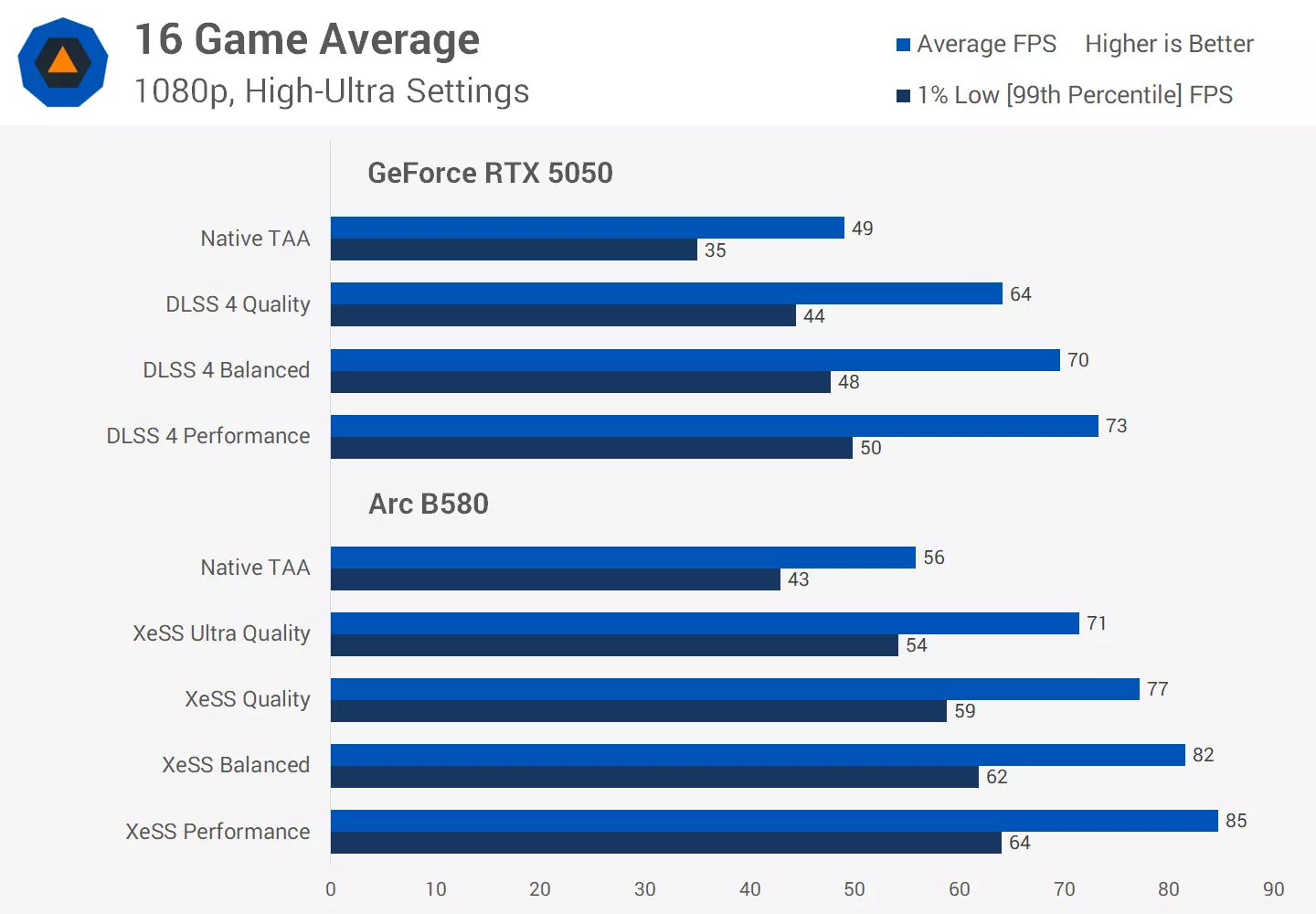
Using native rendering, the B580 is 14% faster than the RTX 5050 in average FPS at 1080p with high to ultra settings. With upscaling enabled at the same render resolution (XeSS Ultra Quality vs DLSS 4 Quality) the B580 is 11% faster on average. C
Comparing matching mode names, Quality vs Quality, the B580 is 20% faster. So depending on how you interpret the data, the B580's advantage falls somewhere between 10 and 20% faster in average FPS.
The Intel GPU also delivers stronger 1% lows thanks to several titles where frametime consistency is much worse on the RTX 5050. Natively, the B580 offers 23% better 1% lows, and this margin remains similar when comparing upscaling at the same render resolution. This is partly because a number of games require more than 8GB of VRAM at 1080p, causing performance issues for the RTX 5050.
Head to Head Performance
What stands out most in this comparison is the unusually high variance in performance from game to game – much greater than what we typically see when comparing GeForce and Radeon GPUs. In the best scenarios, such as Battlefield 6, Ghost of Tsushima or Cyberpunk 2077 with ray tracing enabled, the Arc B580 can be 40% faster or more.
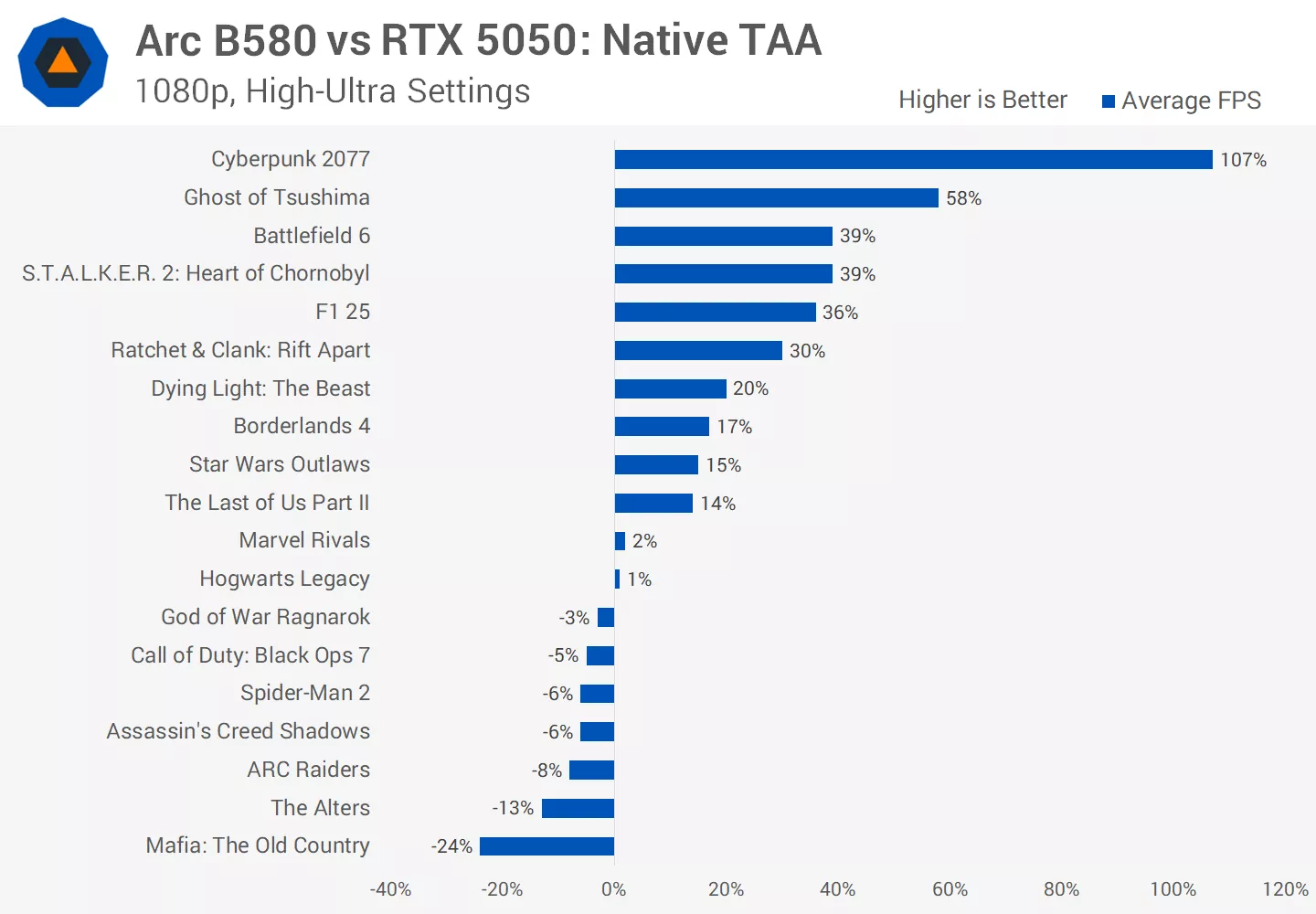
But there are also several titles where the B580 is 5 to 10% slower, with Mafia The Old Country being a particularly poor showing at 24% slower on average. So while the B580 averages a 14% lead across the full set of games, individual results vary far more than the typical 10 – 20% range one might expect from that average.
This variance doesn't change much when upscaling is enabled. Results shift slightly here and there, but upscaling at the same render resolution shows a similar spread. Comparing Quality vs Quality is generally more favorable to the Intel GPU because XeSS upscales from a lower render resolution, which increases performance.
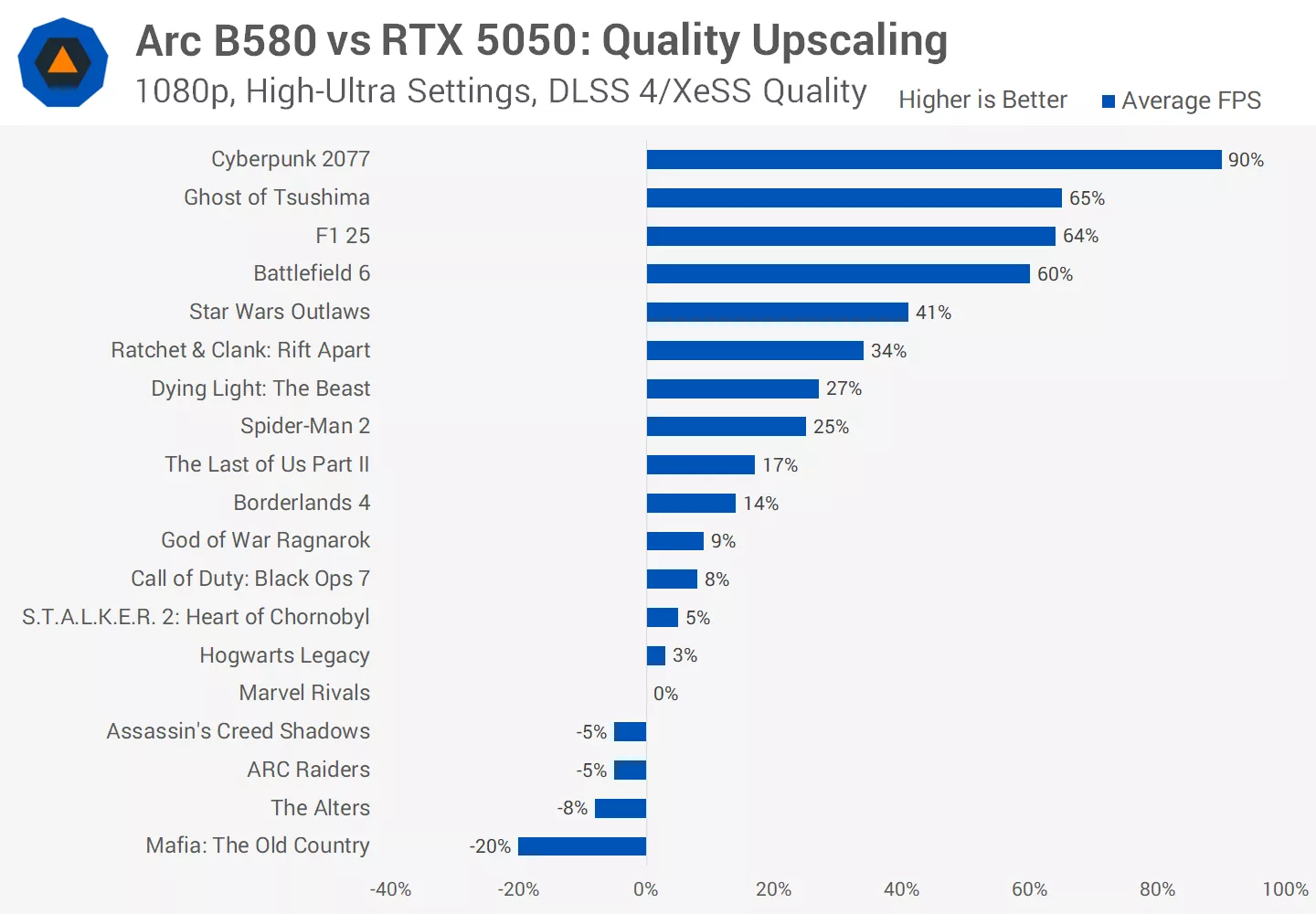
Another interesting pattern is that Unreal Engine titles consistently perform worst on the Arc B580, especially with upscaling enabled. In the Quality vs Quality chart, the seven Unreal Engine games tested landed in the bottom 10 results overall. Some of these titles did exhibit VRAM issues on the RTX 5050 (issues not reflected in that specific chart) but the trend suggests that if Nvidia's entry-level GPUs like the RTX 5050 had enough VRAM, they would likely hold a notable advantage in the world's most widely used game engine. That's a bit concerning for Intel given how widespread Unreal Engine is, especially because outside of that engine, the Arc B580 can be much faster.
What We Learned
At the end of the day, what we're looking at with the GeForce RTX 5050 and Arc B580 are two compromised products. We wish this weren't the case at $250, because a decade ago this price range offered genuinely strong graphics card options. The landscape has changed, and budget GPUs no longer guarantee a reliable, consistent experience.
Let's start with the strengths of each product. The Intel Arc B580 is generally the faster GPU at 1080p. It's not always ahead, but on average it is faster, and in the best scenarios it can be significantly faster than the RTX 5050. Previous testing has also shown that the B580 scales well at higher resolutions like 1440p, so we'd expect this advantage to grow if we retested all titles at that resolution.
The biggest advantage of the B580 is its 12GB of VRAM. Most of the games we tested today use more than 8GB at 1080p with ultra settings, in fact just six of the 19 didn't. Some games only slightly exceed 8GB, allowing the RTX 5050 to scrape by, but others use 9 or 10GB and suffer either performance drops or visual issues on an 8GB card. Upscaling doesn't fix this; most titles still exceed 8GB at ultra settings even with DLSS or XeSS enabled.
In practical terms, the Arc B580 is far more likely to deliver a consistent experience in modern titles that require more than 8GB of VRAM. VRAM demands are rising even for 1080p gaming, making 12GB the more usable and more future-proof option. It also enables the B580 to run higher-quality presets that the RTX 5050 simply cannot sustain. There are several titles where ultra settings produce playable frame rates on the B580 at 1080p, while the RTX 5050 is forced into lower presets just to stay within its VRAM limit.
Some might argue that given the Arc B580's overall performance, you'd likely drop from Ultra to High or Medium anyway. But the key point is that you have that choice on the B580. You can opt for ultra at lower frame rates or medium for higher performance. On the RTX 5050, you often don't have that choice, in many titles today it's a medium settings card only at 1080p.
The RTX 5050 does have strengths. It has more mature drivers, with Nvidia building on decades of game support. If a game fits within 8GB of VRAM, the 5050 is more likely to provide a stable and consistent experience, and reducing settings often works well. The Arc B580, by contrast, can deliver huge wins in some titles but struggles notably in games like Spider-Man 2 and Mafia The Old Country, even with reduced settings. Intel's drivers have improved dramatically, and game-breaking issues are less common now, but there are still some games that just don't play nice with the Battlemage architecture.
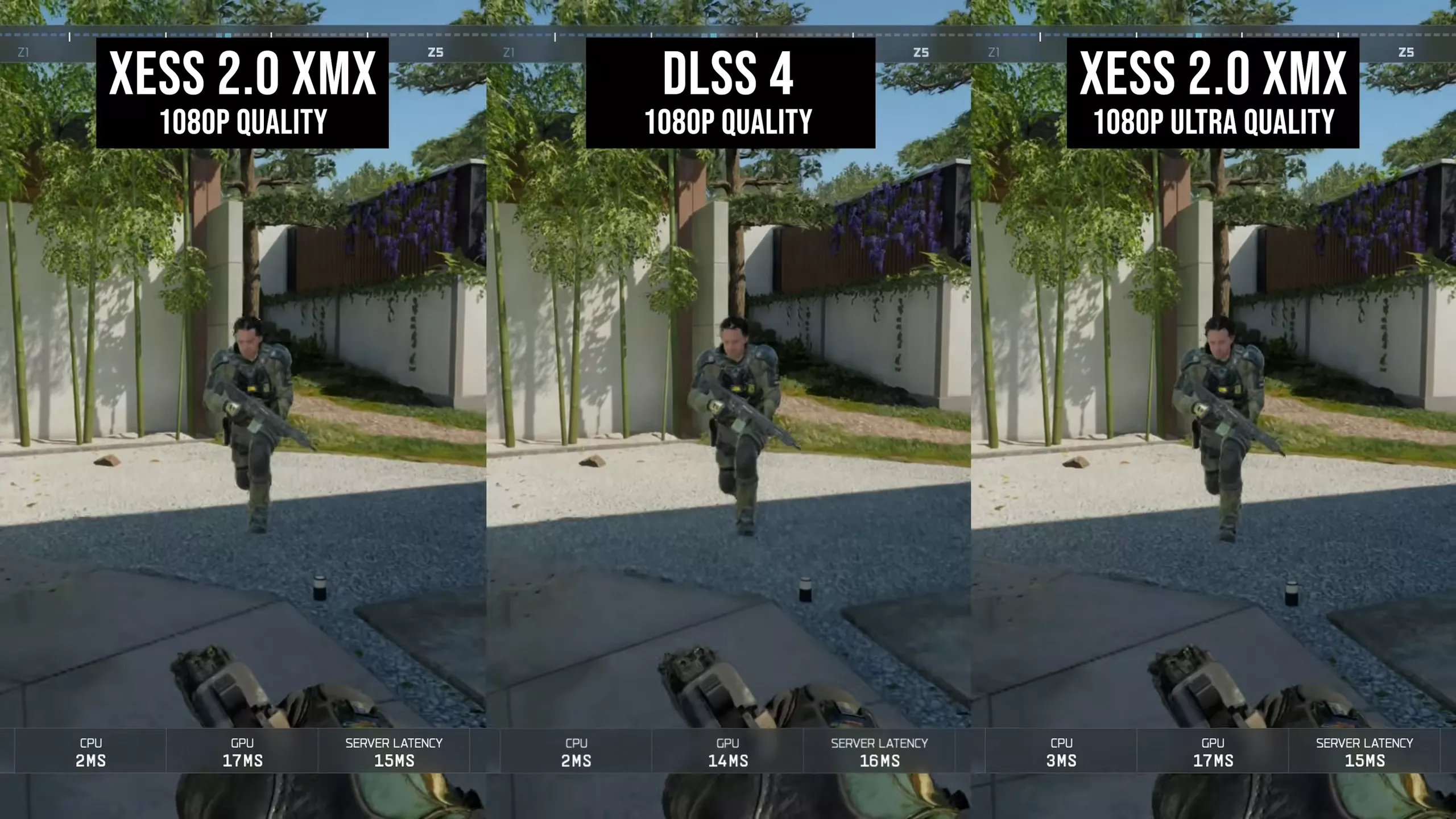
The RTX 5050 also offers superior upscaling. DLSS 4 simply looks better than XeSS at 1080p. The XeSS XMX version on Intel GPUs is usable, but we consistently prefer DLSS 4's image quality. This creates an odd dynamic: the Arc B580 is more likely to run games at higher native visual settings, but the RTX 5050 delivers better upscaled image quality at lower presets.
Nvidia also enjoys far wider DLSS upscaling support. XeSS support is surprisingly strong considering Intel's small market share, and many modern titles now include it. But DLSS is nearly universal at this point – most new games support it, often with DLSS 4, and many older titles use DLSS 2 or 3, which are still solid. In contrast, XeSS is less widely supported than AMD's FSR 4 in 2025 releases, and when a game lacks XeSS, Intel GPUs often default to FSR 3 or 2.2, both of which look poor at 1080p. Limited XeSS support is also why this review includes fewer benchmarked titles compared to our DLSS vs FSR coverage – several major releases, such as Kingdom Come Deliverance II, don't offer XeSS at all.
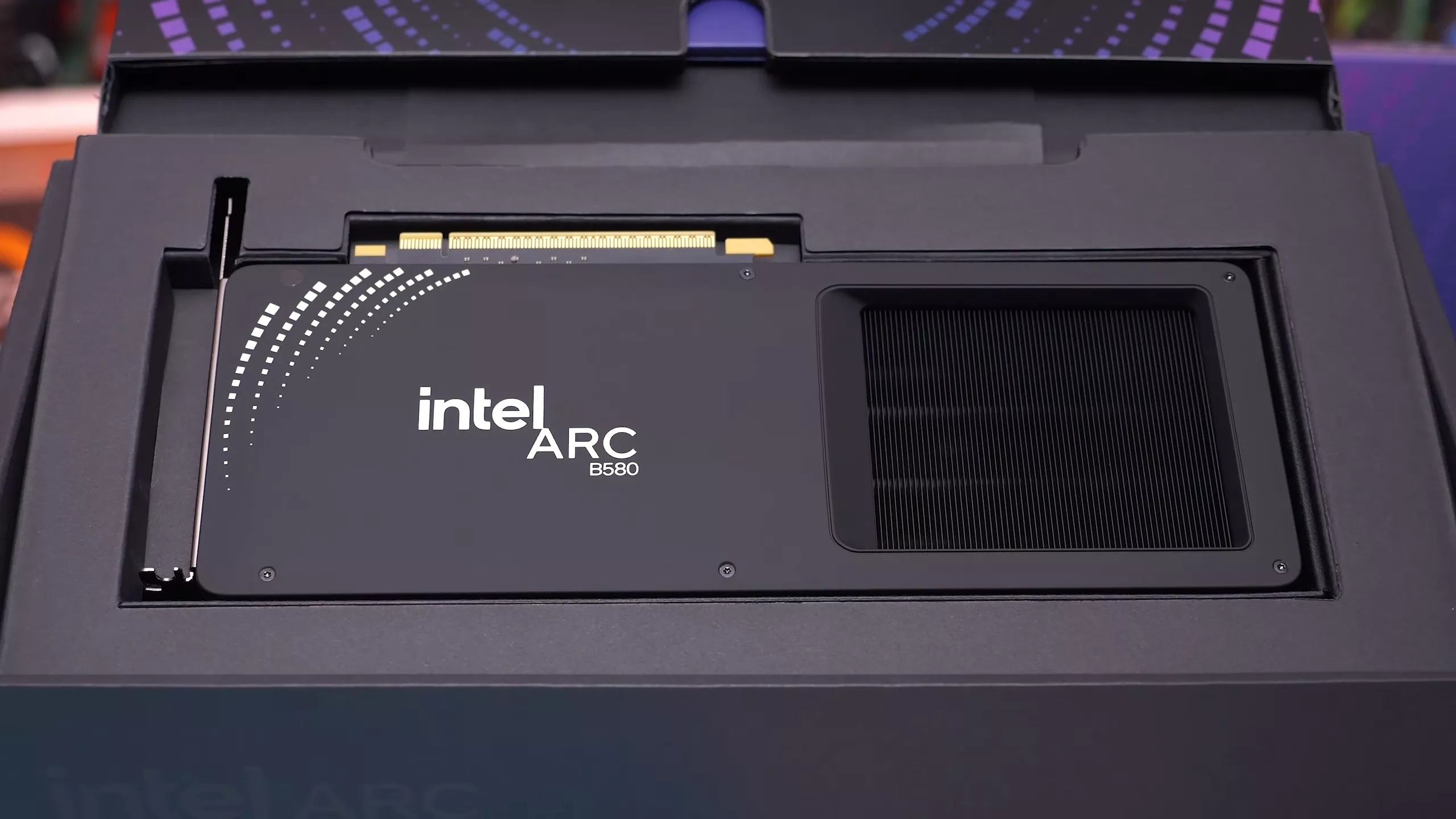
All things considered, for most people we would recommend the Intel Arc B580. DLSS 4 is excellent, but too many modern games exceed 8GB of VRAM even at 1080p, and the RTX 5050's limited VRAM frequently leads to compromised performance or visuals.
For players of new triple-A games who prefer high or ultra settings, more than 8GB is essential, and the B580's 12GB makes it far better equipped. Intel's driver focus also leans heavily toward newer titles, making Arc generally reliable today with occasional exceptions.
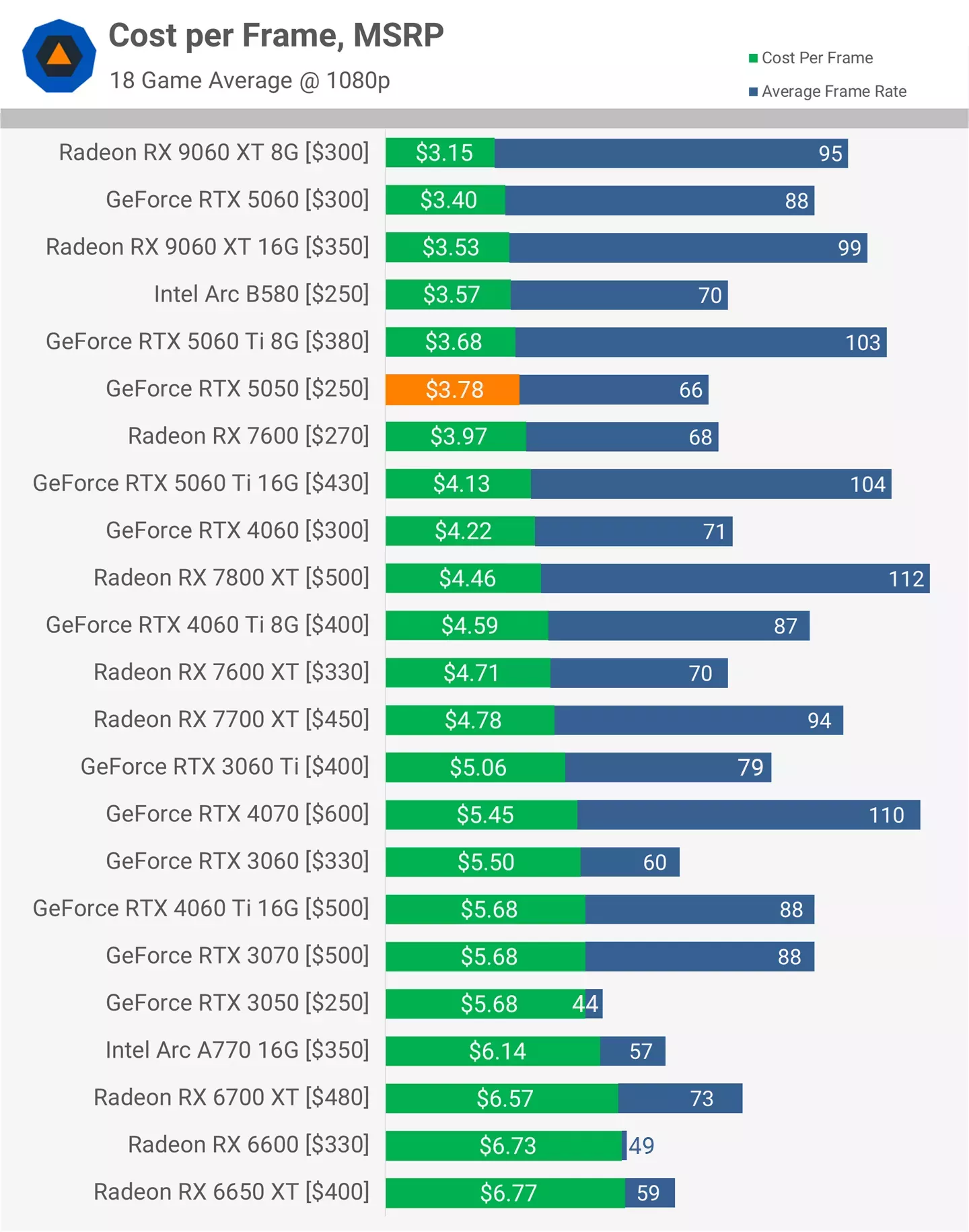
The RTX 5050 is not a great choice at $250 due to its limited VRAM and poor cost-per-frame value compared to models like the RTX 5060. It might make sense if you primarily play older games that fit comfortably within 8GB and simply want the cheapest current-gen Nvidia GPU.
It's not the strongest justification, but better upscaling and strong legacy driver support are the only meaningful reasons we can give for choosing the 5050.