

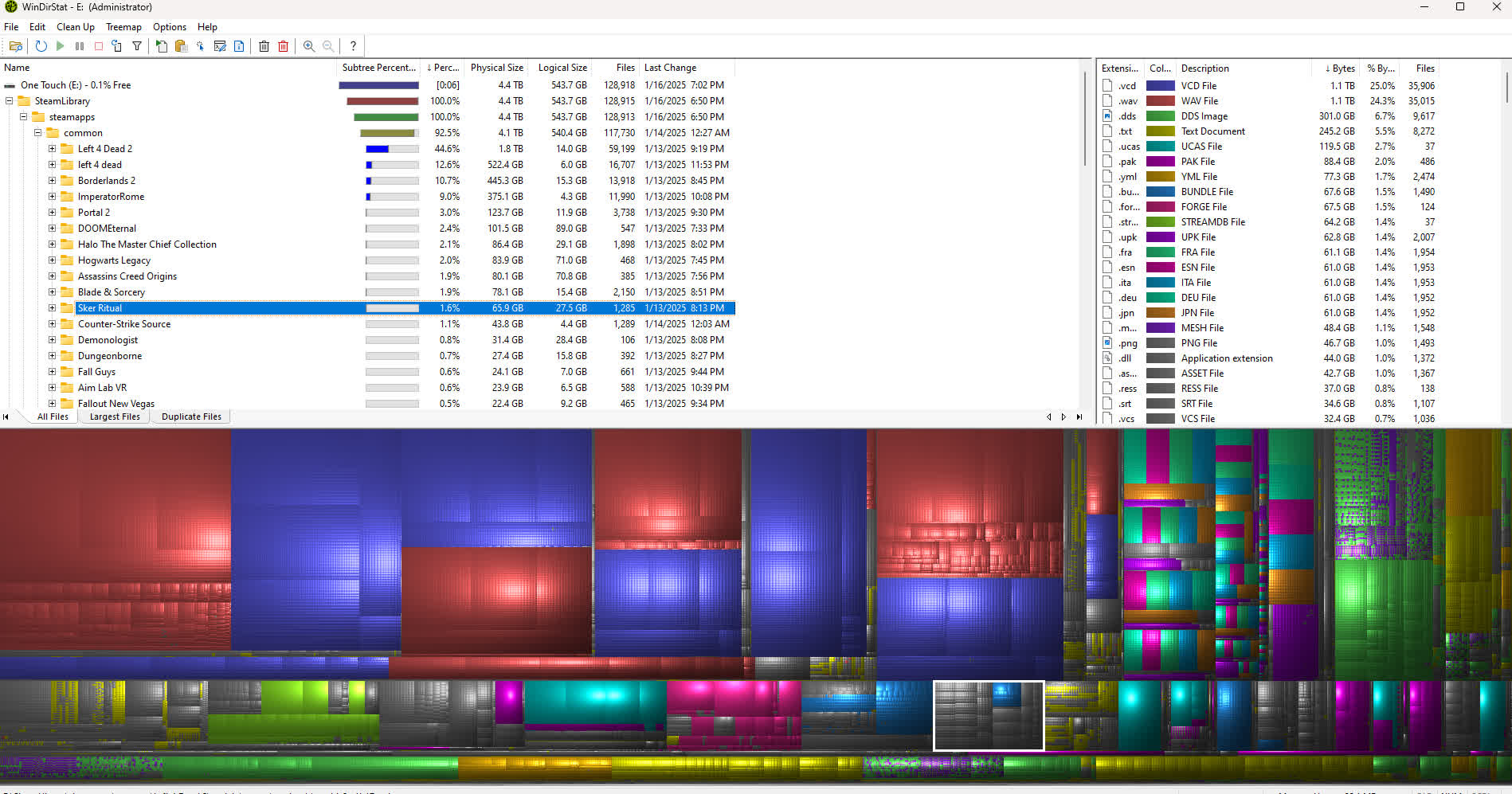
WinDirStat is a program that allows you to find drive space hogs at a glance. It achieves that by displaying a drive, drives or directories in a treemap that assigns bigger areas to bigger files and directories. Making those areas visually separate by coloring and other means allows you to see literally at a glance what the space hogs are and where to dig deeper.
The directory tree is simultaneously shown as a tree list and as a treemap. One can effortlessly gain an impression of the proportions on the drive(s).
Is WinDirStat safe to use?
Yes, it's safe and widely trusted. It doesn't modify files unless you manually delete them.
Can I delete files directly from WinDirStat?
Yes, You can right-click on any file or folder and choose to delete it directly within the interface. However, it's strongly recommended to review what you delete, as WinDirStat doesn't move files to the Recycle Bin - deletions are permanent.
Does WinDirStat support network drives and external disks?
Yes, WinDirStat can analyze local drives, network shares, and external storage devices as long as they're accessible via Windows Explorer. However, scans over a network may take longer due to transfer speed limits.
Why do some file sizes in WinDirStat differ from what Windows Explorer shows?
WinDirStat calculates actual disk usage, not just the logical file size shown in Explorer. It accounts for cluster sizes, NTFS compression, and hard links, which can make sizes appear slightly different from what Windows reports in folder properties.
Does WinDirStat detect duplicate files automatically?
No, WinDirStat identifies which files take up the most space but doesn't compare file contents for duplication. To remove duplicates, users often combine it with tools like dupeGuru, Auslogics Duplicate File Finder, or CCleaner.
Features
- Three views: Directory Tree, Treemap, and Extension
- Duplicate file detection
- Built-in cleanup actions including Open, Delete, Show Properties
- User-defined cleanup actions (command line based)
What's New
- Added Beta 2.5.7 mirrors
Enhancements
- Traditional Chinese language support (thanks @harryytm)
- Korean languages updates (thanks @VenusGirl)
- Gray-out user defined submenu if none are present
- Basic support for scanning \?\Volume{GUID} formatted paths
- Fallback deletion for hiberfil.sys
- Various performance enhancements
Bug Fixes
- Corrected hash entry inconsistencies in duplicate viewer
- Corrected tallying of physical sizes in duplicate viewer
- Corrected treemap zoomed view hit detection and highlighting
- Corrected treemap custom grid color not being applied

