
One of my worst fears has come true: a game developer is officially using frame generation as a crutch to achieve 30 FPS. And I don't mean 30 FPS doubled to 60 FPS through frame gen – I'm talking about a 30 FPS output with frame generation enabled. That's a render rate of just 15 FPS, listed on an official spec sheet for an upcoming title. This may be a troubling new precedent for how performance is communicated to PC gamers.
The game in question is Lego Batman: Legacy of the Dark Knight, due out May 22. The official PC system requirements were published this past week, and on the surface they look unremarkable.
The recommended tier calls for a Core i7-12700 or Ryzen 7 5800X, 16GB of RAM, and either a GeForce RTX 2070 Super, Radeon RX 6650 XT, or Intel Arc B580 – modest, mid-range hardware from a few years back.
The 4K tier steps up to a Core i7-14700K or Ryzen 7 9700X paired with an RTX 4070 or RX 9070 XT. The minimum tier bottoms out at a Core i5-10600K or Ryzen 5 1600 with a GeForce GTX 960, Radeon RX 6400, or Intel Arc A580 – all very slow GPUs by 2026 standards.
The problem isn't the hardware lists. It's what the developers claim that hardware is actually doing. At 4K, the listed configuration targets 2160p at 60 FPS... but only with upscaling and frame generation both enabled. Strip those away and the game is natively rendering at 1440p 30 FPS.
Then it gets worse. The recommended spec follows the same pattern: medium settings, a 1440p output at 60 FPS, but with a native render resolution of just 960p at 30 FPS.
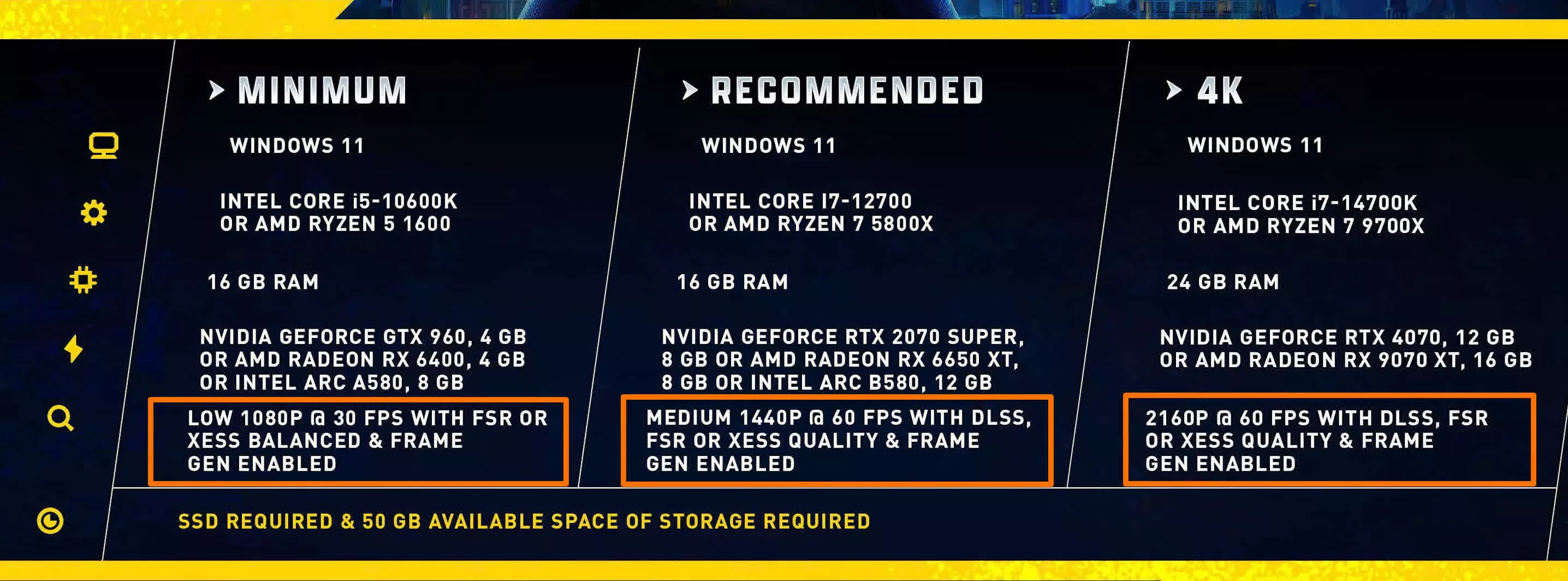
And the really egregious stuff happens in the minimum tier. The hardware required for minimum is weak, but the developers are claiming the game will actually render at low settings, 1080p 30 FPS, with upscaling enabled and frame gen enabled. That's a render resolution of just 635p, using quite a high upscaling ratio at 1080p output, at a render rate of 15 FPS.
15 FPS! listed on an official spec sheet as a viable way to play the game. It's absolute madness.
Lego Batman Moves to Unreal Engine 5
Traveller's Tales developed this latest Lego Batman game – the same long-time studio behind past Lego titles like The Skywalker Saga. But they've made a major change with this newest iteration. The Skywalker Saga used TT's proprietary NTT engine, as did past Lego titles. However, according to a Polygon report citing multiple developers who worked on the game, the NTT engine was difficult to use, which contributed to extreme crunch to get the title finished on time. Internally, the studio wanted to switch to Unreal Engine, but management resisted due to licensing costs.
The problem with these system specs is that frame generation is being used as a crutch to advertise certain levels of "performance."
This ultimately led to the studio switching to Unreal Engine 5 for Lego Batman: Legacy of the Dark Knight. The performance issues associated with Unreal Engine on PC are well documented at this point. We haven't tested Lego Batman yet to see how performance and visuals stack up, but most of the titles we've tested recently with disappointing performance and optimization have used Unreal Engine, so these system requirements hinting at a low level of performance don't surprise me.
The problem with these system specs is that frame generation is being used as a crutch to advertise certain levels of "performance." Most gamers would find playing a game like this unpleasant at 30 FPS, but advertising 60 FPS is far more palatable, so slap some frame generation on and call it a day.
Only if you read everything closely, and only if you properly understand how frame generation works, does it become clear that an RTX 4070 can't actually play this game at 4K 60 FPS – only at 4K 30 FPS.
Frame Generation Doesn't Improve Performance
The issue with using frame generation as a crutch is that frame gen doesn't improve performance – in fact, enabling it actually reduces performance in most situations. That's based on the traditional, long-held definition of what performance means in gaming. Some companies, *cough* Nvidia have argued with us about this definition, claiming that frame gen "performance" is better because the output frame rate is higher. But that's simply not true.
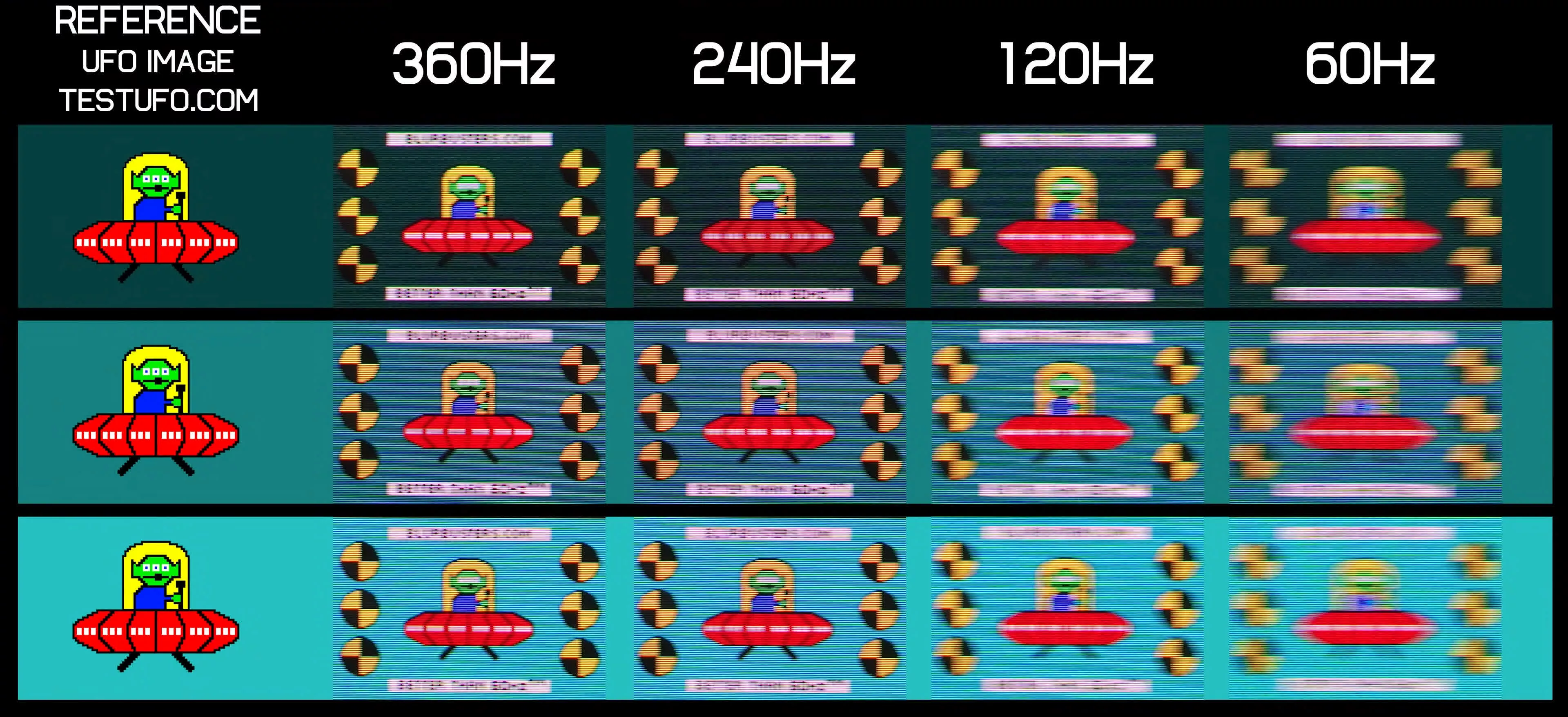
Performance in gaming refers to a combination of elements that together make the experience enjoyable. Higher output frame rates make the game smoother, as more frames are delivered to your display, and on most modern screens this also improves motion clarity, since higher frame rates produce less blur.
For a better representation of image quality comparisons, check out the HUB video below:
But beyond that, rendering the game at a higher rate also reduces input latency. This last element is crucial, because it makes the game feel better to play. Responsiveness improves, controls feel more precise, and in multiplayer titles it has actually been proven to make you a more successful player. With lower input lag, it's simply easier to react and aim.
Throughout history, when everyone has talked about the performance of a game, they're referring to all of these benefits together. When there's talk about the benefits of better performance, like a game running at 60 FPS versus 30 FPS, all of these factors come into play. 60 FPS gaming is smoother, less blurry, less of a slideshow, it feels better to play, controls are less sluggish, and the game is easier overall.
Blur Busters UFO Test - OLED Refresh Rate Comparison
Prior to frame generation, these factors have always been tightly linked. If your GPU and CPU can render the game at a higher frame rate, you get a smoother output and lower input latency. The FPS a game runs at is synonymous with performance. Gamers want those GPU upgrades to hit 120 FPS because they know it means all the elements of better performance in one package.
But when frame generation is used to achieve a certain output frame rate, you're not getting better performance. Frame generation increases the output frame rate, but it does not improve latency. As a result, frame generation only delivers half of the benefits we typically associate with higher FPS.
The standard relationship between FPS and performance is now broken, so an FPS increase driven by frame generation cannot be described as a performance increase.
The Latency Story
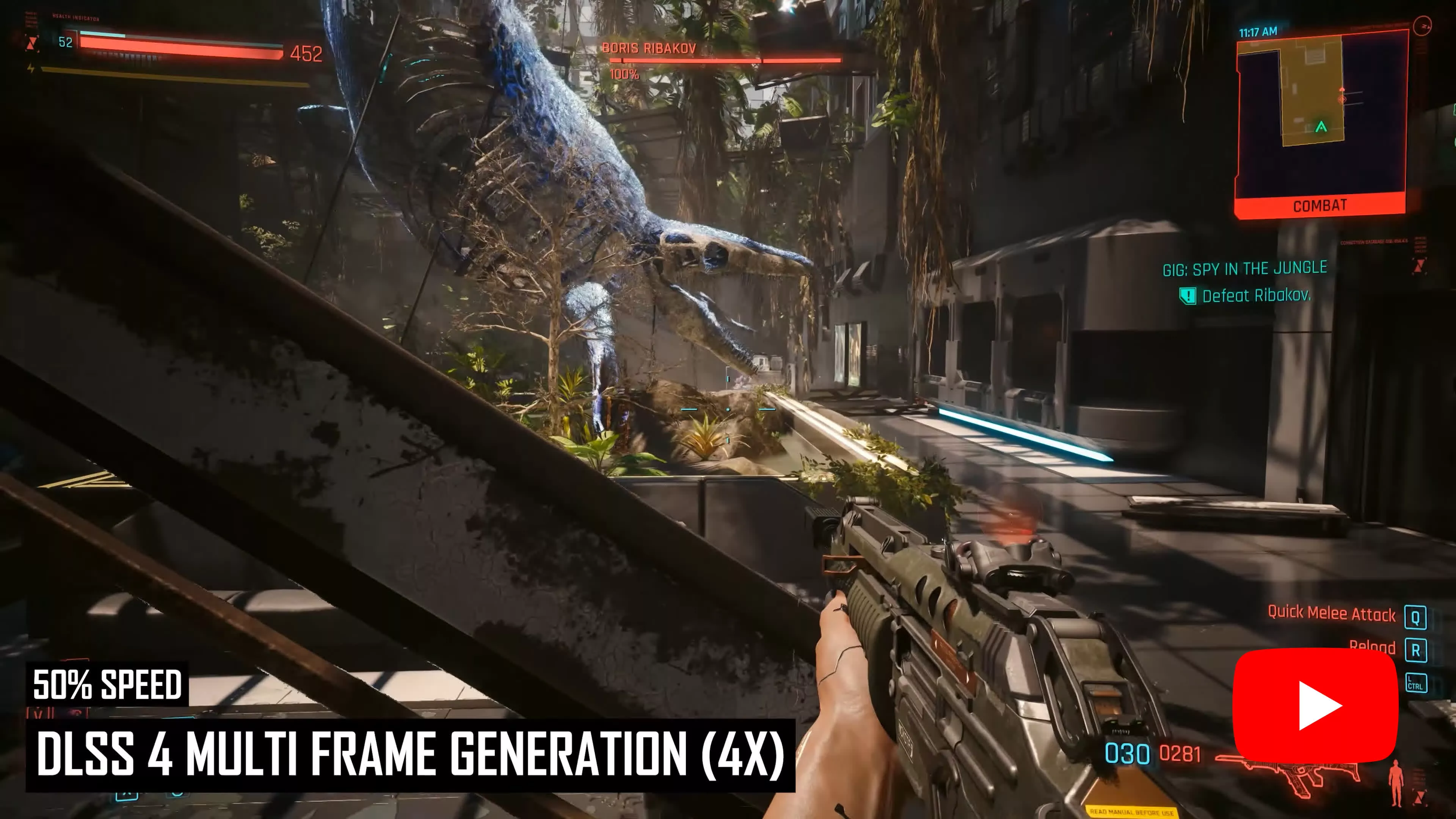
This is a phenomenon we've covered across all of our frame generation content, but we showed it most clearly in our Multi Frame Gen exploration. Take this example from Cyberpunk 2077, running on a GeForce RTX 5090 at Ultra settings, with Reflex enabled across all configurations.
Without frame generation, the game runs at 78 FPS. Switching on frame generation delivers a sizable boost: up to 139 FPS with 2X frame gen, which generates a single frame between each rendered frame. 3X frame gen, with two generated frames, pushes that to 197 FPS, and 4X frame gen with three generated frames reaches 250 FPS.
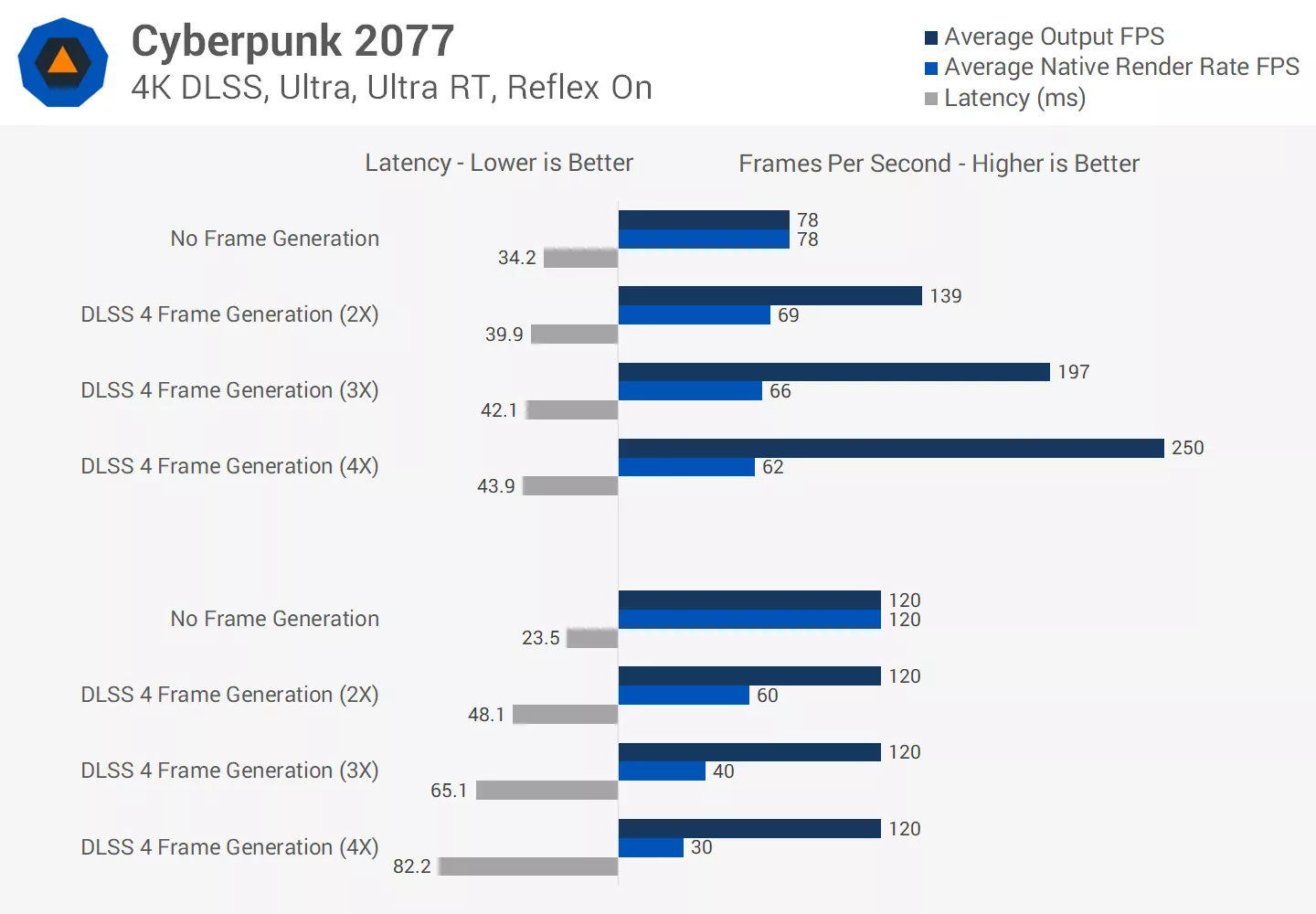
If the output frame rate was the only metric shown, you'd be quite happy to hear that 2X frame gen increased FPS by nearly 80%. Look at all that performance!
But now let's look at latency, measured in milliseconds where lower is faster and better. Without frame generation, the game ran at 34ms of latency. When frame generation is enabled, latency actually goes backwards: increasing to 40ms in the 2X mode, 42ms in the 3X mode, and 44ms in the 4X mode.
This is because frame generation carries a small performance cost – overhead from using GPU time to generate the additional frames. From the output frame rate we can calculate the actual native render rate, which forms the true basis of performance. When frame generation is enabled, the render rate decreases from 78 to 69 FPS, and drops further as additional frames are generated.
When we equalize the output frame rate across all modes, the impact on latency becomes clear. A true 120 FPS output with no frame generation gives us high responsiveness at just 24ms of latency. Achieving that same 120 FPS output using frame generation, with the game natively rendering at 60 FPS, more than doubles latency to 48ms.
That number increases further in the 3X and 4X modes. This seriously affects how the game feels: frame generation makes it feel more sluggish and less responsive, because input lag is higher. It's that simple.
Generally speaking, frame generation makes games feel more sluggish and less responsive, because input lag is higher. It's that simple.
These examples were built around a 120 FPS target, but the same principle applies at a 60 FPS target. When TT Games advertises Lego Batman running at 60 FPS with frame generation enabled, what that actually means is the game will feel like it's being played at 30 FPS – a big red flag for many gamers that the experience won't be enjoyable.
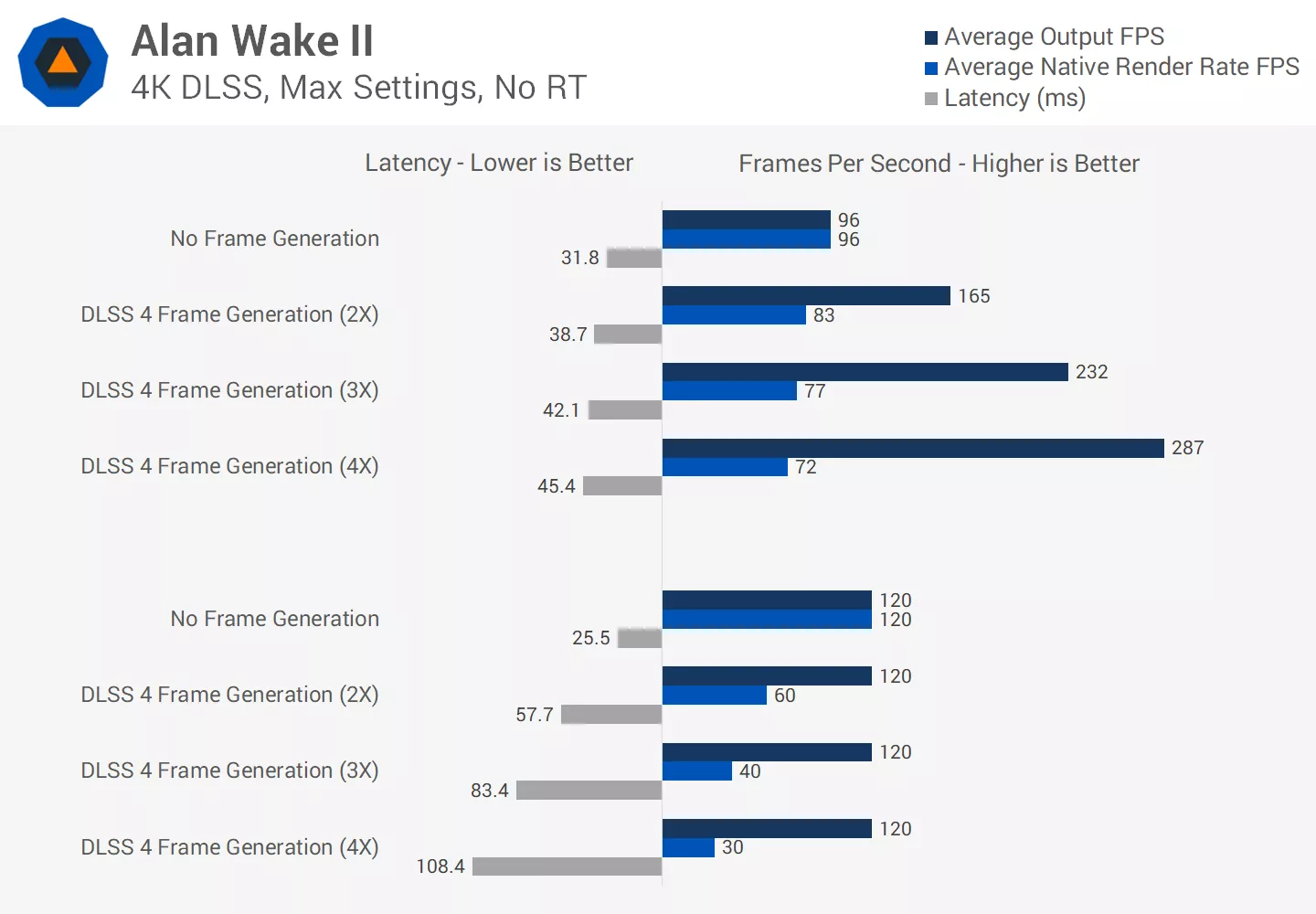
And the 30 FPS minimum configuration is even worse: with frame generation achieving that output, the game will feel like it's running at 15 FPS, which is absolutely horrible.
When Frame Generation Actually Makes Sense
Frame generation not improving latency is perfectly fine when the technology is used correctly. If you're satisfied with how the game feels, and the render rate and latency are already at a decent baseline, enabling frame generation to gain extra smoothness makes sense.
There will be a small latency increase when frame gen is enabled, but at a high base render rate that cost is minor and the smoothness benefits will outweigh it. In our Cyberpunk example, the base render rate sits close to 80 FPS and only drops to 70 FPS with frame gen enabled, while the output jumps to a much smoother 140 FPS. That's a reasonable trade-off worth considering if you're happy with the feel of 70 FPS gaming.
But the problem with using frame generation to target 60 FPS is that the latency experience is equivalent to 30 FPS. Most PC gamers today are not willing to accept 30 FPS gaming and will avoid it at all costs. I'm not the most latency-sensitive gamer personally, but I find 30 FPS gameplay unpleasant even in single-player titles, as controls feel slow and the character just doesn't respond the way it should.
For a better representation of image quality comparisons, check out the HUB video below:
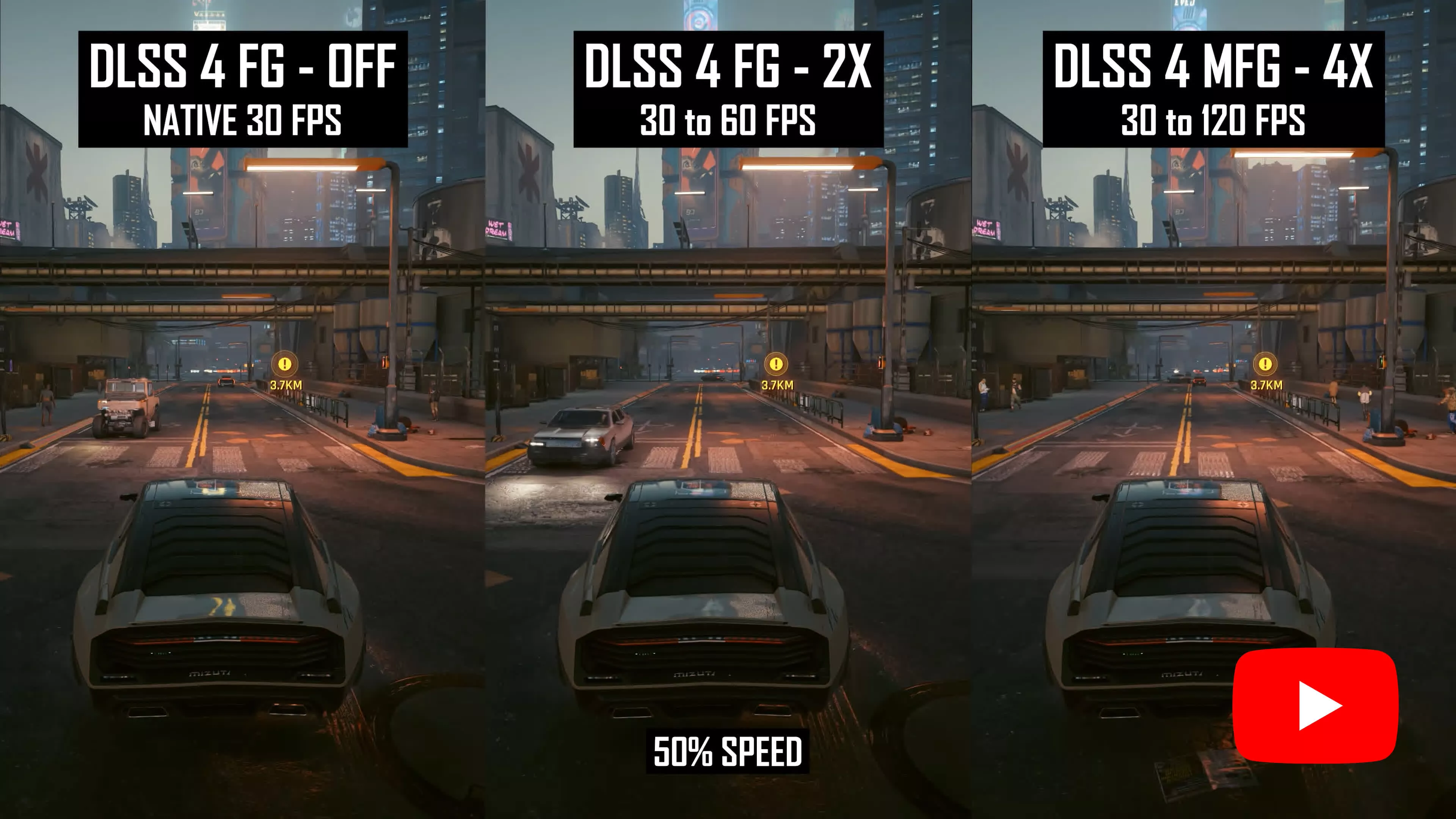
It's crucial that game developers don't use frame generation as a crutch to "optimize" their games and inflate apparent "performance."
Consider two paths a developer could take: one where optimization work gets the game running at a true 60 FPS, and another where optimization stops at 30 FPS and frame gen is bolted on at the end. The game that actually runs at 60 FPS natively will be far more enjoyable to play. A frame-generated 60 FPS output is not the same thing – using the technology this way does not mean the title has been optimized or that good performance is being delivered.
In practice, if a PC gamer loads into a game and is only getting 30 FPS without frame generation, the most likely response is to lower settings, not enable frame generation. And if overall performance is poor and frame generation is the only apparent solution, many gamers will leave a negative Steam review or refund the title outright.
That's exactly what happened at the launch of Borderlands 4, with widespread criticism over how demanding the game was on modest hardware. You can't paper over low native frame rates by telling players to enable frame generation. That's not how it works.
Frame Generation is Not Designed for 30 FPS
Putting the latency angle aside for a moment, frame generation is primarily designed to improve smoothness and overall visual quality, but it can only do that effectively at relatively high frame rates.
For a better representation of image quality comparisons, check out the HUB video below:
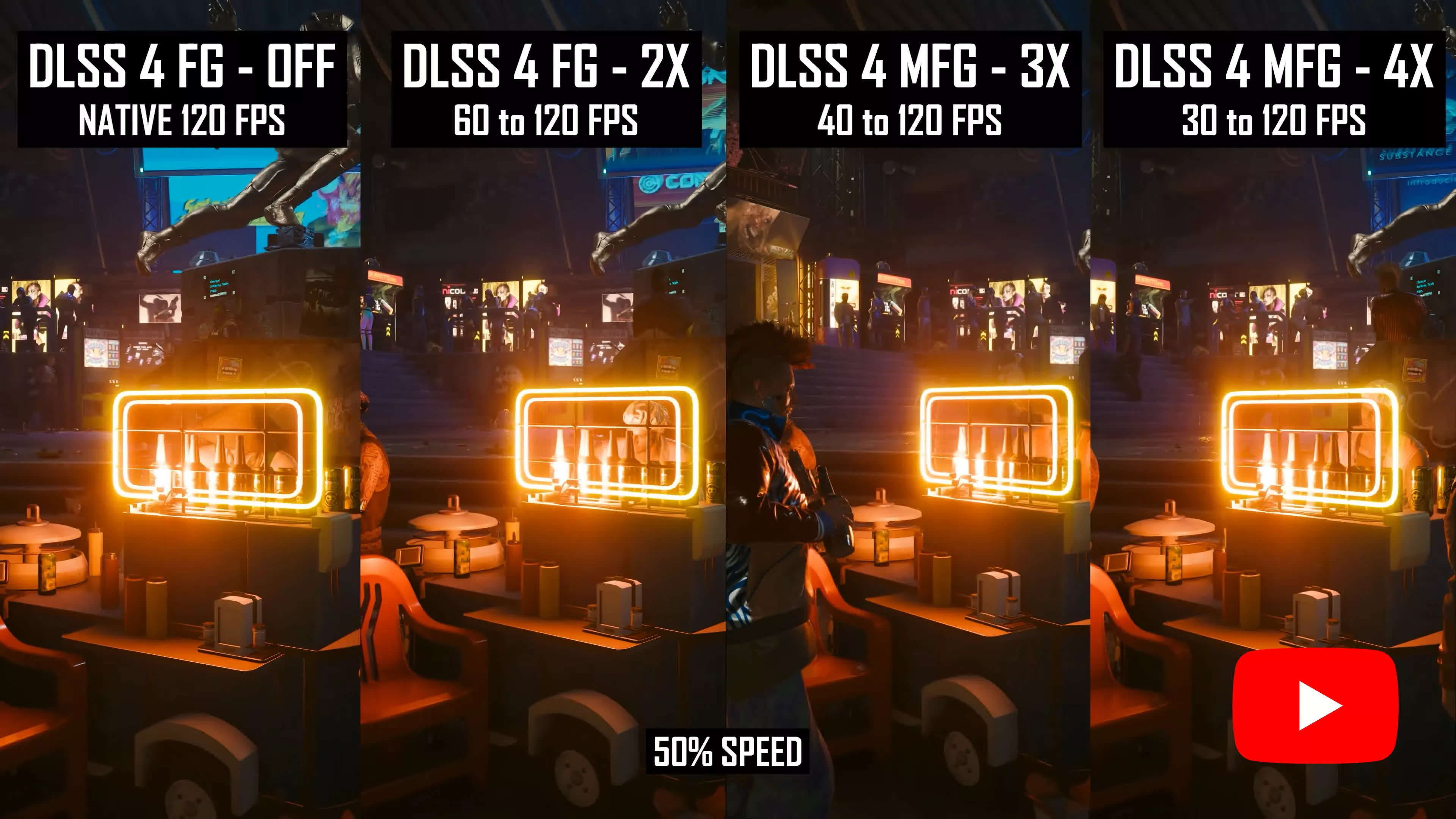
Running this technology at a low frame rate exposes the flaws of generated frames in ways that high frame rates do not. First, the difference between each rendered frame is larger at a lower frame rate, so the generated frames need to interpolate much more to fill in the gaps. Second, each frame is displayed on screen for a longer time, making artifacts more visible. Higher frame rate frame generation is simply much better visually.
All the companies that have created frame generation solutions know this, too. Nvidia recommends a final output of at least 120 FPS when using frame generation, and suggests a high refresh rate monitor due to the "many frames sent to the display." Intel recommends a base frame rate of 60 FPS for XeSS Frame Generation, or 40 FPS for entry-level graphics. In none of these cases is 30-to-60 FPS frame generation recommended, and 15-to-30 FPS is so far outside those guidelines it may as well be an unsupported configuration.
It's Supposed to Be Optional

None of this is to say that frame generation is useless, it just has minimum requirements for a good experience. It can improve smoothness and clarity, but it doesn't do this well at a 15 or 30 FPS render rate.
We briefly looked at what a 1080p output with FSR Balanced would look like when frame generation is used to achieve a 30 FPS output – the exact configuration TT Games listed for the minimum spec. And it goes without saying this is an awful way to play, well below what should be considered acceptable for a minimum-tier gaming experience.
The other issue with frame generation is that it's supposed to be an optional feature gamers can enable if they want enhanced smoothness. It's not meant to be used as a tool to hit a target performance level, because as explained above, it doesn't actually improve performance. It needs to remain optional precisely because enabling it reduces the render rate and increases latency, which latency-sensitive gamers will want to avoid.
Making frame generation mandatory to hit a certain output would be the same as making motion blur mandatory.
After all, frame generation is essentially a more sophisticated version of motion blur. What do we mean by that? Motion blur's main purpose in many games is to blend frames together when the output frame rate is low, reducing the slideshow effect and making the game appear smoother. Motion blur doesn't increase actual performance, but it can look smoother. Frame generation achieves that same goal of improved smoothness by creating interpolated frames, and it generally does so in a way that looks much better than motion blur, with far less, well, blur.
It would be absurd to list on a system requirements sheet that the recommended configuration is 30 FPS with motion blur enabled. The same principle applies to listing frame generation alongside a 60 FPS output. Both run the game at a 30 FPS render rate, with a graphics feature attempting to mask that through added smoothness.
But because frame generation technically does push the FPS output to 60 FPS, it can be exploited for misleading purposes. In the case of Lego Batman, targeting 60 FPS through frame generation for a given hardware tier is not what frame gen is designed for, and it leads to a bad experience.
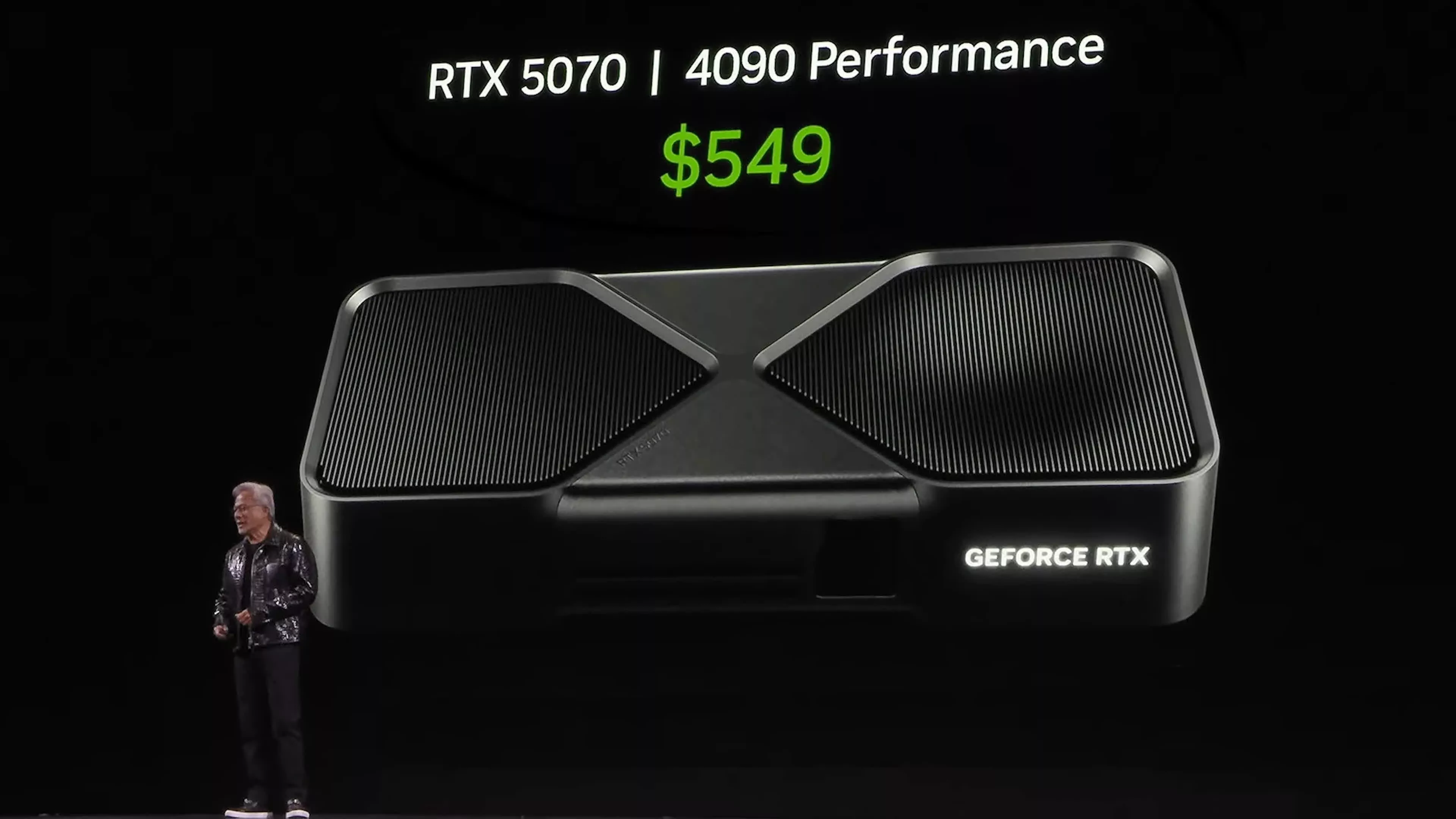
This all ties back to our concerns when we first encountered and tested frame generation. The worry at the time was that various companies would use frame generation as a weapon to mislead gamers and deliver subpar experiences. Nvidia has been doing exactly this for years, making dubious claims like the RTX 5070 being equivalent to an RTX 4090 in performance because it can generate more frames.
But game developers can exploit it, too, through 30-to-60 FPS frame generation configurations and now the even worse 15-to-30 FPS option. Our biggest concern was always consoles, where GPU performance and settings flexibility are limited. But it's now spreading into PC gaming as well, seemingly in place of proper optimization.
Putting the Numbers in Context
With all of that in mind, if we remove the rubbish frame gen listing in the Lego Batman: Legacy of the Dark Knight system requirements, is what we are seeing reasonable? The developers are essentially saying this game will run at 4K 30 FPS on an RTX 4070 or RX 9070 XT with Quality upscaling. They're also saying an RTX 2070 Super or RX 6650 XT will run it at 1440p 30 FPS with medium settings and Quality upscaling.
That would make Lego Batman a very taxing title. It's probably not quite as demanding as Borderlands 4, which we found running at just 14 FPS at native 4K on an RTX 4070 with max settings, and 29 FPS at native 1440p – figures measured at launch, before the patches improved performance.

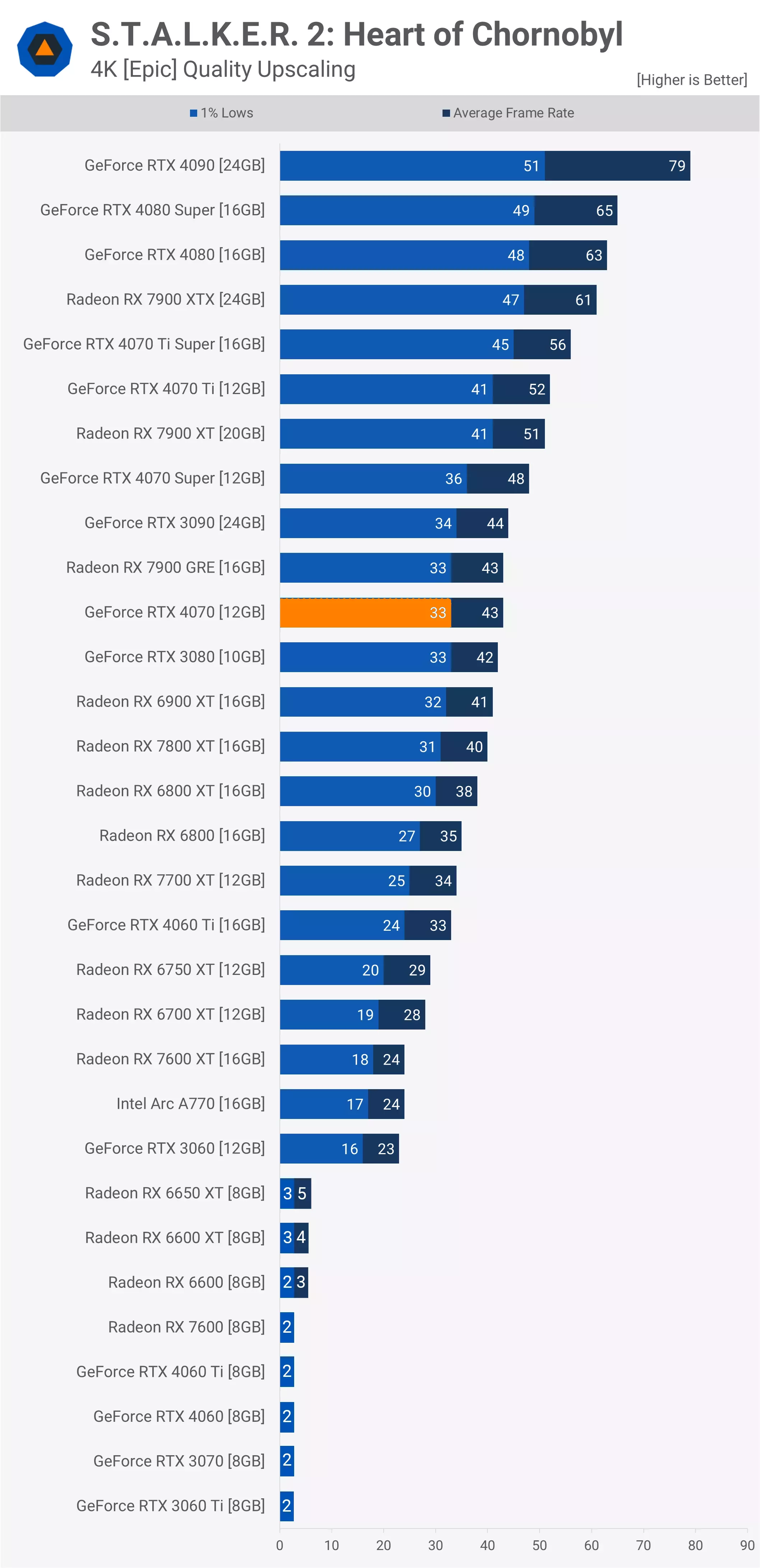
But we're certainly in the ballpark of the most demanding Unreal Engine 5 games. Stalker 2 runs on an RTX 4070 at 43 FPS using 4K Epic settings with Quality DLSS upscaling. Based on TT Games' system requirements, Lego Batman will land in roughly that range.