

Tor for Mac is free software and an open network that helps you defend against a form of network surveillance that threatens personal freedom and privacy, confidential business activities and relationships, and state security known as traffic analysis.
Tor is a network of virtual tunnels that allows people and groups to improve their privacy and security on the Internet. It also enables software developers to create new communication tools with built-in privacy features. Tor provides the foundation for a range of applications that allow organizations and individuals to share information over public networks without compromising their privacy.
Individuals use Tor to keep websites from tracking them and their family members, or to connect to news sites, instant messaging services, or the like when these are blocked by their local Internet providers. Tor's hidden services let users publish web sites and other services without needing to reveal the location of the site. Individuals also use Tor for socially sensitive communication: chat rooms and web forums for rape and abuse survivors, or people with illnesses.
Who uses the Tor Browser?
With Tor Browser having made Tor more accessible to everyday internet users and activists, Tor was an instrumental tool during the Arab Spring beginning in late 2010. It not only protected people's identity online but also allowed them to access critical resources, social media, and websites which were blocked.
Individuals use Tor to keep websites from tracking them and their family members, or to connect to news sites, instant messaging services, or the like when these are blocked by their local Internet providers. Tor's hidden services let users publish web sites and other services without needing to reveal the location of the site. Individuals also use Tor for socially sensitive communication: chat rooms and web forums for rape and abuse survivors, or people with illnesses.
Journalists use Tor to communicate more safely with whistleblowers and dissidents. Non-governmental organizations (NGOs) use Tor to allow their workers to connect to their home website while they're in a foreign country, without notifying everybody nearby that they're working with that organization.
Groups such as Indymedia recommend Tor for safeguarding their members' online privacy and security. Activist groups like the Electronic Frontier Foundation (EFF) recommend Tor as a mechanism for maintaining civil liberties online. Corporations use Tor as a safe way to conduct competitive analysis, and to protect sensitive procurement patterns from eavesdroppers. They also use it to replace traditional VPNs, which reveal the exact amount and timing of communication. Which locations have employees working late? Which locations have employees consulting job-hunting websites? Which research divisions are communicating with the company's patent lawyers?
A branch of the U.S. Navy uses Tor for open source intelligence gathering, and one of its teams used Tor while deployed in the Middle East recently. Law enforcement uses Tor for visiting or surveilling web sites without leaving government IP addresses in their web logs, and for security during sting operations.
What is Tor Browser?
The Tor Browser is the flagship product from the Tor Project. The web browser is based on a modified version of Mozilla Firefox ESR that includes extras like the Tor proxy, TorButton, TorLauncher, NoScript, and HTTPS Everywhere extensions.
How does the Tor Browser keep my internet activity anonymous?
The Tor Browser uses the Tor network, which consists of more than six thousand relays located worldwide, to hide the users' location and online traffic. This ensures anonymity and avoids your activities from being seen by others.
Is Tor better than a VPN?
Tor is not a VPN. Tor is a free browser similar to Chrome or Firefox, but it includes features that encrypt your IP address, making your browsing sessions private. A VPN (Virtual Private Network) is software that can change your IP address when you use any browser installed on your PC. To learn more about VPNs, you can read this article.
Journalists use Tor to communicate more safely with whistleblowers and dissidents. Non-governmental organizations (NGOs) use Tor to allow their workers to connect to their home website while they're in a foreign country, without notifying everybody nearby that they're working with that organization.
Groups such as Indymedia recommend Tor for safeguarding their members' online privacy and security. Activist groups like the Electronic Frontier Foundation (EFF) recommend Tor as a mechanism for maintaining civil liberties online. Corporations use Tor as a safe way to conduct competitive analysis, and to protect sensitive procurement patterns from eavesdroppers. They also use it to replace traditional VPNs, which reveal the exact amount and timing of communication. Which locations have employees working late? Which locations have employees consulting job-hunting websites? Which research divisions are communicating with the company's patent lawyers?
A branch of the U.S. Navy uses Tor for open source intelligence gathering, and one of its teams used Tor while deployed in the Middle East recently. Law enforcement uses Tor for visiting or surveilling web sites without leaving government IP addresses in their web logs, and for security during sting operations.
Welcome Screen
Our old screen had way too much information for the users, leading many of them to spend great time confused about what to do. Some users at the paper experiment spent up to 40min confused about what they needed to be doing here. Besides simplifying the screen and the message, to make it easier for the user to know if they need to configure anything or not, we also did a 'brand refresh' bringing our logo to the launcher.
Censorship circumvention configuration
This is one of the most important steps for a user who is trying to connect to Tor while their network is censoring Tor. We also worked really hard to make sure the UI text would make it easy for the user to understand what a bridge is for and how to configure to use one. Another update was a little tip we added at the drop-down menu (as you can see below) for which bridge to use in countries that have very sophisticated censorship methods.
Proxy help information
The proxy settings at our Tor Launcher configuration wizard is an important feature for users who are under a network that demands such configuration. But it can also lead to a lot of confusion if the user has no idea what a proxy is. Since it is a very important feature for users, we decided to keep it in the main configuration screen and introduced a help prompt with an explanation of when someone would need such configuration.
As part of our work with the UX team, we will also be coordinating user testing of this new UI to continue iterating and make sure we are always improving our users' experience. We are also planning a series of improvements not only for the Tor Launcher flow but for the whole browser experience (once you are connected to Tor) including a new user onboarding flow. And last but not least we are streamlining both our mobile and desktop experience: Tor Browser 7.5 adapted the security slider design we did for mobile bringing the improved user experience to the desktop as well.
What's New
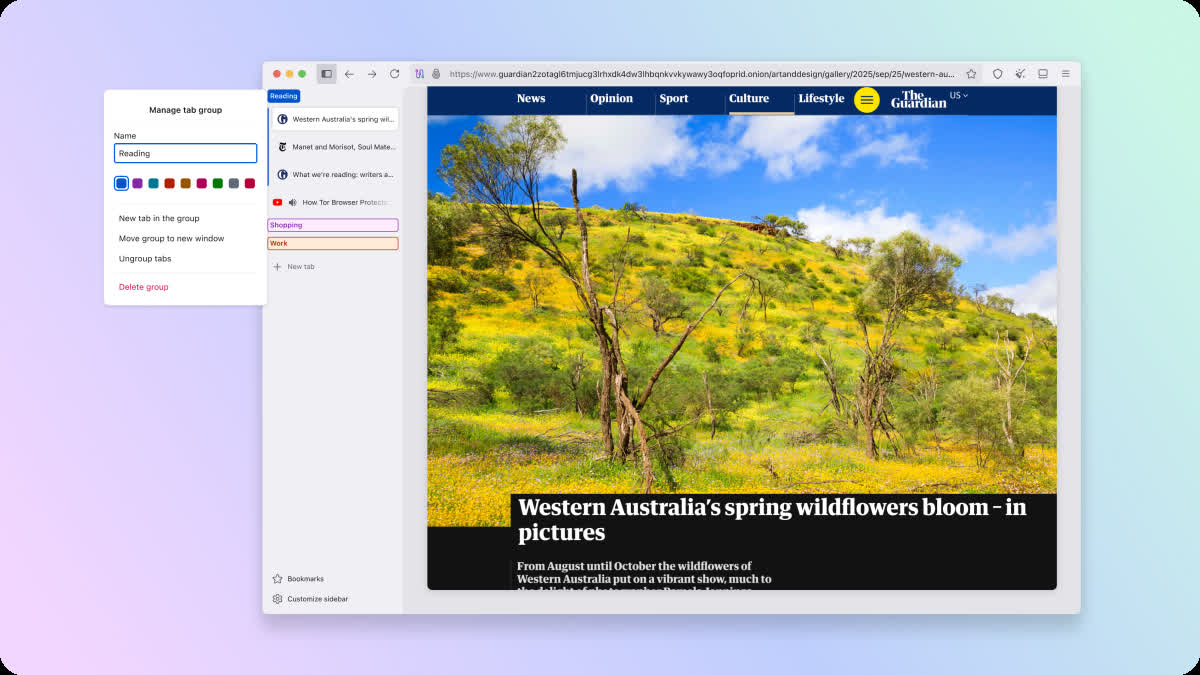
Tor Browser 15.0 inherits a multitude of useful new features and usability improvements from Firefox that have passed our audit. For desktop, these include vertical tabs: providing a more manageable, alternative layout with open and pinned tabs stacked in a sidebar rather than across the top of the window. For ease of access, Bookmarks can be retrieved directly from the sidebar when expanded too. However, regardless of whether you prefer horizontal or vertical tabs, everyone benefits from the addition of tab groups: helping you keep on top of the clutter by organizing tabs into collapsible groups that can be given names and color-coded. Tor Browser 15.0 also inherits elements of Firefox's recent address bar refresh, including a new unified search button that allows you to switch search engines on the fly, search bookmarks or tabs, and reference quick actions from the same menu.
Note that Tor Browser tabs are still private tabs, and will clear when you close the browser. This enforces a kind of natural tidiness in Tor Browser since each new session starts fresh – however for privacy-conscious power users, project managers, researchers, or anyone else who accumulates tabs frighteningly quickly, we hope these organizational improvements will give you a much needed productivity boost.
Android
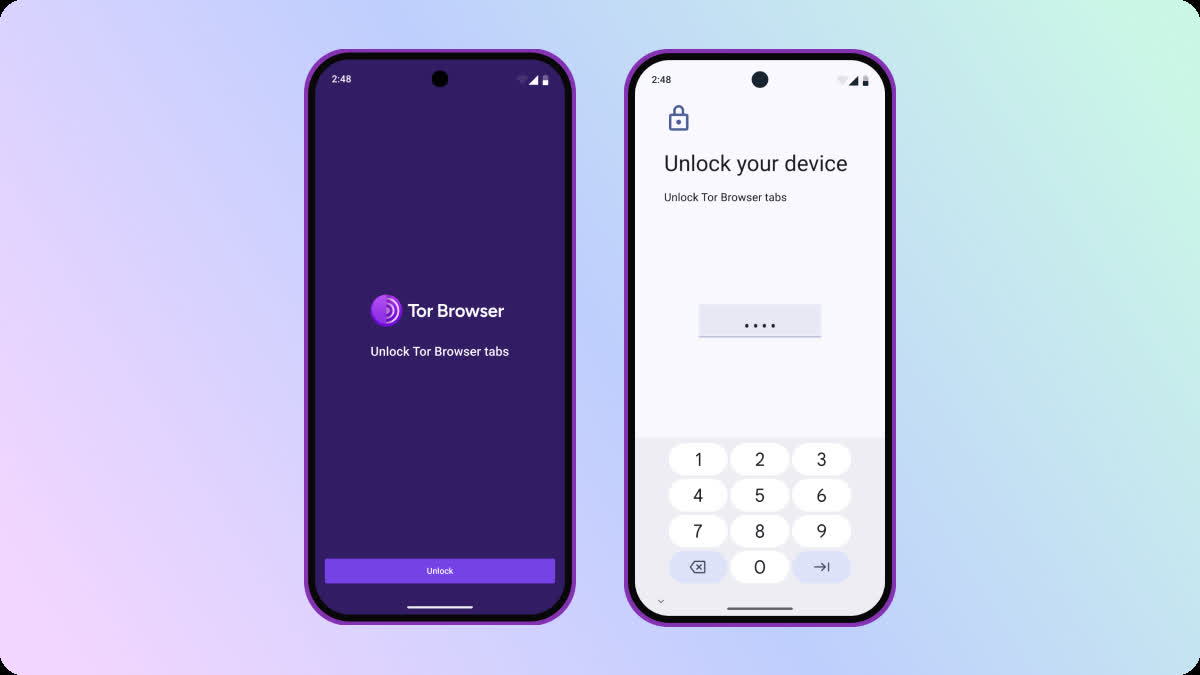
On Android, screen lock adds an extra layer of security to your browsing sessions. After enabling screen lock in Settings > Tabs, your tabs will lock automatically when you switch away from the browser without closing it. Upon returning to the app, you'll be prompted to unlock your tabs using your fingerprint, face, or pass code, depending on which option your device is configured to use.
Like Tor Browser for Desktop, your browsing session will still be cleared when Tor Browser is closed. However, this feature provides peace of mind in a specific scenario: by ensuring that your browsing remains private even if someone has gained temporary access to your unlocked phone with Tor Browser open in the background – whether you've handed it to a friend, or left your device sitting on a table.
What's changing?
Updates to Android and Linux device compatibility
At present, Firefox 140 and Tor Browser 15.0 support Android 5.0 or later, which was released almost 11 years ago. While Mozilla's commitment to support such an old version of Android is admirable, it introduces several technical and security challenges for developers. As a consequence, Firefox have announced their intention to increase the minimum support requirements to Android 8.0, and have also decided to drop support for x86 CPUs for Android and Linux. Sadly, it's not possible for the Tor Project to maintain support for these platforms on our own without official support from Mozilla.
While these changes won't impact Tor Browser users immediately, we expect them to take effect with the release of Tor Browser 16.0 mid-next year. This means that Tor Browser 15.0 will be the last major release to support x86 for Linux and Android, in addition to Android 5.0, 6.0, and 7.0. However, we will continue to release minor updates with security fixes for these platforms until Tor Browser 16.0's eventual release.
Although nobody wants to see support for their platform get dropped, it's an important step to maintain the stability and security of both Firefox and Tor Browser over time, and will allow developers to utilize newer technologies in both browsers. In addition, supporting x86 for Android has been particularly challenging for our developers due to the 100MB package size limit imposed by Google Play. While we have deployed several workarounds to stay within this limit in the recent past, these often come at a cost – such as x86 Android users missing out on the Conjure pluggable transport, for example.
Disabling of WebAssembly now managed by NoScript
WebAssembly (or Wasm) is a web technology that helps websites and web apps run faster. It allows web developers to write programs in languages like C, C++ or Rust, and compiles these into a special format that web browsers can run more efficiently.
As has been suggested in this meta-analysis from 2024, further investigation of Wasm's potential exploits is necessary – therefore Wasm is currently disabled in the Safer and Safest security levels in order to reduce Tor Browser's attack surface. Up until now, this was achieved by setting the global preference javascript.options.wasm to false – however this approach was no longer viable after Mozilla implemented part of their PDF reader in Wasm between versions 128 and 140. Consequently, we have decided to move control of Wasm to NoScript, which is bundled with Tor Browser, and already manages JavaScript and other security features. This means that Wasm now works on privileged browser pages such as the PDF renderer, but NoScript will continue blocking the technology on regular websites at the Safer and Safest security levels.
Users who have manually set javascript.options.wasm to "false" while in the Standard security level will see their security level represented as "Custom" instead. To mitigate any issues that may arise with the browser's PDF reader, we encourage those users to switch the preference back to "true", thereby passing management of Wasm over to NoScript. Furthermore, manually disabling Wasm at the Standard security level (either via NoScript or javascript.options/wasm) may also make your fingerprint more unique by deviating from Tor Browser's default configuration. To avoid this scenario, we recommend sticking with one of the pre-defined security levels and caution users against making further changes to individual preferences in about:config.
Alternatively, should you wish to keep Wasm disabled in future, we invite you to increase your security level to Safer or Safest going forward. Note that both Safer and Safest users may notice javascript.options.wasm switch to "true" automatically as management of Wasm is passed over to and blocked by NoScript, meaning that you are still protected regardless. In addition, Safest users in particular are not vulnerable to any potential vulnerabilities introduced by Wasm since the format requires JavaScript to work.
All Platforms
- Updated tor to 0.4.9.8
- Updated NoScript to 13.6.19.1984
Windows + macOS + Linux
- Updated Firefox to 140.10.2esr
- Bug tor-browser#44746: Funding the Commons Implementation (Desktop)
Android
- Updated GeckoView to 140.10.2esr
- Bug tor-browser#44747: Funding the Commons Implementation (Android)
Build System All Platforms
- Bug tor-browser-build#41781: Fix clean section in rbm.local.conf.example
