

macOS Tahoe 26 makes the Mac more capable, productive, and intelligent than ever. Introducing a stunning new design, more Continuity experiences with the Phone app and Live Activities, the biggest update to Spotlight ever, and expanded Apple Intelligence capabilities.
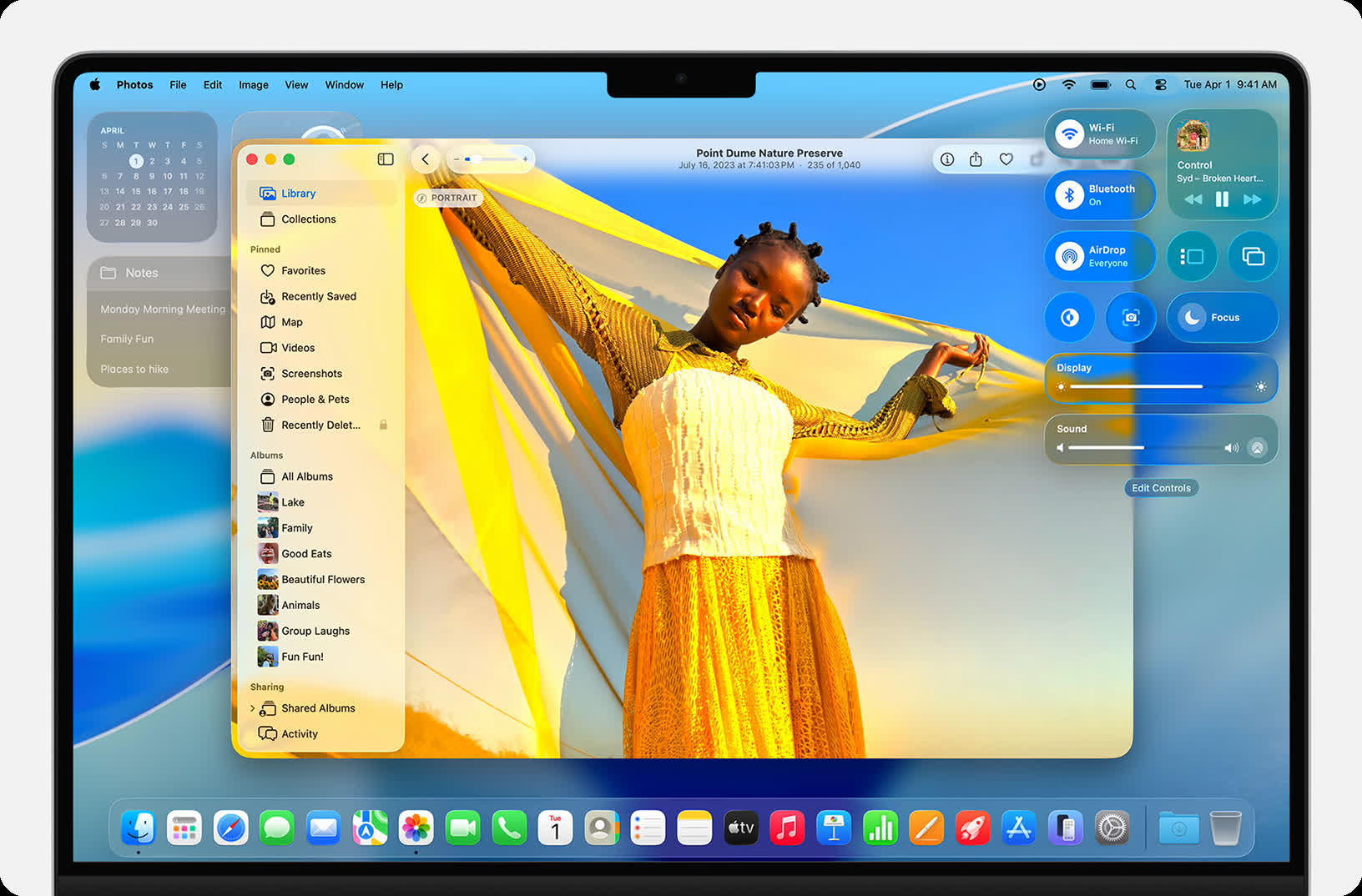
Reimagined with Liquid Glass, macOS Tahoe is at once fresh and familiar. Apps bring more focus to your content. You can personalize your Mac like never before. And everything just flows into place.
Delightful new design
Liquid Glass refracts and reflects content in real time, bringing even more clarity to navigation and controls – and even more vitality to everything you do.
Updated app icons
Personalize your Mac with new options including updated light or dark appearances, new color-tinted icons, or a stunning clear look.
Personalized controls and menu bar
Your display feels even larger with the transparent menu bar. And you have more ways to customize the controls and layout in the menu bar and Control Center, even those from third parties.
Refreshed apps
Sidebars and toolbars in apps reflect the depth of your workspace and offer a subtle hint of the content within reach as you scroll.
When was macOS Tahoe released?
macOS Tahoe was initially unveiled during the WWDC 2025 on June 9, 2025 with a dev release. The final version was launched on September 15, 2025 for all users.
What Mac models in macOS Tahoe compatible with?
MacBook Pro
- MacBook Pro (14-inch, M5)
- MacBook Pro (16-inch, 2024)
- MacBook Pro (14-inch, 2024)
- MacBook Pro (16-inch, 2023)
- MacBook Pro (14-inch, 2023)
- MacBook Pro (13-inch, M2, 2022)
- MacBook Pro (16-inch, 2021)
- MacBook Pro (14-inch, 2021)
- MacBook Pro (13-inch, M1, 2020)
- MacBook Pro (13-inch, 2020, Four Thunderbolt 3 ports)
- MacBook Pro (16-inch, 2019)
MacBook Air
- MacBook Air (15-inch, M4, 2025)
- MacBook Air (13-inch, M4, 2025)
- MacBook Air (15-inch, M3, 2024)
- MacBook Air (13-inch, M3, 2024)
- MacBook Air (15-inch, M2, 2023)
- MacBook Air (M2, 2022)
- MacBook Air (M1, 2020)
iMac
- iMac (24-inch, 2024, Four ports)
- iMac (24-inch, 2024, Two ports)
- iMac (24-inch, 2023, Four ports)
- iMac (24-inch, 2023, Two ports)
- iMac (24-inch, M1, 2021)
- iMac (Retina 5K, 27-inch, 2020)
Mac mini
- Mac mini (2024)
- Mac mini (2023)
- Mac mini (M1, 2020)
Mac Studio
- Mac Studio (2025)
- Mac Studio (2023)
- Mac Studio (2022)
Mac Pro
- Mac Pro (2023)
- Mac Pro (2019)
What's New
The macOS 26.6 SDK provides support to develop apps for Mac computers running macOS Tahoe 26.6 RC. The SDK comes bundled with Xcode 26.6, available from the Mac App Store. For information on the compatibility requirements for Xcode 26.6, see Xcode 26.6 Release Notes.
CoreStorage
Deprecations
- Encrypted HFS+ (CoreStorage) is deprecated and will not be supported in macOS 28. If you use Encrypted HFS+ backups on external drives, begin backing up to encrypted APFS-formatted external drives instead. (175892336)
Ecosystem
- Fixed: macOS deprecation notifications incorrectly identify a host app as Intel-only when a system plugin loader, such as a Color Picker or Print Dialog Extension, loads x86 code into the host process. (174841181) (FB22512943)
HealthKit
- Fixed: Temporally-weighted average statistics queries for discrete quantity types such as Resting Heart Rate may return erroneously high values when samples overlap in time. (178157672)
Messages
- Fixed: HDR screenshots might appear garbled when sent in Messages. (180859837)
Accessibility
Magnifier lets you zoom in on your surroundings using a connected camera. Accessibility Reader provides a systemwide, customized reading and listening experience. Braille Access creates an all-new interface for braille displays.8 And Vehicle Motion Cues help reduce motion sickness in moving vehicles.
Family
Parents can take advantage of a wide set of parental controls designed to keep children safe. These include new enhancements across Communication Limits, Communication Safety, and the App Store.
Journal
Now on Mac for the most comfortable writing experience, Journal makes it easy to capture and write about everyday moments and special events using photos, videos, audio recordings, places, and more.
Photos
An updated design lets you quickly access filtering and sorting options and customize the size of Collections tiles so you can view your library just how you like. And with Pinned Collections, you can keep your most-visited ones right at your fingertips.
FaceTime
Celebrate the people who matter most with a new tiled design that features beautiful and personalized Contact Posters.
Reminders
With Apple Intelligence, Reminders can suggest tasks, grocery items, and follow-ups based on emails or other text on your device. It can also automatically categorize related reminders into sections within a list.
Games
The new Games app brings together all the games you have on your Mac. In the Game Overlay, you can adjust system settings, chat with friends, or invite them to play – all without leaving the game. And for developers, Metal 4 brings even more advanced graphics and rendering technologies, like MetalFX Frame Interpolation and Denoising.
Messages
Create polls and personalize conversations with backgrounds. Redesigned conversation details feature designated sections for contact info, photos, links, location, and more. Typing indicators in groups let you know exactly who is about to chime in. Screening tools detect spam and give you control. And the Add Contact button now appears next to an unknown number in a group.
Passwords
Easily refer to changes you've made to your accounts. Find previous versions of passwords, along with when they were changed.
