

OpenScreen is a lightweight screen recording application designed to help users create clean product demos and guided walkthroughs. It focuses on essential features, offering a simple and accessible alternative for capturing and presenting on-screen activity without unnecessary complexity.
The software is free to use for both personal and commercial purposes, with an open-source model that allows users to modify and distribute it as needed.
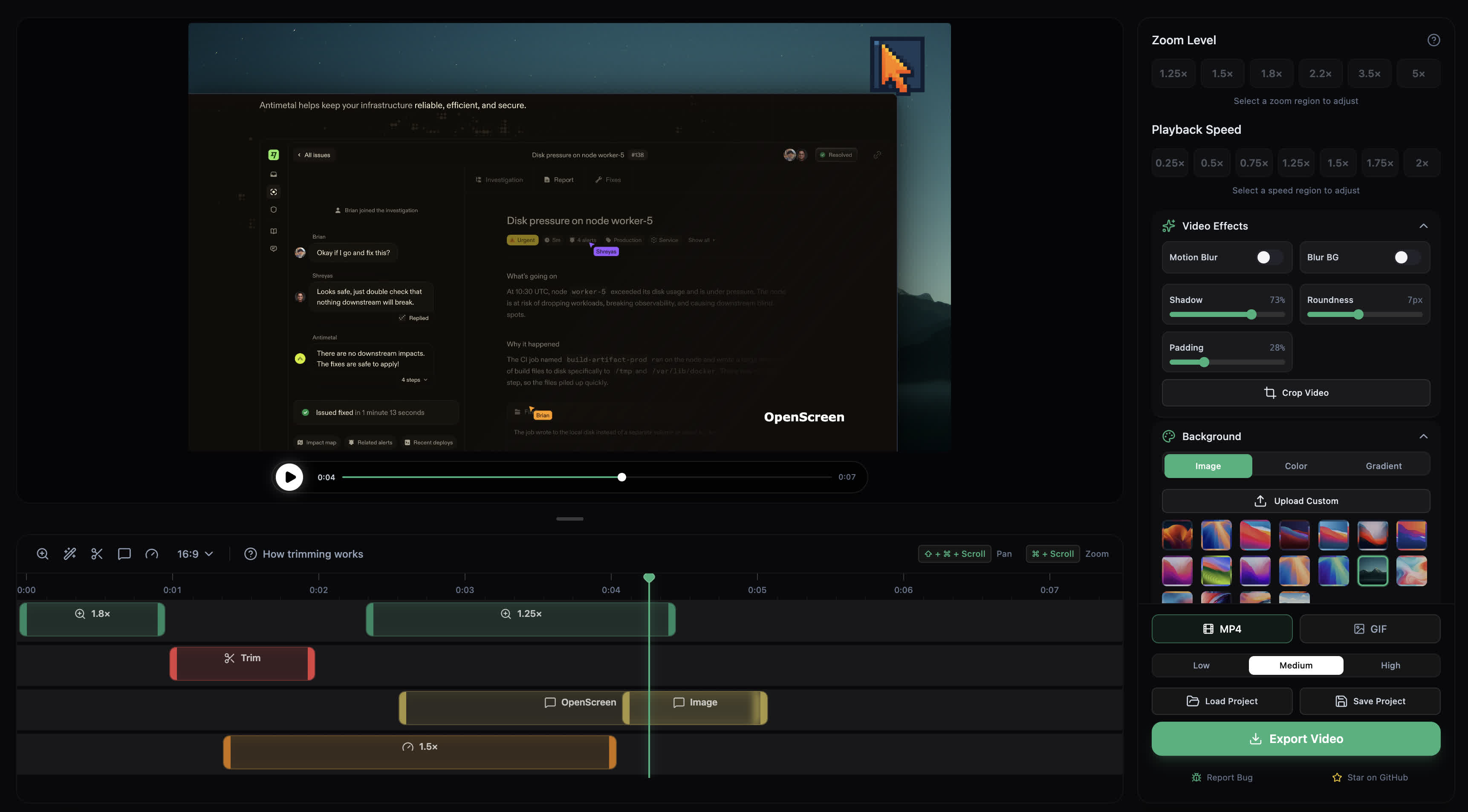
Features
- Record your whole screen or specific apps
- Add automatic zooms or manual zooms (customizable depth levels)
- Customize the duration and position of zooms however you please
- Record microphone audio and system audio capture
- Trim segments of the video timeline
- Add annotations (text, arrows, images)
- Crop video recordings to hide parts
- Export in multiple aspect ratios (1:1, 16:9, 9:16, 4:5, 4:3)
- Choose between wallpapers, solid colors, gradients or your own picture for your background
- Customize border radius and video padding
- Motion blur and exponential easing for smoother pan and zoom effects
- Customize speed at different segments
- Save edits as projects (persisted)
- Import custom Google Fonts for annotation texts
- Configurable keyboard shortcuts
- Multiple export resolution options
What's New
OpenScreen 2.0 is built on one promise: your demo looks good without touching anything, and touching the settings can't make it ugly.
We audited 1.x against that rule and it failed most of it: a cursor four times the size of the system arrow, a shadow nobody could see, a vertical export that filled a fifth of the frame. 2.0 fixes all of that, ships a new editor, and adds automatic zooms planned from your clicks. It is still free for everyone, personal and commercial, with nothing behind a paywall.
Record, stop, and it's already edited
- Zooms planned from your clicks. Stop a take and the editor opens with zooms already placed on the moments you clicked, planned as shots rather than one zoom per click.
- Record from the editor. A Record mode sits next to Edit, with auto-zoom after recording and Hide desktop icons one click away.
- New projects start from your look. The wallpaper, padding, cursor and camera of your last project carry over.
Good defaults, bounded settings
- A cursor the size of a cursor, half its old default, and a shadow you can actually see.
- Every value has a floor, a ceiling and a reset, whoever sets it: the panel, a preset, the AI agent or a hand-edited project file.
- What you see is what you export. Text renders in the font you picked (five open-licensed families are embedded), and gradients use every colour stop.
Auto format
- The frame shapes itself around your composition, and Auto is the default for new projects.
- A 16:9 take in a 9:16 export fills the frame with a window that follows your cursor, instead of a small strip in the middle.
A new editor
- One click per choice. Format, frame style, zoom level, 3D camera, cursor style and caption font are rows of buttons, not dropdowns.
- A timeline you read by colour, with a navigator that shows what it navigates, a smoother waveform and a Clear timeline button.
- Names instead of numbers. A shadow is None, Light, Medium or Strong.
3D that looks intentional
- 3D Orbit, a camera that moves with your zooms, follows the same focus mode as a flat zoom, and never rolls.
- Five original cursor themes, each with a sculpted 3D version: Prism Glow (ray-traced as a glass crystal), Pop Coral, Pixel Candy, Studio Ink and Star Sprout.
- Click impact as a cursor setting, for every camera.
Camera
- Captured at the camera's real resolution and frame rate.
- Frame the webcam by dragging it, and zoom it from its corners.
- Square by default (or Original to keep its proportions), a larger default size, and up to 60% of the frame.
- Sound that's ready to post
- Voice normalised to -16 LUFS with a soft limiter instead of a hard clip.
- Music beds start at -18 dB with one-second fades, and duck under your voice.
Transcripts that line up
- On-device transcription now skips silence first (Silero VAD) and re-times every word on the audio, so a cut made from the transcript lands where the word was spoken.
Export
- One settings panel with four destinations: Web / YouTube, Social, Studio and README GIF. Codec details live under Advanced.
- The bitrate you pay for: 1.x exported at 8 Mb/s whatever the frame rate; 2.0 exports 1080p60 at 18.7 Mb/s. GIFs are dithered.
macOS
- Apple's system picker to choose what to record on macOS 15.2 and later.
- System audio recorded from a Core Audio tap.
- One permissions window on first run, and notifications kept out of your recordings.
For automation
- The AI agent's tools over a local MCP server, so your own agent can edit a project the way the built-in assistant does.
- The CLI still records, edits and exports headlessly, with NDJSON output.
Upgrading from 1.x
- Your projects open as they are. New projects use the new defaults; existing ones keep their settings.
- The 17 third-party cursor packs are gone, because their terms don't allow redistribution. The five original themes replace them.
- Exports are always H.264. The codec picker is gone.
- The .openscreen project format and the CLI can still change between releases.
Other Changes
- fix(macos): decode 24-bit integer microphone audio by @EtienneLescot in #710
- fix(macos): keep the Dock icon, Cmd+Tab and the menu bar by @EtienneLescot in #713
- chore(release): release v1.12.1 into main by @EtienneLescot in #715
- chore(release): release v1.12.2 into main by @EtienneLescot in #718
- fix(macos): accept 8-bit integer PCM microphone input by @EtienneLescot in #717
- chore: bump nix package to v1.12.2 by @EtienneLescot in #720
- chore: name @My-Denia code owner for Windows capture by @EtienneLescot in #721
- fix(export): wait for GIF cancel to finish native cleanup by @My-Denia in #651
- fix(capture-linux): latch capture-started so an early first frame is not lost by @askalf in #708
- feat(auto-zoom): place suggestions on recorded clicks by @My-Denia in #706
- feat(stt): add cross-platform Silero VAD pre-pass via whisper.cpp by @CyberSparkx in #639
- perf(build): optimize package payload, deduplicate assets, and prune locales by @atharva9167j in #617
- feat(macos): first-run permissions window by @EtienneLescot in #735
- fix(macos): stop HUD dialogs painting a grey rectangle over the desktop by @EtienneLescot in #733
- feat(macos): pick sources in Apple's system picker on macOS 15.2+ by @EtienneLescot in #737
- fix(gif): accumulate fractional frame delays so GIF playback matches its fps by @EtienneLescot in #748
- fix(shortcuts): show ⌘ for fixed undo/redo rows on macOS by @EtienneLescot in #749
- docs(inspector): stop listing the retired frame-stepping hint as rewired by @EtienneLescot in #751
- chore: normalize electron/native/README.md to LF by @EtienneLescot in #752
- fix: attach file dialogs to their window so the export save panel cannot get lost by @EtienneLescot in #750
- fix: headless export honors editor cursor tuning keys and cropRegion from v2 projects by @jfkconstruct in #719
- fix(audio): allow imported audio tracks below -12 dB by @apodacaduron in #666
- docs: e2e results for v1.13.0-rc.4 (macOS) by @EtienneLescot in #741
- docs: e2e results for v1.13.0-rc.6 (macOS) by @EtienneLescot in #753
- chore(release): release v1.13.0 into main by @EtienneLescot in #755
- chore: bump nix package to v1.13.0 by @EtienneLescot in #756
- ci(aur): verify sources the way a user's makepkg resolves them by @EtienneLescot in #759
- fix: restore public/ copies of demo.gif and preview images for hotlinks by @EtienneLescot in #754
- ci(winget): name the missing token scope before komac's CreateRef fails by @EtienneLescot in #758
- feat(export): ask for a star once, after the first export by @EtienneLescot in #762
- ci: put one star line at the head of stable release notes by @EtienneLescot in #763
- ci: unpin the macOS compositor runner from macos-14 by @EtienneLescot in #764
- feat(website): offer a star once a download has started by @EtienneLescot in #760
- fix(transcript): load projects whose transcript ends before it starts by @EtienneLescot in #768
- fix(zoom): pace transitions by zoom level and keep them at screen speed by @EtienneLescot in #765
- fix(windows): keep the render endpoint busy during mic-only recordings (#724) by @abduznik in #726
- feat(ui): soften the interface without changing its layout by @EtienneLescot in #767
- feat(compositor): continuous corners on every rounded shape by @EtienneLescot in #776
- fix(preview): no background fringe around the card's rounded corners by @EtienneLescot in #779
- feat(format): add Auto, the default format that fits the composition by @EtienneLescot in #777
- docs(roadmap): review the roadmap at v1.13.0 by @EtienneLescot in #781
- docs: AGENTS.md no longer describes Pixi.js as the renderer by @EtienneLescot in #780
- feat(inspector): buttons for fixed choices, free rows, drag-to-frame webcam by @EtienneLescot in #769
- feat(editor): a shorter top bar, and a first run that offers to record by @EtienneLescot in #770
- feat(timeline): a softer clip card, a smooth waveform and a readable navigator by @EtienneLescot in #774
- feat(editor): camera roundness slider and anchored positions by @EtienneLescot in #771
- fix(website): lift the smooth waveform into the recreation data by @EtienneLescot in #783
- feat(inspector): pick the zoom level from a row of buttons or a free field by @My-Denia in #694
- feat(editor): inline background, grab handles and a wider inspector by @EtienneLescot in #775
- fix(compositor): mask the screen with its slot in block layouts by @EtienneLescot in #785
- feat(format): offer Auto only for a timeline of one composition by @EtienneLescot in #784
- feat(cursor): option to always render the arrow cursor by @EtienneLescot in #773
- feat(editor): new default wallpaper, first in the picker by @EtienneLescot in #782
- fix(timeline): keep queued zoom levels through span and focus saves by @EtienneLescot in #789
- fix: fill rounded background color swatch by @EtienneLescot in #790
- fix(cli): carry the recording frame through v2 project exports by @EtienneLescot in #813
- fix(compositor): let the screen's edges follow the motion blur by @EtienneLescot in #794
- fix(cli): export projects saved by the editor by @EtienneLescot in #815
- refactor(cursor): drop the always-true click effects gate by @EtienneLescot in #788
- fix(ai-edition): let chat message text be selected and copied by @My-Denia in #787
- fix(ai-edition): copy chat messages via main-process clipboard on Windows by @My-Denia in #786
- ci(nix): retain Xvfb diagnostics for capture probes by @My-Denia in #707
- perf(compositor): compile the Windows shaders at build time by @EtienneLescot in #818
- fix(compositor): draw the webcam on Linux during a Full Camera hold by @EtienneLescot in #869
- feat: a demo is never ugly (audit integration) by @EtienneLescot in #814
- feat(cursor): raise the default cursor size by @EtienneLescot in #881
- fix(editor): make the output format part of a style preset again by @EtienneLescot in #882
- feat(export): one settings panel in the export dialog by @EtienneLescot in #883
- fix(camera): shrink to 70% in a zoom, whatever its depth by @EtienneLescot in #885
- fix: prevent duplicate frames at trimmed speed boundaries by @EtienneLescot in #888
- feat(cursor): set the default cursor size at the marked position by @EtienneLescot in #889
- fix: handle macOS capture permission failures by @EtienneLescot in #886
- feat(recording): capture the webcam at its real resolution and frame rate by @christian-wr in #875
- feat(export): always export H.264 and drop the codec picker by @EtienneLescot in #890
- feat(cursor): remodel the 3D cursors after the new reference sheet by @EtienneLescot in #899
- docs(testing): cover webcam capture quality in the manual e2e checklist by @EtienneLescot in #906
- fix(editor): hide the cursor settings when a take has no cursor data by @EtienneLescot in #904
- fix(compositor): copy the decoder surface before sampling it by @christian-wr in #895
- fix(recording): remember the display picked in Apple's picker across a relaunch by @EtienneLescot in #905
- feat(cursor): render Prism Glow as a glass crystal in 3D by @EtienneLescot in #900
- feat(timeline): add a Clear timeline button by @EtienneLescot in #903
- fix(capture): include menus and popups in Windows window recordings by @EtienneLescot in #907
- fix(recording): keep the remembered display out of the Record-mode source row by @EtienneLescot in #908
- fix(annotations): masks and their gimbals follow the footage, arrows get a tight gimbal by @EtienneLescot in #909
- fix(editor): let the audio element free-run instead of re-seeking it every frame by @christian-wr in #898
- feat(hud): rewrite the recording bar tooltips by @EtienneLescot in #912
- feat(editor): drop the tooltips that repeat their label by @EtienneLescot in #914
- feat(editor): rewrite the editor tooltips by @EtienneLescot in #915
- fix(stt): keep transcript words on the audio's clock when the VAD cuts silence by @EtienneLescot in #917
- feat: expose the AI agent's tools over a local MCP server by @davidjayana in #893
- refactor(stt): drop the unreachable /vad endpoint and stt:vad IPC by @EtienneLescot in #919
- fix(release): stage the whisper helper built from the release's own sources by @EtienneLescot in #928
- fix(editor): keep the preview's boosted audio from clipping at the speakers by @EtienneLescot in #918
- fix(macos): size the video bitrate from the actual capture, not the 4K ceiling by @EtienneLescot in #930
- fix(linux): convert and tag the PipeWire helper's video as BT.709 by @EtienneLescot in #932
- fix(windows): stop the audio mixer from punching holes in a continuous voice by @EtienneLescot in #916
- fix(macos): pin the keyframe interval to 1 s and count dropped video frames by @EtienneLescot in #938
- perf(windows): raise the capture helpers' timer resolution and use MMCSS by @EtienneLescot in #927
- fix: keep the display awake while a recording runs by @EtienneLescot in #939
- fix(linux): keep the capture clock ticking while cursor messages flow by @EtienneLescot in #940
- perf(windows): skip the webcam frame copy when its sequence has not changed by @EtienneLescot in #941
- fix(windows): end the audio track where the video ends by @EtienneLescot in #946
- fix(windows): encode H.264 High with the BT.709 colour the compositor expects by @EtienneLescot in #929
- fix(stt): start each transcript word at the end of the token before it by @EtienneLescot in #950
- fix(linux): write fragmented MP4 so a killed helper keeps its take by @EtienneLescot in #949
- perf(windows): repeat the last frame instead of reading back an unchanged screen by @EtienneLescot in #931
- fix(macos): capture and tag the screen track as BT.709 studio range by @EtienneLescot in #947
- feat(stt): align words with character-level DTW by @EtienneLescot in #955
- feat(stt): re-time whisper's words on a CTC forced aligner by @EtienneLescot in #954
- fix(hud): keep the bar in place across a vertical↔horizontal flip by @EtienneLescot in #953
- fix(release): read every helper build when staging, and say why one is rejected by @EtienneLescot in #956
- docs(e2e): log the v2.0.0-rc.1 and rc.6 Windows passes by @EtienneLescot in #957
- feat(camera): square camera by default, "Original" keeps the camera's own proportions by @EtienneLescot in #958
- fix(stt): keep a sentence's last word in the stretch it closes by @EtienneLescot in #959
- fix(main): quit when the hidden countdown overlay is the last window left by @EtienneLescot in #963
- docs(testing): log the v2.0.0-rc.8 e2e pass and fix the export peak check by @EtienneLescot in #962
- fix(preview): hand out no native view while the view for a new source is created by @EtienneLescot in #964
- fix(editor): keep wordmark menu rows on one line in long locales by @EtienneLescot in #970
- fix(macos): keep the HUD out of takes after the editor round trip by @EtienneLescot in #971
- fix(timeline): show the bound shortcut in the empty-lane hints by @EtienneLescot in #974
- fix(hud): keep camEnabled off when no camera can be opened by @EtienneLescot in #972
- fix(stt): show a readable message when transcription cannot read the audio by @EtienneLescot in #973
- perf(preview): stop decoding pictures the hidden media elements never show by @EtienneLescot in #976
- perf(preview): hand composed frames to the canvas as shared GPU textures by @EtienneLescot in #975
- fix(preview): stop re-seeking the native view at every cut and in speed regions by @EtienneLescot in #977
- fix(preview): keep the right clip when scrubbing into the end of a clip by @EtienneLescot in #979
- feat(website): demo loops on the homepage and feature pages, lazily loaded from R2 by @EtienneLescot in #978
- feat(website): track the demo loops, declare them as videos, keep them out of the page load by @EtienneLescot in #980
- docs(readme): show the current editor in the demo GIF by @EtienneLescot in #981
- fix(compositor): restore the export speed lost to the 3D models in the layer shader by @EtienneLescot in #982
- perf(compositor): bring the background cache and the trail scissor to Windows and macOS by @EtienneLescot in #983
- docs: record the Windows A/B of the layer-shader fix by @EtienneLescot in #986
- docs(testing): log the v2.0.0-rc.13 computer-use e2e pass by @EtienneLescot in #988
- feat: larger default camera, 60% cap, scissors on the trim tool by @EtienneLescot in #992
- docs(testing): log the macOS RC e2e passes from v1.10.0-rc.3 to v2.0.0-rc.13 by @EtienneLescot in #991
- perf(preview): stop decoding the stand-in camera when a clip has none by @EtienneLescot in #993
