

Recordly is a desktop app for recording and editing screen captures with motion-driven presentation tools built in. Instead of sending raw footage into a separate editor just to add zooms, cursor polish, or a styled background, Recordly handles that workflow in one place.
Recordly has emerged as one of the most compelling free alternatives to premium screen recording tools like Screen Studio, offering smooth cursor tracking, automatic zoom effects, and clean motion that closely mirrors the paid experience.
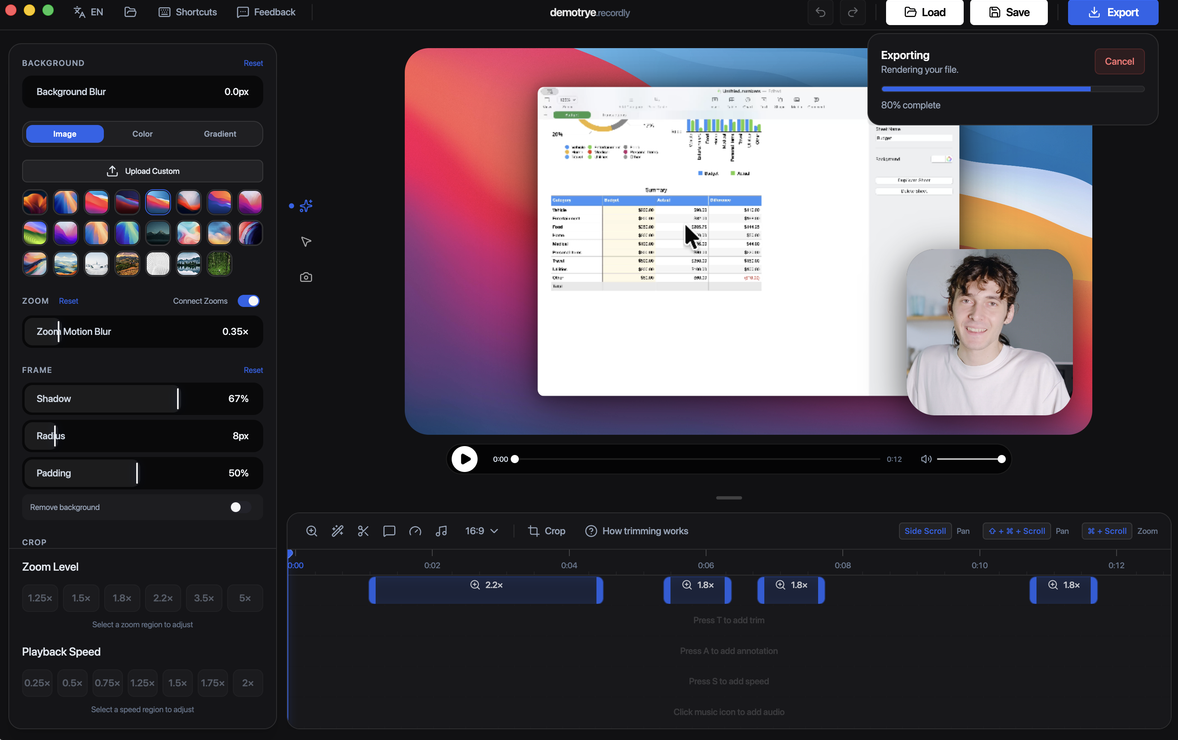
Record a screen or window, jump straight into the editor, and export a polished result with cursor effects, zooms, backgrounds, annotations, webcam overlays, and more. Built as an open-source project, Recordly has gained traction for delivering the features that matter most without a subscription.
Features
Auto-zooms, cursor polish, and styled frames
Recordly can automatically emphasize activity with zoom suggestions, smooth cursor movement, add motion effects, and place the final composition inside a styled frame with wallpapers, colors, gradients, blur, padding, and shadows.
Dynamic webcam bubble overlays
Add webcam footage as an overlay bubble, position it with presets or custom coordinates, mirror it, control shadow and roundness, and optionally make it react to zoom so it stays visually balanced during motion.
Timeline editing built for demos
Use drag-and-drop timeline tools for zooms, trims, speed regions, annotations, extra audio regions, and crop-aware edits. Save and reopen work as .recordly project files.
All Features
Recording
- Record an entire display or a single app window
- Jump directly from recording into the editor
- Capture microphone audio and system audio
- Use native capture backends where supported
- Resume editing from saved .recordly project files
- Open existing recordings or existing project files from the app
Timeline and Editing
- Drag-and-drop timeline editing
- Trim unwanted sections
- Add manual zoom regions
- Use automatic zoom suggestions based on cursor activity
- Add speed-up and slow-down regions
- Add text, image, and figure annotations
- Add extra audio regions on the timeline
- Crop the recorded frame
- Save and reopen projects with editor state preserved
Cursor Controls
- Show or hide the rendered cursor overlay
- Cursor size adjustment
- Cursor smoothing
- Cursor motion blur
- Cursor click bounce
- Cursor sway
- Cursor loop mode for cleaner looping exports
- macOS-style cursor assets for the rendered overlay
Webcam Overlay
- Enable or disable webcam overlay footage
- Upload, replace, or remove webcam footage
- Mirror webcam footage
- Size control
- Preset positions and custom X/Y placement
- Margin control
- Roundness control
- Shadow control
- Optional zoom-reactive webcam scaling
Frame Styling and Backgrounds
- Built-in wallpapers
- Runtime wallpaper discovery from the wallpapers directory
- Custom uploaded backgrounds
- Solid color backgrounds
- Gradient backgrounds
- Frame padding
- Rounded corners
- Background blur
- Drop shadows
- Aspect ratio presets for the final frame
Export
- MP4 export
- GIF export
- Export quality selection
- GIF frame-rate selection
- GIF loop toggle
- GIF size presets
- Aspect ratio and output dimension controls
- Reveal exported files in the system file manager
Workflow and Usability
- Customizable keyboard shortcuts
- In-app shortcut reference
- Feedback and issue links from the editor
- Project persistence for editor preferences
- Faster preview recovery after export
What's New
Features
- macOS window recordings no longer display a watermark in the corner
- Window Capture is now available on Windows
- Added an opt-in channel for automatic experimental updates
- Windows now supports permanent install locations
- Added the Windows 10 cursor style
- Improved motion blur
- Added in-app announcements and popups
Bug fixes
- Fixed slightly washed-out color range in macOS recordings
- Fixed auto-captions and audio on Windows
- Fixed HUD click-through and flickering
- Removed the delay between countdown completion and recording start
- Fixed invisible update notifications
- Refactored the video editor for improved maintainability
- Improved Windows native capture startup, cleanup, webcam sync, and app lifecycle
- Significantly improved startup time by separating HUD launch code from unrelated initialization
- Fixed invisible drag boundaries affecting webcam preview positioning
Recordly runs on:
- macOS 12.3+
- Windows 10 Build 19041+
- Linux on modern distros
Platform notes:
- macOS uses native ScreenCaptureKit-based capture helpers.
- Windows uses a native Windows Graphics Capture (WGC) helper on supported builds, with native WASAPI audio support.
- Linux records through Electron capture APIs. Cursor hiding is not supported on Linux toda
