

Nextpad++ for Mac brings the Windows code editor to the Mac. It's a native macOS application, not a Windows binary running under Wine or CrossOver, and it's a full port of the upstream Notepad++ codebase.

Notepad++ has been one of the most popular text editors on Windows for more than 20 years, with hundreds of millions of downloads. Mac users never got their turn. This project finally gives them one, bringing Notepad++ and its growing catalogue of ported plugins to the Mac.
Is Nextpad++ for Mac affiliated with Don Ho or the official Notepad++ team?
No, this is an independent community project and is not affiliated with Don Ho or the official Notepad++ team. It is based on the open-source Notepad++ codebase, released under the GNU GPL v3, which allows third-party ports and derivatives.
Who maintains Nextpad++ for Mac?
The project is led by Andrey Letov, with contributions from an open-source community via the Notepad++ Mac GitHub organization. Letov developed the native macOS layer in Objective-C++ and coordinates plugin ports and ongoing development.
Is Nextpad++ for Mac a fork or a port?
It is a port, not a fork. The core editing engine (Scintilla) and much of the C++ logic remain aligned with upstream Notepad++, while the Windows-specific interface has been replaced with a native macOS Cocoa layer. This approach allows the project to follow upstream changes without diverging from the original codebase.
What are the best alternatives to Nextpad++ for Mac?
Popular macOS text editors include Sublime Text, BBEdit, and VS Code, each offering its own set of features and workflows. Nextpad++ for Mac, however, is aimed at users familiar with the Windows version who want a similar experience on macOS, focusing on preserving its interface, shortcuts, and overall workflow in a native Mac environment.
Features
Syntax Highlighting
- Support for 80+ programming languages with customizable color themes and user-defined languages.
Plugin Ecosystem
- Extend functionality with a rich plugin ecosystem. Customize your editor to match your workflow. More plugins are being migrated to macOS as we speak.
Apple Silicon Native
- Built for M-series chips. Launches instantly, runs efficiently, and respects your battery life.
Search & Replace
- Powerful search with regular expressions, find in files, bookmark lines, and incremental search.
Split View Editing
- View and edit two documents side by side, or two parts of the same document simultaneously.
Macro Recording
- Record, save, and replay macros to automate repetitive editing tasks with ease.
Native Language Support
- Switch Notepad++ to the language you speak. It supports 137 languages out of the box.
Nextpad++ for Mac is a fully native macOS application built directly on Apple's frameworks, without relying on Wine, Rosetta, or other compatibility layers. It uses the same core codebase as the original Notepad++, preserving its editing engine and behavior while replacing the Windows interface with a native macOS experience.
Nextpad++ is written in Objective-C++, allowing it to combine the original C++ logic with Apple's Cocoa APIs for the interface. This enables native windows, menus, dialogs, keyboard shortcuts, drag-and-drop, clipboard support, and other system-level features, so the app feels consistent with the rest of macOS.
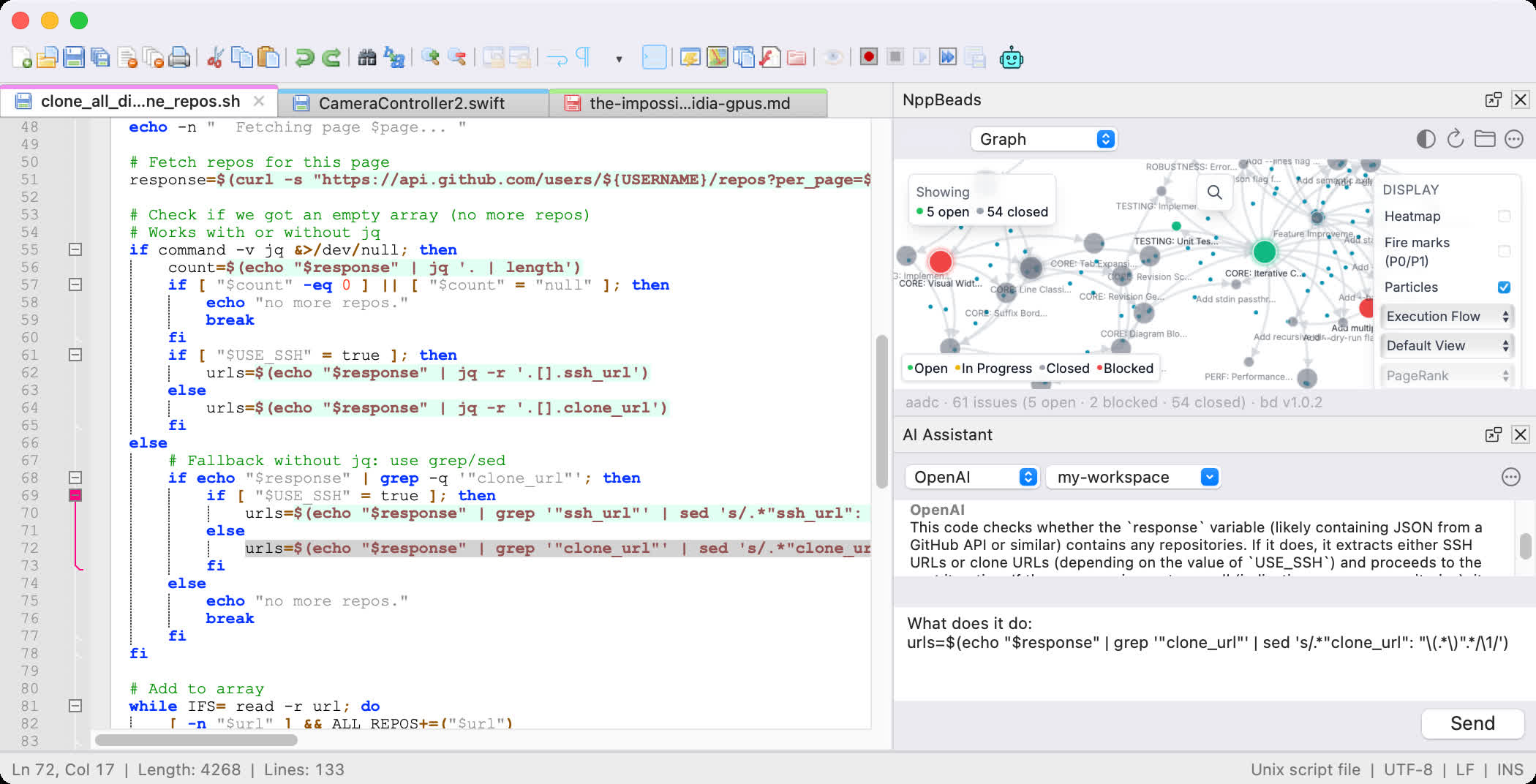
The binary ships as a Universal Binary with native ARM64 (Apple Silicon) and x86_64 (Intel) slices, so Nextpad++ runs at native speed on M1, M2, M3, M4, and M5 Macs without Rosetta, and on older Intel Macs down to macOS 11. The plugin system was reimplemented to load macOS dynamic libraries (.dylib); plugins are ported individually by the community. See the Plugins page for current status and the Online Help for user documentation.
What's New
- Notepad++ for Mac is now Nextpad++ for Mac
Previous Release Notes:
- Unified side-panel chrome with pixel-identical title bars, close buttons, and pop-out affordances across every built-in and plugin-contributed panel.
- Refreshed toolbar artwork and light/dark mode parity for the pop-out / dock-in glyphs.
- Hover-state polish on the shared panel chrome – buttons no longer get stuck in their "highlighted" visual after a pop/dock transition.
- Toolbar overflow (the '>>' chevron that appears when the window is narrow) now reliably lists and fires every plugin-contributed button.
- **JSON Viewer** (v1.0.0, new) – tree-view navigator, formatter, compressor, validator, and JSON-path copier with live search, sub-300 ms render for multi-MB files, a settings dialog matching the Windows layout, and full dockable/pop-out behavior.
- **Markdown Panel** (v1.0.1) – adds an in-document search field with live highlighting, a print button that honors whichever window currently hosts the preview, and participates in the new dockable/pop-out system.
- macOS 11.0 or later.
- Universal binary: arm64 + x86_64.
- Signed with Developer ID Application (Andrey Letov) and Apple-notarized.
