
Google Docs doesn't offer a traditional desktop application, but you can install it as a desktop-style app and enable offline access using your browser. This lets you work on documents without an internet connection, similar to a standard office suite like Microsoft Office.
All of the methods below are free, fully supported by Google, and take just a few minutes to set up.
Before you begin: enable offline mode
- Go to https://docs.google.com
- Sign in to your Google account
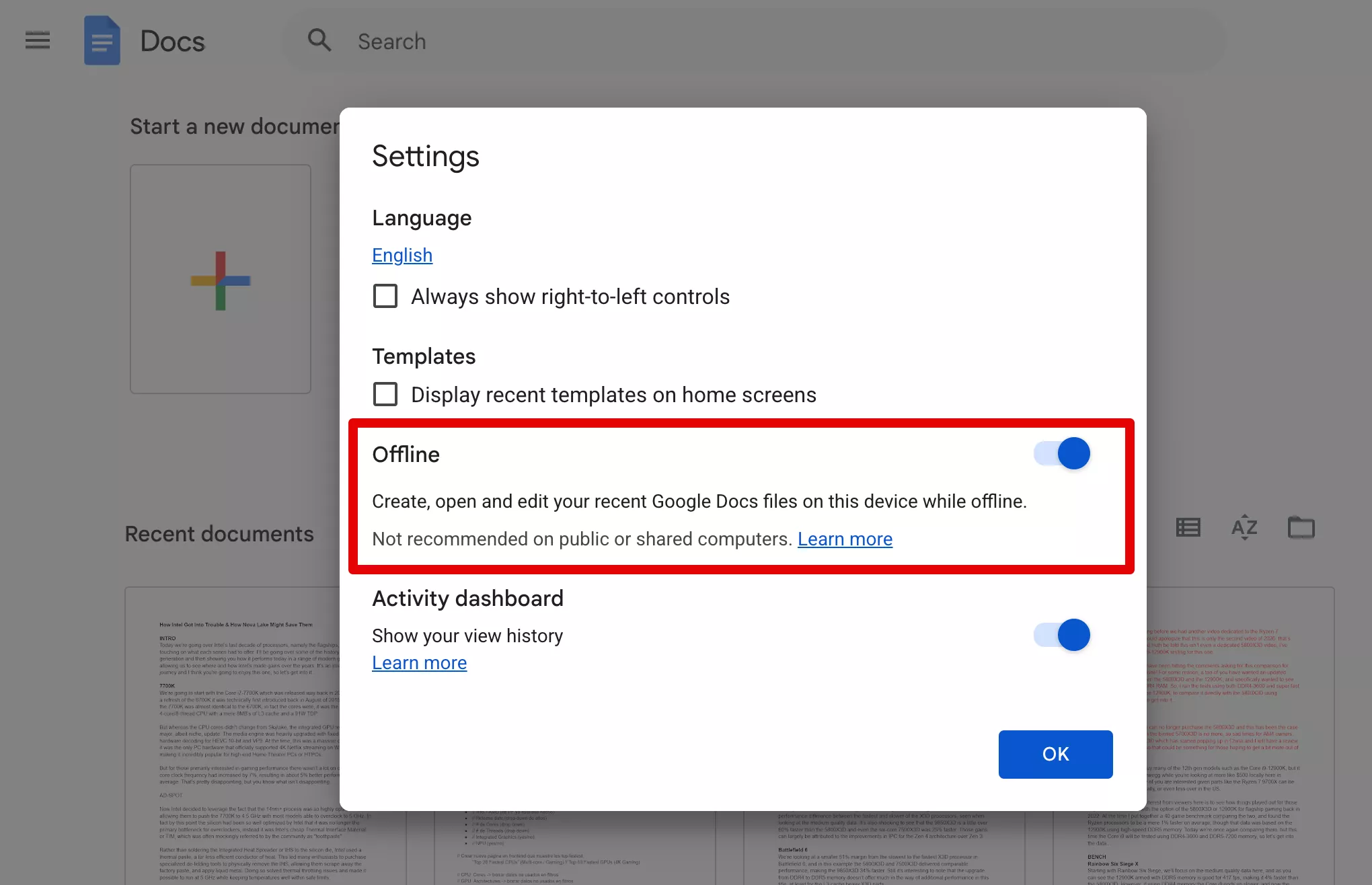
- Click the menu icon (top left) and select Settings
- Enable Offline to allow document editing without an internet connection
Install Google Docs as a desktop app using Google Chrome
- Download and open Google Chrome
- Go to https://docs.google.com and sign in
- Click the three-dot menu in the top right corner
- Select More tools > Create shortcut
- Check Open as window
- Click Create
This installs Google Docs as a standalone app that launches from your desktop or Start menu.
Install Google Docs as a desktop app using Microsoft Edge
- Download and open Microsoft Edge
- Go to https://docs.google.com and sign in
- Click the three-dot menu in the top right corner
- Select Apps > Install this site as an app
- Click Install
Once installed, Google Docs behaves like a native desktop app, with its own window and taskbar icon.
Notes
- Offline mode works in Chrome and Edge and requires a one-time setup while online
- Your recent documents are automatically available offline; you can also manually mark files for offline use
- Changes made offline will sync automatically once you reconnect to the internet
Can I really use Google Docs offline like a normal office app?
Yes, but only after enabling offline mode while you are connected to the internet. Once set up, Google Docs stores recent files locally so you can open, edit, and create documents without a connection. When you go back online, everything syncs automatically.
Do all my documents become available offline?
Not automatically. Google Docs prioritizes recently opened files, but you can manually mark specific documents for offline access if you need to guarantee availability. Otherwise, older or rarely used files may not open until you reconnect.
Why is offline mode not working or missing?
Offline support only works in Chrome or Edge and requires cookies and local storage to be enabled. It may also fail if you are using private browsing, strict tracking protection, or certain extensions that block storage permissions.
Will my changes be saved if I lose connection while editing?
Yes. Edits made offline are saved locally in your browser. Once your internet connection is restored, Google Docs syncs those changes automatically, so you do not lose progress.
Does installing Google Docs as a desktop app make it fully offline by default?
No. Installing it as an app simply creates a dedicated window and shortcut. Offline functionality still depends on enabling offline mode and having your files available locally.