

Afterburner is a free tool that allows you to overclock, monitor, and even benchmark your graphics card. Whether you have an Nvidia or AMD-based GPU, MSI Afterburner supports all brands of graphics cards.
Afterburner gives you full control over your hardware and enables real-time monitoring, and it's completely free.
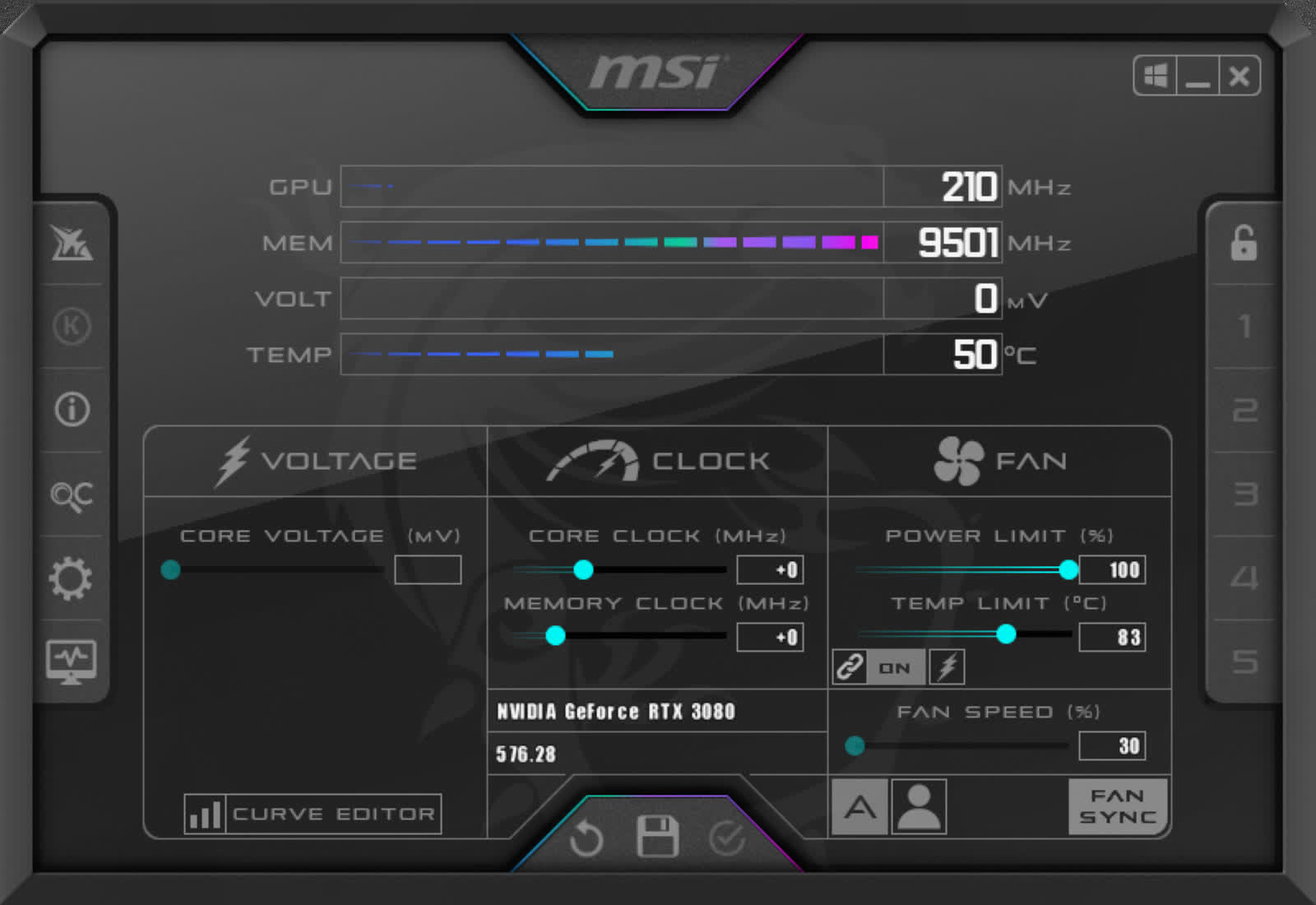
Key information such as GPU core clock, memory clock, temperature, voltage, and fan speed is displayed in real time while gaming (on-screen-display), as well as via the system tray. You can save your configurations as profiles and switch between them instantly using customizable hotkeys.
Does Afterburner work with any graphics card brand?
Absolutely. MSI Afterburner is compatible with most Nvidia and AMD GPUs, regardless of the manufacturer. It works with cards from brands like Asus, Gigabyte, Zotac, Sapphire, PowerColor, and others, including MSI, of course.
Is it safe to overclock my GPU with MSI Afterburner?
Yes, MSI Afterburner will allow you to overclock your GPU without any hassle and it should be safe if you have some basic understanding of what overclocking means and what's your GPU core clock and memory speeds.
Does Afterburner need to be running for my overclock settings to apply?
Not necessarily. If you enable the "Apply overclocking at system startup" option, your settings will load automatically when Windows starts, even if Afterburner isn't running in the background. However, some users have reported inconsistencies where the overclock doesn't apply unless Afterburner is open.
Can I undervolt my GPU using MSI Afterburner, and is it worth it?
Yes, you can undervolt your GPU using the Curve Editor in MSI Afterburner. It's often worth doing, especially for lowering temperatures, reducing fan noise, and improving power efficiency. Many users find it helps with thermal performance without sacrificing gaming performance, but it requires careful testing to ensure stability.
Why isn't the on-screen display showing during gameplay?
This is a common issue that can happen if the on-screen display is not properly enabled in the settings or in RivaTuner Statistics Server (RTSS), which Afterburner uses for OSD. Other overlay software like Discord or GeForce Experience can also interfere. Checking your hotkey settings and ensuring RTSS is running can usually fix it.
Why is my GPU temperature stuck in MSI Afterburner?
If Afterburner displays a constant or incorrect GPU temperature (e.g., stuck at 31°C), it might be due to a sensor reading issue or a compatibility problem with your GPU. Ensure you're using the latest version of Afterburner. If the issue persists, consider using alternative monitoring tools like HWiNFO or GPU-Z to cross-verify temperatures.
Does MSI Afterburner work with integrated graphics?
No, integrated graphics from Intel or AMD CPUs won't work with Afterburner. It will however work with any Nvidia and AMD GPU, even in laptops.
MSI Afterburner for Android
You can use the MSI Afterburner for Android to monitor and overclock your machine from your Android device. To use the MSI Afterburner App you must have installed the MSI Afterburner Remote Server on your computer.
Install Instructions for MSI Afterburner Remote Server:
To access your machine from your Android device first download and install the Remote Server from the download links found here. Once you download the MSIAfterburnerRemoteServer.zip from TechSpot, extract the file to a folder and run MSIAfterburnerRemoteServer.exe. Once installed, it should appear in the system tray. Click on it and copy the bottom IP address shown (you will need it for the MSI Afterburner App).
Configuring the MSI Afterburner App:
After downloading the MSI Afterburner App for Android on your device and installing MSI Afterburner Remote Server on your computer, open the app and click on settings. In settings select 'Host IP Address' and enter the IP address you got from the MSI Afterburner Remote Server (it should be something like 192.168.101.22:82). Once you enter the IP Address your Android device will automatically connect to your personal computer.
Features
Afterburner has added Predator in-game video capture. Gamers can now capture all of their most intense moments in their favorite games and share them on YouTube.
Overclocking tools
Exploring and exceeding the limits of your graphics card might sound scary, but it's actually easier than you think. Afterburner overclocking tools provide easy and precise access to your graphics card settings. While increasing your GPU's clock frequency and voltage, the fan speed control will enable you to find the perfect balance between performance and temperature.
One-click Overclocking
OC Scanner is an automated function that will find the highest stable overclock settings for your card. Giving you a free performance boost for a smooth in-game experience thanks to higher FPS.
Custom Fan Profiles
Heat dissipation is an essential factor for graphics card performance. Afterburner lets you fully customize a predefined fan speed curve, allowing you to determine cooling performance all the way!
Video Capture
Share your greatest moments! With Predator, you can record your best performance in games or overclocking without missing a single frame. The Predator software supports the H.264 codec, multiple file formats (.WMV, .AVI), size and quality to capture your match winning frag, beating the game on hard or breaking a record in overclocking.
Hardware Monitor
The Hardware Monitor shows critical hardware information in real-time; temperature, usage, clock speed, and voltage. You can display selected information on-screen to keep an eye on key statistics while you are in game.
What's New
New MSI Afterburner 4.6.7.16935 Beta 2 released.
Final 4.6.6:
- Ported to VC++ 2022 compiler. Please take a note that due to this change MSI Afterburner will no longer be able to start under Windows XP. Please stay on the previous versions of the product if you need this OS support
- Please take a note that size of mandatory VC++ 2022 runtime redistributables roughly doubled comparing to the previously used VC++ 2008 redistributables, and we'd like to avoid providing overblown application distributive, drastically increased in size due to bundling newer and much heavier VC++ redistributables with it. To deal with this issue we provide our own original tiny web installer for VC++ redistributables, which allowed decreasing the size of final application distributive drastically even comparing to the previous VC++ 2008 based version. Please take a note that install time can be increased slightly due to downloading VC++ 2022 runtimes redistributables on the fly during installation. If you install MSI Afterburner offline, you can always deploy required VC++ 2022 distributives later with web installer by launching .\Redist\VCRedistDeploy.bat
- Now the installer and uninstaller are performing active application instance checking on earlier stages before displaying any GUI
- Added NVIDIA GeForce RTX 50x0 series graphics cards support
- Added quad fan control support for reference design Nvidia GeForce RTX 50x0 series graphics cards
- Added software interface for future G-Assist integration
- MSI Windows 11 Dark skin is selected as default application skin now. Please take a note that quad fan control GUI is currently available in Dark and Light editions of MSI Windows 11 skins only. If you prefer to use some older legacy skins on Nvidia GeForce RTX 50x0 with 3 or 4 independently controllable fans, you may still switch between all fans in async fan control mode by pressing
+ repeatedly - Added new MSI Special and MSI H2O skins by Drerex design. New skins natively supports quad fan control feature on reference design Nvidia GeForce RTX 50x0 series graphics cards
- Extended +3000MHz memory clock overclocking range tweak for NVIDIA RTX 5000 series graphics cards
- Added AMD RDNA4 GPU family and AMD Radeon RX 9000 series cards support. Please take a note that MSI do not sell any AMD RDNA4 based graphics cards, so RDNA4 support is completely unofficial
- Added MP2988 and MP29816A voltage controllers support. New PWM controllers support is reserved for future extreme overclocking oriented graphics card models with triple/quad channel voltage control. Please take a note that such voltage controllers are also used on the most of currently existing NVIDIA RTX 5080 and RTX 5090 series cards, but unfortunately I2C address range of PWM controllers on reference cards is blacklisted by NVIDIA display driver, making extended voltage control on currently existing NVIDIA RTX 50x0 series cards impossible
- Added voltage control support for AMD Radeon RX 7800XT series graphics cards
- Added voltage control support for new low-cost revisions of Nvidia GeForce RTX 40x0 GPUs
- Added new GPU hiding functionality. Added "Hide GPU" button to GPU selection panel of default Dark and Light editions of MSI Windows 11 skins. Alternately, you may use
+ keyboard shortcut to hide currently selected GPU if you prefer to use legacy or third party GUI skins with no such button. You may use it to completely remove some GPUs from MSI Afterburner's GUI, including both hardware control and hardware monitoring sections. The functionality is intended for hiding integrated iGPUs - Relaxing preemptive sleep delay is now excluded from cumulative polling time displayed by performance profiler on Overdrive8 capable graphics cards to avoid confusing beginners
- Name of voltage rail mapped to AUX or AUX2 voltage slider (e.g. VDDCI, MSVDD, PEXVDD or 1V8) is now displayed in context help of AUX or AUX2 GUI controls and inside MSI Afterburner system info window ("i" button)
- Added internal database format improvements, allowing us to remap AUX/AUX2 GUI controls to different physical voltage rail if multiple optional controllable voltage rails are available
- Empty compact names of some iGPUs in GPU selection panel are now replaced with abstract "AMD GPU" / "NVIDIA GPU" / "Intel GPU" names
- Fixed GUID, PCI location and registry key info displayed in MSI Afterburner system info window ("i" button) for secondary Intel GPUs
- I2C cache of secondary GPUs is now saved inside proper hardware profile file. Previously it was always written to and read from the primary GPU's profile
- Asynchronous fan control buttons are no longer displayed in GUI on GPUs with no fan control support (e.g. iGPUs)
- Now MSI Afterburner reinitializes skin scaling engine on DPI scaling change events to prevent cases when GUI looks cut off in some cases (e.g. after switching between display resolutions with different DPI scaling settings)
- Now MSI Afterburner is forcibly uninstalling IO driver on OS shutdown to prevent the driver from being hibernated and reloaded due to fast startup till the next clean system boot event
- Fixed instances enumeration for some performance counters with no localized names (e.g. GPU related Windows performance counters) in PerfCounter.dll plugin
- Added experimental support for "Beta : Use Unicode UTF-8 for global language support" option enabled in administrative regional OS settings. Now each localization description file contains additional "Codepage" field, defining runtime ANSI to UTF8 conversion rule for selected language pack
- Refactored CPU info database format provides more simplified and unified future database updates for MSI Afterburner monitoring HAL, CPU.dll sample plugin and RivaTuner Statistics Server's own monitoring HAL
- Added experimental support for AMD Ryzen 9xxx CPUs
- Added experimental support for Intel Arrow Lake CPUs
- Added alternate Voltage/Frequency point locking mode inside Voltage/Frequency curve editor. Now you may repeatedly press
key inside V/F curve editor to switch between voltage locking and max frequency locking mode - Optimized GPU context switching implementation in HAL. This provides slightly faster GPU selection in GUI and slightly reduced CPU polling time for the systems with multiple GPUs
- Now MSI Afterburner uses extended 32KB RivaTuner Statistics Server's text slot instead of previously used 4KB slot to display On-Screen Display. Due to this improvement legacy MSI Afterburner On-Screen Display can fit up to 8x more text items without hitting the limit
- Updated HwInfo.dll plugin. Now the plugin can automatically spawn new versions on HwInfo, which now store path to installed application in slightly different installer's registry key
- Added Bulgarian localization
- Seriously revamped German and Ukrainian localizations
- Fixed ACL bypass vulnerability and NULL ptr dereferencein RTCore driver (reported by Andres Roldan)
RivaTuner Statistics Server has been upgraded to v7.3.7:
- New version's changes list is huge, it includes more than 150 compatibility enhancements, changes and new features including programmable conditional layers support, PresentMon, LibreHardwareMonitor and NVIDIA Reflex integration
MSI Afterburner 4.6.6 Beta 5
- Added Nvidia GeForce RTX 50x0 series graphics cards support:
- Added quad fan control support for reference design Nvidia GeForce RTX 50x0 series graphics cards
- Added software interface for future G-Assist integration
- MSI Windows 11 Dark skin is selected as default application skin now. Please take a note that quad fan control GUI is currently available in Dark and Light editions of MSI Windows 11 skins only. If you prefer to use some older legacy skins on Nvidia GeForce RTX 50x0 with 3 or 4 independently controllable fans, you may still switch between all fans in async fan control mode by pressing
+ repeatedly - Added new MSI Special skin by Drerex design. New skin natively supports quad fan control feature on reference design NVIDIA GeForce RTX 50x0 series graphics cards
- Added voltage control support for low-cost revisions of Nvidia GeForce RTX 40x0 GPUs
- Refactored CPU info database format provides more simplified and unified future database updates for MSI Afterburner monitoring HAL, CPU.dll sample plugin and RivaTuner Statistics Server's own monitoring HAL
- Updated HwInfo.dll plugin. Now the plugin can automatically spawn new versions on HwInfo, which now store path to installed application in slightly different installer's registry key
- Added experimental support for AMD Ryzen 9xxx CPUs
- Added experimental support for Intel Arrow Lake CPUs
- RivaTuner Statistics Server has been upgraded to v7.3.7 Beta 5

