Winslopr is a lightweight Windows utility designed to help users remove preinstalled apps, disable certain AI-related features, and adjust system settings aimed at reducing background services and telemetry.
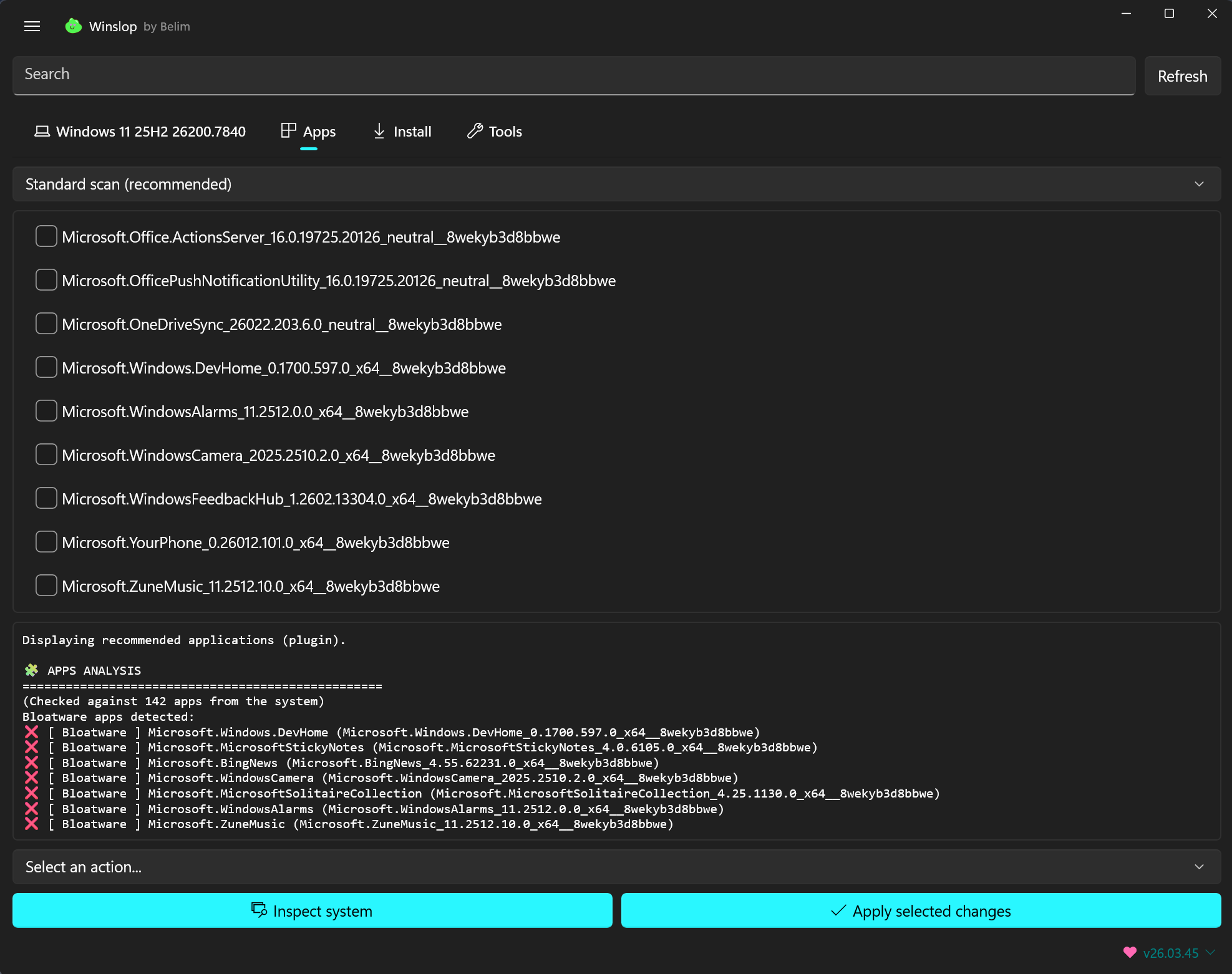
It provides a simple interface to select which components or features to modify, allowing users to streamline their Windows installation and customize the operating system to better suit their preferences.

Is Winslopr anti-Windows?

No. Windows itself is fine. The unnecessary stuff layered on top of it isn't. Winslopr targets slop, not Windows.

Is there a help file / quick start guide?

Yes. There's a small, lightweight entry guide to get you going: Quick Start / Help: https://github.com/builtbybel/Winslop/blob/main/docs/Help.md

Can Winslopr break my system?

Any system tool can if misused. That's why Winslopr shows exactly what it will change, never runs anything automatically and allows changes to be reviewed and reverted.

What is Winslopr written in?

Initially in C, then it was forked from CrapFixer and ended up in C# and continues. No glossy modern UI stack. No WinUI. No Mica. No overdesigned "modern Windows app" look. No "look how fancy we are" . Just tools.

Features

  • Removes Windows bloatware (preinstalled apps like Xbox, Clipchamp, etc.)
  • Disables AI features like Copilot or Recall
  • Reduces telemetry and ads inside Windows
  • Lets you select exactly what to remove instead of running aggressive scripts
  • Portable tool - you just download and run it (no installation)

What's New

Winslop is now Winslopr: short for Windows Slop Remover. Same tool, clearer name

  • [New] Unified Plugins & Scripts management: Plugins and Tool Scripts are now managed in a single dialog (PluginsDialog) instead of two separate places (Plugins and Scripts/Extensions). Routing is based on the manifest type= field: type=tool --> Scripts/ folder, Default --> Plugins/ Folder
  • [Improved] Reduced unnecessary resource usage and made the app feel smoother in daily use, which is saying something given that WinUI 3 still behaves like a small monster now and then
  • [Fix;Critical] Fix winget source agreements on fresh Windows installs. winget list and winget upgrade now run with --accept-source-agreements --disable-interactivity, so the Install tab works out of the box without needing a prior manual winget interaction in the terminal #77
  • [Improved] UI has been refined across the app to feel lighter, cleaner, and more modern
  • [Added] "Plugins" entry to the settings flyout which opens Plugins dialog directly
  • [Improved] Per-entry folder-aware installed state detection via File.Exists(targetDir + fileName). This fixes false positives where same-named files in different folders were incorrectly shown as installed
  • [Removed] ThirdPartyDetector as third-party tools are now discoverable and installable directly via the Plugins dialog
  • [Removed] Share feature from the settings dropdown (redundant)
  • [Removed] Cleaned up obsolete Localization keys: Settings_ToolScripts, Settings_OpenToolsPage, MenuShare
  • [Updated] Localization es-ES; zh-CN

Previous Release Notes:

After two weeks with WinUI 3, I guess it's safe to say... we're getting along now. Winslop has moved from WinForms to WinUI 3 and this update is the result: a fully reworked interface built around one idea, staying out of your way

The old sidebar is gone, replaced by bottom navigation that keeps the focus on content. Pages open instantly, without unnecessary transitions. Search is right where you expect it, and settings are always within reach in the title bar.

Status indicators make it easier to see what needs attention at a glance. Action buttons, Inspect, Apply, Restore are more compact, more consistent, and adapt to your system accent color. Even the Actions menu has been toned down, so it no longer competes with the rest of the interface

Everything is theme-aware. Switch between light and dark mode inside the app, and dialogs, buttons, and controls update with it, no App restart needed.

Winslop still does exactly what it always did. It just finally looks the part

New:

  • [NEW] Search is now hidden by default. Just click the magnifying glass in the title bar to show it whenever you need it
  • [NEW] Support menu: share Winslop with friends via the native Windows share dialog as it opens straight from the Support button in the sidebar
  • [IMPROVED] Settings page got a fresh look with cleaner, wider cards
  • [IMPROVED] Extensions section now shows Plugins, Tools and Winslop Legacy as separate entries with quick-launch buttons
  • [IMPROVED] Quick access to Winslop Legacy added to launch the classic version straight from Settings
  • [IMPROVED] App info and compatibility details are now neatly tucked away under the About section
  • [FIXED] Scrollbar in Settings no longer covered part of the content
  • [FIXED, CRITICAL] App installs from the Install page were sometimes interrupted by a winget prompt. Added --source winget to prevent multi-source conflict prompt during install and upgrade
  • [IMPROVED] First-time notice about the WinUI 3 rebuild is now a small banner you can dismiss, so no more popup
  • [IMPROVED] Internal app folders renamed for consistency, there is no user action needed
  • [ADDED] Add zh-TW (Traditional Chinese, Taiwan) translation for WinUI 3
  • [UPDATED] Updated localization and support for Chinese, French, Spanish, and Russian

Previous Release Notes:

Added

  • Compatibility check: Settings now shows whether your Windows version is fully compatible with Winslop
  • Theme switcher: Choose between System, Light, or Dark mode (requires restart)
  • Backdrop switcher: Switch between Mica and Mica Alt live in Settings
  • Russian and Chinese language support

Improved

  • Improved German language support
  • Log Inspector redesigned with dark theme matching the app's WinUI 3 aesthetic
  • Update page modernized with clean Fluent Light design
  • Settings page reorganized with collapsible sections (Extensions, Compatibility)
  • Removed duplicate Import/Export from the toolbar menu (already in profile selector)

Fixed

  • ScrollViewer on Settings page now scrolls to the bottom correctly
  • Title bar button colors now match the selected theme on restart

Previous Release Notes:

Not everything made it into this listm, mostly because I lost track

Added

  • Full app localization with support for English, German, and French
  • For translators: LOCALIZATION.md
  • Keyboard shortcuts for all major menu actions:
    • Ctrl+T – Toggle All
    • Ctrl+Z – Undo last changes
    • F5 – Refresh
    • Ctrl+L – Copy log to clipboard
    • Delete – Clear log
  • Zoom support for the Home page > Feature tree (Ctrl+Scroll). So WinUI 3 controls carry significantly more padding and spacing than their WinForms equivalents; a ZoomMode was added as a practical workaround to let users reclaim vertical space on smaller screens
  • Language-independent profile matching for feature tree selections
  • Built-in AI Panic Mode profile for quickly disabling Windows AI-related features
  • WINSLOP_SELECTION_V2 Changed the selection export format and added a stable profile selection format based on internal feature IDs and plugin file IDs
  • Reworked Settings page with centralized extension management
  • Context menu on right-click for individual tree nodes: Analyze, Fix, Restore, Help
  • Plugin analysis now included in the combined analysis summary dialog
  • Combined analysis summary after full inspection showing native features and plugins separately:
    • Windows Features : X of Y OK
    • Plugins : X of Y OK
    • Total : X of Y OK
  • Hyperlink to Online Log Inspector directly in the analysis result dialog
  • "No plugins selected" message in log when plugin analysis is skipped
  • Profile ComboBox with built-in Export, Import, and "Open profiles folder" actions
  • [CRITICAL] Search filter respects IsVisible state, so context menu actions (Analyze/Fix/Restore) now correctly skip hidden nodes
  • Log output now color-coded by severity using RichTextBlock and not TextBox
    • Red – Errors
    • Orange – Warnings
    • Gray – Info (theme-sensitive via TextFillColorPrimaryBrush)
  • Nav highlight auto-refreshes on Windows light/dark theme switch
  • Per-page menu state: Export, Import, Undo, Manage Plugins disabled on non-Features pages
  • More options flyout button (⋯) replaces separate Toggle/Undo/Refresh buttons and old log actions ComboBox
  • Log actions submenu under More options: Inspect online, Copy, Clear, Log checked/unchecked/summary
  • Plugin counters (TotalChecked, IssuesFound) added to PluginManager so it mirrors FeatureNodeManager
  • [CRITICAL] UnhandledException + TaskScheduler.UnobservedTaskException handlers to prevent silent crashes

Improved

  • Analysis summary moved to end of log (after dialog closes) so auto-scroll always lands at the bottom
  • More options menu replaces three separate icon buttons. Should bring a cleaner toolbar, less visual noise
  • LogActionsController removed and actions are now wired directly as MenuFlyoutItem handlers, no ComboBox dependency
  • Nav buttons theme-aware highlight via NavigationService.UpdateHighlight() so it reacts to live theme changes
  • ApplyFilter now iterates item.Children.ToList() snapshot to prevent collection-modified crashes
  • ApplySearch guards against _rootItems == null during page initialization
  • Analysis dialog now uses a StackPanel content with a HyperlinkButton instead of plain string
  • Improved profile import/export so selections no longer depend on localized feature or category names
  • Improved plugin profile handling by using the plugin script filename as a stable identifier
  • Improved extension discoverability by separating native Feature Tree plugins from tool scripts in Settings
  • Improved accessibility for international users with a fully localized UI across three languages
  • Changed the Settings page structure to manage extensions in a more native and unified way

Removed

  • Log actions ComboBox (comboLogActions) is eplaced by flyout submenu
  • LogActionsController class is no longer needed
  • Separate Toggle All / Undo / Refresh buttons is consolidated into More options flyout
  • Intermediate analysis dialog shown before plugin analysis are replaced by single combined dialog after both complete
  • Removed support for the old path/name-based selection format

Fixed

  • Context menu Analyze/Fix/Restore now respects active search filter (IsVisible check added to AnalyzeFeature, FixFeature, RestoreFeature)
  • Plugin nodes correctly skipped during native feature analysis and vice versa
  • Summary log entry no longer appears before plugin results

Previous Release Notes:

Added

  • Keyboard shortcuts for all major menu actions:
    • Ctrl+T – Toggle All
    • Ctrl+Z – Undo last changes
    • F5 – Refresh
    • Ctrl+L – Copy log to clipboard
    • Delete – Clear log
  • Zoom support for the Home page > Feature tree (Ctrl+Scroll). So WinUI 3 controls carry significantly more padding and spacing than their WinForms equivalents; a ZoomMode was added as a practical workaround to let users reclaim vertical space on smaller screens
  • Context menu on right-click for individual tree nodes: Analyze, Fix, Restore, Help
  • Plugin analysis now included in the combined analysis summary dialog
  • Combined analysis summary after full inspection showing native features and plugins separately:
  • Windows Features : X of Y OK
  • Plugins : X of Y OK
  • Total : X of Y OK
  • Hyperlink to Online Log Inspector directly in the analysis result dialog
  • "No plugins selected" message in log when plugin analysis is skipped
  • Profile ComboBox with built-in Export, Import, and "Open profiles folder" actions
  • [CRITICAL] Search filter respects IsVisible state, so context menu actions (Analyze/Fix/Restore) now correctly skip hidden nodes
  • Log output now color-coded by severity using RichTextBlock and not TextBox
  • Red – Errors
  • Orange – Warnings
  • Gray – Info (theme-sensitive via TextFillColorPrimaryBrush)
  • Nav highlight auto-refreshes on Windows light/dark theme switch
  • Per-page menu state: Export, Import, Undo, Manage Plugins disabled on non-Features pages
  • More options flyout button (⋯) replaces separate Toggle/Undo/Refresh buttons and old log actions ComboBox
  • Log actions submenu under More options: Inspect online, Copy, Clear, Log checked/unchecked/summary
  • Plugin counters (TotalChecked, IssuesFound) added to PluginManager so it mirrors FeatureNodeManager
  • [CRITICAL] UnhandledException + TaskScheduler.UnobservedTaskException handlers to prevent silent crashes

Improved

  • Analysis summary moved to end of log (after dialog closes) so auto-scroll always lands at the bottom
  • More options menu replaces three separate icon buttons. Should bring a cleaner toolbar, less visual noise
  • LogActionsController removed and actions are now wired directly as MenuFlyoutItem handlers, no ComboBox dependency
  • Nav buttons theme-aware highlight via NavigationService.UpdateHighlight() so it reacts to live theme changes
  • ApplyFilter now iterates item.Children.ToList() snapshot to prevent collection-modified crashes
  • ApplySearch guards against _rootItems == null during page initialization
  • Analysis dialog now uses a StackPanel content with a HyperlinkButton instead of plain string

Removed

  • Log actions ComboBox (comboLogActions) is eplaced by flyout submenu
  • LogActionsController class is no longer needed
  • Separate Toggle All / Undo / Refresh buttons is consolidated into More options flyout
  • Intermediate analysis dialog shown before plugin analysis are replaced by single combined dialog after both complete

Fixed

  • Context menu Analyze/Fix/Restore now respects active search filter (IsVisible check added to AnalyzeFeature, FixFeature, RestoreFeature)
  • Plugin nodes correctly skipped during native feature analysis and vice versa
  • Summary log entry no longer appears before plugin results

Previous Release Notes:

UI Changes

  • One of the biggest complaints was space usage.
  • WinUI loves padding. A lot of padding.

So this release introduces a more compact layout:

  • Navigation moved from the top to a left sidebar
  • More dense controls and spacing
  • Anything else (flyout controls) simply didnt make much sense within the WinUI layout model.

New Feature "Profiles"

Winslop can now save configuration profiles.

In the Home tab you can now:

  • Save your current Winslop configuration
  • Load saved profiles anytime via the dropdown menu
  • This makes it much easier to switch between different setups.

Fixes

  • Fixed profile import/export when running with admin rights (#39)
  • The WinUI3 FilePicker failed to initialize correctly in elevated contexts.
