

This utility is a compilation of Windows tasks I perform on each Windows system I use. It is meant to streamline installs, debloat with tweaks, troubleshoot with config, and fix Windows updates. I am extremely picky about any contributions to keep this project clean and efficient.
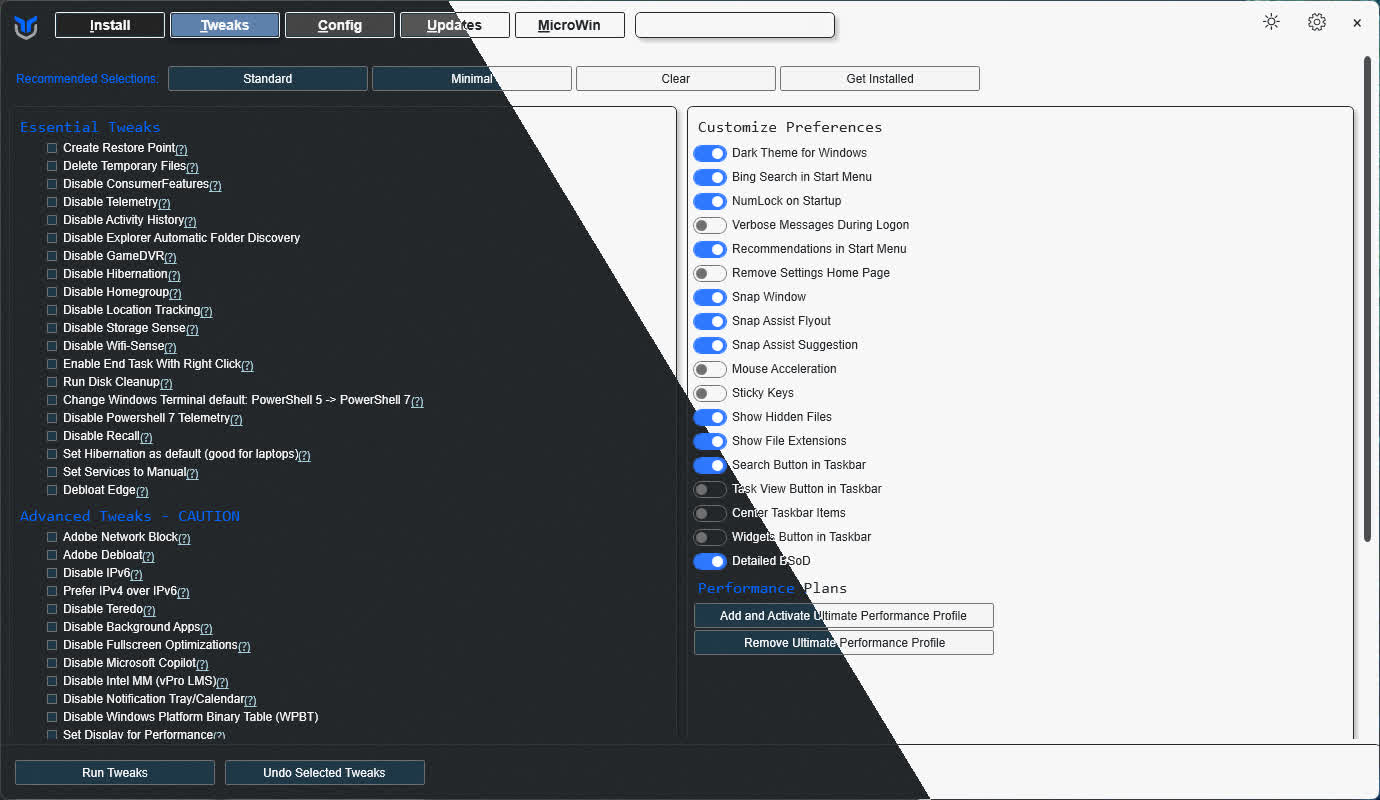
Winutil must be run in Admin mode because it performs system-wide tweaks. To achieve this, run PowerShell as an administrator. Here are a few ways to do it:
Start menu Method:
- Right-click on the start menu.
- Choose "Windows PowerShell (Admin)" (for Windows 10) or "Terminal (Admin)" (for Windows 11).
Search and Launch Method:
- Press the Windows key.
- Type "PowerShell" or "Terminal" (for Windows 11).
- Press Ctrl + Shift + Enter or Right-click and choose "Run as administrator" to launch it with administrator privileges.
What's New
Changes
- fix(apps): warp prettify @FluffyPunk (#5013)
- Link apps to their own site instead of a repo or store page @MyDrift-user (#5010)
- Remove Fullscreen Optimizations disable tweak @mewclouds (#5000)
- chore(deps): bump js-yaml from 4.3.0 to 4.3.1 in /docs @dependabot[bot] (#4970)
- Add Roblox entry to applications.json @ValeThReal (#4931)
Features
- Show preset JSON key in app, tweak, and feature tooltips @malinfossum (#4995)
- feat(github): revival of triage tools @FluffyPunk (#5007)
- Add EmulationStation and Tailscale entries to applications.json @WilliamWaldrop (#4973)
- Add Cloudflare WARP to Pro Tools @untitledmag (#5011)
- feat(apps): Added Battle.net @FluffyPunk (#4996)
- Update issue templates with prefilled titles @seanh1995 (#4960)
- Containerize docs site tooling for security and update documentation @seanh1995 (#4942)
- Adding Mullvad to DNS @voyager2saturn (#4927)
- Make MPO tweak a three-state control @mewclouds (#4897)
- Turn the Install category filters into toggle chips @MyDrift-user (#4926)
- Add foobar2000 back into applications.json @PChaicot (#4932)
- feat: add mpv to Multimedia Tools app list @v-amorim (#4940)
- Restore useful Development applications @mewclouds (#4930)
- Teamspeak6 Added @FallenGME (#4915)
Bug Fixes
- Fix legacy json import compatibility, UI sidebar refactor, and improved test coverage @yadavnikhil03 (#4911)
- fix(system): correct service, update repair, and legacy imports @virtualtable (#4966)
- fix: preserve selections when config import is invalid @Suze021 (#4994)
- Add Cloudflare WARP to Pro Tools @untitledmag (#5011)
- Add accessible name to the font scaling slider @malinfossum (#4993)
- Fix screen reader names for remaining top-bar controls @malinfossum (#4992)
- Fix location service startup type @aim9sour (#4972)
- Fix OSCDIMG detection @mewclouds (#4983)
- Adding Mullvad to DNS @voyager2saturn (#4927)
- Fix screen reader button accessibility and category navigation @makhlwf (#4944)
- Fix WinOneShot ComboItems compatibility @ChrisTitusTech (#4957)
- Point OpenSSH key setup at the file sshd actually reads @ashvinctrl (#4936)
- Fix UI helper errors during headless -Preset and -Config runs @hiphucto (#4941)
- fix: Import now fills all tabs @v-amorim (#4938)
- Fix USB creation when install.wim is read-only @mewclouds (#4910)
- Documentation
- feat(github): revival of triage tools @FluffyPunk (#5007)
- Update title screen image @seanh1995 (#4959)
- Containerize docs site tooling for security and update documentation @seanh1995 (#4942)
- Directly import AGENTS.md into CLAUDE.md @kdavidsschell (#4958)
- Turn the Install category filters into toggle chips @MyDrift-user (#4926)
- docs: correct Win11 Creator behavior after the ISO workflow refactor @vyas-devgna (#4920)
UI/UX Improvements
- Fix legacy json import compatibility, UI sidebar refactor, and improved test coverage @yadavnikhil03 (#4911)
- Add accessible name to the font scaling slider @malinfossum (#4993)
- Fix screen reader names for remaining top-bar controls @malinfossum (#4992)
- Fix screen reader button accessibility and category navigation @makhlwf (#4944)
- Make MPO tweak a three-state control @mewclouds (#4897)
- Turn the Install category filters into toggle chips @MyDrift-user (#4926)
- fix: Import now fills all tabs @v-amorim (#4938)
- Replace the FOSS dot with a corner badge on app entries @MyDrift-user (#4924)
